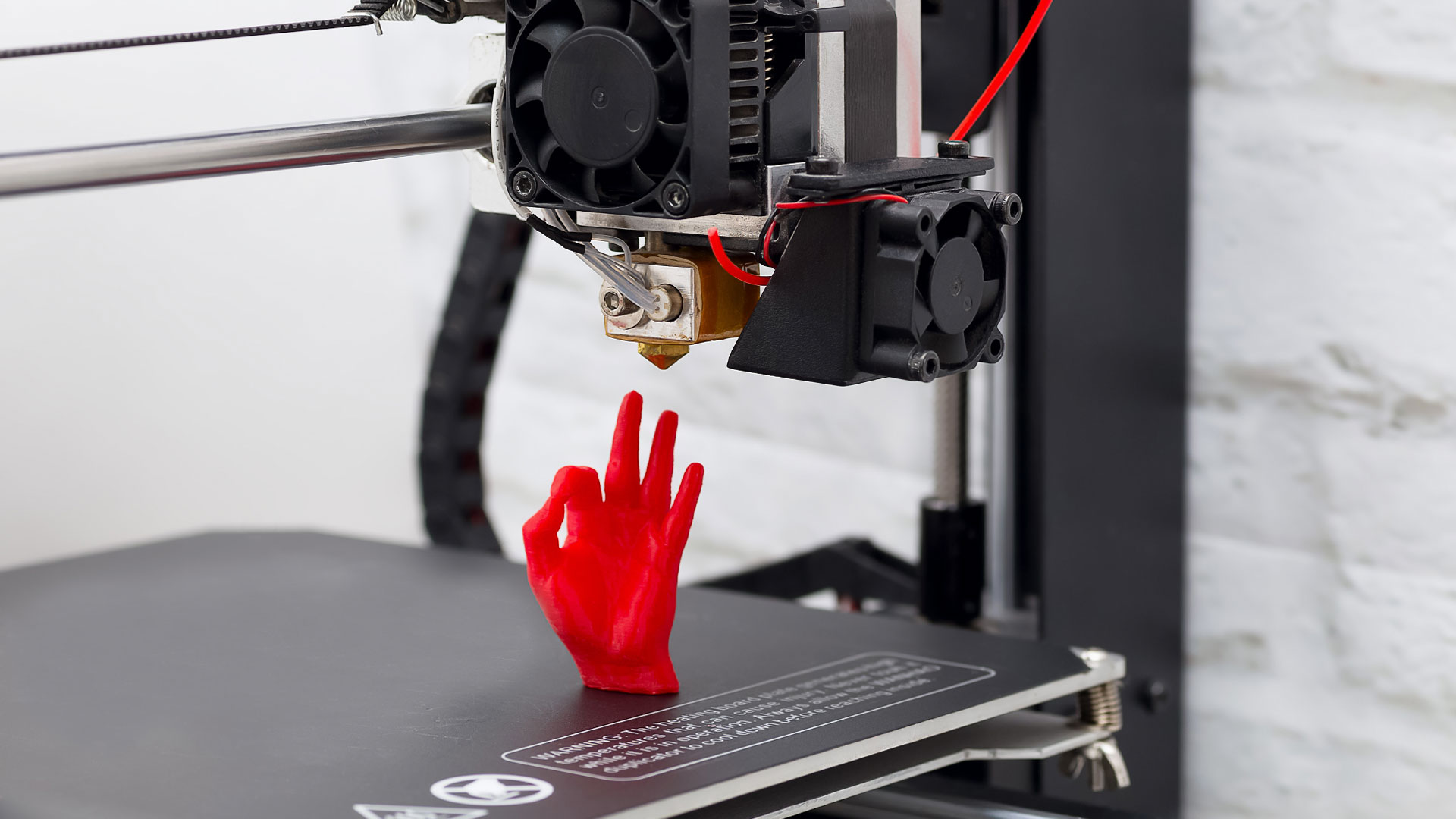

A first layer that peels away, a filament change that turns into a tangled mess, or a machine that needs constant adjustment can drain the fun from 3D printing quickly. The right printer should make the path from model to finished object feel predictable, not like another repair project.
Our Best best 3 d printers guide covers compact enclosed machines, fast CoreXY models, multi-color systems, and genuinely large-format printers. We looked for useful automation, meaningful material support, sensible build volumes, and features that make a difference after the novelty wears off.
Bambu Lab P1S Combo is the single best pick for most people, while the other eight cover faster setup, larger models, quieter home printing, and more demanding materials.
Comparison table
| # | Product | Award | Build volume | Maximum speed | Multi-color | Best for |
|---|---|---|---|---|---|---|
| 1 | Bambu Lab P1S Combo | Best overall | Not specified | 500mm/s | Up to 16 colors | Multi-color printing and dependable everyday use |
| 2 | FlashForge Adventurer 5M | Best for fast setup | 220 x 220 x 220mm | 600mm/s | Not specified | Fast single-color prototyping |
| 3 | FlashForge AD5X | Best compact multi-color printer | 220 x 220 x 220mm | 600mm/s | Up to 4 colors | Colorful models and flexible nozzle choices |
| 4 | FlashForge Adventurer 5M Pro | Best enclosed FlashForge | 220 x 220 x 220mm | 600mm/s | Not specified | Enclosed, app-controlled printing |
| 5 | Bambu Lab P1S | Best single-color Bambu Lab | Not specified | 500mm/s | Up to 16 colors with AMS | Buyers who want the P1S platform without included AMS |
| 6 | QIDI Max4 Combo | Best large-format printer | 390 x 390 x 340mm | 800mm/s | Up to 16 colors with QIDI BOX | Large engineering parts |
| 7 | Creality K2 Plus Combo | Best for large multi-color models | 350 x 350 x 350mm | 600mm/s | Up to 16 colors | Large prints and advanced materials |
| 8 | Creality K2 Combo A | Best ready-to-use multi-color printer | 260 x 260 x 260mm | 600mm/s | Up to 16 colors | Plug-and-play home printing |
| 9 | Anycubic Kobra X | Best quiet family printer | 260 x 260 x 260mm | Not specified | Native 4 colors | Kids, families, and quiet rooms |
1. Bambu Lab P1S Combo: Best Overall

Pros
- AMS bundle supports multi-color and multi-material printing
- Enclosed body helps with advanced filaments
- Automatic bed leveling reduces setup work
- 500mm/s speed and 20, 000mm/s² acceleration
- Setup is listed at about 15 minutes
Cons
- AMS connection is required for the advertised multi-color capability
- Carbon and glass fiber reinforced polymers are not recommended
- Large, heavy machine for a desk setup
Best for: makers who want a polished enclosed printer with multi-color capability ready to use.
The Bambu Lab P1S Combo is the printer we would put in the center of a shared workshop. It avoids the two most common sources of frustration for newer users, complicated leveling and a machine that cannot handle a broad range of everyday filament. The enclosed design gives it a more controlled printing environment, while the automatic bed leveling makes the first layer less dependent on manual adjustment.
The defining feature is the included AMS system. With it connected, the P1S Combo can work with up to 16 colors or multiple materials. That makes it much more useful for display pieces, signs, toys, and models that need several colors without painting afterward. The combination is also more practical than buying a printer that merely supports color in theory. The AMS is part of this package, although the product information specifically says it is required for the multi-color function.
Bambu Lab lists a top speed of 500mm/s and acceleration of 20, 000mm/s². Those figures matter most when the printer is moving through repeated short sections or accelerating between features, rather than when it is simply laying down a long straight wall. The supported filament list is broad for a general-purpose machine: PLA, PETG, TPU, PVA, PET, ABS, and ASA are listed as ideal materials, with PA and PC also supported. Carbon and glass fiber reinforced polymers are not recommended, so this is not the right machine for someone whose work is centered on abrasive composite filament.
The P1S Combo is more complete than the Bambu Lab P1S, because the latter does not include AMS. It is also more convenient for color work than the FlashForge Adventurer 5M, which is presented as a single-color machine. The FlashForge AD5X is a serious alternative for four-color projects and offers useful nozzle flexibility, but the Bambu Lab has the stronger all-around package for someone who wants an enclosed machine and a broad set of supported materials.
There are practical drawbacks. At 47.52 pounds, the Combo is not something most people will want to move between rooms, and its listed dimensions of about 18.03 inches wide, 15.31 inches deep, and 15.31 inches high need a sturdy, dedicated surface. The printer also makes less sense for a buyer who only prints one-color PLA and has no interest in adding multi-color projects. For everyone else, the P1S Combo is the safest recommendation in this group. It is a particularly good starting point for readers comparing the setup details that matter in a first home printer, because its automation does not come at the expense of an enclosed build.
2. FlashForge Adventurer 5M: Best for Fast Setup

Pros
- Automatic leveling and one-click printing
- 600mm/s travel speed
- Quick three-second nozzle changes
- 35-second warm-up to 200°C
- Multiple nozzle sizes from 0.25mm to 0.8mm
Cons
- No multi-color capability is specified
- Open design is less suitable for demanding enclosed-print workflows
- Build volume is smaller than the large-format picks
Best for: anyone who wants a fast, uncomplicated single-color CoreXY printer.
The FlashForge Adventurer 5M is the straightforward recommendation for a maker who wants to get printing quickly without adding a color-management system. Its one-click automatic printing system takes much of the routine calibration out of the process, and the dual-sided PEI platform is designed to make finished models easier to remove. That combination matters more in daily use than a long feature list. A printer that starts cleanly and releases its prints without a fight is easier to keep in rotation.
This model uses a CoreXY structure and lists a maximum travel speed of 600mm/s, with acceleration up to 20, 000mm/s². The printer also has a high-flow nozzle rated at 32mm³/s. High movement speed alone does not guarantee a fast finished part, but the combination gives the machine room to move quickly on prototypes and repeated parts. FlashForge says the nozzle can warm to 200°C in 35 seconds, which helps shorten the wait before a print begins.
The 280°C direct extruder is suited to common materials, and the listing highlights PLA, PETG, TPU, ABS, ASA, and PC among the supported choices. The nozzle system is unusually convenient for this group. A nozzle can be changed in about three seconds, and the printer supports sizes from 0.25mm to 0.8mm. A smaller nozzle can suit fine details, while a larger one can make sturdy, less delicate objects more quickly. The included 0.4mm size remains the sensible everyday option.
Compared with the FlashForge Adventurer 5M Pro, this model gives up the Pro version's enclosed, full-metal presentation and broader material framing. The Pro also lists remote control and live video monitoring. The Adventurer 5M counters with a lighter body at 23.8 pounds and a simpler role. It is easier to justify when you do not need the extra enclosure or app features. The Bambu Lab P1S is a better match for someone who wants an enclosed machine, while the Adventurer 5M is the cleaner choice for open access and quick nozzle changes.
The main limitation is that multi-color printing is not specified here. Buyers who already know they want automatic color changes should look at the FlashForge AD5X, Bambu Lab P1S Combo, or Anycubic Kobra X instead. The 220 x 220 x 220mm build volume is also a moderate working area, so it will not handle the larger one-piece parts that suit the QIDI Max4 Combo or Creality K2 Plus Combo. It is a focused machine, and that focus is exactly why it works so well for fast, single-color prototyping.
3. FlashForge AD5X: Best Compact Multi-Color Printer

Pros
- Supports up to four colors simultaneously
- 600mm/s speed and 20, 000mm/s² acceleration
- 300°C direct-drive extruder
- Four nozzle sizes from 0.25mm to 0.8mm
- Automatic filament feeding and retraction
Cons
- 220 x 220 x 220mm build volume limits large models
- Four-color system is smaller than the 16-color options
- Multi-color workflow adds more hardware and filament management
Best for: makers who want multi-color printing in a compact CoreXY machine.
The FlashForge AD5X earns its place by making multi-color printing the center of the design without becoming a large-format machine. It is a good fit for a desk or workbench where the goal is colorful models, labels, small props, and prototypes rather than oversized objects. Automatic filament feeding and retraction should make color changes less tedious, and the built-in resume function is useful when a power interruption threatens a long print.
Its CoreXY structure is rated for 600mm/s and 20, 000mm/s² acceleration. Those numbers place it alongside the Adventurer 5M family for fast movement, but the AD5X adds a 300°C direct-drive extruder. The higher temperature ceiling gives it more headroom for materials that need more heat than basic PLA, although the supplied information does not provide a complete material list. The dual-channel cooling fan and vibration compensation system are aimed at keeping rapid movement from overwhelming surface quality.
Nozzle choice is a genuine strength. The 0.4mm nozzle comes installed for general work, while 0.25mm, 0.6mm, and 0.8mm options cover the fine-detail and fast-strong-part ends of the spectrum. That range gives the printer more flexibility than the Bambu Lab P1S Combo in one specific area. A 0.25mm nozzle can make miniature features more legible, while a 0.8mm nozzle can reduce the time spent on broad, less intricate walls. The trade-off is that users need to understand when changing nozzles is worthwhile.
The 220 x 220 x 220mm build volume is the boundary to keep in mind. It is enough for many household projects, but the Creality K2 Combo A gives you a 260 x 260 x 260mm cube, and the QIDI Max4 Combo goes much further at 390 x 390 x 340mm. The AD5X is not trying to compete with those machines on scale. It is more compelling for someone who values color and nozzle flexibility while keeping the printer's footprint and typical projects manageable. For readers weighing how automatic color changes affect everyday printing, this is the compact option to understand.
The weakness is the same feature that makes the printer interesting. Multi-color printing means more opportunities for filament swaps, purge material, and a workflow that takes more planning than a single-color print. The listing confirms support for up to four colors, not the larger 16-color expansion offered by several alternatives. Skip it if your projects are mostly large functional parts or if you want the simplest possible filament path. Choose it if four-color objects and adjustable nozzle detail are more important than maximum build size.
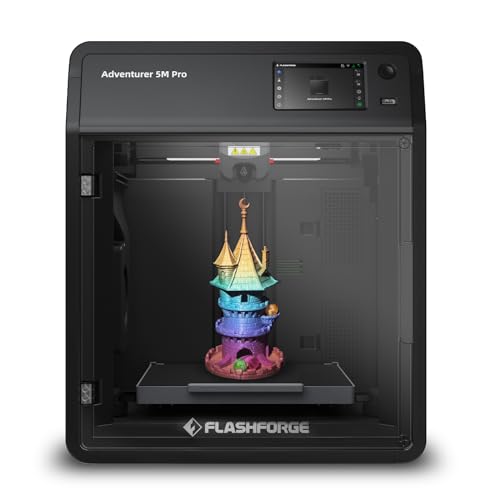
4. FlashForge Adventurer 5M Pro: Best Enclosed FlashForge
Pros
- Enclosed CoreXY, all-metal structure
- 600mm/s speed and 20, 000mm/s² acceleration
- Automatic pressure-based bed leveling
- 280°C all-metal direct extruder
- Remote control and live video monitoring
Cons
- No multi-color capability is specified
- 220 x 220 x 220mm build volume is not large
- Heavier and less compact than the standard Adventurer 5M
Best for: users who want an enclosed FlashForge printer with broad material support.
The FlashForge Adventurer 5M Pro is the more serious version of the standard Adventurer 5M. It keeps the quick, automated operating style but adds an enclosure and an all-metal CoreXY structure. That makes it the better fit for a dedicated workshop or anyone who wants a more controlled space around the print. The listed setup time is about 10 minutes from unboxing to first print, which is a useful sign for people who do not want to begin with mechanical calibration.
Automatic pressure-based leveling is the feature that will matter most to new owners. The printer detects platform height without requiring manual Z-axis calibration, and the dual-sided PEI platform is intended to simplify print removal. These features do not eliminate the need to keep the platform clean, but they reduce the number of routine variables. The Flash Maker app adds remote control, live video monitoring, and real-time adjustments, so the printer is not limited to physical controls at the workbench.
The Pro model reaches 600mm/s with acceleration up to 20, 000mm/s². Its 280°C all-metal direct extruder supports a list that includes PLA, ABS, PETG, ASA, TPU, PC, PLA-CF, and PETG-CF. That is a more explicit high-temperature and composite material story than the standard Adventurer 5M. Four nozzle sizes, from 0.25mm to 0.8mm, let the user favor small details or quicker, more robust parts. The printer also lists a 35-second warm-up to 200°C.
The FlashForge Adventurer 5M is lighter and simpler, so it remains the better choice when enclosure features and app monitoring are not important. The Bambu Lab P1S offers an enclosed alternative with automatic leveling and a 500mm/s top speed, while the Adventurer 5M Pro answers with explicit support for materials such as PLA-CF and PETG-CF. Neither FlashForge model is presented with a built-in multi-color setup, so the FlashForge AD5X is the more natural choice for color work.
The 32.19-pound body is manageable but not especially portable, and the 220 x 220 x 220mm build volume rules out many larger one-piece designs. The product's strengths are control and material range, not scale. People who only print PLA figures may not need the Pro's extra enclosure and material capability. It makes more sense for the user who wants a fast enclosed printer now and expects to explore more demanding filament later.
5. Bambu Lab P1S: Best Single-Color Bambu Lab

Pros
- Enclosed body and automatic bed leveling
- 500mm/s speed and 20, 000mm/s² acceleration
- Ready-to-use design with setup listed at 15 minutes
- Supports PLA, PETG, TPU, PVA, ABS, ASA, PA, and PC
- Can add AMS for multi-color printing
Cons
- AMS is required for the advertised multi-color capability
- Carbon and glass fiber reinforced polymers are not recommended
- Build volume is not specified in the supplied product information
Best for: users who want the P1S platform and plan to print mainly in one color.
The Bambu Lab P1S is the cleanest choice for someone who wants Bambu Lab's enclosed format without making multi-color printing the immediate priority. It is ready to use, has automatic bed leveling, and is listed with a setup time of about 15 minutes. Those details make it feel like a machine for printing projects rather than a machine for learning how to calibrate a machine.
Its performance profile is the same as the Combo version. The P1S is rated for 500mm/s and acceleration up to 20, 000mm/s². It is enclosed, which can improve print performance with advanced filaments compared with an open-frame printer. The supported materials listed here include PLA, PETG, TPU, PVA, PET, ABS, and ASA, with PA and PC described as capable. Carbon and glass fiber reinforced polymers are not recommended, so material selection still needs some care.
The significant difference between this printer and the Bambu Lab P1S Combo is what comes in the package. The Combo includes AMS, while this P1S does not. The printer can support up to 16 colors when connected to AMS, but that capability requires adding the system. That makes the standard P1S a better match for one-color work today, while the Combo is the more complete answer for a buyer already committed to color changes. The FlashForge Adventurer 5M Pro is another enclosed option and offers a 600mm/s top speed plus a more explicit range of composite materials.
The body is listed at 39.02 pounds and about 18.03 inches wide, 15.31 inches deep, and 15.31 inches high. It is a substantial enclosed printer, so plan the work surface before unpacking it. The supplied data does not state the build volume, and that is worth acknowledging rather than filling in from assumptions about the model. If you need a known larger cube, the Creality K2 Combo A and Anycubic Kobra X both specify 260 x 260 x 260mm.
The P1S is not the right pick for a buyer who wants four or more colors without another purchase. It is also not aimed at carbon fiber focused work. For a household maker, designer, or hobbyist who wants an enclosed printer with automatic leveling and a broad everyday filament list, it remains a strong choice. Those starting out may also want to compare the controls and setup features that help new makers before deciding between the P1S and the more color-focused Combo.
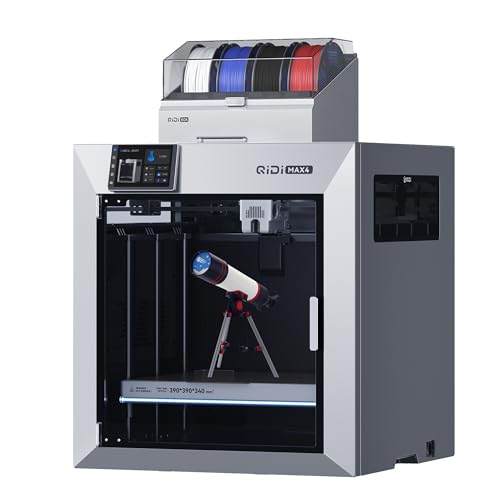
6. QIDI Max4 Combo: Best Large-Format Printer
Pros
- 390 x 390 x 340mm build volume
- Active heated chamber rated to 65°C
- 800mm/s maximum speed and 30, 000mm/s² acceleration
- Hardened steel nozzle supports abrasive materials
- AI camera can detect print failures and pause
Cons
- 120-pound body requires a serious permanent location
- Polar Cooler is sold separately
- Multi-color printing requires a QIDI BOX connection
Best for: professionals and enthusiasts who need large engineering parts in demanding materials.
The QIDI Max4 Combo is for the buyer who has already run into the limits of a typical desktop build area. Its 390 x 390 x 340mm volume is large enough for substantial parts, molds, and prototypes that would otherwise need to be split and assembled. That extra room changes the kind of work you can attempt. It is less about making a slightly larger figurine and more about producing parts in one piece.
QIDI lists a maximum speed of 800mm/s and acceleration up to 30, 000mm/s², supported by closed-loop motors on the X and Y axes. A 2mm lead screw and anti-backlash nut on the Z axis are intended to reduce vertical gaps and keep movement precise. The 40mm³/s high-flow hotend helps feed material at a rate suited to the machine's fast motion. These are ambitious figures, but they make sense here because the large bed would otherwise turn every sizeable project into a long wait.
The heated chamber is the machine's most important differentiator. It is actively heated to 65°C, and the listing highlights ABS-CF, PC, and PPS-CF among materials that benefit from controlled conditions. The hardened steel nozzle is designed for abrasive carbon fiber reinforced nylon and other demanding filaments. A full-surface silicone heated bed is included in the feature description for even temperature distribution and stronger first-layer adhesion. The Polar Cooler is not included, however, and must be purchased separately.
This printer also has a built-in AI camera that can recognize problems such as spaghetti-like failures and pause the print. A large touch screen handles local control. Multi-color printing is expandable to 16 colors through the QIDI BOX, but the listing describes that as an additional connection rather than an included feature that defines the machine. The Creality K2 Plus Combo also supports large parts, multi-color work, and high-temperature materials, but its build volume is smaller at 350 x 350 x 350mm. The QIDI wins on width and depth, while the Creality has a more clearly bundled CFS color system.
The scale creates real demands. The Max4 is listed at 120 pounds, with dimensions of 28 inches wide, 28 inches deep, and 30 inches high. This is not a printer to place on a lightweight desk or move whenever the room changes. It is also unnecessary for small decorative work. Buyers focused on miniatures or everyday household parts should consider the Bambu Lab P1S Combo or FlashForge AD5X instead. Choose the QIDI when large, strong, temperature-sensitive parts are the reason for buying a 3D printer in the first place.
7. Creality K2 Plus Combo: Best for Large Multi-Color Models

Pros
- 350 x 350 x 350mm build volume
- CFS supports up to 16 colors with expansion
- 600mm/s speed and 30, 000mm/s² acceleration
- Dual AI cameras and 18 smart sensors
- Heated chamber supports temperatures up to 60°C
Cons
- Weighs more than 70 pounds
- Large footprint needs dedicated space
- Four CFS units are needed for the full 16-color configuration
Best for: makers who need large parts, automatic color changes, and advanced material support.
The Creality K2 Plus Combo brings the color workflow into a much larger machine. Its 350 x 350 x 350mm build volume is the main reason to choose it over smaller multi-color printers. Large models can be printed without splitting, and smaller parts can be arranged in batches. That makes the K2 Plus useful for both single large objects and repeated production work.
The included CFS system handles automatic filament selection, switching, and relay. With four CFS units connected, the printer can reach up to 16 colors. RFID filament can be read for color and type, and the system can relay to a similar filament when one spool runs out. This is more than a novelty color mode. It can reduce interruptions on long jobs and simplify the transition between several materials, although the full 16-color setup requires four CFS units rather than one.
Creality lists a 600mm/s speed, 30, 000mm/s² acceleration, and a 40mm³/s high-flow system. Industry-grade FOC step-servo motors drive the XYZ axes and extrusion, while the matrix frame is built for rigidity. Two independently motorized Z axes can adjust bed tilt before automatic leveling. These features target the vibration and alignment challenges that come with moving a large bed quickly.
Material support is another strong point. The chamber can actively maintain temperatures up to 60°C, and the hardened steel nozzle supports operating temperatures up to 350°C. The feature list calls out ASA and PPA as examples of higher-end filaments. Two AI cameras monitor the print, with one watching the chamber for spaghetti failures and idling and another on the toolhead for flow optimization. That is a more elaborate monitoring system than the Creality K2 Combo A, which has one AI camera.
The K2 Plus is listed at 70.55 pounds and about 16.1 inches long, 15.4 inches wide, and 18.7 inches high. It is not a casual countertop appliance, and the CFS arrangement needs additional planning around the printer. The QIDI Max4 Combo has an even larger stated build volume and a 65°C heated chamber, so it is the better specialist tool for maximum size and demanding engineering materials. The K2 Plus is the better fit when large colorful models and automated filament handling matter just as much as material capability.
8. Creality K2 Combo A: Best Ready-to-Use Multi-Color Printer

Pros
- 260 x 260 x 260mm build volume
- Includes one CFS unit for multi-color printing
- 600mm/s printing speed
- 95 percent pre-assembled design
- AI camera and automatic leveling
Cons
- Full 16-color capability requires four CFS units
- Build volume is smaller than the K2 Plus
- Product dimensions are relatively large for its build area
Best for: home users who want a mostly assembled multi-color printer with a useful build cube.
The Creality K2 Combo A is designed to remove the intimidating part of buying a 3D printer. The listing says it is 95 percent pre-assembled, leaving the owner with setup work rather than a full mechanical project. It includes one CFS unit and supports up to 16 colors when as many as four CFS units are connected. That gives it a clear advantage over the standard FlashForge Adventurer 5M for buyers who want colorful prints from the start.
The 260 x 260 x 260mm build volume is large enough for many household objects, toys, organizers, and display models. It is a useful middle ground between the 220mm cube of the FlashForge models and the much larger Creality K2 Plus Combo. The K2 Plus remains the right machine for oversized one-piece models, but the K2 Combo A is easier to fit into a normal home workflow. The product also lists support for PLA, PETG, ABS, PLA-CF, and PET.
Creality rates the K2 Combo A for 600mm/s printing. Step-servo motors on the extruder and X/Y axes adjust torque dynamically, which is intended to improve extrusion consistency, print accuracy, and noise control. Silent Mode uses dynamically balanced fans and step-servo motors, with the listing comparing its sound to someone typing on a laptop. That is a useful feature for a printer that may live in a shared room rather than a separate workshop.
Automatic leveling probes only the target print area, according to the feature description, instead of spending time on the entire bed. The AI camera watches for spaghetti failures and idling, and the printer can monitor the work in real time. These are sensible safety features for longer unattended jobs. The Anycubic Kobra X also emphasizes quiet operation and AI monitoring, but it lists a 45dB noise figure and native four-color printing rather than the K2's CFS expansion path.
The K2 Combo A's largest weakness is its footprint relative to its build area. It is listed at about 16.93 inches long, 16.54 inches wide, and 21.06 inches high, so the surrounding space for the CFS and access matters. The full 16-color claim also depends on adding three more CFS units. If you want a straightforward four-color setup without planning around a larger expansion system, the Anycubic Kobra X is worth considering. The K2 Combo A is best for users who want a mostly assembled machine, a moderate build volume, and a clear path into multi-color printing.
9. Anycubic Kobra X: Best Quiet Family Printer

Pros
- Native four-color printing
- 260 x 260 x 260mm build volume
- Listed 45dB operating noise
- 15-minute setup with a pre-assembled design
- 49-point automatic leveling at 0.02mm accuracy
Cons
- Maximum print speed is not specified
- Four-color limit is lower than the expanded Bambu and Creality systems
- Family-focused safety features may be less important to advanced users
Best for: families and beginners who want quiet, automatic, colorful printing.
The Anycubic Kobra X has a more approachable personality than the large engineering machines in this list. It arrives pre-assembled with a modular design, and the setup target is 15 minutes from unboxing to the first print. The combination of native four-color printing, automatic color swaps, and a 260 x 260 x 260mm build volume gives families room to make colorful objects without learning a complicated manual process first.
Noise is a major selling point. Anycubic lists the Kobra X at 45dB, describing it as quieter than a normal conversation. That makes it more suitable for a living room, study, or shared family space than a printer whose motors and fans become the center of attention. It is also the lightest machine in this group at about 20.94 pounds, although its listed footprint is still about 17.93 inches long, 17.53 inches wide, and 18.16 inches high.
The automatic leveling system uses LeviQ 3.0 with 49-point leveling and stated 0.02mm accuracy. A stable XYZ gantry is intended to keep the first layer consistent. The printer also includes power and filament recovery, plus a 720P camera for real-time monitoring. Its AI safety system can detect foreign objects on the bed and errors such as spaghetti, pause the printer, and send a notification to a phone. Those protections make sense when younger users are involved or when a print is left running while the family is elsewhere.
The Kobra X handles four colors natively, which is a simpler proposition than the Creality K2 Combo A and Bambu Lab P1S Combo expansion systems. The trade-off is capacity. The Bambu and Creality machines can reach up to 16 colors in their stated configurations, while the Kobra X stays at four. The product description also does not specify a maximum print speed, so buyers focused on rapid production should choose the FlashForge AD5X, which lists 600mm/s and 20, 000mm/s² acceleration.
Advanced users may find the Kobra X's family-oriented features less important than a heated chamber, a higher-temperature extruder, or a broader composite material list. The listing does not provide those details, so it should not be treated as an engineering-material specialist. For colorful toys, gifts, classroom projects, and household models, its quiet operation and automatic safeguards are more relevant. It is also a natural fit for readers comparing the practical needs of printing with children nearby.
How to choose best 3 d printers
The best 3 d printers are separated less by headline speed than by how well their build area, material support, automation, and color system match the work you actually plan to do.
Build volume
Build volume determines the maximum size of a single printed object and how many smaller objects can fit in one job. A 220 x 220 x 220mm cube, as found on the FlashForge Adventurer 5M, AD5X, and Adventurer 5M Pro, is suitable for many household projects and prototypes. The 260mm cubes of the Creality K2 Combo A and Anycubic Kobra X give a little more flexibility.
Large-format machines change the type of project you can complete. The QIDI Max4 Combo offers 390 x 390 x 340mm, while the Creality K2 Plus Combo offers 350 x 350 x 350mm. Choose those sizes when splitting a model would create unwanted seams or weaken a functional part.
Print speed and acceleration
Maximum speed describes how quickly the print head can move, but acceleration affects how often the printer can reach that speed during a real model. The FlashForge and Creality machines in this list commonly specify 600mm/s, while the QIDI Max4 Combo lists 800mm/s. Acceleration figures range from 20, 000mm/s² to 30, 000mm/s².
A high number is useful only when the frame, motors, extrusion system, and cooling can keep up. Look for a combination of a rigid structure, automatic calibration, and a high-flow hotend rather than treating the speed figure as a guarantee that every model will finish at the same rate.
A large build volume is useful only if the frame can keep a wide, heated bed stable.
Enclosure and chamber temperature
An enclosure helps create a more controlled printing environment and can be valuable with materials that are prone to warping. The Bambu Lab P1S, P1S Combo, and FlashForge Adventurer 5M Pro all use enclosed designs. The QIDI Max4 Combo and Creality K2 Plus Combo go further by listing active heated chambers at 65°C and up to 60°C respectively.
Open or less specialized machines remain perfectly sensible for common PLA projects. Choose a heated chamber when you expect to print ABS, ASA, PC, nylon, or composite materials and need more control over temperature during the job.
Extruder and nozzle temperature
Extruder temperature determines which filaments the printer can process reliably. The FlashForge Adventurer 5M and Adventurer 5M Pro list 280°C extruders, while the AD5X lists a 300°C direct-drive extruder. Creality lists a 350°C operating temperature for the K2 Plus Combo, and QIDI pairs a hardened steel nozzle with support for abrasive materials.
Nozzle construction matters as much as temperature for carbon fiber reinforced filament. A standard nozzle may wear quickly with abrasive composites, while a hardened steel nozzle is designed for that type of use. Do not choose a high-temperature printer solely because the number looks impressive. Match it to the materials you will actually buy and the parts you need to produce.
Automatic leveling and monitoring
Automatic leveling reduces the setup burden and helps maintain first-layer consistency. The P1S family, FlashForge models, Creality printers, and Anycubic Kobra X all list automated leveling features. Anycubic specifies 49-point leveling at 0.02mm accuracy, while the Creality K2 Combo A describes a system that levels the area used by the print.
Cameras add a second layer of convenience. The FlashForge Adventurer 5M Pro offers remote control and live video monitoring. The K2 Plus has two AI cameras, and the Kobra X includes a 720P camera with object and spaghetti detection. These features are useful for long prints, but they do not replace a clean bed, suitable filament, or correct model settings.
Multi-color systems
Multi-color printing can be built into the workflow or added through an accessory. The Bambu Lab P1S Combo includes AMS and supports up to 16 colors, while the standard P1S requires an AMS connection for that capability. FlashForge AD5X supports up to four colors. Creality's K2 Combo A includes one CFS and the K2 Plus Combo uses CFS, with up to 16 colors possible using four connected units.
The Anycubic Kobra X takes a simpler route with native four-color printing. Consider how many colors you genuinely need, how much space the filament system occupies, and whether your models use color changes often enough to justify the extra workflow.

Frequently asked questions
What size 3D printer should a beginner choose?
A 220 x 220 x 220mm printer is enough for many first projects, including small organizers, figures, replacement parts, and prototypes. The 260 x 260 x 260mm models provide more room without moving into the very large footprint of the QIDI Max4 Combo or Creality K2 Plus Combo. Choose based on the objects you expect to print, not only the largest number on the box.
Is an enclosed 3D printer better?
An enclosure can improve control around the print and is useful for materials that are more sensitive to temperature changes. The Bambu Lab P1S and FlashForge Adventurer 5M Pro are enclosed options in this group. An enclosure is less critical if you mainly use PLA and want easy access to the print area.
Which printer is best for multi-color printing?
The Bambu Lab P1S Combo is the strongest all-around multi-color pick because the AMS is included and the stated system can reach up to 16 colors. The FlashForge AD5X is a better fit for a smaller four-color setup, while the Anycubic Kobra X offers native four-color printing with a family-friendly design. Creality's K2 models are worth considering when you need more build volume.
Do automatic leveling systems eliminate maintenance?
No. Automatic leveling reduces calibration work, but the bed still needs to remain clean and the nozzle must be maintained. Adhesion can also be affected by the selected filament and the condition of the PEI surface. Treat automatic leveling as a convenience feature, not a substitute for basic care.
Which 3D printer is best for large parts?
The QIDI Max4 Combo has the largest stated build volume here at 390 x 390 x 340mm. The Creality K2 Plus Combo follows with 350 x 350 x 350mm. Both are better suited to large prototypes and one-piece functional objects than the 220mm and 260mm machines.
Can these printers use carbon fiber filament?
Some can, but support varies. The QIDI Max4 Combo lists a hardened steel nozzle and support for carbon fiber reinforced nylon and other abrasive materials. Creality lists PLA-CF and high-temperature materials for the K2 Combo A, while the K2 Plus has a hardened steel nozzle. Bambu Lab specifically says carbon and glass fiber reinforced polymers are not recommended for the P1S models in this dataset.
Is a fast 3D printer always better?
Not necessarily. Speed is useful for prototypes and repeated parts, but print quality also depends on acceleration, frame stability, cooling, extrusion, and calibration. A printer with a slightly lower stated maximum can be the better choice if its material support and automation suit your projects more closely.
The bottom line
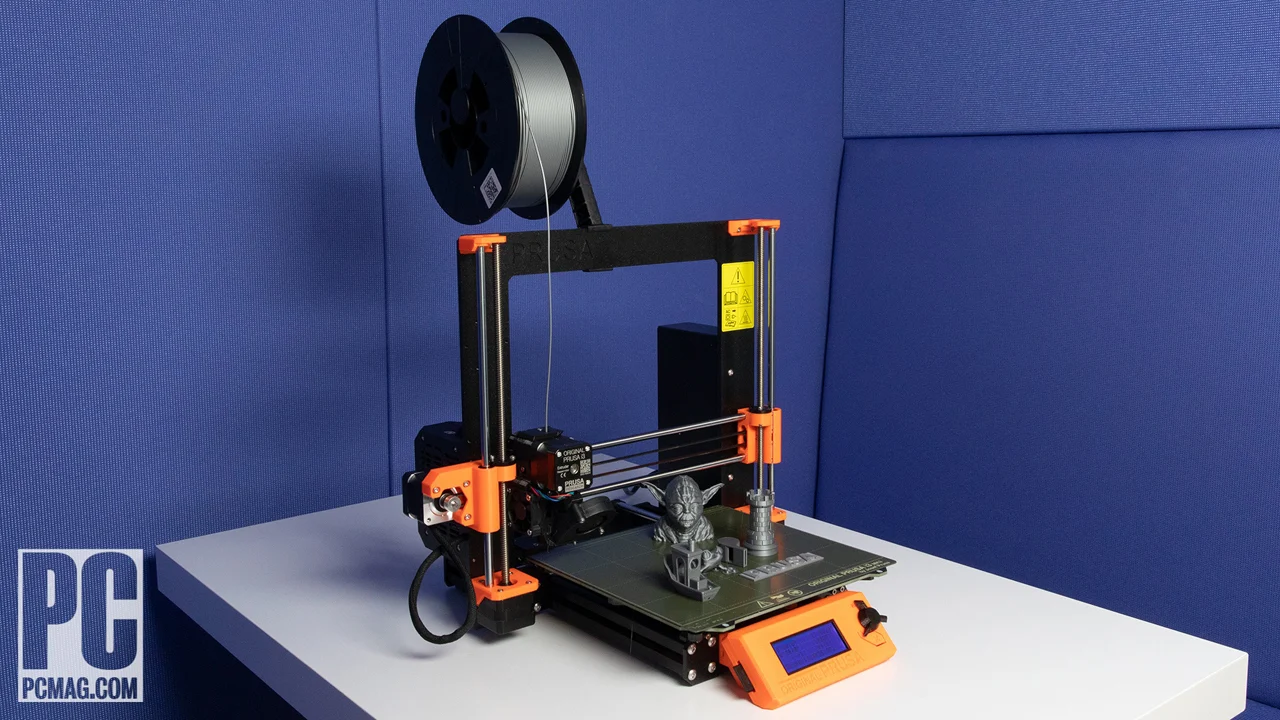
The Bambu Lab P1S Combo is our leading Best best 3 d printers pick because it combines an enclosure, automatic leveling, fast operation, broad everyday filament support, and included AMS multi-color printing. It is the one we would choose for a mixed household workshop where projects may range from simple PLA parts to colorful display models.
Choose the FlashForge Adventurer 5M for fast single-color printing and simple nozzle changes. Choose the QIDI Max4 Combo or Creality K2 Plus Combo when large parts and demanding materials matter more than a compact setup. The Anycubic Kobra X is the quieter family option, while the FlashForge AD5X is the more focused compact color printer.
If you are undecided, choose the Bambu Lab P1S Combo unless your first priority is unusually large parts or a quiet family workspace.
As an Amazon Associate we earn from qualifying purchases.