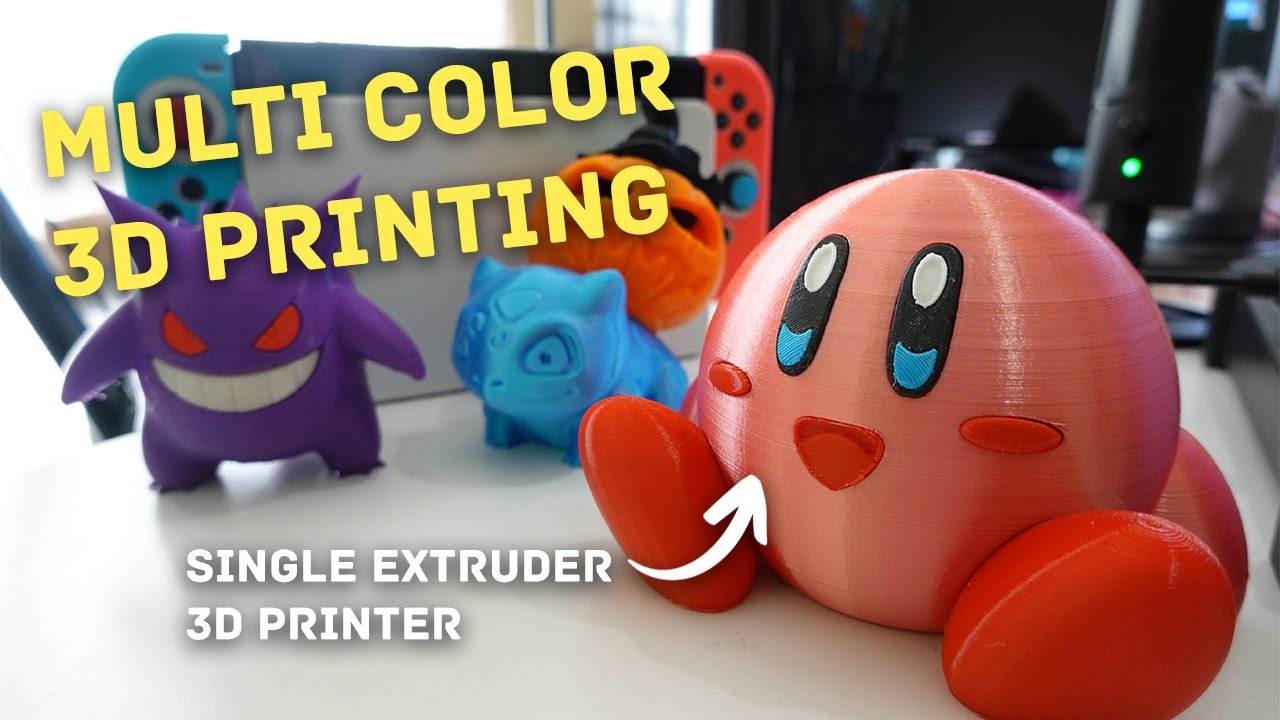

A multicolor printer can turn a model that once needed sanding and hand painting into a finished object straight off the build plate. The catch is that color changes can also mean purged filament, long pauses, clogs, and a machine that needs more attention than the finished model deserves. The Best multicolor 3D printer options solve that problem in very different ways.
Some use a filament management system that feeds several spools through one nozzle. Others use independent toolheads, which can switch materials without repeatedly loading and purging the same hot end. We compared the real differences in speed, build size, automation, enclosure, and material support.
Bambu Lab P1S Combo is our top pick for the broadest mix of dependable automation, enclosed printing, speed, and multicolor flexibility. The rest of this list ranges from compact four-color machines to larger toolhead systems built for mixed-material work.
| # | Product | Award | Color system | Speed | Build volume | Best for |
|---|---|---|---|---|---|---|
| 1 | Bambu Lab P1S Combo | Best overall | Up to 16 colors | Up to 500 mm/s | Not specified | Most multicolor projects |
| 2 | Flashforge AD5X CoreXY | Best for fast four-color prints | Up to 4 colors | Up to 600 mm/s | 220 x 220 x 220 mm | Rapid everyday models |
| 3 | Flashforge AD5X IFS | Best for material flexibility | 4 colors | Up to 600 mm/s | Not specified | Mixed-material projects |
| 4 | Bambu Lab P2S Combo | Best for advanced automation | Multicolor with AMS 2 Pro | Up to 600 mm/s | Not specified | Hands-off printing |
| 5 | Snapmaker U1 | Best toolhead changer | 4 independent toolheads | Up to 500 mm/s | 270 x 270 x 270 mm | Low-waste mixed materials |
| 6 | Creality K2 Combo | Best quiet enclosed option | Up to 16 colors | Up to 600 mm/s | 260 x 260 x 260 mm | Quiet home workshops |
| 7 | Anycubic Kobra X | Best for families | Native 4-color | Not specified | 260 x 260 x 260 mm | Beginner and family projects |
| 8 | Flashforge Creator 5 | Best for clean tool changes | 4 independent toolheads | Up to 600 mm/s | Not specified | Multi-material prototypes |
| 9 | Flashforge AD5X Four-Color | Best compact IFS alternative | Up to 4 colors | Up to 600 mm/s | 220 x 220 x 220 mm | Small workspaces |
1. Bambu Lab P1S Combo: Best Overall

Pros
- Enclosed design supports a wider range of filaments
- AMS setup can handle up to 16 colors
- Automatic bed leveling and quick setup
- Strong 500 mm/s top speed
Cons
- Multicolor printing requires the included AMS system
- Carbon and glass fiber reinforced polymers are not recommended
- Large, heavy desktop footprint
Best for: makers who want an enclosed, automated machine for varied multicolor work.
The Bambu Lab P1S Combo is the easiest printer here to recommend to someone who wants to spend more time designing and less time managing filament changes. Its enclosed body gives it a more controlled printing environment than the open or less clearly specified alternatives, and the automatic bed leveling removes one of the routine setup chores that can derail a first layer. The Combo includes the AMS, and that is the part that enables the printer's multicolor and multimaterial workflow.
The headline capability is support for up to 16 colors when the system is expanded appropriately. That is a meaningful distinction from the four-color machines in the Flashforge AD5X range. Four colors are enough for most figurines and signs, but the P1S Combo gives a complex design more room for separate accents, body colors, and support material. It supports PLA, PETG, TPU, PVA, PET ABS, and ASA as ideal materials, and it is capable of PA and PC. Carbon and glass fiber reinforced polymers are not recommended, so this is not the machine to choose around those particular composites.
Bambu Lab rates the P1S at up to 500 mm/s with 20, 000 mm/s² acceleration. Those figures matter most when printing repeated parts or larger simple surfaces, since intricate multicolor work still depends on layer height, color changes, and the model itself. The enclosed design also makes the P1S more adaptable than the open-frame approach of a basic starter printer. Its stated setup time is 15 minutes, a useful sign that the machine is intended to move quickly from unboxing to a first project.
The weakness is physical presence. The P1S Combo weighs 47.52 pounds and measures about 18.03 inches wide, 15.31 inches deep, and 15.31 inches high, before allowing extra room for practical access. Its material guidance also rules out some reinforced filaments that advanced users may want. The newer Bambu Lab P2S Combo is the more ambitious pick for adaptive airflow, AI failure detection, and filament drying, while the Flashforge AD5X CoreXY is a lighter alternative with a 600 mm/s maximum speed. The P1S remains the better-balanced choice for most buyers because its enclosure, AMS ecosystem, and broad color capacity work together so cleanly.
If you want a fuller look at the category beyond these nine machines, how multicolor printing systems handle color changes is a useful place to compare the underlying approaches. For a first multicolor machine that can also grow with more demanding projects, the P1S Combo is the one we would keep.
2. Flashforge AD5X CoreXY: Best for Fast Four-Color Prints

Pros
- 600 mm/s CoreXY motion system
- Four-color printing with automatic filament handling
- 300°C direct-drive extruder
- Four nozzle sizes supported
- Remote monitoring through the Flash Maker app
Cons
- 220 x 220 x 220 mm build volume is smaller than several rivals
- Four-color capacity is below the expandable Bambu and Creality systems
- The fastest advertised modes are not useful for every model
Best for: users who want quick four-color prints in a compact, capable machine.
The Flashforge AD5X CoreXY makes a strong case for keeping a multicolor printer focused. It does not try to match the largest machines here, but its 220 x 220 x 220 mm build volume covers the small models, desk objects, replacement parts, and decorative pieces most people print regularly. The automatic feeding and retraction system also keeps the central task simple: load the colors, prepare the model, and let the printer manage the changes.
Its CoreXY structure supports speeds up to 600 mm/s and acceleration up to 20, 000 mm/s². That is the highest stated top speed shared by several printers in this roundup, including the larger Creality K2 Combo and the toolhead-based Flashforge Creator 5. The AD5X adds vibration compensation and dual-channel cooling, two details that matter because fast movement can expose ringing, poor overhangs, and uneven layers. These features do not make every print finish at the headline speed, but they give the machine a sensible foundation for quicker production.
The 300°C direct-drive extruder is particularly useful for material range and filament control. The printer supports four nozzle sizes from 0.25 mm to 0.8 mm, with a 0.4 mm nozzle installed. The smaller option suits fine miniature details, while the larger choices can put down wider lines for sturdy models and faster simple forms. Power-loss resume, automatic filament feeding and retraction, and remote monitoring through the Flash Maker mobile app give it more convenience than its compact footprint suggests.
The trade-off is capacity. The 220 mm cube is smaller than the 260 mm cube in the K2 Combo and Anycubic Kobra X, and the AD5X is limited to four colors at once. Its dimensions are relatively manageable at 14 inches wide, 16 inches deep, and 18 inches high, but the listed weight of 24.25 pounds still calls for a stable surface. Choose it over the Flashforge AD5X IFS when the smaller, more clearly specified machine and nozzle flexibility appeal to you. Choose the P1S Combo instead if enclosure and a larger expandable color system matter more than the Flashforge's top speed.
The AD5X CoreXY is a focused choice for colorful objects that fit its build area. It is especially compelling for users who want a direct-drive hot end, practical nozzle choices, and fast motion without stepping up to a much larger toolhead system.
3. Flashforge AD5X IFS: Best for Material Flexibility

Pros
- Four-color and multimaterial printing through IFS
- Supports PLA, TPU, PETG, PLA-CF, and PETG-CF
- Full automatic bed leveling
- CoreXY frame with vibration suppression
- Side-by-side spool arrangement saves workspace
Cons
- Four-color limit
- Build volume is not specified in the listing
- Open-ended material support still demands careful slicing
Best for: makers who want to combine flexible, rigid, and composite filaments.
The Flashforge AD5X IFS is the more material-focused member of the two similarly named AD5X listings here. Its Intelligent Filament System is designed around four spools arranged side by side, which keeps the setup relatively compact while allowing different materials to be available during one job. That makes it more interesting for functional parts than a printer used only to place four colors on a decorative model.
The material list is the real reason to consider it. The listing names PLA, TPU, PETG, silk, PLA-CF, and PETG-CF among its compatible materials. A project can therefore mix a rigid body with flexible features or use a different filament for a contrasting section. The printer's full automatic leveling sensor measures multiple points across the bed, helping maintain a consistent nozzle distance for the first layer. That matters even more when a single project uses materials with different printing behaviors.
The all-metal CoreXY structure is intended to reduce mechanical shifts, while vibration suppression algorithms target layer alignment problems caused by fast movement. The claimed top speed is 600 mm/s with acceleration up to 20, 000 mm/s². Those figures put it alongside the Flashforge AD5X CoreXY, but the IFS listing emphasizes the material system more heavily. It also has a modular design and a listed weight of 22.05 pounds, so it is easier to position than the much heavier Snapmaker U1.
The missing build-volume specification is a limitation for anyone planning large parts. It also has only four color channels, so it cannot compete with the P1S Combo or K2 Combo on expanded color capacity. The standard AD5X CoreXY is the safer pick if nozzle variety and the explicit 220 mm cube matter to you. Pick the IFS version when your projects are defined by material changes, flexible sections, composite filaments, or a desire to keep four spools close together.
The AD5X IFS suits a workshop where color is only one part of the brief. It is the Flashforge to choose when the printer must handle a wider material mix without moving to an independent toolhead design.
4. Bambu Lab P2S Combo: Best for Advanced Automation

Pros
- AMS 2 Pro includes filament drying up to 65°C
- AI failure detection and automatic calibration
- Adaptive airflow can maintain a 50°C chamber
- Quick-swap nozzles
- Up to 600 mm/s printing
Cons
- The P2S itself does not support multicolor printing without the Combo system
- Larger 22-inch listed width
- More advanced controls may be unnecessary for simple color prints
Best for: experienced users who want broad automation and more controlled filament handling.
The Bambu Lab P2S Combo is aimed at people who want the printer to make more decisions on their behalf. Its automatic calibration, quick-swap nozzles, and AI failure detection reduce the number of routine checks between a finished design and a completed object. The included AMS 2 Pro is essential here: the listing specifically says the P2S printer alone does not support multicolor printing.
The AMS 2 Pro adds built-in filament drying up to 65°C. That is useful because damp filament can produce inconsistent extrusion, surface defects, and weak-looking layers. Drying does not remove the need to store filament sensibly, but it gives the multicolor workflow a more controlled starting point. The machine can print at up to 600 mm/s, while its PMSM servo extruder and active flowrate compensation are intended to keep corners and layer lines consistent as speed rises.
Adaptive airflow is the P2S Combo's most distinctive printing feature. The system can emphasize cooling for overhangs or retain heat to maintain a 50°C chamber for engineering-grade materials. A carbon filter is also listed for the enclosure. That gives the P2S a more deliberate approach to changing filament requirements than the simpler four-color machines, although users still need to follow the machine's material guidance and prepare models carefully.
The downside is size and complexity. The listed dimensions are 22 inches wide, 18 inches deep, and 18 inches high, which is a serious footprint for a desk or shelf. It is also difficult to justify this machine if your projects are mostly small PLA signs and simple toys. The Bambu Lab P1S Combo is the more balanced recommendation for those jobs, while the Snapmaker U1 has a more unusual independent-toolhead approach for users who specifically want less purging. The P2S Combo earns its place when drying, airflow control, AI monitoring, and automatic calibration all matter together.
For a machine intended to stay busy with changing materials and varied designs, the P2S Combo is the most sophisticated option in this list. It is best suited to buyers who will actually use its extra controls rather than treating it as a basic four-color printer.
5. Snapmaker U1: Best Toolhead Changer

Pros
- Four independent toolheads
- Tool changes take as little as 5 seconds
- 270 x 270 x 270 mm build volume
- Designed to reduce purging and filament waste
- Supports rigid, flexible, support, and engineering materials
Cons
- Heaviest machine in this roundup at 59.08 pounds
- Large 22.6-inch listed depth
- Four toolheads require more hardware than a single-nozzle system
Best for: workshops producing mixed-material parts, prototypes, and larger multicolor models.
The Snapmaker U1 takes a fundamentally different route to multicolor printing. Instead of repeatedly loading and unloading different filaments through one nozzle, it has four independent toolheads. Each can keep its filament preloaded and preheated, then the SnapSwap system changes heads in as little as 5 seconds. That approach is more compelling for prints with frequent color or material changes than a conventional single-nozzle system.
The benefit is not just speed. The listing says the design can reduce filament waste by up to five times and make multicolor or multimaterial printing up to five times faster than its traditional comparison. The important point is that the printer avoids repeated purge cycles during a tool change. It can combine rigid and flexible materials, water-soluble supports, and engineering materials in a single print. The named material range includes PLA, PVA, TPU, PETG, PCTG, ABS, ASA, PA, and PC.
Its 270 x 270 x 270 mm build volume is larger than the 220 mm cube of the AD5X machines and the 260 mm cube of the Kobra X and K2 Combo. A CoreXY motion system with carbon fiber X-axis rails supports speeds up to 500 mm/s across that larger area. Automatic toolhead offset calibration, vibration compensation, extrusion adjustment, and first-layer work are all intended to prevent the four-head design from becoming a constant manual alignment project.
The physical trade-off is substantial. The U1 weighs 59.08 pounds, and its listed length is 22.6 inches, so this is not a printer to move casually or squeeze onto a shallow desk. It also has more moving hardware to maintain than a standard filament switching setup. The Flashforge Creator 5 offers a similar independent-toolhead idea in a smaller listed footprint and reaches 600 mm/s, but the U1 counters with the larger 270 mm cube and a stated broad material range. If your priority is simple four-color decoration, the P1S Combo is easier to live with.
The U1 is the specialist pick for people who understand why independent toolheads matter. It makes the most sense for prototypes, functional parts, soluble supports, and projects where repeated material changes would otherwise dominate the print.
6. Creality K2 Combo: Best Quiet Enclosed Option

Pros
- CFS can support up to 16 colors with expansion
- 260 x 260 x 260 mm build volume
- Enclosed and 95% preassembled
- AI camera monitors for printing errors
- Silent mode and step-servo motors
Cons
- One CFS unit is included in the Combo
- Nozzle temperature is not specified in the listing
- Larger height than several competitors
Best for: home users who want an enclosed machine with quiet operation and room to grow.
The Creality K2 Combo is a practical answer to two common complaints about desktop 3D printing: noise and setup friction. It arrives 95% preassembled, and the listing says users can begin after unpacking and installing the screen. Silent mode uses step-servo motors and dynamically balanced fans, with the manufacturer describing operation as no louder than someone typing on a laptop. That makes it a better fit for a living space than a machine that constantly dominates the room.
The included CFS provides multicolor printing, and up to four CFS units can be connected for as many as 16 colors. The Combo includes one CFS unit, so its expansion path is more important than its out-of-box color count. Its 260 x 260 x 260 mm build volume is generous enough for larger toys, household parts, and display pieces, and it sits between the compact AD5X machines and the 270 mm cube of the Snapmaker U1.
Creality gives the K2 a maximum printing speed of 600 mm/s. Three step-servo motors on the extruder and X and Y axes can adjust torque dynamically in less than a millisecond, according to the listing. The printer also has targeted automatic leveling, which probes the bed area relevant to the current print, along with an AI camera that watches for spaghetti failures, idling, and other problems. Those features are useful when a print runs unattended, though camera monitoring is no substitute for correct slicing and filament preparation.
The K2's listed height is 21.06 inches, making it taller than the P1S and the AD5X models. The listing does not provide a nozzle temperature, so buyers looking specifically for a documented high-temperature hot end should look at the AD5X models instead. The Anycubic Kobra X offers the same 260 mm cube with native four-color printing and a quieter 45 dB claim, but the K2 has the stronger expansion story and enclosed design. Choose the K2 when a quiet, ready-to-run enclosure matters more than a simpler four-color setup.
This is the Creality to buy for a home workshop that needs more room than a compact printer provides. Its quiet mode, camera, preassembly, and expandable CFS make it unusually approachable for a machine with this much capacity.
7. Anycubic Kobra X: Best for Families

Pros
- Native four-color printing
- 15-minute setup and modular preassembled design
- 260 x 260 x 260 mm build volume
- 45 dB quiet operation
- AI monitoring with a 720P camera
Cons
- Printing speed is not specified
- Four-color system is less expandable than the P1S or K2
- Family-oriented features may not satisfy advanced material users
Best for: families, classrooms, and beginners who want colorful projects with straightforward setup.
The Anycubic Kobra X is built around a simple promise: get a colorful project running without turning the first afternoon into a maintenance lesson. It arrives preassembled with a modular design, and the listing gives a 15-minute setup target. Native four-color printing handles automatic color swaps, which makes the machine a natural fit for toys, gifts, and educational projects where the fun is in designing and seeing the result.
The 260 x 260 x 260 mm build volume is one of the largest in this group, matching the Creality K2 Combo and exceeding both AD5X listings with a specified 220 mm cube. Anycubic also claims 45 dB operation, quieter than a normal conversation. That combination of a large build area and low stated noise makes the Kobra X easier to place in a study, living room, or shared family space.
The automation goes beyond color changes. LeviQ 3.0 provides 49-point leveling with stated 0.02 mm accuracy, while the XYZ gantry is intended to keep the machine stable. A 720P camera provides monitoring, and the AI system can detect foreign objects and spaghetti-style print failures, pause the printer, and send a phone notification. Power and filament recovery are also listed, so an interruption does not necessarily mean discarding a long project.
The limitation is that Anycubic does not state a maximum printing speed in the supplied details. That makes it harder to compare directly with the 500 and 600 mm/s machines here, especially for users running repeated production jobs. The K2 Combo offers an enclosed body and a path to up to 16 colors, while the Flashforge AD5X CoreXY provides a documented 600 mm/s top speed and a 300°C direct-drive extruder. The Kobra X is the better choice when setup, quiet operation, monitoring, and a generous build area matter more than advanced material specifications.
Readers choosing a first family machine may also want to consider features that make 3D printing easier for younger users. The Kobra X is a friendly, spacious platform for colorful objects, especially when several people will share the printer.
8. Flashforge Creator 5: Best for Clean Tool Changes

Pros
- Four independent toolheads prevent color mixing
- 7-second FlashSwap changes
- Designed to reduce purge waste
- Dedicated support toolhead can simplify removal
- 600 mm/s CoreXY printing with automatic calibration
Cons
- Four-color capacity is below expandable systems
- Listed build volume is not specified
- Toolhead architecture adds mechanical complexity
Best for: users who want clean color changes and dedicated multimaterial support.
The Flashforge Creator 5 is the clearest alternative to the Snapmaker U1 for anyone who dislikes the waste and color contamination associated with a single nozzle. It uses four independent toolheads, so each color or material has its own path. That helps prevent color mixing and clogging, and it means a support material can stay loaded in its own head rather than being repeatedly purged through the main nozzle.
Flashforge says its FlashSwap system can change heads in 7 seconds, with intelligent preheating happening in the background. That is a very different experience from waiting through repeated unload, load, and purge cycles. The listing also claims up to 80% less filament waste than single-nozzle multicolor systems. The useful advantage is not simply reduced waste. Cleaner changes can make sharply separated color sections and support interfaces easier to manage.
The Creator 5 supports PLA, PETG, TPU, PETG-CF, and support materials in one job. Its CoreXY frame reaches up to 600 mm/s and uses automatic calibration, active vibration compensation, and flow calibration to keep high-speed movement under control. The machine is listed at 30.8 pounds and measures 14 inches wide, 16 inches deep, and 18 inches high, giving it a more manageable listed footprint than the Snapmaker U1.
There are limits. The listing does not specify a build volume, so users planning tall or wide objects have less information to work with than they do with the Kobra X, K2 Combo, or U1. The Creator 5 also has four toolheads, not an expandable 16-color arrangement. The Snapmaker U1 offers a larger documented 270 mm cube and a wider named material list, while the Bambu Lab P2S Combo adds drying and adaptive airflow. Pick the Creator 5 when clean, independent tool changes and dedicated support handling are more important than maximum color count.
The Creator 5 is a specialist machine with a clear purpose. It belongs in a workshop where mixed materials, soluble or dedicated support, and clean transitions are frequent parts of the workflow.
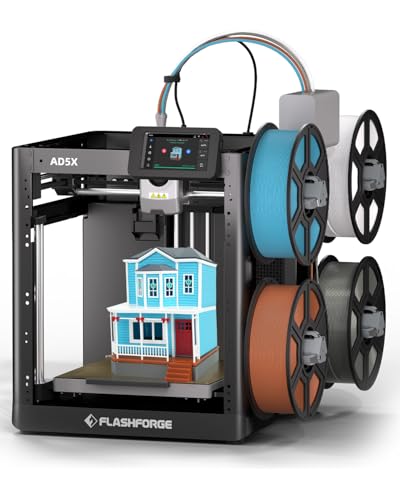
9. Flashforge AD5X Four-Color: Best Compact IFS Alternative
Pros
- Four-color printing through IFS
- 600 mm/s maximum speed
- 220 x 220 x 220 mm build volume
- All-metal CoreXY structure
- Supports flexible TPU printing
Cons
- Four-color limit
- Nozzle temperature is not specified in the listing
- Fewer automation details than the other AD5X entries
Best for: users who need a compact four-color CoreXY printer with TPU support.
The Flashforge AD5X Four-Color is the most straightforward of the three AD5X listings in this roundup. It combines IFS with a 220 x 220 x 220 mm build volume and a CoreXY frame, giving users the core ingredients for compact multicolor printing without a large machine. The listing says it supports up to four colors and flexible TPU, so it can handle more than rigid decorative models.
Its maximum printing speed is listed as 600 mm/s with acceleration up to 20, 000 mm/s². The all-metal CoreXY structure is intended to reduce vibration and keep prints accurate as the gantry moves quickly. In practice, the benefit of this specification is most apparent on repeated functional parts and simple forms where shorter movement times matter. Fine, color-heavy models still require careful slicing and may spend significant time changing filament.
The Intelligent Filament System automatically detects and refills filament, which can help reduce interruptions during a longer print. The 220 mm cube is not large, but it is enough for many figurines, household organizers, and small prototypes. The listed dimensions are 14.3 inches wide, 16.3 inches deep, and 14.8 inches high, and its listed weight is 24.3 pounds. That makes it relatively easy to accommodate compared with the larger K2 Combo and much heavier U1.
The drawback is a thinner feature set in the supplied information. Unlike the other AD5X CoreXY listing, this version does not specify a 300°C direct-drive extruder, nozzle options, remote control, or power-loss resume. The Flashforge AD5X IFS gives a clearer account of supported materials, including PLA-CF and PETG-CF, while the standard Flashforge AD5X CoreXY spells out four nozzle sizes and dual-channel cooling. Choose this version when its compact footprint and IFS color workflow are enough, not when you need the most complete feature set.
This AD5X is a sensible compact option for small multicolor models and TPU projects. It makes the most sense for a buyer who wants the CoreXY platform and four-color IFS system without needing a larger build area or extensive material controls.
How to choose the best multicolor 3D printer
The right multicolor machine depends less on the number of colors printed on the box than on how it changes filament, handles different materials, and keeps the first layer consistent.
Color change system
A single-nozzle filament management system is compact and familiar, but it usually needs to unload, load, and purge during a color change. That can add time and create waste, especially when a model switches colors frequently. The P1S Combo, AD5X models, K2 Combo, and Kobra X use this general style of workflow.
Independent toolheads use a separate nozzle for each loaded filament. The Snapmaker U1 and Creator 5 can switch heads in about 5 to 7 seconds according to their listings, while avoiding repeated purging through one nozzle. Choose this design when mixed materials, soluble supports, or frequent color changes are central to your work.
Build volume
Build volume determines the largest object the printer can produce in one piece. A 220 x 220 x 220 mm cube, as found on the AD5X CoreXY, is suitable for many models but gives less room than the 260 mm cube of the K2 Combo and Kobra X or the 270 mm cube of the U1.
Measure the space around the printer as well as the print area. The AMS, CFS, or other filament system needs practical access, and enclosed machines can have a larger working footprint than their print dimensions suggest.
A larger color count cannot compensate for a build chamber that is too small for the parts you actually plan to print.
Speed and motion system
The headline maximum speed is a ceiling, not a promise that every multicolor object will finish at that rate. Color changes, complex geometry, layer height, and cooling all affect the real job time. CoreXY frames appear throughout this list because they are designed for fast, stable movement, with stated top speeds from 500 to 600 mm/s.
Acceleration and vibration control also matter. The AD5X models list 20, 000 mm/s² acceleration, while the P1S, Creator 5, and other machines use vibration compensation or flow control to help maintain clean layers at higher movement speeds.
Material support
PLA is easy to start with, but TPU, PETG, PVA, ABS, ASA, PA, PC, and composite filaments ask more from a printer. Look for a direct-drive extruder when flexible TPU matters, a heated or controlled enclosure for demanding materials, and a filament drying system when moisture-sensitive spools will be used regularly.
The P2S Combo lists filament drying up to 65°C and adaptive airflow that can maintain a 50°C chamber. The P1S supports several common materials but does not recommend carbon or glass fiber reinforced polymers. The Snapmaker U1 has the broadest named compatibility list in this group.
Leveling and failure detection
Automatic bed leveling makes the first layer less dependent on manual adjustment. The AD5X machines, P1S, P2S, K2, and Kobra X all list automatic calibration or leveling features. Anycubic gives the Kobra X a 49-point system with stated 0.02 mm accuracy, while Creality describes targeted leveling for the print area.
Cameras and failure detection can pause a job when the printer sees a foreign object or spaghetti-style failure. They are useful safeguards, particularly for unattended printing, but they do not replace sensible bed preparation, dry filament, and a properly configured slicer.
Frequently asked questions
Do multicolor 3D printers use one nozzle or several?
Both designs are common. The Bambu Lab and AD5X machines use filament management systems, while the Snapmaker U1 and Flashforge Creator 5 use four independent toolheads. A single nozzle can be more compact, while independent heads can reduce purging during color and material changes.
How many colors can the Bambu Lab P1S Combo print?
The P1S Combo listing says it can support up to 16 colors. The AMS is required for multicolor and multimaterial printing, and additional system capacity is needed to reach the maximum stated color count.
Is an enclosed 3D printer useful for multicolor work?
An enclosure can help maintain a more controlled printing environment and can make advanced filament choices more practical. The P1S and K2 are enclosed options in this list, while the P2S adds adaptive airflow and a listed 50°C chamber capability.
Which printers support flexible TPU?
The P1S lists TPU among its ideal supported filaments. The Flashforge AD5X IFS lists TPU, the AD5X Four-Color lists flexible TPU, and the Snapmaker U1 lists TPU alongside rigid, support, and engineering materials.
Are independent toolheads better than automatic filament switching?
Neither approach is universally better. Independent toolheads can reduce purge cycles and make mixed-material printing cleaner, while filament switching systems can offer a simpler and more compact design. Choose based on how often your models change material and whether the reduction in purge work matters to you.
Do I need automatic bed leveling?
It is strongly useful, especially for a printer that will produce long multicolor jobs. Automatic leveling helps keep the nozzle at a consistent distance from the bed, improving the chance of a reliable first layer without repeated manual adjustment.
Can these printers print large objects?
The largest documented build volume here is the Snapmaker U1 at 270 x 270 x 270 mm. The Creality K2 Combo and Anycubic Kobra X provide 260 x 260 x 260 mm, while the Flashforge AD5X CoreXY and AD5X Four-Color provide 220 x 220 x 220 mm.
The bottom line
The Bambu Lab P1S Combo is the Best multicolor 3D printer for most people because it combines an enclosed body, automatic leveling, a 500 mm/s top speed, and support for up to 16 colors through its AMS setup. It is versatile enough for decorative work and practical enough for regular household printing.
Choose the Bambu Lab P2S Combo if you will use filament drying, adaptive airflow, AI failure detection, and automatic calibration. For mixed materials and lower purge waste, the Snapmaker U1 is the more distinctive choice, with four independent toolheads and a larger 270 mm cube.
If you are undecided, choose the P1S Combo for the broadest, least complicated path into multicolor printing.
As an Amazon Associate we earn from qualifying purchases.