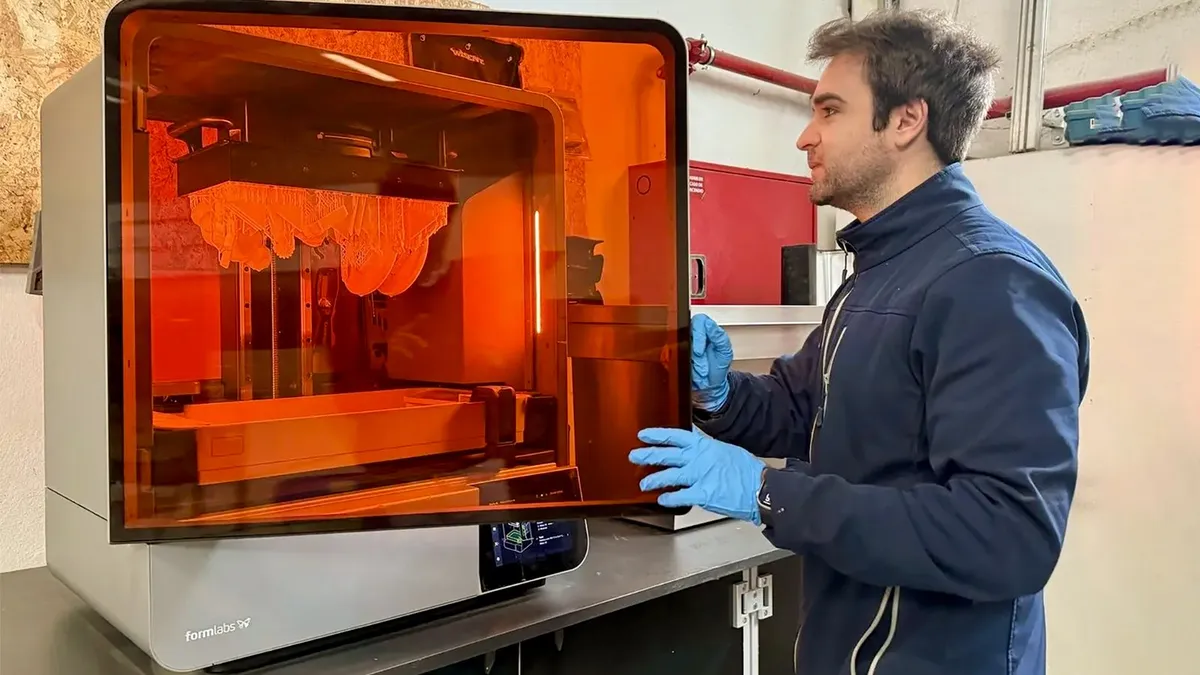

Resin printing gets difficult when a printer turns small setup mistakes into failed models, wasted resin, and a cleanup routine you did not expect. The right machine should make leveling, exposure, monitoring, and model removal less stressful while preserving the fine detail that makes resin printing worthwhile.
Our Best best resin printer picks range from compact beginner machines to large-format systems and one compatible standard resin for readers who already own a printer. The ELEGOO Saturn 4 Ultra is the best all-around machine here, while the other picks cover speed, large builds, simplicity, and consumables.
Comparison table
| # | Product | Award | Resolution or precision | Build volume or compatibility | Best for |
|---|---|---|---|---|---|
| 1 | ELEGOO Saturn 4 Ultra | Best overall | 16K | Smart heated tank, auto leveling | Detailed prints with minimal setup |
| 2 | ELEGOO Mars 5 Ultra | Best compact high-speed printer | 9K, 18μm XY | Up to 150 mm/h | Fast, detailed small models |
| 3 | ANYCUBIC Photon Mono 4 7-inch | Best beginner detail | 10K, 17μm XY | 153.4 × 87 × 165 mm | First-time users |
| 4 | ELEGOO Mars 5 | Best simple setup | 4K | Auto leveling and self-check | Straightforward home printing |
| 5 | ELEGOO Jupiter 2 | Best large format | 16K, 20 × 26μm XY | 302.4 × 161.98 × 300 mm | Large models and batch work |
| 6 | Heygears Reflex RS Turbo | Best industrial precision | ±2μm positioning | 4.5 seconds per layer | Repeatable precision workflows |
| 7 | ANYCUBIC Photon Mono M7 Pro | Best speed | 14K, 16.8 × 24.8μm XY | Up to 170 mm/h | High-throughput printing |
| 8 | ANYCUBIC Photon Mono 4 | Best basic 10K printer | 10K, 17μm XY | 153.4 × 87 × 165 mm | Everyday detail printing |
| 9 | Creality HALOT R6 | Best for kids and beginners | 2K, over 90% light uniformity | Compact 6.08-inch LCD | Guided first projects |
| 10 | SUNLU Standard Resin Plus | Best standard resin | 365 to 405nm compatibility | LCD, DLP, and SLA | General-purpose grey models |
1. ELEGOO Saturn 4 Ultra: Best Overall

Pros
- 16K detail for smooth, finely textured models
- Heated resin tank maintains 30 °C
- Auto leveling and residue detection
- AI camera can flag empty plates and warping
- Tilt release supports speeds up to 150 mm/h
Cons
- Large and heavy for a desktop printer
- Camera alerts can vary with the model and resin
- More machine than casual users may need
Best for: makers who want high detail, automation, and a forgiving workflow.
The Saturn 4 Ultra is the machine we would choose when the goal is to spend more time designing and less time correcting setup problems. Its feature set is unusually focused on the points where resin printing tends to go wrong: leveling, resin temperature, residue on the screen, and failed models that continue printing unnoticed.
The 16K display is the headline feature, but the more useful detail is the printer's ability to keep exposure conditions consistent. The smart tank heating system maintains resin at 30 °C, which helps the material flow and adhere more predictably. That matters in a cool workspace, where resin can become less fluid and layer adhesion can suffer. The tilt release system also peels models from the release film quickly, with a stated top speed of 150 mm/h.
Setup is unusually approachable. Auto leveling removes the usual manual adjustment step, while the mechanical sensor checks for residue and can warn about resin shortages or leveling failures. The AI camera adds another layer of supervision by detecting empty build plates and warped models. Its results can vary with the environment, model, and resin type, so it is a useful safeguard rather than a substitute for checking the first layers yourself.
Compared with the ELEGOO Mars 5 Ultra, the Saturn 4 Ultra gives you a larger, sharper platform and adds smart tank heating. The Mars 5 Ultra is easier to place and still very quick, but the Saturn is better equipped for demanding models and longer print sessions. The ELEGOO Jupiter 2 goes much larger still, though its size and weight make it a different class of machine.
The weakness is physical scale. At roughly 24 inches long, 17 inches wide, and 15 inches high, with a listed weight of about 35.5 pounds, it needs a permanent, sturdy location. It is also not the right choice for someone who only wants occasional tiny miniatures. For everyone else, this is the most balanced combination of detail, automation, monitoring, and speed in the group.
2. ELEGOO Mars 5 Ultra: Best Compact High-Speed Printer

Pros
- 9K screen with 18μm XY resolution
- Up to 150 mm/h with tilt release
- AI camera monitors print failures
- Auto leveling and self-check simplify setup
- Wi-Fi cluster printing supports multiple machines
Cons
- Smaller format than the Saturn and Jupiter models
- AI detection is not guaranteed to catch every failure
- Automation adds features some beginners may not use
Best for: users who want fast, detailed prints in a compact format.
The Mars 5 Ultra is the more practical choice when desk space matters but you still want modern automation. It has the same broad philosophy as the Saturn 4 Ultra, with automatic leveling, residue detection, an AI camera, and tilt release, but it packages those features in a smaller machine.
Its 7-inch mono LCD uses 9K resolution and provides 18μm XY resolution. That is enough to reproduce fine textures and small features cleanly on miniatures, figures, jewelry patterns, and other compact models. The print speed can reach 150 mm/h, and tilt release helps separate the model from the film with less conventional peeling movement. Fast mode is useful when throughput matters, while slow mode gives you a more cautious option for unfamiliar resin or complex geometry.
The self-check system is a welcome touch for a machine aimed at approachable printing. Before a job, the printer can verify key functions, and the mechanical sensor can detect residue that might otherwise damage the LCD. The AI camera watches for an empty build plate or warped model. It is not infallible, and the feature's own limitations around lighting, resin, and model shape are important, but it can still catch an obvious failure while you are away.
The ELEGOO Mars 5 is simpler and offers the same general compact orientation, but the Ultra version is the better pick for users who care about speed and monitoring. The ANYCUBIC Photon Mono M7 Pro is faster on paper, reaching 170 mm/h, but it is physically larger and has more emphasis on automated resin handling. The Mars 5 Ultra makes more sense when a tidy, compact workstation matters.
Its limitation is build scale. This is not the printer for large helmets, tall props, or many large parts in one run. It is also approximately 18.5 inches wide and weighs about 19.4 pounds, so compact does not mean tiny. Choose it for detailed small models, networked workflows, and a quick setup rather than maximum volume.
3. ANYCUBIC Photon Mono 4 7-inch: Best Beginner Detail

Pros
- 10K resolution and 17μm XY pixels
- Useful 153.4 × 87 × 165 mm build volume
- Uniform LighTurbo matrix light source
- Laser-engraved platform improves adhesion
- Power-loss resume helps protect long jobs
Cons
- Requires four-point leveling initially
- Anycubic app service is not supported
- No automated resin heating or filling
Best for: first-time resin users who want sharp models without a complicated control system.
The Photon Mono 4 7-inch is a sensible introduction to resin printing because it concentrates on the fundamentals. It gives beginners a high-resolution screen, a manageable build area, and a platform designed to make adhesion less temperamental. It does not try to automate every part of the process, which can make it easier to understand what each adjustment does.
The 7-inch mono LCD has a 9024 by 5120 resolution and 17 by 17μm pixels on the X and Y axes. Those figures translate into clean edges and fine surface detail on small figures and functional parts. Anycubic's LighTurbo matrix light source is intended to keep exposure balanced across the screen, reducing visible layer lines and uneven curing.
Its build volume is 153.4 by 87 by 165 mm, which is enough for the majority of small desktop projects. The laser-engraved platform is designed to improve adhesion while keeping finished models reasonably easy to remove. Beginners still need to orient models correctly and use appropriate supports, but the platform addresses one common source of early failures.
Unlike the ELEGOO Mars 5 Ultra, this printer uses a four-point leveling method rather than one-click automatic leveling. The initial process requires tightening four screws, after which repeated leveling should not be necessary. That is a little more hands-on, but it also keeps the machine straightforward. The printer can resume after power is restored, a useful safeguard for longer jobs.
There are two meaningful omissions. The Anycubic app is not supported, and the printer lacks the tank heating and resin automation found on the more advanced models here. Its roughly 7.7-pound weight and 10-inch dimensions make it easy to position, though. If you are learning the basics and want to understand the process while preserving fine detail, this is a strong starting point. Readers comparing material options should also consider how different resin types affect cleanup and surface finish before choosing a bottle.
4. ELEGOO Mars 5: Best Simple Setup
Pros
- One-click automatic leveling
- Self-check before printing
- 4K mono LCD with COB lighting
- Residue detection and resin shortage alarms
- Overheat protection pauses unsafe operation
Cons
- Less screen detail than the Mars 5 Ultra
- No stated high-speed print mode
- Compact build class limits larger projects
Best for: beginners who want a guided printer with useful safety checks.
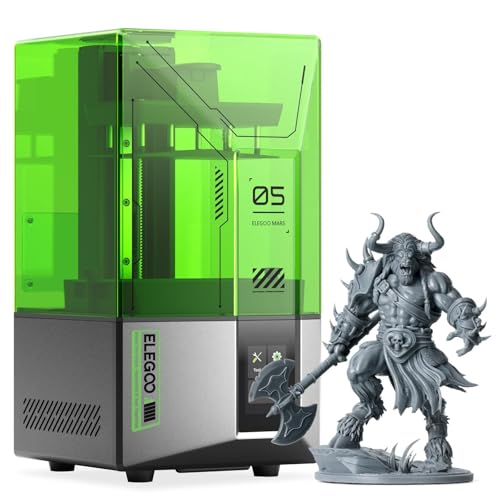
The Mars 5 is the uncomplicated member of ELEGOO's small-format range. It avoids the feature overload of the Ultra model while keeping the controls that matter most to a new user. One-click automatic leveling is the headline convenience, and it removes one of the least intuitive parts of starting a resin printer.
A self-check routine verifies the printer before each job, which can help identify setup issues before resin is exposed. The smart mechanical sensor detects residue and can warn about low resin or leveling failures. Those checks do not eliminate the need to wash and inspect the vat, but they make it harder to overlook a basic problem.
The 4K mono LCD and COB light source are aimed at reproducing fine detail with consistent exposure. The resolution is lower than the 9K Mars 5 Ultra and the 10K Photon Mono 4 models, so the Ultra has more headroom for tiny lettering and especially fine textures. For common miniatures, display pieces, and small household parts, the Mars 5 remains well suited.
Overheat protection adds a sensible layer of safety. If the LED temperature exceeds 80 degrees Celsius, printing stops and an alarm sounds. That is a protective feature rather than a performance advantage, but it is the kind of detail that makes a beginner machine less stressful to leave running nearby.
The trade-off is that the Mars 5 does not offer the Ultra's stated 150 mm/h speed, AI camera, or Wi-Fi cluster controls. It is also a compact printer, so large props are outside its remit. Choose it over the ANYCUBIC Photon Mono 4 7-inch if automatic leveling matters more than higher screen resolution. It is the better fit for a first printer that explains less and guides more.
5. ELEGOO Jupiter 2: Best Large Format

Pros
- 302.4 × 161.98 × 300 mm build volume
- 16K resolution for large detailed prints
- Smart tank heating at 30 °C
- Automatic resin feeding
- Dual-band Wi-Fi and cluster management
Cons
- Very large and heavy
- Needs substantial workspace and handling room
- More complex than a typical beginner printer
Best for: large models, multiple parts, and users managing repeated print jobs.
The Jupiter 2 exists for the problem smaller resin printers cannot solve: fitting a large object on the build plate without splitting it into many pieces. Its build volume measures 302.4 by 161.98 by 300 mm, giving it substantially more vertical and horizontal room than the Saturn 4 Ultra and compact Mars models.
The 16K screen has a resolution of 15120 by 6230 and an XY resolution of 20 by 26μm. Those numbers are designed to preserve detail across a much larger area. The enclosed light source helps prevent light leaks, while the smart tank heating system preheats the resin to 30 °C. Consistent resin temperature becomes especially useful when long, large jobs would otherwise expose more of the material to changing room conditions.
The automated resin system feeds the vat as needed, reducing the chance of a long job stopping because the tank ran low. The printer also includes residue, resin shortage, and leveling failure alarms, along with power-loss recovery and LCD cooling. A built-in camera supports real-time monitoring and time-lapse photography. These features make the Jupiter 2 more suitable for a repeatable production routine than a casual single-model setup.
The physical cost of that capacity is significant. The machine is listed at about 28 inches long, 20 inches wide, and 19.3 inches high, with a weight near 64 pounds. It has double doors, a transparent viewing window, a resin drip tray, and a 4-inch touch screen, but moving it into place still requires planning. If your workspace is limited, how much room a resin printing setup needs for ventilation and cleanup is worth deciding before purchase.
Compared with the ELEGOO Saturn 4 Ultra, the Jupiter 2 wins decisively on build capacity and resin automation. The Saturn is easier to accommodate and is the better general-purpose pick for most desks. Jupiter 2 buyers should have a clear reason for needing its large platform, such as batch production or full-size parts. For that audience, it is the most capable large-format option in this group.
6. Heygears Reflex RS Turbo: Best Industrial Precision

Pros
- Amber screen with 566:1 contrast ratio
- Claimed ±2μm Z-axis repeat positioning
- 4.5 seconds per layer in stated conditions
- Automated model repair and support generation
- Force monitoring detects fine residue
Cons
- Heavy and wide for a desktop workspace
- Advanced workflow may overwhelm casual users
- Speed claims depend on resin and print conditions
Best for: users who prioritize repeatability, diagnostics, and precision-oriented workflows.
The Reflex RS Turbo is aimed less at hobby experimentation and more at controlled, repeatable printing. Its feature list focuses on process management: automatic model preparation, force sensing, motion control, and a rigid Z-axis. That makes it interesting for users who care about consistency across a sequence of similar parts.
The amber screen uses a stated 566:1 contrast ratio, and Heygears says the machine can cure a layer in 4.5 seconds under its stated conditions. Speed is only meaningful when the resin, layer height, and model support strategy suit it, so those figures should not be treated as a universal result. The screen's contrast and optical design are intended to produce sharper edges while allowing faster curing with standard and high-speed resins.
The C5 industrial ball-screw Z-axis is specified with repeat positioning accuracy of no more than 2μm, tested over 10, 000 cycles under a 50kg load. The printer also claims printing tolerances of no more than 0.05mm, with a calibrated LCD divided into 60 zones and light-intensity variation within ±3%. These are highly specific engineering claims, and they matter most when you are making parts that need to match one another rather than merely look good.
Its automated pre-processing is unusual in this list. The system can detect and repair inverse normals, holes, and intersecting shells, then generate supports. Force monitoring works at 0.1N sensitivity, detects resin residue as fine as 0.2mm, and can pause a print. The system reads motion data 80 times per second and creates a diagnostic report after each job, which can make troubleshooting more methodical.
The Reflex RS Turbo is not a small machine. Its listed dimensions are about 23 inches wide, 15 inches long, and 15 inches high, and it weighs about 51 pounds. The ANYCUBIC Photon Mono M7 Pro is the more obvious speed pick, while the ELEGOO Saturn 4 Ultra is easier to recommend for general home use. Choose Heygears when its precision controls and process diagnostics solve a real workflow problem, not simply because the specifications sound impressive.
7. ANYCUBIC Photon Mono M7 Pro: Best Speed
Pros
- Up to 170 mm/h with high-speed resin
- 14K screen with 16.8 × 24.8μm XY resolution
- Automatic resin filling and recycling
- Temperature-controlled resin vat
- Six types of intelligent detection
Cons
- Maximum speed depends on high-speed resin
- Large footprint
- Feature set is more complex than entry models
Best for: experienced users who want faster production and automated material handling.
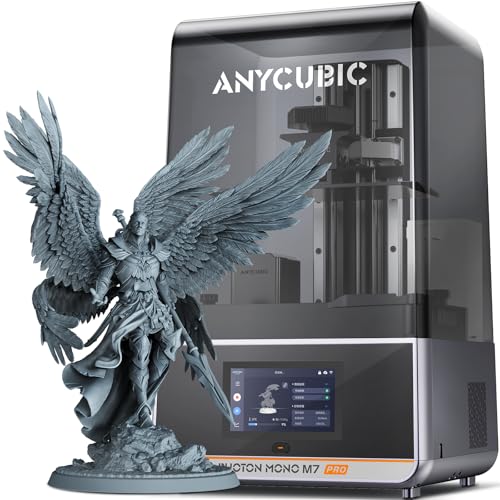
The Photon Mono M7 Pro is the throughput specialist. Its most important advantage is not just a high-resolution screen, but the way speed, resin temperature, and monitoring work together. It is designed for users who print often and want to reduce the small interruptions that accumulate over a busy schedule.
Anycubic specifies a top speed of 170 mm/h at a 0.1mm layer thickness with high-speed resin. With standard resin, the stated speed is 130 mm/h. That distinction matters because the faster figure depends on the material and print profile. The 14K monochrome LCD has a 13312 by 5120 resolution and 16.8 by 24.8μm XY resolution, with the ability to print holes as small as 0.3mm according to the product specifications.
The dynamic temperature-controlled vat adjusts resin temperature to maintain the intended printing conditions. Automatic filling can add resin during a job, and the printer can recycle remaining resin with a one-key process. Those features are useful for repeated printing, though they also introduce more mechanisms and settings than a simple manual vat.
The M7 Pro checks component connections, resin level, residue, failed prints, release-film life, and build-plate installation. That six-part detection system can prevent a careless setup error from becoming a long failed print. Its COB LighTurbo 3.0 system combines Fresnel lenses and front-facing reflectors, with a stated light angle within 3 degrees and light uniformity above 90 percent.
Its listed dimensions are approximately 25 inches long, 15 inches wide, and 35 inches high, and it weighs about 33 pounds. That height deserves particular attention when planning a shelf or workbench. The Heygears Reflex RS Turbo offers a more specialized precision workflow, while the ELEGOO Mars 5 Ultra is easier to fit into a compact space. Select the M7 Pro when speed and automated resin management outweigh the need for a small, simple machine.
8. ANYCUBIC Photon Mono 4: Best Basic 10K Printer

Pros
- 10K mono LCD with 17μm XY pixels
- 153.4 × 87 × 165 mm build volume
- 1.5-second stated single-layer exposure
- Improved laser-engraved build platform
- Resume printing after power restoration
Cons
- Requires leveling before first print
- No resin heating or auto-fill
- App support is not listed among the features
Best for: everyday miniatures and detailed small parts without advanced automation.
The Photon Mono 4 is a straightforward 10K printer for users who want detail without paying for a long list of connected features. It shares the same basic build volume as the other Photon Mono 4 entry, but this version's product information is centered on its 10K display, exposure speed, and platform design.
Its 7-inch 10K mono LCD has a 9024 by 5120 resolution and 17 by 17μm XY pixels. Anycubic says a single layer can expose in 1.5 seconds, though actual print time depends on layer height, lift settings, supports, and resin. The LighTurbo matrix light source is intended to produce balanced exposure and reduce visible rasterization.
The 153.4 by 87 by 165 mm build volume is a good match for miniatures, small replacement parts, and decorative models. A redesigned laser-engraved platform aims to give models enough adhesion to reduce lifting and warping while keeping removal manageable. As with every resin printer, the platform cannot compensate for poor orientation or insufficient supports, but it addresses the mechanical side of first-layer stability.
The printer arrives assembled, calibrated, tuned, and tested according to the product information. You still need to complete the first leveling process, but the general workflow is unbox, level, and prepare a model. Power-loss resume is another useful practical feature because it can continue a job after power is restored instead of discarding the partially printed model.
This model is less automated than the ELEGOO Mars 5, which offers one-click leveling and a self-check routine. The ANYCUBIC Photon Mono 4 7-inch is closely related and also uses a 10K screen, so the choice comes down to the particular listing and the workflow features you want. For a basic high-detail printer, this is a capable option, but skip it if automatic resin handling or remote control is important.
9. Creality HALOT R6: Best for Kids and Beginners

Pros
- Built-in boot guide for first-time setup
- Fully assembled design
- Compact 6.08-inch printer body
- Orange cover blocks 99.89% of UV rays
- High-strength alloy body
Cons
- 2K LCD has lower detail than every other printer here
- Small build capacity
- Resin safety still requires adult supervision
Best for: guided first projects and users who need a compact, uncomplicated machine.
The HALOT R6 is the most approachable machine in this group, at least in terms of setup. It is fully assembled and includes a built-in boot guide for networking and basic configuration. That makes it a better fit for a complete beginner than a printer that assumes familiarity with leveling, slicing, and exposure settings.
Its 2K 6.08-inch LCD is much less detailed than the 10K and 16K screens elsewhere in this roundup. That limits the finest surface texture and tiny lettering, but it is not a problem for simple figures, toys, educational projects, and larger uncomplicated shapes. The integral light source has stated uniformity above 90 percent, which helps each layer cure more consistently.
Creality says the body is about two-fifths the size of a conventional machine and weighs 4.25kg. The compact alloy body is designed to resist daily bumps, which is helpful when the printer shares space with other equipment. The orange cover is rated to shield 99.89 percent of UV rays, but resin remains a chemical material that needs careful handling, ventilation, gloves, and adult supervision.
The flat platform is designed to improve adhesion, while a high-precision Z-axis guide and gap elimination nut aim to reduce wobble and misalignment. HALOT BOX provides parameter presets and one-click slicing, and Creality Cloud offers access to models. A USB port can support an added webcam for remote monitoring and time-lapse work.
The ELEGOO Mars 5 is the better pick for sharper detail and automatic leveling, while the HALOT R6 is easier to justify when guided setup and compact size matter most. Do not choose it expecting large models or highly resolved miniatures. Choose it for a first supervised introduction to resin printing, especially when the owner benefits from an on-screen guide.
10. SUNLU Standard Resin Plus: Best Standard Resin

Pros
- Compatible with LCD, DLP, and SLA printers
- 365 to 405nm wavelength compatibility
- Low shrinkage for more accurate shapes
- Smooth, hard surface that is easy to paint
- Light odor and leak-resistant bottle design
Cons
- This is resin, not a printer
- Standard formulation may not suit specialist applications
- Print settings still need adjustment by machine
Best for: general-purpose grey models and users who need a broadly compatible material.
The SUNLU Standard Resin Plus is the outlier in this list because it is a consumable rather than a printer. It belongs here as a practical companion for readers choosing a complete resin workflow, but it should not be confused with a machine. The grey standard formulation is intended for ordinary models, display pieces, and hand-painted projects.
Compatibility is broad. SUNLU specifies a 365 to 405nm printing wavelength and support for LCD, DLP, and SLA printers. That covers the curing ranges used by the printers in this roundup, but users should still confirm the exposure profile for their specific machine and resin color. A compatible wavelength does not guarantee identical results without calibration.
The resin is described as having good fluidity, low shrinkage, and resistance to deformation. Low shrinkage helps printed parts retain their intended dimensions, while good flow can make vat filling and support contact more predictable. The cured surface is described as hard and smooth, and it can be cleaned with isopropyl alcohol or ethanol before painting.
SUNLU also highlights light odor and a leak-resistant bottle design. Those are useful handling details, but they do not make uncured resin harmless. Work in a ventilated area, wear suitable gloves, avoid skin contact, and follow the printer and material safety instructions. A grey resin can show surface detail clearly, while the available range of colors makes the same formulation useful for decorative work.
Compared with a specialty resin, this standard formula is less targeted toward flexibility, toughness, heat resistance, or transparent optical results. It is a sensible general-purpose material for the ELEGOO Saturn 4 Ultra, ANYCUBIC Photon Mono 4, and other compatible machines here. Pick it when you want predictable everyday prints, and choose a different formulation when the finished part has unusual mechanical or visual requirements.
How to choose best resin printer
The right resin printer depends on the scale of your models, the detail you need, and how much setup you want to handle yourself.
Resolution and pixel size
Resolution affects how finely the printer can expose details across the screen. A 16K or 14K display can preserve very fine edges, while a 2K display such as the HALOT R6 is better suited to simpler models. XY pixel size gives a more useful comparison than the marketing label alone, so look for figures such as 17μm, 18μm, or 20 by 26μm.
Build volume
Build volume determines whether you can print a model in one piece and how many smaller parts fit into one job. Compact machines with a volume around 153.4 by 87 by 165 mm suit miniatures and small components. The Jupiter 2's 302.4 by 161.98 by 300 mm area is designed for much larger parts and batches.
Leveling and failure detection
Automatic leveling reduces one of the most frustrating setup tasks for new users. Self-checks, residue detection, resin shortage alerts, and failed-print monitoring add protection during long jobs. Manual leveling is not automatically weak, but it requires more attention and a willingness to learn the relationship between the plate, film, and first layers.
The printer that saves the most failed first layers is often more useful than the one with the biggest resolution number.
Speed and resin temperature
Fast printing depends on more than a headline millimeters-per-hour figure. Resin type, layer height, lift movement, supports, and exposure settings all affect the result. Heated vats, such as those in the Saturn 4 Ultra and Jupiter 2, help maintain consistent resin flow at 30 °C, while the M7 Pro adds temperature control and automatic filling.
Workspace and cleanup
Resin printers need a stable surface, room for the cover to open, and space for washing, curing, tools, gloves, and material storage. Large machines such as the Jupiter 2 and Reflex RS Turbo can weigh more than 50 pounds, so they should be positioned before filling the vat. If you are setting up near living areas, how to plan a cleaner and safer home printing station can help you avoid cramped cleanup workflows.
Software and monitoring
One-click slicing, model repair, support generation, Wi-Fi, cameras, and cluster management can shorten the path from file to finished model. They also add a layer of software to learn. A simple printer may be preferable if you want to control exposure and supports manually, while a production workflow benefits from monitoring and automated alerts.

Frequently asked questions
Is resin printing suitable for beginners?
Yes, though it requires more careful handling than many filament printers. The ELEGOO Mars 5 and Creality HALOT R6 offer guided features that reduce setup difficulty. Beginners still need ventilation, gloves, careful washing, and proper curing for uncured resin and finished models.
Which printer has the finest stated resolution?
The ELEGOO Saturn 4 Ultra and ELEGOO Jupiter 2 both use 16K screens in this group. The ANYCUBIC Photon Mono M7 Pro uses 14K resolution, while the Photon Mono 4 models use 10K screens. Resolution is only one part of print quality, since exposure uniformity, supports, leveling, and resin settings also matter.
Are faster resin printers always better?
No. A higher stated speed is useful for repeated jobs, but it depends on the resin and print profile. The ANYCUBIC Photon Mono M7 Pro reaches a stated 170 mm/h with high-speed resin, while the ELEGOO Mars 5 Ultra reaches up to 150 mm/h. Slower settings can be preferable for unfamiliar materials or difficult models.
Do resin printers need heating?
Not always, but stable temperature can improve resin flow and layer adhesion. The Saturn 4 Ultra and Jupiter 2 maintain the tank at 30 °C, while the M7 Pro uses a dynamic temperature-controlled vat. Printers without heating can still work well when the workspace and resin are within the material's recommended conditions.
How large a model can these printers produce?
The ELEGOO Jupiter 2 has the largest stated build volume at 302.4 by 161.98 by 300 mm. The Photon Mono 4 models provide 153.4 by 87 by 165 mm, which suits small parts and miniatures. The maximum model size also depends on orientation, supports, and the clearance around the build plate.
Is the SUNLU Standard Resin Plus a printer?
No. It is a standard grey photopolymer resin intended for compatible LCD, DLP, and SLA printers. It supports a 365 to 405nm wavelength range and is suitable for general-purpose models, but it cannot replace a printer.
The bottom line
The Best best resin printer for most readers is the ELEGOO Saturn 4 Ultra. Its 16K detail, 30 °C heated tank, automatic leveling, tilt release, and monitoring features give it the strongest balance of print quality and practical automation. The ELEGOO Mars 5 Ultra is the better compact alternative for fast small models, while the ELEGOO Jupiter 2 is the clear choice for genuinely large parts.
The ANYCUBIC Photon Mono 4 7-inch and ELEGOO Mars 5 are easier entry points, with the Photon emphasizing detail and the Mars emphasizing automatic setup. The ANYCUBIC Photon Mono M7 Pro makes more sense for high-throughput users, and the Creality HALOT R6 is the most approachable machine for guided first projects. SUNLU Standard Resin Plus is a useful general-purpose material, but it is an addition to a printer rather than an alternative to one.
If you are undecided, choose the Saturn 4 Ultra unless your main need is compact size, large-format output, or a guided beginner workflow.
As an Amazon Associate we earn from qualifying purchases.