

A scanner can be frustrating when the lid is too small for a book, the software turns every page into a separate file, or the hardware asks you to wait before every scan. The right flatbed scanner makes the process quiet and predictable, whether you are preserving family photos or archiving paperwork.
The Best flatbed scanner for most people is the Canon CanoScan LiDE 400, thanks to its 4800 x 4800 dpi resolution, one-cable USB Type-C connection, quick scans, and useful PDF controls. This list also includes compact document models, photo specialists, film scanners, and large-format A3 machines.
Comparison table
| # | Product | Award | Resolution | Scan size | Best for |
|---|---|---|---|---|---|
| 1 | Canon CanoScan LiDE 400 | Best overall | 4800 x 4800 dpi | Up to 8.5 x 11.69 inches | Photos and documents |
| 2 | Epson Perfection V39 II | Best photo software | 4800 dpi optical | Letter size | Home photo archiving |
| 3 | Epson Perfection V19 II | Best compact Epson | 4800 dpi optical | Letter size | Small desks |
| 4 | Canon CanoScan LiDE 300 | Best simple document scanner | Not listed | Not listed | Everyday paperwork |
| 5 | VIISAN 3120 A3 | Best A3 speed | 1200 x 1200 dpi | Up to 304 x 426 mm | Large books and artwork |
| 6 | Plustek OpticPro A320E | Best large-format workflow | Not listed | Up to 12 x 17 inches | Maps and batch scanning |
| 7 | Epson Perfection V600 | Best for film and prints | 6400 x 9600 dpi | Up to 8.5 x 11.7 inches | Film and enlargements |
| 8 | Plustek OS1180 | Best A3 office scanner | Not listed | Up to 11.7 x 17 inches | Offices and schools |
| 9 | Plustek ePhoto Z300 | Best for photo batches | Up to 600 dpi | Up to 8 x 10 inches | Digitizing loose photos |
| 10 | Epson Perfection V550 | Best legacy film features | 6400 dpi optical | Up to 17 x 22 inches | Film restoration |
1. Canon CanoScan LiDE 400: Best Overall

Pros
- 4800 x 4800 dpi resolution
- One USB Type-C cable handles data and power
- Fast scans and useful EZ buttons
- Built-in PDF controls support multi-page files
Cons
- Limited to standard document sizes
- USB connection is wired
- No film scanning hardware
Best for: home users who want one compact scanner for paperwork and photos.
The Canon CanoScan LiDE 400 is the easiest scanner here to recommend without a long list of qualifications. It feels like a sensible home office tool rather than a specialist machine. It handles documents and photos, starts quickly, and keeps the physical controls simple. The one-cable USB Type-C setup also avoids the usual tangle of a separate power adapter and data lead.
Its 4800 x 4800 dpi resolution gives it enough detail for photo archiving and careful crops, while the scanner's advertised scan speed can reach eight seconds. That speed matters more for a stack of ordinary pages than for a single treasured print. Canon's EZ buttons make the routine actions direct, and Auto Scan mode can identify whether the item is a document or an image. The built-in PDF buttons are useful when the real goal is a multi-page, searchable or editable document rather than a collection of image files.
The LiDE 400 is 14.5 inches long, 9.9 inches wide, and 1.7 inches high, with a listed weight of 3.6 pounds. That makes it a manageable permanent fixture on a desk, though not a truly tiny accessory. Compared with the Canon CanoScan LiDE 300, it offers a more complete set of photo and PDF features. The Epson Perfection V39 II is the stronger alternative for restoration tools and cloud-oriented workflows, but the Canon feels more immediate for mixed daily use.
There are clear boundaries. This is not the scanner for negatives, slides, or oversized artwork, and the wired USB connection means it needs to stay near a computer. People who need to scan books with a deep spine or large art should move to an A3 model such as the VIISAN 3120 A3. For everyone else, the LiDE 400 is the one we'd keep because it balances photo detail, document controls, compact dimensions, and uncomplicated operation.
2. Epson Perfection V39 II: Best Photo Software

Pros
- 4800 dpi optical resolution
- Easy Photo Fix restores faded color
- High-rise removable lid suits books and albums
- ScanSmart supports stitched images and cloud storage
- Letter-size scans can take as little as 10 seconds
Cons
- No film scanning capability is listed
- USB-powered operation requires a computer connection
- Larger and less streamlined than the Canon LiDE 400
Best for: families and home archivists who want practical photo restoration software.
The Epson Perfection V39 II is the photo-focused pick for people who want help after the scan, not just a high-resolution capture. Its Easy Photo Fix technology can restore color to faded photographs with one click, which is a useful shortcut when an archive contains prints that have spent decades in albums or boxes. Epson ScanSmart adds a clearer route into documents, illustrations, books, and cloud storage.
A 4800 dpi optical resolution is enough to make meaningful crops from a standard print and gives small originals room to become larger digital images. Epson says letter-size documents can be scanned in as little as 10 seconds. That is a more useful figure for home paperwork than an inflated maximum resolution because it describes a routine job. The high-rise removable lid is another practical feature. It can accommodate books and albums more gracefully than a fixed, shallow cover.
The V39 II measures 14.4 inches long, 9.9 inches wide, and 1.5 inches high, and weighs 3.1 pounds. It is USB powered, so there is no separate power brick competing for space, and its light weight makes it easier to move between a desk and a storage shelf. The software also supports stitching oversized images together, which gives it some flexibility beyond a single letter-sized page. For more detail on preserving a large collection, the workflow that keeps scanned family photos organized is worth considering before you begin.
The Epson Perfection V19 II has a very similar physical footprint and the same 4800 dpi resolution, but it is the better fit when vertical storage and searchable office files matter most. The V39 II earns its higher position through its photo-restoration emphasis and stitched-image support. Skip it if you need film holders or a large-format bed. For fading prints, albums, and occasional paperwork, it is a well-rounded photo scanner with unusually useful software.
3. Epson Perfection V19 II: Best Compact Epson

Pros
- 4800 dpi optical resolution
- USB powered and lightweight
- Built-in kickstand for vertical storage
- OCR can create searchable PDFs and editable Office files
- One-touch scanning controls
Cons
- Letter-size bed limits large originals
- No film scanning features are listed
- Requires a computer connection
Best for: small home offices that scan both photos and searchable documents.
The Epson Perfection V19 II is a tidy, practical scanner that earns its place through flexibility rather than a dramatic specialist feature. It is easy to imagine using it for a few receipts, a school project, and a box of old prints without changing the setup. The built-in kickstand lets it stand vertically for storage, a small detail that matters when desk depth is limited.
Its 4800 dpi optical resolution gives photos plenty of capture detail, and the one-touch buttons reduce the number of trips into scanning software. Epson ScanSmart supports the image side, while the OCR features make the V19 II more useful for paperwork. It can turn scans into searchable PDFs and create editable Microsoft Word, Excel, and PowerPoint documents. Those tools separate it from a basic photo-only model.
The scanner is 14.4 inches long, 9.9 inches wide, and 1.5 inches high, and the listed weight is 3.1 pounds. It is USB powered, so it is portable in the practical sense of being easy to relocate, though it is not a wireless device. Epson states that a letter-sized document can be scanned in as little as 10 seconds. That places it close to the Epson Perfection V39 II for ordinary pages, while the V39 II has the more compelling case for stitched oversized images and photo restoration work.
The limitation is the standard flatbed size. A book, artwork, or tabloid page will require compromises or multiple scans, and the V19 II has no listed transparency unit for film. It is also not as direct for mixed document and photo controls as the Canon CanoScan LiDE 400. Choose the V19 II when searchable files, vertical storage, and a light USB-powered body matter more than film work or oversized originals.
4. Canon CanoScan LiDE 300: Best Simple Document Scanner

Pros
- Auto Scan mode detects the type of original
- Dedicated PDF, copy, and send functions
- Compact 3.6-pound body
- USB connectivity
- Straightforward document digitizing
Cons
- Photo resolution is not listed
- No OCR or film features are listed
- Standard flatbed format limits larger pages
Best for: straightforward document scanning with occasional image work.
The Canon CanoScan LiDE 300 is the uncomplicated option in this group. It is built around scanning documents, and its controls reflect that purpose. Auto Scan mode detects what is placed on the bed, while dedicated actions for PDF, copy, and send keep common jobs from turning into a software hunt. For a household that mainly needs to digitize letters, forms, and a few pictures, that directness has real appeal.
Canon lists USB connectivity and a body measuring 14.5 inches long, 9.9 inches wide, and 1.7 inches high. At 3.6 pounds, it is still easy to move, but it has the same basic desk footprint as the LiDE 400. The features confirm that it is intended to digitize documents and images rather than handle film or unusual materials. If your priority is a clean archive of paperwork, a workflow for turning paper records into searchable files can help you get more from a simple flatbed.
The LiDE 300 does not list a resolution figure in the supplied product information, so it is not the pick for comparing fine-art detail against the Epson models. It also lacks the LiDE 400's stated 4800 x 4800 dpi resolution, USB Type-C single-cable design, and more developed PDF feature set. The newer Canon is the stronger all-rounder, especially when photo quality and multi-page documents share the workload.
The weakness is specialization in the other direction. This Canon is a poor match for film, large art, or serious restoration, and buyers who need OCR should look at the Epson Perfection V19 II. Still, its Auto Scan mode and dedicated controls make it a sensible choice for people who value fewer decisions. It is the scanner to buy when the job is mostly ordinary paperwork and the device should stay out of the way.
5. VIISAN 3120 A3: Best A3 Speed

Pros
- Scans A3-size color pages at 200 dpi in eight seconds
- 1200 x 1200 dpi optical resolution
- Frameless design suits books and thick materials
- Auto Scan starts when the lid closes
- Supports Windows and Mac
Cons
- Very large desktop footprint
- CIS sensor is intended for flat items
- Some Windows scanning paths are limited to 600 dpi
Best for: schools, libraries, and studios that regularly scan A3 pages and books.
The VIISAN 3120 A3 changes the question from “How compact is the scanner?” to “How much can it capture in one pass?” Its bed handles items up to 304 x 426 mm, or roughly 11.98 x 16.8 inches. That opens the door to large artwork, newspapers, books, CAD drawings, and school materials that would be awkward on every standard letter-size model above.
Its 1200 x 1200 dpi optical resolution is not as high as the Epson photo scanners' headline figures, but it is a more sensible match for large documents and artwork than a tiny bed with a very high number. The scanner can capture an A3 color page at 200 dpi in eight seconds, according to the supplied features. The frameless, narrow-boundary design helps when a book or magazine extends beyond the usual lid border. Auto Scan can start the next capture when the lid closes, and four-panel buttons cover scan, email, print, and PDF tasks.
The physical scale is substantial. The listed dimensions are about 24.8 inches long, 21.65 inches wide, and 5.12 inches high. That is not a scanner to slide beside a laptop after every use. The CIS sensor is designed for flat paper images, so the product information specifically cautions against scanning three-dimensional objects. Windows users also need to pay attention to the software path: WIA supports up to 600 dpi, while the supplied ViiScan software is used for full-size 1200 dpi scans. Mac compatibility is listed through ICA drivers.
Compared with the Plustek OS1180, the VIISAN offers a faster stated A3 scan and a more accommodating frameless design. The Plustek OpticPro A320E is the better fit for batch image management and broader operating system support. Skip the VIISAN if your originals are mostly letter-size photos or documents. Choose it when large books, artwork, and A3 pages are frequent enough that stitching smaller scans together would become a daily nuisance.
6. Plustek OpticPro A320E: Best Large-Format Workflow

Pros
- 12 x 17 inch A3 scan area
- Handles maps, drawings, books, and odd-shaped items
- Batch scanning for multiple printed images
- OCR creates searchable PDF content
- Supports Windows, Mac, and Linux
Cons
- Large and heavy desktop unit
- Resolution is not listed in the supplied data
- Linux setup may require seller guidance
Best for: offices and creative workspaces that need large-format batch scanning.
The Plustek OpticPro A320E is a serious large-format machine, and its size is part of the point. The 12 x 17 inch scan area accommodates A3 paper, maps, drawings, wide-format material, large bound books, and odd-shaped items. Instead of building a process around multiple partial scans, you can put the original on a bed designed for it.
The workflow features are stronger than the basic hardware description. DocAction can send scans to different file formats and destinations, including print, email, a Windows public folder, and an FTP web folder. OCR can make scanned PDFs searchable. The A320E also supports batch scanning, allowing multiple printed images to be scanned in one session and saved to multiple PDF files. Those are the features that matter in a small office or archive where the scanner is part of a repeatable process.
The chassis is 31.25 inches long, 23 inches wide, and 10.75 inches high, with a listed weight of about 16.5 pounds. That is far larger and heavier than the VIISAN 3120 A3, so a dedicated work surface is sensible. TWAIN and WIA support improve compatibility with established scanning software, and the listed operating systems include Windows, Mac, and Linux. Linux support is qualified by a note to ask the seller about the SANE driver, so Linux users should confirm their setup before committing.
The A320E does not list a resolution figure in the supplied data, which makes it harder to position as a photo-detail specialist. The Epson Perfection V600 is much better for film and high-resolution prints, while the VIISAN 3120 A3 has the more attractive stated speed and frameless construction. Pick the A320E for its file handling, batch work, and broad document compatibility, not for a compact footprint.
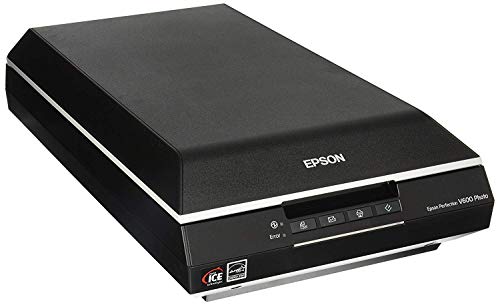
7. Epson Perfection V600: Best for Film and Prints
Pros
- 6400 x 9600 dpi maximum resolution
- Built-in transparency unit
- Supports 35mm slides, negatives, and medium-format film
- Digital ICE removes the appearance of dust and scratches
- Easy Photo Fix restores faded images
Cons
- Larger and heavier than compact photo scanners
- Hi-Speed USB 2.0 connection
- Not designed for A3 documents
Best for: photographers and families digitizing prints, negatives, and slides.
The Epson Perfection V600 is the specialist to choose when the flatbed must handle more than paper. Its built-in transparency unit supports four mounted 35mm slides or 12 negatives, and it also handles medium-format film up to 6 x 22 cm. That makes it far more useful for a mixed archive than a conventional document and photo bed. The lid includes the film hardware, so there is no separate transparency accessory to keep track of.
The 6400 x 9600 dpi maximum resolution is aimed at enlargements, with support for images up to 17 x 22 inches. That kind of capture headroom is meaningful when the original is a small negative or a print that needs cropping. Epson's ReadyScan LED technology operates without a warm-up period, while Digital ICE is designed to remove the appearance of dust and scratches. Easy Photo Fix handles faded images, and the supplied software includes ArcSoft PhotoStudio for image enhancement.
The V600 scans photos and documents up to 8.5 x 11.7 inches. It measures 19 inches long, 11 inches high, and 4.6 inches wide, and weighs about 9 pounds. Its Hi-Speed USB 2.0 connection is old-fashioned compared with the one-cable setup of the Canon CanoScan LiDE 400, but that is a secondary concern for a scanner that will spend much of its life processing film. Four customizable buttons cover scanning, copying, email attachments, and PDF creation.
This is not the right tool for a small desk or an A3 archive. The Epson Perfection V550 also offers film features and a 6400 dpi optical resolution, but the V600's listed film support and software make it the clearer choice here. If your collection is only loose prints, the Epson Perfection V39 II is easier to live with. Choose the V600 when negatives, slides, medium-format film, and restoration are central to the job, not occasional extras.
8. Plustek OS1180: Best A3 Office Scanner

Pros
- 11.7 x 17 inch maximum scan size
- LED source requires no warm-up
- One-touch function buttons
- ABBYY OCR software included
- 48-bit color and 16-bit grayscale scan modes
Cons
- Large 9.52-pound chassis
- Resolution is not listed
- Primarily a wired office scanner
Best for: schools, libraries, and small offices handling tabloid or A3 pages.
The Plustek OS1180 is a practical A3 scanner for a workplace that needs a larger bed but does not need the more elaborate batch and destination workflow of the OpticPro A320E. Its maximum scan size is 11.7 x 17 inches, which covers tabloid and A3 documents. That is enough for posters, diagrams, layouts, and many bound materials that cannot fit on the compact Epson and Canon models.
An LED light source means there is no warm-up period before scanning. One-touch preset buttons are designed for quick use, while DocAction handles file sharing and ABBYY software adds OCR. The scan modes include 48-bit color and 16-bit grayscale, giving artwork and documents more capture depth than a basic office-only specification would suggest. The supplied information does not list a maximum optical resolution, so this is better judged by its format and workflow than by a resolution comparison.
The OS1180 measures 23.18 inches wide, 16.02 inches long, and 2.67 inches high, and weighs 9.52 pounds. It is much easier to place than the Plustek OpticPro A320E, whose chassis is wider and heavier, but it still needs a proper work surface. The VIISAN 3120 A3 is the more appealing choice when fast A3 color scans and automatic lid-triggered scanning matter. The OS1180 answers with a simpler office setup and useful OCR.
Its weakness is the lack of a listed resolution figure and the absence of any film-specific hardware. It is not a replacement for the Epson Perfection V600, and it makes little sense for someone scanning only standard letters and snapshots. For a school or office that routinely handles A3 documents, though, the OS1180 offers the right physical capacity without adding features that may never be used.
9. Plustek ePhoto Z300: Best for Photo Batches

Pros
- Scans a 4 x 6 photo in two seconds
- Auto crop and deskew
- Supports 3 x 5, 4 x 6, 5 x 7, and 8 x 10 photos
- Works with Mac and PC
- Image enhancement tools restore faded pictures
Cons
- Maximum optical resolution is 600 dpi
- Photos must be inserted one at a time
- Less suitable for books and general paperwork
Best for: quickly digitizing a large box of loose photographic prints.
The Plustek ePhoto Z300 is not a conventional flatbed experience, and that is precisely why it can be so effective for a photo backlog. Instead of lifting a lid and positioning every print on glass, you insert photos one by one. The supplied information says a 4 x 6 photo can scan in two seconds, while an 8 x 10 photo takes five seconds at 300 dpi. For a box of loose prints, that difference in handling can matter more than a high maximum resolution.
The Z300 supports 3 x 5, 4 x 6, 5 x 7, and 8 x 10 photos, as well as letter and A4 paper. Auto crop and deskew reduce the cleanup work after scanning, and the included image enhancement functions can restore faded images with a mouse click. Its optical resolution reaches 600 dpi, with 300 dpi and 600 dpi settings. That is adequate for ordinary photo sharing and family archives, but it does not offer the enlargement headroom of the Epson Perfection V600.
The scanner supports Windows 7 through 11 and Mac OS X 10.12 through 15.x. Its listed weight is about 3.3 pounds, though the supplied dimensions are unusually large at roughly 19.7 inches in both length and width and 11 inches in height. The important point is that the workflow is built around feeding prints rather than repeatedly opening a flatbed. The software and compatibility make it approachable for a family archive that does not need film holders.
The trade-off is focus. The Z300 is less appealing for books, documents, and delicate originals that should remain flat on glass. The Epson Perfection V39 II produces a stronger general-purpose scan and offers 4800 dpi resolution, while the Z300 wins when speed and automatic cropping are the priority. Pick it for hundreds of loose prints, and skip it if your archive is mostly negatives, bound albums, or documents.
10. Epson Perfection V550: Best Legacy Film Features

Pros
- 6400 dpi optical resolution
- Built-in transparency unit for slides and negatives
- Digital ICE for dust and scratch removal on film
- Auto edge detection separates multiple photos
- ABBYY OCR converts documents into editable text
Cons
- Older Hi-Speed USB 2.0 connectivity
- Larger 9.6-pound design
- No modern wireless workflow
Best for: film scanning and multi-photo restoration with automatic separation.
The Epson Perfection V550 remains interesting because it combines film handling with a few unusually useful archive features. Its built-in transparency unit scans 35mm slides, negatives, and film, while Digital ICE is intended to reduce the visible effects of dust and scratches on film. That gives it a clear role for people sorting through older photographic collections rather than simply scanning current paperwork.
The 6400 dpi optical resolution supports enlargements up to 17 x 22 inches. The scanner also has 48-bit color depth, which is aimed at preserving smoother color information in photos. Easy Photo Fix handles faded prints, and ReadyScan LED technology means no warm-up period. Auto edge detection can identify multiple photos on the glass, crop each one, and save them as separate files. That is a substantial time saver when several prints can be placed together.
The V550 measures 19.1 inches long, 11.2 inches wide, and 4.6 inches high, with a listed weight of 9.6 pounds. It connects over Hi-Speed USB 2.0, so it lacks the cleaner modern cable arrangement found on the Canon CanoScan LiDE 400. ABBYY FineReader Sprint Plus adds OCR for editable text, giving the scanner more document utility than its photo-first design might suggest.
The V550's biggest issue is that it is a legacy-oriented choice, and the supplied listing does not make it as easy to recommend as the V600 for a new film workflow. The Epson Perfection V600 has a similarly strong film focus and clearer support for medium-format film. The V550 still makes sense for someone who specifically wants auto-separated photos, Digital ICE, and film scanning in one flatbed, but standard document users should choose a newer compact model instead.

How to choose the Best flatbed scanner
The right scanner depends less on the largest resolution number than on the originals you need to capture and the cleanup you want to avoid afterward.
Resolution and image detail
Resolution affects how much detail a scanner can preserve and how far you can crop or enlarge the result. For ordinary documents, moderate resolution is usually enough, while photo restoration and film scanning benefit from the higher optical figures found on the Epson Perfection V600, Epson Perfection V550, and compact Epson models.
Do not treat a high number as a guarantee of better output. The sensor, software, original condition, and your intended file size all matter. A 1200 dpi A3 scanner can be more useful for a large drawing than a 6400 dpi scanner with a letter-size bed.
Scan bed size
Letter-size beds suit most paperwork and standard prints. A3 models such as the VIISAN 3120 A3, Plustek OpticPro A320E, and Plustek OS1180 are the better tools for maps, tabloid pages, posters, artwork, and large books.
A larger bed takes more desk space, so measure the work surface before buying. If large originals are occasional rather than routine, stitching multiple scans may be less disruptive than keeping a large-format unit permanently set up.
Film and transparency support
Slides and negatives need a transparency unit, film holders, and software designed for that material. The Epson Perfection V600 and Epson Perfection V550 include film-focused hardware, while the compact Canon and Epson document models do not list that capability.
If you need to scan negatives, choose a model with built-in film hardware first, then compare resolution and restoration tools.
Software and file handling
One-touch buttons are helpful for repeated scans, but the included software determines how much work comes afterward. OCR can create searchable PDFs or editable Office documents. Auto crop, deskew, photo restoration, stitching, and automatic separation can save more time than a small increase in resolution.
For paperwork-heavy use, compare the OCR and PDF functions. For photo archives, look for restoration controls and automatic cropping. The Plustek OpticPro A320E stands out for destinations and batch work, while the Epson Perfection V19 II is particularly useful for searchable documents in a compact body.
Size, power, and connection
USB-powered scanners are easy to move and do not require a separate adapter, but they still need a computer connection. A USB Type-C single-cable design, as used by the Canon CanoScan LiDE 400, keeps the setup tidy. A3 scanners need dedicated space, and large film scanners are heavier than compact document models.
Consider how often the scanner will be stored away. A kickstand on the Epson Perfection V19 II helps in a small room, while the large Plustek and VIISAN models are better treated as permanent equipment.
Frequently asked questions
What is the best flatbed scanner for photos?
The Canon CanoScan LiDE 400 is the strongest general-purpose choice for photos and documents. The Epson Perfection V39 II is better if faded-photo restoration and stitched oversized images are priorities, while the Epson Perfection V600 is the specialist choice for film and high-resolution enlargements.
Can a flatbed scanner scan books?
Yes, but the result depends on the bed size and lid design. The Epson Perfection V39 II and V19 II have high-rise removable lids, while the VIISAN 3120 A3 has a frameless design intended for books and thick items. Standard letter-size scanners may require multiple scans for larger books.
Which scanner is best for A3 documents?
The VIISAN 3120 A3 is the best fit when fast A3 color scanning and automatic scanning are important. The Plustek OpticPro A320E and Plustek OS1180 also handle A3 material, with the OpticPro emphasizing batch and file-management features.
Do I need a film scanner for negatives?
A regular document flatbed is not enough unless it includes a transparency unit and film holders. The Epson Perfection V600 and Epson Perfection V550 include those features, making them appropriate for slides and negatives. The Canon LiDE models and compact Epson document scanners do not list film support.
Is 4800 dpi enough for photo scanning?
For ordinary prints, 4800 dpi optical resolution provides substantial detail for cropping and enlargement. The actual result also depends on the print, sensor, and software. Film users may prefer the Epson models with 6400 dpi optical resolution and dedicated restoration features.
Can flatbed scanners create searchable PDFs?
Some can. The Epson Perfection V19 II supports searchable PDFs and editable Microsoft Office files through OCR, while the Canon CanoScan LiDE 400 includes controls for multi-page PDFs. Check the software requirements because the scanner hardware alone does not create searchable text.
Are A3 scanners suitable for small desks?
Usually not. The VIISAN 3120 A3, Plustek OpticPro A320E, and Plustek OS1180 need substantially more room than compact letter-size scanners. Measure both the scanner footprint and the space needed to open the lid before choosing one.

The bottom line
The Canon CanoScan LiDE 400 is the Best flatbed scanner for most homes because it handles photos and documents without making either task complicated. Its 4800 x 4800 dpi resolution, single-cable USB Type-C setup, quick scans, and PDF controls cover the widest range of everyday needs. Choose the Epson Perfection V39 II instead when faded photo restoration, book scanning, and stitched images matter more than the Canon's simpler workflow.
For specialist work, the choice is clearer. The Epson Perfection V600 is the pick for negatives, slides, medium-format film, and large photo enlargements. The VIISAN 3120 A3 is the better tool for large books, artwork, and A3 pages, while the Plustek ePhoto Z300 makes the most sense for a large box of loose prints.
If you are undecided, buy the Canon for mixed home use, the Epson V600 for film, or an A3 model only when oversized originals are part of the regular workload.
As an Amazon Associate we earn from qualifying purchases.