

Old photo boxes create a surprisingly difficult scanning job. Prints vary in size, some are faded, others have handwritten notes on the back, and a flatbed scanner can make a large archive feel endless. The right machine depends less on a headline resolution number than on how many photos you need to process and what kind of originals you have.
We compared ten scanners for the most common digitizing jobs, from individual family prints to thousands of photos, slides, negatives, and mixed documents. The Best scanner to digitize photos for most people is the Plustek ePhoto Z300, while the Epson FastFoto FF-680W is the stronger choice for a very large collection.
Comparison table
| # | Product | Award | Resolution or speed | Connectivity | Best for |
|---|---|---|---|---|---|
| 1 | Plustek ePhoto Z300 | Best overall | 300 or 600 dpi, 4x6 in 2 seconds | Mac and PC | Fast print scanning |
| 2 | Epson FastFoto FF-680W | Best for large archives | 1 photo per second at 300 dpi, up to 36 photos | USB and Wi-Fi | High volume photo projects |
| 3 | Epson Perfection V19 II | Best high resolution flatbed | 4800 dpi optical | USB | Enlargements and albums |
| 4 | KODAK Slide N Scan | Best for film | 22MP, 5-inch LCD | USB and SD or SDHC | Slides and negatives |
| 5 | Canon imageFORMULA RS40 | Best mixed media feeder | Up to 40 items per minute, duplex | USB | Photos and paperwork |
| 6 | ScanSnap iX2500 Photo Edition | Best wireless workflow | Up to 100 photos per minute | Wi-Fi 6 and USB-C | Connected home archives |
| 7 | Epson Perfection V39 II | Best flatbed for restoration | 4800 dpi optical | USB | Faded prints and artwork |
| 8 | Canon CanoScan LiDE 300 | Best simple flatbed | Auto Scan mode | USB | Basic photo and document scans |
| 9 | Canon CanoScan LiDE 400 | Best slim high resolution flatbed | 4800 x 4800 dpi, scans in 8 seconds | USB-C | Compact desktop setups |
| 10 | Canon imageFORMULA R10 | Best portable document feeder | Up to 12 pages per minute, duplex | USB | Mobile document scanning |
1. Plustek ePhoto Z300: Best Overall

Pros
- Scans a 4x6 photo in 2 seconds
- Handles several common print sizes
- Auto crop and deskew simplify batch work
- Includes image enhancement tools
- Works with Mac and PC
Cons
- Photos must be fed one at a time
- Maximum optical resolution is 600 dpi
- Does not handle slides or negatives
Best for: families digitizing a large box of ordinary printed photographs.
The Plustek ePhoto Z300 is the scanner we would choose first for a typical family photo archive. It is built around the job people actually dread: taking one loose print after another from a box and turning it into usable files without constantly adjusting a flatbed lid. Feed a 4x6 print, let the scanner crop and deskew it, then move on.
Its headline speed is unusually relevant here. Plustek says a 4x6 photo takes 2 seconds, while an 8x10 photo takes 5 seconds at 300 dpi. The scanner accepts 3x5, 4x6, 5x7, and 8x10 photos, along with letter and A4 paper. That range covers most family snapshots, and the choice between 300 dpi and 600 dpi lets you prioritize faster sharing or more detail for later editing.
The Z300 also includes one-click image enhancement for faded pictures. That does not turn a damaged original into a new photograph, but it gives an archive project a practical first pass without requiring separate editing software. Auto crop and deskew are the features that matter most during a long session because they reduce the small corrections that otherwise accumulate across hundreds of files.
Compared with the Epson Perfection V19 II, the Plustek is less suitable for artwork, books, or careful enlargements. The Epson has a much higher optical resolution and a flatbed that keeps the original stationary. Compared with the Epson FastFoto FF-680W, the Z300 is slower for a truly massive collection because each photo is inserted separately. Its simpler workflow is also its strength, though, and it is easier to recommend to someone who wants to scan prints rather than build a document station.
The real limitation is the lack of film scanning and the 600 dpi ceiling. Skip it if your archive is mostly slides or negatives, or if you need very large enlargements from small originals. For ordinary printed photos, this is the Best scanner to digitize photos because it keeps the process focused, quick, and manageable.
2. Epson FastFoto FF-680W: Best for Large Archives

Pros
- Scans one photo per second at 300 dpi
- Batch scans up to 36 photos
- Captures photo backs with duplex scanning
- Handles mixed photo sizes
- Offers USB and wireless connections
Cons
- Large and relatively heavy
- Feeder design is not ideal for every fragile original
- More scanner than a small archive needs
Best for: people working through thousands of prints, postcards, and snapshots.
The Epson FastFoto FF-680W is the obvious choice when the archive is measured in boxes rather than albums. Its automatic feeder accepts up to 36 photos at a time, and the advertised rate of one photo per second at 300 dpi gives the machine a fundamentally different rhythm from a flatbed. You still need to prepare the prints, but you are no longer standing over every individual scan.
Epson designed it for varied collections. It handles Polaroid photos, panoramas, postcards, and photos up to 8x10, and it can process multiple sizes in a batch. That flexibility matters when family photos have been collected from several decades and no one bothered to sort them by format. The included carrier sheet and SafeTouch technology are useful safeguards for delicate prints, although especially fragile or curling originals still deserve caution.
The FF-680W goes beyond simple image capture. At 300 dpi it is set up for easy sharing, while 600 dpi TIFF files are intended for archiving and 1200 dpi scans give more room for enlargements. Automatic enhancement includes color restoration, red-eye reduction, crop, rotate, and deskew. Duplex scanning can capture the front and back of a photo in one pass, preserving handwritten dates or names that would otherwise disappear from the archive.
It is also a capable document scanner. Epson lists speeds up to 45 pages per minute and 90 images per minute for documents, with OCR through Epson ScanSmart. USB and Wi-Fi provide placement flexibility, and the FastFoto app can help add voice and text to memories or back them up to services such as Dropbox and Google Drive. Readers organizing a large family collection may also want to consider how to preserve faded prints without losing their original context.
The weakness is scale in the opposite direction. At 8.2 pounds, it is not a casual scanner to pull out for one photograph, and the feeder is not the right tool for every cracked or exceptionally delicate print. The Plustek ePhoto Z300 is more approachable for a smaller stack, while the ScanSnap iX2500 Photo Edition offers a newer connected workflow. Choose the FF-680W when throughput and the backs of photos matter more than compactness.
3. Epson Perfection V19 II: Best High Resolution Flatbed

Pros
- 4800 dpi optical resolution
- High-rise removable lid accommodates books and albums
- Easy Photo Fix restores faded color
- USB powered
- Supports OCR and searchable PDFs
Cons
- Flatbed scanning is slow for large stacks
- No automatic photo feeder
- Requires careful positioning for consistent batches
Best for: scanning prints, artwork, books, and albums where detail matters.
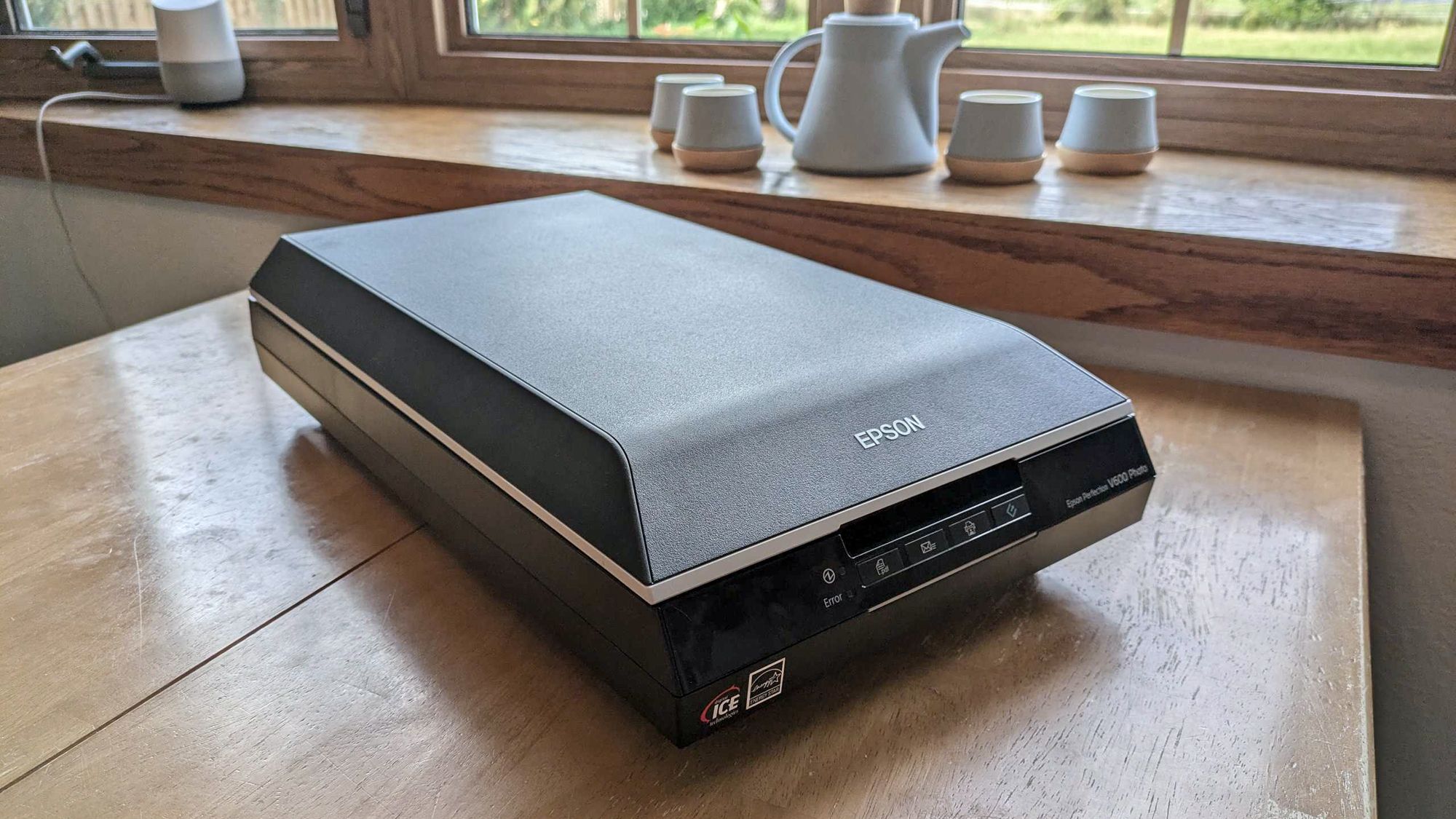
The Epson Perfection V19 II is the careful, deliberate alternative to the feeder scanners above. Place a print on its glass, lower the lid, and you have a stable platform for originals that are too valuable, thick, or awkward to send through a slot. It is not the fastest way to digitize a box of snapshots, but it is a better fit for an album page, a drawing, or a photograph that should not be handled aggressively.
Its 4800 dpi optical resolution gives the scanner considerable room for enlargements. Most family sharing does not require that much detail, but high optical resolution is useful when a small print needs cropping or when the scan will be edited later. The V19 II also scans letter-size documents in as fast as 10 seconds, so it can handle ordinary paperwork without feeling limited to photographs.
The high-rise, removable lid is a meaningful design detail. It makes room for books and photo albums that cannot lie completely flat, and it avoids the awkward pressure that a fixed low lid can put on thicker material. One-touch buttons shorten common tasks, while Epson ScanSmart supports searchable PDFs and editable Microsoft Office documents through OCR.
Epson's Easy Photo Fix can restore color to faded photos with one click. That makes the V19 II especially appealing for older prints that need a gentle correction before they are shared. It is also USB powered and weighs 3.1 pounds, with a built-in kickstand for vertical storage. The setup is less self-contained than the FastFoto FF-680W, but it takes up less effort when the collection is small and the originals need individual attention.
The V19 II's weakness is the flatbed workflow itself. You cannot load a stack and walk away, and the large resolution number does not make each scan instant. The Epson Perfection V39 II has a similar basic proposition, while the Plustek Z300 is much better for repetitive 4x6 scanning. Pick the V19 II for image detail, albums, and physical originals that benefit from a glass bed.
4. KODAK Slide N Scan: Best for Film

Pros
- Handles 135, 110, and 126 negatives
- Supports 50mm, 110, and 126 slides
- Built-in 5-inch LCD
- Saves scans directly to an SD or SDHC card
- Includes film adapters and cleaning brush
Cons
- Designed for film rather than ordinary photo prints
- SD card is not included
- Editing controls are deliberately basic
Best for: digitizing slides and negatives while previewing them without a computer.
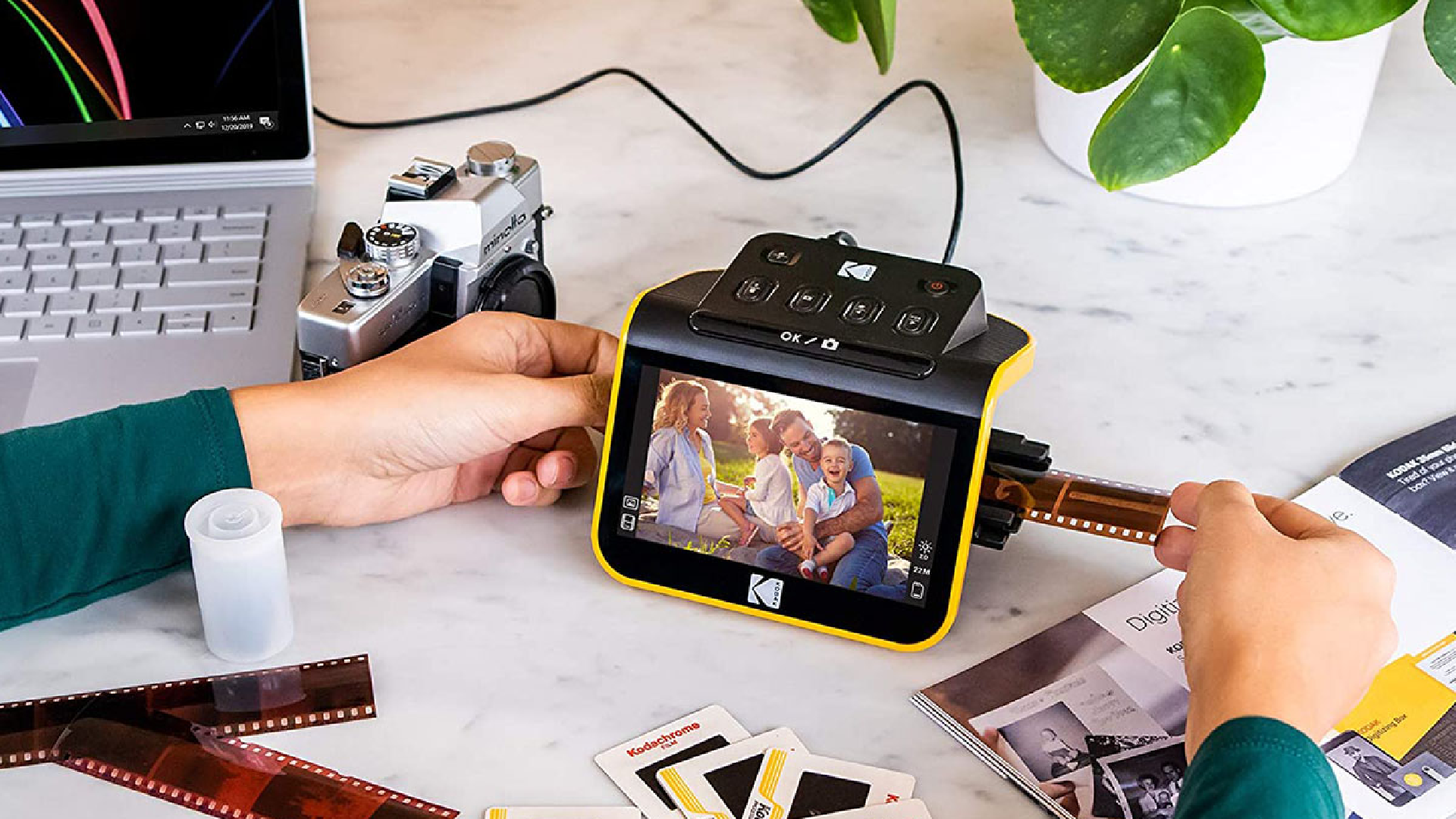
The KODAK Slide N Scan is a different kind of product from the flatbeds and photo feeders in this roundup. It is for the shoebox of negatives and slides that cannot be handled by a normal print scanner. The small body is easy to place near a computer or television, but it can also work as a self-contained film digitizing station because scans go directly to an SD or SDHC card.
The 5-inch LCD is the feature you notice first. It gives you a wide viewing area for checking a frame before saving it, and its gallery mode makes the scanner useful for sharing old images with family members gathered around the device. The scanner supports 135, 110, and 126 film, plus 50mm slides, with the appropriate holders and adapters included.
KODAK lists a 22MP capture figure, while the controls focus on practical adjustments rather than complicated image processing. A single scan button starts the process, and you can adjust color, brightness, date, and time. The package includes USB and HDMI cables, a cleaning brush, and the film holders. An SD card is required for direct storage but is not included.
This is not the right answer for a box of 4x6 prints. The Plustek ePhoto Z300 and Epson FastFoto FF-680W are purpose-built for printed photos, while the KODAK is more convenient when the original is a slide or negative. Its quick-feed tray also makes it easier to move through strips of film than a conventional flatbed with improvised positioning.
The limitation is image control. The KODAK is meant to make film conversion accessible, not to replace a professional film workflow with extensive color correction. Its small display and simple editing tools will not satisfy someone who wants deep control over every frame. For family slides, negatives, and an easy preview-first process, it is the clear specialist in this group.
5. Canon imageFORMULA RS40: Best Mixed Media Feeder

Pros
- Scans both sides of photos and documents
- Automatic feeder handles varied sizes
- Rated for up to 40 items per minute
- Supports Windows and Mac
- Includes photo enhancement software
Cons
- Larger than a flatbed
- Feeder scanning needs care with delicate prints
- Less specialized for film than the KODAK
Best for: households that need one feeder for photos, receipts, cards, and documents.
The Canon imageFORMULA RS40 makes sense when photo scanning is only one part of the job. Its automatic feeder is designed for old and new photographs in varying sizes, but it also accepts receipts, cards, driver licenses, and tax documents. That mixed-media ability gives it a more useful role in a home office than a photo-only machine.
Canon says the RS40 can process up to 40 items per minute and scan both sides at the same time. Duplex capture is particularly helpful for photos with notes on the back, and it avoids the extra handling required by a standard flatbed. For a family archive, that means dates, names, and locations can stay attached to the image instead of being lost in a separate notebook.
The bundled software includes tools for photo enhancement, red-eye correction, and digital face smoothing. It supports JPG, TIF, BMP, PNG, PDF, and PPTX output, which covers both image archives and document work. Windows and Mac support, plus a TWAIN driver, give it wider compatibility than a basic USB-only flatbed.
Compared with the Epson FastFoto FF-680W, the RS40 is a more balanced office machine rather than a dedicated high-volume photo archive tool. The Epson offers more explicit photo-oriented batch features and wireless connectivity. The Canon is a better fit when receipts and paperwork will pass through the same feeder every week. The Plustek Z300 remains simpler if all you want to do is scan loose prints.
The RS40 still has the basic feeder limitation: delicate, curled, or unusually fragile originals deserve more care than a flatbed provides. Its footprint is also much larger than the compact Epson V19 II. Choose it for a mixed collection where automatic feeding and duplex scanning are more useful than film support or maximum flatbed detail.
6. ScanSnap iX2500 Photo Edition: Best Wireless Workflow

Pros
- Up to 100 photos per minute
- Automatic feeder holds up to 36 photos
- Large touchscreen
- Wi-Fi 6 and USB-C connectivity
- Includes three photo carrier sheets
Cons
- Heavy desktop design
- Extensive features may be unnecessary for occasional scanning
- Feeder scanning is not ideal for every fragile print
Best for: connected households that want profiles, cloud destinations, and fast batch work.
The ScanSnap iX2500 Photo Edition is the most modern-feeling scanner here. Its large touchscreen puts scanning profiles and destinations in front of you, while Wi-Fi 6 allows the machine to connect to computers, mobile devices, and cloud services without being tied to a desk cable. For a household that wants several people to use the scanner, that convenience is significant.
Its photo capacity is built for batch work. The automatic feeder holds up to 36 photos, and ScanSnap lists speeds up to 100 photos per minute. Those figures make it a serious rival to the Epson FastFoto FF-680W for a large archive. The included three photo carrier sheets add protection for delicate prints, though the usual caution with fragile originals still applies.
The iX2500 is also designed to organize what it scans. It can automatically optimize, name, and sort files, and the touchscreen supports personalized profiles. Quick Menu can send scans to favorite computer applications, while USB-C provides a direct connection when wireless is not the right option. That combination is more useful than raw speed if the finished archive needs a consistent filing system.
The trade-off is that this is a substantial desktop unit weighing 7.7 pounds. It has more workflow capability than someone scanning a few albums once will need, and the feeder remains less reassuring for damaged photographs than the glass of the Epson Perfection V19 II. Readers who need wireless placement may also want to compare the practical differences between wired and wireless scanning.
The Epson FastFoto FF-680W remains a strong dedicated photo choice, especially for capturing handwritten notes on the back. The iX2500 pulls ahead when wireless access, profiles, cloud destinations, and automated organization are central to the project. It is the Best scanner to digitize photos for a connected archive that will keep growing.
7. Epson Perfection V39 II: Best Flatbed for Restoration

Pros
- 4800 dpi optical resolution
- One-click Easy Photo Fix color restoration
- Removable high-rise lid
- USB powered
- Supports cloud scanning and stitched oversized images
Cons
- No automatic feeder
- Requires one scan setup at a time
- Not intended for slides or negatives
Best for: carefully scanning faded prints, artwork, and oversized originals.
The Epson Perfection V39 II is a straightforward flatbed with a useful emphasis on restoration. It is a good match for someone who wants to slow down and make sure each old photograph is positioned correctly rather than feeding a stack through an automatic mechanism. The removable high-rise lid also makes it more accommodating for books, albums, and thicker originals.
Like the V19 II, it uses 4800 dpi optical resolution. That gives small photos enough detail for cropping and enlarging, though the benefit depends on the quality of the original. Epson's Easy Photo Fix restores color to faded photos with one click, making it a practical tool for family prints that have lost some of their life over the years.
The V39 II adds useful software flexibility. Epson ScanSmart can stitch oversized images together and send scans to cloud storage services. One-touch buttons reduce the number of steps for routine scans, and the scanner can process a letter-sized document in as quickly as 10 seconds. USB power keeps the setup simple and helps the 3.1-pound scanner remain easy to move.
The distinction between this model and the V19 II is subtle because their core scanning specifications are similar. The V19 II places more emphasis on OCR and editable Office documents, while the V39 II highlights stitched oversized images and cloud workflows. Both are much slower for a large loose-photo archive than the Plustek Z300 or a feeder-based Epson.
The V39 II cannot scan film and cannot automatically process a pile of prints. It is best for a smaller collection where image handling and restoration matter more than throughput. If you need the Best scanner to digitize photos for faded family images, artwork, and albums, this is one of the strongest flatbed options here.
8. Canon CanoScan LiDE 300: Best Simple Flatbed

Pros
- Auto Scan mode detects the original
- USB connectivity keeps setup simple
- Handles documents and images
- Compact flatbed design
- Supports PDF, copy, and send functions
Cons
- No automatic photo feeder
- Few photo-specific enhancement features are listed
- Not suitable for slides or negatives
Best for: occasional photo scanning with minimal setup.
The Canon CanoScan LiDE 300 is the uncomplicated pick. It has a flatbed for photographs and documents, USB connectivity, and an Auto Scan mode that detects what has been placed on the glass. That is enough for a user who wants to scan a few prints, save documents, and avoid learning a complicated photo archiving workflow.
The feature list is notably short, but that can be an advantage. There is no feeder to calibrate and no wireless system to configure. Place the original on the bed, let Auto Scan identify it, and use the scanner for digital images or documents. The PDF, copy, and send functions make it more flexible than a photo-only device.
Its 1.7-inch height and 3.6-pound weight make it relatively easy to keep on a desk, although the 14.5-inch length still requires a suitable surface. Compared with the Epson Perfection V19 II and V39 II, the LiDE 300 has a less detailed feature set and does not list a 4800 dpi optical resolution. The Epson models are better for restoration, albums, and enlargement work.
The LiDE 300 also lacks the automatic throughput of the Plustek ePhoto Z300. If you have hundreds of prints, repeatedly lifting the lid will become the limiting factor. This is a scanner for occasional use, not a machine to buy for a weekend archive project with several full boxes.
Its appeal is the lack of friction. There are no film holders, feeder trays, or advanced profiles to manage. Skip it if you need high resolution restoration, wireless access, or batch scanning. For basic home use and a few family prints at a time, the LiDE 300 is a sensible, quiet starting point.
9. Canon CanoScan LiDE 400: Best Slim High Resolution Flatbed

Pros
- 4800 x 4800 dpi resolution
- Scans in as fast as 8 seconds
- USB-C carries data and power
- Auto Scan mode detects the original
- Color restoration and dust removal features
Cons
- Flatbed workflow is slow for large archives
- No automatic feeder
- Does not scan film
Best for: detailed flatbed scans in a compact desktop setup.
The Canon CanoScan LiDE 400 takes the basic LiDE 300 idea and adds a stronger resolution and connection story. Its 4800 x 4800 dpi capability is aimed at detailed photos and images, while the slim body is easy to store when the scanner is not in use. It is a good fit for a desk where every piece of equipment has to justify its footprint.
Canon says the scanner can work in as fast as 8 seconds, and the included USB Type-C cable carries both power and data. That single-cable setup is cleaner than a scanner that needs a separate power brick. Auto Scan mode identifies the type of original, while dedicated EZ buttons make common scan and PDF tasks easier to reach.
The LiDE 400 includes color restoration and dust removal tools, which help with older prints. Built-in PDF buttons can create multipage PDFs that are editable and searchable, so the scanner can handle paperwork as well as photographs. Its paper support includes letter and A4 sizes, making it a practical general-purpose flatbed.
Compared with the LiDE 300, the LiDE 400 is the better choice when detailed image capture and a one-cable USB-C setup matter. The Epson V19 II and V39 II offer similar 4800 dpi optical resolution plus more explicit photo restoration and album-friendly lid designs. The Plustek Z300 is far faster for repeated 4x6 scans because it does not require placing every print on a glass bed.
The central weakness is shared by nearly every flatbed here: no automatic feeder. A large archive will require patience, and the scanner is not a substitute for a film digitizer. Choose the LiDE 400 for a compact, detailed flatbed that will handle both photos and documents, especially when the scanner needs to disappear into storage between projects.
10. Canon imageFORMULA R10: Best Portable Document Feeder

Pros
- USB powered and easy to move
- Duplex scanning
- 20-sheet automatic feeder
- Handles receipts, cards, and reports
- Works with Windows and Mac
Cons
- Not intended for photographic paper
- Lower throughput than dedicated archive feeders
- More useful for documents than family prints
Best for: mobile document work where photo-paper scanning is not required.
The Canon imageFORMULA R10 needs a clear warning before its advantages: Canon states that it is not intended for scanning photographs on photo paper or photographic media. That makes it a poor choice for the central job in this roundup, but it can still be useful to someone whose archive project is mostly paperwork surrounding the photos, such as captions, records, receipts, and family documents.
The R10 is compact, USB powered, and designed for mobile use. It has a 20-sheet automatic feeder and can scan both sides of a document at once at up to 12 pages per minute. It handles receipts, business cards, plastic or embossed cards, reports, and legal documents, so it is more versatile than a narrow document-only slot scanner.
Canon includes software that requires no installation and updates automatically. The preview tools can straighten and trim scans, organize files, and create custom destinations. Windows and Mac compatibility makes it easy to move between a home office and a remote setup, while the claimed power consumption stays at 2.5W or less, with an energy-saving mode using 0.7W.
The R10 should not be confused with the Canon imageFORMULA RS40. The RS40 is explicitly designed to scan old and new photos in varying sizes, while the R10 is a portable document specialist. The Plustek ePhoto Z300 is a far better answer for printed photographs, and the KODAK Slide N Scan is the right tool for film.
Its limitation is not a hidden drawback but a stated use restriction. Do not buy it to feed glossy photo paper through an automatic document path. Buy it when portability, duplex paperwork, and a small feeder are the priorities, and choose another model in this list for the photographs themselves.
How to choose best scanner to digitize photos
The right scanner depends on the original material and the size of the archive. Start with the type of photos you have, then match the scanning method, resolution, feeding system, and software to the work.
Original format
Printed photographs, slides, and negatives need different hardware. A flatbed such as the Epson Perfection V19 II or Canon CanoScan LiDE 400 is suited to prints and albums, while the KODAK Slide N Scan is designed for film formats including 135, 110, and 126. The Canon imageFORMULA R10 should be ruled out for photo paper because its listed use is document scanning.
Feeder or flatbed design
A flatbed gives each original a stable glass surface and is usually the safer choice for thick, curled, or delicate material. A feeder is much faster for loose prints, especially when it can batch several photos at once. The Plustek Z300 takes photos one by one but moves quickly, while the Epson FastFoto FF-680W and ScanSnap iX2500 are built for larger batches.
A high resolution number cannot compensate for a scanner that makes you avoid the archive because every photo takes too long.
Optical resolution
Resolution matters most when you plan to enlarge, crop, or extensively edit a small print. The Epson V19 II and V39 II offer 4800 dpi optical resolution, and the Canon LiDE 400 lists 4800 x 4800 dpi. For ordinary sharing, 300 dpi can be enough, while 600 dpi gives more detail for archiving. Do not treat a large interpolated figure as a substitute for optical resolution.
Photo restoration
Faded color, dust, red-eye, and crooked placement are common problems in old family archives. The Epson flatbeds include Easy Photo Fix, the Plustek offers image enhancement, and the FastFoto FF-680W adds color restoration, red-eye reduction, crop, rotate, and deskew. The best software is the one that corrects routine problems without forcing you to edit every file manually.
Connectivity and storage
USB keeps the connection simple, while Wi-Fi can make a shared archive easier to use across computers and mobile devices. The Epson FastFoto FF-680W supports USB and wireless connections, and the ScanSnap iX2500 adds Wi-Fi 6, USB-C, touchscreen profiles, and cloud destinations. The KODAK Slide N Scan can save directly to SD or SDHC cards, which is useful when you do not want a computer beside the scanner.
Frequently asked questions
What is the best scanner to digitize photos from a large collection?
The Epson FastFoto FF-680W and ScanSnap iX2500 Photo Edition are the strongest choices for a large archive because they use automatic feeders and batch scanning. The Plustek ePhoto Z300 is easier to manage for a smaller collection of ordinary prints. Choose a flatbed when the originals are delicate or unusually thick.
Is a flatbed scanner better for old photos?
A flatbed is usually better for fragile, curled, thick, or valuable prints because the original stays on a glass surface. The Epson Perfection V19 II and V39 II also have removable high-rise lids for books and albums. A feeder is faster, but it requires more care with damaged photographs.
What resolution should I use for scanning printed photographs?
Use 300 dpi for convenient sharing and routine digital copies, and consider 600 dpi when you want more detail for editing or future enlargements. The Epson FastFoto FF-680W also supports 1200 dpi scans for enlargements. A very high setting creates larger files and takes longer, so match the resolution to the finished use.
Can a photo scanner digitize slides and negatives?
Not every photo scanner can handle film. The KODAK Slide N Scan is the dedicated film option in this roundup and supports 135, 110, and 126 negatives along with several slide formats. The Plustek, Epson, and Canon print scanners listed here are designed primarily for paper originals.
Is the Canon imageFORMULA R10 suitable for photo paper?
No. Its product information specifically states that it is not intended for photographs on photo paper or photographic media. It is a portable duplex document scanner for receipts, cards, reports, and similar material.
Do I need wireless connectivity for a photo archive?
No, but wireless can make a shared household workflow easier. USB is perfectly adequate for a single computer, while Wi-Fi on models such as the Epson FastFoto FF-680W and ScanSnap iX2500 helps with placement, mobile devices, and cloud destinations.
The bottom line
The Best scanner to digitize photos for most family archives is the Plustek ePhoto Z300. Its 2-second 4x6 scanning, automatic crop and deskew, support for common print sizes, and simple Mac and PC workflow make it easier to finish a box of photographs without turning the project into a technical exercise.
For thousands of prints, choose the Epson FastFoto FF-680W. Its 36-photo batch capacity, duplex capture, mixed-size support, and restoration tools are better suited to a serious archive. Choose the Epson Perfection V19 II or V39 II for albums and delicate originals, and the KODAK Slide N Scan when the collection is made up of film.
If you are undecided, choose the Plustek for loose printed photos, the Epson FastFoto for volume, and a flatbed when protecting the original matters most.
As an Amazon Associate we earn from qualifying purchases.