

A graphics card can look perfect on paper and still be the wrong part for your PC. A huge cooler may not fit your case, while a smaller card may run into memory limits at higher resolutions. The right choice depends on the games you play, the display you use, and how much room your build has around the PCIe slot.
Our Best graphics card picks cover NVIDIA Blackwell cards, AMD Radeon options, compact designs, and large triple or quad fan coolers. The ASUS TUF RTX 5080 is our top pick, while the list also includes sensible choices for smaller systems, high refresh rate gaming, and 16GB memory buyers.
Comparison table
| # | Product | Award | Memory | Cooler and size | Best for |
|---|---|---|---|---|---|
| 1 | ASUS TUF RTX 5080 | Best overall | 16GB GDDR7 | Three Axial-tech fans, 3.6-slot | High-end gaming and creation |
| 2 | ASUS Dual RTX 5060 | Best compact NVIDIA pick | 8GB GDDR7 | Axial-tech fan, 2.5-slot | Smaller gaming PCs |
| 3 | ASUS ROG Astral RTX 5080 | Best cooling headroom | 16GB GDDR7 | Four fans, 3.8-slot | Sustained heavy workloads |
| 4 | PNY RTX 5080 Epic-X | Best creator focused RTX 5080 | 16GB GDDR7 | Triple fan | Gaming and creative software |
| 5 | Gigabyte RX 9070 XT | Best Radeon performance pick | 16GB GDDR6 | WINDFORCE, Hawk Fan | High resolution Radeon builds |
| 6 | Gigabyte RTX 5080 Gaming OC | Best straightforward RTX 5080 | 16GB GDDR7 | WINDFORCE | Conventional large gaming PCs |
| 7 | ASUS Prime RTX 5070 | Best SFF enthusiast pick | 12GB GDDR7 | Axial-tech fans, 2.5-slot | Small form factor systems |
| 8 | XFX RX 9060 XT Swift | Best 16GB Radeon alternative | 16GB GDDR6 | Triple fan | Mainstream 1440p gaming |
| 9 | ASUS Dual RX 9060 XT | Best quiet compact Radeon | 16GB GDDR6 | Axial-tech fan, 2.5-slot | Compact and quiet builds |
| 10 | Gigabyte RTX 5070 Ti | Best 16GB NVIDIA alternative | 16GB GDDR7 | WINDFORCE | High-end 1440p gaming |
1. ASUS TUF RTX 5080: Best Overall

Pros
- RTX 5080 platform with DLSS 4
- 16GB of GDDR7 memory
- Substantial three fan cooling system
- Protective PCB coating and phase-change thermal pad
Cons
- Large 3.6-slot card
- Listed dimensions make case clearance important
- Five-pound weight may need support
Best for: builders who want a durable high-end NVIDIA card with serious cooling hardware.
The ASUS TUF RTX 5080 is the card we'd choose when a system has enough room and the goal is uncomplicated high-end performance. Its appeal is not just the RTX 5080 GPU. ASUS gives it a large fin array, three Axial-tech fans, military-grade components, and a protective coating designed to help guard the PCB against moisture, dust, and debris.
The 16GB GDDR7 memory gives demanding games and creative applications a generous working area, while NVIDIA's Blackwell architecture and DLSS 4 add the platform's AI-assisted rendering features. Those features matter most on a high refresh rate display or at higher resolutions, where extra rendering assistance can help maintain smooth motion. The card uses PCIe 5.0, matching the newer platform represented throughout this roundup.
Physical fit is the catch. At 13.7 inches long, 5.7 inches wide, and 2.8 inches high, this is not a card for a compact case. Its 3.6-slot design can also crowd adjacent expansion slots, and the listed five-pound weight is substantial. The phase-change GPU thermal pad is a thoughtful long-term thermal detail, but it does not make the cooler small.
Compared with the Gigabyte RTX 5080 Gaming OC, the TUF has a similarly serious large-card brief but adds the protective PCB coating and phase-change pad. The ASUS ROG Astral RTX 5080 has even more cooling hardware, yet its 3.8-slot footprint is harder to accommodate. Choose the TUF when you want a strong balance of RTX 5080 capability and robust construction, and skip it if your case has tight GPU clearance.
2. ASUS Dual RTX 5060: Best Compact NVIDIA Pick

Pros
- Compact 9-inch length
- 2.5-slot design
- DLSS 4 and Blackwell architecture
- 0dB fan technology in the product title
Cons
- 8GB memory is less generous than the 16GB cards here
- Dual fan cooling has less thermal mass than the larger RTX 5080 models
- Not the first choice for the most demanding high resolution workloads
Best for: smaller gaming PCs that need a current NVIDIA platform without a massive cooler.
The ASUS Dual RTX 5060 is the easy fit in this group. Its listed length is 9 inches, its height is 2 inches, and it weighs 1.4 pounds. Those figures make it much friendlier to compact cases than the oversized RTX 5080 designs, while the 2.5-slot format leaves more room around the card.
It uses NVIDIA's Blackwell architecture and supports DLSS 4. ASUS lists an OC mode of 2, 565 MHz and a default mode of 2, 535 MHz, so the distinction is clear without turning the card into a complicated tuning project. The 8GB GDDR7 allocation is the compromise. It suits a mainstream gaming build, but buyers planning to keep a card for especially demanding texture packs should think carefully about that limit.
The Axial-tech fan design uses a smaller hub to allow longer blades, with a barrier ring intended to increase downward air pressure. That is a sensible design for a compact cooler, and the listed 0dB technology points toward quieter light use. It remains a 2.5-slot card, so small case owners still need to check the space around the motherboard slot.
The ASUS Prime RTX 5070 is the more capable compact NVIDIA option, with 12GB GDDR7, but it is also longer and heavier. The Dual RTX 5060 makes more sense when fit and moderate power needs matter more than maximum headroom. It is the card to choose for a smaller system, not for someone building around a large high resolution monitor and demanding future releases.
3. ASUS ROG Astral RTX 5080: Best Cooling Headroom

Pros
- Four Axial-tech fans
- Patented vapor chamber
- 16GB GDDR7 memory
- Phase-change GPU thermal pad
Cons
- Largest slot footprint in the roundup
- 14.1-inch length demands a spacious case
- Five-pound weight is considerable
Best for: users running long, demanding gaming or rendering sessions in a generously sized desktop.
The ASUS ROG Astral RTX 5080 is built around cooling capacity. Its four-fan design is the headline feature, and ASUS says the arrangement can increase airflow and pressure by up to 20 percent. That makes this the most ambitious thermal design in the list, especially when paired with the massive heatsink and fin array.
The card uses a patented vapor chamber with a milled heatspreader, along with a phase-change GPU thermal pad. Those parts are aimed at transferring heat away from the GPU efficiently during sustained loads. The 16GB GDDR7 memory and DLSS 4 support give it the same broad RTX 5080 platform appeal as the TUF and Gigabyte models, so its advantage is primarily the cooler rather than a different GPU tier.
The physical demands are obvious. It is 14.1 inches long, 5.9 inches wide, and 3 inches high, with a 3.8-slot design and a listed five-pound weight. That combination can block nearby expansion slots and may put pressure on a motherboard slot if the card is not properly supported. Measure the case, the front radiator area, and the available slot space before buying.
The ASUS TUF RTX 5080 is easier to live with because it uses three fans and a slightly smaller 3.6-slot design. The Astral is the more specialized choice for buyers who value thermal headroom above installation convenience. Skip it for a compact or tightly packed build, and choose it when the case has the room to let the four-fan cooler make sense.
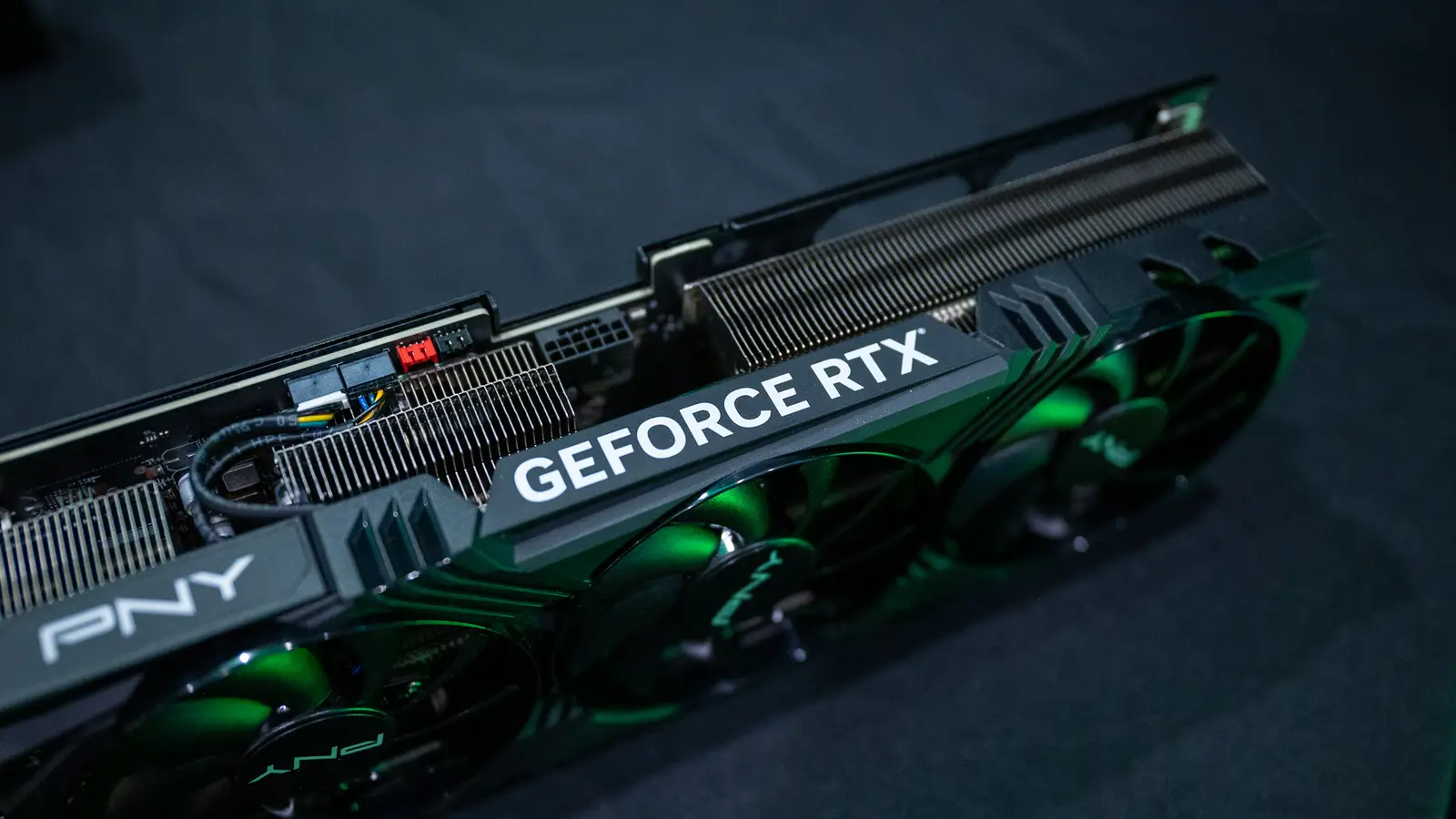
4. PNY RTX 5080 Epic-X: Best Creator Focused RTX 5080

Pros
- 16GB GDDR7 memory
- Triple-fan cooler
- DLSS 4 and Reflex 2 support
- NVIDIA Studio positioning for creative applications
Cons
- Long 12.94-inch body
- Product data gives limited cooler detail
- Not a compact card despite its lighter listed weight
Best for: creators who want an RTX 5080 for both graphics work and gaming.
The PNY RTX 5080 Epic-X takes a different route from the feature-heavy ASUS designs. Its most useful identity is the combination of an RTX 5080 GPU, a triple-fan cooler, and support for NVIDIA's broader software ecosystem. PNY specifically points to DLSS 4, Reflex 2, RTX AI PC features, and NVIDIA Studio drivers for creative work.
That software mix makes the 16GB GDDR7 memory especially relevant. Video editing, 3D rendering, and graphic design applications can all benefit from a card that has room for larger projects, while DLSS 4 targets compatible games. Reflex 2 is aimed at responsiveness, including the newer Frame Warp feature described by PNY as coming soon.
The listed length is 12.94 inches and the width is about 5.39 inches. The product information reports a very small height figure, but it does not provide a conventional slot thickness, so buyers should verify the card's clearance on the product page and against their case. The triple-fan design suggests a substantial cooler, even though the available data does not spell out its fin stack or thermal hardware.
The ASUS TUF RTX 5080 gives more detail about physical construction, including the protective PCB coating and phase-change pad. The PNY card makes a stronger case for a creator who will use NVIDIA Studio applications and wants the RTX 5080 platform without selecting the most elaborate cooler. It is a sensible workstation and gaming pick, but not the one we'd recommend for a small case.
5. Gigabyte RX 9070 XT: Best Radeon Performance Pick

Pros
- Radeon RX 9070 XT GPU
- 16GB GDDR6 memory
- WINDFORCE cooling system
- Hawk Fan and server-grade thermal conductive gel
Cons
- Radeon feature support differs from NVIDIA's DLSS ecosystem
- 11.34-inch length still needs case planning
- Triple fan cooling takes more room than compact dual fan designs
Best for: Radeon buyers who want a high performance 16GB card with a substantial cooler.
The Gigabyte RX 9070 XT is the AMD alternative to the RTX-heavy upper half of this roundup. Its 16GB of GDDR6 memory gives it the same capacity as the RTX 5080 models and the Gigabyte RTX 5070 Ti, though the memory type and GPU architecture are different. That makes it a strong candidate for buyers who prefer Radeon and do not want to narrow the build to NVIDIA features.
Gigabyte uses a WINDFORCE cooling system with a Hawk Fan, plus server-grade thermal conductive gel. The card also includes RGB lighting, which is a small but useful detail for a visible desktop build. The available information does not specify a fan stop mode or BIOS switch, so buyers seeking those controls should not assume they are present.
At 11.34 inches long, 5.2 inches wide, and 2.2 inches high, it sits between the compact cards and the giant RTX 5080 designs. Its listed weight is about 3.92 pounds, enough to justify checking whether the case has a support bracket or another way to keep the card level. PCIe 5.0 support keeps it aligned with the newer platforms represented here.
The ASUS Prime RTX 5070 is smaller and easier to install, but it has 12GB rather than 16GB of memory. The RX 9070 XT is the better fit for someone who wants more memory capacity and Radeon hardware, while the RTX cards remain more natural choices for users committed to DLSS 4 or NVIDIA Studio. For a broader look at choosing a GPU around a complete system, the graphics hardware that suits a whole PC build is a useful next step.
6. Gigabyte RTX 5080 Gaming OC: Best Straightforward RTX 5080

Pros
- 16GB GDDR7 with a 256-bit memory interface
- WINDFORCE cooling system
- PCIe 5.0 support
- Blackwell architecture and DLSS 4
Cons
- 13.46-inch length
- 2.76-inch height and 5.59-inch width require a spacious case
- Less specialized feature detail than the top ASUS models
Best for: a conventional full-size gaming PC that needs an RTX 5080 without an unusual cooler layout.
The Gigabyte RTX 5080 Gaming OC is the least complicated RTX 5080 recommendation here. It uses the Blackwell architecture, supports DLSS 4, and pairs the GPU with 16GB of GDDR7 through a 256-bit memory interface. Those are the details that matter most to a buyer who wants the RTX 5080 platform rather than a particular lighting or specialty cooling feature.
Its WINDFORCE cooling system gives the card a clear thermal identity, though the supplied product information does not list the number of fans or a specific fan control mode. That is not a reason to dismiss it, but it does mean the ASUS cards provide more explicit information about their cooling design. The Gigabyte card is better understood as a large conventional cooler rather than a compact or highly specialized one.
The dimensions are 13.46 inches long, 5.59 inches wide, and 2.76 inches high, with a listed weight of 4.03 pounds. That is close to the size class of the TUF card and enough to make case clearance a first step, not an afterthought. The 16GB capacity also makes it a more comfortable high resolution choice than the 8GB RTX 5060.
The PNY RTX 5080 Epic-X is the more creator-oriented option because its listing emphasizes NVIDIA Studio and creative workflows. The ASUS TUF RTX 5080 gives more construction detail and a slightly different durability pitch. Choose the Gigabyte when you want a straightforward RTX 5080 in a spacious gaming case and do not need those extra design distinctions.
7. ASUS Prime RTX 5070: Best SFF Enthusiast Pick

Pros
- SFF-ready design
- 12GB GDDR7 memory
- 2.5-slot format
- Dual BIOS and phase-change thermal pad
Cons
- 12-inch length is compact only by comparison
- Less memory than the 16GB cards
- Still needs careful clearance planning in very small cases
Best for: enthusiasts building a smaller PC without dropping to a lower tier compact card.
The ASUS Prime RTX 5070 is the practical middle ground for a small form factor build. ASUS labels it SFF-ready, and the 2.5-slot design gives it more build compatibility than the 3.6-slot and 3.8-slot RTX 5080 cards. It is not tiny, but it avoids the oversized cooler problem that defines several higher-end options here.
The 12GB GDDR7 memory sits between the 8GB RTX 5060 and the 16GB cards. That capacity gives the RTX 5070 more room for demanding games and higher texture settings than the smaller ASUS Dual model, while keeping the physical design more manageable than the full-size high-end cards. It also uses NVIDIA's Blackwell architecture and DLSS 4.
ASUS uses Axial-tech fans with a smaller hub and a barrier ring intended to increase downward air pressure. The card also has a phase-change GPU thermal pad and a dual BIOS switch. That last feature is useful for builders who want to choose between two operating profiles, though the supplied data does not name the exact behavior of each profile.
At 12 inches long, 5 inches wide, and 2 inches high, the card still needs a case measurement. The listed weight is 2.3 pounds, considerably easier to support than the five-pound RTX 5080 models. The ASUS Dual RTX 5060 is the better fit for especially tight cases, while the Gigabyte RX 9070 XT offers 16GB memory in a larger Radeon design. Pick the Prime RTX 5070 when small size and NVIDIA features need to coexist.
8. XFX RX 9060 XT Swift: Best 16GB Radeon Alternative

Pros
- 16GB GDDR6 memory
- Triple fan cooling solution
- Boost clock up to 3, 320 MHz
- Radeon RX 9060 XT chipset
Cons
- 11.42-inch length is not suited to every compact case
- Product information does not list card weight
- No supplied detail about fan stop or BIOS profiles
Best for: mainstream Radeon systems where 16GB memory matters more than a compact dual fan cooler.
The XFX RX 9060 XT Swift is defined by two useful choices: 16GB of GDDR6 and a triple fan cooling solution. That memory capacity gives it a stronger long-term footing than the 8GB ASUS Dual RTX 5060, especially for games that use large texture sets. It is also a clear alternative to the ASUS Dual RX 9060 XT, which uses the same broad GPU family but a smaller dual fan design.
XFX lists a boost clock up to 3, 320 MHz. A clock figure alone does not predict performance across every game, but it does tell buyers this is an OC focused board rather than a basic reference-style implementation. The chipset is the AMD RX 9060 XT, and the card is intended for desktop PCs.
The triple fan cooler should help spread heat across a larger cooling assembly, although the supplied features do not identify the fin stack, fan stop mode, or a BIOS switch. The listed length is 11.42 inches and the width is about 4.92 inches. Height is also provided in the product data, but it appears as a very small converted figure, so buyers should confirm the physical slot thickness before installing it.
The ASUS Dual RX 9060 XT is easier to fit, lighter at a listed 1.3 pounds, and includes 0dB technology plus dual BIOS. The XFX card is the better choice for a buyer who prefers three fans and a listed boost clock, while ASUS is more attractive for a quiet compact build. If gaming is the priority, the features that matter most for a gaming focused GPU can help narrow the decision.
9. ASUS Dual RX 9060 XT: Best Quiet Compact Radeon

Pros
- Very short 8-inch length
- 16GB GDDR6 memory
- 0dB technology
- Dual BIOS and dual ball fan bearings
Cons
- Dual fan cooler has less fan capacity than the XFX model
- Radeon feature set differs from the NVIDIA choices
- Compact size does not eliminate the need to check power and slot clearance
Best for: quiet, compact Radeon gaming PCs with room for 16GB of memory.
The ASUS Dual RX 9060 XT is the small Radeon card to buy when the case is the main constraint. Its listed length is only 8 inches, with a width of 4.7 inches and height of 1.9 inches. The 2.5-slot design is still important, but the short body gives it a major installation advantage over the 11.42-inch XFX option.
It carries 16GB of GDDR6 memory, matching the XFX card and giving this compact design more memory capacity than the ASUS Dual RTX 5060. ASUS includes HDMI 2.1b and DisplayPort 2.1a in the title, along with PCIe 5.0 support. Those connections make it a current platform choice for a new desktop rather than an old interface design.
The quieter-use features are unusually clear. 0dB technology lets the fans stay off during light gaming or less demanding work, while the dual BIOS switch lets the owner select Quiet or Performance profiles. ASUS also lists dual ball fan bearings, which it says can last up to twice as long as sleeve bearing designs. Those details are more useful than decorative lighting when the card is going into a quiet room.
The XFX RX 9060 XT Swift has three fans and a listed boost clock up to 3, 320 MHz, but it is much longer. The ASUS card is the better fit for a short case or a low-noise build, provided the buyer accepts the limits of a smaller dual fan cooler. For a large open case where cooling capacity matters more than length, the XFX is the stronger alternative.
10. Gigabyte RTX 5070 Ti: Best 16GB NVIDIA Alternative

Pros
- 16GB GDDR7 memory
- 256-bit memory interface
- Blackwell architecture and DLSS 4
- WINDFORCE cooling system
Cons
- Large 13.46-inch body
- 4-pound listed weight
- No compact form factor advantage
Best for: high-end 1440p or mixed gaming and creation systems that want NVIDIA features with 16GB memory.
The Gigabyte RTX 5070 Ti is the sensible NVIDIA alternative for buyers who want 16GB but do not need to step up to an RTX 5080 design. It uses the Blackwell architecture, supports DLSS 4, and pairs 16GB of GDDR7 with a 256-bit memory interface. That combination makes it a more comfortable choice than the 8GB RTX 5060 for demanding games and creative applications.
Gigabyte uses its WINDFORCE cooling system, but the supplied listing does not specify the fan count or provide a detailed description of the heat sink. That makes the card less distinctive on paper than the ASUS TUF or ROG Astral models. Its strengths are the GPU tier, memory capacity, and familiar large-card layout.
The dimensions are 13.46 inches long, 5.59 inches wide, and 2.76 inches high. The listed weight is 3.92 pounds, so this is a full-size card that needs a case with generous front-to-back clearance and a sensible way to support the GPU. It is not a choice for a small form factor build, where the ASUS Prime RTX 5070 is much easier to justify.
The Gigabyte RTX 5080 Gaming OC is the step-up choice for buyers who want more RTX 5080 headroom, while the ASUS Prime RTX 5070 is better for compact systems. Choose the RTX 5070 Ti when 16GB NVIDIA memory is the priority and your case is built for a large cooler. It is a strong middle position in this list, though not the simplest installation.

How to choose best graphics card
The right GPU comes down to the balance between graphics workload, memory, cooling, and the physical limits of your PC. Use these factors to separate genuine advantages from spec sheet noise.
GPU class and rendering features
The GPU itself determines the broad performance tier. The RTX 5080 models sit above the RTX 5070 Ti, RTX 5070, and RTX 5060 in NVIDIA's lineup, while the Radeon RX 9070 XT and RX 9060 XT represent AMD alternatives at different levels.
NVIDIA cards in this list support DLSS 4, and the PNY model also highlights Reflex 2 and NVIDIA Studio features. AMD cards may be preferable for buyers committed to Radeon software and hardware. Do not choose by architecture name alone. Match the GPU tier to the resolution, refresh rate, and games you actually use.
A card with the right memory and cooler for your case is better than a faster GPU that cannot run comfortably in the system.
Video memory
Memory capacity matters when games use high resolution textures, when several displays are connected, or when creative applications load large projects. The ASUS Dual RTX 5060 has 8GB GDDR7, the ASUS Prime RTX 5070 has 12GB GDDR7, and most of the higher tier or Radeon alternatives here have 16GB.
Memory type matters too, but capacity is the first practical filter. A 16GB card is not automatically faster than a 12GB card, yet it can offer more room for demanding workloads. Buyers planning a long ownership period should pay close attention to this difference.
Card length and slot thickness
Measure the space from the rear expansion slots to the front of the case. The ASUS Dual RX 9060 XT is listed at 8 inches long, while the ASUS Dual RTX 5060 is 9 inches. The ASUS ROG Astral RTX 5080 reaches 14.1 inches and uses 3.8 slots.
Slot thickness can block other expansion cards and may interfere with motherboard headers. A 2.5-slot design is easier to accommodate than a 3.6-slot or 3.8-slot cooler, but it still needs room around the PCIe slot. Check the actual case clearance rather than relying on the word compact.
Cooling design
Large coolers use more fans, larger fin arrays, vapor chambers, or specialized thermal pads to move heat away from the GPU. The ROG Astral has four Axial-tech fans and a patented vapor chamber, while the TUF uses three fans and a phase-change thermal pad. Gigabyte's cards use WINDFORCE systems, and the XFX Radeon uses a triple fan solution.
Cooling influences sustained performance, noise, and installation. A small dual fan card can make sense in a short case, while a large triple or quad fan model needs enough airflow around it. Fan count is only one part of the design, so look for thermal hardware and fan behavior too.
Noise and control features
Quiet operation is easiest to judge when the listing names a fan stop mode or BIOS profiles. The ASUS Dual RX 9060 XT includes 0dB technology and a dual BIOS switch. The ASUS Dual RTX 5060 also lists 0dB technology.
These features matter for desktop work and light gaming, when the fans may not need to spin continuously. A larger cooler may run more quietly under load because it has more surface area, but the available data does not provide noise measurements for these cards. Treat silence claims as design indicators, not a guarantee of a particular sound level.
Frequently asked questions
How much graphics memory should a gaming PC have?
The cards here range from 8GB to 16GB of memory. An 8GB card can suit a mainstream system, while 12GB or 16GB gives more room for high resolution textures and demanding applications. The right amount also depends on the games, display resolution, and expected ownership period.
Is a 16GB graphics card always faster than an 8GB card?
No. Memory capacity describes how much data the card can hold, not the complete rendering speed. A card with 16GB may handle larger textures more comfortably, while the GPU architecture and processing capability determine how quickly it renders.
Do all of these graphics cards fit a standard PC case?
No. The ASUS Dual RX 9060 XT is listed at 8 inches long, but the ASUS ROG Astral RTX 5080 is 14.1 inches long and 3.8 slots thick. Check length, height, slot thickness, motherboard clearance, and the space needed for power connections before buying.
Is DLSS 4 available on every card in this roundup?
The NVIDIA Blackwell cards listed here identify DLSS 4 support in their features or titles. The AMD Radeon cards do not list DLSS 4 because it is an NVIDIA feature. Choose the platform based on the software and games you use rather than assuming every upscaling feature works on every GPU.
What is the advantage of a triple fan graphics card?
A triple fan design can spread cooling across a larger heatsink and may offer more thermal capacity than a small dual fan cooler. It also requires more case space. The XFX RX 9060 XT Swift, PNY RTX 5080 Epic-X, and Gigabyte RX 9070 XT all use triple fan or triple fan related cooling designs.
Is a dual BIOS switch useful?
A dual BIOS switch lets the owner choose between two firmware profiles, often emphasizing quieter operation or higher cooling performance. The ASUS Prime RTX 5070 and ASUS Dual RX 9060 XT include this feature. It is useful when you want a quieter profile for ordinary work and a more performance focused profile for heavy loads.

The bottom line
The ASUS TUF RTX 5080 is the Best graphics card pick in this group for a full-size high-end build. Its 16GB GDDR7 memory, Blackwell architecture, DLSS 4 support, three fan cooler, protective PCB coating, and phase-change thermal pad make it a well-rounded choice, though the 3.6-slot, five-pound design demands a large case.
The ASUS Prime RTX 5070 is the better answer for a smaller enthusiast system, while the ASUS Dual RX 9060 XT is the compact Radeon choice when 16GB memory and quiet features matter. Buyers who want Radeon performance in a larger desktop should consider the Gigabyte RX 9070 XT, and those who want 16GB of NVIDIA memory without moving to an RTX 5080 can choose the Gigabyte RTX 5070 Ti.
If you are undecided, measure your case first, then choose the highest GPU tier that fits without sacrificing cooling space.
As an Amazon Associate we earn from qualifying purchases.