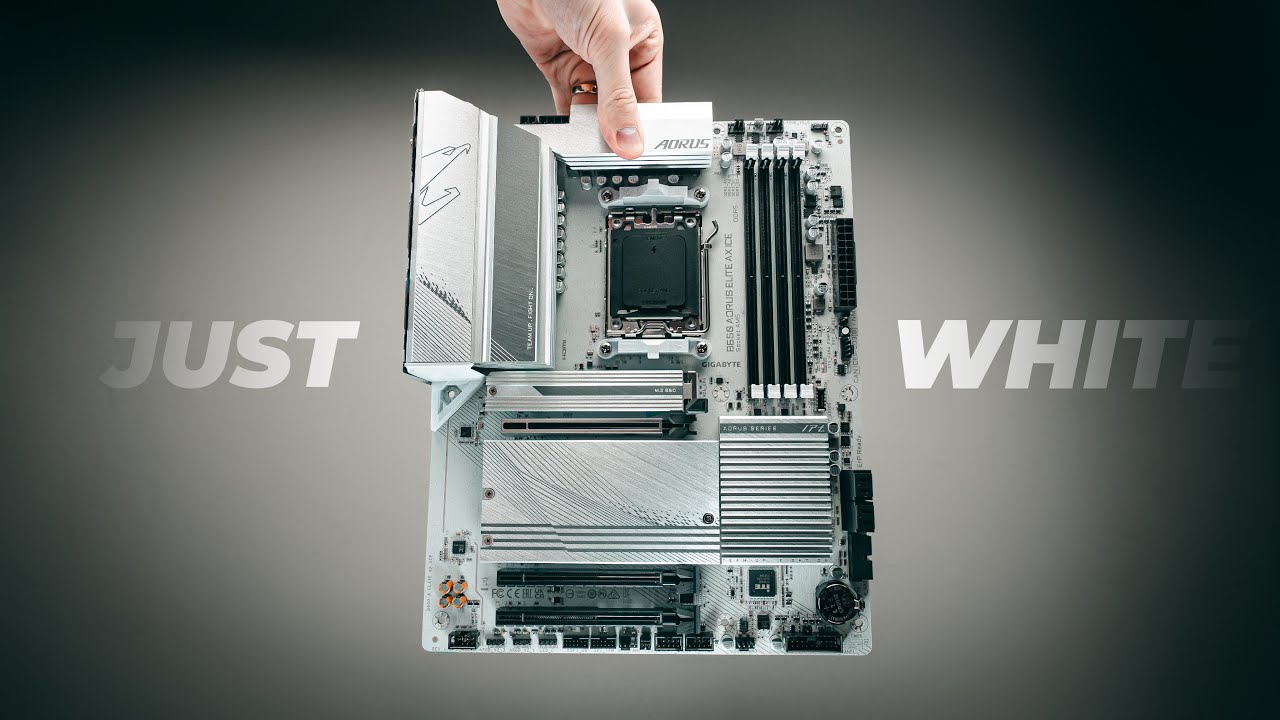

Choosing an AM5 motherboard is less about finding the longest feature list and more about avoiding a poor match for your processor, memory, storage, and case. The wrong board can leave you with too few M.2 slots, dated networking, or an unnecessarily complicated upgrade path.
Our Best AM5 motherboard picks range from the straightforward GIGABYTE B650 AORUS Elite AX to enthusiast boards with five M.2 slots, USB4, advanced overclocking controls, and Wi-Fi 7. The GIGABYTE B650 AORUS Elite AX is the best choice for most builders, while the other nine cover newer chipsets, heavier processors, distinctive designs, and specialized expansion needs.
Comparison
| # | Product | Award | Chipset and M.2 | Networking | Best for |
|---|---|---|---|---|---|
| 1 | GIGABYTE B650 AORUS Elite AX | Best overall | B650, 1 PCIe 5.0 M.2 | Wi-Fi 6E, 2.5GbE | Most Ryzen builds |
| 2 | ASUS ROG Strix X870E-E Gaming WiFi | Best high-end all-rounder | X870E, 5 M.2 | Wi-Fi 7, 5GbE | Enthusiast systems |
| 3 | GIGABYTE B850 AORUS Elite WiFi7 | Best B850 platform | B850, 3 M.2 | Wi-Fi 7, 2.5GbE | Newer mainstream builds |
| 4 | MSI MAG B850 Tomahawk MAX WiFi | Best for memory tuning | B850, 4 M.2 | Wi-Fi 7, 5GbE | High-speed DDR5 |
| 5 | MSI MAG X870 Tomahawk WiFi | Best USB4 option | X870, Gen5 M.2 | Wi-Fi 7, 5GbE | Fast peripherals |
| 6 | ASUS ROG Strix X870-A Gaming WiFi | Best light-colored board | X870, 4 M.2 | Wi-Fi 7 | White PC builds |
| 7 | MSI MPG X870E Carbon WiFi | Best dual-network board | X870E, PCIe 5.0 | Wi-Fi 7, dual LAN | Advanced connectivity |
| 8 | MSI B850 Gaming Plus WiFi | Best memory bundle | B850, Gen5 M.2 | Wi-Fi 7, 5GbE | New builds with DDR5 |
| 9 | ASUS ROG Crosshair X870E Hero | Best for overclocking | X870E, 5 M.2 | Wi-Fi 7 | Ryzen enthusiasts |
| 10 | GIGABYTE B850 AORUS Elite WiFi7 ICE | Best white B850 board | B850, 3 M.2 | Wi-Fi 7, 2.5GbE | White mainstream builds |
1. GIGABYTE B650 AORUS Elite AX: Best Overall

Pros
- Supports Ryzen 7000, 8000, and 9000 processors
- PCIe 5.0 M.2 support
- Four DDR5 memory slots with EXPO and XMP support
- Strong cooling around the VRM and M.2 slot
- Front and rear USB-C
Cons
- Wi-Fi 6E rather than Wi-Fi 7
- Only one PCIe 5.0 M.2 slot
- Older B650 platform
Best for: builders who want a balanced ATX foundation for a current Ryzen system.
The GIGABYTE B650 AORUS Elite AX is the board we would start with for a normal Ryzen desktop. It avoids the distracting excess found on enthusiast models while still covering the parts that affect daily use: four DDR5 DIMM slots, a PCIe 5.0 NVMe M.2 slot, USB-C connectivity, and integrated wireless networking. It is a sensible match for a gaming or productivity system that needs room to grow without turning the motherboard into the centerpiece.
Its power design uses a 14+2+1 phase arrangement with 70A power stages, and the board uses an eight-layer, two-ounce copper PCB. Those figures matter because the board has a sturdier electrical and thermal foundation for multi-core Ryzen processors than a basic entry-level design. A 6mm heatpipe, covered MOSFET heatsinks, and an M.2 Thermal Guard help keep the areas around the CPU and primary storage under control during sustained workloads.
The AM5 socket supports Ryzen 7000, 8000, and 9000 series processors, while the four memory slots accept DDR5 modules with AMD EXPO and Intel XMP support. That gives builders flexibility when choosing a memory kit. Wi-Fi 6E and 2.5GbE cover fast home networking, and PCIe 5.0 is available for the primary M.2 storage slot. The front and rear USB-C ports are useful in a modern case, and EZ-Latch plus Q-Flash make installation and firmware maintenance less fussy.
The limitation is expansion. Compared with the ASUS ROG Strix X870E-E Gaming WiFi, this board has fewer next-generation connections and less room for several high-speed M.2 drives. The newer GIGABYTE B850 AORUS Elite WiFi7 brings Wi-Fi 7 and three M.2 slots, too. Still, for a conventional one-drive build, the B650 AORUS Elite AX is easier to justify and easier to understand. It is the right choice for anyone who wants a capable AM5 base rather than a motherboard built around edge-case expansion.
2. ASUS ROG Strix X870E-E Gaming WiFi: Best High-End All-Rounder

Pros
- Five onboard M.2 slots
- Three PCIe 5.0 M.2 slots
- Dual USB4 Type-C ports
- Wi-Fi 7 and 5GbE
- Extensive diagnostic and installation controls
Cons
- More board than most systems need
- Large heatsinks can complicate cramped builds
- Enthusiast controls require some learning
Best for: high-end Ryzen systems with several fast drives and demanding connectivity needs.
The ASUS ROG Strix X870E-E Gaming WiFi is aimed at the builder who already knows why a premium platform matters. Its strongest argument is not one isolated feature. It is the combination of substantial power delivery, five M.2 slots, unusually broad rear connectivity, and useful tools for troubleshooting a complicated build.
The 18+2+2 power solution uses stages rated at 110A each, with dual ProCool II power connectors, alloy chokes, and durable capacitors. That gives the board considerable headroom for high-core-count Ryzen processors and manual tuning. ASUS also includes Dynamic OC Switcher, Core Flex, asynchronous clock controls, and PBO Enhancement, so experienced users can shape how the processor behaves under different workloads rather than relying on one fixed overclock.
Storage is where this model clearly separates itself from the GIGABYTE B650 AORUS Elite AX and the B850 boards lower in this list. Three onboard M.2 slots use PCIe 5.0, while two more use PCIe 4.0. All five receive substantial cooling solutions. Dual USB4 Type-C ports, a front USB 20Gbps Type-C header, a USB 10Gbps port with up to 30W power delivery, and nine additional USB 10Gbps ports make this a strong workstation board for fast external devices.
ASUS adds Q-Release Slim, M.2 Q-Latch, Q-Slide, Q-Dashboard, Q-Code, Q-LED, BIOS FlashBack, and a pre-mounted I/O shield. Those touches are meaningful when a build has several drives or a large graphics card. The weakness is that the board's feature density can be excessive for a simple gaming PC, and its physical heatsink coverage demands careful case planning. Choose it over the ASUS ROG Crosshair X870E Hero when you want a similarly serious platform with a slightly less extreme focus on enthusiast controls.
3. GIGABYTE B850 AORUS Elite WiFi7: Best B850 Platform

Pros
- Supports Ryzen 7000, 8000, and 9000 processors
- Wi-Fi 7 and 2.5GbE
- Three M.2 slots
- PCIe 5.0 support
- Five-year warranty listed in the product title
Cons
- Fewer M.2 slots than premium X870E boards
- No detailed USB layout in the supplied specifications
- ATX size may not suit compact cases
Best for: a new mainstream AM5 build that needs current wireless networking and practical storage expansion.
The GIGABYTE B850 AORUS Elite WiFi7 is a clean middle ground between the older B650 AORUS Elite AX and the more elaborate X870 models. It keeps the familiar ATX layout and four-DIMM DDR5 design, then updates the platform with Wi-Fi 7, three M.2 slots, and a 14+2+2 power arrangement.
That power design is paired with VRM and M.2 Thermal Guard cooling. The supplied specifications do not give a per-stage current rating, so it would be wrong to treat the phase count as a direct performance guarantee. What it does show is a board designed around the needs of current multi-core Ryzen processors rather than a stripped-down platform intended only for basic processors.
Three M.2 slots give the builder room for an operating system drive, a game library, and another project or scratch drive without immediately reaching for add-in cards. PCIe 5.0 covers the next generation of fast storage and expansion. Wi-Fi 7 is the more notable daily-use upgrade over the first-place GIGABYTE, especially for a new router and a home network that can take advantage of it. The 2.5GbE connection remains practical for wired networks and local transfers.
The MSI MAG B850 Tomahawk MAX WiFi offers four M.2 connectors and a more detailed storage layout, while the GIGABYTE is simpler and has a five-year warranty called out in its title. The drawback is that the supplied product information leaves some rear I/O specifics unstated. Pick this board when three M.2 slots and Wi-Fi 7 are the right balance, not when you need the maximum number of drives or workstation-class expansion.
4. MSI MAG B850 Tomahawk MAX WiFi: Best for Memory Tuning

Pros
- Four M.2 connectors
- Two PCIe 5.0 M.2 slots
- DDR5 support rated at 8400+ MT/s overclocked
- Wi-Fi 7, Bluetooth 5.4, and 5GbE
- Strong VRM cooling provisions
Cons
- Memory figures depend on overclocking and system configuration
- More storage hardware than many builders require
- ATX layout needs a full-size compatible case
Best for: builders who plan to tune DDR5 and install several NVMe drives.
The MSI MAG B850 Tomahawk MAX WiFi is the practical choice for a system where memory and storage matter more than decorative extras. Its four M.2 connectors and two Gen5 x4 slots give it a stronger storage story than the GIGABYTE B850 AORUS Elite WiFi7, while the Wi-Fi 7 module, Bluetooth 5.4, and 5Gbps LAN keep the rest of the platform current.
MSI lists DDR5 Memory Boost support at 8400+ MT/s with overclocking. That is an upper-limit specification, not a promise that every processor and memory kit will run there. The useful takeaway is that the board is designed for serious memory experimentation. Four DDR5 DIMM slots make it possible to start with a matched kit and leave room for later changes, though high-speed memory is always sensitive to the processor's memory controller and the chosen module layout.
The 14 Duet Rail power system uses 80A smart power stages. MSI backs that with 7W/mK MOSFET thermal pads, extra choke thermal pads, an extended heatsink, and the EZ M.2 Shield Frozr II. These are the kinds of details that matter when a high-core-count processor and several fast drives are working at the same time. The PCIe 5.0 x16 slot also uses Steel Armor II for added physical reinforcement around a heavy graphics card.
The MSI MAG X870 Tomahawk WiFi adds USB4 and a newer chipset, but the B850 Tomahawk MAX has the more explicit memory and M.2 emphasis. Its weakness is that the headline DDR5 speed requires tuning and compatible components. Skip it if you want a set-and-forget build with one drive. Choose it if you enjoy configuring memory, need four M.2 slots, and want fast wired networking without moving to a flagship board.
5. MSI MAG X870 Tomahawk WiFi: Best USB4 Option

Pros
- USB4 connection with 40Gbps support
- PCIe 5.0 and Gen5 M.2 support
- Wi-Fi 7 and Bluetooth 5.4
- 5Gbps LAN
- HDMI and DisplayPort outputs
Cons
- Fewer detailed power specifications than some rivals
- X870 features may be unnecessary for a basic build
- No M.2 count is supplied in the product details
Best for: systems that will use fast USB4 storage, docks, or other high-bandwidth peripherals.
The MSI MAG X870 Tomahawk WiFi is the board to consider when external connectivity is part of the build plan. Its built-in USB4 port supports 40Gbps transmission, which can make a real difference with compatible external storage and other demanding peripherals. That port is a more tangible reason to choose this X870 board than the chipset name alone.
It supports Ryzen 7000, 8000, and 9000 processors, DDR5 memory, PCIe 5.0, and Gen5 M.2 storage. MSI's extended heatsink design and enhanced circuit design are intended to help high-end processors run at full speed. The supplied information does not include a phase count or current rating, so this board should be judged by its documented connectivity and cooling design rather than by assumptions about power delivery.
Networking is equally current. Wi-Fi 7 handles compatible wireless networks, Bluetooth 5.4 covers peripherals, and 5Gbps LAN gives wired users more headroom than the 2.5GbE connection on the GIGABYTE B850 AORUS Elite WiFi7. HDMI and DisplayPort outputs are useful when the processor provides integrated graphics, particularly for troubleshooting before a discrete graphics card is installed. Audio Boost 5 adds an isolated audio design and a high-quality audio processor.
The MSI MAG B850 Tomahawk MAX WiFi offers more explicit storage detail and a higher stated memory overclocking ceiling, but it does not make USB4 the headline feature. The X870 Tomahawk is the better fit for creators and power users who already own fast USB-C equipment. It is less compelling for a gaming-only machine whose external devices are ordinary USB accessories.
6. ASUS ROG Strix X870-A Gaming WiFi: Best Light-Colored Board

Pros
- Wi-Fi 7
- Four M.2 slots
- USB4 support
- Dynamic OC Switcher and Core Flex
- Strong 16+2+2 power solution
Cons
- Fewer M.2 slots than the X870E-E model
- White and silver styling narrows case-matching options
- Advanced controls may be unnecessary for a basic gaming build
Best for: a light-colored ATX gaming system with modern expansion and enthusiast-friendly controls.
The ASUS ROG Strix X870-A Gaming WiFi brings the ROG Strix feature set to a light-colored board without reducing the core platform capabilities. It is a particularly good match for a white or silver build, but the styling is not the only reason to consider it. This is a serious X870 board with four M.2 slots, Wi-Fi 7, PCIe 5.0, and USB4.
Its 16+2+2 power solution uses stages rated at 90A per stage, with dual ProCool II power connectors, alloy chokes, and durable capacitors. That is a strong foundation for multi-core Ryzen processors. Dynamic OC Switcher, Core Flex, asynchronous clock controls, and PBO Enhancement give advanced users more ways to tune performance, while ASUS AI Cooling II and AI Networking aim to simplify the process for people who do not want to adjust every setting manually.
Four M.2 slots are enough for most gaming systems and many editing workstations. The board supports Ryzen 7000, 8000, and 9000 processors and DDR5 memory through ASUS AEMP. PCIe 5.0 covers the main expansion path, and the ROG installation features are useful during a first build or a later upgrade. Compared with the ASUS ROG Strix X870E-E Gaming WiFi, it gives up one M.2 slot and uses a less elaborate X870E platform.
That trade-off makes the X870-A easier to target. Its real weakness is not capability but specialization. The light color may clash with a dark interior, and the enthusiast controls add complexity if you only want to enable a memory profile and play games. For a coordinated light-colored PC that needs modern wireless and USB connectivity, it is the ASUS board to choose.
7. MSI MPG X870E Carbon WiFi: Best Dual-Network Board

Pros
- X870E platform with PCIe 5.0
- Wi-Fi 7 and Bluetooth 5.4
- Dual LAN networking
- Heavy MOSFET and M.2 cooling
- EZ PCIe release button
Cons
- Heavy heatsink design
- Dual LAN is unnecessary for many homes
- M.2 count is not specified in the supplied details
Best for: advanced systems that need separate wired network connections as well as fast wireless networking.
The MSI MPG X870E Carbon WiFi earns its place through networking flexibility. It combines Wi-Fi 7 with Bluetooth 5.4 and dual LAN, making it more interesting for a workstation, home server, streaming setup, or system that separates local and internet traffic. Most gaming PCs do not need two network connections, but the people who do need them will notice the difference immediately.
The board supports Ryzen 7000, 8000, and 9000 processors, DDR5 memory, PCIe 5.0, Gen5 M.2 storage, SATA 6Gb/s, and USB 40Gbps. The X870E platform gives it a high-end expansion foundation, while the PCIe 5.0 solution is listed with up to 128GB/s bandwidth. That figure describes the interface capability, not the speed of every installed device, but it confirms that the board is prepared for current high-speed expansion hardware.
MSI uses a plated MOSFET heatsink connected by a heatpipe, 7W/mK thermal pads, extra choke pads, and onboard M.2 Shield Frozr cooling. It also includes an EZ PCIe Release button, which is a welcome detail when a large graphics card makes the slot latch difficult to reach. The board's design is substantial, and the supplied dimensions and weight indicate a full-featured ATX build rather than a minimalist platform.
The MSI MAG X870 Tomahawk WiFi is a more focused choice if one LAN port and USB4 are enough. The MPG X870E Carbon WiFi makes sense when network separation is part of the plan, not as a general-purpose upgrade. Its weakness is that the supplied specifications do not state the number of M.2 slots, so storage-heavy buyers should confirm the layout before committing.
8. MSI B850 Gaming Plus WiFi: Best Memory Bundle

Pros
- Includes a 32GB DDR5 memory kit
- Memory supports AMD EXPO and Intel XMP
- PCIe 5.0 x16 and PCIe 4.0 x16 slots
- Wi-Fi 7 and 5GbE
- DDR5 support rated at 8200+ MT/s overclocked
Cons
- Bundle is less useful for builders who already own DDR5
- Memory kit is specified at 6000MHz with CL38 timings
- Motherboard storage layout is not fully described
Best for: new AM5 systems where the motherboard and matched memory should arrive together.
The MSI B850 Gaming Plus WiFi is different from every other entry here because the product is a motherboard and DDR5 bundle. The included TEAMGROUP T-Force Delta kit contains 32GB as two 16GB modules, so a new builder can avoid one of the most common AM5 setup decisions: choosing a compatible memory kit after selecting the board.
The included memory is specified at 6000MHz with CL38 timings and supports one-click activation through Intel XMP 3.0 or AMD EXPO. That is more useful than a lofty unsupported memory claim because it describes the configuration the bundle is intended to provide. MSI also lists motherboard support for DDR5 memory at 8200+ MT/s with overclocking, but that ceiling depends on the processor, modules, and BIOS settings.
The board supports Ryzen 7000 through 9000 processors, PCIe 5.0 x16, PCIe 4.0 x16, a Gen5 M.2 slot, Wi-Fi 7, and 5G LAN. The mix suits a new gaming or general-purpose PC that needs current graphics and network interfaces. The included memory also leaves two slots open for future expansion, though adding modules later can affect achievable memory speed.
The MSI MAG B850 Tomahawk MAX WiFi is the stronger choice if you are selecting memory separately and want four detailed M.2 options. This bundle is more straightforward for someone starting with no DDR5 hardware. Its drawback is obvious: owners of a suitable memory kit gain little from the package. For the rest, it removes a compatibility step and gives the build a ready-to-configure memory baseline.
9. ASUS ROG Crosshair X870E Hero: Best for Overclocking

Pros
- 18+2+2 power stages rated at 110A
- Five M.2 slots
- Wi-Fi 7 and USB4
- Dynamic OC Switcher and Core Flex
- Extensive AI-assisted control features
Cons
- Enthusiast controls are excessive for basic builds
- Large physical design
- Five M.2 slots may exceed ordinary needs
Best for: experienced builders who want extensive Ryzen tuning and expansion options.
The ASUS ROG Crosshair X870E Hero is the enthusiast answer in this group. It is built for someone who wants to experiment with processor behavior, memory, cooling, and expansion rather than simply install a CPU and leave every setting alone. Its 18+2+2 power stages are rated at 110A, and ASUS pairs them with ProCool II connectors, MicroFine alloy chokes, and premium metallic capacitors.
Dynamic OC Switcher and Core Flex are the headline tuning tools. They let an experienced builder approach performance differently across workloads, while AI Overclocking, AI Cooling II, AI Networking, and AEMP offer assistance with setup. The features are meaningful, but they also require a willingness to read the firmware options and understand what is being changed. This is not the board we would recommend to someone who finds BIOS configuration irritating.
Storage and connectivity are equally generous. Five M.2 slots provide room for a large collection of drives, PCIe 5.0 supports the primary expansion path, and USB4 handles compatible high-speed accessories. Wi-Fi 7 keeps wireless networking current. The board supports Ryzen 7000, 8000, and 9000 processors, so it can anchor a broad range of AM5 systems.
The ASUS ROG Strix X870E-E Gaming WiFi offers five M.2 slots and much of the same broad platform appeal, while the Crosshair Hero is the more natural pick for hands-on tuning. Its weakness is simple: most users will not use the full feature set. Choose it for a high-end Ryzen processor, several drives, and a genuine interest in overclocking. Skip it if the motherboard's job is simply to provide a stable home for a graphics card and one SSD.
10. GIGABYTE B850 AORUS Elite WiFi7 ICE: Best White B850 Board
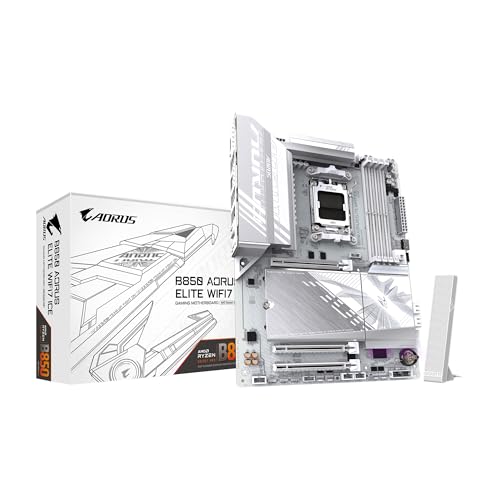
Pros
- Light-colored ATX design
- Wi-Fi 7 and 2.5GbE
- Three M.2 slots
- PCIe 5.0 support
- Five-year warranty listed in the product title
Cons
- Same core feature set as the black B850 AORUS Elite WiFi7
- Three M.2 slots may not suit storage-heavy workstations
- Styling is less flexible in dark builds
Best for: light-colored AM5 systems that need a current B850 platform.
The GIGABYTE B850 AORUS Elite WiFi7 ICE is the light-colored counterpart to the standard B850 AORUS Elite WiFi7. The core platform remains familiar: AM5 support for Ryzen 7000, 8000, and 9000 processors, four DDR5 DIMM slots, a 14+2+2 power design, three M.2 slots, PCIe 5.0, USB-C, Wi-Fi 7, and 2.5GbE.
Its main reason to exist is build coordination. A white or light-colored motherboard can make a major difference in a system where the case interior, graphics card, cooler, and memory follow the same theme. The styling does not replace useful hardware, though. Three M.2 slots allow a sensible operating system, games, and project-storage layout, while VRM and M.2 Thermal Guard cooling address the areas most likely to need passive cooling.
The board is listed as ATX and weighs about 4.4 pounds, so it belongs in a standard ATX case rather than a compact enclosure. EZ-Latch features make graphics card and storage installation less awkward, and the five-year warranty listed in the product title provides a longer stated coverage period than many ordinary component listings. The supplied details do not identify the full rear I/O arrangement, so users with specific port requirements should verify those before ordering.
The black GIGABYTE B850 AORUS Elite WiFi7 has the same documented core specifications and is the more flexible visual choice for a mixed-color build. The ICE version is the one to select when the white theme matters. Its real weakness is duplication rather than performance: if the color does not matter, there is little reason to choose it over the standard version.

How to choose best am5 motherboard
The right AM5 motherboard starts with the processor and the parts you already plan to install. These are the factors that separate a board that will stay useful from one that only looks impressive on a specification sheet.
Chipset and processor support
Every board here uses the AM5 socket and lists support for Ryzen 7000, 8000, and 9000 processors. The chipset still matters because it affects expansion, connectivity, and the platform features available around that socket. B650 and B850 boards are usually the straightforward route for a gaming system, while X870 and X870E models make more sense when USB4, additional PCIe capability, or advanced tuning is central to the build.
Check firmware support before installing a newer processor, especially when pairing an older board with a recently released chip. Features such as Q-Flash, BIOS FlashBack, and clear diagnostic controls can make that process easier.
Power delivery and cooling
Power phases and current ratings describe the board's ability to feed the processor, but they should not be read as a simple ranking system. The ASUS ROG Crosshair X870E Hero and ASUS ROG Strix X870E-E Gaming WiFi specify 110A stages, while the ASUS ROG Strix X870-A Gaming WiFi lists 90A stages and the MSI MAG B850 Tomahawk MAX WiFi lists 80A stages.
Heatsinks and thermal pads matter just as much for sustained workloads. Look for covered MOSFET heatsinks, heatpipes, extended heatsinks, and an M.2 heatsink when pairing the board with a high-core-count processor or several fast drives.
M.2 and PCIe expansion
A single PCIe 5.0 M.2 slot is enough for many systems. Three or more slots become useful when the computer will hold separate operating system, game, media, and scratch drives. The ASUS ROG Strix X870E-E Gaming WiFi and ASUS ROG Crosshair X870E Hero each list five M.2 slots, while the MSI MAG B850 Tomahawk MAX WiFi lists four.
PCIe 5.0 is also relevant to the graphics slot and future expansion cards. Do not assume every slot runs at the same speed. Read the board layout and the manual if you plan to use several cards or drives at once.
Buy the board that supports the drives and ports you will actually install, not the one with the longest feature list.
Memory support
All ten boards use DDR5, and several list support for AMD EXPO and Intel XMP. These profiles make it easier to run a memory kit at its rated settings, but advertised overclocking ceilings are not guarantees. The processor's memory controller, the number of modules, and the BIOS all influence stability.
For most builds, two matched DIMMs are a simpler starting point than filling all four slots. The MSI B850 Gaming Plus WiFi is unusual because it includes a 32GB kit rated at 6000MHz with CL38 timings, giving new builders a defined starting configuration.
Networking and external ports
Wi-Fi 7 appears on most of the newer boards, while the GIGABYTE B650 AORUS Elite AX uses Wi-Fi 6E. A wireless standard only helps if the router and client devices support it, but Wi-Fi 7 is a sensible feature for a new long-term build. Wired networking ranges from 2.5GbE to 5Gbps LAN, with the MSI MPG X870E Carbon WiFi adding dual LAN.
USB4 is the more specialized feature. The ASUS ROG boards and MSI MAG X870 Tomahawk WiFi list USB4 support, which is useful for compatible docks and fast external storage. If you are still choosing the processor for the system, compare it with the processor traits that matter in a gaming build before spending on motherboard features you may not use.
A motherboard also affects the rest of the system. Planning the graphics card first can help, and how the graphics card changes the rest of the build is worth considering before choosing the number of PCIe slots and power connectors you need.
Frequently asked questions
Which AM5 motherboard is best for most Ryzen builds?
The GIGABYTE B650 AORUS Elite AX is the best fit for most conventional systems. It supports Ryzen 7000, 8000, and 9000 processors, four DDR5 modules, PCIe 5.0 storage, USB-C, Wi-Fi 6E, and 2.5GbE. Choose a newer B850 or X870 board when Wi-Fi 7, USB4, or additional M.2 slots is important.
Do all of these motherboards support Ryzen 9000 processors?
Each product's supplied specifications list support for Ryzen 9000 processors. BIOS support can still matter when installing a newer processor on a board that was released earlier, so check the firmware requirements and use the board's flashback or update feature when available.
Is B850 better than B650 for AM5?
B850 is a newer chipset generation in this selection and commonly brings newer connectivity such as Wi-Fi 7. B650 can still be the better fit when one PCIe 5.0 M.2 slot, Wi-Fi 6E, and a straightforward expansion layout cover your needs. The chipset name alone does not determine processor performance.
How many M.2 slots should a gaming PC have?
Two M.2 slots are enough for many gaming systems, while three or four provide more flexibility for separate game, media, or project drives. Five slots, as found on the ASUS ROG Strix X870E-E Gaming WiFi and ASUS ROG Crosshair X870E Hero, are more useful for storage-heavy workstations than ordinary gaming PCs.
Does Wi-Fi 7 require a Wi-Fi 7 router?
A Wi-Fi 7 router is needed to use the newest Wi-Fi 7 capabilities. These boards can still connect to compatible older wireless networks, but the connection will operate according to the capabilities of the router and client device.
Is an ATX motherboard suitable for every PC case?
No. All ten boards in this roundup are ATX models, so the case must support ATX. A larger case can also make it easier to work around tall heatsinks, large graphics cards, and multiple M.2 covers.
Is the included memory bundle on the MSI B850 Gaming Plus WiFi useful?
It is useful if you are starting a new AM5 build without DDR5 memory. The bundle includes two 16GB modules for 32GB total, with a stated 6000MHz speed and CL38 timings, plus support for AMD EXPO and Intel XMP. Existing DDR5 owners have less reason to choose that package.
The bottom line
The GIGABYTE B650 AORUS Elite AX remains the most sensible choice for a broad range of systems. It has the AM5 processor support, DDR5 compatibility, PCIe 5.0 storage, USB-C, wireless networking, and cooling that most builders actually need. The GIGABYTE B850 AORUS Elite WiFi7 is the better alternative when Wi-Fi 7 and three M.2 slots are priorities.
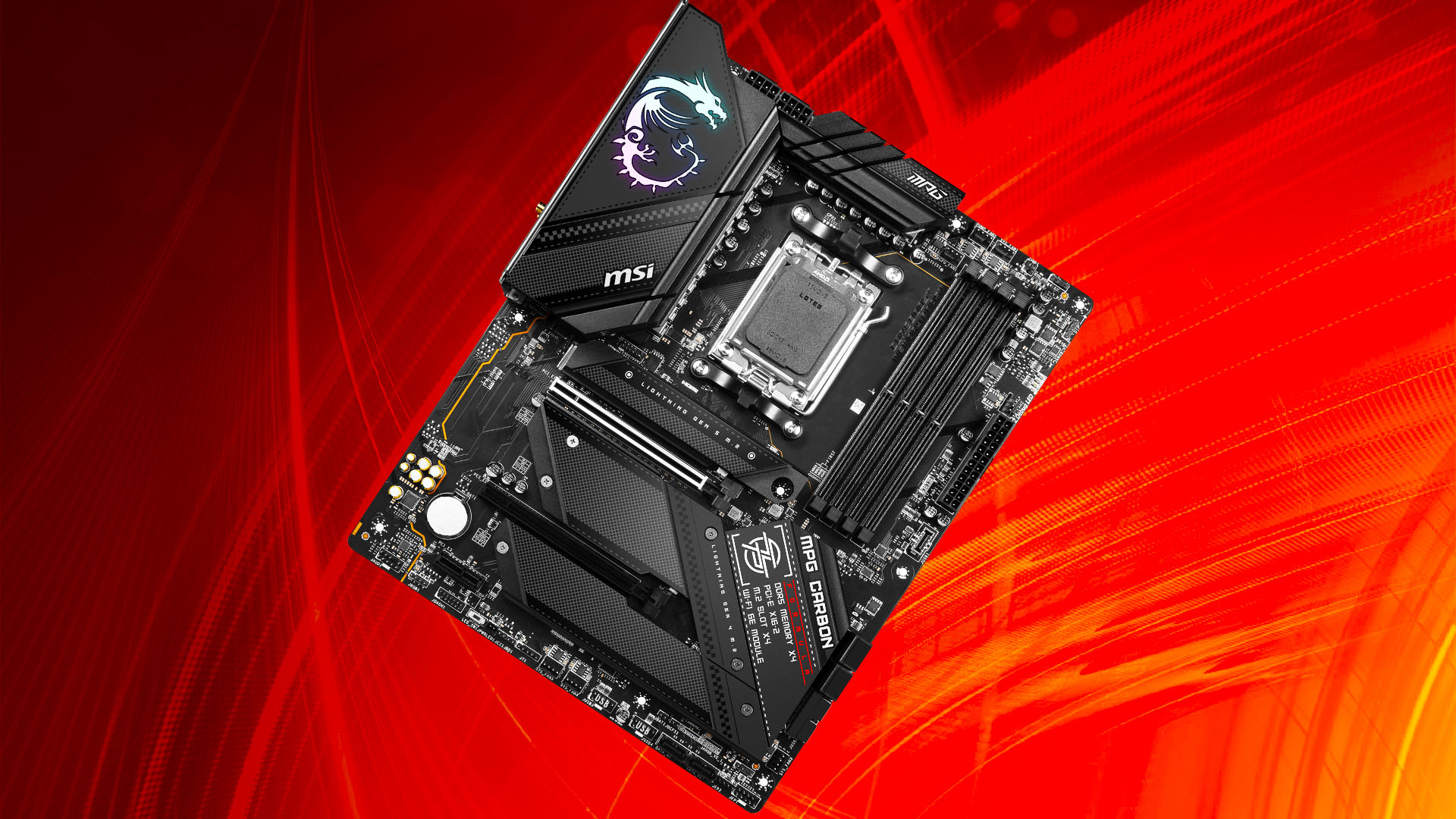
For enthusiasts, the ASUS ROG Strix X870E-E Gaming WiFi and ASUS ROG Crosshair X870E Hero offer the broadest storage and tuning options, while the MSI MAG X870 Tomahawk WiFi stands out for USB4. The Best AM5 motherboard for an undecided reader is the GIGABYTE B650 AORUS Elite AX, unless several fast drives or newer high-speed connections are already part of the plan.
As an Amazon Associate we earn from qualifying purchases.