

Choosing a desktop CPU is rarely just about counting cores. A processor can be excellent for high-refresh gaming yet less suitable for compiling code, editing video, or running several demanding applications at once. The platform matters too, since a socket choice determines which memory and motherboard upgrades remain open.
Our Best gaming processor picks cover current AMD AM5 chips, established AM4 options, and Intel's hybrid-core alternative. AMD Ryzen 7 9800X3D is the single best pick for a gaming-first build, while the list also includes strong options for content creation, older AM4 systems, and more modest gaming PCs.
| # | Product | Award | Cores and threads | Max boost | Platform | Best for |
|---|---|---|---|---|---|---|
| 1 | AMD Ryzen 7 9800X3D | Best overall | 8 cores, 16 threads | Up to 5.2 GHz | AM5 | High-refresh gaming |
| 2 | AMD Ryzen 9 9950X3D | Best for gaming and creation | 16 cores | Up to 5.7 GHz | AM5 | Gaming and heavy workloads |
| 3 | AMD Ryzen 7 7800X3D | Best previous-generation gaming chip | 8 cores, 16 threads | 4.2 GHz listed clock | AM5 | Established gaming builds |
| 4 | AMD Ryzen 5 9600X | Best six-core AM5 option | 6 cores, 12 threads | Up to 5.4 GHz | AM5 | Mainstream gaming |
| 5 | AMD Ryzen 5 5500 | Best for an AM4 refresh | 6 cores, 12 threads | Up to 4.2 GHz | AM4 | Existing AM4 systems |
| 6 | AMD Ryzen 7 5800X3D | Best AM4 gaming upgrade | 8 cores, 16 threads | Up to 4.5 GHz | AM4 | Extending an AM4 build |
| 7 | AMD Ryzen 7 9700X | Best non-X3D all-rounder | 8 cores, 16 threads | Up to 5.5 GHz | AM5 | Gaming and everyday creation |
| 8 | Intel Core Ultra 9 285K | Best Intel hybrid design | 24 cores, 24 threads | Up to 5.7 GHz | Intel 800 series | Multitasking and gaming |
| 9 | AMD Ryzen 9 7900X | Best 12-core option | 12 cores, 24 threads | 4.7 GHz listed clock | AM5 | Multithreaded desktop work |
| 10 | AMD Ryzen 7 7700X | Best balanced Zen 4 chip | 8 cores, 16 threads | Up to 5.4 GHz | AM5 | Versatile gaming PCs |
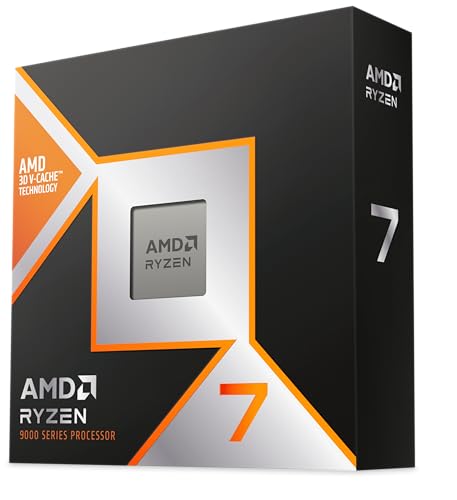
1. AMD Ryzen 7 9800X3D: Best Overall
Pros
- 3D V-Cache is built specifically around gaming workloads
- Zen 5 architecture brings a stated IPC uplift
- AM5 platform leaves room for future upgrades
- Efficient eight-core, 16-thread design
Cons
- Cooler is not included
- Sixteen threads are less suited to heavy production work than the Ryzen 9 models
Best for: a gaming-first AM5 build where frame consistency and high refresh rates matter most.
The AMD Ryzen 7 9800X3D is the one we'd choose when the computer's main job is playing games. Its eight cores and 16 threads are a sensible gaming configuration, but the defining feature is the 96MB of L3 cache. That large pool of nearby data can help games keep more of what they need close to the cores, which is precisely the kind of behavior that makes an X3D processor more interesting than a conventional high-clock chip.
This is also a Zen 5 processor, and the listing cites an approximately 16 percent IPC uplift. Its boost clock reaches up to 5.2 GHz, so it is not relying on cache alone. The combination gives this chip a more modern balance than the older Ryzen 7 7800X3D, while its AM5 socket matches the current AMD desktop platform. If you are planning a new build, that platform choice is just as important as the processor itself because it avoids starting with the older AM4 memory and motherboard ecosystem.
The Ryzen 9 9950X3D has more cores and reaches up to 5.7 GHz, making it the stronger tool for sustained creation work. For a gaming-only machine, though, the 9800X3D is the cleaner recommendation. The Ryzen 7 9700X is another capable eight-core AM5 chip, but it lacks the X3D cache design that gives this model its gaming focus. Readers assembling a complete system should also think through how the processor and motherboard need to work together, especially if PCIe 5.0 storage or later CPU upgrades are part of the plan.
The weakness is straightforward: there is no cooler in the box. You need to select a compatible cooling solution and allow room for it in the build. The eight-core layout is also not the right answer for someone whose work is dominated by long renders or similarly parallel tasks. For everyone else, this is the most focused gaming pick here, with enough general desktop headroom to avoid feeling narrow outside games.
2. AMD Ryzen 9 9950X3D: Best for Gaming and Creation

Pros
- Sixteen cores suit demanding multitasking
- 3D V-Cache targets gaming workloads
- Up to 5.7 GHz boost clock
- Zen 5 architecture and AM5 support
Cons
- More processor than a gaming-only system needs
- No thermal solution is listed
Best for: a powerful AM5 desktop that must handle games and serious content creation.
The AMD Ryzen 9 9950X3D is the specialist pick for someone who refuses to separate a gaming PC from a work machine. Sixteen cores give it twice the core count of the Ryzen 7 9800X3D, and the listing identifies the chip as a gaming and content creation processor. That makes the extra hardware easier to justify for video work, 3D applications, encoding, or a busy streaming setup.
Its Zen 5 design reaches up to 5.7 GHz, with a 4.3 GHz base clock listed in the product information. Those figures describe a chip built for both responsive single-threaded work and broad parallel workloads. The X3D designation matters here because this is not simply a high-core-count productivity processor. It retains the gaming-oriented cache approach while adding the cores that the 9800X3D does not have.
For gaming alone, the Ryzen 7 9800X3D is the more focused choice. The 9950X3D becomes more compelling when the PC will game while recording, stream, render, or run several demanding applications. The Ryzen 9 7900X is another AM5 12-core route, but the 9950X3D offers four more cores and a higher listed boost ceiling. It is the model to choose when gaming performance cannot come at the expense of workstation capability.
The trade-off is scale. A sixteen-core desktop processor needs a carefully planned cooling and power setup, and the listing does not include a thermal solution. It also makes less sense for a simple gaming tower where the graphics card and display are the main priorities. Choose this chip if you can name the non-gaming workloads that will use its additional cores, not merely because a larger core count looks impressive.
For a creator who also plays, this is the most complete processor in the group. It is more versatile than the 9800X3D, while the 9800X3D remains the sharper answer for a pure gaming build.
3. AMD Ryzen 7 7800X3D: Best Previous-Generation Gaming Chip

Pros
- Eight cores and 16 threads remain well suited to gaming
- 96MB of L3 cache
- AM5 platform support
- Integrated AMD Radeon graphics controller
Cons
- Listed 4.2 GHz clock is behind newer Zen 5 options
- No cooler is included
Best for: a gaming build that wants X3D cache and the AM5 platform without moving to a newer Ryzen 9000 chip.
The AMD Ryzen 7 7800X3D remains an easy processor to understand. It has eight cores, 16 threads, and a large 96MB L3 cache, so its design is heavily tilted toward gaming rather than workstation throughput. That simplicity is part of its appeal. There are no unusual hybrid core groups to account for, and the AM5 socket puts it in the same broad platform family as the newer Ryzen 7 9800X3D.
The listed clock speed is 4.2 GHz, and the product information reports an 89°C maximum operating temperature. Those details place it behind the newer 9800X3D in generation and clock headroom, but the 7800X3D still has the cache structure that makes this product family relevant for games. It also includes an AMD Radeon graphics controller, useful for basic display output and troubleshooting even when a discrete graphics card handles gaming.
The 9800X3D is the better pick for a new high-end gaming build because it uses Zen 5 and advertises improved performance and thermal behavior. The 7800X3D is more interesting when you are already considering an AM5 system and want a proven eight-core gaming layout. Compared with the Ryzen 7 7700X, it gives gaming a more specialized cache design, while the 7700X has a more conventional Zen 4 configuration.
There are two practical limitations. First, no cooler is included, so the build still needs a separate cooling plan. Second, this is not a sixteen-core processor for heavy production work. Someone editing video regularly or running demanding applications beside a game should look toward the Ryzen 9 9950X3D or Ryzen 9 7900X.
The AMD Ryzen 7 7800X3D is best viewed as a focused AM5 gaming chip, not a general-purpose workstation replacement. It makes the most sense for a buyer who wants the X3D approach and has a specific reason to choose this generation instead of the newer 9800X3D.
4. AMD Ryzen 5 9600X: Best Six-Core AM5 Option

Pros
- Zen 5 architecture in a six-core design
- Up to 5.4 GHz boost clock
- Unlocked for overclocking
- DDR5-5600 support and AM5 compatibility
Cons
- Six cores limit heavy parallel workloads
- Cooler is not included
Best for: a responsive mainstream gaming PC built on AMD's current AM5 platform.
The AMD Ryzen 5 9600X is the sensible middle ground in this list. Six cores and 12 threads are enough for a conventional gaming desktop, while Zen 5 and a boost clock of up to 5.4 GHz give it current-generation credentials. It does not try to be a miniature workstation. Instead, it concentrates on the fast, responsive behavior that makes a gaming system feel quick in menus, applications, and games.
The processor has 38MB of cache and supports DDR5-5600 memory. Those numbers matter because the chip belongs on AM5, not the older AM4 platform. It can also support PCIe 5.0 on select motherboards, giving a new builder access to current expansion features where the motherboard supports them. The processor is unlocked, so experienced builders have room to experiment with tuning rather than being locked to its out-of-box settings.
The Ryzen 7 9700X adds two cores and a higher 5.5 GHz boost ceiling, so it is the safer choice for gaming alongside frequent creative or multitasking work. The Ryzen 7 9800X3D remains the more specialized gaming pick because of its 96MB L3 cache. The 9600X earns its place by offering a straightforward current AM5 foundation without stepping into the larger Ryzen 7 and Ryzen 9 designs.
The limitations are real. Six cores and 12 threads are not ideal for long, heavily parallel workloads, and the box does not include a cooler. You will need to choose cooling and a motherboard that support the intended configuration. Someone upgrading an AM4 system should also remember that this is a platform change, not a drop-in CPU replacement.
For a new gaming desktop with a sensible six-core architecture, this is the AMD chip we'd start with before moving up to the X3D models. It is especially well suited to a buyer who wants the AM5 upgrade path and does not need a large core count for work.
5. AMD Ryzen 5 5500: Best for an AM4 Refresh

Pros
- Six cores and 12 threads
- Compatible with the AM4 platform
- Wraith Stealth cooler is bundled
- Unlocked for overclocking
- DDR4-3200 support
Cons
- Older AM4 platform
- Discrete graphics card is required for gaming
- Four-point-two GHz maximum boost is below newer chips
Best for: upgrading an existing AM4 desktop while keeping its motherboard and DDR4 memory.
The AMD Ryzen 5 5500 is not aimed at a brand-new cutting-edge PC. Its real appeal is avoiding an unnecessary platform change. The six-core, 12-thread design fits an AM4 system, and the bundled Wraith Stealth cooler means the processor arrives with a basic cooling solution rather than requiring one to be selected separately.
Its maximum boost is listed at 4.2 GHz, with 19MB of cache and DDR4-3200 support. Those specifications clearly separate it from the AM5 processors above. The memory and socket requirements are older, but that can be exactly what an existing AM4 owner needs. The processor is also unlocked, giving builders the option to tune it, and the listing states that a discrete graphics card is required.
The Ryzen 5 9600X is the much more modern six-core choice for a new build, with Zen 5, DDR5-5600 support, and a boost clock up to 5.4 GHz. The Ryzen 5 5500 makes sense only when the surrounding AM4 components are staying in place. It is a more practical upgrade path than buying a processor that forces a new motherboard and memory kit.
Do not choose it for a system that needs integrated graphics, since the listing explicitly requires a discrete graphics card. It also has less cache and lower clock headroom than the newer processors. The included cooler is convenient, but buyers should still make sure their case airflow and motherboard support are appropriate.
This is the AM4 maintenance pick. If your current desktop already uses that socket and you want six cores without rebuilding everything around AM5, the Ryzen 5 5500 is the cleanest fit in this group.
6. AMD Ryzen 7 5800X3D: Best AM4 Gaming Upgrade

Pros
- Eight cores and 16 threads
- 100MB total listed cache
- 3D V-Cache technology
- AM4 compatibility
- PCIe 4.0 support on X570 and B550 motherboards
Cons
- High-performance cooler is recommended
- Older AM4 platform
- Lower boost clock than current AM5 alternatives
Best for: extending the gaming life of an AM4 desktop with a compatible motherboard.
The AMD Ryzen 7 5800X3D is the upgrade specialist. Eight cores and 16 threads give it the same broad core layout as the 7800X3D, but the important detail is its 3D V-Cache technology on the AM4 platform. The listing reports 100MB of cache, making this processor much more gaming-focused than a conventional Ryzen 7 from the same socket family.
It reaches up to 4.5 GHz and supports DDR4-3200. That is not as dramatic on paper as the newer AM5 chips, but it keeps the upgrade centered on the motherboard and memory already in the system. PCIe 4.0 support is available on X570 and B550 motherboards. Compatibility still needs checking, since the motherboard chipset and firmware determine whether the processor can be used as intended.
The Ryzen 7 7800X3D moves the same general gaming idea to AM5, while the Ryzen 5 5500 is the simpler six-core AM4 option. The 5800X3D is the one to consider when gaming is important and the current AM4 board is worth preserving. Starting from scratch, the newer AM5 platform gives more room for future processor changes, but that is a different decision from upgrading a working desktop.
Cooling deserves attention. The listing says a high-performance cooler is recommended and does not include one. This is not the processor to buy casually without checking the existing cooler, motherboard support, and case airflow. It also lacks the newer platform features attached to AM5, so a buyer planning several future upgrades should think beyond the immediate gaming result.
For an AM4 owner with a suitable X570 or B550 board, this is the strongest upgrade-oriented pick here. It makes more sense as a way to extend an existing PC than as the foundation for an entirely new machine.
7. AMD Ryzen 7 9700X: Best Non-X3D All-Rounder

Pros
- Eight cores and 16 threads
- Zen 5 architecture
- Up to 5.5 GHz boost clock
- DDR5-5600 and AM5 support
- PCIe 5.0 support on select motherboards
Cons
- No 3D V-Cache
- Cooler is not included
- Less suited to the heaviest multithreaded work than Ryzen 9 models
Best for: a balanced AM5 desktop that handles games and general creation without an X3D design.
The AMD Ryzen 7 9700X is the conventional alternative to the 9800X3D. It uses Zen 5, has eight cores and 16 threads, and reaches up to 5.5 GHz. That makes it a natural fit for a PC that needs to move between gaming, everyday desktop work, and moderate creation tasks without making the cache design the center of the build.
Its 40MB cache and DDR5-5600 support place it firmly in the current AM5 ecosystem. PCIe 5.0 is supported on select motherboards, so the processor can sit in a system designed around newer storage or expansion hardware when the rest of the components support those features. The unlocked design also gives technically minded builders room to tune the chip.
The 9800X3D is the better gaming specialist because its 96MB L3 cache is specifically called out for gaming. The 9700X has the higher listed boost ceiling, though, and its conventional design may be preferable to someone who wants a more evenly balanced desktop CPU. The Ryzen 9 7900X adds four cores, making it more appropriate for heavier parallel workloads, but the 9700X is less oversized for a mixed-use gaming PC.
There is no cooler in the box, so the cooling decision remains part of the build. The lack of 3D V-Cache also means this is not the chip we'd select for a high-refresh gaming system where the last stretch of CPU-limited performance is the priority. Buyers focused on frame rates should compare it directly with the 9800X3D rather than assuming the newer Zen 5 architecture settles the question.
Choose the 9700X when you want a strong all-round AM5 processor and prefer a conventional eight-core design. It is a better fit for mixed use than a narrowly gaming-focused chip, while still giving a gaming desktop plenty of CPU headroom.
8. Intel Core Ultra 9 285K: Best Intel Hybrid Design

Pros
- 24 cores made up of eight P-cores and 16 E-cores
- Up to 5.7 GHz unlocked boost
- Integrated Intel Graphics
- PCIe 5.0 and PCIe 4.0 support
- 40MB cache
Cons
- Requires an Intel 800 series chipset motherboard
- No thermal solution is included
- Hybrid architecture is more complex than a uniform-core design
Best for: an Intel-based desktop that combines gaming, multitasking, and demanding background workloads.
The Intel Core Ultra 9 285K takes a different route from every AMD processor here. It uses 24 cores, split between eight performance cores and 16 efficiency cores, with 24 threads listed. The performance hybrid architecture assigns workloads across those two core types, which is useful when a game, browser, capture software, and other applications are all active at once.
A maximum speed of up to 5.7 GHz and 40MB of cache give it the headline specifications expected from Intel's top desktop tier. It is unlocked, and the platform supports PCIe 5.0 and PCIe 4.0. Integrated Intel Graphics is included as well, giving the system a basic display path for setup and troubleshooting when a discrete graphics card is not being used.
The platform difference is significant. This chip requires an Intel 800 series chipset motherboard, so it is not an alternative for an AM5 or AM4 upgrade. The Ryzen 9 9950X3D offers a uniform 16-core AMD design with an X3D gaming focus, while the 285K offers more listed cores through its hybrid arrangement. Picking between them should start with the motherboard ecosystem and the applications you use, not just the maximum boost number.
Intel does not include a thermal solution, and a high-end processor with this many cores deserves careful cooling and case planning. The hybrid layout can also make software scheduling and workload behavior more complicated than a processor with one core type. That does not make it unsuitable for gaming, but it does mean that buyers should be comfortable building around Intel's current platform requirements.
This is the right pick for an Intel loyalist or a user whose desktop workload genuinely benefits from many simultaneous tasks. For a gaming-only build, the AMD X3D models are more direct recommendations. For a PC that games while doing a lot else, the Core Ultra 9 285K has a clear reason to exist.
9. AMD Ryzen 9 7900X: Best 12-Core Option

Pros
- 12 cores and 24 threads
- AM5 platform support
- 64MB L3 cache
- Integrated AMD Radeon graphics controller
- 5 nm process technology
Cons
- Not an X3D gaming design
- No cooler is included
- Older Zen 4 architecture than the Ryzen 9000 options
Best for: a multithreaded AM5 desktop that also plays games.
The AMD Ryzen 9 7900X is aimed at the buyer who sees gaming as one part of a larger desktop workload. Its 12 cores and 24 threads give it more parallel capacity than the Ryzen 7 models, and the 64MB L3 cache is substantial even though it is not the specialized 3D V-Cache arrangement found on the X3D processors.
The listing identifies a 5 nm process and a 4.7 GHz clock speed. It also includes an AMD Radeon graphics controller, which can help with basic display output and system setup. As an AM5 processor, it uses the newer socket and memory ecosystem rather than the DDR4-oriented AM4 platform, giving a new build a current AMD foundation.
The Ryzen 9 9950X3D is the more capable choice for a desktop that combines serious creation work with top-end gaming, thanks to its 16 cores, Zen 5 architecture, and X3D design. The Ryzen 7 9800X3D is the stronger gaming-first choice. The 7900X sits between those goals, with enough cores for meaningful multitasking and a design that remains straightforward for a general-purpose AM5 desktop.
It is not the ideal choice for someone whose only concern is gaming frame rate. The absence of 3D V-Cache makes the gaming case less direct, and the product listing does not include a cooler. You should also compare its 12-core layout with the eight-core Ryzen 7 9700X if most of your applications do not scale across many threads.
Buy the Ryzen 9 7900X when the extra cores will be used. It is a sensible foundation for gaming alongside encoding, compiling, or other parallel desktop work, but it is not the narrow gaming specialist at the top of this list.
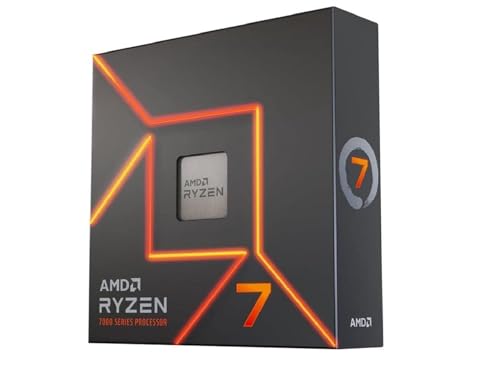
10. AMD Ryzen 7 7700X: Best Balanced Zen 4 Chip
Pros
- Eight cores and 16 threads
- Up to 5.4 GHz boost clock
- 80MB listed cache
- AM5 and DDR5-5200 support
- PCIe 5.0 support on select 600 series motherboards
Cons
- Older Zen 4 architecture
- No 3D V-Cache
- Cooler is not included
Best for: a balanced AM5 gaming desktop based on AMD's Zen 4 generation.
The AMD Ryzen 7 7700X is a straightforward eight-core, 16-thread processor. Its Zen 4 architecture and up to 5.4 GHz boost clock give it the profile of a fast general-purpose gaming chip, while the 80MB listed cache supports the processor across ordinary desktop and gaming workloads. It does not have the specialized X3D cache design, so its appeal comes from balance rather than a single gaming feature.
This chip belongs on AM5 and supports DDR5-5200 memory. PCIe 5.0 is available on select 600 series motherboards, making the board choice important when planning expansion hardware. The listing also identifies a 4.5 GHz base clock. Taken together, those details describe a processor for a current AMD build that does not need the newest Zen 5 generation.
The Ryzen 7 9700X is the direct step up in this list, with Zen 5, DDR5-5600 support, and a higher listed boost ceiling. The Ryzen 7 7800X3D is the more gaming-specific alternative, since its 96MB L3 cache targets the workloads gamers care about most. The 7700X is the better fit for someone who wants a conventional Zen 4 desktop and expects to use it for more than games.
There are clear limits. It is not the newest architecture here, and the lack of 3D V-Cache makes the gaming recommendation less forceful than the X3D models. No cooler is included, so the system still needs a separate thermal solution. Check the motherboard's capabilities carefully, since PCIe 5.0 support depends on the selected board.
The 7700X remains a coherent choice for a balanced AM5 build when its Zen 4 design fits the rest of the system. It is best for buyers who want eight cores and strong clock speed without making the processor a dedicated gaming specialist.
How to choose best gaming processor
A good gaming CPU has to match the graphics card, display refresh rate, motherboard, memory, and the work you do when the game is closed. These are the factors that separate a sensible build from a specification list that looks impressive but does not fit together.
Gaming cache
Large cache can be especially useful in games that repeatedly access the same data. AMD's X3D models make this the central feature, with the Ryzen 7 9800X3D and Ryzen 7 7800X3D listing 96MB of L3 cache, while the Ryzen 7 5800X3D lists 100MB of total cache.
Cache is not a replacement for strong cores or a capable graphics card. It is most useful when the game benefits from keeping more data close to the processor. If gaming is the priority, compare an X3D model with a similarly positioned conventional CPU rather than judging only by boost clock.
For a gaming-first build, cache design can matter more than adding cores you will never use.
Cores and threads
Eight cores and 16 threads are a strong shape for a modern gaming desktop, which is why several picks use that configuration. Six cores and 12 threads, as found in the Ryzen 5 9600X and Ryzen 5 5500, can suit a more focused gaming PC. Twelve or 16 cores become more meaningful when the system also handles rendering, encoding, compiling, or other parallel work.
More cores do not automatically produce better game performance. The Ryzen 9 9950X3D has 16 cores, but its extra appeal comes from combining that capacity with an X3D gaming design. The Intel Core Ultra 9 285K takes a different approach with eight P-cores and 16 E-cores.
Clock speed and architecture
A boost clock describes the ceiling a processor can reach under suitable conditions, not a guaranteed speed in every game. Architecture matters too. The Ryzen 7 9800X3D and Ryzen 5 9600X use Zen 5, while the Ryzen 7 7700X uses Zen 4. Comparing the numbers without considering the generation can produce a misleading conclusion.
The Ryzen 7 9700X lists up to 5.5 GHz, while the 9800X3D lists up to 5.2 GHz. That does not make the 9700X the better gaming chip. The 9800X3D's larger gaming-oriented cache changes the comparison.
Socket and memory
AM4 and AM5 are not interchangeable platforms. The Ryzen 5 5500 and Ryzen 7 5800X3D use AM4 and DDR4-oriented support, while the newer Ryzen processors use AM5 and DDR5. A new AM5 build provides a different upgrade path from an AM4 refresh, but an existing AM4 desktop may make the older socket the more practical choice.
Motherboard support still needs checking. The Ryzen 7 9800X3D and Ryzen 5 9600X can use PCIe 5.0 on compatible AM5 infrastructure, while the Ryzen 7 5800X3D supports PCIe 4.0 on X570 and B550 boards. Intel's Core Ultra 9 285K requires an Intel 800 series chipset motherboard.
Cooling and included hardware
Several processors in this group do not include a cooler. That applies to the Ryzen 7 9800X3D, Ryzen 5 9600X, Ryzen 7 5800X3D, Ryzen 7 9700X, Ryzen 9 7900X, Ryzen 7 7700X, and Intel Core Ultra 9 285K. The Ryzen 5 5500 is the exception here because its listing specifies a Wraith Stealth cooler.
Cooling affects sustained behavior, noise, and build compatibility. Check the processor requirements, the motherboard socket, the case clearance, and the cooler before ordering the rest of the system. A high-performance chip is not a complete build by itself.

Frequently asked questions
How many cores do I need for gaming?
Six cores and 12 threads can handle a focused gaming system, while eight cores and 16 threads provide more room for background applications and future games. Move to 12 or 16 cores when the PC will also handle sustained creation or other heavily parallel work.
Is an X3D processor better for gaming?
X3D processors are designed with additional cache aimed at gaming workloads. The Ryzen 7 9800X3D, Ryzen 7 7800X3D, and Ryzen 7 5800X3D all use that approach, but the best fit still depends on the platform and the rest of the system.
Should I choose AM4 or AM5?
Choose AM4 when you are upgrading an existing compatible system and want to keep its motherboard and DDR4 memory. Choose AM5 for a new AMD build that uses DDR5 and offers a newer processor platform.
Does a gaming CPU need a graphics card?
The Ryzen 5 5500 listing explicitly says a discrete graphics card is required. Several other processors list integrated AMD Radeon or Intel Graphics, but integrated graphics capability does not make them equivalent to a dedicated gaming GPU.
Is a higher boost clock always better?
No. Boost clock is only one part of CPU performance, and it does not account for architecture, cache, core layout, or cooling. The Ryzen 7 9800X3D has a lower listed boost ceiling than the Ryzen 7 9700X but is the more gaming-focused choice because of its cache design.
Do I need a cooler for these processors?
Many of these processors do not include a cooler, so you need to choose one separately. The Ryzen 5 5500 is listed with a Wraith Stealth cooler, but every other system still needs a compatibility check for socket support, case clearance, and cooling capacity.
The bottom line
The AMD Ryzen 7 9800X3D is the Best gaming processor for a gaming-first AM5 desktop. Its eight cores, 16 threads, Zen 5 architecture, and 96MB of L3 cache make the package more focused than the conventional Ryzen 7 options. The AMD Ryzen 9 9950X3D is the better choice when the same PC must also power serious content creation and heavy multitasking.
For older systems, the AMD Ryzen 7 5800X3D is the upgrade pick, while the AMD Ryzen 5 5500 makes sense for an AM4 machine that needs a simpler six-core refresh. New builders who want a more balanced AM5 CPU should look closely at the Ryzen 5 9600X or Ryzen 7 9700X.
If you are undecided, choose the Ryzen 7 9800X3D for gaming, or the Ryzen 9 9950X3D if work matters nearly as much as play.
As an Amazon Associate we earn from qualifying purchases.