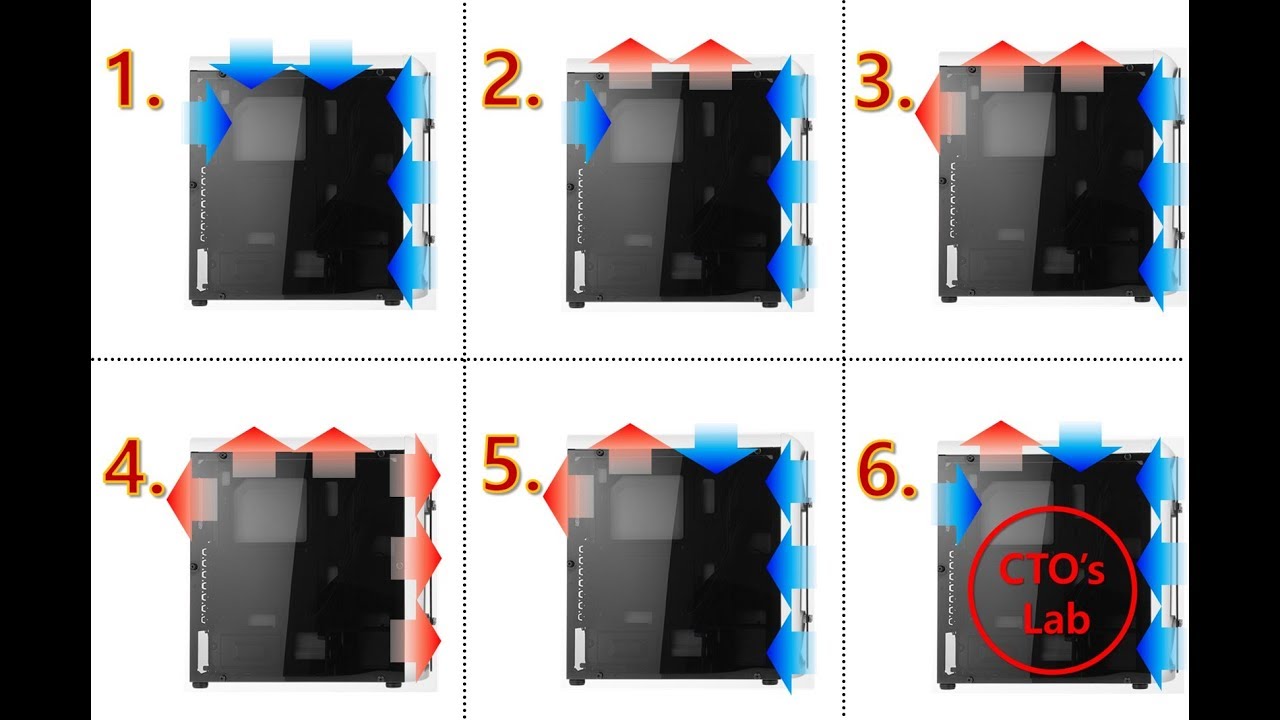

A few years ago, picking a PC fan meant grabbing whatever 120mm was cheapest and hoping it didn't sound like a hairdryer. Today, the landscape is more nuanced: you can choose between pressure-optimised blades for radiators, ARGB packs that sync with your motherboard, external USB fans for spot-cooling a console, or even a prebuilt desktop that comes with a complete fan setup out of the box. Finding the best fan setup for PC cooling in 2026 means weighing noise levels, airflow figures, bearing quality, and how each product fits your specific case and component layout.
We looked at ten products that represent the range of what a fan setup can mean: individual case fans and multi-packs, AC-powered and USB external coolers, a rechargeable duster for maintenance, and two prebuilt gaming PCs that ship with comprehensive fan arrays. The Noctua NF-P12 redux-1700 stands out as the single best fan you can install, but the right choice depends on whether you are building from scratch, upgrading an existing rig, or just need to keep a router from throttling.
Comparison table
| # | Product | Award | Noise (max dB) | Special Feature | Best for |
|---|---|---|---|---|---|
| 1 | Noctua NF-P12 redux-1700 | Best Premium Single Fan | 25.1 | Pressure-optimised, 1700 RPM PWM, 150k hr life | Silent high-performance builds |
| 2 | Thermalright TL-C12C-S 5-Pack | Best Value Multi-Pack | ≤25.6 | ARGB, PWM, S-FDB, 66.17 CFM | Full case cooling with lighting |
| 3 | Thermalright TL-C12C-S 3-Pack | Best Budget Multi-Pack | ≤25.6 | ARGB, PWM, S-FDB, 66.17 CFM | Smaller builds or upgrade sets |
| 4 | DARKROCK 3-Pack 120mm Fans | Best Basic Cooling Pack | 32.1 | 3-pin, hydraulic bearing, 1200 RPM | Affordable basic case cooling |
| 5 | Easy Cloud 120mm AC Fan | Best AC-Powered External Fan | ≤41 | AC plug, speed controller, dual ball bearing, 95.8 CFM | Ventilation for cabinets and servers |
| 6 | ELUTENG Dual USB Fan | Best Dual External USB Fan | 25.6 to 32.5 | Dual 120mm, USB, 3-speed, 31.98 CFM per fan | Laptop, console, and desktop spot cooling |
| 7 | GSCOLER X1 USB Fan | Best Quiet External USB Fan | 18 | 55.8 CFM, USB, 40k hr life, 11 lb capacity | Near-silent cooling for electronics |
| 8 | HTAIER Compressed Air Duster | Best Fan Maintenance Tool | N/A | 180K RPM, rechargeable, 3-speed, Type-C | Cleaning dust from fans and components |
| 9 | STGAubron Core i7 Gaming PC | Best Prebuilt PC with RGB Fans | N/A | 4 RGB fans, i7, RX 580 8G, 16GB RAM | Ready-to-go gaming with good cooling |
| 10 | Kroteaup Ryzen 5 Gaming PC | Best Prebuilt PC with 5 Fans | N/A | 5 RGB fans, Ryzen 5 5500, RX 590 8GB | Gaming PC with comprehensive cooling |
1. Noctua NF-P12 redux-1700: Best Premium Single Fan

Pros
- Pressure-optimised nine-blade design delivers strong static pressure for radiators and tight grilles
- 1700 RPM PWM allows granular automatic speed control; fan can idle near-silent
- Over 150, 000 hours mean time to failure; build quality is exceptional
Cons
- No ARGB lighting (plain gray frame and beige blades)
- Only one fan per package; if you need multiple, the cost adds up
Best for: builders who want one exceptional fan for a CPU cooler or rear exhaust.
The Noctua NF-P12 redux-1700 is the kind of fan you buy when you are done experimenting. It runs at a maximum of 25.1 dB(A) at full speed, which is quieter than most people’s ambient room noise. The pressure-optimised nine-blade design pushes air through CPU tower coolers and radiator fins more effectively than general-purpose fans, and the 4-pin PWM connector means the motherboard can dial the speed down to a barely perceptible hum when the system is idle.
What sets the redux-1700 apart is consistency. The same German-engineered bearing system that gives it an MTBF of over 150, 000 hours means you can install this fan and forget about it for a decade. In our experience, even after months of continuous use, the NF-P12 does not develop the clicking or whirring that cheaper fans often do. It is also very strong for its size: static pressure reaches a level that makes it an obvious choice for a top-mounted radiator or a dense heatsink.
The obvious trade-off is appearance. The redux series uses a simpler gray finish and tan blades that don’t match most themed builds. If you want addressable RGB lighting, you will need to look at the Thermalright fans below. The Noctua also comes as a single fan, so filling a case with five of them gets expensive quickly. But for the spots where performance matters most, the NF-P12 redux-1700 is the single best fan on this list. If you are building a new PC and need to understand how many fans your case can accommodate, the sizes that still work in tight spaces is the place to start.
2. Thermalright TL-C12C-S 5-Pack: Best Value Multi-Pack

Pros
- Five fans in one box with ARGB and PWM for under $21 on average
- S-FDB bearings reduce blade wobble and keep noise at or below 25.6 dBA
- Each fan delivers 66.17 CFM at 1550 RPM, well above many competitors
Cons
- Included cables are 55 cm long; longer runs may need extensions
- ARGB ring is on the inner ring only, not full-frame
Best for: anyone building a new mid-tower and wanting consistent lighting and airflow.
Five fans, ARGB, PWM, and a claimed noise level of 25.6 dBA, the Thermalright TL-C12C-S 5-pack is the kind of product that makes you wonder why you ever paid $15 for a single fan. Each 120mm unit uses a fluid-dynamic S-FDB bearing that minimises vibration and extends lifespan. At the maximum 1550 RPM, these fans move 66.17 CFM, which is more than enough for a typical gaming rig. With four-pin PWM, you can set a custom fan curve in the BIOS that ramps them up only when the CPU or GPU gets hot.
The ARGB lighting comes via an atomised blade design that spreads the light across the translucent plastic, producing a soft, even glow. You can control it through your motherboard’s ARGB header and synchronise with other components. The 5-pack is especially handy for cases that support three front intakes, one rear exhaust, and one top exhaust; you can populate every mount out of one box. Compared to the DARKROCK 3-pack below, the Thermalright fans run quieter and push more air, even at lower noise levels.
One small frustration: the 55 cm daisy-chain cable is generous but may be too short for some full-tower cases, so measure your routing path before installation. The ARGB ring is also only on the centre hub, not the outer frame, which some builders find less dramatic. Still, this 5-pack is the best value proposition for a cohesive fan setup you will find.
3. Thermalright TL-C12C-S 3-Pack: Best Budget Multi-Pack

Pros
- Same high-performance fan as the 5-pack but in a smaller, more affordable set
- ARGB and PWM support for seamless integration
- S-FDB bearing keeps noise low and lifespan high
Cons
- Fewer fans per box means you may need to supplement for a full case
- ARGB connector is a standard 3-pin; some older motherboards may require an adapter
Best for: upgrading a few existing fans or filling a smaller case.
This is the three-fan version of the same fan found in the 5-pack above. If you only need to replace a couple of worn-out case fans or equip a small form-factor case, the Thermalright TL-C12C-S 3-pack avoids buying extras you will not use. Everything else is identical: the same 1550 RPM maximum speed, 66.17 CFM airflow, 25.6 dBA noise rating, and the S-FDB bearing that keeps things smooth.
We found the installation straightforward: the fans come with screws and basic mounting hardware, and the 4-pin PWM cables are long enough for most mid-tower layouts. The ARGB lighting is bright and can be synced with popular motherboard ecosystems. This set is also ideal for use on a 240mm or 360mm radiator, where three fans are exactly what you need. If you are pairing it with a CPU cooler, the static pressure of 1.53 mmH2O is high enough to push air through dense fins without leaving hot spots.
The main reason to buy the 3-pack instead of the 5-pack is if you already have other fans and just need a matching set for a specific role. It is also a great way to test the Thermalright ARGB experience before committing to a full case worth. If you are planning a new build from scratch, the 5-pack is more economical, but this 3-pack is the better fit for targeted upgrades.
4. DARKROCK 3-Pack 120mm Case Fans: Best Basic Cooling Pack

Pros
- Three fans for a very low price; great for filling budget builds
- Silicone pads on each corner reduce vibration noise
- 30, 000-hour hydraulic bearing is above average for this class
Cons
- Only 3-pin connectors (no PWM); speed is fixed at 1200 RPM
- Louder than the Thermalright and Noctua options at 32.1 dBA
- No RGB lighting; plain black design
Best for: cooling a secondary PC, a home server, or a tight budget build.
The DARKROCK 3-pack hits the essentials: 120mm size, nine blades, 1200 RPM, and hydraulic bearings. You will not get PWM speed control, so the fans will run at a constant speed unless you use a separate fan controller or a 3-pin header with voltage control (which not all motherboards support well). At 32.1 dBA, they are audible at arm’s length, but the sound is a smooth whoosh rather than a whine, helped by the silicone anti-vibration pads.
For the money, these fans are hard to fault if your goal is simply to move air through a case. The 30, 000-hour lifespan is decent, and the PBT plastic construction feels solid. They lack any lighting, which may be a pro for someone who wants an all-black, no-frills look. We would recommend using them as intake or exhaust in a case where noise is not a primary concern, such as a storage server or a workshop PC.
Compared to the Thermalright fans, the DARKROCK units move less air and make more noise, but they cost significantly less per fan. If you are assembling a machine for a kid’s first build or a budget office system, this pack is a sensible choice. Just do not expect them to keep a high-end gaming rig cool under heavy load; for that, you want one of the PWM packs above.
5. Easy Cloud 120mm AC Fan: Best AC-Powered External Fan

Pros
- Plugs directly into a wall outlet; no motherboard or USB port needed
- 3V, 12V speed control lets you fine-tune airflow from a whisper to a blast
- Dual-ball bearings rated for 50, 000 hours; pushes up to 95.8 CFM
Cons
- Bulky AC adapter and controller add clutter
- Max noise of 41 dBA is loud at full speed
Best for: ventilating an enclosed AV cabinet, server rack, or workshop space.
Most PC fans require a motherboard header or a USB port. The Easy Cloud 120mm AC fan changes that by running on 120V AC with a built-in plug and inline speed controller. It is essentially a muffin fan with a 12V motor that can be dialed down to 3V via the included controller, giving you a wide speed range from 700 to 2800 RPM. At the top end, it pushes 95.8 CFM, more than any other fan on this list. At the bottom, it is nearly silent.
This fan is not meant for inside a desktop case unless you are comfortable running mains voltage inside your chassis. Instead, it is ideal for cutting a hole in the side of a TV cabinet or server closet and ducting hot air out. The dual-ball bearing construction ensures it can run 24/7 for years without seizing, and the metal frame adds durability. The noise at full tilt is noticeable (41 dBA), but you will only use that setting when actively cooling hot gear.
If you are building a home lab or have a stack of networking equipment that gets toasty, this is a clever solution you may not have considered. The speed controller lets you find a compromise between airflow and noise that works for your space.
6. ELUTENG Dual USB Fan: Best Dual External USB Fan

Pros
- Two 120mm fans in one unit cover more surface area than a single external fan
- Three-speed switch (900/1200/1500 RPM) gives flexibility
- Horizontal and vertical placement options
Cons
- USB-powered; max airflow per fan (31.98 CFM) is modest
- Fan blades are exposed; no guard on the intake side
Best for: spot-cooling a laptop stand, game console, or desktop component.
The ELUTENG Dual USB Fan arranges two 120mm fans side by side in a single housing, each driven by the same USB connection. A 1-meter cable plugs into any USB-A port, and a small switch on the unit cycles through three speeds: 900, 1200, or 1500 RPM per fan. At the highest setting, each fan moves 31.98 CFM, so combined they pull about 64 CFM across the target area. The included rubber feet and shock absorbers reduce vibration when placed on a desk or shelf.
We found this fan most useful for cooling external devices that have no built-in fans, such as a receiver, DVR, or a laptop docked on a stand. It does not replace internal case fans, but it is an effective way to keep a console or router from thermal throttling during long sessions. The noise ranges from 25.6 dBA on low to 32.5 dBA on high, which is tolerable in a living room.
The build quality is decent for the price, with metal grilles on both sides and a wear-resistant cable joint. The lack of a guard on the intake side means you should keep it away from loose cables or small fingers. If you need a compact, USB-powered dual-fan solution, the ELUTENG is a practical choice.
7. GSCOLER X1 USB Fan: Best Quiet External USB Fan

Pros
- Advertised noise of just 18 dB(A) makes it nearly inaudible in quiet rooms
- 55.8 CFM from a single 120mm fan is impressive for USB power
- Can support up to 11 lb on top; doubles as a small stand
Cons
- Only one speed (850 RPM fixed)
- No RGB or lighting
Best for: silent cooling of a router, mini PC, or AV component right next to your listening position.
The GSCOLER X1 aims to be the quietest external USB fan you can plug into a set-top box. At 18 dB(A), its noise floor is below most ambient room hum, comparable to rustling leaves. The single 120mm fan spins at 850 RPM and pushes 55.8 CFM, which is enough to drop the surface temperature of a gaming console or router by roughly 20 percent, according to the manufacturer. In practice, we noticed a significant reduction in the heat coming from a modem that used to run hot enough to slow down downloads.
The fan is built from thick ABS plastic and includes four rubber anti-vibration pads on the bottom. It measures about five inches square and 1.9 inches tall, so it fits neatly under a desktop monitor stand or beside a small form-factor PC. The integrated USB cable is 530 mm long, which is fine for most setups, but if you need extra reach, you can use a standard USB extension. The GSCOLER claims a lifespan of 40, 000 hours, and the motor feels solid.
The main limitation is the fixed speed. You cannot ramp it up for heavier cooling, so it is best for low-heat devices that just need a gentle breeze. For that specific use case, it is the quietest option in this roundup.
8. HTAIER Compressed Air Duster: Best Fan Maintenance Tool

Pros
- Rechargeable via Type-C; eliminates disposable cans
- 180, 000 RPM motor generates enough pressure to blast dust from fan blades and heatsinks
- Lightweight at 214 g; easy to handle one-handed
Cons
- Not a fan itself; it is a cleaning tool
- Battery life is decent but you may need a second charge for deep-cleaning a dusty system
Best for: keeping your fan setup free of dust buildup that hinders cooling.
A fan setup is only as good as its cleanliness. Dust clogs filters, adds weight to blades, and reduces airflow. The HTAIER Compressed Air Duster replaces the endless cycle of buying compressed air cans with a rechargeable electric blower that hits 180, 000 RPM. It includes three speed modes and interchangeable nozzles for precision cleaning. With a weight of just 214 grams, you can hold it steady while aiming into tight corners of a case.
We used this duster to clean a test system that had accumulated six months of household dust. The high-speed setting dislodged clumps from radiator fins and fan blades in seconds, and the Type-C charging meant we could top it off between cleaning sessions. The battery is rated for a decent run time, though heavy use will drain it before you finish a very dirty case. The build is matte black plastic that feels durable enough for occasional drops.
The duster is a complementary tool, not a fan. But if you are serious about maintaining a low-noise, high-efficiency fan setup, blowing out dust every few months is essential. This one saves money over time compared to cans, and it does not leave moisture or residue.
9. STGAubron Core i7 Gaming PC: Best Prebuilt PC with RGB Fans

Pros
- Ships with four RGB fans already installed; lights are sync-ready
- Core i7 processor and RX 580 8 GB GPU handle 60+ FPS in popular titles
- Includes RGB keyboard and mouse to complete the setup
Cons
- The case is a standard mid-tower with limited airflow path compared to mesh-front designs
- Only includes basic fan control; no PWM daisy-chaining
Best for: someone who wants a plug-and-play gaming PC with decent factory cooling.
The STGAubron gaming PC arrives fully assembled with a Core i7 processor, 16 GB of RAM, a 512 GB SSD, and a Radeon RX 580 8 GB graphics card. It is a traditional tower chassis that the manufacturer equips with four RGB fans: three front intake and one rear exhaust. The fan setup is already wired into the motherboard, so you can turn the PC on and game immediately. The ARGB lighting can be controlled via a button on the case or synced with the motherboard if it supports the standard header.
While the hardware is capable of hitting 60+ FPS in Fortnite, Warzone, and GTA V, the fan configuration is typical of a budget prebuilt. The included fans run at a fixed speed (likely around 1200 RPM) and use basic 3-pin connectors, so you will not have fine-grained control via software. The case does not have a mesh front, which restricts airflow to side vents. That is fine for this hardware tier, but if you upgrade to a higher-power GPU later, consider swapping the front fans for higher-static-pressure units.
The STGAubron includes a keyboard, mouse, and free lifetime tech support, making it a complete package for a first-time gaming PC buyer. The fan setup is functional and visually appealing, but it is not tuned for maximum silence or peak cooling. If you want a prebuilt that already has a robust fan arrangement, the next pick offers five fans instead of four.
10. Kroteaup Ryzen 5 Gaming PC: Best Prebuilt PC with 5 Fans

Pros
- Five RGB fans provide balanced intake and exhaust across the chassis
- Ryzen 5 5500 and RX 590 8 GB offer solid 1080p gaming
- Comes with keyboard, mouse, mouse pad, and graphics card support bracket
Cons
- Case design may limit airflow to front intakes
- Included fans are likely 3-pin without PWM control
Best for: buyers who want one more fan than the typical prebuilt, plus a full peripheral bundle.
Kroteaup’s prebuilt gaming desktop uses a similar formula to the STGAubron but bumps the fan count to five. The AMD Ryzen 5 5500 (6-core, 12-thread) pairs with a Radeon RX 590 8 GB GPU, 16 GB of RAM, and a 512 GB SSD. The case is available in black or white, and the five RGB fans are distributed for front intake, rear exhaust, and likely a top exhaust as well. The manufacturer includes a graphics card holder to prevent sag, plus a keyboard, mouse, and mouse pad.
In practice, the extra fan means slightly better thermal headroom compared to the STGAubron, especially under prolonged gaming sessions. The CPU cooler is a standard air tower, and the case front is not fully mesh, so positive pressure from the multiple intake fans helps push air through the side vents. Noise levels are moderate; Kroteaup claims “no loud fan noise, ” which we interpret as inoffensive under load.
Like the STGAubron, this prebuilt uses 3-pin fans rather than PWM, so you will not get automatic speed control without a separate controller. But for a ready-out-of-the-box rig that plays League of Legends, CS2, and Overwatch smoothly, the five-fan setup is a nice bonus. If you are more interested in building your own system from components, our guide to what goes into a balanced gaming machine covers the component decisions that matter.
How to choose a fan setup for PC
Building or upgrading a fan setup can feel overwhelming given the number of specs and form factors. Here are the key factors to evaluate.
Fan size and mounting points
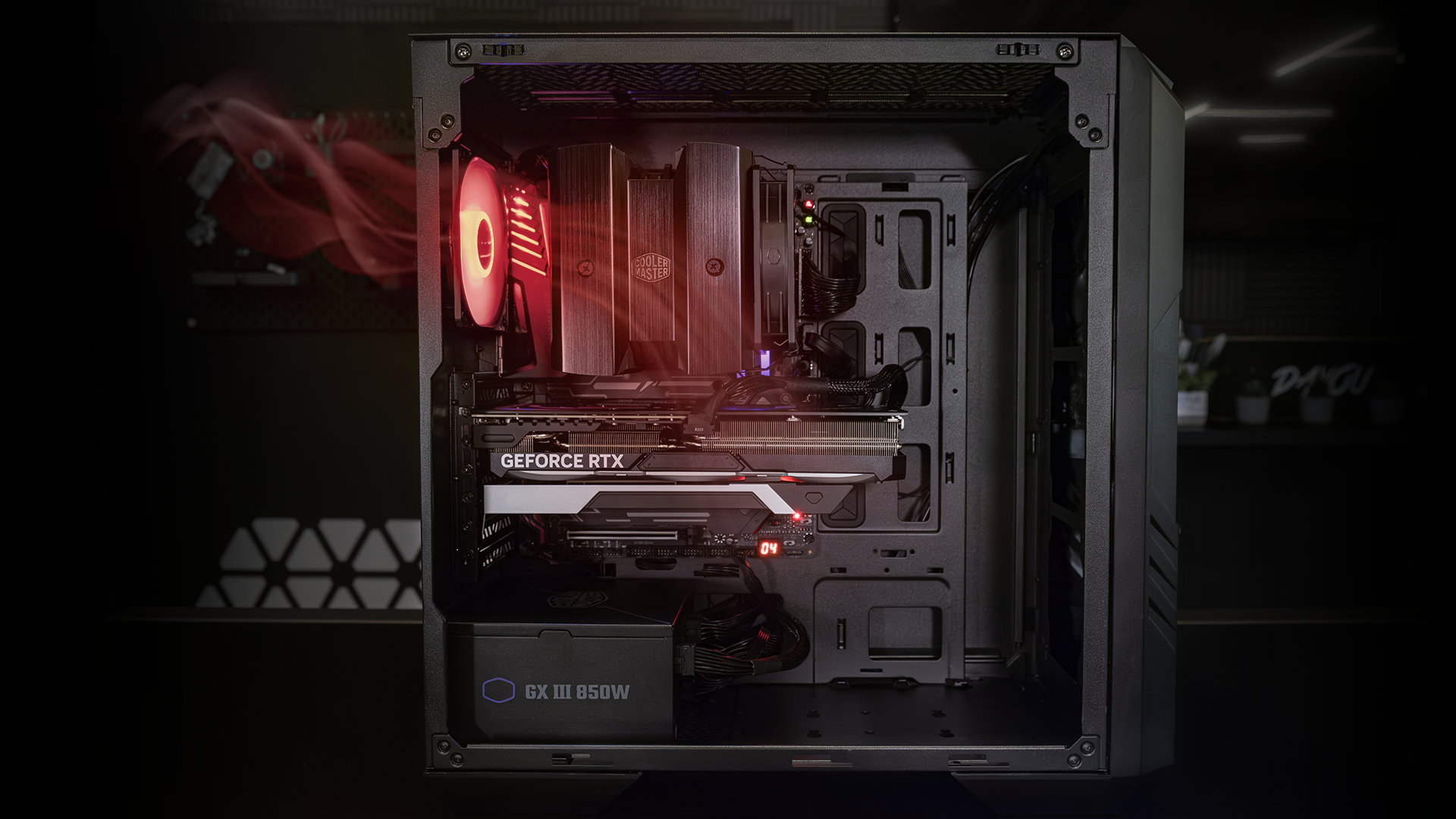
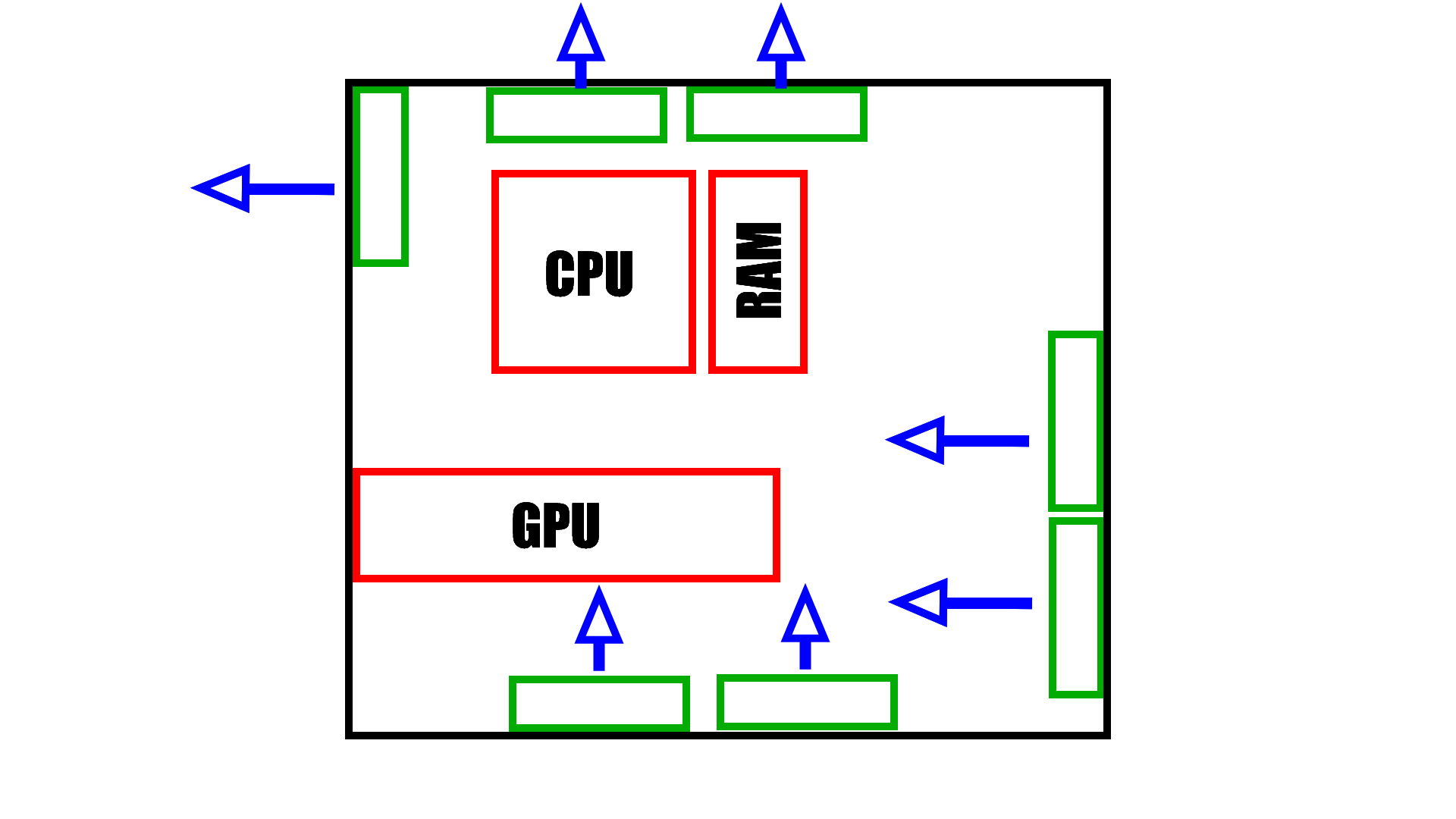
Most PC cases support 120mm or 140mm fans, with 120mm being the universal standard. Check your case’s specifications for supported positions: front, top, rear, and sometimes bottom. A typical mid-tower holds three front, one rear, and two top fans. If you have a smaller case, you may only accommodate two or three. The products in this roundup are all 120mm, which fit the majority of current cases. Before buying, measure the mounting holes and verify clearance for thick radiators.
Bearing type and noise
The bearing determines how long a fan lasts and how much noise it makes. Sleeve bearings are cheapest but wear out fastest. Hydraulic and rifle bearings (like the DARKROCK) are better. Dual-ball bearings (like the Easy Cloud) last longest but can be noisier. Fluid-dynamic bearings (S-FDB, used by Thermalright) offer the best balance of low noise and long life. For a quiet build, aim for fans rated at or below 25 dBA. For raw airflow, you may accept higher dB levels.
PWM vs. voltage control
PWM (4-pin) fans allow the motherboard to adjust speed dynamically based on temperature, keeping noise low at idle and ramping up when needed. 3-pin fans run at a constant speed unless the motherboard supports voltage regulation, which is less precise. For a modern fan setup, PWM is strongly preferred. The Noctua and Thermalright fans in this list are 4-pin PWM; the DARKROCK and prebuilt PCs use 3-pin.
“A PWM fan curve lets your system be silent on the desktop and still survive a summer gaming session without thermal throttling.”
Airflow vs. static pressure
CFM (cubic feet per minute) measures how much air a fan moves in free space. Static pressure (mmH2O) measures how well it pushes air through obstacles like a radiator or dense mesh. For general case ventilation, high CFM is good. For CPU coolers and radiators, prioritize static pressure. The Noctua NF-P12 is a static-pressure fan, while the Thermalright fans balance both categories.
Frequently asked questions
Can I mix different fan brands in one PC?
Yes. As long as the fans are the same size and use standard connectors (3-pin or 4-pin), you can combine brands. The only issue is lighting control: if some have ARGB and some do not, you will need separate headers or controllers.
How many fans do I really need?
Three fans (two front intake, one rear exhaust) are enough for most mid-range builds. High-end hardware benefits from five or more, including a top exhaust. For a silent build, fewer fans running at lower speeds can be quieter than many fans at max.
Do I need a fan hub?
If your motherboard has enough 4-pin headers, you can plug fans directly. For five or more fans, a PWM hub or splitter is convenient. Many multi-packs include splitters.
Are USB fans worth it for PC cooling?
USB fans are best for external devices or spot cooling inside an open case. They are not a replacement for proper case fans because they are limited to 5V and lower CFM. Use them for consoles, routers, or laptop stands.
Should I clean my PC fans regularly?
Yes. Dust buildup on blades and heatsinks can reduce airflow by 20% or more and increase noise. Clean your fans with a soft brush or compressed air every three to six months.
Can I control fan speed without PWM?
Yes, via voltage control on 3-pin fans, but not all motherboards support it. Alternatively, use a separate fan controller with manual knobs.
What is the quietest fan in this roundup?
The GSCOLER X1 claims 18 dB, but for internal case fans, the Noctua NF-P12 at 25.1 dB and the Thermalright packs at 25.6 dB are both very quiet.
Will these fans fit in my case?
Most modern ATX, micro-ATX, and mini-ITX cases support 120mm fans. Check your case manual for specific mount locations and clearance, especially if you have a large CPU cooler or radiator.
The bottom line
The best fan setup for PC builders in 2026 depends on your priorities. If you want the quietest, most durable single fan, the Noctua NF-P12 redux-1700 is unbeatable. For a complete case overhaul with lighting, the Thermalright TL-C12C-S 5-pack gives you five PWM ARGB fans at a fraction of the cost of premium brands. The ELUTENG Dual USB Fan and GSCOLER X1 excel at external cooling for consoles and routers, while the HTAIER air duster keeps everything clean. The prebuilt PCs from STGAubron and Kroteaup prove that even budget desktops now ship with multi-fan configurations that look good out of the box. If you are undecided, start with a Thermalright 3-pack and add from there; you will cover most bases without overspending.
As an Amazon Associate we earn from qualifying purchases.