

A monitor can make an otherwise capable computer feel frustratingly slow. Blurry motion, cramped 22-inch screens, narrow viewing angles, and stands that waste desk space are common compromises in this category. The Best budget monitors avoid those traps without piling on features most people will never use.
This list covers compact office displays, fast gaming screens, larger 27-inch panels, and one curved option. The strongest all-rounder is the Dell SE2426H, while the rest give you clear alternatives for built-in audio, deeper contrast, a bigger workspace, or a much faster refresh rate.
Comparison table
| # | Product | Award | Resolution | Panel | Refresh rate | Notable feature | Best for |
|---|---|---|---|---|---|---|---|
| 1 | Dell SE2426H | Best overall | 1920 x 1080 | IPS | 144Hz | 2x HDMI, tilt | Mixed work and gaming |
| 2 | Acer KB242Y G0bi | Best office and gaming balance | 1920 x 1080 | IPS | 120Hz | 1ms VRB, Adaptive-Sync | Everyday desktop use |
| 3 | Dell SE2726HG | Best high-refresh gaming | 1920 x 1080 | IPS | 240Hz | FreeSync Premium, DisplayPort 1.4 | Competitive gaming |
| 4 | Sceptre E225W-FW144 | Best compact gaming | 1920 x 1080 | Not specified | Up to 144Hz | Built-in speakers | Small desks |
| 5 | Dell SE2726H | Best large IPS screen | 1920 x 1080 | IPS | 144Hz | 2x HDMI, tilt | Bigger viewing area |
| 6 | Sceptre E275W-FW100T | Best feature-rich 27-inch | 1920 x 1080 | Not specified | 100Hz | 100% sRGB, speakers | Gaming and creative work |
| 7 | Acer KB272 G0bi | Best large office monitor | 1920 x 1080 | IPS | 120Hz | 1ms VRB, Adaptive-Sync | Spacious everyday work |
| 8 | Philips 241V8LB | Best for reading | 1920 x 1080 | VA | 100Hz | EasyRead mode, VESA | Documents and browsing |
| 9 | Philips 221V8LB | Best compact VA display | 1920 x 1080 | VA | 100Hz | Adaptive-Sync | Small workstations |
| 10 | Samsung S36GD | Best curved screen | FHD | Not specified | 100Hz | 1800R curve | Immersive desk setups |
1. Dell SE2426H: Best Overall

Pros
- IPS panel with consistent color from wide angles
- 144Hz refresh rate and 1ms MPRT
- Two HDMI ports and a tilt-adjustable design
- TÜV Rheinland 3-Star eye comfort certification
Cons
- Full HD resolution is less spacious than a higher-resolution display
- No built-in speakers are listed
- The 23.8-inch screen is smaller than the 27-inch alternatives
Best for: someone who wants one monitor for office work, streaming, and responsive gaming.
The Dell SE2426H is the monitor we would put in front of most people first. Its 23.8-inch size fits comfortably on an ordinary desk, and the 1920 x 1080 image remains sensible at that scale. It feels more balanced than the larger 27-inch Full HD models, which give you more physical screen area but spread the same number of pixels over a wider surface.
The IPS panel is the important part for mixed use. Dell specifies a 178-degree horizontal and vertical viewing angle, so the image should stay consistent when you shift in your chair or someone looks over your shoulder. The 144Hz refresh rate is a meaningful step up from the 100Hz Philips displays for fast games, scrolling, and general motion. Its listed 1ms MPRT response specification is aimed at keeping moving objects clearer, while AMD FreeSync is designed to reduce tearing when the display and graphics card vary their timing.
Connectivity is straightforward rather than extravagant. Two HDMI ports make it easier to keep a computer and another source connected, and the tilt adjustment gives you a basic way to set the viewing angle. The thin bezels also make this a practical candidate for a two-screen desk. If you are planning that kind of setup, the desk dimensions that make two screens comfortable matter as much as the individual panel.
The main limitation is the Full HD resolution. Text and detailed creative work will not have the room of a higher-resolution monitor, and the screen does not list built-in speakers. The 27-inch Dell SE2726H is better when sheer physical size matters, while the Dell SE2726HG is the more serious gaming pick. For everyone else, this is the cleanest blend of motion, viewing angles, eye-comfort features, and desk-friendly size in the group.
2. Acer KB242Y G0bi: Best Office and Gaming Balance

Pros
- 23.8-inch IPS display
- 120Hz refresh rate with 1ms VRB
- Adaptive-Sync support
- 250-nit brightness specification
- Zero-frame design
Cons
- Full HD provides limited room for large spreadsheets
- No built-in speakers are listed
- Stand features are not specified beyond the supplied product data
Best for: a home office that also needs smooth casual gaming performance.
The Acer KB242Y G0bi is the sensible middle ground in this lineup. It does not chase the extreme refresh rate of the Dell SE2726HG, but it is much more fluid than a traditional 60Hz office display. The 23.8-inch Full HD format is familiar, easy to place, and sharp enough for ordinary documents, browser tabs, video, and games when viewed at a normal desk distance.
Acer identifies this as an IPS monitor, which should help preserve color and contrast when you are not sitting perfectly square to the screen. The 1920 x 1080 resolution fits the panel size well. Its 250-nit brightness specification is adequate for a typical indoor workspace, though it is not a reason to choose this display for a sunlit room. If your desk faces a bright window, how much screen brightness a bright room really needs is a useful question to settle before buying.
The 120Hz refresh rate is the feature that separates it from basic office monitors. It can make pointer movement, page scrolling, and compatible games look more composed, while Adaptive-Sync helps match the monitor's refresh timing to the graphics card. The 1ms VRB figure is a motion-response mode specification, so it should be understood as a tool for reducing visible blur rather than a promise that every scene will look perfect.
There is no built-in audio feature listed, and the product information does not spell out a broad set of ports or advanced stand adjustments. That makes the Acer less versatile than the Sceptre E275W-FW100T, which includes speakers and several stated inputs. It is also not as fast as the Dell SE2426H. Still, the Acer is the pick for a user who spends equal time writing, browsing, watching video, and playing games, and wants the panel technology to remain consistent across those jobs.
3. Dell SE2726HG: Best High-Refresh Gaming
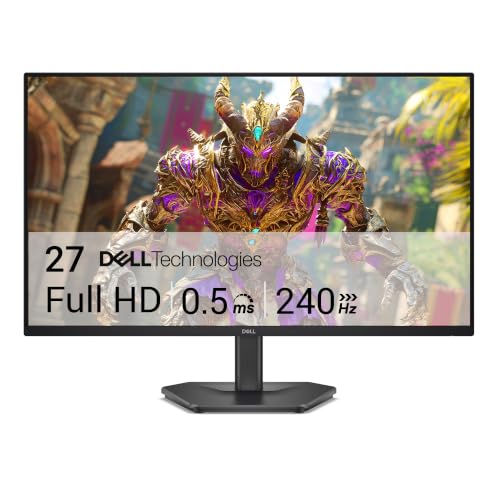
Pros
- 240Hz refresh rate
- Fast IPS panel with 0.5ms response specification
- FreeSync Premium and HDMI VRR
- 99% sRGB color coverage
- DisplayPort 1.4 and two HDMI ports
Cons
- Full HD is less dense on a 27-inch panel
- Its extra speed matters most with a capable gaming computer
- No built-in speakers are listed
Best for: competitive players who want high refresh speed without moving to a smaller screen.
The Dell SE2726HG is the specialist of the group. Its defining feature is not subtle: a 240Hz refresh rate that targets fast competitive play. That speed gives a gaming computer more opportunities to show newly rendered frames, making rapid camera movement and aiming feel more immediate when the rest of the system can keep up.
This is a 27-inch Full HD display with a fast IPS panel. Dell lists a 0.5ms response specification, 99% sRGB coverage, and wide IPS viewing angles. The color coverage makes the screen useful outside games, while the IPS design is a better fit than a narrow-view panel for a desk shared by more than one person. FreeSync Premium and HDMI VRR address variable frame rates, helping reduce tearing during games played over compatible connections.
The port selection is unusually practical for a fast gaming display. Two HDMI connections can handle a computer and console, while DisplayPort 1.4 gives a PC another route to the full refresh capability. Dell also lists TÜV Rheinland 3-Star eye comfort certification, a useful consideration for long sessions, though no eye-comfort feature eliminates the need for sensible breaks and room lighting.
The trade-off is pixel density. Full HD on 27 inches gives you a larger image, but text and fine game detail will not look as tight as they do on the 23.8-inch Dell SE2426H. It is also a poor match for a computer that cannot produce high frame rates. Choose the Dell SE2726HG when competitive motion is the priority. For office work with occasional gaming, the smaller Dell or Acer KB242Y G0bi makes more sense.
4. Sceptre E225W-FW144: Best Compact Gaming

Pros
- Compact 22-inch size
- Full HD resolution
- Refresh rate up to 144Hz
- Built-in speakers
- Blue-Light Shift technology and minimal bezel design
Cons
- Smaller viewing area than every 24-inch and 27-inch option here
- Panel type is not specified in the supplied data
- The feature set is less detailed than the larger gaming models
Best for: a small desk, starter gaming setup, or secondary display where built-in audio helps.
The Sceptre E225W-FW144 earns its place by being easy to fit. A 22-inch Full HD monitor takes less visual and physical space than the 27-inch choices, which is useful on a shallow desk, in a dorm room, or as part of a compact dual-display setup. The image should also look reasonably tight because 1920 x 1080 is being shown across a smaller surface.
Its headline gaming feature is a refresh rate up to 144Hz. That puts it ahead of the 100Hz Philips screens and close to the Dell SE2426H for motion smoothness. The supplied data does not identify the panel type, so we would not choose it for color-critical work based on the product description alone. It is better understood as a straightforward gaming and general-use screen.
The built-in speakers are a useful convenience. They remove the need for separate desktop speakers when you want game sound, a video, or an occasional call without wearing a headset. HDMI and DisplayPort are listed in the product title, giving the monitor familiar connection choices. Blue-Light Shift is intended to reduce blue light during long viewing, and the minimal bezel design should work well when placing two displays next to each other.
The weakness is that the compact size limits immersion and workspace. The 27-inch Sceptre E275W-FW100T gives you stronger stated color coverage, more inputs, and a wider canvas, while the Acer KB242Y G0bi offers a specified IPS panel. Pick the E225W-FW144 when desk space and built-in audio are more important than a large image or a more fully documented panel specification.
5. Dell SE2726H: Best Large IPS Screen

Pros
- Large 27-inch IPS display
- 144Hz refresh rate and 1ms MPRT
- 178-degree horizontal and vertical viewing angles
- Two HDMI ports
- Tilt adjustment and thin bezels
Cons
- Full HD is relatively spread out across 27 inches
- No built-in speakers are listed
- Less suitable than the SE2726HG for high-refresh competitive gaming
Best for: someone who wants a spacious screen for work with smooth gaming on the side.
The Dell SE2726H is the straightforward choice when 23.8 inches feels too cramped. Its 27-inch screen gives documents, timelines, browser windows, and games more physical room, and the thin bezels keep the front of the monitor from looking bulky. It uses the same Full HD resolution as the smaller Dell SE2426H, so the difference is workspace rather than extra detail.
The IPS panel is a strong fit for an open office or shared desk. Dell lists 178-degree viewing angles in both directions, along with consistent color from the IPS technology. The 144Hz refresh rate makes scrolling and motion smoother than a basic office screen, while the 1ms MPRT specification and AMD FreeSync support give it a gaming-friendly foundation.
Two HDMI ports make switching between sources simple, and the tilt adjustment lets you point the screen toward your seating position. The TÜV Rheinland 3-Star eye comfort certification is another useful detail for long workdays. It is not a monitor packed with specialized inputs, but it covers the common desktop and console arrangement without making the setup complicated.
The catch is the same one that applies to most large Full HD monitors: text and fine interface elements will not look as dense as they would on a smaller Full HD screen. The Dell SE2726HG is faster for serious gaming, and the Sceptre E275W-FW100T brings built-in speakers plus stated 100% sRGB coverage. The SE2726H remains the better fit for a large, calm, multipurpose workspace.
6. Sceptre E275W-FW100T: Best Feature-Rich 27-Inch

Pros
- 27-inch Full HD screen
- 100% sRGB color gamut
- DisplayPort and two HDMI ports
- Built-in speakers and headphone jack
- VESA wall-mountable design
Cons
- Refresh rate is lower than the 120Hz and 144Hz picks
- Panel type is not specified in the supplied data
- Full HD resolution is less dense at 27 inches
Best for: a user who wants a large screen with useful connectivity, speakers, and broad color coverage.
The Sceptre E275W-FW100T is more versatile than its gaming label suggests. Its 27-inch Full HD canvas is comfortable for ordinary work and video, while the 100% sRGB claim gives the display a clearer role for color-conscious design and image tasks than some of the less documented options here. It is not a high-resolution creator monitor, but it has a useful set of capabilities for a general desk.
The 100Hz refresh rate is enough to make everyday movement feel smoother than 60Hz, though the Dell monitors at 144Hz and 240Hz are better for fast competitive games. Sceptre includes FPS and RTS game modes, which provide presets for those genres rather than changing the panel's underlying performance. Blue Light Shift is intended to make long sessions more comfortable.
Connectivity is one of the reasons to choose this model. It has one DisplayPort and two HDMI ports, along with audio input and a headphone jack. Built-in speakers also help keep a compact desk uncluttered. VESA compatibility gives you the option to use a monitor arm or wall mount, which can matter when the 27-inch footprint consumes valuable desk depth.
The product data does not identify the panel type, and the screen remains Full HD at a size where smaller text can look less dense. The Dell SE2726H is the safer IPS choice, while the Acer KB272 G0bi offers 120Hz with a specified IPS panel. The Sceptre is the one to pick when inputs, speakers, color coverage, and mounting flexibility matter more than maximum refresh speed.
7. Acer KB272 G0bi: Best Large Office Monitor

Pros
- 27-inch IPS panel
- 120Hz refresh rate
- 1ms VRB response specification
- Adaptive-Sync support
- 250-nit brightness specification
Cons
- Full HD is not especially dense on a 27-inch screen
- No built-in speakers are listed
- The product data does not specify an extensive port selection
Best for: office work that benefits from a large screen and occasional gaming smoothness.
The Acer KB272 G0bi gives an office desk more room without abandoning the responsive feel of a modern gaming display. At 27 inches, it is comfortable for two windows side by side and easier to read across a little more distance. The 16:9 Full HD format also works naturally with standard laptops, desktops, and video content.
Acer uses an IPS panel and lists 1920 x 1080 resolution, 250 nits of brightness, and a 0.311mm pixel pitch. Those numbers describe a conventional Full HD desktop display rather than an ultra-dense screen. The 120Hz refresh rate is the bigger practical upgrade, making page movement and compatible games look smoother. Adaptive-Sync support helps prevent obvious tearing when frame delivery varies.
The 1ms VRB specification is aimed at reducing blur in fast-moving content. As with the smaller KB242Y G0bi, it is a response mode specification rather than a guarantee of identical performance in every setting. The zero-frame styling on the smaller model is explicitly listed, while this 27-inch version emphasizes its IPS image, refresh rate, and large format instead.
This monitor loses to the Dell SE2726H if you want 144Hz, and the Sceptre E275W-FW100T offers more clearly stated audio and connection options. Its advantage is a simple combination of IPS viewing consistency, 120Hz motion, and a generous work surface. It suits people who want a large, uncomplicated monitor and do not need speakers or competitive-level gaming speed.
8. Philips 241V8LB: Best for Reading

Pros
- 23.8-inch Full HD display
- VA panel with deeper blacks and brighter whites
- 100Hz refresh rate
- EasyRead mode for lengthy documents
- VESA support and three-sided minimal bezels
Cons
- Slower than the 120Hz and 144Hz gaming picks
- VA panel is less targeted at fast competitive play
- No built-in speakers are listed
Best for: reading, office documents, browsing, and general media on a 24-inch screen.
The Philips 241V8LB is built around the quieter side of monitor use. Its 23.8-inch Full HD screen is a comfortable size for documents and browser work, and the EasyRead mode is specifically intended to make long text sessions feel more like reading on paper. That makes this a more focused office choice than the faster gaming displays.
The VA panel is the other defining feature. Philips says it produces brighter whites, deeper blacks, and 16.7 million colors, while the 178-degree viewing angle helps keep the image consistent when viewed from the side. VA panels can be a sensible fit for mixed office and entertainment use because stronger dark tones help movies and games look more substantial, even though this model is not aimed at the quickest competitive motion.
Its 100Hz refresh rate is a useful step above a conventional 60Hz monitor. Scrolling should feel smoother, and Adaptive-Sync is listed for fluid action without obvious stutter when compatible hardware is connected. The three-sided near-bezel-free design also makes it easier to place beside another screen, and VESA support gives you a mounting option when the supplied stand is not the right arrangement.
The Philips is slower than the Acer KB242Y G0bi and lacks the Dell SE2426H's 144Hz speed. It is also not the pick for someone who wants the broadest gaming connectivity or built-in sound. Choose it for its reading mode, VA contrast, sensible size, and calm office orientation. For more buying context, the screen traits that matter most for long work sessions are more useful than chasing the highest refresh number.
9. Philips 221V8LB: Best Compact VA Display

Pros
- Compact 22-inch class design
- Full HD 1920 x 1080 resolution
- VA contrast with 16.7 million colors
- 100Hz refresh rate
- Adaptive-Sync and wide viewing angle
Cons
- Smaller than the 23.8-inch and 27-inch alternatives
- Slower than the gaming-focused monitors
- No built-in speakers are listed
Best for: a compact workstation that needs better contrast and smoother motion than a basic office display.
The Philips 221V8LB is the small-screen counterpart to the 241V8LB. Its 22-inch class size, with a 21.5-inch viewable area, makes it a natural choice for a narrow desk or a secondary screen. Full HD resolution remains appropriate at this size, giving text and interface elements a reasonably compact presentation without requiring unusual scaling.
The VA panel emphasizes contrast. Philips describes brighter whites, deeper blacks, and 16.7 million colors, which should help video and darker scenes look more convincing than they might on a flat-looking office display. The stated 178-degree horizontal and vertical viewing angles are also useful if the monitor is positioned off-center or used while someone else is looking at it.
A 100Hz refresh rate gives everyday motion a smoother appearance than a basic 60Hz display, and Adaptive-Sync is designed to keep game and video playback fluid when the source frame rate changes. This is not a 144Hz gaming monitor, but it can still handle casual games without feeling stuck in an older office-display category.
The obvious compromise is usable space. The Philips 241V8LB is easier for side-by-side documents, and the Acer KB242Y G0bi gives you IPS viewing behavior plus 120Hz. The smaller Philips wins when desk dimensions are the deciding factor and you prefer VA contrast to the compact Sceptre's built-in speakers. It is a practical small display, not a high-speed gaming specialist.
10. Samsung S36GD: Best Curved Screen
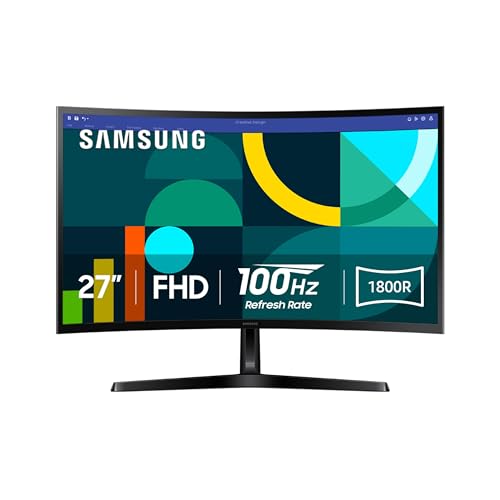
Pros
- 27-inch curved design
- 1800R curve for a more enveloping view
- 100Hz refresh rate
- TÜV-certified eye-comfort technology
- Game Mode and adjustable game settings
Cons
- The supplied data does not specify panel type or resolution beyond FHD
- 100Hz is slower than the main gaming picks
- Curved screens are not ideal for every desk or multi-monitor arrangement
Best for: someone who prefers an immersive curved screen for games, video, and everyday desktop use.
The Samsung S36GD takes a different approach from the flat displays here. Its 27-inch screen uses an 1800R curve, bringing the edges slightly closer to the viewer and giving games and video a more enveloping feel. That shape is most noticeable when you sit centered in front of the monitor, so it suits a dedicated desk better than a screen that frequently needs to face several people.
Samsung lists a 100Hz refresh rate, which should make scrolling and motion look smoother than a basic 60Hz screen. Game Mode can adjust the image for games, and the listed settings are intended to make contrast and dark scenes easier to tune. This makes the S36GD more engaging than a purely utilitarian office display, although it does not approach the 240Hz Dell SE2726HG for competitive play.
Eye comfort is a clear part of the feature set. Samsung says its TÜV-certified technology reduces blue light and screen flicker for longer sessions. The product also includes connection flexibility, though the supplied details do not name the individual ports. That missing information is worth checking carefully if you need a particular input for a laptop, desktop, or console.
The curve is both the reason to buy this Samsung and the reason to skip it. It can make a single-screen setup feel more immersive, but it is less natural for precision layout work and can complicate a flat multi-monitor arrangement. The Philips 241V8LB is better for document-focused use, while the Dell SE2726H is faster and uses a specified IPS panel. Pick the Samsung when the curved viewing experience matters more than maximum speed or clearly documented panel details.

How to choose best budget monitors
The right monitor depends less on a long feature list than on how the screen will sit on your desk, what your computer can output, and how much motion or image consistency you notice.
Screen size and pixel density
A 22-inch or 23.8-inch Full HD monitor keeps 1920 x 1080 pixels relatively compact, which can make text and interface elements look tidy at a normal desk distance. A 27-inch screen gives you more physical room for windows and games, but the same resolution is spread over a larger area. That can make fine details appear less dense.
Choose the smaller format for a shallow desk, sharper-looking Full HD text, or a two-screen setup. Choose 27 inches when workspace and immersion matter more than compact pixel spacing.
Panel type and viewing angles
IPS panels, such as those in the Dell and Acer models, are designed to keep color and image consistency stable across wide viewing angles. VA panels, used by the Philips monitors, emphasize contrast with deeper blacks and brighter whites. Neither type is automatically right for every desk.
IPS is the safer direction for shared viewing, general productivity, and color consistency. VA can be more appealing for movies and darker games, especially when you sit directly in front of the screen.
Refresh rate and response
Refresh rate describes how often the monitor can update the image. The 100Hz Philips and Samsung displays should feel smoother than a basic 60Hz monitor, while the 120Hz Acer models and 144Hz Dell displays leave more room for fast games. The Dell SE2726HG goes furthest with 240Hz.
Response figures such as 1ms VRB, 1ms MPRT, and 0.5ms describe manufacturer-specified motion modes. They do not replace a capable graphics card, and they should not be compared as if every brand measures them in exactly the same way. Adaptive-Sync, FreeSync, or VRR support is also useful because it helps the display follow changing frame rates.
A high refresh rate only helps when the computer can produce enough frames to use it.
Resolution and brightness
Every display here is designed around Full HD, although the Samsung's supplied title describes it simply as FHD. Full HD remains a practical resolution for ordinary work, streaming, and entry-level gaming. The important judgment is how it pairs with screen size. It is a natural match for compact displays and a more spacious but less dense match for 27-inch models.
Brightness matters most when room lighting is difficult. Acer lists 250 nits for both KB-series monitors. The other products do not provide a brightness figure in the supplied data, so do not assume they match Acer's specification.
Ports, audio, and mounting
Connection details can decide whether a monitor fits your setup. The Dell SE2426H and SE2726H list two HDMI ports, the Sceptre E225W-FW144 lists HDMI and DisplayPort, and the Sceptre E275W-FW100T lists DisplayPort plus two HDMI ports. The larger Sceptre also includes a headphone jack, audio input, built-in speakers, and VESA mounting.
If you switch between a computer and console, multiple inputs reduce cable swapping. Built-in speakers are convenient for basic audio, but the products that do not list them should be paired with headphones or separate speakers.

Frequently asked questions
Is Full HD enough for a budget monitor?
Full HD, or 1920 x 1080, is still suitable for browsing, office work, streaming, and gaming on a compact or mid-size monitor. It gives you less desktop room than a higher-resolution display, and it looks less dense on a 27-inch screen. The Acer and Dell 23.8-inch models make especially natural use of this resolution.
Is 100Hz noticeably better than 60Hz?
A 100Hz monitor can make scrolling, pointer movement, and compatible games look smoother than a 60Hz display. The difference is less dramatic than moving to 144Hz or 240Hz, but it is still useful for everyday use. Your computer must also output an appropriate frame rate for games to benefit fully.
Which monitor is best for competitive gaming?
The Dell SE2726HG is the strongest gaming option here because it combines a 240Hz refresh rate, 0.5ms response specification, FreeSync Premium, HDMI VRR, and a fast IPS panel. It is best suited to a computer capable of producing high frame rates. The Dell SE2426H is a better general-purpose alternative when work and gaming share equal priority.
Are IPS monitors better than VA monitors?
IPS monitors generally offer consistent color across wide viewing angles, while VA monitors are known for stronger contrast and darker blacks. The Dell and Acer displays use IPS, while both Philips models use VA. Choose based on your viewing position and content rather than treating one panel type as universally superior.
Does a 27-inch monitor need more than Full HD?
A 27-inch monitor does not require a higher resolution, but Full HD will look less dense at that size than it does on a 22-inch or 23.8-inch screen. The larger format gives you more physical workspace, while the smaller formats tend to make text appear tighter. The Dell SE2726H and Acer KB272 G0bi are sensible choices if you prioritize size.
Do built-in monitor speakers replace desktop speakers?
Built-in speakers can handle basic video, system sounds, and casual game audio without adding equipment to the desk. They are not listed on every model in this group, and the Sceptre E225W-FW144 and E275W-FW100T are the clear choices when integrated audio is important. Headphones or separate speakers remain the better route for more involved listening.

The bottom line
The Best budget monitors start with the Dell SE2426H because it combines a desk-friendly 23.8-inch size, IPS viewing consistency, 144Hz motion, FreeSync, eye-comfort certification, and two HDMI ports. It has the broadest appeal for work, streaming, and gaming, though its Full HD resolution and lack of listed built-in speakers are real limitations.
For competitive gaming, the Dell SE2726HG is the more focused choice, with 240Hz, a fast IPS panel, FreeSync Premium, and DisplayPort 1.4. The Acer KB242Y G0bi is the better office-first alternative, while the Philips 241V8LB makes more sense for reading and document-heavy work.
If you are undecided, choose the Dell SE2426H for mixed use, the Dell SE2726HG for fast gaming, or the Philips 241V8LB when long reading sessions matter most.
As an Amazon Associate we earn from qualifying purchases.