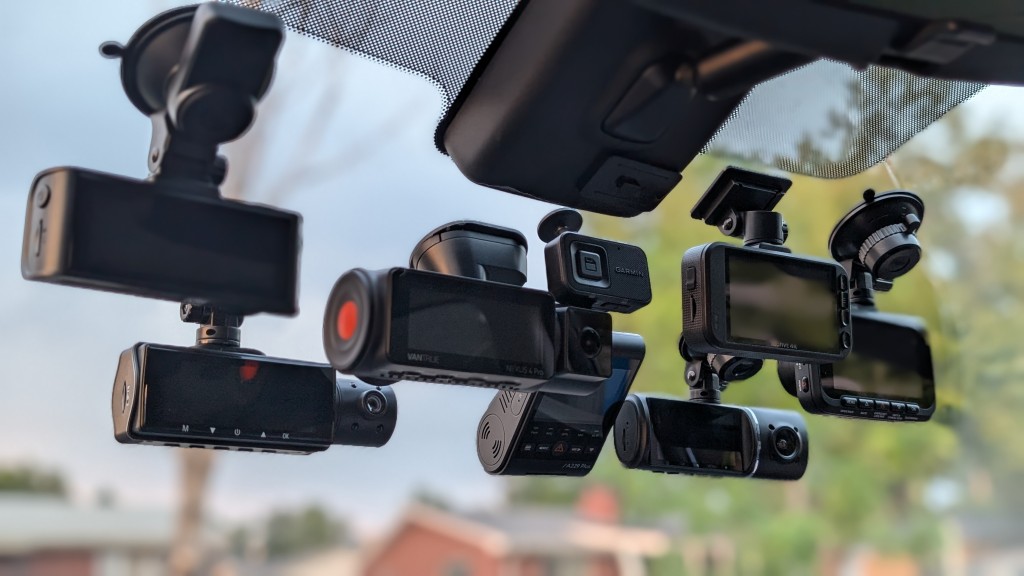

A dash cam earns its place when a routine drive suddenly needs a record. The useful footage is not just a sharp view ahead. It may be the rear plate, a side impact, a parked-car bump, or a clear time and location stamp. The Best dash cam choices below cover those needs with very different camera layouts and control systems.
Most drivers will be happiest with a front and rear camera that records clear video without turning every setup into a project. Rideshare drivers, fleet owners, and anyone worried about side impacts should look at three or four-channel systems instead. Our top pick is the ROVE R2-4K Dual Dash Cam, while the list also includes compact single-camera designs and unusually capable 360-degree options.
Comparison table
| # | Product | Award | Front and rear video | Coverage | Best for |
|---|---|---|---|---|---|
| 1 | ROVE R2-4K Dual Dash Cam | Best overall | 4K and 1080p | 150° front, 140° rear | Most drivers |
| 2 | REDTIGER F7NP | Best night recording | 4K and 1080p | 170° front, 140° rear | Commuters and road trips |
| 3 | REDTIGER F7N Touch | Best for easy control | 4K and 1080p | 170° front, 140° rear | Drivers who want a screen |
| 4 | Icesky S03 | Best side coverage | 4K and 1080p | Front, rear, left, right | Full-vehicle monitoring |
| 5 | IIWEY N6 | Best 360-degree night view | Ultra FHD, four channels | 170° front and rear, 150° sides | Rideshare and fleet use |
| 6 | Affver A4 | Best rear resolution | 4K and 2.5K | 160° front, 155° rear | Drivers prioritizing rear detail |
| 7 | 70mai T800E | Best three-channel system | 4K, 1080p, 1080p | Front, rear, interior | Rideshare and family cars |
| 8 | XYGCACO D65 | Best four-camera setup | 4K and three 1080p cameras | Front, rear, left, right | Wide incident coverage |
| 9 | galphi Mini Dash Cam | Best discreet camera | 4K front | 160° front | Simple front recording |
| 10 | Garmin Dash Cam 67W | Best compact smart camera | 1440p front | 180° front | Drivers who want connected features |
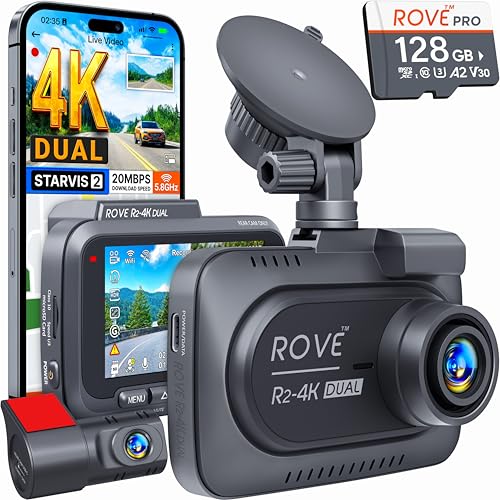
1. ROVE R2-4K Dual Dash Cam: Best Overall
Pros
- 4K front recording and 1080p rear recording
- STARVIS 2 sensor and wide apertures
- Fast 5GHz Wi-Fi downloads
- Built-in GPS and three parking modes
- 128GB card included
Cons
- Parking mode requires a separate hardwire kit
- The rear camera is limited to 1080p
- Its front unit is less discreet than the smallest cameras here
Best for: drivers who want a polished dual-camera system with strong coverage and useful everyday controls.
The R2-4K is the dash cam we would choose for a typical car because it gets the important decisions right without making the system unusually complicated. The front camera records in 3840 by 2160 at 30 frames per second, while the rear camera records 1920 by 1080 at 30 frames per second. That gives the forward-facing view enough detail for road signs and plates while still preserving a separate view of what happens behind the car.
Its Sony IMX675 STARVIS 2 front sensor is paired with an F1.5 aperture, and the rear lens uses F1.8. Those details matter most after sunset, when a camera needs to gather light without turning headlights into large white blobs. The 150-degree front field of view and 140-degree rear view are broad without reaching the extreme side coverage of the four-channel cameras below. A 3-inch IPS screen makes initial alignment and menu changes easier than on screen-free models such as the galphi Mini Dash Cam.
The built-in GPS records route, location, speed, and compass information, and the ROVE app can download clips over dual-band Wi-Fi at up to 20 MB/s. That is a practical advantage when an incident clip needs to move to a phone quickly. Loop recording, emergency locking, motion detection, and a built-in supercapacitor round out the everyday feature set. The included 128GB microSD card also means the camera is ready to install without an immediate card search.
The weakness is the rear resolution. The REDTIGER F7NP offers the same 4K and 1080p split, while the Affver A4 raises the rear camera to 2.5K. The ROVE also needs a hardwire kit for its 24-hour parking features, and that kit is not included. Its three parking modes are useful, though: one-frame-per-second time-lapse, motion detection, and collision detection. The camera can save a one-minute event clip and announce it when the car starts again.
Choose the ROVE R2-4K if you want one sensible answer for commuting, long drives, and ordinary parking protection. It is more complete than the single-camera picks and less elaborate to install than the four-channel models.
2. REDTIGER F7NP: Best Night Recording

Pros
- 4K front and 1080p rear recording
- STARVIS 2 sensor with F1.5 aperture
- 170-degree front field of view
- 5.8GHz Wi-Fi with downloads up to 20 MB/s
- Supercapacitor design
Cons
- Parking modes need a separate hardwire kit
- No touchscreen control
- Rear footage is not 4K
Best for: drivers who spend substantial time commuting at night or on poorly lit roads.
The F7NP is the most convincing alternative to the ROVE for drivers who care about difficult lighting. It records 4K video from the front and 1080p from the rear, with a 170-degree front lens that sees a little farther toward the sides than the ROVE. That broader view can help at junctions and during lane changes, though it also puts more demands on the lens and image processing.
REDTIGER combines a STARVIS 2 sensor with an F1.5 aperture, a six-layer optical lens, WDR, and HDR. Those features work together rather than acting as interchangeable badges. The sensor and aperture help gather light, while WDR and HDR manage the difference between dark road surfaces and bright headlights. The result should be easier-to-read footage across mixed lighting than a basic front camera, especially when a car moves from a dark street into a bright intersection.
The F7NP has built-in 5.8GHz Wi-Fi and can transfer clips through the REDTIGER Cam app at up to 20 MB/s. GPS data covers route, speed, and location, and loop recording automatically replaces older unlocked files when the card fills. The G-sensor locks footage after a sudden impact. A supercapacitor replaces a lithium battery, which is a sensible design for a device that remains in a hot windshield area.
Compared with the ROVE R2-4K, this model has the wider front view and a clear emphasis on night imaging, but the ROVE offers a more informative 3-inch screen and a more clearly described set of parking options. The F7NP still supports time-lapse and G-sensor parking modes, but the hardwire kit is required. Drivers who want a built-in screen and multiple ways to control recording should look at the REDTIGER F7N Touch instead.
The F7NP is the better fit for someone whose car spends mornings and evenings on the road. It is also a strong choice for road trips where fast phone transfers and GPS-stamped clips matter.
3. REDTIGER F7N Touch: Best for Easy Control

Pros
- 4K front and 1080p rear recording
- Touchscreen, physical buttons, and voice control
- 170-degree front field of view
- GPS and 5.8GHz Wi-Fi
- 128GB card included
Cons
- Rear camera remains 1080p
- Parking monitoring needs a hardwire kit
- The screen adds visual hardware to the windshield
Best for: drivers who want to change settings or protect a clip without relying only on a phone app.
The F7N Touch is the most approachable of the two REDTIGER dual-camera models. Its 4K front camera and 1080p rear camera match the F7NP, but the control experience is different. A touchscreen sits alongside physical buttons and voice commands, so saving footage or turning on Wi-Fi does not require choosing one control method and accepting its limitations.
The front lens covers 170 degrees and the rear lens covers 140 degrees. WDR, HDR, and STARVIS 2 support the front camera in changing light, while the 4K front recording preserves more detail than a standard 1080p unit. The rear camera is still useful for collision context and following traffic, but the Affver A4 has a sharper 2.5K rear view for drivers who put more weight on what happens behind the car.
GPS records location, speed, and route in the footage, and the REDTIGER app handles wireless preview and downloads at up to 20 MB/s through 5.8GHz Wi-Fi. The included 128GB card works with loop recording, which overwrites the oldest unprotected clips. A G-sensor protects event footage when it detects an impact or sudden movement.
The touchscreen is the reason to choose this model, but it is also the reason to skip it if you want the least visible camera possible. A screen can make setup much easier, yet a compact camera such as the Garmin Dash Cam 67W draws less attention on the windshield. The F7N Touch also requires a separate hardwire kit for collision-triggered or time-lapse parking monitoring.
Pick the F7N Touch when direct control matters more than a minimalist installation. It is especially sensible for drivers who want to lock a clip immediately, adjust settings from the driver's seat, or use voice control when reaching for the screen would be distracting.
4. Icesky S03: Best Side Coverage

Pros
- Four simultaneous camera views
- 4K front and 1080p rear, side, and interior views
- 3-inch display with multi-view layout
- GPS and Wi-Fi 6
- Eight infrared lights for side cameras
Cons
- Requires more installation work than a dual camera
- Hardwire kit for parking mode is not included
- Side and interior cameras are 1080p
Best for: drivers who want to document activity around the sides of the vehicle as well as ahead and behind.
The S03 solves a problem that the first three cameras cannot: a front and rear pair leaves the doors and side windows largely outside the frame. It records four views at once, with 4K at the front and 1080p from the rear, inside, left, and right cameras. The included 3-inch screen can show all four perspectives, making alignment less guesswork than it would be with a screen-free camera.
The side cameras are adjustable, and eight infrared lights help them record in low light. That is a meaningful distinction for a car parked in a dark lot or a rideshare vehicle where activity around the doors matters. The resolution is lower on the side and interior channels than on the front, but the extra angles can provide context that a sharper single view simply cannot capture.
Wi-Fi 6 on the 5.8GHz band supports downloads up to 20 MB/s through the app. GPS logs speed, route, location, and time, with playback available through the app or GPS player. Loop recording removes older unlocked files as storage fills, while the G-sensor locks important clips. The included 128GB card is a useful starting point, and the camera supports cards up to 512GB.
This setup is more involved than the ROVE R2-4K because there are more cameras and more cables to place. The 24-hour parking mode also needs a separate hardwire kit. The IIWEY N6 offers a similar four-channel arrangement and adds a longer stated time-lapse parking capability, while the Icesky is easier to understand if the multi-view display is a priority.
The S03 makes sense for rideshare drivers, people who regularly park in exposed spaces, and anyone concerned about side-swipe disputes. It is unnecessary for a driver who only wants clear forward evidence with minimal installation.
5. IIWEY N6: Best 360-Degree Night View

Pros
- Four-channel front, rear, and side coverage
- 170-degree front and rear views
- 150-degree adjustable side cameras
- Infrared night vision and Wi-Fi 6
- 48-hour time-lapse parking claim with hardwire kit
Cons
- Parking mode requires a separate hardwire kit
- No built-in battery
- More wiring than a dual-camera setup
Best for: rideshare, fleet, and other vehicles where side coverage and interior context are central.
The N6 takes the same broad idea as the Icesky S03 and makes the side cameras a central part of the design. It records front, rear, and both sides at the same time, with 170-degree views at the front and rear and 150-degree coverage from the adjustable side cameras. That layout is much better suited to documenting a door-side incident than a conventional two-camera kit.
IIWEY describes the four channels as Ultra FHD rather than assigning a separate 4K figure to the front view. The practical trade-off is clear: this camera is about seeing around the vehicle, not maximizing forward resolution. Eight infrared lights support the side cameras at night, and the Vision Enhance system is intended to preserve lane and plate detail at junctions. Buyers who want a specified 4K front image should consider the Icesky S03 or XYGCACO D65.
The N6 includes GPS, Wi-Fi 6 at 5.8GHz, and an app for previewing and downloading clips at up to about 20 MB/s. It supports 2.4GHz Wi-Fi too. Loop recording works with the included 128GB card and supports cards up to 256GB. The G-sensor can lock a 10-second event clip, while the parking system offers time-lapse at 1, 3, or 5 frames per second.
The important limitation is power. This camera has no built-in battery and must remain connected to the vehicle power source while recording. The ordinary car charger handles driving use, but the stated 48-hour parking surveillance requires the separate IIWEY hardwire kit. That makes the installation a bigger commitment than the single-camera galphi Mini Dash Cam.
The N6 is the right pick when side evidence matters more than a simple front-facing setup. It is particularly well suited to rideshare and fleet vehicles, but a normal commuter may find its extra cameras and wiring unnecessary.
6. Affver A4: Best Rear Resolution

Pros
- 4K front and 2.5K rear recording
- Wi-Fi 6 and built-in GPS
- 3.59-inch IPS screen
- F1.5 aperture and WDR
- Low-profile design
Cons
- Wi-Fi transfers are listed at up to 10 MB/s
- Parking mode requires a separate hardwire kit
- Four-channel cameras provide wider surrounding coverage
Best for: drivers who want more detail from the rear camera without moving to a four-camera system.
The A4 stands out because it does not treat the rear camera as an afterthought. Its front camera records in 4K and its rear camera records in 2.5K, giving the back view more detail than the 1080p rear cameras used by the ROVE and both REDTIGER dual systems. That makes it a strong candidate for drivers who are as concerned about a rear-end incident as they are about what happens ahead.
The front field of view is 160 degrees and the rear is 155 degrees. Those angles are broad enough to cover surrounding lanes without the four separate side cameras used by the Icesky S03 and IIWEY N6. A 3.59-inch IPS screen provides room for setup and playback, while the low-profile design is intended to keep the camera from taking over the windshield.
Affver lists Wi-Fi 6 on 5GHz with downloads up to 10 MB/s, plus built-in GPS for speed, route, and real-time coordinates. The app and Windows or Mac GPS player provide different ways to review journey data. The camera includes a 64GB card, uses loop recording, and locks clips through its three-axis gravity sensor. The car charger also includes an extra port for charging another device.
The A4's stated F1.5 aperture, six-layer lens, and WDR support its low-light mode, but the rear resolution is the bigger reason to choose it. Its weakness is that the Wi-Fi transfer speed is lower than the 20 MB/s listed for the ROVE and REDTIGER models. It also needs a dedicated Type-C hardwire kit for low-frame-rate parking recording.
Choose the A4 if rear detail is the deciding factor. For a broader explanation of the trade-offs between front-only, dual, and multi-camera layouts, how many camera angles your car really needs is a useful question to settle before installing anything.
7. 70mai T800E: Best Three-Channel System

Pros
- 4K front, 1080p rear, and 1080p interior recording
- Switchable infrared interior recording
- GPS, Wi-Fi 6, and voice control
- Parking monitoring and G-sensor lock
- Supercapacitor for a stated 14°F to 140°F operating range
Cons
- Interior camera adds complexity for ordinary drivers
- Wi-Fi downloads are listed at up to 10 MB/s
- Parking monitoring needs a compatible hardwire kit
Best for: rideshare drivers and families who need to record the cabin as well as the road.
The T800E is the most focused cabin-monitoring camera in this group. It records 4K from the front, 1080p from the rear, and 1080p from inside the vehicle. That third channel is more useful for an Uber or Lyft driver than side cameras if the main concern is what happens between the seats, at the doors, or in the rear cabin.
The interior camera has switchable infrared recording, so it can be adjusted for clearer footage at night. The front camera uses an F1.55 aperture, HDR, and 3D noise reduction to handle dark scenes and headlights. The front and rear wide-angle lenses cover the road while the cabin channel fills the gap that a standard dual camera leaves.
Built-in five-mode GPS records location, speed, and route. Wi-Fi 6 transfers footage through the 70mai app at up to 10 MB/s, and voice commands can take a photo, start recording, or lock important video. The included 64GB card supports loop recording, and the camera accepts cards up to 512GB. A supercapacitor is specified for operation from 14°F to 140°F, which is a useful detail for vehicles that sit outside through seasonal temperature changes.
The T800E is not the best fit for a driver who wants a tiny, unobtrusive camera. It is also not a substitute for a four-channel system if side impacts are the main concern. The Garmin Dash Cam 67W is much more discreet, while the XYGCACO D65 records three additional exterior directions instead of the cabin.
Pick the T800E when the interior view has a clear purpose. It is a practical arrangement for rideshare work, family vehicles, and anyone who wants front, rear, and cabin evidence without installing four exterior cameras.
8. XYGCACO D65: Best Four-Camera Setup

Pros
- 4K front and three 1080p views
- Simultaneous front, rear, left, and right recording
- 3-inch IPS screen
- GPS, 5GHz Wi-Fi, and app control
- Eight infrared lights and WDR
Cons
- Separate hardwire kit needed for parking mode
- More installation work than dual-camera systems
- Included card is 64GB
Best for: drivers who want four exterior views and a conventional screen-based setup.
The D65 is the most direct four-camera alternative to the Icesky S03. Its 4K front camera works with three 1080p cameras aimed at the rear, left, and right sides. A 3-inch IPS screen displays the synchronized views, which helps during installation and gives a quick way to verify that the side lenses are aimed where they should be.
A 5GHz Wi-Fi connection and GPS work through the Viidure app. The system can show a vehicle path and help tie a clip to a location, while high-speed downloads avoid removing the card for every short review. Loop recording overwrites older footage, and the G-sensor locks clips after sudden movement or a collision.
Night recording uses eight LED infrared lights, an F1.6 aperture, and WDR. The WDR system is intended to control exposure when headlights create a sharp contrast between bright and dark areas. The side cameras are 1080p, so their role is to establish what happened around the car rather than to provide the same fine forward detail as the 4K camera.
The D65's parking mode monitors objects approaching within a stated 3 to 4 meters and can start a one-minute video after detecting an event. It requires a separate hardwire kit, as does the Icesky. The 64GB included card is smaller than the 128GB cards supplied with several dual and four-channel competitors, so frequent drivers may need to manage storage more actively.
Choose the XYGCACO if you want a four-view design with front 4K recording, a screen, and familiar app controls. Its limitations are the extra installation work and lower storage capacity, not a lack of coverage.
9. galphi Mini Dash Cam: Best Discreet Camera

Pros
- 4K front recording
- 160-degree field of view
- Screen-free design
- 5GHz Wi-Fi and app control
- Compact installation
Cons
- No rear camera
- Wi-Fi downloads are listed at up to 8 MB/s
- Parking mode requires a separate hardwire kit
Best for: drivers who want a small front-facing camera with few distractions inside the car.
The galphi takes the opposite approach from the four-channel cameras. It records only the road ahead, has no screen, and keeps the hardware compact. That simplicity is its strongest feature. Once installed, it can record without adding a bright display to the windshield or asking the driver to manage several camera angles.
Its front camera records 4K at 2160p through a 160-degree lens. An F1.6 aperture and WDR support low-light recording, while the wide view captures more of the lanes and roadside than a narrow lens. The missing rear view is the obvious trade-off. A dual-camera model such as the ROVE R2-4K provides much stronger evidence when an incident begins behind the vehicle.
The 5GHz Wi-Fi system downloads footage through the app at up to 8 MB/s. Loop recording replaces older clips when the card fills, and the G-sensor locks footage after a sudden shake or collision. The camera includes a 32GB card and supports cards up to 256GB. That is enough to begin recording immediately, though the smaller included capacity gives the dual-camera models more breathing room.
The screen-free design makes the galphi less distracting than the ROVE or REDTIGER F7N Touch, but it also means app control is the main way to review or adjust the camera. Its 24-hour parking mode uses time-lapse recording and requires a separate Type-C hardwire kit. Drivers who need GPS data should also note that GPS is not listed among this model's features, unlike the ROVE and Affver.
The galphi is a sensible choice for a second vehicle, a new driver, or anyone who wants simple forward evidence without a visible screen. Skip it if rear coverage or location-stamped footage is important.
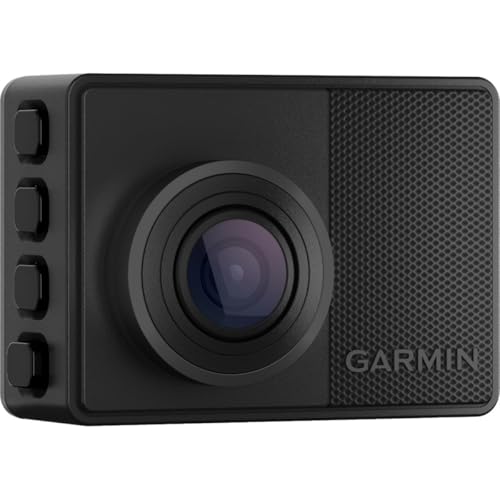
10. Garmin Dash Cam 67W: Best Compact Smart Camera
Pros
- Compact, discreet design
- 1440p recording with 180-degree field of view
- HDR optics and GPS
- Voice control
- Connected Vault, Live View, and Parking Guard features
Cons
- Front camera only
- Requires Wi-Fi for several connected features
- Lower resolution than the 4K front cameras here
Best for: drivers who value a discreet camera and connected monitoring more than multi-camera coverage.
The Garmin 67W is the smallest-feeling camera in this roundup. Its compact body is designed to go largely unnoticed on the windshield, which is appealing when a large screen or multiple lenses would be distracting. It records 1440p video through an extra-wide 180-degree lens, so it gives up 4K detail but gains a particularly broad view.
Garmin's Clarity HDR optics are intended to preserve detail in both bright and dark areas. The camera also records GPS location, date, and time with incident footage. Voice control can save video, start or stop audio recording, and take still pictures. Those commands are available in several languages, though the feature is not as useful to drivers who prefer a completely hands-off setup.
The connected features separate the 67W from the basic galphi. Saved clips can upload over Wi-Fi to Garmin's secure online Vault, while the Garmin Drive app provides access to Live View and Parking Guard. Live View needs constant power and an active Wi-Fi connection, and Parking Guard also depends on Wi-Fi. The camera can work with up to four Garmin dash cams in the app, though the additional cameras are sold separately.
The Garmin's weakness is coverage. It records only forward, and its 1440p resolution is below the 4K front cameras in the ROVE, REDTIGER, Affver, 70mai, and four-channel models. Driver alerts for forward collision, lane departure, and speed cameras are useful extras, but conditions can affect them and some warnings are not available in every region. Privacy and local-use rules also deserve attention before enabling connected monitoring.
Choose the 67W when discreet hardware and Garmin's connected ecosystem matter more than rear or side evidence. It is a polished single-camera option, but most drivers seeking the strongest incident record should choose a dual-camera model instead.

How to choose best dash cam
The right dash cam depends less on a single headline resolution than on the angles, power setup, and controls you will actually use.
Camera coverage
A front-only camera is the simplest option, but it cannot document what happens behind or beside the car. Dual systems add a rear view, while three-channel models such as the 70mai T800E add the cabin. Four-channel designs cover the front, rear, left, and right, which is useful for rideshare work and side-impact disputes.
A broad field of view helps capture adjacent lanes, but extremely wide footage can make distant plates look smaller. Choose the number of cameras based on the incidents you want to document, not just the largest angle listed on the box.
Video resolution and image sensors
4K front recording gives the camera more pixels to work with when a plate or road sign is relatively far away. A 1080p rear camera can still be useful, but the 2.5K rear camera in the Affver A4 provides a sharper back view. Resolution is only one part of the image. STARVIS 2 sensors, wide apertures, WDR, HDR, and infrared lighting all affect how footage behaves at night or when headlights enter the frame.
A sharp front view cannot replace a rear or side camera pointed at the wrong part of the incident.
Parking mode and power
Parking monitoring usually needs a hardwire kit because the camera must keep running after the ignition is off. Time-lapse recording conserves storage, while collision detection saves clips when the G-sensor detects an impact. Check whether the required kit is included. In this group, the parking kits for the ROVE, REDTIGER, Icesky, IIWEY, Affver, 70mai, XYGCACO, and galphi systems are separate.
A supercapacitor is useful in a camera exposed to hot and cold vehicle interiors. It does not mean the camera can record without vehicle power, so pay attention to that distinction.
Wi-Fi, GPS, and controls
Wi-Fi lets you preview and download clips without removing the card. The listed transfer speeds range from up to 8 MB/s on the galphi to up to 20 MB/s on several ROVE and REDTIGER models. GPS adds speed, route, and location information to footage, which can make an incident record easier to interpret.
Touchscreens are convenient for alignment and settings, while voice control can reduce the need to reach toward the camera. A screen-free model is more discreet, but phone app control becomes more important. Drivers comparing different installation approaches may also want to consider how a no-wire setup changes daily dash cam use.
Storage and recording protection
Loop recording lets the camera continue once the card fills by replacing older unlocked clips. G-sensors lock files after impacts or sudden movements, but a locked folder can eventually consume storage if it is never cleared. Included cards range from 32GB to 128GB in this selection, and some cameras support capacities as high as 512GB or 1TB.
Use the card type specified by the camera and check important clips after an incident. The goal is not simply to record continuously. It is to make sure the footage you need is still accessible and protected.

Frequently asked questions
Do I need a front and rear dash cam?
A front camera is enough if your main concern is recording the road ahead. A front and rear system gives much better context for rear-end collisions, tailgating incidents, and events that begin behind your car. The ROVE R2-4K, REDTIGER F7NP, and Affver A4 are the most straightforward dual-camera options here.
Is 4K dash cam video better at night?
4K can preserve more detail, but resolution alone does not determine night performance. Sensor type, aperture, HDR, WDR, and exposure control also matter. The ROVE R2-4K and REDTIGER F7NP pair 4K front recording with STARVIS 2 sensors and wide apertures, while the IIWEY and XYGCACO use infrared lighting for additional camera views.
Do dash cams record while the car is parked?
They can, but parking recording generally requires continuous power from a hardwire kit. Some models use time-lapse recording, while others wake after a collision or sudden movement. Confirm the kit requirement before installation because most products in this roundup do not include it.
Is a four-channel dash cam worth installing?
It is worthwhile when side coverage matters. Four-channel cameras record the front, rear, left, and right sides, which can help with side-swipes, door-area incidents, and activity around a parked vehicle. They require more cable routing than a front-only or dual-camera system, so they are less suitable for drivers who want the simplest installation.
Does GPS matter on a dash cam?
GPS records information such as speed, route, location, and time alongside the video. That can make footage more useful when the exact place or direction of an incident is disputed. GPS is included on the ROVE, REDTIGER, Icesky, IIWEY, Affver, 70mai, XYGCACO, and Garmin models listed here.
What size memory card should I use?
The answer depends on the number of cameras and the recording resolution. Four-channel systems generate more footage than a front-only camera, so a larger supported card is more useful. The products here include cards from 32GB to 128GB and list maximum supported capacities ranging from 256GB to 1TB.
Can I use a dash cam without a screen?
Yes. A screen-free camera records normally and uses a phone app for setup, playback, and downloads. The galphi Mini Dash Cam follows this approach, while the ROVE R2-4K and several other models include screens for easier alignment and direct control.

The bottom line
The ROVE R2-4K Dual Dash Cam is the Best dash cam for most drivers because it combines 4K front footage, a useful rear view, GPS, fast Wi-Fi, a screen, and flexible parking modes. The REDTIGER F7NP is the better alternative for drivers who put extra emphasis on night recording, while the Affver A4 deserves attention if a higher-resolution rear camera matters most.
For rideshare and fleet vehicles, the 70mai T800E is the more focused three-channel choice, and the Icesky S03 or IIWEY N6 make more sense when side coverage is essential. The Garmin Dash Cam 67W remains the cleanest compact option for a front-only installation with connected features.
If you are undecided, choose the ROVE for a normal car, the 70mai for cabin recording, or a four-channel model when an incident could happen beside the vehicle rather than directly ahead.
As an Amazon Associate we earn from qualifying purchases.