
A failed first layer can turn an evening project into a pile of plastic, while slow printers make even simple parts feel like an overnight commitment. The Best 3D Printer Under 500 options now offer automatic leveling, enclosed frames, remote monitoring, and high-speed CoreXY motion without demanding a full workshop.
This group ranges from compact, kid-friendly machines to enclosed printers built for engineering materials and multicolor work. Some are genuinely ready to print, while others make more sense as a platform you can expand later.
Our top pick is the FLASHFORGE Adventurer 5M Pro, with the Bambu Lab P1S Combo close behind for effortless multicolor printing. The rest cover fast open workflows, larger build volumes, expandable filament systems, and family use.
Comparison table
| # | Product | Award | Speed | Build volume | Nozzle | Best for |
|---|---|---|---|---|---|---|
| 1 | FLASHFORGE Adventurer 5M Pro | Best overall | Up to 600mm/s | 220 x 220 x 220mm | 280°C | Fast enclosed printing |
| 2 | Bambu Lab P1S Combo | Best for multicolor | Up to 500mm/s | Not stated | Not stated | Multicolor projects |
| 3 | Bambu Lab P1S | Best ready-to-use printer | Up to 500mm/s | Not stated | Not stated | Enclosed single-color printing |
| 4 | Creality SPARKX i7 | Best for smart monitoring | Up to 500mm/s | 260 x 260 x 255mm | Not stated | Camera-assisted printing |
| 5 | FLASHFORGE Adventurer 5M | Best open-workflow printer | Up to 600mm/s | 220 x 220 x 220mm | 280°C | Fast everyday projects |
| 6 | Creality K2 SE | Best expandable printer | Up to 500mm/s | 220 x 215 x 245mm | Not stated | Future multicolor upgrades |
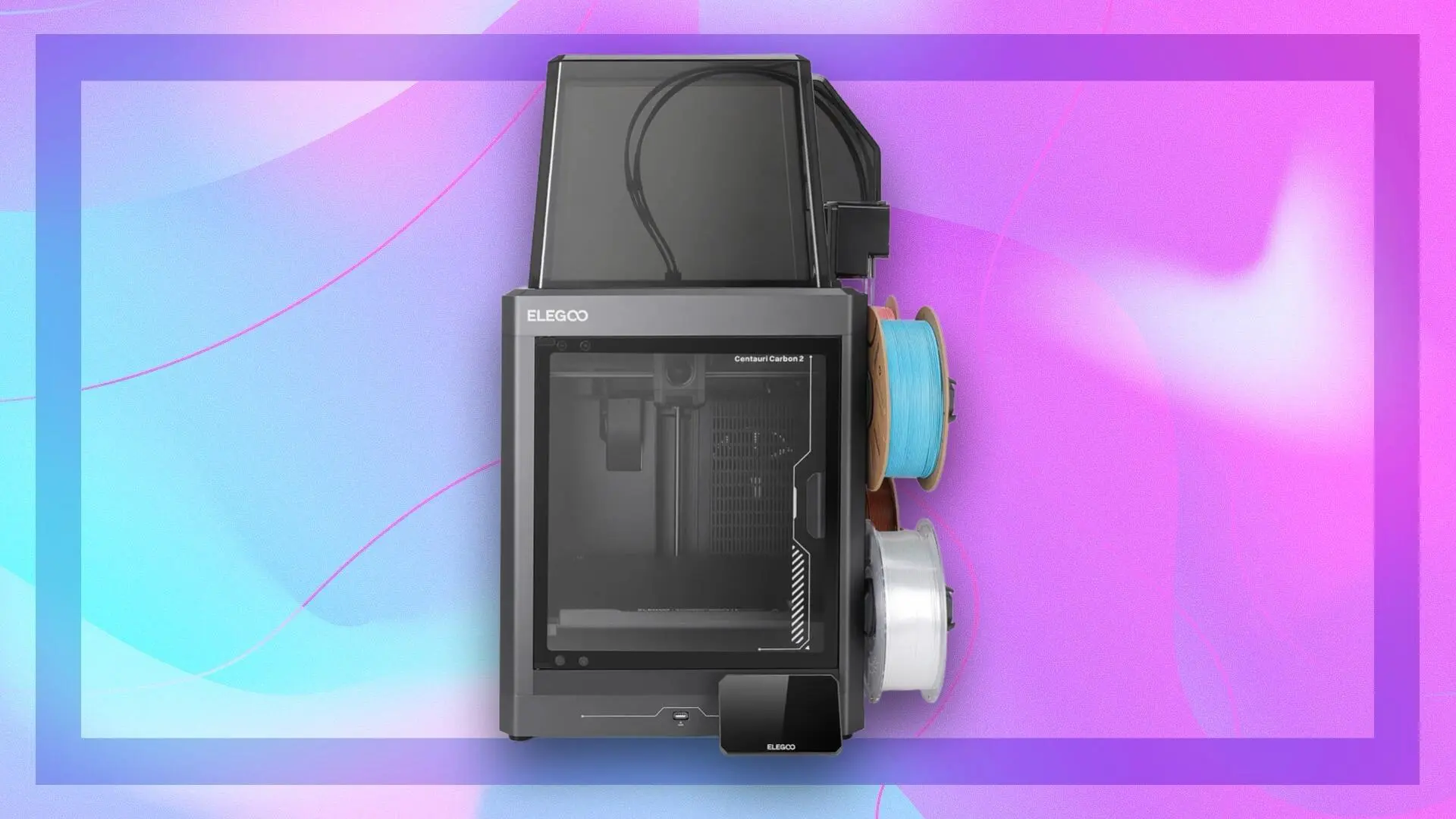
| 7 | ELEGOO Centauri Carbon 2 Combo | Best multicolor alternative | Up to 500mm/s | 256 x 256 x 256mm | 350°C | Larger multicolor models |
| 8 | ELEGOO Centauri Carbon | Best for advanced filament | Up to 500mm/s | 256 x 256 x 256mm | 320°C | Enclosed engineering prints |
| 9 | AOSEED AI 3D Printer | Best for kids | Up to 400mm/s | Not stated | Not stated | Guided family projects |
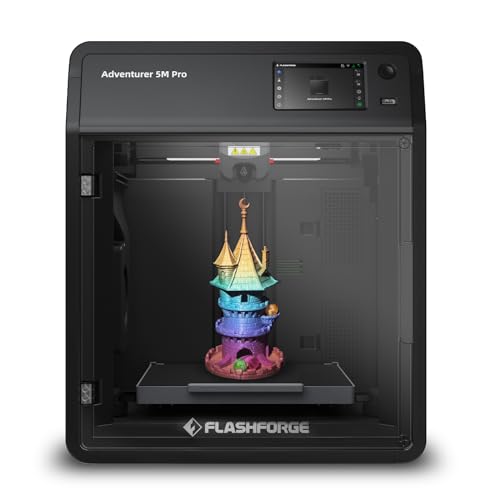
1. FLASHFORGE Adventurer 5M Pro: Best Overall
Pros
- CoreXY motion system supports speeds up to 600mm/s
- Enclosed all-metal structure
- Automatic leveling and quick setup
- 280°C direct extruder
- Remote control and live video monitoring
Cons
- Build volume is limited to 220 x 220 x 220mm
- No multicolor system is included
- Larger and heavier than a basic open-frame printer
Best for: makers who want fast, enclosed printing with very little initial tuning.
The Adventurer 5M Pro is the printer we would put in the center of a busy home workshop. Its combination of an enclosed CoreXY structure, automatic leveling, quick setup, and remote monitoring removes several of the small chores that make 3D printing feel more complicated than it needs to be. It is not the largest machine here, but it is unusually well balanced.
The headline speed is up to 600mm/s with acceleration up to 20, 000mm/s². Those figures matter most when the printer is moving through long walls, infill, and travel sections, rather than when every model can simply be printed at its maximum setting. The full-metal frame helps keep those rapid movements controlled, while the pressure-based automatic leveling system removes the need for manual Z-axis calibration. Setup is listed at about 10 minutes, which makes the Pro a more approachable starting point than a traditional kit.
Its 220 x 220 x 220mm build volume is enough for most household parts, figures, brackets, and prototypes. The 280°C all-metal direct extruder also gives it a useful material range, including PLA, ABS, PETG, ASA, TPU, PC, PLA-CF, and PETG-CF. The supported nozzle sizes from 0.25mm to 0.8mm let you choose between finer detail and faster material flow. A dual-sided PEI platform should make model removal less fussy, and the nozzle heats to 200°C in 35 seconds according to the listed specifications.
Compared with the FLASHFORGE Adventurer 5M, the Pro adds the enclosed design and a broader material-oriented workflow. The Bambu Lab P1S has a similarly polished approach, but the Adventurer 5M Pro gives you the higher listed speed and a clear quick-change nozzle system. Its weakness is the lack of included multicolor printing, and the 220mm cube is smaller than the ELEGOO Centauri Carbon models. Skip it if large sculptures or ready-made color changes are your priority. For fast single-color printing with fewer interruptions, this is the one we would keep.
2. Bambu Lab P1S Combo: Best for Multicolor

Pros
- P1S printer and AMS included together
- Supports multicolor and multimaterial printing
- Enclosed design
- Up to 500mm/s speed and 20, 000mm/s² acceleration
- Automatic bed leveling
Cons
- Not the lightest printer in this group
- Carbon and glass fiber reinforced polymer are not recommended
- The build volume is not specified in the product details
Best for: users who want multicolor printing without assembling a separate filament system.
The P1S Combo is the most straightforward route into multicolor printing in this lineup. The important distinction is the included AMS, rather than the printer alone. That bundled system is what enables the P1S to manage up to 16 colors, so this model makes sense for signs, toys, display pieces, and models where color changes are part of the design rather than an afterthought.
The enclosed body is useful beyond appearance. It gives the printer a more controlled space for materials that benefit from enclosure, while automatic bed leveling reduces the usual first-layer setup work. Bambu Lab lists a 15-minute setup, which puts the P1S Combo firmly in the ready-to-use category. It supports PLA, PETG, TPU, PVA, PET ABS, and ASA as ideal materials, with PA and PC listed as capable materials.
The motion system reaches up to 500mm/s with acceleration up to 20, 000mm/s². That gives it the same kind of fast workflow that makes the FLASHFORGE Adventurer 5M Pro attractive, though the Flashforge lists a higher maximum speed. The P1S Combo is also a substantial machine at 47.52 pounds, so it deserves a stable surface and a permanent place rather than being treated like a casual desktop accessory.
The main limitation is material selection. Carbon and glass fiber reinforced polymer are not recommended, so users choosing the P1S Combo for demanding reinforced parts should look closely at the material guidance. The standalone Bambu Lab P1S is the better fit if you only need single-color printing, while the ELEGOO Centauri Carbon 2 Combo offers a larger stated 256 x 256 x 256mm volume and a 350°C nozzle. Choose the P1S Combo when smooth color changes and a mature enclosed workflow matter more than maximum material temperature or build size.
3. Bambu Lab P1S: Best Ready-to-Use Printer

Pros
- Enclosed printer with automatic bed leveling
- Up to 500mm/s printing speed
- Setup is listed at 15 minutes
- Supports PLA, PETG, TPU, PVA, PET ABS, and ASA
- Ready-to-use design
Cons
- AMS is required for multicolor printing
- Carbon and glass fiber reinforced polymer are not recommended
- Build volume is not specified in the product details
Best for: anyone who wants the P1S platform without paying for a bundled multicolor system.
The standalone P1S is the sensible choice for a printer that should mostly produce one color at a time. It keeps the enclosed frame, automatic leveling, and ready-to-use setup of the Combo, but leaves the AMS out of the box. That makes the machine less specialized and easier to understand for someone who wants to print functional parts, replacement pieces, and models without planning a multicolor workflow.
Its listed speed reaches 500mm/s, with 20, 000mm/s² acceleration. Those numbers put it in the same fast class as the Creality K2 SE and both ELEGOO Centauri Carbon models. Automatic bed leveling is the more important feature for new owners because it addresses one of the most common causes of failed prints before the model starts. The 15-minute setup claim also suggests a short path from unboxing to the first project.
Bambu Lab lists PLA, PETG, TPU, PVA, PET ABS, and ASA as ideal materials, while PA and PC are described as capable. That is a useful range for general making, but the note against carbon and glass fiber reinforced polymer matters if you are planning particularly demanding parts. The printer weighs 39.02 pounds and measures about 18.03 inches wide, so it is not something most people will want to move after every project.
The central trade-off against the P1S Combo is obvious: this version does not include the AMS, and the product listing says the AMS is required for up to 16-color printing. The FLASHFORGE Adventurer 5M Pro is the better alternative for a 280°C direct-extruder workflow, while the P1S is more attractive for users who want an enclosed printer with a simple operating pattern. If your projects are almost always single-color, this is the cleaner P1S configuration. If color changes are central to the plan, buy the Combo instead.
4. Creality SPARKX i7: Best for Smart Monitoring

Pros
- 260 x 260 x 255mm build volume
- Automatic bed leveling, Z-offset, and input shaping
- Built-in AI camera for print monitoring
- Up to 500mm/s speed
- Night mode and customizable RGB lighting
Cons
- Multicolor printing requires the CFS system
- The product details do not state the nozzle temperature
- AI features may matter less to experienced users
Best for: people who want a larger printer with camera-assisted monitoring and simplified calibration.
The SPARKX i7 stands apart by treating the camera and software as central features rather than optional extras. Its built-in AI camera is intended to monitor prints for problems such as spaghetti prints and filament entanglement, then send alerts. That is useful for anyone who starts a long print and does not want to stand beside the machine for its entire duration.
The printer also handles several calibration tasks automatically. The product details mention automatic bed leveling, nozzle Z-offset, and input shaping before printing. Input shaping is designed to reduce visible ringing caused by vibration, while pressure advance is intended to reduce blobs and oozing around corners. Those systems are aimed at cleaner walls and sharper edges when the printer is moving quickly.
The 260 x 260 x 255mm build volume is one of the largest stated capacities here. It gives the SPARKX i7 more room than the 220mm cube of both FLASHFORGE Adventurer 5M models and slightly more room than the 256mm cube of the ELEGOO Centauri Carbon printers. Its maximum speed is 500mm/s, and the product listing also highlights 50 percent less purging waste and a 15 percent improvement in printing efficiency for its multicolor workflow. Multicolor printing requires the CFS system, so the printer itself is not the complete color solution.
The RGB light bar is more than decoration because it can show print status, and the listed Night Mode turns off the lights for quieter overnight operation. Still, the product information does not give a nozzle temperature, so users choosing materials should not assume the range offered by the 320°C and 350°C ELEGOO models. The P1S is the more established-looking enclosed alternative for a simple material workflow, while the SPARKX i7 is the better fit for a larger work area and active monitoring. It is especially appealing to owners who value alerts and automation as much as raw speed.
5. FLASHFORGE Adventurer 5M: Best Open-Workflow Printer

Pros
- Up to 600mm/s travel speed
- Automatic bed leveling
- 280°C direct extruder
- Quick three-second nozzle changes
- Dual-sided PEI platform
Cons
- Build volume is limited to 220 x 220 x 220mm
- The product details do not describe an enclosure
- No multicolor hardware is included
Best for: makers who want fast, uncomplicated single-color printing in a compact footprint.
The Adventurer 5M is the simpler sibling to the 5M Pro, and that distinction makes it a useful choice rather than a lesser copy. It keeps the fast CoreXY motion, automatic leveling, quick nozzle changes, and 220 x 220 x 220mm build volume. The design is aimed at people who want to get prints moving without spending their time on manual platform adjustments.
Flashforge lists travel speeds up to 600mm/s and acceleration up to 20, 000mm/s². The high-flow nozzle is rated at 32mm³/s, and the printer can heat to 200°C in 35 seconds. Those features make a practical difference when you are moving from one small project to the next. Automatic leveling helps with first-layer consistency, while the dual-sided PEI platform is designed to make adhesion and model removal less troublesome.
The 280°C direct extruder supports the same broad nozzle strategy as the Pro, with sizes from 0.25mm to 0.8mm. A smaller nozzle can favor fine detail, while a larger one can push more material through for sturdier or faster parts. The Flash Maker mobile app adds remote monitoring and intelligent operation, though the Pro goes further with its enclosed structure and live video monitoring.
The biggest question is whether you need the Pro's enclosure. The P1S is a stronger competitor if you want a fully enclosed body, while the Creality K2 SE offers a slightly taller 245mm build dimension and compatibility with Creality's CFS system. The Adventurer 5M remains the more direct pick for quick, single-color work, especially when quick three-second nozzle replacement matters. Skip it if you regularly print materials that benefit from a controlled enclosed environment or need multicolor output.
6. Creality K2 SE: Best Expandable Printer

Pros
- Compatible with the Creality CFS multicolor system
- 500mm/s speed and 20, 000mm/s² acceleration
- Rigid die-cast aluminum alloy frame
- Direct-drive extruder with quick-swap nozzle
- Five-minute assembly and automatic leveling
Cons
- CFS multicolor system is separate
- Nozzle temperature is not stated
- Build volume is smaller than the SPARKX i7
Best for: users who want a capable single-color printer that can grow into multicolor printing later.
The K2 SE is built around the idea that your first setup does not have to define your long-term workflow. It prints as a single-color machine, but it is compatible with Creality's CFS system for multicolor printing. That makes it more flexible than a printer with no stated expansion path, though buyers should understand that the CFS is not included in this listing.
Its CoreXY motion system reaches up to 500mm/s with 20, 000mm/s² acceleration. The die-cast aluminum alloy frame, corner gussets, and dual-side crossbeams are intended to reduce flex as the toolhead changes direction quickly. A built-in vibration sensor and input shaping help reduce ringing and resonance, which can otherwise show up as ripples along fast-printed walls.
The 220 x 215 x 245mm build area is taller than the 220mm cube of the FLASHFORGE Adventurer 5M and 5M Pro, although it is not as broad as the 260 x 260 x 255mm space in the Creality SPARKX i7. The direct-drive extruder includes hardened steel dual-drive gears, a filament runout sensor, and a quick-swap nozzle. Automatic leveling, fan calibration, and first-time tuning are part of the five-minute assembly workflow, making this one of the more approachable Creality options.
The product details do not state the nozzle temperature, so the ELEGOO Centauri Carbon is a clearer choice for users selecting the printer around a stated 320°C nozzle, and the Centauri Carbon 2 reaches 350°C. The K2 SE instead wins on upgrade potential and its solid frame. It is a good choice for someone who wants to start with ordinary projects, then add multicolor capability later. Choose another model if you want the color system included immediately or need the largest build area in this group.
7. ELEGOO Centauri Carbon 2 Combo: Best Multicolor Alternative

Pros
- Four-color printing with the CANVAS system
- 256 x 256 x 256mm build volume
- 350°C high-temperature nozzle
- Automatic calibration and monitoring
- CoreXY system with up to 500mm/s speed
Cons
- Large and heavy desktop footprint
- Four-color capability is more limited than the P1S Combo's listed 16 colors
- Product dimensions include a height of 29.3 inches
Best for: makers who want included multicolor hardware, a larger build area, and higher nozzle temperature.
The Centauri Carbon 2 Combo is the choice for a maker who wants to move straight into multicolor printing while keeping room for larger models. Its CANVAS system supports four-color printing, instant color switching, smart filament detection, auto refill, and tangle detection. That is a complete multicolor-oriented setup, unlike the Creality K2 SE, which needs a separate CFS system.
The 256 x 256 x 256mm build volume gives the Carbon 2 more space than the FLASHFORGE models and the K2 SE. It runs a CoreXY system at up to 500mm/s with acceleration up to 20, 000mm/s², while a rigid aluminum frame and active vibration compensation are intended to keep fast movement controlled. Automatic leveling and monitoring are designed around a simple workflow: load the material, tap print, and let the printer handle calibration.
The 350°C nozzle is the most ambitious temperature rating in this roundup. It matters for users who plan to explore materials beyond basic PLA and PETG, although the listing describes material versatility broadly rather than naming a complete supported-material chart. The product also describes process and temperature control for basic through engineering-grade materials. That makes this machine more interesting for functional parts than a printer aimed only at decorative models.
There is a practical space penalty. The product dimensions list a 29.3-inch height, 19.7-inch width, and 18.9-inch length, with a weight of about 42.66 pounds. The Bambu Lab P1S Combo is the more compact-feeling route for users focused on its multicolor ecosystem, while the Carbon 2 offers the larger stated build volume and hotter nozzle. Choose the ELEGOO if those capabilities matter more than a smaller installation footprint.
8. ELEGOO Centauri Carbon: Best for Advanced Filament

Pros
- 320°C brass-hardened steel nozzle
- 256 x 256 x 256mm build volume
- Enclosed chamber
- Built-in camera and dual LED lighting
- Fully assembled and pre-calibrated
Cons
- No multicolor system is listed
- Larger than the FLASHFORGE Adventurer models
- The product listing describes a used condition
Best for: users who want an enclosed, ready-to-print machine for more demanding filament types.
The Centauri Carbon focuses on material headroom and monitoring rather than included multicolor hardware. It arrives fully assembled and pre-calibrated, with automatic bed leveling and touchscreen controls. That combination makes it accessible for a first printer, but its enclosed chamber and reinforced-material support give experienced users reasons to take it seriously.
The 320°C brass-hardened steel nozzle is the key specification. Hardened steel is relevant when working with abrasive reinforced filaments, and the higher temperature ceiling broadens the material possibilities beyond ordinary low-temperature plastics. The listing specifically mentions carbon fiber reinforced filament and parts intended for drones, automotive uses, and athletic applications. Those are use cases, not a guarantee that every material will be effortless, so users should still follow the filament guidance.
The CoreXY system reaches up to 500mm/s with acceleration up to 20, 000mm/s². Its 256 x 256 x 256mm build volume is large enough for more substantial parts, and the integrated die-cast aluminum frame is designed to limit vibration at speed. Automatic vibration compensation and pressure advance address two common sources of rough walls and inconsistent corners. A dual-sided plate with a PLA-specific surface is also included in the product description.
The built-in chamber camera and dual LED lighting allow real-time monitoring, time-lapse capture, and remote adjustments. That makes the Carbon more self-monitoring than the FLASHFORGE Adventurer 5M, while the ELEGOO Centauri Carbon 2 is the obvious alternative if four-color printing is a requirement. The listing identifies this unit as used, which is an important condition detail for anyone expecting a new machine. For a buyer comfortable with that condition and focused on enclosed advanced-material printing, it is the more specialized ELEGOO pick.
9. AOSEED AI 3D Printer: Best for Kids

Pros
- Enclosed, pinch-resistant design
- Access to more than 8, 000 listed models
- AI tools for voice, text, and image prompts
- Built-in camera and time-lapse recording
- Includes eight rolls of PLA filament
Cons
- Supports single-color printing only
- Build volume and nozzle temperature are not stated
- The fastest listed speed is a peak figure rather than the regular range
Best for: families who want guided creative projects instead of a conventional maker machine.
The AOSEED AI printer is aimed at a different buyer from the other eight machines. It is less about tuning a high-speed motion system and more about helping a child get from an idea to a finished toy. The app includes access to more than 8, 000 human-reviewed and print-tested models across 17 themed modules, while AI Doodle, AI MiniMe, and MINIMAKIE let children create designs from voice, text, images, or photos.
Safety and simplicity are the main reasons to choose it. The printer has an enclosed, pinch-resistant design, a leveling-free platform, quiet operation, and a TÜV Rheinland ISO 16000-tested PLA specification in the listing. One-tap printing, Wi-Fi, voice control, and compatibility with iOS, Android, and Windows make the experience more guided than the touchscreen-and-slicer workflow used by the faster CoreXY machines.
The speed description needs careful reading. The listing says regular printing runs at 220 to 250mm/s, with peaks up to 400mm/s, and that small toy projects can take as little as 20 minutes. It also includes filament runout detection, a quick-release nozzle, and a built-in camera for phone monitoring and time-lapse videos. The package includes eight rolls of PLA, tools, a magnetic build plate, and DIY stickers, giving a family several ways to begin without gathering a separate starter kit.
This is a single-color printer, and the listing specifically says multicolor designs require printing separate parts and assembling them. The FLASHFORGE Adventurer 5M is a much stronger choice for a technically minded teenager or adult who wants fast hardware and nozzle flexibility. The AOSEED is the better fit when guided models, parental visibility, and an enclosed experience matter most. For families comparing printers specifically around age-appropriate access, how a child-friendly printer handles setup and supervision is a useful next consideration.
How to choose best 3d printer under 500
The right machine depends less on a maximum speed headline than on the materials, model size, and amount of supervision you expect to provide.
Build volume
Build volume determines the largest single object the printer can make. A 220mm cube is enough for many brackets, figures, and household parts, while a 256mm cube gives you more room for larger models without splitting them. The Creality SPARKX i7 goes further with a stated 260 x 260 x 255mm volume.
Look at all three dimensions, not just the width. A taller 245mm or 255mm Z dimension can make a meaningful difference for vases, towers, and vertically oriented parts. If the printer will mostly make small toys, the compact volumes in the FLASHFORGE models are less restrictive.
Motion system and speed
CoreXY motion systems appear throughout this group because they can move quickly while keeping the moving mass controlled. The advertised maximum speeds reach 600mm/s on the FLASHFORGE models and 500mm/s on several other printers. Acceleration, vibration compensation, input shaping, and frame rigidity affect whether those speeds produce clean parts.
A printer that reaches a high number but needs constant adjustment is less useful than one with automatic calibration and sensible fast profiles. The Creality K2 SE, Creality SPARKX i7, and ELEGOO Centauri models all pair high speed with vibration or pressure controls listed in their features.
Fast printing is useful only when the frame, calibration, and material flow can keep the walls clean.
Nozzle temperature and extruder design
Nozzle temperature limits which materials you can realistically explore. The FLASHFORGE Adventurer 5M and 5M Pro list 280°C direct extruders, the ELEGOO Centauri Carbon lists 320°C, and the Centauri Carbon 2 lists 350°C. The Creality K2 SE, Creality SPARKX i7, Bambu Lab P1S models, and AOSEED listing do not state a nozzle temperature in the supplied product details.
A direct-drive extruder can help with accurate filament control, especially for flexible materials such as TPU. The K2 SE adds hardened steel dual-drive gears, while the ELEGOO Centauri Carbon specifies a brass-hardened steel nozzle. Choose based on the materials you actually plan to use rather than treating a higher temperature as automatically better.
Automatic calibration
Automatic bed leveling is one of the most valuable beginner-facing features because the first layer affects the entire print. The products in this list describe automatic leveling or full automatic calibration in different ways. The Creality SPARKX i7 also handles nozzle Z-offset and input shaping, while the ELEGOO Centauri Carbon 2 emphasizes one-click full auto leveling.
A good calibration system should shorten setup and reduce repeated manual corrections. It does not remove the need to keep the build plate clean, load filament correctly, or maintain the nozzle. Buyers new to the category may also want to consider which beginner features reduce first-layer frustration before choosing a more advanced machine.
Enclosure and monitoring
An enclosed printer can be a better fit for materials that benefit from a more controlled environment, and it keeps moving and hot components behind a physical barrier. The Bambu Lab P1S models, FLASHFORGE Adventurer 5M Pro, and ELEGOO Centauri Carbon clearly emphasize enclosed designs. The AOSEED adds a pinch-resistant enclosure for family use.
Cameras are useful when prints run for hours. The FLASHFORGE Pro, Creality SPARKX i7, ELEGOO Centauri Carbon, and AOSEED list remote or built-in monitoring features. A camera cannot prevent every failure, but alerts, time-lapse recording, and remote checks can make unattended printing less nerve-racking.
Multicolor systems
Multicolor printing requires more than a printer that can accept different filament colors. It needs a compatible material system that can switch, identify, and manage filament. The Bambu Lab P1S Combo includes an AMS and lists up to 16 colors. The ELEGOO Centauri Carbon 2 Combo includes CANVAS for four-color printing.
The Creality K2 SE and Creality SPARKX i7 can use Creality's CFS system, but the CFS is not included with the K2 SE listing and is required for the SPARKX i7's multicolor workflow. AOSEED supports single-color printing only, so it is not the right machine for one-piece multicolor models.
Frequently asked questions
Is a 3D printer under 500 suitable for a beginner?
Yes. Automatic leveling, pre-calibrated systems, enclosed bodies, and one-click workflows make several of these machines approachable. The FLASHFORGE Adventurer 5M Pro, Bambu Lab P1S, and ELEGOO Centauri Carbon are easier starting points than a printer that requires extensive manual setup.
Which printer is best for multicolor printing?
The Bambu Lab P1S Combo is the clearest multicolor choice because the AMS is included and the listing describes support for up to 16 colors. The ELEGOO Centauri Carbon 2 Combo is a strong alternative with a larger stated build volume and four-color CANVAS printing.
Do all of these printers support multicolor printing?
No. The AOSEED AI printer supports single-color printing only, with multicolor designs requiring separate parts and assembly. The Bambu Lab P1S needs an AMS, and the Creality K2 SE needs the compatible CFS system for multicolor work.
Is an enclosed 3D printer better?
An enclosure can help with materials that benefit from a controlled printing environment and can place a barrier between users and hot or moving components. It is especially useful for family spaces and advanced filament workflows. An open or less explicitly enclosed printer can still be a good choice for ordinary PLA projects and easier access to the print area.
Does maximum speed mean prints will always finish faster?
No. Maximum speed is only one part of print time. Model geometry, layer height, infill, acceleration limits, material flow, and the slicer profile all affect the final duration. A rigid frame and vibration compensation help a printer make useful progress at higher speeds without sacrificing as much surface quality.
What build volume should I look for?
A 220 x 220 x 220mm volume is a practical starting point for many models and household parts. A 256mm or 260mm build dimension gives more flexibility for larger figures, functional parts, and objects that would otherwise need to be split. Check the height as well as the two horizontal dimensions.
Can these printers use flexible or engineering materials?
Some can. The FLASHFORGE Adventurer 5M Pro lists PLA, PETG, TPU, PC, ASA, and carbon fiber reinforced materials among its supported options. The Bambu Lab P1S lists TPU, PA, and PC with different guidance levels, while the ELEGOO Centauri Carbon emphasizes a 320°C hardened-steel nozzle for advanced filaments. Always follow the specific printer and filament guidance before choosing a material.
The bottom line
The Best 3D Printer Under 500 for most makers is the FLASHFORGE Adventurer 5M Pro. It combines 600mm/s motion, automatic leveling, an enclosed CoreXY structure, a 280°C direct extruder, quick nozzle changes, and remote monitoring in a machine that remains easier to approach than a heavily manual printer.
For multicolor work, choose the Bambu Lab P1S Combo because its AMS is included and the system is designed around color and material changes. The ELEGOO Centauri Carbon 2 Combo is the better alternative when a larger 256mm cube and 350°C nozzle matter more than the P1S Combo's listed color capacity. Families should choose the AOSEED AI 3D Printer, while advanced-material users should look at the ELEGOO Centauri Carbon.
If you are undecided, buy the FLASHFORGE Adventurer 5M Pro for fast single-color printing, or the Bambu Lab P1S Combo when multicolor output is the main reason you are shopping.
As an Amazon Associate we earn from qualifying purchases.