

A first layer that peels up, a filament swap that turns into a tangled mess, or a printer that needs constant adjustment can ruin the fun before a model is finished. The right machine should make the important decisions for you while still giving you room to experiment.
Our Best 3d printer picks cover quick CoreXY machines, enclosed printers for demanding materials, multicolor systems, and genuinely large-format models. The FLASHFORGE Adventurer 5M is the single best starting point here, while the other eight make stronger cases for multicolor work, engineering filaments, or oversized parts.
Comparison table
| # | Product | Award | Build volume | Maximum speed | Best for |
|---|---|---|---|---|---|
| 1 | FLASHFORGE Adventurer 5M | Best overall | 220 x 220 x 220 mm | 600 mm/s | Fast everyday printing |
| 2 | Bambu Lab P1S Combo | Best multicolor starter | Not provided | 500 mm/s | Enclosed multicolor printing |
| 3 | Bambu Lab P2S Combo | Best smart upgrade | Not provided | 600 mm/s | Assisted, higher-end printing |
| 4 | FLASHFORGE Adventurer 5M Pro | Best enclosed FlashForge | 220 x 220 x 220 mm | 600 mm/s | Flexible filament choices |
| 5 | Bambu Lab P1S | Best printer-only option | Not provided | 500 mm/s | Ready-to-use enclosed printing |
| 6 | FLASHFORGE AD5X | Best compact multicolor machine | 220 x 220 x 220 mm | 600 mm/s | Four-color projects |
| 7 | QIDI Max4 Combo | Best large-format printer | 390 x 390 x 340 mm | 800 mm/s | Large engineering parts |
| 8 | Creality K2 Plus Combo | Best large multicolor model | 350 x 350 x 350 mm | 600 mm/s | Large multicolor models |
| 9 | Creality K2 Combo | Best quiet multicolor printer | 260 x 260 x 260 mm | 600 mm/s | Quieter home printing |
1. FLASHFORGE Adventurer 5M: Best Overall

Pros
- Automatic bed leveling simplifies first layers
- CoreXY frame supports fast movement
- Quick-change nozzle system
- Dual-sided PEI build platform
- Remote monitoring through the Flash Maker app
Cons
- The 220 x 220 x 220 mm build area limits oversized models
- The 280°C extruder is less capable than the hottest machines here
- Multicolor printing is not included
Best for: anyone who wants a fast, approachable printer for everyday PLA, PETG, and TPU projects.
The FLASHFORGE Adventurer 5M is the machine we would put in the hands of the widest range of makers. It removes two of the most irritating early hurdles, bed leveling and slow nozzle changes, without making the printer feel like a sealed appliance. The 1-click automatic leveling system handles platform height before a print, and the dual-sided PEI surface is designed to make finished parts easier to remove.
Its CoreXY structure is the reason the printer can move quickly without relying on a flimsy moving-bed design. FlashForge lists travel speeds up to 600 mm/s and acceleration up to 20, 000 mm/s². Those figures matter most when printing repeated brackets, organizers, and prototypes, where shorter travel movements add up. A high-flow nozzle rated at 32 mm³/s and a 35-second warm-up to 200°C help the printer get into the job quickly, although maximum speed will still depend on the model and filament.
The 280°C direct extruder covers common materials including PLA, PETG, TPU, ABS, ASA, and PC, with the listing also identifying PA, PLA-CF, and PETG-CF support. The supplied nozzle setup can be changed in about three seconds, and nozzle sizes from 0.25 to 0.8 mm let you trade fine detail for faster, heavier layers. Vibration compensation and dual-fan cooling are useful complements to the fast motion system.
The limitation is clear beside the FLASHFORGE AD5X and the Bambu Lab machines: this is a single-color printer, and the 220 mm cube is not built for large props. The 280°C ceiling also gives the QIDI Max4 Combo and Creality K2 Plus more headroom for demanding materials. Still, for a first serious machine or a dependable daily printer, this is the easiest recommendation in the group. Readers focused on simple setup can also see how the right features reduce beginner frustration before choosing a more specialized model.
2. Bambu Lab P1S Combo: Best Multicolor Starter

Pros
- AMS system enables multicolor and multimaterial work
- Fully enclosed body
- Automatic bed leveling
- Quick setup
- Supports PLA, PETG, TPU, PVA, ABS, ASA, PA, and PC
Cons
- The AMS is required for multicolor printing
- Carbon and glass fiber reinforced polymers are not recommended
- The maximum speed is lower than the fastest printers here
Best for: makers who want an enclosed printer and a straightforward path into multicolor models.
The Bambu Lab P1S Combo makes multicolor printing feel like part of the normal workflow rather than a separate project. The printer and AMS arrive as a coordinated system, so the appeal is not just the ability to change colors. It is the reduced need to pause a print, unload filament, and manage each transition by hand. The enclosed body also makes the P1S a more controlled machine for materials that benefit from a stable printing environment.
Bambu Lab specifies speeds up to 500 mm/s and acceleration of 20, 000 mm/s². That is quick enough for rapid prototypes and household parts, but the number is less important than how little setup stands between a model and a print. Automatic bed leveling handles the platform calibration, while the advertised setup time is about 15 minutes. The enclosed design is also a practical advantage in a shared room because it keeps the print area contained.
The supported material list is broad for a printer in this class. PLA, PETG, TPU, PVA, ABS, and ASA are identified as ideal materials, while PA and PC are listed as capable. Carbon and glass fiber reinforced polymers are not recommended, so this is not the machine to select for abrasive composite filament. The AMS is described as supporting up to 16 colors, but that requires connecting additional AMS units rather than assuming the standard arrangement provides every color at once.
Compared with the Bambu Lab P1S, this Combo is the more complete creative tool because the AMS is included. Compared with the Bambu Lab P2S Combo, it gives up the newer model's active flow compensation, AI failure detection, and filament drying to 65°C. The P1S Combo remains the calmer choice for people who want multicolor printing without moving into a more involved engineering setup. For projects where color changes are the main attraction, how automatic filament switching changes a multicolor workflow is the key distinction to understand.
3. Bambu Lab P2S Combo: Best Smart Upgrade

Pros
- 600 mm/s maximum printing speed
- AMS 2 Pro includes filament drying up to 65°C
- AI failure detection
- Automatic calibration and quick-swap nozzles
- Adaptive airflow and carbon filtration
Cons
- The P2S printer alone does not support multicolor printing
- The listing does not provide a build volume
- Its larger body needs substantial desk space
Best for: experienced makers who want more active monitoring and material control than the P1S platform provides.
The Bambu Lab P2S Combo is aimed at the maker who wants the printer to notice more of the things that usually go wrong. Its AI failure detection is intended to identify failed prints, while automatic calibration and quick-swap nozzles reduce routine intervention. That does not make the machine maintenance-free, but it shifts more of the repetitive work away from the operator.
The P2S reaches a listed 600 mm/s and uses a PMSM servo extruder with active flowrate compensation. That combination is meaningful for sharp corners and consistent extrusion when the printer is moving quickly. The system is designed to keep layers smooth rather than simply chasing a headline speed. Setup is listed at about 15 minutes, which puts it in the same convenient category as the P1S family.
The AMS 2 Pro is the important part of this Combo. It enables multicolor and multimaterial printing, and its built-in dryer can reach 65°C. Drying matters because moisture in filament can cause rough surfaces, weak layers, and inconsistent extrusion. The adaptive airflow system can cool overhangs or retain heat in a chamber listed at 50°C for engineering materials, while a carbon filter helps manage the air inside the enclosure.
This machine is more capable than the Bambu Lab P1S Combo, but it is also harder to justify for someone who mainly prints single-color PLA. The listing does not provide a build volume, so buyers who routinely print large objects should look at the QIDI Max4 Combo or Creality K2 Plus instead. The P2S Combo is the right step up when detection, drying, and flow control matter more than maximum object size.
4. FLASHFORGE Adventurer 5M Pro: Best Enclosed FlashForge
Pros
- Fully metal CoreXY structure
- Automatic pressure-based leveling
- 600 mm/s maximum speed
- Supports PLA, ABS, PETG, ASA, TPU, PC, PLA-CF, and PETG-CF
- Remote video monitoring
Cons
- Build volume remains 220 x 220 x 220 mm
- The 280°C nozzle is not the hottest in this group
- No multicolor system is included
Best for: users who want the Adventurer 5M platform with an enclosed body and broader material support.
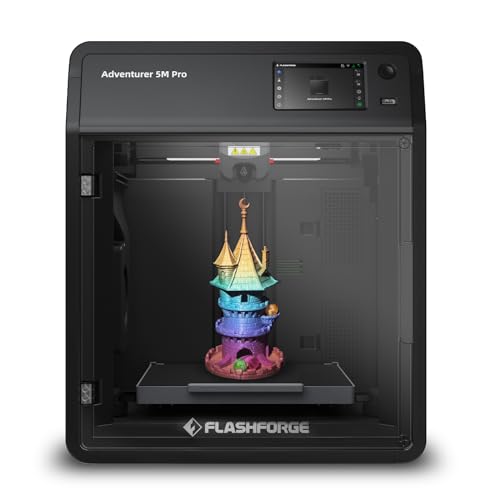
The FLASHFORGE Adventurer 5M Pro takes the quick, compact character of the Adventurer 5M and adds a more controlled enclosure. That makes it the more sensible FlashForge choice for a workspace where temperature stability and material flexibility matter. It is still a 220 mm cube, so the Pro designation does not mean a larger print area.
Its CoreXY frame is built from metal, and the printer is rated for 600 mm/s travel speed with 20, 000 mm/s² acceleration. FlashForge says the nozzle reaches 200°C in 35 seconds, which helps reduce the dead time before a print begins. Pressure-based automatic leveling is a useful feature for repeatability, while the dual-sided PEI plate should make routine removal less fussy.
The 280°C all-metal direct extruder handles a long list of materials, including PLA, ABS, PETG, ASA, TPU, PC, PLA-CF, and PETG-CF. Nozzle options from 0.25 to 0.8 mm let the same machine move from small detailed pieces to faster, sturdier parts. The Flash Maker app adds remote control, live video monitoring, and real-time adjustments, which are practical when a print runs for hours.
The FLASHFORGE Adventurer 5M is lighter and simpler, while the AD5X adds multicolor printing and a 300°C extruder. The Pro makes the stronger case for enclosed single-color work, but it cannot match the QIDI Max4 Combo or K2 Plus for chamber temperature and large parts. Choose it when the supported material range and enclosure matter more than multicolor capability.
5. Bambu Lab P1S: Best Printer-Only Option

Pros
- Ready-to-use enclosed design
- Automatic bed leveling
- 500 mm/s maximum speed
- Broad everyday filament support
- About 15-minute setup
Cons
- AMS is required for multicolor printing
- Carbon and glass fiber reinforced polymers are not recommended
- Build volume is not provided in the listing
Best for: makers who want the P1S platform without an included multicolor filament system.
The Bambu Lab P1S is the straightforward version of the P1S platform. It keeps the enclosed body, automatic bed leveling, and ready-to-use setup while leaving the AMS out of the box. That makes the printer easier to understand as a single-color machine, and it leaves a clear upgrade route for anyone who later decides that multicolor printing is essential.
The listed maximum speed is 500 mm/s, with acceleration up to 20, 000 mm/s². Those figures place it below the 600 mm/s FlashForge, P2S, and Creality models, but the P1S still has enough motion speed for quick prototypes and repeated functional parts. Automatic leveling is the feature that matters more for many owners because it reduces the amount of mechanical setup before a print.
Bambu Lab identifies PLA, PETG, TPU, PVA, ABS, and ASA as ideal materials, with PA and PC listed as capable. The enclosure helps the printer handle that range more consistently than an open-frame design, but the listing does not recommend carbon or glass fiber reinforced polymer. That limitation is important for anyone planning to print abrasive composite parts rather than ordinary workshop models.
The Bambu Lab P1S Combo is the obvious alternative if color changes are part of the plan from the beginning. The FLASHFORGE Adventurer 5M offers a faster headline speed and a smaller, lighter body, while the P1S answers with an enclosure and Bambu's established automated workflow. Buyers who are still learning the basics may find the setup features that matter most for a first printer more useful than an extra speed specification.
6. FLASHFORGE AD5X: Best Compact Multicolor Machine

Pros
- Supports up to four colors
- 300°C direct-drive extruder
- 600 mm/s maximum speed
- One-click automatic leveling
- Multiple nozzle sizes
Cons
- The build volume is limited to 220 x 220 x 220 mm
- Four-color operation requires careful filament management
- The enclosure and chamber features are less extensive than on larger models
Best for: users who want multicolor printing in a compact CoreXY machine.
The FLASHFORGE AD5X is the most direct answer for someone who likes the Adventurer 5M format but wants color changes. It supports up to four colors simultaneously and adds automatic filament feeding and retraction. That makes it more suitable for signs, figures, labels, and decorative parts than the single-color Adventurer models.
The printer uses a CoreXY structure with a listed maximum speed of 600 mm/s and acceleration of 20, 000 mm/s². One-click auto leveling handles the bed calibration, and vibration compensation is intended to keep fast movements from showing up as obvious surface problems. A resume function can recover a print after unexpected power loss, a small feature that can save a long job.
The 300°C direct-drive extruder is one of the AD5X's strongest specifications. It gives the machine more temperature headroom than the Adventurer 5M and 5M Pro. The nozzle system supports 0.25, 0.4, 0.6, and 0.8 mm sizes. The fine nozzle is aimed at miniature details, while the larger options can shorten jobs involving broad walls or sturdy parts.
The Bambu Lab P1S Combo is the more polished enclosed multicolor alternative, and the Bambu Lab P2S Combo adds filament drying and active flow control. The AD5X wins on its 300°C extruder and compact format, but the 220 mm cube limits large designs. Pick it when four-color capability and hotter extrusion are more important than chamber control or maximum build size.
7. QIDI Max4 Combo: Best Large-Format Printer
Pros
- 390 x 390 x 340 mm build volume
- 65°C active heated chamber
- 800 mm/s maximum speed
- Hardened steel nozzle supports abrasive materials
- AI camera can detect print failures
Cons
- Very large and heavy chassis
- Polar Cooler is not included
- Multicolor printing requires a separate QIDI BOX connection
Best for: professionals and serious hobbyists printing large engineering parts or prototypes.
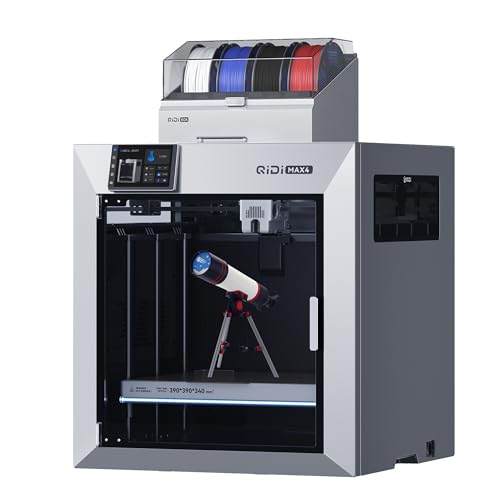
The QIDI Max4 Combo is not a typical desktop starter printer. Its reason for existing is the 390 x 390 x 340 mm build area, which allows large parts, molds, and prototypes to be printed in one piece instead of split across several jobs. The machine itself measures 28 by 28 by 30 inches and weighs 120 pounds, so the workspace has to be planned before it arrives.
QIDI lists speeds up to 800 mm/s and acceleration up to 30, 000 mm/s², making this the fastest machine on paper in the group. Closed-loop motors on the X and Y axes, a 2 mm lead screw, and an anti-backlash nut on the Z axis are intended to keep that movement controlled. A full-surface silicone heated bed helps distribute heat and support first-layer adhesion over the larger platform.
The material support is the standout feature after build size. The 40 mm³/s high-flow hotend uses a hardened steel nozzle and supports abrasive materials such as carbon fiber reinforced nylon. Its active chamber can reach 65°C, with the listing specifically calling out ABS-CF, PC, and PPS-CF. The Polar Cooler is not included, however, so buyers should not assume every cooling feature shown in the broader Max4 system is part of this package.
An AI camera can identify failures such as spaghetti-like extrusion and pause the printer. Multicolor and multimaterial work is expandable through QIDI BOX, with support for up to 16 colors and filament-level monitoring. The Creality K2 Plus Combo is smaller but also offers a heated chamber and an included color system, while the QIDI Max4 wins for raw workspace and engineering-material ambition. Readers comparing machines by footprint should start with the build areas that make large parts practical.
8. Creality K2 Plus Combo: Best Large Multicolor Model

Pros
- 350 x 350 x 350 mm build volume
- CFS can expand to 16 colors
- 600 mm/s printing speed
- 350°C nozzle supports demanding materials
- Dual AI cameras and automatic bed adjustment
Cons
- Heavy 70.5-pound machine
- Four CFS units are needed for 16-color printing
- The feature set is more than many single-color users need
Best for: makers who want large models, multicolor output, and high-temperature filament support in one system.
The Creality K2 Plus Combo combines a substantial build area with the kind of color workflow normally associated with smaller printers. Its 350 x 350 x 350 mm volume is large enough for bigger models and batches of smaller parts, while the included CFS handles automatic filament selection, switching, and relay. Connecting four CFS units can expand the system to 16 colors.
Creality lists a 600 mm/s speed and 30, 000 mm/s² acceleration, supported by step-servo motors on the XYZ axes and extrusion system. The printer uses a 40 mm³/s high-flow setup and a rigid Matrix frame made from aerospace-grade aluminum alloy die-casting. These features are intended to reduce resonance and deformation when the large bed and toolhead are moving quickly.
This is also one of the most capable machines here for hot and abrasive filaments. The chamber can be maintained at up to 60°C, and the hardened steel nozzle supports operating temperatures up to 350°C. Creality identifies materials such as ASA and PPA as suitable targets. Two AI cameras monitor the print area and toolhead, while independently motorized Z axes can adjust bed tilt before automatic leveling.
The QIDI Max4 Combo provides a larger volume and a hotter chamber, but the K2 Plus has the more integrated multicolor proposition. The Creality K2 Combo is smaller and easier to place, while the K2 Plus is the better pick for large decorative models, batch work, and demanding materials. Skip it if most of your projects fit comfortably inside a 220 mm cube and you have no interest in CFS color changes.
9. Creality K2 Combo: Best Quiet Multicolor Printer

Pros
- CFS supports up to 16 colors with expansion
- 260 x 260 x 260 mm build volume
- 600 mm/s maximum speed
- Mostly preassembled
- Silent mode and AI camera monitoring
Cons
- The included setup has one CFS unit
- Smaller build area than the K2 Plus
- The listing provides fewer chamber-temperature details than the K2 Plus
Best for: home users who want fast multicolor printing with a quieter operating mode.
The Creality K2 Combo is the more approachable member of Creality's K2 pair. It arrives 95 percent preassembled, according to the listing, and the remaining setup is centered on unpacking and installing the screen. That makes it a practical choice for a home user who wants to print quickly without assembling a large machine from individual parts.
Its 260 x 260 x 260 mm build volume covers more space than the 220 mm machines while staying considerably more manageable than the K2 Plus or QIDI Max4. The listed 600 mm/s speed is backed by step-servo motors on the X and Y axes and the extruder. Creality also includes a silent mode using dynamically balanced fans, positioning the K2 as a better fit for a workspace where constant mechanical noise is distracting.
The included CFS supports multicolor printing, and up to four CFS units can be linked for as many as 16 colors. The printer can automatically select and switch filament, while the AI camera watches for spaghetti failures and idling. Smart auto leveling probes the area relevant to the planned print rather than scanning the whole bed, which is a thoughtful way to shorten preparation.
The FLASHFORGE AD5X is smaller but has a hotter 300°C extruder, while the K2 Combo gives you a larger platform and a quieter operating mode. The K2 Plus is the stronger choice for large engineering models, but the standard K2 is easier to place and less excessive for ordinary home projects. It is the right pick for buyers who want multicolor output without committing to the physical scale of a large-format machine.
How to choose best 3d printer
The right printer depends less on a single speed figure than on the type of filament, model size, and amount of automation you will use repeatedly.
Build volume
Build volume sets the maximum size of a single printed object. A 220 x 220 x 220 mm machine handles most household organizers, brackets, toys, and small prototypes, but larger props may need to be split. The QIDI Max4, Creality K2 Plus, and Creality K2 provide more room for one-piece models and batch production.
Extruder temperature
A 280°C extruder is suitable for many common filaments, while the AD5X reaches 300°C and the K2 Plus reaches 350°C. Higher temperature capability matters when using materials with demanding melting behavior, but it does not automatically make a printer better for PLA. Match the temperature range to the materials you actually plan to use.
Chamber control
An enclosure helps maintain a more stable environment around the print. The P1S family uses an enclosed body, the P2S describes adaptive airflow and a 50°C chamber, the K2 Plus reaches 60°C, and the QIDI Max4 reaches 65°C. Heated chambers are most useful for large parts and engineering filaments that are prone to warping.
A large build area is useful only when the printer can keep the whole part stable from the first layer to the last.
Multicolor hardware
Multicolor printing requires more than a printer that can pause for a filament swap. The P1S Combo includes an AMS, the P2S Combo includes an AMS 2 Pro, the AD5X supports up to four colors, and the Creality systems use CFS. Check whether the color system is included, how many filaments it handles in the supplied configuration, and whether expansion units are needed for higher color counts.
Automation and monitoring
Automatic leveling is one of the most useful features for any owner because it reduces first-layer problems. Cameras add another layer of supervision by identifying failed or idle prints. The P2S, QIDI Max4, K2 Plus, and K2 Combo all make monitoring a central part of their feature sets, while the FlashForge models add app-based remote viewing and control.
Frequently asked questions
What is the best 3d printer for a first-time buyer?
The FLASHFORGE Adventurer 5M is the most balanced starting point in this group. Automatic leveling, a quick-change nozzle, a PEI platform, and a manageable 220 x 220 x 220 mm build area keep the main setup tasks understandable.
Is an enclosed 3D printer better?
An enclosure can help maintain more consistent conditions around a print and is useful for materials such as ABS and ASA. It does not remove the need for correct bed preparation, ventilation, and material storage. The Bambu Lab P1S and P2S families are enclosed, as are the larger QIDI and Creality machines.
Which printer is best for multicolor models?
The Bambu Lab P1S Combo is the simplest multicolor entry in this list, while the Bambu Lab P2S Combo adds filament drying and more active monitoring. The FLASHFORGE AD5X is a strong compact alternative, and the Creality K2 Plus is better suited to large multicolor models.
Do faster printers always finish prints faster?
No. Maximum speed is only one part of print time. Acceleration, travel paths, layer height, nozzle size, cooling, and the model itself all affect the final result. A printer with a high speed rating may still need slower settings for detailed or difficult parts.
What build volume should a home user choose?
A 220 mm cube is enough for many functional parts, models, and household projects. Moving to the 260 mm K2 gives more flexibility without reaching large-format dimensions. Choose the 350 mm or 390 mm machines when you regularly print large objects or batches that would otherwise need to be split.
Can these printers use carbon fiber filament?
The listings identify different levels of support. The Adventurer 5M Pro supports PLA-CF and PETG-CF, the QIDI Max4 uses a hardened steel nozzle for abrasive materials, and the Creality K2 Plus supports high-temperature engineering filaments. The Bambu Lab P1S listings specifically do not recommend carbon or glass fiber reinforced polymers.
The bottom line
The Best 3d printer in this group for most people is the FLASHFORGE Adventurer 5M. It combines fast CoreXY movement, automatic leveling, a useful nozzle range, and a straightforward 220 mm build area without forcing every buyer into a large or complicated system. The Bambu Lab P1S Combo is the better choice when multicolor printing and an enclosure matter more than the FlashForge's compact simplicity.
For large engineering parts, choose the QIDI Max4 Combo. For large multicolor models, the Creality K2 Plus Combo has the more complete combination of CFS support, chamber control, and high-temperature extrusion. The Bambu Lab P2S Combo is the smart-feature pick for buyers who want drying, flow compensation, and failure detection built into the workflow.
If you are undecided, choose the Adventurer 5M for single-color projects and the P1S Combo when color changes are central to what you want to make.
As an Amazon Associate we earn from qualifying purchases.