

A Google TV setup can mean very different things. You might need a complete 43-inch television, a faster box for an older screen, or a replacement remote after the original disappears between the sofa cushions. The Best 4k google tv choice depends first on which of those problems you are trying to solve.
This list puts the strongest complete products first, then covers the streamers and accessories that make sense for specific setups. The Sony BRAVIA 3 II is the best full television here, while the Google TV Streamer 4K is the one we'd choose to upgrade an existing TV. The rest range from Xiaomi streaming hardware to replacement remotes, a protective case, and a tidy mounting solution.
Comparison table
| # | Product | Award | Type | Key capability | Best for |
|---|---|---|---|---|---|
| 1 | Sony BRAVIA 3 II | Best overall TV | 43-inch TV | 4K HDR, Dolby Vision, 4K/120, VRR, ALLM | Movies and PS5 gaming |
| 2 | Google TV Streamer 4K | Best streaming box | Streaming box | 4K HDR, Dolby Vision, Dolby Atmos, 32GB | Upgrading an existing TV |
| 3 | Sony BRAVIA 2 II | Best straightforward TV | 43-inch TV | 4K Processor X1, Google TV, Google Cast | Everyday streaming |
| 4 | Xiaomi TV Box S 3rd Gen | Best feature-rich box | Streaming box | HDR10+, Dolby Vision, Wi-Fi 6, 32GB | Flexible home streaming |
| 5 | Xiaomi TV Stick 4K 2nd Gen | Best portable streamer | Streaming stick | Dolby Vision, HDR10+, Wi-Fi 6 | Travel and projectors |
| 6 | LOUTOC Google TV Remote | Best replacement remote | Remote | Voice control, 26-foot range, shortcut keys | Chromecast and Streamer owners |
| 7 | Fintie Streamer Remote Case | Best remote protection | Silicone case | Grip, drop and scratch protection | Families and busy rooms |
| 8 | Griscen Google TV Remote | Best spare remote | Remote | Voice control, 39-foot range | A basic replacement |
| 9 | Wasserstein Streamer Mount | Best cable-management accessory | Clip mount | Tool-free clip, ventilation cutouts | Clean TV installations |
| 10 | Google TV Streamer 4K Porcelain | Best alternate finish | Streaming box | 4K HDR, Dolby Vision, Dolby Atmos, 32GB | A light-colored setup |
1. Sony BRAVIA 3 II: Best Overall TV

Pros
- XR Processor improves color, contrast, and clarity
- Dolby Vision and Dolby Atmos support
- 4K/120, VRR, and ALLM for capable gaming
- Gemini features built into Google TV
- Nearly invisible bezel and flush design
Cons
- The 43-inch screen is the only listed size
- HDMI 2.1 gaming features matter less without a compatible console
- Built-in speakers cannot replace a full surround system
Best for: someone who wants a complete Google TV with strong movie processing and modern console features.
The Sony BRAVIA 3 II is the easiest product here to recommend without qualification. It is a complete 43-inch 4K HDR television rather than an accessory or add-on, and it combines a polished Google TV interface with picture processing that should help both new 4K movies and less pristine older content. The almost invisible bezel and flush surface design also keep attention on the screen instead of the hardware around it.
Sony's XR Processor uses AI scene recognition to adjust color, contrast, and clarity frame by frame. That matters when a streaming service serves a mixture of native 4K footage, HD shows, and compressed live content. XR Clear Image is designed to restore lost detail and reduce noise, while XR Triluminos Pro handles color with a stated palette of more than a billion shades. These features make the BRAVIA 3 II more ambitious than the BRAVIA 2 II, whose 4K Processor X1 and 4K XR-Reality PRO still provide useful processing but sit below Sony's XR system.
The gaming support is the major separator. HDMI 2.1 features include 4K/120, variable refresh rate, and automatic low-latency mode. A PlayStation 5 can also use Auto HDR Tone Mapping and Auto Genre Picture Mode, with the Game Menu collecting gaming controls in one place. Fast action gets Sony's enhanced 120Hz clearness and Motionflow XR treatment. Those capabilities make this a more complete gaming television than the Google TV Streamer 4K, which improves streaming on an existing TV but cannot change its panel or gaming response.
Sound is better considered than an afterthought. Dolby Vision and Dolby Atmos support cover compatible movies and sound systems, while DTS:X adds another surround format. Sony's X-Balanced Speakers are designed for deeper bass and improved sound resolution, though the television's built-in audio remains limited by its slim body. The BRAVIA 3 II is also the only pick here with the full-screen experience, PS5-specific features, Gemini conversation support, and a minimalist physical design in one device. Skip it if you only want to add Google TV to a screen you already own, or if you need a much larger display. For a compact living room, bedroom, or gaming space, this is the Best 4k google tv television in the group.
2. Google TV Streamer 4K: Best Streaming Box

Pros
- 4K HDR with Dolby Vision
- 32GB of storage
- Personalized recommendations across services
- Access to more than 800 free live channels
- Dolby Atmos support and smart home control
Cons
- HDMI 2.1 cable is required and sold separately
- It needs an existing TV or display
- It cannot improve the panel quality of the connected screen
Best for: anyone upgrading an older television without replacing the display.
The Google TV Streamer 4K is the product to buy when the screen you already own is still good but its built-in software has become slow, cluttered, or difficult to navigate. It puts Google TV, voice search, watchlists, live channels, and smart home controls in a compact device that weighs about 0.36 pounds. Its 6.4-inch length and 3-inch width make it easy to place on a media shelf, though the optional Wasserstein mount is a cleaner answer when the television is wall mounted.
The central specification is support for up to 4K HDR with Dolby Vision. That does not turn an HD television into a 4K panel, but it gives a compatible 4K display access to higher-resolution streams and Dolby Vision's supported picture format. Dolby Atmos speakers can also be connected for more immersive 3D sound. The box has 32GB of storage, giving downloaded apps and the Google TV environment more room than a minimal streaming stick.
Google's interface is particularly useful in homes with several streaming subscriptions. Movies and shows are collected on the home screen, recommendations can be tailored for different people, and a title found on a phone or in Google search can be added to a watchlist. Live viewing is part of the system too, with access to more than 800 free channels from services such as Pluto TV and Tubi. If you are still deciding between a box and a television, the screen features that matter most for 4K viewing are a useful place to start, because a streamer cannot compensate for weak panel hardware.
Compared with the Xiaomi TV Box S 3rd Gen, Google's box has the more direct first-party Google TV experience and the same listed 32GB storage capacity, while Xiaomi adds Wi-Fi 6 and DTS:X. The Google unit is the more natural fit for people already using Google smart home devices and Google search to find shows. Its real weakness is the cable requirement: an HDMI 2.1 cable is needed and is not included according to the listing. It is also not a television replacement. Choose it for a reliable upgrade path, especially when the current screen already has the picture quality you want.
3. Sony BRAVIA 2 II: Best Straightforward TV

Pros
- 4K Processor X1 gives content a clean, detailed look
- 4K XR-Reality PRO upscales lower-resolution material
- Google TV, Apple AirPlay 2, and Google Cast
- Motionflow XR handles sports and action
- Dedicated PS5 picture features
Cons
- Less advanced processing than the BRAVIA 3 II
- The 43-inch size may not suit a large room
- The listing does not specify 4K/120 support
Best for: everyday streaming in a compact room with a preference for Sony's picture processing.
The Sony BRAVIA 2 II is a simpler television than the BRAVIA 3 II, but that simplicity is part of its appeal. It gives you a 43-inch 4K HDR screen, Google TV, and Sony's familiar processing without asking you to build a setup around a separate streaming box. For a bedroom, apartment, or smaller lounge, the size is manageable and the software covers the main streaming and casting routines.
Its 4K Processor X1 is intended to produce rich color and sharp detail, while 4K XR-Reality PRO brings lower-resolution content closer to 4K. That second function matters because not everything watched on Google TV arrives in native 4K. Older shows, broadcast content, and some free channels can look softer, so a television that handles missing texture well is more useful than a screen that only looks impressive with premium source material.
Motionflow XR is designed to keep fast sports and movie action clearer. Owners of a PlayStation 5 get Auto HDR Tone Mapping, Auto Genre Picture Mode, and the Game Menu, which places gaming controls and assist features in one area. The listing also mentions Google TV, Apple AirPlay 2, and Google Cast, so the BRAVIA 2 II works well for households that mix Android and Apple devices. It is a more self-contained solution than the Google TV Streamer 4K, although the Streamer is the better route if the existing panel is already larger or better.
The trade-off is clear beside its sibling. The BRAVIA 3 II adds XR processing, Dolby Vision, Dolby Atmos, DTS:X, Gemini features, and HDMI 2.1 support for 4K/120, VRR, and ALLM. The BRAVIA 2 II does not list those higher-end features, so demanding console players should move up the range. It is also worth considering viewing distance before choosing any 43-inch television, since the right screen size for a small room depends on seating and layout as much as resolution. Choose this model when straightforward Google TV access and dependable Sony processing matter more than advanced gaming specifications.
4. Xiaomi TV Box S 3rd Gen: Best Feature-Rich Box

Pros
- Dolby Vision and HDR10+ support
- Dolby Atmos and DTS:X audio formats
- Wi-Fi 6 connectivity
- 2GB memory and 32GB storage
- Voice remote and Google Cast
Cons
- Wi-Fi 6 benefits require a compatible router
- It needs a separate display
- The listing does not state that an HDMI cable is included
Best for: a viewer who wants broad HDR and surround support in a compact Google TV box.
The Xiaomi TV Box S 3rd Gen is built for people who care about format support and network performance as much as the interface. Its 6nm platform uses a quad-core A55 CPU running up to 2.5GHz, with 2GB of memory and 32GB of storage. Those figures are useful because a box with enough local space and processing headroom is less likely to feel restricted as apps and services accumulate.
Picture support is unusually broad among these compact devices. The box handles 4K UHD, Dolby Vision, and HDR10+, giving compatible displays and content more options for contrast and highlight detail. On the audio side, Dolby Atmos and DTS:X cover two important cinematic formats. That makes the Xiaomi a stronger match for an enthusiast setup than a basic replacement remote or a small streaming stick, provided the TV and sound system support the formats being sent through.
Wi-Fi 6 is the other notable feature. It requires a Wi-Fi 6-enabled router, so it is not an automatic improvement in every home. With compatible network equipment, OFDMA and MU-MIMO are intended to provide more bandwidth and better transmission efficiency when several devices are active. The result should be more consistent streaming in a busy home, though wired networking details are not provided in the listing.
Google TV supplies cross-app search, personalized recommendations, Google Assistant voice control, and Google Cast from a phone or tablet. The 360-degree Bluetooth remote is useful when the box is placed out of direct line of sight. Compared with the Google TV Streamer 4K, Xiaomi gives you HDR10+, Wi-Fi 6, and DTS:X, while Google's device is the more obvious choice for a first-party Google setup and also provides 32GB of storage. Skip Xiaomi if your home network is older and reliable streaming already works, or if you want the simplest possible Google hardware. It is a capable choice for a display that benefits from broad format coverage.
5. Xiaomi TV Stick 4K 2nd Gen: Best Portable Streamer
Pros
- Very small and lightweight design
- Dolby Vision, HDR10+, Dolby Atmos, and DTS:X
- Dual-band Wi-Fi 6
- Google Cast and voice remote
- Works well with hotel TVs and projectors
Cons
- Stick design leaves fewer placement options
- Wi-Fi 6 requires a compatible router
- It still needs an available HDMI port and power
Best for: travelers, projector owners, and anyone who wants Google TV in a compact stick.
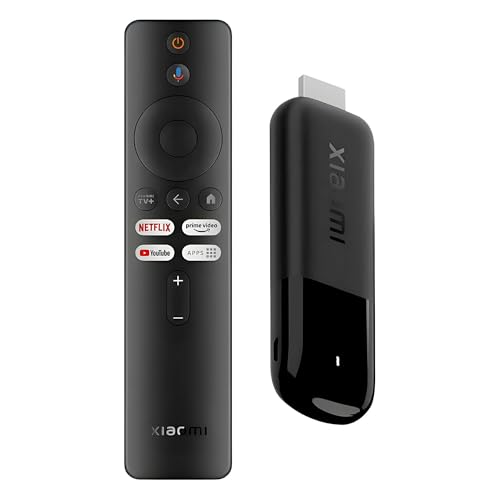
The Xiaomi TV Stick 4K 2nd Gen makes the most sense when portability is more important than having a box on the media shelf. It is about 4.2 inches long, 1.18 inches wide, and weighs roughly 0.06 pounds. That is small enough to pack for travel or leave connected to a projector without turning the setup into another piece of furniture.
Despite the small body, the stick supports 4K decoding, Dolby Vision, HDR10+, Dolby Atmos, and DTS:X. Those formats can improve detail, contrast, and surround sound when the display and content support them. It is not merely a basic HD travel device. Dual-band Wi-Fi 6 is also included, with the same compatibility caveat as the Xiaomi TV Box S 3rd Gen: a Wi-Fi 6 router is needed to use that newer wireless standard.
The 2.5GHz quad-core A55 CPU and 64-bit architecture are intended to keep Google TV navigation and playback smooth. The Bluetooth voice remote provides Google Assistant access, while Google TV gathers apps, shows, music, recommendations, and free live channels in one interface. Google Cast lets a phone or tablet send photos, movies, and shows to the connected screen. The plug-and-play design is especially attractive for a projector that moves between rooms.
The TV Box S 3rd Gen is the better Xiaomi pick when you want a stable shelf-based device with 32GB of storage and 2GB of memory. The TV Stick is the better choice when every inch matters, and its physical size is a more meaningful advantage than the box's extra storage. It is also worth checking the connection requirements before travel, since an occupied HDMI port and a power source are still necessary. For a hotel TV, portable projector, or second room, this is the most practical Xiaomi streamer in the group.
6. LOUTOC Google TV Remote: Best Replacement Remote
Pros
- Compatible with Google TV Streamer 4K
- Compatible with Chromecast with Google TV 4K and HD
- Voice interaction for searches and app control
- Dedicated YouTube and Netflix buttons
- Listed 26-foot range and quick response
Cons
- AAA batteries are not included
- It is a remote only, not a streaming device
- Pairing is required before use
Best for: replacing a lost or damaged Google TV or Chromecast remote without replacing the streamer.
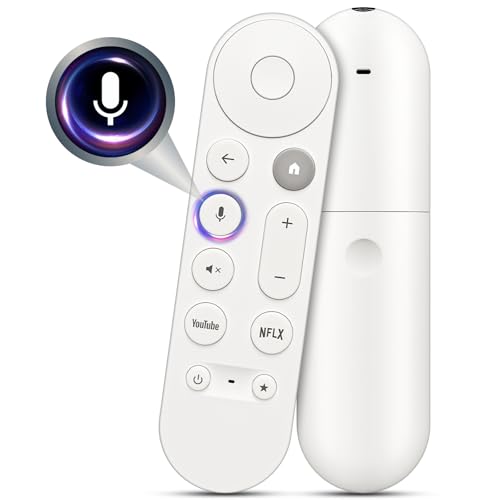
The LOUTOC Google TV Remote solves a narrow problem well: the streaming box works, but its controller does not. It is listed as compatible with the Google TV Streamer 4K and Chromecast with Google TV in both 4K and HD versions. That compatibility makes it more useful than a generic television remote, since the voice and shortcut functions are intended for Google's streaming interface.
Voice interaction is the key feature. A user can search for shows, launch apps, adjust volume, and control entertainment without typing with an on-screen keyboard. Dedicated YouTube and Netflix buttons make frequent services easier to reach. Those shortcuts are small conveniences, but they matter when a remote is used every day and the original has already established a familiar button layout.
Pairing uses a two-step process described in the listing. Press the button on the back of the Google device, then hold Back and Home on the remote for 10 seconds until the LED flashes. The listed operating range is 26 feet, and the response time is stated as 0.2 seconds. It requires two AAA batteries, which are not included, so it is not ready to use straight from the package unless you already have them.
The LOUTOC is a better match for a Chromecast or Google TV owner who wants a familiar voice-enabled replacement than the Griscen remote, whose listing describes a different pairing process and longer stated range. Neither remote can add features to a television by itself. Check the exact device compatibility before ordering, especially if the television uses its own manufacturer remote. If the original controller is simply hard to find rather than broken, the Fintie Streamer Remote Case may solve the problem more neatly by making it easier to spot.
7. Fintie Streamer Remote Case: Best Remote Protection
Pros
- Made specifically for the 2024 Google TV Streamer remote
- Silicone body protects edges from drops and scratches
- Bright finish makes the remote easier to find
- Honeycomb pattern improves grip
- Soft, lightweight, and easy to install
Cons
- The remote is not included
- The television and streamer are not included
- It does not replace a lost remote on its own
Best for: households where remotes are frequently dropped, misplaced, or handled by children.
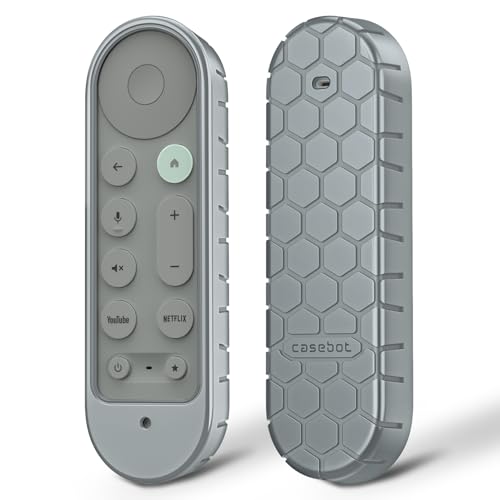
The Fintie Streamer Remote Case is a small accessory with a practical purpose. Its bright Hazel color is intended to make the Google TV Streamer remote stand out among other controllers, while the silicone exterior adds protection around the remote's edges. That combination is more useful than a decorative cover in a busy living room, where finding the right controller can be as frustrating as using it.
Fintie says the case is designed specifically for the 2024 Google TV Streamer 4K voice remote. The silicone material is soft and lightweight, with a honeycomb pattern for a more secure grip. The cover is intended to reduce the effects of drops, slips, scratches, and general handling. It cannot prevent every impact, but it gives the remote a less slippery surface and a little more cushioning than the uncovered plastic body.
Installation is simple according to the listing. The case slips over the remote, and its shape is meant to preserve a comfortable grip rather than add a bulky shell. The color also makes it easier to identify when several remotes are mixed together. That is particularly helpful in a household with a television remote, a soundbar controller, and more than one streaming device.
The important limitation is what this product does not include. The Google TV remote, television, and streamer are all excluded, so this is an accessory for an owner who already has the correct controller. It is not an alternative to the LOUTOC or Griscen replacement remotes. Choose Fintie when the remote still works and your main concerns are visibility, grip, and protection. If it has already vanished, a replacement remote is the more direct fix.
8. Griscen Google TV Remote: Best Spare Remote

Pros
- Compatible with Chromecast with Google TV 4K and HD
- Listed for Google TV Streamer 4K
- Voice search and playback control
- Stated transmission distance of more than 39 feet
- Rated for more than 160, 000 button presses by the listing
Cons
- Batteries are not included
- Only one remote can be paired at a time
- It does not include a Chromecast or Google TV device
Best for: keeping a functional voice-enabled spare for a compatible Google streaming device.
The Griscen Google TV Remote is another replacement controller, but its selling point is a longer stated operating distance and a durability claim aimed at heavy use. It is listed as compatible with Chromecast with Google TV in 4K and HD versions, as well as the Google TV Streamer 4K. That makes it a sensible spare for a household that does not want a broken or misplaced remote to interrupt streaming.
The built-in voice function handles content search, volume control, input switching, and music playback through the microphone button. The remote's upgraded chip is described as extending transmission distance beyond 39 feet, with a stated response time of 0.25 seconds. Those numbers suggest plenty of room for a normal lounge, although actual performance will depend on placement, batteries, and the device being controlled.
The listing also claims support for more than 160, 000 clicks and describes the buttons as sensitive and comfortable. Treat that as a construction claim rather than a guarantee of service life, but it does indicate that the remote is designed as a regular-use controller instead of an emergency novelty. It comes as a remote only, without AAA batteries or the streaming box.
Pairing deserves attention before buying. The instructions use the device's pairing button and the remote's Return and Home buttons, and voice issues may require adding the remote through the device's Remotes & Accessories settings. Only one remote can be paired at a time according to the listing. The LOUTOC remote has dedicated YouTube and Netflix shortcuts and a slightly faster stated response, so it may suit users who want a familiar shortcut layout. Pick Griscen when range and a spare-controller role are more important than matching every original button.
9. Wasserstein Streamer Mount: Best Cable-Management Accessory

Pros
- Designed for the Google TV Streamer 4K
- Tool-free clip-on installation
- Hides the streamer and helps organize cables
- Grill cutouts support ventilation
- Made for Google certified according to the listing
Cons
- Only useful with the compatible Google streamer
- It does not include the streamer
- Fit depends on the television's top edge
Best for: wall-mounted televisions where the streaming box and cables need a discreet home.
The Wasserstein Streamer Mount is for the setup problem that appears after the streaming upgrade: the box works, but it is sitting beside the television with a cable trailing down the wall. This holder clips onto the top of the TV and keeps the Google TV Streamer 4K behind the display. There are no tools required, which makes it a much less involved installation than a general electronics bracket.
Its design is specific rather than universal. The listing says it was made for the Google TV Streamer 4K and passed the Made for Google certification process. The charcoal finish and pill-shaped form are intended to blend with the streamer instead of looking like a separate piece of hardware. That focus is a strength for owners of Google's current box, but it also means this is not the right mount for the Xiaomi TV Box or Xiaomi TV Stick.
Ventilation is an important detail. Grill-type cutouts on the bottom are intended to keep airflow around the streamer and reduce the chance of heat buildup. The mount also helps hide cables behind the television, so the benefit is both visual and practical. It does not change streaming performance, picture quality, or voice control, but it can make a wall-mounted installation look substantially more deliberate.
The main thing to check is the television's top edge and the cable route behind it. A clip mount needs a suitable place to sit, and the HDMI connection still has to reach the TV. The Google TV Streamer 4K itself is the more important purchase if you do not already own it, while the Wasserstein mount is a finishing accessory for an existing setup. Choose it when tidy cable management and airflow matter more than keeping the box visible on a shelf.
10. Google TV Streamer 4K Porcelain: Best Alternate Finish

Pros
- 4K HDR with Dolby Vision
- 32GB of storage
- Personalized Google TV recommendations
- More than 800 free live channels listed
- Dolby Atmos support and smart home control
Cons
- HDMI 2.1 cable is required and sold separately
- Porcelain finish may not suit every media setup
- It needs an existing display
Best for: a Google TV upgrade where a light-colored streamer fits the room better.
The Google TV Streamer 4K Porcelain is functionally the same kind of product as the Google TV Streamer 4K listed above, but its finish gives it a distinct place in a carefully matched entertainment setup. It is a compact streaming box measuring 6.4 inches long, 3 inches wide, and 1 inch high, with a listed weight of about 0.36 pounds. The light Porcelain appearance can work better than dark hardware on an open shelf or with a pale media console.
Its software is the main reason to choose it. Google TV brings services together on one home screen, uses viewing habits to tailor recommendations, and lets users add shows or movies to a watchlist from a television, mobile app, or Google search. Voice search handles discovery, while smart home control keeps compatible devices accessible from the entertainment system. The listing also points to more than 800 free channels through Pluto TV, Tubi, and other services.
The hardware supports up to 4K HDR with Dolby Vision, and compatible speakers can provide Dolby Atmos sound. The 32GB storage capacity gives the streamer room for apps and content services without feeling like a minimal interface device. Like the Hazel version, it needs an HDMI 2.1 cable that is sold separately. That requirement is easy to overlook when replacing an older streaming dongle, so it should be part of the installation plan.
There is no meaningful performance distinction in the supplied product details between this Porcelain model and the Hazel Google TV Streamer 4K. The choice is primarily about finish and the exact listing you prefer. Xiaomi's TV Box S 3rd Gen offers Wi-Fi 6, HDR10+, and DTS:X, while Google's box has the cleaner first-party Google experience. Choose the Porcelain version if it suits the room, and choose the Hazel version if color is irrelevant and you simply want the leading Google streamer.
How to choose best 4k google tv
The right choice starts by separating a complete television from a streaming upgrade. After that, focus on the picture formats, processing, connections, sound support, and physical installation that match your room.
Display and resolution
A 4K television has a much larger role than a streaming box because it determines the panel, screen size, and built-in picture processing. The Sony BRAVIA 3 II and BRAVIA 2 II both use 43-inch 4K HDR displays, making them complete choices for someone starting from scratch.
A streaming device can send 4K content only when the connected television supports it. If your current display is already a good 4K panel, the Google TV Streamer 4K or Xiaomi TV Box S 3rd Gen can make more sense than replacing the screen. For a broader look at televisions with different sizes and panel priorities, the features that separate capable 4K screens are worth comparing before you choose.
HDR and picture formats
HDR support affects how a compatible television handles bright highlights, dark scenes, and color range. Dolby Vision appears on the Google TV Streamer 4K, both Xiaomi streamers, and the Sony BRAVIA 3 II. HDR10+ is listed for the two Xiaomi devices, while the BRAVIA 2 II listing identifies 4K HDR without naming those additional formats.
Format support is not a guarantee that every show will look different. The content, display, and streaming service all need to support the format. Still, broader compatibility gives a setup more flexibility over time.
A streamer can pass along better picture formats, but it cannot repair a weak panel.
Processing and motion
Processing matters when the source is not pristine. Sony's BRAVIA 3 II uses an XR Processor, XR Clear Image, XR Triluminos Pro, and Motionflow XR. The BRAVIA 2 II uses 4K Processor X1, 4K XR-Reality PRO, and Motionflow XR. These systems are intended to improve scaling, color, clarity, and fast movement.
Look for processing features if you watch live television, older shows, sports, or heavily compressed streams. A streaming box is mainly judged by interface responsiveness and playback support, while a television's processor has to make decisions about every image on the screen.
Network and storage
The Google TV Streamer 4K and the Porcelain version list 32GB of storage. The Xiaomi TV Box S 3rd Gen lists 2GB of memory and 32GB of storage, while the Xiaomi TV Stick focuses on its small body and Wi-Fi 6 connectivity.
Wi-Fi 6 can help when the router supports it and many household devices compete for bandwidth. It is not automatically useful on an older network. Storage matters when you install many apps or want a streamer that has more room for its operating environment. For a simple setup with a few services, the interface and remote may matter more.
Gaming and connections
The BRAVIA 3 II is the clear gaming specialist. Its listed HDMI 2.1 features include 4K/120, VRR, and ALLM, and it has PS5-focused Auto HDR Tone Mapping, Auto Genre Picture Mode, and a Game Menu. The BRAVIA 2 II also has PS5 features, but the supplied details do not list 4K/120, VRR, or ALLM.
For streamers, connection planning is simpler but still important. The Google TV Streamer 4K requires an HDMI 2.1 cable that is sold separately. The Xiaomi TV Stick needs an available HDMI port and power, while the Wasserstein mount needs a suitable television edge and a cable route that can reach behind the screen.
Frequently asked questions
Is the Google TV Streamer 4K a television?
No. It is a streaming box that connects to a television or other compatible display. It adds Google TV, voice search, recommendations, live channels, smart home control, and 4K HDR playback to the connected screen.
Which product is the best 4k google tv television?
The Sony BRAVIA 3 II is the strongest complete television in this group. It combines a 43-inch 4K HDR screen with XR processing, Dolby Vision, Dolby Atmos, Gemini features, and HDMI 2.1 gaming support.
What is the difference between the two Google TV Streamer listings?
The supplied details show the same core streaming functions, dimensions, weight, 32GB storage, 4K HDR, Dolby Vision, Dolby Atmos support, and cable requirement. The clearest difference is the finish, with one listed in Hazel and the other in Porcelain.
Can these streamers play 4K content on any TV?
No. The television or display must support 4K to show 4K resolution. A streamer can provide the signal and supported HDR formats, but it cannot upgrade an HD panel into a 4K panel.
Do the replacement remotes include batteries?
The LOUTOC remote requires two AAA batteries, and the listing says batteries are not included. The Griscen listing also says the remote comes without AAA batteries.
Can the Fintie case replace a lost Google TV remote?
No. It is a protective silicone cover for the 2024 Google TV Streamer 4K voice remote. It can make an existing remote easier to grip and find, but it does not contain remote electronics.
Is the Wasserstein mount universal?
No. The listing describes it as designed for the Google TV Streamer 4K. It clips onto the top of a television, so the TV edge and cable route should be checked before installation.
The bottom line
The Best 4k google tv choice for a complete television is the Sony BRAVIA 3 II. Its 43-inch screen, XR processing, Dolby Vision, Dolby Atmos, and HDMI 2.1 gaming features give it a broader role than the BRAVIA 2 II, especially for movie fans and PlayStation 5 owners.
For an existing 4K display, choose the Google TV Streamer 4K. It combines a useful 32GB of storage with personalized Google TV recommendations, voice search, free live channels, Dolby Vision, and smart home control. The Xiaomi TV Box S 3rd Gen is the alternative for buyers who specifically want Wi-Fi 6, HDR10+, and DTS:X.
If you are undecided, buy the Sony for a new television and the Google streamer for an upgrade to a screen you already like.
As an Amazon Associate we earn from qualifying purchases.