
Choosing a 4K HDR screen is harder than it should be. A television can support Dolby Vision and HDR10+ yet still look flat in a bright room, while a smaller model may have better processing and gaming features than a larger one.
We compared nine televisions and streaming devices that make sense for a 4K HDR setup. The best 4K HDR TVs here range from compact 43-inch screens to a 65-inch Mini-LED model, with two streaming players for older or less capable displays.
Our top pick is the TCL QM6K, while the Hisense U6 Pro is the better choice for a large, bright-room screen. The rest cover smaller rooms, simpler streaming, Google TV, Fire TV, and dedicated media playback.
| # | Product | Award | Screen or format | HDR and smart platform | Best for |
|---|---|---|---|---|---|
| 1 | TCL QM6K | Best overall | 55-inch Mini-LED QLED, native 144Hz | Dolby Vision, HDR10+, HDR10, HLG, Google TV | Movies, sports, and gaming |
| 2 | Hisense U6 Pro | Best large screen | 65-inch Mini-LED ULED, native 144Hz | Dolby Vision IQ, HDR10+, HDR10, HLG, Fire TV | Bright rooms and big-screen viewing |
| 3 | TCL Q65 | Best Google TV value | 55-inch QLED | Dolby Vision, HDR10+, HDR10, HLG, Google TV | Everyday streaming |
| 4 | Sony BRAVIA 3 II | Best for PlayStation 5 | 43-inch LED | Dolby Vision, Dolby Atmos, Google TV | Small rooms and console gaming |
| 5 | Hisense E6 50-inch | Best mid-size Fire TV | 50-inch Hi-QLED | Dolby Vision, HDR10+ Adaptive, HDR10, HLG, Fire TV | Flexible living-room viewing |
| 6 | Hisense E6 43-inch | Best compact QLED | 43-inch Hi-QLED | Dolby Vision, HDR10+ Adaptive, HDR10, HLG, Fire TV | Bedrooms and smaller spaces |
| 7 | INSIGNIA F50 | Best connected LED TV | 43-inch LED | HDR10, Fire TV | Cable-free streaming and connections |
| 8 | Roku Streaming Stick Plus | Best simple streamer | 4K streaming device | HDR10+, Roku | Easy upgrades and travel |
| 9 | NVIDIA Shield TV Pro | Best advanced streamer | 4K streaming device | Dolby Vision, Dolby Atmos, Android TV | Plex, local media, and power users |
1. TCL QM6K: Best Overall

Pros
- Mini-LED backlight gives HDR scenes stronger contrast
- Native 144Hz refresh rate suits sports and gaming
- Supports the major HDR formats
- Google TV and Dolby Atmos support
Cons
- The larger chassis needs a sturdy stand or wall mount
- The listed features do not specify connection counts
Best for: viewers who want one 55-inch TV for movies, sports, streaming, and gaming.
The TCL QM6K is the most complete television in this group. Its Mini-LED backlight and QLED color approach the problem from both sides: the backlight is designed to create stronger separation between bright highlights and dark areas, while quantum dot color keeps saturated scenes from looking dull. That makes it a more convincing HDR screen than a conventional LED model such as the INSIGNIA F50.
The Halo Control System is intended to reduce blooming around bright objects on dark backgrounds. No LCD backlight can behave exactly like individually lit pixels, but local dimming is the feature that matters most when watching a night scene, a space sequence, or white subtitles over black. The QM6K also supports Dolby Vision, HDR10+, HDR10, and HLG, so it is not tied to one streaming or broadcast format.
Motion is a major reason to choose this set. The native 144Hz refresh rate is useful for fast games and sports, and the listed Motion Rate 480 describes TCL's motion processing rather than a separate panel refresh mode. The higher native rate still gives the QM6K a clear advantage over the TCL Q65 and the 43-inch Hisense models when camera movement gets frantic.
Google TV provides the familiar app-centered interface, while Dolby Atmos and Onkyo audio features give the built-in sound a more ambitious foundation than a basic television. The weakness is that the supplied information does not spell out the connection layout, so buyers with several consoles, a receiver, and a soundbar should confirm the ports before ordering. For a living room that needs one screen to handle nearly everything, this is the one we'd keep.
If your room has strong daylight, how to choose a screen for bright viewing conditions matters as much as the HDR badge. The QM6K's Mini-LED design makes it the strongest all-rounder here, but a larger room may call for the Hisense U6 Pro instead.
2. Hisense U6 Pro: Best Large Screen

Pros
- 65-inch Mini-LED screen with precise backlighting
- Native 144Hz refresh rate
- Glare-free, anti-reflection display
- Dolby Vision IQ and HDR10+ Adaptive
- Built-in subwoofer
Cons
- Its 65-inch size is excessive for smaller rooms
- Fire TV may not suit people who prefer Google TV
Best for: families wanting a large, bright-room television with strong gaming and movie features.
The Hisense U6 Pro is the obvious big-screen choice. Its 65-inch panel gives films, live sports, and games room to breathe, and the Mini-LED backlight is a meaningful step above the regular LED system used by the Sony BRAVIA 3 II. The screen is also described as anti-reflection and glare-free, which is useful when the television faces windows or a bright open room.
Hisense pairs Mini-LED with Hi-QLED color and Pantone validation. Those labels do not tell us exactly how the set performs in every scene, but they point to the right priorities: controlled backlighting for contrast and a quantum-dot layer for richer color. HDR support includes Dolby Vision IQ, HDR10+ Adaptive, HDR10, and HLG. The adaptive versions are particularly relevant when ambient light changes because they can preserve more scene intent than a fixed picture mode.
The native 144Hz refresh rate is one of the strongest specifications in the roundup. It is suited to fast games and sports, and it sits alongside Motion Rate 480 processing. The native rate matters more than the larger motion number because it describes the panel's actual refresh capability. The TCL QM6K offers a similar native refresh claim in a smaller 55-inch body, but the U6 Pro wins for viewers who sit farther away or want a more imposing cinema-style image.
Sound gets unusual attention here. A built-in subwoofer should give explosions and music more weight than the thin sound produced by many flat televisions, while Dolby Atmos and IMAX Enhanced support add compatible formats for a fuller home-theater setup. Fire TV handles apps, recommendations, watchlists, and voice control through Alexa+. The tradeoff is physical as much as technical: a 65-inch screen measuring 56.9 inches wide needs careful placement, and its 40.8-pound weight makes installation a two-person job.
The U6 Pro is the better pick than the Sony BRAVIA 3 II for bright-room impact and screen size. Sony remains more interesting for PlayStation 5 owners who specifically need its HDMI 2.1 gaming features. Choose Hisense when big HDR pictures, glare control, and fast motion are the priorities.
3. TCL Q65: Best Google TV Value

Pros
- QLED color and High Brightness+ backlight
- Dolby Vision and HDR10+ support
- Google TV interface
- Auto Game Mode and enhanced dialogue mode
- Dolby Atmos and DTS Virtual:X
Cons
- It lacks the Mini-LED backlight of the QM6K
- The supplied data does not confirm a native 120Hz or 144Hz panel
Best for: households that want a straightforward 55-inch Google TV with broad HDR support.
The TCL Q65 gets the fundamentals right without chasing the more specialized hardware of the QM6K. It is a 55-inch QLED television with a High Brightness+ LED backlight, so color and general picture punch should be more compelling than on a plain LED screen. The missing piece is Mini-LED local dimming. Dark scenes will not have the same backlight precision as the TCL QM6K or Hisense U6 Pro.
HDR coverage is broad. The Q65 supports Dolby Vision, HDR10+, HDR10, and HLG, and TCL's AIPQ processor is designed to optimize color, contrast, and clarity. Processing is especially important when the source is older broadcast television or a lower-quality stream. The feature list also describes 4K upscaling, though the results will always depend on the original content.
For gaming, Auto Game Mode uses ALLM to switch into a lower-latency mode when compatible equipment is detected. That is convenient for console players who do not want to change picture settings manually. TCL also lists Motion Rate 240 with MEMC frame insertion, but the data does not state a native panel refresh rate, so buyers should not treat that number as equivalent to the 144Hz panels in the QM6K and U6 Pro.
Google TV is the main reason to pick this model over the Hisense E6 televisions. It brings recommendations and apps into one interface, while Dolby Atmos, DTS Virtual:X, and Enhanced Dialogue Mode address the common problem of hard-to-hear speech from built-in speakers. The Q65 is not the best choice for a serious dark-room movie setup, but it is an easy everyday television with a solid format list.
The TCL Q65 makes more sense than the INSIGNIA F50 when color, Dolby Vision, and Google TV matter. It gives up the deeper backlight control of the QM6K, but its simpler feature balance suits a family room where streaming, live television, and occasional gaming share the screen.
4. Sony BRAVIA 3 II: Best for PlayStation 5

Pros
- HDMI 2.1 features include 4K/120, VRR, and ALLM
- Dedicated PlayStation 5 picture features
- XR processing and Clear Image upscaling
- Dolby Vision and Dolby Atmos
- Google TV with Gemini
Cons
- Regular LED backlighting is less advanced than Mini-LED
- 43-inch size may feel small in a large room
Best for: PlayStation 5 owners who want a compact gaming and streaming display.
The Sony BRAVIA 3 II is the specialist pick in this lineup. It is a 43-inch LED television, so it cannot match the Mini-LED contrast potential of the Hisense U6 Pro or TCL QM6K. Its appeal comes from processing and gaming support, particularly for PlayStation 5 owners who can use Sony's Auto HDR Tone Mapping and Auto Genre Picture Mode.
The XR Processor uses scene recognition to adjust color, contrast, and clarity, while XR Clear Image works on lost detail and noise in lower-quality material. Those tools matter in a smaller screen because viewers often sit relatively close, making compression and rough upscaling easier to notice. Dolby Vision and Dolby Atmos cover the major cinematic formats, and DTS:X adds another spatial-audio option.
Sony lists enhanced 120Hz clearness and Motionflow XR for fast action. More importantly for console gaming, HDMI 2.1 supports 4K/120, variable refresh rate, and ALLM. That gives the BRAVIA 3 II a clearer gaming advantage over the TCL Q65, whose supplied specifications only confirm ALLM. The Sony is the more sensible choice when a current console is central to the room.
Google TV and Gemini provide a broad content interface, while Sony Pictures Core adds movie access and credits as part of the package. The X-Balanced Speakers are designed to improve bass and sound resolution, though the television still has limited room for genuinely deep low-end sound. A soundbar remains the natural companion for a larger movie setup.
The main reason to skip the BRAVIA 3 II is not picture quality. It is size and backlight class. The Hisense E6 43-inch offers QLED color and a wider HDR format list, while the Sony offers better gaming connectivity and processing. For a desk-adjacent room, bedroom, or PlayStation-focused setup, Sony's strengths are easier to appreciate.
For a small room, the screen sizes that work in tighter spaces can prevent a television from overwhelming the furniture. The BRAVIA 3 II is the pick when HDMI 2.1 and console response matter more than Mini-LED contrast.
5. Hisense E6 50-inch: Best Mid-Size Fire TV

Pros
- Hi-QLED color in a useful 50-inch size
- Dolby Vision, HDR10+ Adaptive, HDR10, and HLG
- AI light sensor adjusts brightness
- Fire TV with Alexa voice control
- Filmmaker Mode and AI 4K upscaling
Cons
- It does not have Mini-LED backlighting
- The supplied data does not confirm a native high-refresh panel
Best for: viewers who want a mid-size Fire TV with broad HDR format support.
The Hisense E6 50-inch is the sensible middle ground between the two E6 sizes. A 50-inch screen fits more comfortably in an ordinary living room than the 65-inch U6 Pro, while still offering more cinematic space than the 43-inch models. Its Hi-QLED color system should produce richer color than a basic LED television, though it does not have the contrast control of Mini-LED.
Hisense includes a useful HDR set: Dolby Vision, HDR10+ Adaptive, HDR10, and HLG. The AI light sensor is the more distinctive everyday feature. It detects ambient light and adjusts brightness, which can keep the image from feeling harsh at night or washed out in a brighter room. It is not a replacement for a strong backlight, but it reduces the need to keep changing settings manually.
The AI 4K Upscaler is aimed at older broadcasts, home videos, and lower-resolution streams. Hisense also lists AI Smooth Motion with MEMC, noise reduction, and a responsive panel for fast action. Those claims are broader than the specific native refresh information given for the TCL QM6K and Hisense U6 Pro, so this set should be viewed as an all-purpose television rather than a high-refresh gaming specialist.
Fire TV puts live channels and streaming apps on the home screen, and Alexa can launch content, check sports scores, and control compatible features. Filmmaker Mode is useful for films because it aims to preserve the intended aspect ratio, frame rate, color, and audio presentation. Dolby Atmos support is present, but built-in television speakers cannot reproduce the scale of a dedicated surround system.
The Hisense E6 50-inch beats the INSIGNIA F50 on color technology and HDR format coverage. It loses to the TCL Q65 in the choice between Fire TV and Google TV, and it cannot compete with the Mini-LED models in dark-scene contrast. Pick it for a comfortable mid-size screen and a Fire TV interface, not for the most demanding gaming setup.
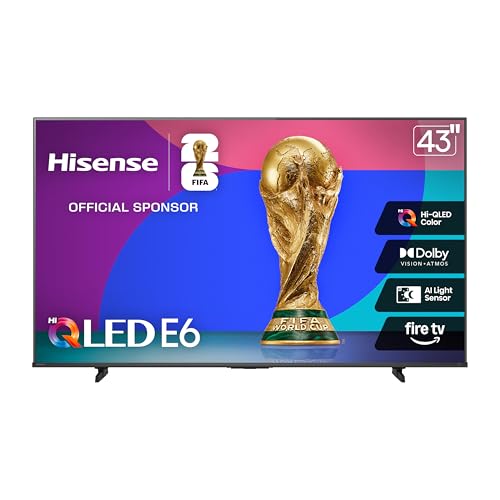
6. Hisense E6 43-inch: Best Compact QLED
Pros
- Compact 43-inch form with Hi-QLED color
- Dolby Vision and HDR10+ Adaptive
- AI light sensor and AI 4K upscaler
- Fire TV and Alexa voice remote
- Wi-Fi 6
Cons
- Smaller picture than the 50-inch E6
- No Mini-LED local dimming
Best for: bedrooms, apartments, and smaller viewing distances that still need broad HDR support.
The Hisense E6 43-inch is the compact version of the E6 formula. It takes up about 37.9 inches of width and weighs 14.9 pounds, making it easier to place on a smaller stand than the 50-inch model. The 43-inch size is also practical for a bedroom or apartment where a 55-inch television would dominate the room.
Hi-QLED color gives it a useful advantage over the INSIGNIA F50, while Total HDR Solution supports Dolby Vision, HDR10+ Adaptive, HDR10, and HLG. The screen still uses a conventional backlight rather than Mini-LED, so bright highlights and shadow separation will not have the same authority as the TCL QM6K. That difference is most obvious in dark movie scenes, not casual daytime television.
Hisense's AI light sensor adjusts brightness as room lighting changes. AI 4K Upscaler is intended to sharpen lower-resolution material, and AI Smooth Motion combines MEMC and noise reduction to keep fast scenes clearer. The listed Motion Rate 120 should not be confused with the native 144Hz refresh rates of the top TCL and Hisense models, but it is a useful feature set for regular sports and television viewing.
Fire TV keeps apps and live channels together, with Alexa voice control for launching content and handling general commands. Filmmaker Mode is a welcome inclusion for movie fans, while Dolby Atmos support can pass a compatible soundtrack to a suitable audio system. Wi-Fi 6 is another practical touch for homes with several connected devices.
The Hisense E6 43-inch is better than the 50-inch version only when the smaller footprint matters. The bigger E6 gives the same core feature set more visual impact, and the Sony BRAVIA 3 II is the stronger gaming choice because of HDMI 2.1, 4K/120, VRR, and ALLM. Choose this Hisense for compact Fire TV convenience and broad HDR support.
7. INSIGNIA F50: Best Connected LED TV

Pros
- 43-inch 4K LED display
- Fire TV and Alexa voice remote
- Three HDMI ports plus eARC
- Optical, USB, Ethernet, headphone, and coaxial connections
- VESA 200 by 300 wall-mount compatibility
Cons
- Supports HDR10 but not the wider HDR list of the QLED models
- Regular LED backlighting lacks Mini-LED contrast control
- No gaming refresh details are provided
Best for: buyers who need many physical connections and a straightforward Fire TV interface.
The INSIGNIA F50 is less ambitious than the QLED televisions above it, but it has a clear practical advantage: connections. It includes three HDMI ports, composite AV inputs, digital optical output, USB, a headphone jack, coaxial, Ethernet, and Wi-Fi. That makes it easier to connect a console, disc player, soundbar, antenna, and older equipment without immediately needing a switch.
The picture is based on a 43-inch LED panel with 4K resolution and HDR10. HDR10 can add contrast and color detail to compatible films and shows, but the F50 does not list Dolby Vision or HDR10+. The distinction matters when comparing it with the Hisense E6 43-inch, which supports more HDR formats and adds Hi-QLED color.
Fire TV handles apps such as Prime Video, Netflix, Disney+, Hulu, and other services, with free content available through Fire TV Channels, Tubi, and Pluto TV. Alexa voice control can search for shows and manage compatible smart-home devices. Parental controls let households restrict content or channels with a PIN, a useful feature for a family room.
DTS Virtual:X is designed to create a more spacious sound from the built-in speakers, and HDMI eARC can pass a full-resolution audio signal to a compatible soundbar or receiver. The F50 also supports VESA 200 by 300 mounting. These features make it a flexible replacement television even though its picture hardware is basic.
The INSIGNIA F50 is not the right choice for a demanding HDR movie room. The TCL Q65 has stronger color and a broader format list, while the E6 models add Dolby Vision and adaptive HDR. Pick Insignia when the connection panel, Fire TV layout, and simple 43-inch footprint matter more than premium backlighting.
8. Roku Streaming Stick Plus: Best Simple Streamer

Pros
- Compact 4K and HDR10+ streaming
- Can power from the television
- Does not block neighboring HDMI ports
- Voice remote controls the TV and streamer
- Simple Roku home screen
Cons
- It is a streaming device, not a television
- Picture quality depends on the connected TV
- Requires a compatible television and internet connection
Best for: people upgrading an older television with a clean, uncomplicated streaming interface.
The Roku Streaming Stick Plus belongs in this roundup because a good streamer can transform the experience of a television that still has a perfectly usable panel. It supports 4K streaming and HDR10+, and its compact body plugs into the back of the TV without taking over the surrounding space. At 0.176 pounds, it is easy to move between rooms or take on a trip.
Setup is built around Roku's uncluttered home screen and simple navigation. The voice remote can search for content, play entertainment, power the television, and adjust volume, reducing the need to juggle separate remotes. The stick can also draw power from the TV, which avoids another wall adapter and keeps the installation tidy.
Roku provides access to free movies, shows, live television, news, sports, and apps, with subscription management through one account. That does not make every service free, but it does make the interface easier to understand than a television that scatters apps across several menus. The stick is particularly useful with the INSIGNIA F50 or an older set whose built-in software has become slow or awkward.
The limitation is fundamental. The Streaming Stick Plus cannot create Dolby Vision on a screen that does not support it, and it cannot improve the panel's contrast, motion, or viewing angles. It is a software and streaming upgrade, not a picture upgrade. The NVIDIA Shield TV Pro is much more capable for local media and advanced home theater, but Roku is easier for ordinary streaming.
Choose the Roku when simplicity is the feature you care about most. It is also a good travel companion because it can move between compatible televisions without forcing you to learn a new interface in every room.
9. NVIDIA Shield TV Pro: Best Advanced Streamer

Pros
- AI upscaling from HD to 4K
- Dolby Vision and Dolby Atmos
- 3GB RAM and 16GB storage
- Two USB 3.0 ports
- Gigabit Ethernet, Wi-Fi, Bluetooth 5.0, and Chromecast 4K
- Built-in Plex Media Server
Cons
- More complex than Roku for basic streaming
- The hardware platform is older
- It is a media player rather than a television
Best for: enthusiasts with local media libraries, Plex servers, USB storage, or demanding streaming needs.
The NVIDIA Shield TV Pro is the power user's option. It is built around NVIDIA's Tegra X1+ chip, 3GB of RAM, and 16GB of storage, with two USB 3.0 ports for storage, cameras, keyboards, controllers, and other accessories. That is a very different proposition from the plug-and-play Roku Streaming Stick Plus.
Its AI upscaling is the standout picture feature. The Shield is designed to enhance HD video toward 4K in real time, which can help older television shows and lower-resolution libraries look cleaner on a 4K display. It also supports Dolby Vision, Dolby Atmos, and Dolby Digital Plus. As with the Roku, the connected television still determines which formats can actually appear on screen.
Connectivity is unusually generous for a small streamer. Gigabit Ethernet is useful for high-bitrate local files, while dual-band AC Wi-Fi and Bluetooth 5.0 cover wireless setups. Chromecast 4K makes it easy to cast from a phone, and Plex Media Server is built in. The remote includes motion-activated backlighting, voice control, infrared control, and a locator feature.
The Shield is not the best choice for someone who simply wants Netflix, YouTube, and a few free channels. The interface and extra capabilities demand more setup than Roku, and the device's release date shows that this is a mature platform rather than a newly designed streamer. Its advantage is still clear for a media collection, USB expansion, or a home theater that needs reliable wired networking.
For readers comparing a player with the televisions in this guide, the Shield makes most sense beside an older set or a display with weak built-in software. For a new television, the TCL QM6K already offers a more complete picture and smart-TV package. Choose Shield when your media library and connectivity matter more than the shortest setup.
How to choose best 4k hdr tv
Start with the room, viewing distance, and content you watch most. The best 4K HDR TVs are separated less by the 4K label than by backlight control, HDR format support, motion handling, and the usefulness of their smart platform.
Backlight and contrast
Mini-LED televisions such as the TCL QM6K and Hisense U6 Pro use many smaller backlight elements and local dimming zones to improve separation between bright and dark areas. That helps HDR highlights stand out without making the entire screen glow. Regular LED models can still look good, but they are more likely to show weaker blacks or visible blooming.
HDR format support
Dolby Vision, HDR10+, HDR10, and HLG are different ways of carrying brightness and color information. A television supporting several formats is less likely to leave a compatible movie or show in a fallback mode. The INSIGNIA F50 lists HDR10, while the Hisense and TCL QLED models support a broader mix.
HDR support matters most when the screen can also control its backlight well.
Refresh rate and gaming
Native refresh rate is more useful than an inflated motion-processing label. The TCL QM6K and Hisense U6 Pro list native 144Hz panels, while the Sony BRAVIA 3 II lists HDMI 2.1 features for 4K/120, VRR, and ALLM. Those features reduce blur and input delay in compatible games. A television with only general motion smoothing is better suited to shows and casual sports.
Screen size and room layout
A 65-inch screen needs substantially more wall or furniture width than a 43-inch model. Measure the space before choosing, including the stand width and viewing position. A smaller screen can be more comfortable at close range, while a larger one makes cinematic detail easier to appreciate from across a living room.
Smart platform and connections
Fire TV, Google TV, Roku, and Android TV each organize apps differently. Fire TV suits Alexa households, Google TV is useful for content discovery, Roku emphasizes simple navigation, and Android TV on the Shield supports more advanced local-media tasks. Physical connections matter too. The INSIGNIA F50 is the most flexible here with HDMI, eARC, optical, USB, Ethernet, coaxial, and headphone connections.

Frequently asked questions
Is 4K HDR the same as Dolby Vision?
No. 4K describes the screen's resolution, while HDR describes expanded brightness and color range. Dolby Vision is one HDR format, alongside HDR10, HDR10+, and HLG.
Is Mini-LED better than QLED?
They address different parts of picture quality. QLED generally refers to a quantum-dot color layer, while Mini-LED describes a more precise backlight system. A television can use both, as seen with the TCL QM6K and Hisense U6 Pro.
Which television is best for gaming?
The Sony BRAVIA 3 II is the strongest choice for PlayStation 5 because it lists 4K/120, VRR, ALLM, Auto HDR Tone Mapping, and Auto Genre Picture Mode. The TCL QM6K and Hisense U6 Pro are also strong choices because they list native 144Hz refresh rates.
Do I need a separate streaming device?
Not necessarily. All of the televisions in this list include a smart-TV platform. A Roku Streaming Stick Plus or NVIDIA Shield TV Pro makes sense when an older television has slow software, limited apps, or weak media playback features.
Does a 4K television improve HD content?
It can. The Hisense E6 models list AI 4K upscaling, while the Sony BRAVIA 3 II lists XR Clear Image for restoring detail and reducing noise. Upscaling cannot add genuine detail that was never captured, but good processing can make HD sources look cleaner.
Is Dolby Atmos from television speakers the same as a soundbar?
No. A television can decode or process Dolby Atmos, but its built-in speakers have limited physical space. A soundbar or surround system can create a larger and more convincing sound field.
Which smart platform is easiest to use?
Roku is usually the simplest for people who want a clean home screen and straightforward search. Fire TV is a natural fit for Alexa users, while Google TV is better suited to households that want recommendations gathered across many services.
The bottom line
The TCL QM6K is the strongest all-rounder among the Best 4K HDR TVs here. Its Mini-LED backlight, QLED color, broad HDR support, native 144Hz refresh rate, and Google TV platform cover movies, sports, games, and everyday streaming without a major gap. The Hisense U6 Pro is the better choice when a 65-inch screen, glare control, and built-in bass matter more than compact placement.
For smaller rooms, the Sony BRAVIA 3 II has the most convincing gaming case, while the Hisense E6 50-inch gives Fire TV users a comfortable middle size and broad format support. The Roku and NVIDIA players are useful upgrades for existing televisions, but neither replaces the picture improvements of a new Mini-LED set.
If you are undecided, choose the TCL QM6K for a balanced living-room setup, or the Hisense U6 Pro when the room and viewing distance can support 65 inches.
As an Amazon Associate we earn from qualifying purchases.