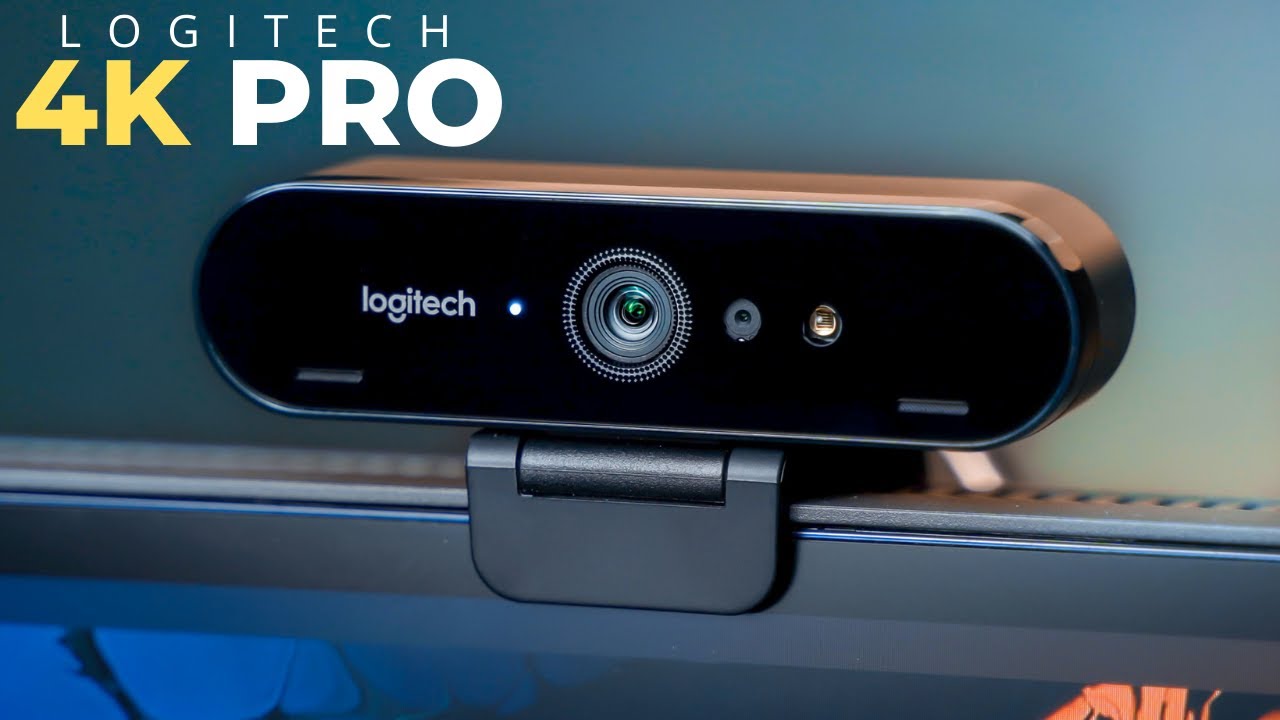

A soft, noisy webcam image can make a good meeting look careless, while a narrow camera can cut off a whiteboard or a second person. The right 4K model should improve detail without demanding a complicated setup every time you join a call.
Our Best 4K webcam picks range from simple plug-and-play cameras to motorized models that track you around the room. We looked at sensor size, autofocus, framing tools, microphones, software controls, mounting, and privacy features to separate cameras that are genuinely useful from those that simply advertise a high resolution.
Logitech MX Brio is our top pick for most people, with the Insta360 Link 2 close behind for anyone who needs physical tracking. The rest of the list covers compact cameras, flexible streaming tools, wide-angle and telephoto framing, and straightforward office use.
Comparison table
| # | Product | Award | Resolution | Focus | Audio | Best for |
|---|---|---|---|---|---|---|
| 1 | Logitech MX Brio | Best overall | 4K at 30fps, 1080p at 60fps | Autofocus | Dual beamforming noise reduction | Meetings and streaming |
| 2 | EMEET NOVA | Best simple setup | 4K at 30fps | PDAF | Dual microphones | Everyday calls |
| 3 | Acer 4K Webcam | Best compact build | 4K with HDR | PDAF | Dual noise reduction microphones | Portable workstations |
| 4 | Insta360 Link 2C | Best fixed-frame software | 4K with HDR | PDAF | AI noise cancellation | Creators and presenters |
| 5 | Logitech Brio | Best for Windows Hello | 4K at 30fps | Autofocus | Dual omnidirectional microphones | Office desktops |
| 6 | EMEET C960 | Best focused view | 4K | PDAF | Dual omnidirectional microphones | One-person calls |
| 7 | Philips 4K Webcam | Best basic privacy | 4K | Not specified | Built-in microphone | Casual meetings |
| 8 | EMEET S600 | Best streaming controls | 4K at 30fps, 1080p at 60fps | PDAF | Noise filtering microphones | New streamers |
| 9 | Insta360 Link 2 | Best tracking | 4K with HDR | PDAF | AI noise cancellation | Presenters who move |
| 10 | EMEET C60E | Best dual-camera design | 4K | PDAF | Dual omnidirectional microphones | Close-up demonstrations |
1. Logitech MX Brio: Best Overall

Pros
- 4K at 30fps and 1080p at 60fps
- Fine image controls through Logitech software
- Built-in privacy cover
- Show Mode tilts the camera toward a desk
Cons
- Larger and heavier than several compact rivals
- No physical subject tracking
- Many advanced controls require software
Best for: anyone who wants one polished camera for work calls, streaming, and desk presentations.
The Logitech MX Brio is the camera we would keep on a primary desk. Its image has the sort of detail that makes glasses frames, hair, and fine textures look more defined than they do through an ordinary laptop camera, but the useful part is how little attention it demands. Auto exposure, auto white balance, noise reduction, and autofocus handle the routine work, while the camera can still be adjusted when the room is difficult.
It records 4K at 30fps or 1080p at 60fps. The first mode favors fine detail for meetings and recordings, while the second makes motion look smoother for streaming or demonstrations. Logitech says the sensor uses pixels that are 70 percent larger than those in its prior webcam sensor, and the camera includes AI-enhanced image processing for better face visibility in difficult light. Those features matter most when a bright window or a dim room makes cheaper cameras flatten your face into shadow.
The dual beamforming microphones use noise reduction to make speech clearer, and the camera works with Windows, macOS, ChromeOS, and Linux. The built-in cover is more convenient than the attachable shade on the older Logitech Brio. Tilt the MX Brio downward and Show Mode can present notes or sketches on the desk, a useful trick for teachers, designers, and anyone who explains physical objects on a call.
Compared with the Logitech Brio, the MX Brio has a more current control system and a better-integrated privacy cover. The Insta360 Link 2 is the stronger choice if you move around while presenting, since it physically follows you. The MX Brio's weakness is its size and weight, listed at 0.84 pounds, along with the need for Logitech software to unlock its deeper ISO, shutter speed, tint, and vibrance controls. Skip it if you want a tiny camera that simply clips on and disappears. For a main work or creator setup, it is the most complete pick here.
2. EMEET NOVA: Best Simple Setup

Pros
- 4K at 30fps
- Fast PDAF autofocus
- Physical privacy cover
- 360-degree horizontal rotation
- Tripod thread
Cons
- Defaults to 1080p
- Fixed 73-degree field of view
- USB 2.0 and fixed cable
Best for: people who want a flexible plug-and-play camera for calls without motorized tracking.
The EMEET NOVA is a practical webcam that avoids turning a video call into a small software project. Connect its USB Type-A cable and it is ready to use, with a physical cover for the lens and a mount that can be adjusted across a broad range of desk and monitor positions. Its compact 0.29-pound body is easy to move between a home office and a second workstation.
The camera uses a CMOS sensor and supports 4K at 30fps, although its default video resolution is 1080p. You must switch to 4K through compatible camera software or an application such as PotPlayer or OBS. PDAF autofocus works across a stated range of 7.9 to 118 inches, which is useful when you lean toward the camera or hold something up for discussion. Manual focus is not supported, and the field of view stays fixed at 73 degrees.
Two built-in microphones capture speech from up to 8 feet away under the stated conditions. That reach is suitable for a normal desk, though the guidance to keep the microphones unobstructed and use them in a quiet environment is important. EMEETLINK provides brightness, contrast, saturation, and backlight compensation adjustments when the automatic image needs help.
The EMEET C960 has a similar 73-degree view and basic layout, but the NOVA gives its autofocus range and software adjustment options more prominence. The Acer 4K Webcam has a more premium all-metal body and a larger Sony sensor, but the NOVA is easier to rotate and mount, with 360-degree horizontal movement, 15 degrees of vertical adjustment, and a 180-degree adjustable stand. Its default 1080p mode and USB 2.0 connection are the main reasons to skip it if you want a camera that arrives already configured for 4K recording. It suits everyday calls where dependable framing matters more than cinematic control.
3. Acer 4K Webcam: Best Compact Build

Pros
- Sony 1/2-inch CMOS sensor
- HDR and low-light support
- All-metal unibody construction
- Magnetic privacy cover
- Very light at 57 grams
Cons
- Audio pickup is specified only to 2.5 meters
- No listed frame rate
- Compact body may be easier to misplace
Best for: mobile workers and creators who want a small camera with a substantial build.
The Acer 4K Webcam stands out as soon as you pick it up. Its aerospace-grade aluminum unibody is CNC-machined and sandblasted, giving this unusually small camera a sturdier feel than the plastic-heavy designs around it. Acer lists the weight at 57 grams, or about 0.11 pounds, so it remains easy to carry between a laptop bag, home office, and shared desk.
A large Sony 1/2-inch CMOS sensor gives the camera a strong foundation for 4K video, HDR, and low-light performance. A larger sensor can capture more light than a tiny webcam sensor, which helps preserve facial detail when the room is not brightly lit. PDAF keeps focus responsive when you shift in your chair or bring an object into view. The product data does not specify a frame rate, so buyers who need a particular motion setting should check their intended software.
The dual high-sensitivity digital microphones are designed to reduce wind, keyboard clicks, and other ambient sounds, with voice pickup stated up to 2.5 meters away. The USB-C to USB-A connection includes an adapter, and the webcam works with Windows, Mac, and ChromeOS. There is no need for drivers, Wi-Fi, Bluetooth, or an app for basic operation. Its magnetic cover snaps over the lens and uses 12 built-in magnets to stay in place.
The Acer 4K Webcam has a more distinctive build than the EMEET NOVA, while the Logitech MX Brio offers more detailed image controls and a documented 1080p at 60fps mode. Acer's weakness is the thin specification around frame rate and advanced control. This is not the camera for someone who wants to tune every image parameter before a stream. It is the one to choose when portability, sensor size, and physical construction matter most.
4. Insta360 Link 2C: Best Fixed-Frame Software

Pros
- 1/2-inch sensor with HDR
- PDAF autofocus
- Auto framing and gesture control
- DeskView and Whiteboard modes
- AI noise-canceling microphone
Cons
- Not compatible with ARM-based Windows systems
- No physical pan and tilt tracking
- Best features depend on Link Controller software
Best for: presenters and streamers who want software-assisted framing without a moving camera head.
The Insta360 Link 2C is built around the idea that the camera should do more than sit still. Its 1/2-inch sensor supports 4K video with HDR, and the PDAF system is intended to lock focus quickly when a presenter shifts position or raises an item toward the lens. In a room with uneven lighting, HDR and the stated low-light capability should help preserve detail in both the face and the background.
Auto framing adjusts the crop to keep one person or a group visible. That is different from the physical movement of the Insta360 Link 2, but it can be a cleaner solution for a fixed desk setup. Gesture controls can start auto framing, zoom, or Whiteboard Mode without reaching for the keyboard. Smartphone control adds another way to adjust the camera remotely.
The Link Controller software opens more of the camera's personality. It includes DeskView and Whiteboard modes, image adjustments, and a natural bokeh effect intended to create a softer background. The AI noise-canceling microphone is designed to reduce unwanted sound in busy rooms. A physical privacy switch provides a direct way to block the camera when the call ends.
This is a more creative tool than the Logitech Brio, but the Logitech is easier to recommend for a conventional office that values Windows Hello and broad operating-system support. The Link 2C does not work with ARM-based Windows systems or Windows Hello Face Recognition. If you want a camera for presenting clearly while streaming from a home desk, its software modes are compelling. Skip it if you do not want to install or learn a desktop control app.
5. Logitech Brio: Best for Windows Hello

Pros
- 4K at 30fps
- Three field-of-view presets
- Windows Hello support
- RightLight 3 exposure adjustment
- Manual focus controls in software
Cons
- Privacy shade is attachable rather than built in
- Older design than the MX Brio
- No 1080p at 60fps mode listed
Best for: Windows users who want 4K video and facial login from one webcam.
The Logitech Brio remains a sensible office camera because it solves several practical problems at once. It supports 4K at 30fps, autofocus, and 5x digital zoom, while RightLight 3 adjusts exposure and contrast when a window or lamp creates glare. The image is designed for both meetings and streaming, with color and detail controls available through Logitech's software.
Its adjustable diagonal field of view is more useful than a generic wide-angle claim. The presets are 65 degrees for a head-and-shoulders frame, 78 degrees for more of the room, and 90 degrees for the broadest view. That gives you a way to avoid showing too much background in a solo call or include another person when needed. The dual omnidirectional microphones are rated to capture clear audio from up to 1.2 meters while reducing background noise.
The standout feature is the combination of optical and infrared sensors for Windows Hello. A compatible Windows setup can use the webcam for facial recognition login, which makes it more useful on a dedicated office computer. It works with Windows, Mac, and ChromeOS, and includes an attachable privacy shade that flips over the lens.
The MX Brio is the better pick for a newer all-purpose setup, with a built-in cover and 1080p at 60fps. The older Logitech Brio is still the one to choose if Windows Hello is central to your routine. Its main weakness is the external privacy shade, which is easier to lose and less elegant than a built-in shutter. It makes sense for a Windows desktop that stays in one place.
6. EMEET C960: Best Focused View

Pros
- 4K CMOS sensor
- PDAF and automatic light correction
- Fixed 73-degree field of view
- Privacy cover and tripod thread
- Broad operating-system support
Cons
- Defaults to 1080p
- Requires correct microphone selection
- USB-A connection
Best for: solo callers who want a centered view that does not show too much of the room.
The EMEET C960 takes a restrained approach to webcam design. Its 73-degree field of view keeps attention on one speaker instead of making a small room look even wider. That is a helpful choice for work calls, online teaching, and interviews where a clean head-and-shoulders composition matters more than fitting a group into the shot.
A true 4K CMOS sensor provides the resolution, though the camera defaults to 1080p and needs compatible software such as PotPlayer or OBS to switch to 4K. PDAF autofocus is meant to keep the image stable as you move, while automatic light adjustment handles overexposed and dim scenes. The fixed field of view avoids the framing decisions found on the Logitech Brio, but it also means you cannot widen the picture when someone joins you.
The dual omnidirectional microphones capture speech for calls and remote teaching. EMEET recommends selecting the C960 as the default microphone device, a small setup step that is easy to overlook. The camera works with Windows 7, 10, and 11, macOS 10.14 or later, Android TV 7.0 or later, and Linux. It has 360-degree horizontal adjustment, 15 degrees of vertical adjustment, a tripod thread, and a privacy cover.
Compared with the EMEET NOVA, the C960 offers a similar fixed 73-degree view and autofocus approach, while the NOVA specifies an autofocus range and a slightly more adjustable stand. The C960's strength is its focused composition and broad compatibility. Its weakness is that the out-of-box 1080p setting can surprise buyers expecting immediate 4K. Choose it for a single-person desk, not a shared conference table.
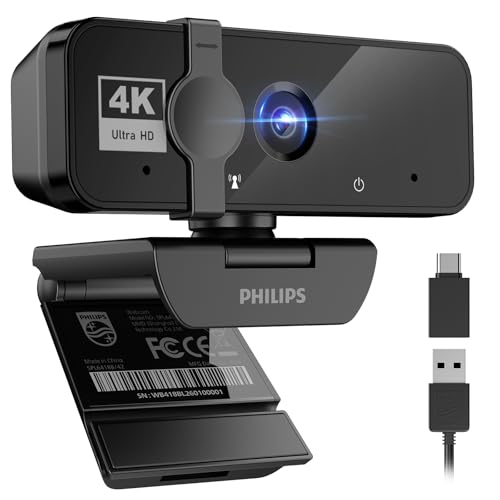
7. Philips 4K Webcam: Best Basic Privacy
Pros
- True 4K resolution
- Built-in microphone
- Physical privacy shutter
- Plug-and-play setup
- Works with Windows and macOS
Cons
- Autofocus details are not specified
- Microphone features are basic
- Few image controls are listed
Best for: everyday meetings where simple setup and lens privacy matter more than advanced controls.
The Philips 4K Webcam is the least complicated camera in this group. It is aimed at meetings, virtual classes, telehealth, and casual video chats rather than elaborate streaming setups. Plug it into a laptop or desktop and the camera is designed to work without drivers or a separate application.
Philips specifies true 4K resolution for sharp, vivid video, but the available product information does not provide a frame rate, autofocus system, field of view, or sensor size. That makes it difficult to compare its image behavior directly with the PDAF-equipped EMEET C960 or the larger-sensor Acer 4K Webcam. Buyers should view the Philips as a straightforward high-resolution camera, not a tuning platform.
The built-in microphone provides an all-in-one setup for daily communication. Its physical privacy shutter is a meaningful advantage because it blocks the lens mechanically instead of relying on software. Compatibility covers Windows and macOS, along with Microsoft Teams, Skype, and Google Meet.
The Philips 4K Webcam gives up the detailed controls and microphone processing found on the Logitech MX Brio and Insta360 Link 2C. Its weakness is the lack of published detail around focus, framing, and frame rate. If you want to plug in a camera for regular calls and slide the shutter closed afterward, it is a sensible fit. Skip it when streaming quality or manual image adjustment is a priority.
8. EMEET S600: Best Streaming Controls

Pros
- Sony 1/2.55-inch sensor
- 4K at 30fps and 1080p at 60fps
- PDAF autofocus
- Adjustable field of view at 1080p
- Built-in privacy cover
Cons
- Field of view is fixed at 73 degrees in 4K
- Advanced controls require EMEETLINK
- Noise cancellation is enabled by default
Best for: newer streamers who want flexible framing and image controls without a larger camera system.
The EMEET S600 is a strong fit for a creator who is still deciding how much of the desk or room belongs in the shot. Its Sony 1/2.55-inch sensor supports 4K at 30fps for detail and 1080p at 60fps for smoother motion. That choice is useful for streaming, where motion can matter more than maximum resolution.
PDAF autofocus keeps the image sharp as you move, and automatic light adjustment balances shadows and highlights in less controlled rooms. At 1080p, the field of view can be adjusted from 40 to 73 degrees, allowing a tight face shot or a wider view of the setup. In 4K, it is fixed at 73 degrees to reduce distortion and preserve image quality.
The microphones use a proprietary noise-filtering algorithm, enabled by default, and EMEETLINK can turn it off or help refine sound and image parameters. The camera connects through USB 2.0 and USB 3.0, works with popular operating systems and software, and has a built-in cover. Its mounting design supports flexible rotation and wide-angle tilting while staying secure.
The EMEET S600 offers more framing flexibility than the EMEET C960, while the Acer 4K Webcam has a larger sensor and a more compact metal body. The S600's real limitation is the split behavior between modes: 4K locks the view at 73 degrees, and the more adjustable framing is reserved for 1080p. For someone learning how to frame a camera for live broadcasts and tutorials, it is a versatile starting point.
9. Insta360 Link 2: Best Tracking

Pros
- Physical AI tracking
- 1/2-inch sensor with HDR
- PDAF autofocus
- Gesture and smartphone control
- DeskView and Whiteboard modes
Cons
- Not compatible with ARM-based Windows systems
- No Windows Hello Face Recognition
- More camera movement than a fixed webcam
Best for: presenters, teachers, and creators who move around while speaking.
The Insta360 Link 2 is the most capable camera here for people who refuse to stay planted in front of a monitor. Its PTZ design physically pans and tilts to follow you, keeping a speaker or group in frame as movement changes. That is more natural than simply cropping the image, especially when you stand to explain something or move between a desk and a whiteboard.
Its 1/2-inch sensor records 4K video with HDR and is designed for low-light situations. PDAF autofocus helps maintain clarity when the camera changes position, and the AI noise-canceling microphone reduces background noise. Natural bokeh through the Link Controller software can soften the background, while DeskView and Whiteboard modes give the camera a reason to move beyond ordinary calls.
Gesture control can activate tracking, zoom, or Whiteboard Mode, and smartphone control allows remote adjustments. The camera automatically tilts down after 10 seconds of inactivity for privacy, or you can adjust it manually. It works with major meeting and streaming platforms, though the hardware does not support ARM-based Windows systems or Windows Hello Face Recognition.
The Insta360 Link 2C provides many of the same software ideas in a fixed-frame design, so it is the better choice when camera movement would be distracting. The Logitech MX Brio is more conventional and easier for a static office. The Link 2's weakness is that its advanced behavior adds software and mechanical complexity. It is a poor fit for anyone who wants a webcam to remain completely still, but an excellent one for choosing the right camera for a moving presenter.
10. EMEET C60E: Best Dual-Camera Design

Pros
- Wide-angle and telephoto cameras
- 1x to 11x hybrid zoom
- PDAF autofocus
- Remote and EMEET STUDIO controls
- RGB status lighting
Cons
- Zoom is unavailable in 4K, 60fps, and YUY2 modes
- USB 2.0 connection
- More specialized than a normal webcam
Best for: teachers, demonstrators, and streamers who switch between room views and close-ups.
The EMEET C60E takes a different route from the single-lens cameras above. It uses two cameras, with a wide-angle unit for people and backgrounds and a telephoto unit for close views. That makes it interesting for product demonstrations, lessons, and streams where the presenter needs to show both a complete scene and a smaller detail without physically moving the webcam.
The system offers hybrid zoom from 1x to 11x, with intermediate choices such as 3x, 5x, and 7x. PDAF is intended to keep the image stable and focused as the framing changes. The telephoto camera has a recommended working distance of 13.8 inches for close-up views. The important limitation is that zoom is not supported in 4K, 60fps, or YUY2 modes, so the most flexible framing does not work in every capture setting.
Remote control and EMEET STUDIO software allow adjustments to zoom, color, brightness, focus, and RGB lighting. The two microphones capture speech within a stated 9.8-foot radius, and the camera supports Windows 10 and 11 64-bit, macOS 10.14 or later, OBS, Twitch, YouTube, and Facebook. A 1/4-inch tripod mount adds flexibility for a permanent teaching or streaming position.
The C60E is more specialized than the EMEET S600, which is simpler for ordinary streaming, and it lacks the physical tracking of the Insta360 Link 2. Its zoom restriction in 4K is the biggest reason to skip it if maximum resolution and close-up control must coexist. Choose it when changing perspective is central to your work, not merely because two lenses sound impressive.

How to choose best 4k webcam
A webcam's 4K label is only the beginning. The sensor, frame rate, autofocus, framing, microphone design, and privacy hardware determine how useful that resolution will be in a real room.
Sensor and low-light performance
Sensor size affects how much light the camera can gather and how naturally it can render a face against a darker background. The Acer 4K Webcam and both Insta360 Link models list 1/2-inch sensors, while the EMEET S600 lists a 1/2.55-inch Sony sensor. A larger sensor is especially helpful beside a window, under uneven room lighting, or during evening streams.
HDR can help preserve bright and dark areas in the same frame, but it does not replace good lighting. A camera with a strong sensor and sensible exposure behavior is more useful than a nominally sharp camera that produces a noisy face.
Resolution and frame rate
4K is useful for cropping, recording, and showing fine detail. A 30fps mode is common in this group and is suitable for meetings and stationary presentations. A 1080p at 60fps mode, found on the MX Brio and S600, can make hand movement and gaming streams look smoother.
Check how a camera enters 4K. The EMEET NOVA and C960 default to 1080p and require compatible software to change modes. The C60E sacrifices zoom in 4K, 60fps, and YUY2 modes, so its headline features cannot all be used at once.
A 4K webcam is only as useful as the lighting, software mode, and framing you can use at the same time.
Autofocus and tracking
PDAF is designed to focus quickly when you move or bring an object toward the camera. It appears on the NOVA, Acer, Link 2C, C960, S600, and C60E. Standard autofocus can still be perfectly adequate for a fixed desk, especially when the subject stays at a consistent distance.
Tracking is a separate feature. The Insta360 Link 2 physically pans and tilts, while the Link 2C uses auto framing and a software crop. Choose physical tracking for presenters who walk around, and fixed or software framing for a camera that should stay visually unobtrusive.
Field of view and framing
A narrow or moderate field of view keeps a solo speaker prominent and avoids showing unnecessary background. The NOVA and C960 use a fixed 73-degree view. The Logitech Brio offers 65, 78, and 90-degree presets, making it more adaptable for one person or a small group.
The S600 adjusts from 40 to 73 degrees at 1080p but remains fixed at 73 degrees in 4K. The C60E takes a different approach with wide-angle and telephoto cameras, while the Insta360 models offer auto framing and specialized DeskView and Whiteboard modes.
Microphones and privacy
Built-in microphones are convenient for calls, but their pickup range and noise processing vary. The Acer lists voice capture up to 2.5 meters, the NOVA up to 8 feet, and the C60E within 9.8 feet. Those figures assume suitable positioning and a reasonably controlled room.
A physical cover or shutter is preferable when privacy matters. The MX Brio, NOVA, Acer, C960, Philips, and S600 provide physical lens blocking. The Link 2C has a privacy switch, while the Link 2 tilts downward after inactivity.

Frequently asked questions
Do all of these webcams record in 4K immediately?
No. The EMEET NOVA and C960 default to 1080p and require compatible software or an application such as OBS to switch to 4K. The camera and the video application must both support the selected mode.
Is 4K useful for video meetings?
It can be useful when the meeting software supports it, when you want to crop the image, or when you record presentations locally. For ordinary calls, lighting, autofocus, and microphone clarity may make a larger difference than resolution alone.
Which webcam is best for someone who moves while presenting?
The Insta360 Link 2 is the clearest choice because it physically pans and tilts to follow movement. The Insta360 Link 2C offers auto framing but does not provide the same physical tracking behavior.
Which webcam has the most flexible field of view?
The Logitech Brio provides three diagonal field-of-view presets at 65, 78, and 90 degrees. The EMEET S600 also adjusts its view, from 40 to 73 degrees at 1080p, but its 4K view is fixed at 73 degrees.
Do these webcams need special drivers?
Many support basic plug-and-play operation. The EMEET NOVA, Acer, C960, Philips, and S600 specifically describe driver-free setup for basic use, while Logitech and Insta360 software unlock additional image and control features.
Which models include physical privacy protection?
The MX Brio, NOVA, Acer, Brio, C960, Philips, and S600 include a physical cover or shutter. The Link 2C has a privacy switch, and the Link 2 uses an automatic downward tilt after inactivity as part of its privacy mode.
Can a webcam microphone replace a headset microphone?
It can work for routine calls when the camera is near the speaker and the room is quiet. A headset or dedicated microphone remains preferable in noisy rooms, during streams, or when consistent vocal quality matters.
The bottom line
The Logitech MX Brio is the Best 4K webcam for most buyers because it combines 4K at 30fps, 1080p at 60fps, strong automatic image handling, useful manual controls, noise-reducing microphones, and a built-in privacy cover. It is the most balanced camera for meetings, streaming, and desk demonstrations.
Choose the Insta360 Link 2 instead if you present while moving, or choose the Acer 4K Webcam if a compact all-metal body and a large Sony sensor matter more than advanced software. The EMEET S600 is a strong option for new streamers, while the C60E earns its place for close-up demonstrations.
If you are undecided, buy the MX Brio for a static desk and the Link 2 for a moving presentation setup.
As an Amazon Associate we earn from qualifying purchases.