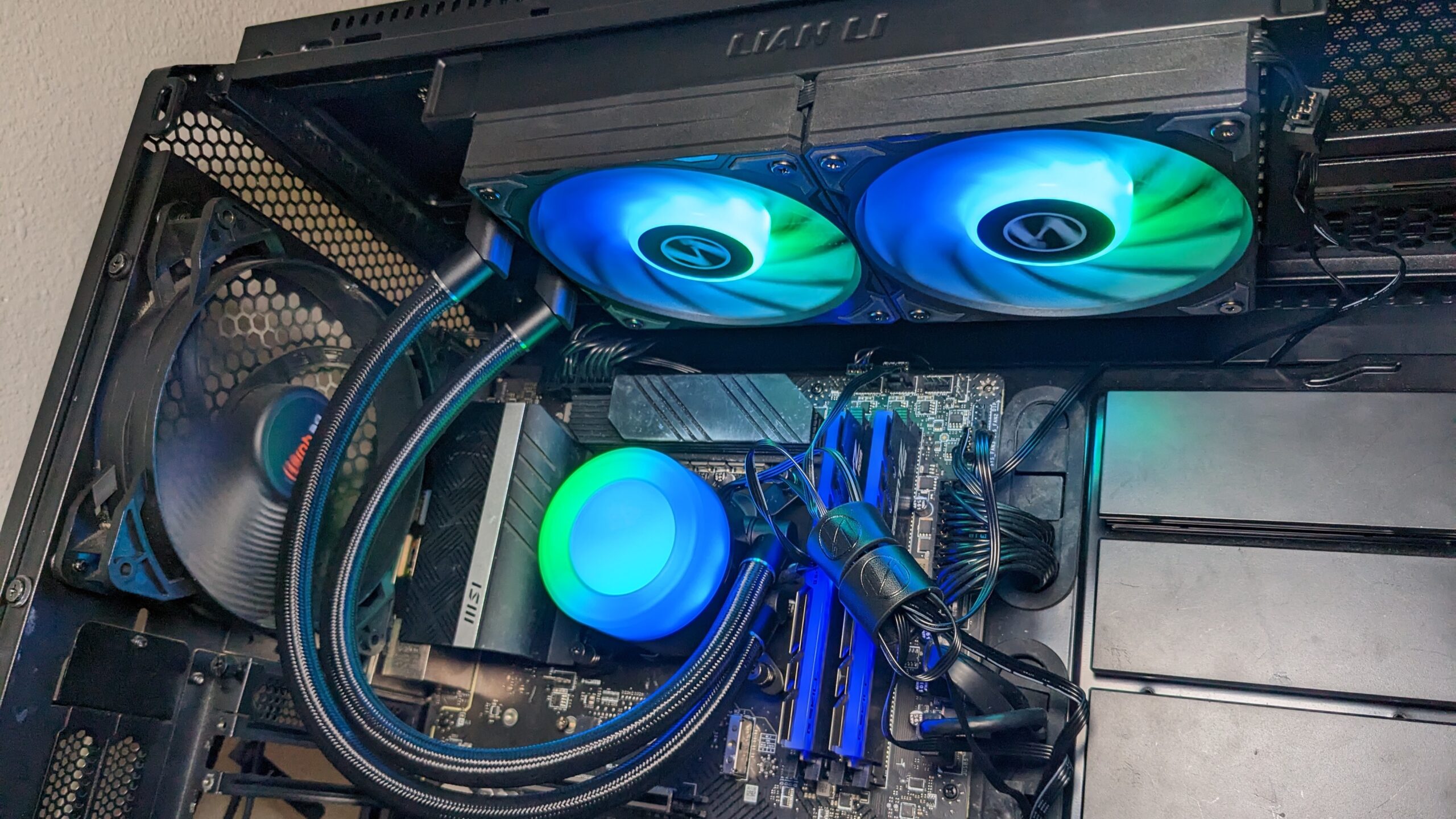

A 360mm radiator can tame a demanding processor, but it also creates new fit, noise, wiring, and installation decisions. A cooler that looks excellent on a product page may be too long for a case, too elaborate for a simple build, or missing the small features that make daily use pleasant.
The Best AIO Cooler for most builders is the ARCTIC Liquid Freezer III Pro 360. It combines a useful contact frame, offset cold-plate mounting, an integrated VRM fan, and tidy cable management. The rest of this roundup covers quiet designs, RGB versions, display-equipped models, a premium Noctua option, and the plain Corsair Nautilus 360 RS.
| # | Product | Award | Radiator | Notable feature | Best for |
|---|---|---|---|---|---|
| 1 | ARCTIC Liquid Freezer III Pro 360 | Best overall | 360mm | Offset mounting, VRM fan | High-performance builds |
| 2 | Corsair Nautilus 360 RS | Best simple installation | 360mm | 20 dBA pump, daisy-chain fans | Clean, uncomplicated builds |
| 3 | ARCTIC Liquid Freezer III 360 ARGB | Best ARGB performance | 360mm | P12 Pro fans, VRM fan | RGB systems needing strong cooling |
| 4 | Corsair Nautilus 360 RS ARGB | Best ARGB setup | 360mm | ARGB daisy chain | Easy-to-wire RGB builds |
| 5 | ASUS ROG Ryujin III 360 ARGB | Best LCD display | 360mm | 3.5-inch 640 x 480 LCD | Showcase gaming PCs |
| 6 | ARCTIC Liquid Freezer III 360 ARGB White | Best white ARGB cooler | 360mm | Offset mounting, integrated wiring | White PC builds |
| 7 | Corsair Nautilus 360 RS ARGB White | Best white installation | 360mm | 20 dBA pump, ARGB fans | White builds with simple cabling |
| 8 | Noctua NL-LC1-36 | Best quiet workstation cooler | 360mm | Three NF-A12x25 G2 fans | Quiet workstations |
| 9 | NZXT Kraken Plus 360 | Best compact display | 360mm | 1.54-inch LCD, Zero RPM mode | Smart-looking gaming PCs |
1. ARCTIC Liquid Freezer III Pro 360: Best Overall

Pros
- Offset mounting targets the CPU hotspot
- Integrated VRM fan adds airflow around the socket
- P12 Pro fans balance high-speed cooling with lower-speed quietness
- Fan cables are built into the hose sheathing
Cons
- No lighting or LCD display
- 360mm radiator needs a compatible case
- Heavier than the Corsair Nautilus 360 RS
Best for: builders who want serious CPU cooling without adding display software or decorative hardware.
The ARCTIC Liquid Freezer III Pro 360 is the cooler we'd start with for a high-power build. It focuses on the parts that affect sustained CPU performance rather than adding a screen or a large software ecosystem. The result is a substantial 360mm cooler with a practical layout, a more purposeful cold-plate position, and less visible wiring than many competing designs.
Its most interesting feature is the native offset mounting for both Intel and AMD processors. Shifting the cold plate toward the CPU hotspot is a small design decision, but it addresses where heat is concentrated instead of treating the integrated heat spreader as a perfectly uniform target. Intel builders also get a contact frame for LGA1851 and LGA1700, designed to distribute contact pressure more evenly. That makes this a particularly compelling match for current Intel platforms.
ARCTIC uses three P12 Pro fans, which are described as more powerful and quieter than the standard P12, especially at lower speeds. They also have a higher maximum speed for heavy loads. The radiator itself measures 15.7 inches long, 4.7 inches wide, and 2.9 inches high, so case clearance matters. A PWM-controlled fan is built into the pump housing to cool the motherboard voltage converters, a useful extra for a system that spends long periods under load.
The weakness is easy to identify: this is a performance-first cooler with no RGB lighting and no LCD. It is also heavier than the 3.51-pound Corsair Nautilus 360 RS, and its larger listed height may complicate some installations. The pump and radiator assembly are not the choice for a compact case. For readers comparing how liquid cooling changes a CPU build, the ARCTIC stands out because it improves the functional details without making the system depend on extra control software.
Choose the ARCTIC Liquid Freezer III Pro 360 if you want a well-equipped 360mm cooler for a demanding Intel or AMD processor and care more about thermal design than visual effects.
2. Corsair Nautilus 360 RS: Best Simple Installation

Pros
- 20 dBA pump specification
- Pre-applied thermal paste speeds installation
- Fans can be daisy-chained to one PWM header
- Supports Intel LGA1851 and LGA1700 plus AMD AM5 and AM4
Cons
- No ARGB lighting
- No display or integrated VRM fan
- Large radiator still demands 360mm case support
Best for: builders who want a straightforward 360mm cooler with minimal fan wiring.
The Corsair Nautilus 360 RS is the least fussy pick in this group. It does not try to be a system monitor or a lighting centerpiece. Instead, it pairs a conventional 360mm radiator with a low-noise pump, three fans, and a wiring scheme that should be easy to understand even during a first build.
Corsair specifies a pump noise level of 20 dBA and uses a convex cold plate with thermal paste already applied. The slightly convex surface is intended to improve contact with the CPU's integrated heat spreader, while the pre-applied paste removes one small installation decision. The cooler supports Intel LGA1851 and LGA1700 as well as AMD AM5 and AM4, covering the sockets most relevant to a current desktop build.
The included RS120 fans use high static pressure for pushing air through the radiator. AirGuide technology helps direct airflow, while Magnetic Dome bearings are intended to support smooth, quiet operation. The three fans can be daisy-chained and connected to a single 4-pin PWM fan header. That is a meaningful advantage in a case where motherboard headers are already occupied by intake and exhaust fans.
Compared with the ARCTIC Liquid Freezer III Pro 360, the Nautilus gives up the offset mount, contact frame, and integrated VRM fan. It is also slightly lighter, at 3.51 pounds, and its listed radiator dimensions are 15.59 inches long, 4.72 inches wide, and 1.06 inches high. The thin radiator height is useful for clearance, but the cooler's design is less specialized around hotspot placement. Skip it if you specifically want the ARCTIC's socket-focused hardware or integrated cable routing.
The Nautilus 360 RS is the sensible choice for a clean, conventional build where simple connections matter more than lighting or advanced mounting features. It also makes a good reference point when comparing the socket support and mounting trade-offs for CPU coolers.
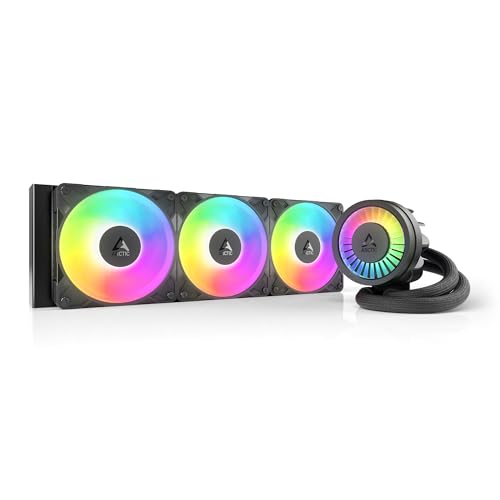
3. ARCTIC Liquid Freezer III 360 ARGB: Best ARGB Performance
Pros
- P12 Pro fans provide strong radiator airflow
- Offset mounting supports hotspot-focused cooling
- Integrated VRM fan adds socket-area airflow
- Fan cables are integrated into the hose sheathing
Cons
- RGB adds another lighting connection to manage
- No LCD screen
- 360mm radiator limits case selection
Best for: builders who want ARGB lighting without giving up ARCTIC's thermal design features.
The ARCTIC Liquid Freezer III 360 ARGB is the version to choose when the plain Liquid Freezer III Pro 360 is functionally right but visually too restrained. Its core cooling design remains the attraction. The ARGB treatment changes the presentation, not the fundamental approach to heat transfer.
ARCTIC includes the same offset mounting concept for Intel and AMD processors, shifting the cold plate toward the hotspot. For Intel LGA1851 and LGA1700 systems, the contact frame is designed to improve pressure distribution. These details make more sense on a processor that will spend time under sustained rendering, compiling, or gaming loads than on a basic office machine.
Three P12 Pro fans provide the air movement through the 360mm radiator. ARCTIC says the fans offer more power at any speed and a higher maximum speed for heavy cooling demand, while remaining particularly quiet at lower speeds. The pump housing also contains a PWM-controlled VRM fan. It is easy to overlook that component in a product description, but airflow around the motherboard power circuitry can be useful in a densely packed performance system.
The listed dimensions are 15.7 inches long, 4.7 inches wide, and 2.9 inches high, with a weight of about 4.45 pounds. That is a larger, heavier assembly than the Corsair Nautilus 360 RS, and builders should confirm radiator clearance before buying. The other compromise is that ARGB lighting introduces another connection and another layer of motherboard lighting control. The cooler is not a display product, so choose the ASUS or NZXT instead if system information on the pump matters more than radiator-focused design.
For an RGB system that still needs serious CPU cooling, this is the ARCTIC model we'd choose. It keeps the useful hotspot-oriented mounting and VRM airflow while giving a windowed case the lighting many builders expect.
4. Corsair Nautilus 360 RS ARGB: Best ARGB Setup

Pros
- RS120 ARGB fans combine lighting with radiator airflow
- Fans daisy-chain through one PWM header and one 5V ARGB header
- Pre-applied thermal paste simplifies mounting
- 20 dBA pump specification
Cons
- No display
- Lacks the ARCTIC's contact frame and VRM fan
- ARGB requires a compatible 5V header
Best for: RGB builders who want fewer fan cables and direct motherboard lighting control.
The Corsair Nautilus 360 RS ARGB takes the uncomplicated Nautilus formula and adds lighting where it is most visible. The three radiator fans carry ARGB illumination, while the installation remains centered around a conventional cold plate, pump, and radiator. It is a good fit for a build where coordinated lighting matters but a pump display would be unnecessary.
Its 360mm radiator is paired with a convex cold plate and pre-applied thermal paste. Corsair supports Intel LGA1851 and LGA1700 plus AMD AM5 and AM4, so the mounting platform is broad enough for current Intel and AMD builds. The pump is specified at 20 dBA, and the RS120 ARGB fans use high static pressure to push air through the radiator rather than acting like general-purpose case fans.
The useful part of the ARGB implementation is the connection layout. The fans can be daisy-chained to a single 4-pin PWM fan header and a single 5V ARGB header. That keeps the wiring more manageable than running a separate fan and lighting cable from every unit. Lighting is controlled through a compatible motherboard, so the motherboard must have the appropriate header if you want full direct control.
This model is physically similar to the non-ARGB Nautilus, measuring 15.59 inches long, 4.72 inches wide, and 1.06 inches high. It weighs 3.53 pounds. The ARCTIC Liquid Freezer III 360 ARGB is the stronger pick for buyers who value offset mounting, a contact frame, and an integrated VRM fan. The Corsair is easier to justify when straightforward cabling and a familiar motherboard lighting connection are the priority.
Skip this version if your board lacks a 5V ARGB header or if the system will spend most of its life hidden under a desk. For a visible RGB build with a clean internal layout, however, the Nautilus 360 RS ARGB is the more approachable lighting option.
5. ASUS ROG Ryujin III 360 ARGB: Best LCD Display

Pros
- 3.5-inch 640 x 480 customizable LCD
- Can show temperatures, voltage, fan speed, and coolant flow
- Asetek Emma Gen8 V2 pump with a three-phase motor
- Embedded pump fan cools motherboard VRMs
- Magnetic ARGB fans streamline assembly
Cons
- Largest and most elaborate cooler here
- Display and software add complexity
- Not the right fit for a minimalist build
Best for: showcase systems where monitoring and a customizable pump display are central features.
The ASUS ROG Ryujin III 360 ARGB is the visual centerpiece of this roundup. Its defining feature is not simply that it has an LCD, but that the screen is large enough to function as a genuine part of the build's identity. It can show custom animated GIFs or live readings, so the pump housing can act as both decoration and a small system dashboard.
ASUS lists a 3.5-inch LCD with a 640 x 480 resolution. The display can monitor clock frequency, voltage, temperature, fan speed, or coolant flow. Those options give the screen a practical purpose, although anyone who wants a quiet, maintenance-free setup should remember that display customization and monitoring add software decisions. The cooler also supports AIDA64 features with special ROG themes.
The cooling hardware is equally ambitious. It uses the Asetek Emma Gen8 V2 pump with a three-phase motor, described as providing higher flow and lower impedance. An embedded fan in the pump housing is designed to cool the motherboard VRMs. The ARGB fans are thickened for airflow and static pressure, and they snap together magnetically to make installation more orderly.
This is a large piece of hardware. The listed dimensions are 16.7 inches long, 7.4 inches wide, and 7.4 inches high, and the product is described as a 360mm cooler for current AMD Ryzen 9000 and Intel Core Ultra platforms. That makes case planning especially important. Compared with the NZXT Kraken Plus 360, the ASUS provides a much larger, higher-resolution display and more extensive monitoring. Compared with the ARCTIC Liquid Freezer III Pro 360, it adds a great deal of visual and software complexity.
The ASUS is the wrong purchase for a quiet, understated workstation or a build where every millimeter matters. Its strengths are concentrated in enthusiast systems that will be viewed through a side panel. If the screen is the reason you are considering an AIO, this is the most capable display-equipped option in the group.
6. ARCTIC Liquid Freezer III 360 ARGB White: Best White ARGB Cooler

Pros
- White finish suits light-themed PC builds
- Offset cold plate targets the CPU hotspot
- Integrated VRM fan supports motherboard cooling
- Integrated cable management reduces visible fan wiring
Cons
- No LCD or display controls
- Larger radiator height than the Corsair models
- ARGB still requires lighting-header planning
Best for: white PC builds that need ARCTIC's cooling layout and integrated lighting.
The white ARCTIC Liquid Freezer III 360 ARGB is a practical answer for a light-colored system. It is not a separate cooling design from the black ARGB model in this list. The meaningful distinction is the white finish, which lets the radiator, hoses, and fan assembly blend into a white case while retaining the same feature set.
The cold plate uses native offset mounting for Intel and AMD processors, and the Intel contact frame supports LGA1851 and LGA1700. That combination is more purposeful than a generic mounting kit because it addresses pressure distribution and the location of the CPU hotspot. The pump housing's integrated VRM fan adds a second cooling task beyond moving coolant through the loop.
The cooler uses P12 Pro fans, described as having strong airflow at low speeds and a higher maximum speed for demanding loads. ARCTIC also routes the radiator fan PWM cables inside the hose sheathing, leaving a single visible cable connected to the motherboard. In a white build, where dark cables can stand out, that small layout decision is especially welcome.
The white version is listed at 15.67 inches long, 4.72 inches wide, and about 2.6 inches high, with a weight of approximately 4.42 pounds. That radiator height is still something to check against the case. The Corsair Nautilus 360 RS ARGB White is lighter and has a thinner listed height, while the ARCTIC offers the more specialized mounting and VRM airflow. Neither has a pump LCD.
Choose this model when the case color matters as much as the cooling architecture. It suits someone who wants a coordinated white-and-ARGB interior but does not want to surrender the ARCTIC design choices that make the black version our performance-focused ARGB pick.
7. Corsair Nautilus 360 RS ARGB White: Best White Installation

Pros
- White finish works cleanly in light-themed cases
- ARGB fans connect through one 5V ARGB header
- Daisy-chained PWM wiring reduces clutter
- Pre-applied thermal paste speeds installation
Cons
- No screen
- No integrated VRM fan
- Requires a compatible 5V ARGB motherboard header
Best for: white builds that prioritize easy fan and lighting connections.
The Corsair Nautilus 360 RS ARGB White is the cleanest visual match for a white system that uses motherboard-controlled lighting. It shares the core design of the black ARGB Nautilus, but the light finish changes how naturally it fits into a bright case. The product avoids the larger pump screen and the extra configuration that comes with display-equipped coolers.
Its convex cold plate comes with thermal paste already applied, so there is less preparation before mounting the pump block. Socket support includes Intel LGA1851 and LGA1700 as well as AMD AM5 and AM4. Corsair specifies a 20 dBA pump and includes RS120 ARGB fans with high static pressure, AirGuide technology, and Magnetic Dome bearings.
The wiring arrangement remains the strongest practical feature. The three fans can be linked together and connected to one 4-pin PWM header and one 5V ARGB header. That is a simpler route through the case than managing separate leads for each fan. It also means the motherboard needs the right ARGB header, so check the board layout before committing to this model.
The listed dimensions are 15.59 inches long, 4.72 inches wide, and 1.06 inches high. It weighs 3.53 pounds. That makes it substantially easier to place around nearby components than the taller ARCTIC Liquid Freezer III 360 ARGB White, though the ARCTIC has more elaborate hotspot and VRM cooling features. This Corsair model is the better fit for a builder who wants predictable installation and a thin radiator profile.
The main reason to skip it is if you want a monitoring screen or more specialized CPU contact hardware. For a white gaming system where lighting should be coordinated without becoming a project, it is a clean and sensible choice.
8. Noctua NL-LC1-36: Best Quiet Workstation Cooler

Pros
- Three NF-A12x25 G2 PWM fans
- Pump noise absorber uses a three-layer structure
- Offset mounting options support AMD AM5 and Intel LGA1851
- Includes NT-H2 thermal paste and an AM5 thermal paste guard
- SecuFirm2 mounting system
Cons
- No RGB lighting or LCD
- The auxiliary VRM fan is optional rather than included
- Large 360mm format is unnecessary for modest processors
Best for: quiet workstations and gaming PCs where acoustic control matters more than lighting.
The Noctua NL-LC1-36 approaches an AIO like an acoustics project. Its notable hardware is not a screen or a lighting system, but the combination of a pump noise absorber, three carefully selected radiator fans, and mounting options aimed at current CPU hotspots. This is the cooler for a builder who wants the system to recede into the background.
The pump uses an Asetek Emma V2 closed-loop platform, while the pump noise absorber uses a three-layer acoustic structure and a tuned-mass damper effect to reduce vibration. Those features target the kind of low-level hum and resonance that can be more distracting than fan noise in a quiet room. The 360mm radiator is paired with three Noctua NF-A12x25 G2 PWM 120mm fans, with speed-offset tuning for acoustic optimization.
Mounting is handled by Noctua's SecuFirm2 system, with offset options for hotspot optimization on AMD AM5 and Intel LGA1851. The package includes NT-H2 thermal paste and an AM5 thermal paste guard. An NL-ACF1 auxiliary fan can be purchased separately for airflow over VRMs, M.2 storage, and memory, but it is not part of the listed cooler package. That distinction matters if you want every extra cooling component included.
The Noctua is listed at 6.2 inches long, 1.86 inches wide, and 0.91 inches high, with a weight of about 4.37 pounds. Those product dimensions do not describe the radiator in the same way as the other listings, so case planning should still use the manufacturer's installation guidance. Compared with the ARCTIC Liquid Freezer III Pro 360, the Noctua's argument is quieter operation and refined fan hardware. Compared with the ASUS ROG Ryujin III 360 ARGB, it is intentionally plain.
Skip it if your priority is a colorful showcase build or an LCD pump cap. Pick it when sustained workloads, recording sessions, or a quiet office make acoustic behavior more important than visual extras.
9. NZXT Kraken Plus 360: Best Compact Display

Pros
- Customizable 1.54-inch square LCD
- Displays temperatures, images, GIFs, and web integrations
- Zero RPM mode stops fans at low loads
- Pre-applied thermal paste
- Single breakout cable reduces pump-cap wiring
Cons
- LCD is much smaller than the ASUS display
- Requires NZXT CAM software for customization
- No integrated VRM fan listed
Best for: builders who want a small monitoring display and quiet idle behavior.
The NZXT Kraken Plus 360 is the approachable display cooler in this group. Its pump cap has a 1.54-inch square LCD, which is large enough for a temperature readout or a small animated graphic without taking over the front of the build. It gives a system some personality while avoiding the imposing presence of the ASUS ROG Ryujin III 360 ARGB.
NZXT says the display can show real-time system temperatures, animated GIFs, custom images, or web integrations such as Spotify and YouTube. Customization runs through NZXT CAM software. That makes the cooler appealing to builders already comfortable with software control, but less attractive to anyone who wants an entirely hardware-only installation.
The pump is described as a high-flow, high-head-pressure turbine design for low-noise cooling under heavy workloads. High-static-pressure fans move air through the radiator, while Zero RPM mode stops them completely at low loads. That feature can make the computer nearly silent during light use, though the exact result will also depend on the rest of the case fans and the motherboard's control settings.
The cooler supports current AMD and Intel sockets including AM5 and LGA1851, and it includes tool-free mounting brackets and pre-applied thermal paste. A single breakout cable from the pump cap reduces cable clutter. The listed dimensions are 18.46 inches long, 7.4 inches wide, and 5.47 inches high, with a weight of about 2.43 pounds. Those figures are unusual compared with the other listings, so case compatibility deserves careful checking.
The NZXT's biggest limitation is the screen itself. The ASUS provides a much larger 3.5-inch, 640 x 480 display with more extensive live-monitoring options, while the ARCTIC Liquid Freezer III Pro 360 is the better fit for buyers who do not want software or a display at all. Choose the Kraken Plus 360 for its combination of a modest screen, low-load fan stopping, and simplified pump cabling.
How to choose best aio cooler
A good 360mm AIO is a balance of radiator clearance, mounting hardware, fan behavior, socket support, and the amount of software or lighting you actually want to manage.
Radiator size and case clearance
A 360mm radiator gives the cooler more surface area and room for three 120mm fans, but it also needs a case with a suitable mounting position. Check the case's supported radiator length, radiator thickness, fan clearance, and hose orientation rather than assuming every 360mm model fits.
The ARCTIC models are listed at roughly 15.7 inches long and 2.6 to 2.9 inches high. The Corsair models are about 15.59 inches long but have a much thinner listed height of 1.06 inches. Those differences can decide whether the radiator clears the motherboard heatsinks or the top of the case.
Pump and cold-plate design
The cold plate is the part that transfers heat from the CPU into the coolant. A convex plate can improve contact with the integrated heat spreader, while offset mounting places more of the plate over the processor's hotspot. The ARCTIC coolers combine offset mounting with an Intel contact frame for LGA1851 and LGA1700.
The Corsair Nautilus models use a convex cold plate and pre-applied thermal paste. The ASUS and Noctua models use Asetek pump platforms, with the Noctua adding a pump noise absorber and the ASUS using an Emma Gen8 V2 design with a three-phase motor.
A 360mm radiator cannot compensate for a case that cannot move air through it.
Fan noise and radiator airflow
Radiator fans need static pressure to push air through the dense fin stack. Fan bearing design, speed control, and low-load behavior matter just as much as maximum airflow. The ARCTIC P12 Pro fans are designed for strong airflow across a broad speed range, while Corsair's RS120 fans use AirGuide technology and Magnetic Dome bearings.
The Noctua NL-LC1-36 is the most explicitly acoustic-focused option, with three NF-A12x25 G2 PWM fans and speed-offset tuning. The NZXT Kraken Plus 360 takes a different route by offering Zero RPM mode, which stops its fans at low loads. Neither approach is automatically better. Choose a quiet fan platform for sustained workloads, or a stop mode if silence during light desktop use matters most.
Socket compatibility and mounting
Socket support should be checked against the exact processor and motherboard, not just the CPU family. The Corsair Nautilus models support Intel LGA1851 and LGA1700 plus AMD AM5 and AM4. The ARCTIC models list Intel LGA1851 and LGA1700 support with AMD offset mounting, while the NZXT supports AM5 and LGA1851 among the latest sockets.
Mounting convenience also varies. Corsair includes pre-applied thermal paste, NZXT uses tool-free mounting brackets, and Noctua uses the SecuFirm2 system with offset options. If the build is your first AIO installation, simpler preparation may matter more than a small difference in cooling architecture.
Lighting, displays, and software
ARGB fans need a compatible 5V ARGB header, and the Corsair ARGB models can connect their fans through one PWM header and one ARGB header. That is cleaner than individual fan connections, but it does not eliminate the need to check the motherboard.
An LCD is a separate decision. The NZXT has a 1.54-inch square display for temperatures, images, GIFs, and web integrations. The ASUS has a much larger 3.5-inch 640 x 480 screen with live readings for temperature, voltage, clock frequency, fan speed, and coolant flow. If you do not plan to use those features, the display hardware and its software may add clutter without improving the build.
Frequently asked questions
Is a 360mm AIO cooler suitable for every PC case?
No. The case must support a 360mm radiator and provide enough clearance for the radiator, three 120mm fans, the pump block, and the hoses. Compare the case manufacturer's radiator dimensions with the specific cooler's listed length and height before buying.
Which cooler is best for Intel LGA1851?
The ARCTIC Liquid Freezer III Pro 360 is the strongest fit for builders who want Intel-focused mounting features because it includes a contact frame for LGA1851 and native offset mounting. The Corsair, ASUS, Noctua, and NZXT models also list support for current Intel sockets, but their mounting approaches differ.
Do these AIO coolers support AMD AM5?
The Corsair Nautilus models support AMD AM5 and AM4. The ARCTIC models use native offset mounting for AMD, while the Noctua includes AM5 offset options. The NZXT also lists AM5 compatibility, and the ASUS model is described as ready for AMD Ryzen 9000 processors.
Do ARGB AIO coolers require special motherboard connections?
ARGB versions generally need a compatible 5V ARGB header for lighting control. The Corsair Nautilus 360 RS ARGB models connect their daisy-chained fans to one 4-pin PWM header and one 5V ARGB header. Check the motherboard manual before choosing an ARGB model.
Is an LCD on an AIO cooler useful?
An LCD can show temperatures, fan information, images, or animations, but it is not necessary for cooling. The NZXT Kraken Plus 360 has a 1.54-inch square LCD, while the ASUS ROG Ryujin III 360 ARGB has a 3.5-inch 640 x 480 screen with broader monitoring options.
Which AIO cooler is best for a quiet workstation?
The Noctua NL-LC1-36 is the most focused on low-noise operation. It combines a pump noise absorber with three NF-A12x25 G2 PWM fans and speed-offset tuning. The NZXT Kraken Plus 360 is another good fit if silent behavior during light loads matters, since its Zero RPM mode can stop the fans.
Can a 360mm AIO cool the motherboard VRMs too?
Some models include features aimed at the VRM area. The ARCTIC Liquid Freezer III Pro models have an integrated PWM-controlled VRM fan, and the ASUS ROG Ryujin III 360 ARGB has an embedded fan in the pump housing. The Noctua can work with an optional auxiliary fan, while the Corsair and NZXT listings do not specify an integrated VRM fan.
The bottom line
The Best AIO Cooler for most demanding Intel and AMD systems is the ARCTIC Liquid Freezer III Pro 360. Its offset mounting, Intel contact frame, P12 Pro fans, integrated VRM fan, and built-in cable management make it more thoughtfully engineered than a basic 360mm loop. The Corsair Nautilus 360 RS is the cleaner alternative for builders who want straightforward installation, a thin radiator profile, and daisy-chained fan connections.
For RGB systems, choose the ARCTIC Liquid Freezer III 360 ARGB when cooling design comes first, or the Corsair Nautilus 360 RS ARGB when simpler lighting cabling matters more. The ASUS ROG Ryujin III 360 ARGB is the showcase pick, while the Noctua NL-LC1-36 is the specialist option for quiet workstations.
If you are undecided, choose the ARCTIC Liquid Freezer III Pro 360 unless your case, lighting plan, or need for an LCD points clearly to another model.
As an Amazon Associate we earn from qualifying purchases.