

A printer that takes up half a desk, loses its wireless connection, or forces you to scan one page at a time quickly becomes the most irritating device in the office. Monochrome laser printers avoid many of those problems, but the differences between a simple print-only model and a proper small-office machine matter.
Our Best black and white laser printer picks cover compact home printers, wireless duplex models, and multifunction machines with scanning, copying, faxing, and document feeders. The right choice depends less on headline speed than on how much paper you handle and which tasks you need to finish without reaching for another device.
The Brother HL-L2405W is our top pick, with the Brother DCP-L2640DW, HP LaserJet Pro MFP 3101fdw, and the other eight printers covering different workloads.
Comparison table
| # | Product | Award | Speed | Duplex | Functions | Connectivity | Best for |
|---|---|---|---|---|---|---|---|
| 1 | Brother HL-L2405W | Best overall | Up to 30 ppm | No | Dual-band Wi-Fi, USB | Home offices | |
| 2 | Brother DCP-L2640DW | Best multifunction compact | Up to 36 ppm | Yes | Print, scan, copy | Dual-band Wi-Fi, Ethernet, USB | Small businesses |
| 3 | HP LaserJet M110w | Best small footprint | Up to 21 ppm | No | Wi-Fi, USB | Tight desks | |
| 4 | HP LaserJet Pro MFP 3101sdw | Best duplex all-in-one | Up to 35 ppm | Yes | Print, scan, copy | Wi-Fi | Small teams |
| 5 | HP LaserJet MFP M140w | Best compact all-in-one | Up to 21 ppm | No | Print, scan, copy | Wi-Fi | Home document tasks |
| 6 | Brother HL-L2460DW | Best duplex printer | Up to 36 ppm | Yes | Dual-band Wi-Fi, Ethernet, USB | Frequent document printing | |
| 7 | HP LaserJet Pro 3001dw | Best secure office printer | Up to 35 ppm | Yes | Wi-Fi, Ethernet, Bluetooth | Offices of up to seven | |
| 8 | HP LaserJet Pro MFP 3101fdw | Best office all-in-one | Up to 35 ppm | Yes | Print, scan, copy, fax | Wi-Fi, Ethernet, Bluetooth | Busy small offices |
| 9 | Brother MFC-L2820DW | Best touchscreen all-in-one | Up to 36 ppm | Yes | Print, scan, copy, fax | Dual-band Wi-Fi, Ethernet, USB | Office document workflows |
| 10 | HP LaserJet M209d | Best wired duplex printer | Not specified | Yes | USB | Home offices with one computer |
1. Brother HL-L2405W: Best Overall

Pros
- Up to 30 pages per minute
- Dual-band wireless connection
- 250-sheet paper tray
- Manual feed slot for envelopes and specialty paper
Cons
- Print-only design
- No automatic two-sided printing
- USB connection is limited to one local computer
Best for: home offices that need dependable wireless document printing without scanning or copying.
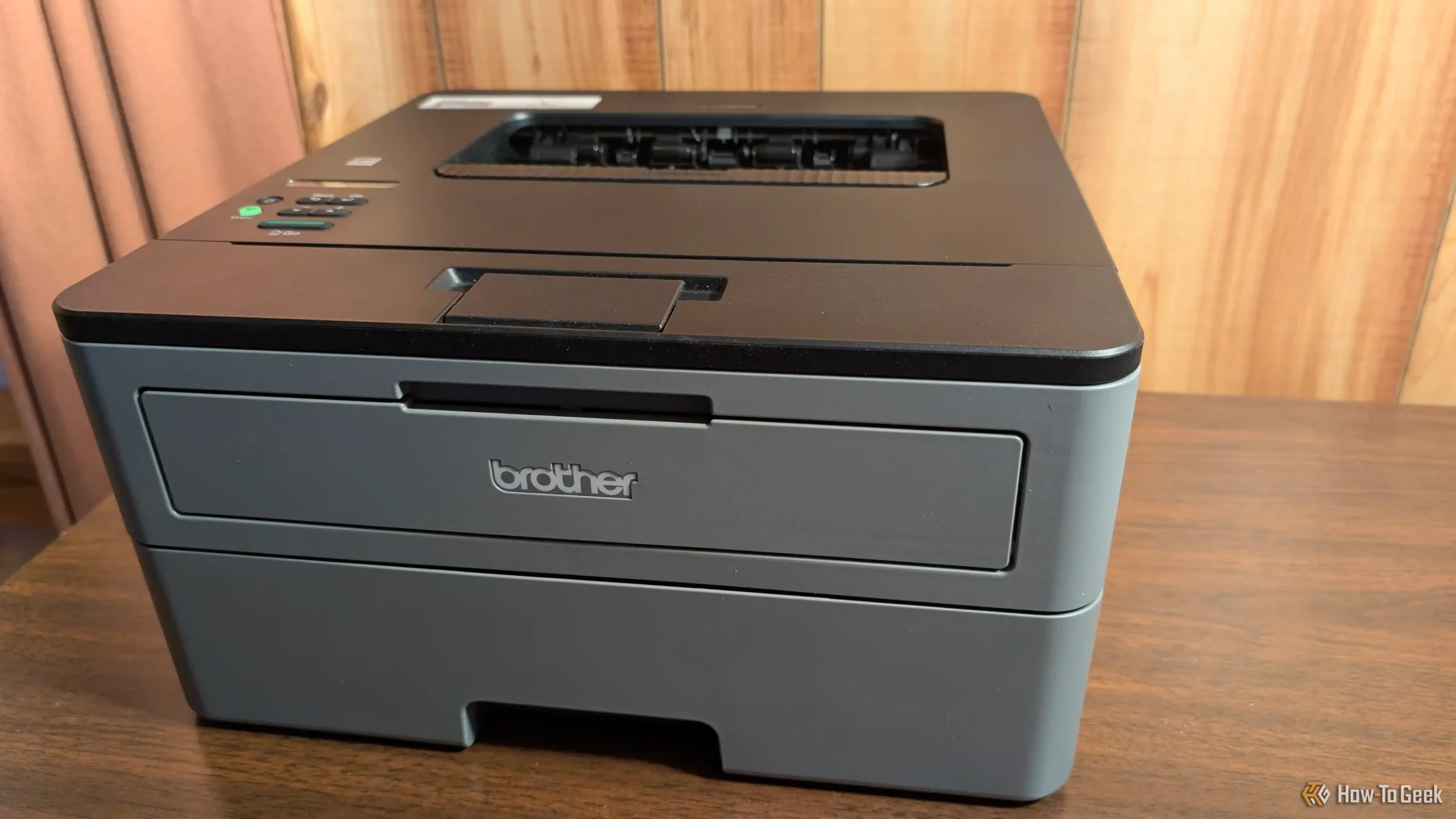
The Brother HL-L2405W gets the basics right without adding a scanner that some buyers will never use. It is compact enough for a home office, but its 250-sheet paper tray means it does not feel like a personal printer that needs constant attention. The printer weighs 15.1 pounds and measures 14 inches wide, 14.2 inches deep, and 7.2 inches high, so it needs a reasonably sturdy surface but not a dedicated stand.
Its print speed reaches 30 pages per minute for one-sided documents. That is quick enough for reports, forms, school paperwork, and ordinary office batches. The manual feed slot is useful when an envelope or specialty sheet should not go through the main tray. This model uses Brother Genuine TN830 or TN830XL toner, and the Brother Refresh EZ Print service can track toner use and help with replenishment.
Wireless support is a strong part of the design. Built-in dual-band Wi-Fi supports both 2.4GHz and 5GHz networks, while the Brother Mobile Connect app lets users print from a phone and manage the printer remotely. The app can also track toner usage. A one-year limited warranty and ongoing online, phone, or live-chat support add reassurance, though they do not change the printer's simple print-only role.
The weakness is automatic duplex printing. The Brother HL-L2460DW is the better fit if two-sided documents are routine, and the Brother DCP-L2640DW is the more sensible step up if scanning and copying matter. Choose this one when the job is mainly producing crisp black and white pages from several devices, and skip it if your workflow includes regular copying or scanning.
2. Brother DCP-L2640DW: Best Multifunction Compact
Pros
- Print speeds up to 36 pages per minute
- Automatic duplex printing
- 50-page automatic document feeder
- Print, scan, and copy functions
- Wi-Fi, Ethernet, and USB
Cons
- Larger and heavier than a print-only model
- No fax function
- Multifunction controls add complexity
Best for: small businesses that need fast printing plus routine scanning and copying.
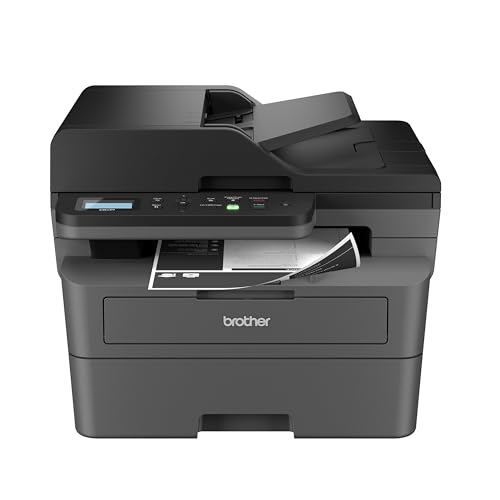
The Brother DCP-L2640DW is the most balanced multifunction printer in this group. It combines printing, scanning, and copying in a compact office design, so it can replace several single-purpose devices without becoming a full-size departmental machine. At 25 pounds, with a footprint 16.1 inches wide by 15.7 inches deep and 12.5 inches high, it needs more room than the HL-L2405W.
The print engine reaches 36 pages per minute, which gives it a clear advantage over the smaller Brother print-only model when a document batch grows. Automatic duplex printing also matters more than it first appears. It saves the manual page-flipping step and keeps ordinary reports from consuming unnecessary sheets. The 250-sheet tray supports longer runs, while the 50-page automatic document feeder handles multi-page copying and scanning without placing every sheet on the glass.
Scanning is rated at up to 23.6 images per minute for black and 7.9 images per minute for color. The distinction matters for an office that occasionally scans color originals but mainly handles monochrome paperwork. Dual-band Wi-Fi supports multiple devices, Ethernet provides a more stable wired office connection, and USB works for a directly connected computer. Brother Mobile Connect adds mobile printing, scanning, and printer management.
Compared with the Brother MFC-L2820DW, this model leaves out faxing and the touchscreen, but it keeps the core print, scan, and copy workflow and occupies a similar physical class. The HP LaserJet Pro MFP 3101sdw is a strong alternative for teams that prefer HP's platform, while the DCP-L2640DW has the more flexible Brother connection mix in this selection. Its real limitation is the lack of fax support, so buyers who still send documents that way should move to the MFC-L2820DW or HP LaserJet Pro MFP 3101fdw.
3. HP LaserJet M110w: Best Small Footprint

Pros
- Very compact design
- Wireless printing from phones, tablets, and computers
- Supports AirPrint, Android, Chromebook, Mac, and Microsoft systems
- HP Smart app support
Cons
- Print-only
- No automatic duplex printing
- Slower than the Brother compact printers
Best for: one to three people who need a laser printer for a particularly tight workspace.
The HP LaserJet M110w is the printer to consider when available desk space is the first constraint. It measures 13.63 inches wide, 7.45 inches deep, and 6.26 inches high, and weighs 9.02 pounds. That is substantially lighter and shorter than the Brother HL-L2405W, making it easier to place beside a monitor or move between a desk and storage shelf.
The trade-off is speed and capability. It prints up to 21 black and white pages per minute, and it only prints on one side. That is perfectly workable for occasional forms, invoices, and short reports, but the gap becomes obvious when several people are sending jobs throughout the day. There is no scanner or copier, so it cannot take over basic document handling tasks.
Wireless printing works from mobile devices, PCs, and tablets, with support for Microsoft, Mac, AirPrint, Android, and Chromebook environments. HP describes the wireless connection as self-resetting, and the HP Smart app supports mobile printing, copying, and cloud scanning tasks from a smartphone. Those app features should not be confused with built-in scanning hardware. This printer itself remains a print-only device.
The HP LaserJet MFP M140w is the obvious alternative if copying and scanning are important, while the Brother HL-L2405W is faster and offers a much larger paper tray. The M110w's key weakness is its limited output rate and lack of duplexing, not its wireless reach. Pick it for a small personal workspace, and skip it for a shared office or any workflow built around long two-sided documents.
4. HP LaserJet Pro MFP 3101sdw: Best Duplex All-in-One

Pros
- Up to 35 pages per minute
- Automatic two-sided printing
- 250-sheet input tray
- 50-sheet automatic document feeder
- Wireless printing
Cons
- Large footprint
- No fax function
- HP cartridge chip restrictions apply
Best for: small teams that need fast duplex printing, scanning, and copying.
The HP LaserJet Pro MFP 3101sdw is built around the parts of an office printer that save the most time: a large input tray, automatic duplexing, and an automatic document feeder. It prints, scans, and copies, so it is more useful than the HP LaserJet Pro 3001dw for a team that handles paper forms or signed documents. The machine is 16.5 inches wide, 15.7 inches deep, and 12.3 inches high, with a 23.1-pound weight.
Its black and white print speed reaches 35 pages per minute. That puts it close to the fastest Brother models in this roundup, while the 250-sheet input tray reduces interruptions during longer print runs. The 50-sheet feeder is the other important hardware feature. It lets users scan or copy a stack rather than placing pages one by one, although the supplied data does not specify a scan speed.
Wireless connectivity is designed to stay online by looking for the strongest available connection. That is useful in a shared office where the printer may be several rooms away from the main router. HP's toner is intended to work through cartridges with original HP chips or circuitry, and periodic firmware updates maintain those measures. Buyers who expect to use third-party cartridges should understand that limitation before choosing this printer.
The Brother DCP-L2640DW offers similar print, scan, and copy duties with dual-band Wi-Fi and Ethernet, while the HP LaserJet Pro MFP 3101fdw adds faxing for a more complete office workflow. The 3101sdw is a strong middle ground, but its physical size makes it a poor choice for a shallow desk. Choose it for a small team that prints and scans often, not for someone who only needs occasional pages.
5. HP LaserJet MFP M140w: Best Compact All-in-One

Pros
- Print, scan, and copy functions
- Compact multifunction design
- Wireless printing from many device types
- ID card copying feature
- HP Smart app support
Cons
- No automatic duplex printing
- Print speed tops out at 21 pages per minute
- HP cartridge chip restrictions apply
Best for: home offices that need occasional scanning and copying in a compact machine.
The HP LaserJet MFP M140w makes a sensible compromise for a home office that needs more than printing but does not have room for a larger office machine. Its 10.4-inch width and 14.2-inch depth are manageable, and its 11.9-pound weight makes repositioning less troublesome than with the larger multifunction printers. At 7.8 inches high, it still needs room for the scanner lid and paper handling.
It prints up to 21 black and white pages per minute, matching the print speed of the HP LaserJet M110w. Unlike that smaller printer, the M140w can scan and copy. Its ID card copying feature is particularly practical for forms and records because it can copy both sides of an ID card onto the same side of one sheet. The printer does not offer automatic duplex printing, so two-sided documents require a manual process.
Wireless printing works from mobile devices, PCs, and tablets, with support for Microsoft, Mac, AirPrint, Android, and Chromebook systems. The HP Smart app can help with mobile printing and cloud scanning, but the printer's physical scanning hardware remains the reason to choose this model over the M110w. HP also describes the wireless connection as self-resetting, which should help it recover when a home network changes.
The Brother DCP-L2640DW is much better suited to heavier document work because it adds duplexing, a faster print engine, and a 50-page automatic document feeder. The M140w wins on compactness and simplicity, but its lack of duplexing is a real limitation for regular reports. Pick it for a home user who scans and copies occasionally, and skip it if several people will be feeding it long jobs.
6. Brother HL-L2460DW: Best Duplex Printer

Pros
- Up to 36 pages per minute
- Automatic duplex printing
- 250-sheet paper tray
- Dual-band Wi-Fi, Ethernet, and USB
- Manual feed slot
Cons
- Print-only
- Larger than the HL-L2405W
- No scanner or copier
Best for: frequent document printing where automatic two-sided output is essential.
The Brother HL-L2460DW is the straightforward upgrade for anyone who likes the Brother HL-L2405W but does not want to turn pages by hand. It has the same general compact printer shape, measuring 14 inches wide, 14.2 inches deep, and 7.2 inches high, but weighs 15.6 pounds. That makes it easy to accommodate on a sturdy desk while still giving it room for the paper path.
Its 36-page-per-minute engine is the fastest print-only option here. Automatic duplex printing turns that speed into a more efficient workflow for contracts, reports, and multi-page documents. A 250-sheet tray supports longer runs, and the manual feed slot accepts envelopes and specialty paper. Brother lists TN830 and TN830XL toner for replacement, with toner tracking available through the Brother Mobile Connect app.
Connection choices are unusually flexible for a compact print-only model. Dual-band wireless supports 2.4GHz and 5GHz networks, Ethernet allows a direct office connection, and USB handles a single local computer. The Brother app supports mobile printing and printer management, so this model can serve a small group without being tied to one desk.
The Brother HL-L2405W is a little lighter and simpler, but it gives up automatic duplexing and some speed. If scanning is part of the job, the Brother DCP-L2640DW is the better direction, though it is considerably larger. The HL-L2460DW's weakness is that it cannot do anything beyond printing. It is the right choice for a team that already has a scanner or copier and wants fast, economical document output.
7. HP LaserJet Pro 3001dw: Best Secure Office Printer

Pros
- Up to 35 pages per minute
- Automatic two-sided printing
- Designed for offices of up to seven people
- HP Wolf Pro Security
- Wi-Fi, Ethernet, and Bluetooth
Cons
- Print-only
- No scanning, copying, or faxing
- HP cartridge chip restrictions apply
Best for: offices that need a shared, secure print-only device for up to seven people.
The HP LaserJet Pro 3001dw is aimed at a shared office rather than a single home workstation. It measures 14.4 inches wide, 15.7 inches deep, and 8.5 inches high, and weighs 16.1 pounds. That is still desk-friendly, but its size and features make more sense in a central work area where several people send documents.
Print speed reaches 35 black and white pages per minute, and automatic two-sided printing keeps routine office paperwork moving without manual intervention. HP describes the model as suitable for up to seven people. It also includes HP Wolf Pro Security with customizable settings, an important distinction for offices that handle documents containing internal or client information.
Connection options include wireless printing, Ethernet, and Bluetooth. The intelligent Wi-Fi system looks for the best available connection, while support for mobile devices, PCs, tablets, Mac, AirPrint, Android, Chromebook, and Microsoft systems makes it easy to share across mixed equipment. It does not include a scanner, copier, or fax, so its role is deliberately narrow.
The Brother HL-L2460DW offers a similar print-only concept with dual-band Wi-Fi, Ethernet, and USB, while the HP adds Bluetooth and a more explicit security feature set. The HP LaserJet Pro MFP 3101sdw is the better choice when paper must be scanned or copied. The 3001dw is not a fit for a home user who occasionally needs a copy, but it is a strong option for a workgroup that already has those functions elsewhere.
8. HP LaserJet Pro MFP 3101fdw: Best Office All-in-One

Pros
- Print, scan, copy, and fax functions
- Up to 35 pages per minute
- Automatic duplex printing
- Automatic document feeder
- Wi-Fi, Ethernet, and Bluetooth
- HP Wolf Pro Security
Cons
- Very large footprint
- Heavier than compact home models
- HP cartridge chip restrictions apply
Best for: small offices that need one machine for printing, scanning, copying, and faxing.
The HP LaserJet Pro MFP 3101fdw is the most complete HP office printer in this roundup. It handles printing, scanning, copying, and faxing, with automatic two-sided printing and an automatic document feeder for scan and copy batches. Its stated workload is up to seven people, making it a better central office machine than the compact HP models.
The engine prints up to 35 black and white pages per minute. That is fast enough for shared reports and forms, and duplex printing means the printer can complete two-sided documents without supervision. HP does not provide a scan-speed figure in the supplied information, but the automatic document feeder still removes the most tedious part of a multi-page scan or copy job.
This machine needs a substantial workspace. It measures 19.25 inches wide, 19.25 inches deep, and 15 inches high, with a listed weight of about 23.15 pounds. That footprint is a major consideration, especially because the smaller HP LaserJet Pro MFP 3101sdw offers print, scan, and copy functions in a smaller body. The fdw earns its place through fax support and its broader office role.
Wireless connectivity is supported alongside Ethernet and Bluetooth, and the printer can work with mobile devices, PCs, tablets, Mac, AirPrint, Android, Chromebook, and Microsoft systems. HP Wolf Pro Security provides customizable security settings. The main operational restriction is HP's use of cartridge chips or circuitry, which can block cartridges using non-HP chips. Choose this model when faxing is part of the workflow and there is dedicated room for it.
9. Brother MFC-L2820DW: Best Touchscreen All-in-One

Pros
- Up to 36 pages per minute
- Print, scan, copy, and fax functions
- Automatic duplex printing
- 50-page automatic document feeder
- 2.7-inch touchscreen
- Dual-band Wi-Fi, Ethernet, and USB
Cons
- Larger than a print-only printer
- More features than occasional users need
- No color printing
Best for: small offices that want a complete document center with direct touchscreen controls.
The Brother MFC-L2820DW brings the broadest set of office functions to Brother's compact monochrome range. It prints, scans, copies, and faxes, while automatic duplexing handles two-sided documents. A 50-page automatic document feeder makes multi-page work much easier, and the 2.7-inch touchscreen gives users a direct way to navigate functions without relying on a computer.
Print speed reaches 36 pages per minute, matching the DCP-L2640DW. Scan speeds are listed at up to 23.6 images per minute for black and 7.9 images per minute for color. Those figures make it particularly useful for offices that process a stream of monochrome paperwork but still need to digitize occasional color originals.
The touchscreen supports printing from and scanning to cloud services such as Google Drive, Dropbox, Evernote, and OneNote. Dual-band Wi-Fi, Ethernet, and USB provide flexible connections, while Brother Mobile Connect adds mobile printing, scanning, and management. The 16.1-inch width, 15.7-inch depth, and 12.5-inch height are manageable for a multifunction office machine, though its 22.5-pound weight makes it less casual to move.
The Brother DCP-L2640DW is the better fit if faxing and touchscreen controls are unnecessary. The HP LaserJet Pro MFP 3101fdw offers a similarly complete office feature set and adds Bluetooth, but it needs more desk space. The MFC-L2820DW's weakness is feature overhead for light users. For an office that regularly scans, copies, faxes, and works with cloud documents, those same features make it one of the most capable choices here.
10. HP LaserJet M209d: Best Wired Duplex Printer

Pros
- Automatic two-sided printing
- USB cable included
- Compact design
- 150-sheet input tray
- Smart-guided buttons
Cons
- Wired USB connection only
- No scanning, copying, or faxing
- HP cartridge chip restrictions apply
Best for: a home office with one computer that does not need wireless printing.
The HP LaserJet M209d is unusual among these printers because it intentionally leaves out wireless networking. It connects through USB, and a cable is included, so setup can be direct when the printer will remain beside one computer. That simplicity is useful in a home office where wireless access is not needed, but it is a serious limitation for anyone printing from phones, tablets, or multiple computers.
Automatic duplex printing is the main reason to choose it. HP describes it as having fast two-sided printing, and the 150-sheet input tray is suited to ordinary home office batches. Smart-guided buttons are intended to make common controls easier to follow, while the compact design helps it fit into a smaller work area. HP does not provide a pages-per-minute figure in the supplied product information, so it cannot be directly compared with the 21, 30, 35, and 36 ppm models here.
The M209d is print-only. It cannot scan, copy, or fax, and the USB connection means it is less convenient than the HP LaserJet M110w for a household with several devices. It does, however, avoid the extra hardware and setup choices that come with a multifunction wireless printer. HP also states that the printer is designed for cartridges with original HP chips or circuitry, with firmware updates maintaining those measures.
The Brother HL-L2460DW is the stronger choice for a shared desk because it combines duplex printing with Wi-Fi, Ethernet, and USB, while the Brother HL-L2405W offers wireless access at a lower speed. Choose the M209d only when a fixed USB connection is genuinely acceptable. It is a practical home office tool, but not a flexible network printer.

How to choose the best black and white laser printer
The best black and white laser printer for one desk may be the wrong machine for a small team. Start with the work you actually do, then compare speed, paper handling, connectivity, and document features.
Print speed and workload
Print speed matters most when several documents are queued or when a report runs to many pages. The models rated at up to 35 or 36 pages per minute, including the Brother HL-L2460DW, Brother DCP-L2640DW, Brother MFC-L2820DW, and HP office models, are better suited to shared workloads than the 21 ppm HP compact printers.
A higher rated speed does not make a print-only machine better for every buyer. If you print only a few pages at a time, the physical size and available functions may matter more. For a small business, choose a faster model with a larger tray so routine jobs require less supervision.
Automatic duplex printing
Automatic duplexing prints both sides of a sheet without asking you to turn pages manually. It is one of the most useful features for reports, forms, meeting documents, and longer records. The Brother HL-L2405W, HP LaserJet M110w, HP LaserJet MFP M140w, and Brother HL-L2460DW differ sharply on this point.
If two-sided work is occasional, manual printing may be acceptable. If it is part of the daily routine, choose a model with automatic duplexing from the start. The feature saves handling time and keeps the printer more useful as the workload grows.
For regular reports, automatic duplexing usually matters more than a small difference in headline print speed.
Scanning, copying, and faxing
Print-only models are smaller and simpler, but a multifunction printer can replace a separate scanner and copier. The Brother DCP-L2640DW and HP LaserJet Pro MFP 3101sdw print, scan, and copy. The Brother MFC-L2820DW and HP LaserJet Pro MFP 3101fdw add faxing.
An automatic document feeder is important when scanning or copying more than a page or two. The Brother multifunction models include a 50-page feeder, while the HP LaserJet Pro MFP 3101sdw and 3101fdw include 50-sheet automatic document feeders. For occasional ID card copies, the HP LaserJet MFP M140w has a dedicated feature that is not present in the supplied details for the other compact models.
Paper capacity and specialty media
A larger paper tray reduces interruptions during a workday. The Brother HL-L2405W, Brother HL-L2460DW, HP LaserJet Pro MFP 3101sdw, and Brother multifunction printers include 250-sheet trays. The HP LaserJet M209d includes a 150-sheet tray, while the HP compact models are positioned around smaller personal or home office workloads without a stated tray capacity in the supplied information.
Manual feed slots are useful for envelopes and specialty paper. The Brother HL-L2405W and HL-L2460DW include them, giving those print-only models more flexibility than their basic design suggests.
Connections and mobile printing
Wireless printing is important when several devices need access. Dual-band Wi-Fi supports both 2.4GHz and 5GHz networks, and Ethernet can provide a direct connection for a shared office. Brother's compact models offer Wi-Fi, Ethernet, and USB in different combinations, while HP's office models add Bluetooth.
The HP LaserJet M209d is the exception because it is wired through USB only. It suits one fixed computer, not a household or office where users expect to print from phones and tablets. For broader device support, look for compatibility with platforms such as AirPrint, Android, Chromebook, Mac, and Microsoft systems.
If your main workspace includes scanning and copying, the differences are easier to sort with the document handling features that matter in a home office. Buyers comparing compact machines can also consider how much room a printer and scanner combination needs.
Frequently asked questions
Are black and white laser printers good for home offices?
Yes. They are well suited to documents, forms, reports, and other text-heavy work. Print-only models such as the Brother HL-L2405W and HP LaserJet M110w take less space, while multifunction models add scanning and copying.
Is automatic duplex printing important?
It is important if you regularly print reports or other multi-page documents. Duplexing handles both sides automatically, while models without it require manual page handling. The Brother HL-L2460DW and HP LaserJet M209d are print-only examples that include automatic duplex printing.
Should I choose a multifunction printer?
Choose one if you scan, copy, or fax with any regularity. The Brother DCP-L2640DW and HP LaserJet Pro MFP 3101sdw include printing, scanning, and copying, while the Brother MFC-L2820DW and HP LaserJet Pro MFP 3101fdw also include faxing.
Do these printers support wireless printing?
Most of them do. The Brother and HP wireless models support printing from phones, tablets, computers, or compatible mobile platforms. The HP LaserJet M209d is wired through USB only.
What is an automatic document feeder?
An automatic document feeder lets you place several pages into a feeder for scanning, copying, or faxing. It is more convenient than placing each sheet on the scanner glass. The Brother DCP-L2640DW and Brother MFC-L2820DW include 50-page feeders, while the HP LaserJet Pro MFP 3101sdw and 3101fdw include 50-sheet feeders.
Can these printers handle envelopes?
The Brother HL-L2405W and Brother HL-L2460DW include manual feed slots for envelopes and specialty paper. The supplied information does not confirm the same feature for every model in the roundup, so check the individual listing before planning a specialty-media workflow.
Is a wired printer a good choice?
A wired printer can be a good choice when it will stay beside one computer and wireless printing is unnecessary. The HP LaserJet M209d includes a USB cable and automatic duplex printing. It is less suitable for multiple users or mobile printing because it has no wireless connection.
The bottom line
The Brother HL-L2405W is the best black and white laser printer here for most home offices that need fast, dependable wireless printing and do not need a scanner. It has a 250-sheet tray, a manual feed slot, dual-band Wi-Fi, and a useful mobile app. The Brother DCP-L2640DW is the better pick for small businesses because it adds automatic duplexing, scanning, copying, Ethernet, and a 50-page document feeder.
For an office that needs every document function in one machine, choose the Brother MFC-L2820DW or HP LaserJet Pro MFP 3101fdw. The Brother is more compact and includes a touchscreen with cloud controls, while the HP adds a full office feature set with faxing, Bluetooth, and HP Wolf Pro Security.
If you are undecided, choose the Brother HL-L2405W for printing only, and the Brother DCP-L2640DW when paper handling tasks extend beyond printing.
As an Amazon Associate we earn from qualifying purchases.