

A monitor with weak built-in audio can make meetings sound distant, games feel flat, and music lose its shape. The right desktop speaker does not need to dominate the desk, but it should connect cleanly, sit in the right place, and make voices easy to follow.
We compared compact soundbars, detachable desktop speakers, and full stereo pairs to find the Best bluetooth speakers for monitors for different setups. The SOULION R50 is our top pick, while the rest cover stronger stereo sound, monitor mounting, calls, lighting, and flexible inputs.
| # | Product | Award | Connectivity | Speaker format | Best for |
|---|---|---|---|---|---|
| 1 | SOULION R50 | Best overall | Bluetooth, 3.5mm AUX, USB power | Single soundbar | Most monitor desks |
| 2 | Ortizan C7 | Best stereo detail | Bluetooth 5.3, USB, RCA, AUX, 6.35mm TRS | Two-way stereo pair | Music and content creation |
| 3 | Bluedee Sound Bar | Best slim soundbar | Bluetooth 5.0, 3.5mm AUX, USB power | Single soundbar | Tidy workspaces |
| 4 | Logitech Z207 | Best easy-switch pair | Bluetooth 4.2, 3.5mm | Two-speaker stereo pair | Switching between devices |
| 5 | Cyber Acoustics CA-2890BT | Best for calls | Bluetooth 5.0, USB | Monitor soundbar | Meetings and small desks |
| 6 | Cyber Acoustics CA-2890PRO | Best clip-on bar | Bluetooth, USB-C, USB-A | Monitor-mounted soundbar | Clean monitor setups |
| 7 | OHAYO 60W Speakers | Best powerful stereo | Bluetooth 5.3, RCA, AUX, USB | Two-way stereo pair | Music and gaming |
| 8 | AOC Detachable Speakers | Best flexible layout | Bluetooth, USB | Detachable stereo pair | Adjustable desk arrangements |
| 9 | BESTISAN 30W Speakers | Best for lighting | Bluetooth, AUX, USB-C | Desktop stereo pair | Gaming desks |
1. SOULION R50: Best Overall

Pros
- Compact 16-inch soundbar fits beneath most monitors
- Bluetooth and 3.5mm AUX playback
- Four selectable lighting modes
- USB-powered setup
- Physical volume control
Cons
- Bluetooth and AUX still require USB power
- Single-bar design does not create true left and right separation
- Bluetooth range is specified at 33 feet
Best for: someone who wants a simple monitor soundbar with flexible connections and desk-friendly lighting.
The SOULION R50 gets the basic desktop speaker brief right. It is a single bar rather than a pair of boxes, so it does not force you to find space on both sides of the monitor. Its 16-inch length and 2.7-inch width make it easy to position below a display, while the 30-degree slanted design aims the sound toward the listener instead of straight across the desk.
Connection is straightforward but worth understanding. USB supplies power, while the 3.5mm jack handles AUX audio. For wireless playback, press the mode button and pair with the speaker listed as R50. Bluetooth has a stated stable range of 10 meters, or 33 feet, which is more than enough for a monitor desk but not a reason to place the speaker across a large room. There is no need for drivers or software in the supplied connection methods.
The soundbar uses two independent diaphragms and boosters, with the design aimed at crisp, richer sound for movies, games, and general computer audio. A physical volume knob is more useful than touch controls when you need to make a quick adjustment during a video call. The light button also controls the four lighting options: gradient, breathing, rhythm, and fixed monochrome. Those modes give the bar some personality without requiring an app.
Compared with the Bluedee Sound Bar, the R50 offers more lighting choices and a slightly more explicitly angled design. The Logitech Z207 makes a better case for stereo separation, and the Ortizan C7 is the obvious step up for detailed music playback, but both need more room. The R50's weakness is the usual limitation of a single bar: voices and effects come from one broad location, so it cannot match a properly separated pair.
The R50 is the one we would choose for a monitor-first workspace where clean placement matters as much as sound. It is also a sensible choice if you want Bluetooth for a phone but a wired connection for a computer. Skip it if wide stereo imaging is your main priority.
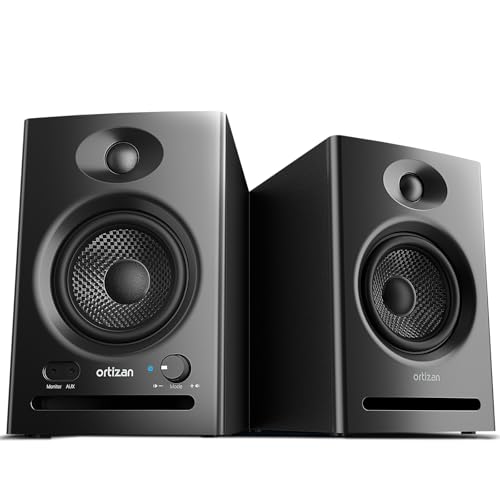
2. Ortizan C7: Best Stereo Detail
Pros
- Two-way design with 3.5-inch mid-bass drivers
- 0.75-inch silk dome tweeters
- Bluetooth 5.3 and USB audio
- RCA, AUX, and 6.35mm balanced input
- Front headphone output
Cons
- Takes substantially more desk space than a soundbar
- Two-speaker layout needs careful placement
- Better suited to a larger desk than a compact monitor shelf
Best for: listeners who want more separated, accurate audio and have room for a pair of powered speakers.
The Ortizan C7 is the most serious audio design in this group. It is a pair of powered studio monitors, not a bar designed to disappear under a screen. That distinction affects everything: you need space on both sides of the monitor, but you get a much more convincing stereo presentation for music, games, and video editing.
Each speaker combines a 3.5-inch carbon-fiber mid-bass driver with a 0.75-inch silk dome tweeter. The two-way layout gives bass and midrange a dedicated driver while the tweeter handles higher frequencies. Ortizan also describes an electronic two-way crossover and tuning intended to keep the response flat, so the C7 is aimed at hearing more of the source rather than adding an intentionally exaggerated effect.
Its input selection is unusually broad for a desktop pair. Bluetooth 5.3 handles wireless playback from a phone or tablet, while USB uses a built-in 24-bit DAC to receive digital audio directly. RCA and 3.5mm AUX cover conventional analog sources, and the 6.35mm TRS balanced input allows connection to compatible professional equipment. A front headphone output is a useful touch when the monitor speakers need to become private listening speakers without reaching behind the desk.
The C7 beats the SOULION R50 and Bluedee Sound Bar for separation, input flexibility, and detailed music playback. It gives the OHAYO 60W Speakers a close challenge, particularly for users who care about balanced monitoring and a front headphone connection. The tradeoff is physical: the pair is listed at about 7.1 pounds and its speaker dimensions are much larger than the compact bars here.
This is not the right pick for a narrow desk or a monitor mounted close to the wall. It is the right pick for someone who wants computer speakers that can also serve as a small content-creation or listening system. If the monitor is the center of a larger workstation, the C7 is the most capable stereo option in the roundup.
3. Bluedee Sound Bar: Best Slim Soundbar

Pros
- Very slim 16.45-inch profile
- Bluetooth 5.0 and 3.5mm audio
- USB-powered plug-and-play design
- Dual drivers and dual diaphragms
- Built-in ambient light strips
Cons
- No separate left and right speakers
- USB supplies power rather than serving as a stated audio input
- Bluetooth range is not specified
Best for: a clean desk where a low-profile bar is preferable to separate speakers.
The Bluedee Sound Bar is built around a simple physical idea: put a broad speaker under the monitor and keep the rest of the desk clear. At 16.45 inches wide, 2.67 inches deep, and 2.67 inches high, it has a particularly restrained footprint. The slim profile should work well in front of a monitor stand, provided that stand leaves enough clearance.
There are two ways to send audio. Bluetooth 5.0 is the wireless route, while a 3.5mm plug provides a direct connection. USB powers the unit from a computer, laptop, power bank, or adapter, and the speaker does not require additional drivers or software. The braided Y-cable combines power and audio connections to help avoid a loose cluster of separate leads around the monitor.
Bluedee says the bar uses dual drivers and dual diaphragms, with anti-magnetic technology intended to reduce static interference. That combination is designed to add clarity to high frequencies and depth to bass without needing a separate subwoofer. The light strips are gentle rather than a full gaming-light show, which suits an office desk better than the more colorful options on the AOC or BESTISAN speakers.
The SOULION R50 has a similar under-monitor role and offers four named lighting modes, while the Bluedee has the more compact stated depth and a cleaner braided cable arrangement. The Cyber Acoustics CA-2890BT is a stronger choice for calls because it includes a speakerphone feature, but the Bluedee is more focused on general playback. Both bars sacrifice the left-right separation that comes naturally with the Logitech Z207.
The main limitation is connection clarity for buyers who expect USB audio. The listed USB function is power, with sound coming through Bluetooth or the 3.5mm connection. Choose it for a tidy workspace and uncomplicated playback. Look elsewhere if you need a monitor-mounted call speaker or a wide stereo field.
4. Logitech Z207: Best Easy-Switch Pair

Pros
- Separate left and right speakers
- Bluetooth 4.2 and 3.5mm input
- Easy-Switch device switching
- Passive radiators add bass extension
- Headphone jack on the speaker
Cons
- Older Bluetooth 4.2 connection
- Uses more desk width than a single bar
- Does not offer USB audio
Best for: people who alternate between a computer and another Bluetooth device.
The Logitech Z207 remains appealing because it behaves like a familiar pair of desktop speakers. Put one on each side of the monitor and the audio has a clear left and right position, which makes games, dialogue, and music feel less confined than they do from a single soundbar. Each speaker has one powered full-range driver and one passive radiator for bass extension.
Bluetooth 4.2 is not the newest wireless standard in this list, but it covers the central use case: connecting a phone, tablet, or other Bluetooth device to the same speakers used with a computer. A 3.5mm input handles wired sources, including a computer, television, music player, or monitor with an audio output. The controls for power, volume, and pairing sit on the speakers, and a headphone jack keeps private listening within reach.
The standout feature is Logitech Easy-Switch. You can pause audio on one device and press play on the other to move between sources. That is less elaborate than a dedicated input selector, but it is practical for a desk where a computer and phone share the same speakers. The speaker pair is also fairly substantial, listed at 9.5 by 3.5 by 4.9 inches for size, so check the space beside the display before buying.
The Ortizan C7 is more versatile for recording equipment and digital USB playback, while the AOC Detachable Speakers offer a more flexible physical arrangement. The Z207 is easier to understand than either, and its headphone jack is more convenient than the bar designs from SOULION R50 and Bluedee Sound Bar. Its weakness is age: Bluetooth 4.2 and the lack of USB audio make it less modern than several competitors.
Choose the Z207 when dependable two-speaker placement and quick source switching matter more than the newest connectivity. It suits a conventional desktop especially well. Skip it if your computer setup is USB-C-first or if you want a single speaker that leaves both sides of the monitor open.
5. Cyber Acoustics CA-2890BT: Best for Calls

Pros
- Built-in speakerphone functionality
- USB and Bluetooth 5.0
- Monitor-friendly 8.5-inch bar
- Mic mute indicator
- USB-A to USB-C converter included
Cons
- Lower 5W power output than the CA-2890PRO
- No 3.5mm AUX input
- Mono soundbar design limits stereo width
Best for: office users who need monitor audio and hands-free calls from one compact bar.
The Cyber Acoustics CA-2890BT makes the most sense when video calls are as important as music. Its 8.5-inch bar attaches to the bottom of a monitor, keeping the speaker close to the display and leaving the desk surface available for a keyboard or notebook. At 2.75 inches high, 1.25 inches wide, and 0.7 pounds, it is one of the least intrusive choices here.
USB connects it to a desktop or laptop, and Bluetooth 5.0 handles a smartphone. The product supports a simultaneous PC or Mac USB connection and a smartphone Bluetooth connection, so it can serve as a computer speaker and a hands-free calling device without constant cable changes. The included USB-A to USB-C converter helps with newer laptops that have limited USB-A ports.
Controls cover more than volume. The multifunction button switches between USB and Bluetooth and manages play and pause, while dedicated controls handle volume and microphone mute. A light indicates mute status, a small but important detail when a meeting is already underway. The listed 5W power output is appropriate for close-range desk listening, though it does not suggest the room-filling presence of the OHAYO 60W Speakers.
Compared with the Cyber Acoustics CA-2890PRO, the CA-2890BT is smaller and less powerful, but it follows the same monitor-bar idea. The PRO model adds 20W output, a rear bass radiator, and smart voice enhancement, making it the stronger multimedia choice. The Logitech Z207 has better physical stereo separation, but it lacks the CA-2890BT's built-in speakerphone focus.
This bar is a good fit for a home office or a compact workstation where calls are frequent. Its real limitation is the absence of a listed 3.5mm input, so buyers with older analog-only setups should choose the SOULION, Bluedee, or Logitech instead. For USB computer audio and Bluetooth phone calls, it is the neatest specialist pick.
6. Cyber Acoustics CA-2890PRO: Best Clip-On Bar

Pros
- Clips onto monitors up to 2 inches thick
- USB-C, USB-A, and Bluetooth connections
- 20W power output
- Rear-facing bass radiator
- Smart voice enhancement for calls
Cons
- Monitor thickness limits mounting compatibility
- No stated 3.5mm AUX input
- Still lacks the separation of a two-speaker pair
Best for: users who want a stronger monitor-mounted speaker without placing a bar on the desk.
The Cyber Acoustics CA-2890PRO solves a problem that many compact soundbars do not: where the speaker actually goes. Its clip-on design attaches to monitors up to 2 inches thick, so the bar can sit with the display instead of taking up space in front of it. That is particularly useful on shallow desks or setups with a large keyboard, docking station, and other equipment already competing for room.
It supports USB-C, USB-A, and Bluetooth. The USB connection is intended for a desktop or laptop, while Bluetooth handles a smartphone when connected through USB. An adapter is included for USB-C to USB-A compatibility, and the plug-and-play design avoids software setup. Controls on the bar switch sources, play and pause audio, adjust volume, and mute the microphone.
The PRO model is substantially more ambitious than the CA-2890BT. Its 20W power output is four times the smaller bar's listed output, and a rear-facing bass radiator is intended to give low frequencies more presence. Cyber Acoustics also lists accurate mids, clear highs, and Smart Voice Enhancement Technology that minimizes background noise during hands-free calls. Those features make it more suitable for mixed work and entertainment than a basic monitor speaker.
The CA-2890BT remains easier to recommend for a very small display or a call-heavy desk where compactness is the main concern. The SOULION R50 and Bluedee Sound Bar offer 3.5mm analog connections, which the CA-2890PRO does not list. On the other hand, the PRO has the strongest mounting solution in the group and more output than any other soundbar here.
The clip is the key restriction. A monitor thicker than 2 inches may not be compatible, and a pair of Ortizan C7 or OHAYO 60W Speakers will still produce a broader stereo image. Choose the CA-2890PRO when desk space and monitor mounting matter more than separate left and right channels.
7. OHAYO 60W Speakers: Best Powerful Stereo

Pros
- 30W per channel listed
- 0.75-inch tweeters and 3-inch full-range drivers
- Bluetooth 5.3, RCA, AUX, and USB
- MDF wooden enclosure
- Front volume control
Cons
- Large desktop footprint
- No monitor clip or under-monitor bar format
- More speaker than a basic office setup may need
Best for: music and gaming setups that have space for a substantial stereo pair.
The OHAYO 60W Speakers are built for listeners who want the computer to function as a proper small-room audio system. This is a pair of bookshelf-style speakers with a modern black MDF enclosure, not a discreet monitor accessory. The cabinets are designed to reduce box resonance, and the rear bass ports give low frequencies room to develop behind the speakers.
The stated output is 30W per channel, or 60W total. Each speaker combines a 0.75-inch carbon-fiber silk dome tweeter with a 3-inch carbon-fiber full-range driver. That arrangement gives the pair a clearer path to detailed highs and rich mid-bass than the single-driver soundbars. A front volume knob makes everyday changes quick, particularly during games or music sessions.
Connectivity is broad enough for a mixed entertainment setup. Bluetooth 5.3 covers phones and tablets, while RCA and 3.5mm AUX accept conventional sources. USB is also listed as an input, and the speakers are described as compatible with computers, TVs, turntables, mixers, streaming devices, and gaming systems. An integrated independent sound card is intended to support smoother digital playback.
The Ortizan C7 is the more convincing pick for balanced monitoring, with its 24-bit DAC, 6.35mm balanced input, and front headphone output. The OHAYO pair is more about force and versatility. It also gives the BESTISAN 30W Speakers a larger, more substantial alternative, though the BESTISAN design is easier to fit on a compact gaming desk.
The drawback is physical scale. The listed dimensions are about 11.5 inches high, 9.4 inches wide, and 6.9 inches deep, so these speakers need a large desk or nearby shelf. They are a poor match for a narrow monitor stand. For a spacious workstation where music and games deserve more impact, the OHAYO pair is the strongest full-bodied option.
8. AOC Detachable Speakers: Best Flexible Layout

Pros
- Speakers can combine or separate
- 10W total output listed
- Bluetooth and USB modes
- 39.3-inch cable between speakers
- Six lighting modes and volume knob
Cons
- Bluetooth mode still requires USB power
- Cable length limits the widest placement
- No 3.5mm AUX input
Best for: users who want to change between a joined speaker arrangement and separated stereo placement.
The AOC Detachable Speakers take a different approach to desktop layout. The two speaker units can slide together along a top rail or separate into a stereo arrangement. That gives the design more flexibility than a fixed soundbar, while still allowing it to occupy a compact footprint when the desk is crowded.
AOC lists a 10W output unit, configured as 5W per speaker, with a full-range 2.0 stereo core. The design aims for clearer treble and stronger bass than a monitor's built-in speakers, but the modest output makes it most appropriate for close listening rather than filling a room. The cable between the speakers is 39.3 inches, providing useful freedom for placing them on either side of a monitor.
USB provides power and a plug-and-play wired mode. Bluetooth mode is also available, but it still needs USB power, so the speakers are not portable in the way a battery-powered wireless speaker would be. A single button switches between wired and Bluetooth modes, while a rotary knob adjusts volume. The light bar turns into a progress display as the volume changes.
For a more conventional stereo pair, the Logitech Z207 offers separate speakers and a headphone jack. The AOC is more adaptable physically, while the SOULION R50 is simpler if all you want is one bar below the screen. The AOC also provides more lighting control than either, with six modes and touch control on the top of the speaker.
The lack of a listed 3.5mm input narrows its usefulness with older analog sources. It is best for a USB-equipped computer, laptop, or monitor setup where Bluetooth is a secondary option. If your desk changes configuration often, the detachable rail and long inter-speaker cable make this a clever alternative to a fixed bar.
9. BESTISAN 30W Speakers: Best for Lighting

Pros
- 30W drivers for gaming and movies
- Bluetooth, AUX, and USB-C
- Six adjustable LED modes
- Simple physical controls
- Compact desktop design
Cons
- No separate speaker placement is described
- No exact Bluetooth version is listed
- Dimensions still require space beside a monitor
Best for: gaming desks that want colorful lighting and straightforward wireless connectivity.
The BESTISAN 30W Speakers are aimed squarely at a gaming or entertainment desk. The listed 30W drivers are intended to produce clear treble and rich bass for games, movies, music, and desktop calls. The compact design is meant to sit beside a monitor, desktop PC, or laptop rather than take the long, horizontal shape of a soundbar.
The connection options cover the devices most likely to share a desk. Bluetooth handles wireless playback, AUX provides an analog route, and USB-C offers a wired connection. The product is described as compatible with phones, desktop PCs, laptops, monitors, and gaming consoles. The exact Bluetooth version is not listed, so buyers who need a specific wireless standard should not assume one from the general Bluetooth description.
Lighting is a major part of the appeal. Six adjustable LED modes range from a calmer glow for work to cycling effects for gaming. Controls also cover volume, lighting, and connection changes, so the visual effects do not require an app. That keeps the setup simple, though it also means there is no stated software-based equalizer or lighting customization beyond the built-in modes.
The AOC Detachable Speakers offer a more flexible physical design and a stated 10W per-pair output, while the BESTISAN emphasizes stronger listed driver output and gaming presentation. The OHAYO 60W Speakers are the better fit for a larger room and serious music listening, but they take far more space. The BESTISAN sits between compact monitor accessories and full bookshelf speakers.
Its weakness is a lack of detail about the internal driver arrangement and Bluetooth version. That makes it harder to judge against the more explicitly specified Ortizan C7 and OHAYO models. Choose it when lighting and broad device compatibility are high priorities, and skip it if you want a clearly documented studio-style design.
How to choose best bluetooth speakers for monitors
The right monitor speaker depends on the desk space available, the way the computer connects, and whether you care more about calls, music, or gaming atmosphere.
Speaker format
A single soundbar is the easiest format for a narrow desk. It can sit below the display and keeps the left and right sides open, but it cannot create the same stereo width as two separated speakers. Pairs such as the Logitech Z207, Ortizan C7, and OHAYO 60W Speakers need more room but place effects and instruments more convincingly across the desk.
Clip-on models solve a different problem. The Cyber Acoustics CA-2890BT and CA-2890PRO attach to the monitor, which preserves desk depth. Check the monitor's thickness before choosing the CA-2890PRO, since its clip supports displays up to 2 inches thick.
Power and driver design
Output figures can indicate how much headroom a speaker has, though they do not tell the whole sound-quality story. The CA-2890BT lists 5W, while the AOC lists 5W per speaker and the OHAYO lists 30W per channel. A two-way design, such as the Ortizan C7's 3.5-inch mid-bass driver and 0.75-inch tweeter, can separate frequency duties more effectively than a small full-range driver.
For music, prioritize separated drivers and speaker placement before chasing the biggest output figure.
Bluetooth and wired inputs
Bluetooth is convenient for phones and tablets, but monitor setups often still benefit from a cable. USB can mean either power or digital audio, so read the connection description carefully. The SOULION R50 and Bluedee Sound Bar use USB for power with audio through Bluetooth or 3.5mm AUX, while the Ortizan C7 lists USB audio through a built-in 24-bit DAC.
AUX remains useful for computers, monitors, and older devices with a headphone output. RCA and balanced 6.35mm TRS inputs are more relevant to the Ortizan C7 and OHAYO models, especially when the speakers are part of a larger audio system.
Desk footprint and placement
Measure the space below and beside the monitor before selecting a speaker. The Bluedee Sound Bar is 16.45 inches wide but only 2.67 inches deep, while the CA-2890BT is a much shorter 8.5-inch bar. Full stereo pairs require room on both sides and should not be pushed so close together that their stereo advantage disappears.
If a second screen changes how much space is available, how to arrange speakers around a multi-screen desk can help you decide between a bar and a pair. A soundbar is usually easier to place beneath a wide display, while separate speakers can work better beside two monitors.
Calls and controls
For frequent meetings, look for a speakerphone, microphone mute control, and an indicator that confirms mute status. The Cyber Acoustics CA-2890BT and CA-2890PRO are the clearest choices here. Smart Voice Enhancement on the CA-2890PRO is intended to minimize background noise, while the CA-2890BT focuses on simple hands-free calls.
Physical controls matter on a desk. Volume knobs are faster than reaching for a software slider, and source buttons help when a phone and computer share the speakers. Headphone outputs, such as the one on the Ortizan C7 and Logitech Z207, are useful when you need to switch from room audio to private listening.

Frequently asked questions
Can Bluetooth speakers connect directly to a computer monitor?
They can connect directly if the monitor supports Bluetooth audio output, but many monitors do not. In that case, pair the speaker with the computer or use the speaker's AUX input from the monitor's headphone output. USB-powered models still need a USB power source even when audio arrives over Bluetooth.
Are soundbars or separate speakers better for a monitor?
Soundbars are better when desk space is limited and you want a speaker below or attached to the display. Separate speakers create a wider stereo image and are usually preferable for music and games. The Ortizan C7 and OHAYO 60W Speakers are the strongest examples of the separate-speaker approach in this group.
Do USB-powered monitor speakers need a wall outlet?
Not always. The SOULION R50, Bluedee Sound Bar, and AOC Detachable Speakers can draw power from a computer USB port, power bank, or adapter as described for the relevant product. USB power does not necessarily mean USB audio, so check whether the USB connection carries sound or only supplies electricity.
Which speakers are suitable for video calls?
The Cyber Acoustics CA-2890BT and CA-2890PRO are the most call-focused options because they include speakerphone features and microphone controls. The CA-2890BT has a mic mute indicator, while the CA-2890PRO adds Smart Voice Enhancement Technology. A regular stereo pair can play call audio, but it may not include a microphone.
Can I use these speakers with a phone as well as a monitor setup?
Yes, the Bluetooth models can pair with a phone, while several also support AUX, RCA, or USB connections for the computer. The CA-2890BT and CA-2890PRO are designed to maintain a computer connection while also connecting to a smartphone through Bluetooth. A USB-powered speaker still needs to remain connected to power during phone playback.
Do larger speakers automatically sound better?
No. Larger cabinets and drivers can provide more bass and output, but placement and driver design matter just as much. The compact SOULION R50 can make more sense on a small desk, while a larger two-way pair such as the Ortizan C7 can provide better separation for careful listening.

The bottom line
The Best bluetooth speakers for monitors for most desks are the SOULION R50. Its compact soundbar shape, Bluetooth and AUX support, USB power, physical volume control, and four lighting modes cover the everyday needs of a monitor setup without demanding much room.
For listeners who have a larger desk, the Ortizan C7 is the more capable stereo choice. Its two-way drivers, 24-bit USB DAC, Bluetooth 5.3, broad analog inputs, and front headphone output make it better suited to music and content creation. Choose the Cyber Acoustics CA-2890PRO instead when monitor mounting and hands-free calls matter more than a wide stereo image.
If you are undecided, choose the SOULION R50 for a compact all-purpose setup, or move to the Ortizan C7 when you have space for true stereo speakers.
As an Amazon Associate we earn from qualifying purchases.