
A keyboard can make a new computer feel unfinished: keys wobble, shortcuts are missing, and a full-size board swallows the desk. The right Best budget keyboard pick should match the way you actually type, not just add lights to a setup.
We compared straightforward office boards, compact membrane models, wireless combos, and mechanical gaming keyboards. Redragon K521 is our top pick for its full layout, useful controls, anti-ghosting support, and gaming-focused feel, while the rest cover quieter typing, wireless freedom, deep customization, and compact desks.
Comparison table
| # | Product | Award | Layout | Connection | Best for |
|---|---|---|---|---|---|
| 1 | Redragon K521 | Best overall | 104 keys | Wired | Full-size gaming and general use |
| 2 | Logitech MK120 Combo | Best keyboard and mouse combo | Full size | Wired | A complete desk replacement |
| 3 | Redragon K671 | Best mechanical upgrade | Full size | Wired | Switch customization |
| 4 | GEODMAER 65% | Best compact membrane keyboard | 68 keys | Wired | Small desks |
| 5 | Amazon Basics Full Size | Best simple office keyboard | Full size | Wired | Familiar Windows typing |
| 6 | Logitech G213 | Best RGB office-gaming hybrid | Full size | Wired | Gaming and productivity |
| 7 | AULA WIN68 HE | Best rapid-trigger keyboard | 68 keys | Wired | Competitive gaming |
| 8 | Logitech MK270 Combo | Best wireless combo | Full size | Wireless | Cable-free desks |
| 9 | AULA F75 Pro | Best wireless mechanical keyboard | 81 keys | Tri-mode wireless and wired | Custom keyboard enthusiasts |
| 10 | Logitech K120 | Best basic wired keyboard | Full size | Wired | Simple home or work desks |
1. Redragon K521: Best Overall

Pros
- Full 104-key layout with number pad
- 19-key anti-ghosting support
- One-touch backlight control
- 12 multimedia key combinations
- Works with PC, Mac, PlayStation, and Xbox
Cons
- Mechanical-feeling rather than true mechanical switches
- Wired-only design
- Rainbow lighting is less customizable than per-key RGB
Best for: someone who wants a full-size gaming keyboard with a lively backlight and familiar layout.
The Redragon K521 gets the fundamentals right without making a gaming desk complicated. It has the conventional 104-key layout, so the number pad, function row, arrows, and navigation cluster are all where you expect them. That makes it easier to recommend than the compact boards here for anyone who switches between games, spreadsheets, and everyday typing.
Its keys are designed to provide a mechanical feel, but this is not the same thing as a board with mechanical switches. The distinction matters. You get a more deliberate, faster-feeling press than a plain office membrane keyboard, but you should not buy the K521 expecting the switch replacement and key-by-key customization offered by the Redragon K671 or AULA F75 Pro.
Gaming features are well chosen. The 19-key anti-ghosting arrangement is intended to let several inputs register together, which is useful when movement, sprinting, and an action are pressed at the same time. The keyboard also provides 12 multimedia combinations and a dedicated one-touch lighting control. Its lighting has three breathing modes and four brightness positions, so it can be toned down when the rainbow effect becomes distracting.
Compatibility is broad, with support listed for Windows, macOS, PS4, PS5, and Xbox, and no driver required for setup. That flexibility gives it an edge over the Windows-focused Amazon Basics Full Size and Logitech K120. The weakness is the fixed wired design and the limited lighting control compared with the Logitech G213 and AULA WIN68 HE. Choose the K521 if you want one capable full-size board for gaming and everyday use, especially if you prefer direct plug-and-play setup.
2. Logitech MK120 Combo: Best Keyboard and Mouse Combo

Pros
- Keyboard and ambidextrous mouse included
- Standard full-size layout
- Spill-resistant keyboard design
- Adjustable tilt legs
- Bold, durable key characters
Cons
- No backlighting
- Wired connection limits desk flexibility
- Windows compatibility is narrower than the gaming-focused picks
Best for: replacing an aging keyboard and mouse with one familiar wired set.
The Logitech MK120 Combo is the sensible choice when the mouse matters as much as the keyboard. Instead of buying a keyboard and then discovering that the old mouse is also ready for replacement, this set supplies both peripherals through USB. The result is a tidy, predictable setup for a home office, school desk, or shared computer.
Typing is intentionally conventional. The full-size layout includes the number pad and full function row, while deep-profile keys give it a more substantial feel than the flatter Logitech MK270. The keyboard uses a curved space bar, bold white characters, and adjustable tilt legs. Those details do not transform it into a premium typing instrument, but they remove several common frustrations from long office sessions.
The included optical mouse has an ambidextrous shape and high-definition tracking. That makes it easier to share the setup between left-handed and right-handed users than a sculpted mouse with a fixed hand orientation. The keyboard is also spill-resistant, and the keys are specified for up to 10 million keystrokes. The connection is simple: plug the keyboard and mouse into USB ports and start working.
The MK120 is less interesting for gaming than the Redragon K521, and it has none of the backlighting or anti-ghosting features found in most gaming picks. It is also designed around Windows 7, 8, 10, or later, rather than the broader console and Mac compatibility claimed by Redragon. For a desk that needs two reliable wired peripherals and no learning curve, it is the more complete package. Readers focused mainly on comfortable typing can also consider the layout features that help during long writing sessions before choosing.
3. Redragon K671: Best Mechanical Upgrade
Pros
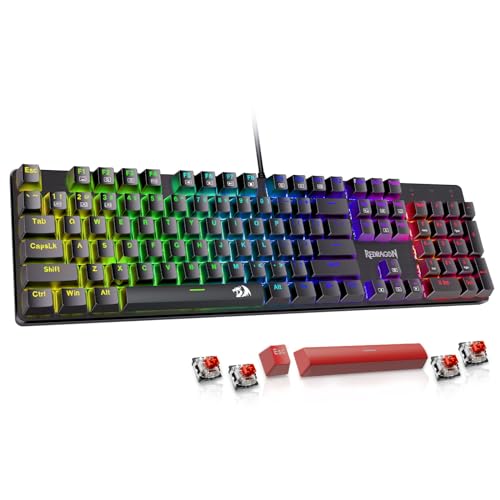
- Hot-swappable linear red switches
- Four spare switches included
- Full-key anti-ghosting
- 11 lighting modes
- Macro editing and remapping support
Cons
- Lighting color cannot be changed
- Wired-only connection
- Software is needed for deeper customization
Best for: a gamer who wants real mechanical switches and room to customize later.
The Redragon K671 is the point where this roundup moves from mechanical-feeling to genuinely mechanical. Its linear red switches press smoothly with less force, which suits repeated inputs in role-playing, multiplayer, and action games. The full-size case keeps the number pad and dedicated function row, so it is still practical for office work.
The most important feature is hot-swappability. The switches can be replaced without soldering, and four spare switches are included. That gives the K671 an upgrade path missing from the K521, Logitech G213, and the membrane boards. A user can keep the same keyboard while changing a faulty switch or experimenting with a different feel. Its double-shot keycaps are intended to keep the legends clear while the backlight shines through.
The board supports full-key anti-ghosting, meaning simultaneous key presses are designed to register without conflicts. There are also 12 multimedia shortcuts for volume, media, calculator, email, and related controls. Its 11 backlight modes can be adjusted across five brightness levels and different speeds. Macro editing and key remapping add another layer, though those functions require software and the lighting color cannot be changed.
That last limitation is important beside the AULA F75 Pro and Logitech G213. Both offer more elaborate lighting control, while the AULA also adds wireless operation. The K671 answers with a familiar full-size layout and the flexibility of replaceable switches. It is a stronger mechanical starting point than the K521, but skip it if you want a quiet, low-maintenance office board or a cable-free setup.
For shoppers deciding between switch types, the difference between a smoother linear press and other mechanical feels is more useful than chasing feature counts.
4. GEODMAER 65%: Best Compact Membrane Keyboard

Pros
- 68-key compact layout
- Separate arrow keys
- Detachable Type-C cable
- 26-key no-conflict support
- Quiet membrane construction
Cons
- No number pad
- Shortcut-based layout takes adjustment
- Product dimensions are unusually listed in the supplied data
Best for: a small desk that needs arrow keys without a full-size keyboard.
The GEODMAER 65% makes the strongest case for shrinking the keyboard without abandoning the arrow keys. Its 68-key layout leaves out the number pad but keeps separate arrow keys, making it more practical for games and navigation than many ultra-compact boards. The compact footprint also leaves more room for a mouse.
This is a membrane keyboard with an imitation mechanical feel, not a mechanical model. That makes it the quieter pick beside the Redragon K671 and AULA boards. GEODMAER says the keys are rated beyond 10 million keystrokes, and the keycaps use UV treatment intended to prevent the legends from fading. The result is a straightforward board for someone who wants a compact gaming layout without the sharper mechanical sound.
The detachable Type-C cable is a useful touch. It makes the keyboard easier to pack away or carry, while the wired connection keeps input consistent and avoids battery management. The board has 26 no-conflict keys, a Windows lock function, and 11 media buttons. Backlighting includes always-on and breathing modes, with brightness and breathing speed controlled through function-key combinations.
The trade-off is the learning curve. A 65% layout puts more functions behind shortcuts, and anyone who regularly enters numbers will miss the number pad. The Redragon K521 is much easier for mixed office use, while the AULA WIN68 HE is more capable for competitive gaming. Pick GEODMAER when desk space and quieter membrane typing matter more than switch customization.
5. Amazon Basics Full Size: Best Simple Office Keyboard

Pros
- Familiar full-size QWERTY layout
- Dedicated media and system hot keys
- USB plug-and-play setup
- Number pad included
- Broad Windows compatibility
Cons
- No backlight
- No wireless option
- Not designed for console gaming
Best for: a Windows desk that needs familiar controls and no extra software.
The Amazon Basics Full Size is an office keyboard in the purest sense. It does not try to imitate a mechanical board, add gaming effects, or reduce the layout. The standard QWERTY arrangement includes the number pad and familiar function keys, so it can replace an older keyboard without forcing anyone to relearn the desk.
Its useful extras are placed in the shortcuts rather than on a separate control strip. Media, My Computer, mute, volume, and calculator functions are available from the keyboard. Setup is simply a USB connection, and the listed compatibility covers Windows Vista, 7, 8, and 10. That makes this a good fit for a conventional Windows workstation where predictable behavior matters more than customization.
The full-size case measures 17.39 inches across and 5.01 inches wide according to the supplied product information. Those dimensions put it close to the Logitech K120 and Logitech MK120 in desk footprint. It weighs 0.98 pounds, which is light enough to move between work areas while still giving the board a defined place on a desk.
It is not the right choice for a player who wants anti-ghosting, dedicated gaming controls, or vivid lighting. Redragon K521 is more flexible for gaming, and Logitech MK270 is better when cables are the problem. The Amazon Basics board makes sense for a Windows user who wants a basic full-size replacement and nothing more.
6. Logitech G213: Best RGB Office-Gaming Hybrid

Pros
- Five customizable lighting zones
- 16.8 million color options
- Dedicated media controls
- Integrated palm rest
- Adjustable feet and spill-resistant construction
Cons
- Full-size body takes substantial desk space
- Requires Logitech G HUB for deeper customization
- Membrane design is not hot-swappable
Best for: someone who wants a gaming-style control set without giving up a full office layout.
The Logitech G213 is built for the person who uses the keyboard for work during the day and gaming at night. It keeps the full-size layout, then adds the controls that make a gaming board feel more deliberate: dedicated media buttons, a game mode, configurable lighting, and a gaming-oriented key matrix.
The lighting is split into five zones with support for more than 16.8 million colors through Logitech G HUB. That is a significant step up from the fixed rainbow effect on the Redragon K521 and the limited color control on the Redragon K671. The G HUB software can also manage lighting, game mode, and macro programming, though this means the richer experience is tied to software rather than being entirely built into the keyboard.
Logitech says each key is tuned for tactile feedback and quick response, while the anti-ghosting matrix is designed to keep gaming inputs under control. The board also has a spill-resistant construction, adjustable feet, and an integrated palm rest. At 17.79524 inches wide and 2.20462262 pounds in the supplied information, it is a substantial object that will stay put more readily than the smaller compact boards.
The G213 is not a mechanical keyboard, and its integrated palm rest cannot be removed according to the supplied details. The AULA F75 Pro offers a more enthusiast-oriented switch and keycap design, while the Redragon K521 is a simpler plug-and-play gaming pick. Choose G213 for its combination of lighting and everyday controls, then skip it if you need a smaller footprint or genuine mechanical switches.
7. AULA WIN68 HE: Best Rapid-Trigger Keyboard

Pros
- Hall Effect magnetic switches
- Adjustable actuation from 0.02 mm to 3.44 mm
- 8, 000Hz polling rate
- 68-key compact layout with arrow keys
- Detachable USB cable
Cons
- Customization driver supports Windows only
- Wired-only connection
- Advanced features may be unnecessary for office typing
Best for: competitive players who want adjustable actuation and rapid-trigger controls.
The AULA WIN68 HE is the specialist in this group. Its Hall Effect magnetic switches allow the actuation point to be adjusted from 0.02 mm to 3.44 mm, with changes possible in 0.1 mm increments. That means a player can tune how far a key travels before registering, rather than accepting one fixed activation point.
The 8, 000Hz polling rate and claimed 0.3ms latency are aimed at fast input. Those figures will matter most to players who notice timing differences and use rapid-trigger functions, not to someone writing email or entering figures into a spreadsheet. The compact 68-key layout retains arrow keys and basic function access through combinations, saving up to 40% of desk space according to the product description.
AULA provides a web driver for key mapping, macros, RGB lighting, and advanced functions including RT, SOCD, DKS, MT, and TGL. The driver does not require a download, but it supports Windows only and does not support Mac. The board also has 16.8 million RGB colors, 14 preset effects, south-facing LEDs, and a detachable USB cable.
The WIN68 HE is more technically ambitious than GEODMAER 65%, but that does not make it the more comfortable choice for everyone. The 60% style layout requires function combinations, and the wired connection rules out the convenience of the AULA F75 Pro. For competitive gaming, though, the adjustable actuation is its defining advantage. Choose it when rapid-trigger control is the feature you will actually use, not simply because the specification list is longer.
If the small layout appeals but the wired limitation does not, the trade-off between cable-free use and mechanical control is the next decision to make.
8. Logitech MK270 Combo: Best Wireless Combo

Pros
- Keyboard and mouse included
- Wireless range up to 33 feet
- Full-size layout with number pad
- Eight multimedia hotkeys
- Long stated keyboard and mouse battery life
Cons
- Requires batteries
- Wireless receiver occupies a USB port
- Less suited to mechanical keyboard enthusiasts
Best for: a full-size home or office setup without a keyboard cable.
The Logitech MK270 Combo solves a common desk problem with one receiver, one keyboard, and one mouse. Its wireless connection is rated for up to 33 feet, so the keyboard can move from a desk to a nearby media setup without stretching a cable. It remains a full-size board, with the number pad, arrow keys, and function row intact.
Typing is built around low-profile, quiet keys. Compared with the deeper keys on the MK120, the MK270 feels flatter and less pronounced, which may suit shared rooms or users who dislike a louder, more deliberate press. Eight multimedia hotkeys provide shortcuts for internet, email, playback, and volume. The keyboard also includes adjustable tilt legs and a spill-resistant design.
Battery management is the central difference from every wired model here. Logitech lists up to 36 months of keyboard battery life and 12 months for the mouse, with on-off switches for periods when the set is not being used. The compact mouse is ambidextrous and designed for smooth cursor control on most surfaces.
The MK270 is not the board for someone chasing a mechanical feel, configurable RGB, or console flexibility. The AULA F75 Pro gives a more customizable wireless experience, while the Logitech MK120 is the simpler wired combo. Select MK270 when the keyboard and mouse need to work away from the computer and a familiar full-size layout matters more than gaming features.
9. AULA F75 Pro: Best Wireless Mechanical Keyboard

Pros
- Bluetooth 5.0, 2.4GHz, and USB-C connections
- 75% layout with 81 keys
- Hot-swappable 3-pin and 5-pin switches
- 4000mAh battery
- Knob for lighting, volume, and media
Cons
- Heavy at 2.2487150724 pounds
- More involved than a basic office keyboard
- Driver features add setup complexity
Best for: someone who wants a customizable mechanical keyboard that can move between several devices.
The AULA F75 Pro is the most enthusiast-friendly keyboard in the roundup. Its 75% layout has 81 keys, retaining arrow keys while removing some of the width of a full-size board. The pre-lubricated Reaper switches, stabilizers, and layered internal construction are intended to create a smoother, softer mechanical feel than the office-focused keyboards.
Its connection options are unusually broad. Bluetooth 5.0, 2.4GHz wireless, and USB-C wired operation are all available, and the keyboard can connect with up to five devices. A 4000mAh battery supports the wireless design, while shortcut keys or a side button handle switching. That makes the F75 Pro a better fit than the MK270 for someone who moves between a desktop, laptop, tablet, or phone.
Customization extends beyond wireless modes. The hot-swap base accepts 3-pin or 5-pin switches without soldering, and the side-printed PBT keycaps are designed to resist fading and handle sweat. RGB lighting offers 16.8 million colors, 16 preset effects, and 10 music-rhythm effects through the driver. A multifunction knob can adjust brightness or volume, change effects, and control playback depending on the selected mode.
The F75 Pro is also the heaviest keyboard here, at 2.2487150724 pounds in the supplied product information. That weight can feel reassuring on a desk, but it is less appealing for frequent travel. It is more sophisticated than the AULA WIN68 HE for mixed-device use, while the WIN68 HE is the better specialist choice for rapid-trigger gaming. Buy the F75 Pro if you want to customize switches and move between wireless and wired devices without replacing the keyboard.
10. Logitech K120: Best Basic Wired Keyboard

Pros
- Full-size layout with number pad
- Plug-and-play USB connection
- Spill-resistant design
- Adjustable tilt legs
- Anti-fade key characters
Cons
- No media shortcut keys listed
- No backlight
- Windows-focused compatibility
Best for: a home or work computer that needs a plain full-size replacement.
The Logitech K120 is the cleanest answer for a keyboard that should disappear into the desk. It has a standard full-size layout with F-keys, arrow keys, and a number pad, so there is no compact arrangement to decode and no gaming software to maintain. Plug it into USB and start typing.
Its deep-profile keys provide the familiar feel many users expect from a basic office keyboard. Logitech lists a spill-resistant design, anti-fade characters, and sturdy tilt legs with adjustable height. Those are modest features, but they address the everyday problems that tend to end a keyboard's useful life: worn legends, awkward angles, and accidental spills.
The K120 measures 17.7 inches wide and weighs one pound in the supplied product information. That places it close to the Amazon Basics Full Size in both purpose and footprint. The Amazon Basics model adds media and system hot keys, while the K120 stays more stripped back. The Logitech MK120 adds a mouse, but also takes the desk into a two-device bundle.
The K120 is not a gaming keyboard and does not claim anti-ghosting, lighting, wireless operation, or switch customization. The Redragon K521 is the clear step up for gaming, and the MK270 is the better choice when cables are inconvenient. Choose the K120 when the goal is simply a familiar Windows keyboard with a direct wired connection.
How to choose best budget keyboard
The right keyboard depends on layout, connection, key mechanism, and the controls you will use every day.
Layout and desk space
Full-size keyboards include the number pad and are the easiest choice for spreadsheets, accounting, and familiar office work. Compact 65%, 60%, and 75% layouts reclaim mouse space, but they move some functions behind Fn shortcuts. GEODMAER 65% and AULA WIN68 HE retain arrow keys, while AULA F75 Pro uses an 81-key 75% layout.
A compact keyboard only saves space if you can live with the keys it removes.
Switch and key feel
Membrane keyboards such as Amazon Basics Full Size, Logitech K120, and GEODMAER 65% tend to suit quiet, uncomplicated typing. Mechanical boards offer more distinct switch behavior, and the Redragon K671, AULA WIN68 HE, and AULA F75 Pro add mechanical switch features. Hot-swappable boards are useful if you expect to change the feel later, while a mechanical-feeling membrane keyboard is better for someone who wants a more tactile press without a more involved setup.
Wired and wireless connections
A wired USB keyboard avoids battery management and keeps the setup direct. Wireless models add movement and reduce cable clutter, but require a receiver or Bluetooth pairing and, in the case of the MK270 and F75 Pro, battery management. AULA F75 Pro is the most flexible because it supports Bluetooth 5.0, 2.4GHz wireless, and USB-C wired use.
Gaming input features
Anti-ghosting and no-conflict support help when several keys must register together. The Redragon K521 offers 19-key anti-ghosting, GEODMAER lists 26 no-conflict keys, and the Redragon K671 supports full-key anti-ghosting. AULA WIN68 HE goes further with Hall Effect switches, adjustable actuation, and rapid-trigger functions.
Lighting and controls
Backlighting helps identify keys in a dim room, but the control range varies. Basic boards have no backlight, GEODMAER provides several lighting modes, and Redragon K521 offers one-touch control with brightness and breathing adjustments. Logitech G213 and the AULA models offer more extensive RGB controls, while dedicated media keys or a knob can be more useful than lighting during ordinary work.
For a gaming-focused setup, the features that matter when inputs need to stay quick deserve more attention than decorative lighting. A smaller desk may also benefit from the amount of room a compact layout really frees.
Frequently asked questions
Are budget keyboards good for gaming?
Some are. Redragon K521, Redragon K671, GEODMAER 65%, Logitech G213, AULA WIN68 HE, and AULA F75 Pro include gaming-oriented features such as anti-ghosting, backlighting, compact layouts, or programmable controls. The basic Logitech and Amazon Basics models are better suited to ordinary office typing.
Is a mechanical keyboard better than a membrane keyboard?
Neither mechanism is automatically better for every user. Mechanical models provide more distinct switch characteristics and can offer hot-swapping, while membrane boards are often quieter and simpler. The Redragon K671 and AULA F75 Pro are suitable for switch customization, while GEODMAER 65% offers a quieter membrane design with a mechanical feel.
Do compact keyboards have a number pad?
The compact models in this roundup do not include a number pad. GEODMAER 65% has 68 keys and AULA WIN68 HE has a 68-key layout, while AULA F75 Pro has 81 keys in a 75% layout. Choose a full-size board if frequent number entry is part of your work.
Is a wired keyboard more reliable than a wireless keyboard?
A wired keyboard avoids wireless pairing, receiver placement, and battery concerns. Wireless keyboards can be reliable and offer more freedom of movement, especially the Logitech MK270 and AULA F75 Pro. The better option depends on whether a fixed connection or a cleaner, more flexible desk matters more.
Can keyboard switches be replaced without soldering?
Only the hot-swappable models in this list support that feature. Redragon K671 accepts replacement switches, and AULA F75 Pro supports 3-pin and 5-pin switches. The other keyboards do not list hot-swap support.
Do all gaming keyboards work with Mac computers?
No. Compatibility varies by model and by software. Redragon K521, Redragon K671, and the AULA F75 Pro list Mac support, while the AULA WIN68 HE driver is Windows-only. The Amazon Basics and Logitech office models are primarily described around Windows compatibility.
The bottom line
The Best budget keyboard for most mixed-use desks is Redragon K521. Its full-size layout, anti-ghosting support, multimedia controls, broad device compatibility, and backlight make it more versatile than the basic office boards without forcing a compact layout.
For a more serious mechanical experience, choose Redragon K671 if you want a full-size board with hot-swappable switches. Choose AULA F75 Pro when wireless flexibility and customization matter more, or AULA WIN68 HE when rapid-trigger gaming controls are the central requirement.
If you are undecided, pick the Redragon K521 for a full-size all-rounder, and move to the AULA F75 Pro only when you specifically need wireless mechanical customization.
As an Amazon Associate we earn from qualifying purchases.