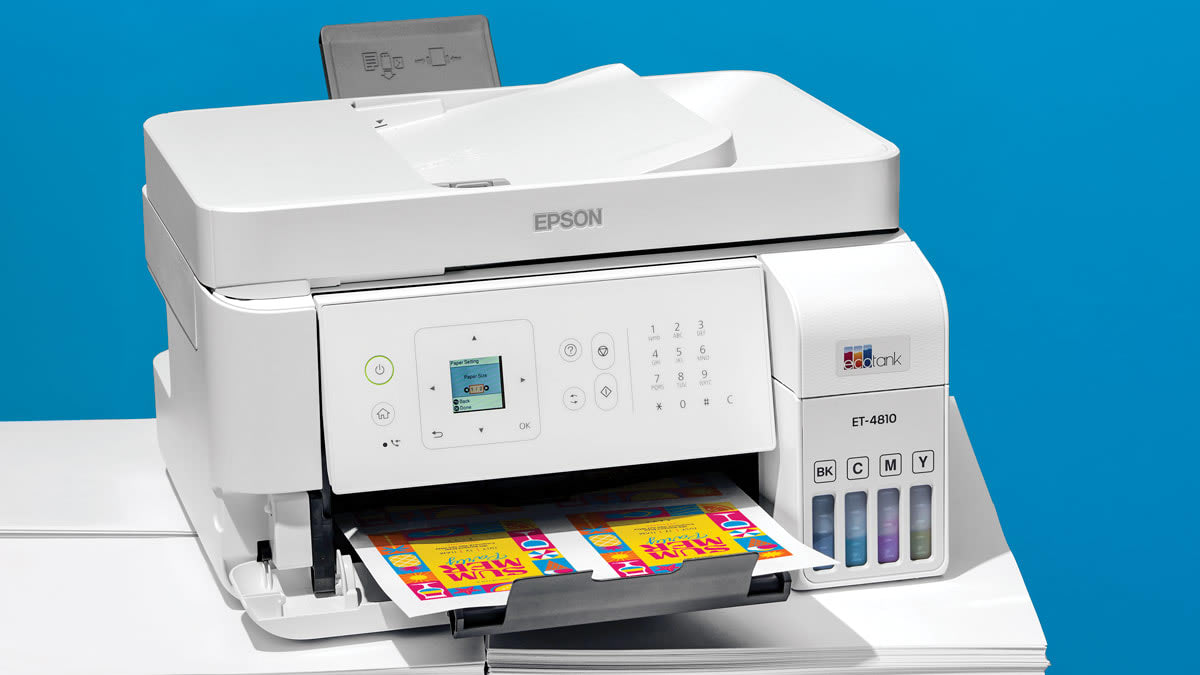

A home printer can be frustratingly easy to buy and surprisingly difficult to live with. A compact inkjet may handle recipes and school forms neatly, yet struggle when a stack of documents arrives. A laser model can make short work of office pages, but it takes more room and offers a different kind of color output.
We compared ten current all-in-one and color laser models, looking at paper handling, wireless features, duplex printing, ink or toner design, and the practical differences between them. The Best color printer for home for most people is the Canon PIXMA TS6520, while the Epson EcoTank ET-2800 is the stronger choice for frequent printing and the Brother HL-L3220CDW is the pick for a busier home office.
Comparison table
| # | Product | Award | Print system | Duplex | Paper capacity | Best for |
|---|---|---|---|---|---|---|
| 1 | Canon PIXMA TS6520 | Best overall | Two-cartridge hybrid ink | Automatic | Not stated | Everyday home printing |
| 2 | Epson EcoTank ET-2800 | Best cartridge-free model | Refillable ink tank | Not stated | Not stated | Frequent color printing |
| 3 | HP OfficeJet Pro 8139 | Best for home offices | Inkjet | Automatic | 225 sheets | Mixed documents and admin |
| 4 | Brother MFC-J1360DW | Best with an ADF | Inkjet | Automatic | 150 sheets | Multi-page scanning |
| 5 | HP DeskJet 2955 | Best compact basic model | Inkjet | Not stated | 60 sheets | Occasional home use |
| 6 | Brother HL-L3220CDW | Best color laser | Color laser | Automatic | 250 sheets | High-volume documents |
| 7 | HP Envy 6155 | Best for photos and documents | Inkjet | Automatic | 100 sheets | Family printing |
| 8 | Canon PIXMA TS4320 | Best simple Canon alternative | Two-cartridge hybrid ink | Automatic | Not stated | Photos and basic documents |
| 9 | Epson EcoTank ET-2720 | Best basic EcoTank | Refillable ink tank | Not stated | Not stated | Low-cartridge-waste printing |
| 10 | HP DeskJet 4255e | Best for light home tasks | Inkjet | Not stated | 60 sheets | Small print jobs |
1. Canon PIXMA TS6520: Best Overall

Pros
- Automatic two-sided printing
- Dual-band Wi-Fi supports 2.4GHz and 5GHz networks
- Integrated scanner and copier
- Compact footprint with a 1.42-inch OLED display
- Supports borderless and bordered output up to 8.5 by 11 inches
Cons
- Two-cartridge design is less flexible than separate color tanks
- Display is monochrome and quite small
- No automatic document feeder is listed
Best for: households that want a compact all-in-one for documents, schoolwork, and occasional photos.
The Canon PIXMA TS6520 is the one we would place on a typical family desk first. It covers the jobs that make a home printer useful without turning the machine into a miniature office copier. Printing, scanning, and copying are all built in, and automatic two-sided printing means a longer school handout or household document does not require manual page flipping.
Its two-cartridge hybrid ink system is aimed at a mix of sharp text and vivid color. That arrangement is simpler than the refillable tanks in the Epson EcoTank ET-2800, but it also means the printer is more straightforward for someone who prints in bursts rather than every day. The TS6520 handles documents and photos up to 8.5 by 11 inches, with or without borders, so it is not limited to plain office pages.
Wireless setup is one of its more useful strengths. Dual-band Wi-Fi supports both 2.4GHz and 5GHz networks, which gives it a better chance of fitting into a modern home network than a printer limited to one band. Canon PRINT, Apple AirPrint, and Mopria Print Service cover the usual phone and tablet workflows. The 1.42-inch monochrome OLED shows status and ink information, although it is more of a helpful control panel than a rich touchscreen interface.
The main limitation is its lack of a listed automatic document feeder. Scanning a single page is easy enough, but copying or scanning a multi-page packet will require placing pages on the scanner one at a time. The display is also small compared with the HP OfficeJet Pro 8139 and Brother MFC-J1360DW. Those models are better when document handling is the central job.
For a household that wants one machine to handle forms, recipes, homework, and the occasional photo, the TS6520 has the most balanced feature set here. It is the Best color printer for home when compact operation and automatic duplex printing matter more than high-volume capacity.
2. Epson EcoTank ET-2800: Best Cartridge-Free Model

Pros
- Refillable ink tanks instead of small cartridges
- Ink set is stated to support up to 4, 500 black pages and 7, 500 color pages
- Scanner and copier are built in
- Micro Piezo Heat-Free Technology
- Wireless printing for documents and photos
Cons
- Listed print speed is 10 ISO pages per minute
- Ink tanks require more deliberate filling than cartridges
- No automatic document feeder is listed
Best for: families, students, and home workers who print color regularly and want fewer ink changes.
The Epson EcoTank ET-2800 makes sense for a different kind of household than the Canon PIXMA TS6520. Its defining feature is not a clever screen or an especially quick document engine. It is the pair of visible refillable ink tanks, which replace the cycle of keeping several small cartridges on hand. Epson says the supplied ink can cover up to 4, 500 black pages and 7, 500 color pages, making this the most natural fit for a home that prints often.
That capacity changes the ownership experience. A student printing worksheets, a parent producing activities, or a home worker handling regular color documents will spend less time interrupting a job to replace ink. The design also avoids the cartridge waste associated with conventional inkjet printers. Epson recommends genuine ink for print quality and warranty support, so owners should treat the refill system as a specific maintenance routine rather than an invitation to use any bottle.
The ET-2800 uses Micro Piezo Heat-Free Technology and is described as producing vivid, detailed documents and photos. Its stated speed is 10 ISO pages per minute, which is suitable for ordinary household work but not a reason to choose it for a large last-minute packet. Like the Canon models, it includes a scanner and copier, but the dataset does not list automatic duplex printing or an automatic document feeder. It is best viewed as a capable print, scan, and copy station for single-page work.
The machine is also not the smallest option in this group. Its listed dimensions are about 17 inches long, 16 inches wide, and 9.3 inches high. That footprint is manageable on a proper desk, but it needs more planning than the small HP DeskJet 2955. The refill tanks bring long intervals between ink changes, yet filling them is more hands-on than clicking in a cartridge.
If regular color output is the priority, the ET-2800 is more compelling than the Canon PIXMA TS6520. If most printing happens once or twice a month, the Canon is easier to live with. Readers comparing broader household workflows may also find how a home printer handles scanning and copying useful before choosing between a tank and cartridge design.
3. HP OfficeJet Pro 8139: Best for Home Offices

Pros
- Automatic document feeder
- Automatic two-sided printing
- 225-sheet input tray
- Up to 20 pages per minute in black and 10 in color
- 2.7-inch color touchscreen
- Print, scan, copy, and fax functions
Cons
- Larger and heavier than basic home models
- Uses cartridges with original HP chips or circuitry
- Fax hardware is unnecessary for many households
Best for: a home office that needs faster documents, larger paper capacity, and hands-off multi-page scanning.
The HP OfficeJet Pro 8139 is the clearest step up from a casual home printer. Its automatic document feeder and 225-sheet input tray address two annoyances that become obvious when a printer is used for work: feeding pages one by one and refilling the tray halfway through a document set. It also prints, scans, copies, and faxes, so it is equipped for administrative work rather than just household notes.
The speed figures explain the appeal. HP lists up to 20 pages per minute in black and 10 pages per minute in color. Those numbers do not turn it into a production machine, but they put it ahead of the Canon PIXMA TS6520 and the Epson EcoTank ET-2800 for routine document throughput. Automatic two-sided printing helps reduce manual handling and makes longer reports more practical.
The 2.7-inch color touchscreen is another meaningful difference. It gives the printer a more comfortable standalone interface than the Canon's 1.42-inch monochrome OLED or the icon panels on the smaller HP DeskJets. Dual-band Wi-Fi is included, and the HP app can handle printing, scanning, copying, and faxing from a phone. HP also describes an AI formatting feature that can remove unwanted content from web pages and emails before printing, which could help when a browser page would otherwise spill across awkward pages.
Its weaknesses are mostly about commitment. The 18.12-inch width and 17.6-pound listed weight make it a substantial object for a small desk. HP also states that the printer is intended to work only with cartridges using original HP chips or circuitry, and firmware updates maintain those measures. That restriction matters to anyone who prefers broad cartridge flexibility. The fax feature adds capability, but many homes will never use it.
The 8139 beats the Brother MFC-J1360DW on tray capacity and listed color speed, while the Brother remains a little more focused on straightforward home and cloud-app use. Choose the HP when a household office regularly handles contracts, forms, reports, and multi-page scans. For a broader office setup, it is worth considering the document features that matter in a home office before settling on a smaller model.
4. Brother MFC-J1360DW: Best With an ADF

Pros
- Automatic document feeder handles up to 20 single-sided sheets
- Automatic two-sided printing
- 1.8-inch color display
- 150-sheet paper tray
- Wireless and USB connections
- Cloud app support
Cons
- Color speed is listed at up to 9 pages per minute
- ADF is single-sided
- Smaller tray than the HP OfficeJet Pro 8139
Best for: home users who scan and copy multi-page documents but do not need a fax machine.
The Brother MFC-J1360DW is a sensible middle ground between a basic family printer and a full home-office machine. Its strongest practical feature is the 20-sheet single-sided automatic document feeder. That is enough to make a multi-page scan or copy far less tedious, even though it does not turn over double-sided originals automatically.
Brother gives it a 150-sheet paper tray, automatic duplex printing, and a stated speed of up to 16 pages per minute in black and 9 pages per minute in color. The black speed is useful for forms and letters, while the color figure places it close to the Epson EcoTank ET-2800 and behind the HP OfficeJet Pro 8139. For a home office that does not need the HP's fax feature, the Brother's feature mix is more focused.
The 1.8-inch color display keeps common settings visible without taking over the front of the printer. Brother's Mobile Connect app handles printing, copying, scanning, and device management, while the printer can connect to cloud services such as Google Drive, Dropbox, Box, and OneDrive. Wireless and USB connections are both available, which is reassuring if a home network becomes temperamental.
At 16.8 pounds and 15.4 inches wide, it is not a tiny desktop accessory. The 150-sheet tray also gives up some breathing room to the HP 8139's 225-sheet capacity. Since the feeder is single-sided, users scanning two-sided originals will still need to turn the pages manually. Those limits are easy to accept for ordinary household paperwork, but they matter in a document-heavy office.
The Brother is a better match than the Canon PIXMA TS6520 for anyone who regularly scans packets, receipts, or school forms. The Canon remains simpler for occasional printing, and the HP is stronger for heavier workloads. Pick the MFC-J1360DW when an ADF is essential but a fax and oversized office controls are not.
5. HP DeskJet 2955: Best Compact Basic Model

Pros
- Compact design for small home spaces
- Print, scan, and copy functions
- Wireless and mobile printing
- 60-sheet input tray
- Dual-band Wi-Fi
- Made with at least 70% recycled plastics
Cons
- Listed speed is 7.5 pages per minute in black and 5.5 in color
- No automatic document feeder is listed
- Icon LCD is basic
Best for: occasional printing of lists, recipes, letters, and simple color documents.
The HP DeskJet 2955 is designed around restraint. It does not try to be a home office hub, and that is precisely why it can work well in a kitchen, bedroom, or small study. It prints, scans, and copies, supports wireless and mobile printing, and has a 60-sheet input tray for the short jobs most occasional users actually send.
Its listed speeds are 7.5 pages per minute in black and 5.5 pages per minute in color. Those figures are modest, so this is not the printer to choose for a large report or a busy family's constant output. For a recipe, permission slip, to-do list, or occasional financial document, the slower pace is less consequential.
The control system is an icon LCD rather than a touchscreen. That keeps the interface uncomplicated, but it also means more setup and troubleshooting may happen through the HP app or a computer. The printer includes dual-band Wi-Fi, and HP says its wireless system can detect and resolve connection issues. The app supports printing, scanning, copying, and faxing from a mobile device, although the product's listed core functions are print, scan, and copy.
The biggest trade-off is paper handling. There is no listed automatic duplex feature or ADF, so two-sided documents and multi-page scans involve manual steps. The 60-sheet tray is also much smaller than the Brother HL-L3220CDW's 250-sheet tray or the OfficeJet Pro 8139's 225-sheet tray. Its compact body, measuring about 11.97 inches long and 16.73 inches wide, helps it fit where those larger printers cannot.
The DeskJet 2955 is a better small-space choice than the HP DeskJet 4255e when a simple footprint and basic operation matter most, while the 4255e adds an ADF. Skip the 2955 if you routinely scan stacks or print lengthy color documents. For a lightly used household printer, it avoids paying desk space for features that may never be used.
6. Brother HL-L3220CDW: Best Color Laser

Pros
- Color laser printing
- Up to 19 pages per minute
- Automatic two-sided printing
- 250-sheet paper tray
- Manual feed slot for envelopes and specialty media
- Wireless and mobile printing
Cons
- Print-only design without a scanner or copier
- Heavier than every inkjet model in this list
- Larger footprint for a home desk
Best for: a home office that prints frequent color documents and does not need scanning or copying.
The Brother HL-L3220CDW is the outlier here, and that is its strength. It is a color laser printer rather than an inkjet all-in-one, so it does not scan, copy, or manage photos in the same way as the Canon and HP models. In return, it is built around predictable document production, with a stated output speed of up to 19 pages per minute.
The 250-sheet paper tray is the largest listed capacity in this group. That makes a real difference in a home office where printing happens in batches. Automatic duplex printing handles double-sided documents without manual intervention, while the manual feed slot accepts envelopes and specialty media. Wireless printing supports laptops, smartphones, and tablets, and Brother lists compatibility with major mobile printing platforms and cloud services.
Laser output is most convincing on business documents, where crisp text and clean color graphics matter more than photographic nuance. The HL-L3220CDW is a better tool for reports, invoices, presentations, and forms than for a household that mainly wants borderless snapshots. Its design also avoids the pauses and maintenance habits associated with a rarely used inkjet, though the product data does not provide a toner yield figure.
There are clear compromises. At 24.7 pounds, this is substantially heavier than the Epson EcoTank ET-2800 and almost every inkjet in the roundup. Its listed dimensions are 15.7 inches long, 15.7 inches wide, and 9.4 inches high, so it needs a sturdy, permanent home. Since there is no scanner or copier, a separate device is required for those jobs.
The Brother HL-L3220CDW beats the HP OfficeJet Pro 8139 for tray capacity and laser-style document work, but the HP is far more versatile for a household that scans and copies. Choose the Brother when printing is the main job and office pages matter more than all-in-one convenience. Readers handling a growing workload should also think about the paper handling that keeps a home business moving before selecting a compact inkjet.
7. HP Envy 6155: Best for Photos and Documents

Pros
- Automatic two-sided printing
- 2.4-inch color touchscreen
- Borderless photo support is highlighted
- 100-sheet input tray
- Dual-band Wi-Fi
- Print, scan, and copy functions
Cons
- No automatic document feeder is listed
- Listed color speed is 7 pages per minute
- Cartridge restrictions apply
Best for: families that print homework and household documents alongside borderless photos.
The HP Envy 6155 is the family-oriented HP in this group. It combines the everyday functions of a home all-in-one with features aimed at photos, including borderless output and HP's P3 technology, which is intended to keep printed documents and photos looking vibrant relative to the screen. It is a more natural photo companion than the office-first Brother HL-L3220CDW.
HP lists speeds of up to 10 pages per minute in black and 7 pages per minute in color. Those numbers are suitable for homework, forms, and occasional color pages, though they do not compete with the HP OfficeJet Pro 8139 for office throughput. Automatic two-sided printing helps with longer documents, and the 100-sheet tray is a reasonable fit for a household that prints regularly without needing a large reserve.
The 2.4-inch touchscreen is a welcome improvement over the icon LCD on the DeskJet 2955. Dual-band Wi-Fi supports more home networks, and the HP app handles printing, scanning, copying, and faxing from a phone, although fax is not listed among the printer's main physical functions. HP also includes an AI formatting feature for web pages and emails, intended to remove unwanted content before printing.
The Envy has two practical drawbacks. There is no listed ADF, so multi-page scanning remains a page-at-a-time process. HP also states that the printer is intended to work only with cartridges using original HP chips or circuitry, with firmware updates maintaining that restriction. Its listed dimensions are unusual enough to check carefully against a desk, especially the 17.05-inch length and 14.21-inch height.
Compared with the Canon PIXMA TS6520, the Envy offers a more prominent touchscreen and specifically emphasizes borderless photos, while the Canon has a smaller footprint and dual-band support with Canon's mobile services. Choose the HP when family photos and easy touchscreen control matter more than a compact body. It is a strong Best color printer for home option for mixed photo and document use, but not for someone scanning thick paperwork.
8. Canon PIXMA TS4320: Best Simple Canon Alternative

Pros
- Automatic two-sided printing
- Two-cartridge hybrid ink system
- Scanner and copier included
- Supports borderless and bordered output up to 8.5 by 11 inches
- Dual-band Wi-Fi
- Canon PRINT, Apple AirPrint, and Mopria support
Cons
- No automatic document feeder is listed
- No print speed is provided
- Smaller feature set than the TS6520
Best for: home users who want a Canon all-in-one for basic documents and photos.
The Canon PIXMA TS4320 shares the family resemblance of the TS6520 and covers much of the same territory. It prints, scans, and copies, supports automatic two-sided printing, and is designed for both documents and photos. Its two-cartridge hybrid ink system is intended to produce sharp text and vivid color without the more involved refill process found on Epson's EcoTank models.
The media support is useful for a home printer. Canon lists output up to 8.5 by 11 inches, with or without borders, so it can handle ordinary letters as well as photo-style pages. Dual-band Wi-Fi works on 2.4GHz and 5GHz networks, and the Canon PRINT app extends control to a phone or tablet. Apple AirPrint and Mopria Print Service add simple device compatibility without requiring a computer.
Canon does not provide a print speed in the supplied product information, which makes it harder to recommend for deadline-driven work. The printer also has no listed automatic document feeder. That puts it closer to the HP Envy 6155 and Canon PIXMA TS6520 than to the Brother MFC-J1360DW, where the feeder is a central reason to buy.
Its listed dimensions are about 14 inches wide, 14.8 inches long, and 6.7 inches high, with a weight of 14.8 pounds. That is reasonably easy to place, although the Canon PIXMA TS6520 has the same listed footprint and adds a 1.42-inch OLED display. The TS4320 is therefore the more stripped-back choice between the two, not the more capable one.
Choose this Canon when the core requirements are automatic duplex printing, wireless access, scanning, copying, and occasional photos. The TS6520 is the better pick if the control panel and newest feature mix matter. The TS4320 remains a straightforward option for a household that wants the basics without moving to an ink tank.
9. Epson EcoTank ET-2720: Best Basic EcoTank
Pros
- High-capacity ink tanks
- Built-in scanner and copier
- Micro Piezo Heat-Free Technology
- Sharp text and color photo output
- Cartridge-free design
Cons
- No print speed is provided
- No automatic document feeder is listed
- Older design with fewer listed details than the ET-2800
Best for: users who want refillable ink tanks and basic scanning and copying.
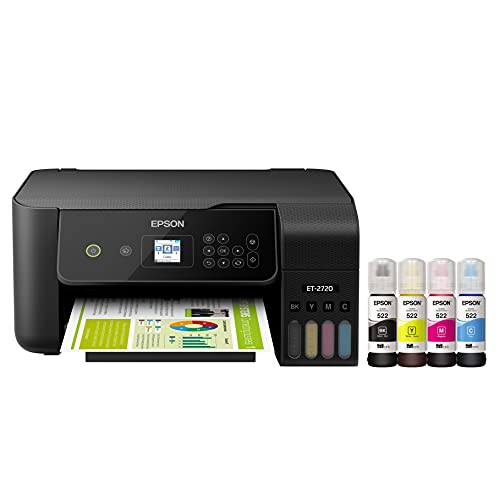
The Epson EcoTank ET-2720 is the simpler, older sibling to the ET-2800 in this roundup. Its central idea is the same: high-capacity ink tanks replace small cartridges, and a single refill can cover a long stretch of household printing. That makes it appealing to someone who prints frequently enough to dislike regular cartridge changes.
Epson highlights Micro Piezo Heat-Free Technology, along with sharp text and color photos and graphics on a range of paper types. The built-in scanner and copier expand its usefulness beyond printing. It is a better fit for a household that wants a refillable document station than for someone looking for a fast, modern office machine.
The supplied information does not state a print speed, automatic duplex printing, paper capacity, or automatic document feeder. Those omissions are important when comparing it with the newer ET-2800, which lists a 10 ISO pages-per-minute speed and specific ink output figures. The ET-2720 should be chosen for its tank system and core print, scan, and copy functions, not for unlisted productivity features.
It is relatively light at 8.8 pounds, with listed dimensions of 14.8 inches wide, 13.7 inches long, and 8.7 inches high. That makes it easier to move than the ET-2800, though the tank design still rewards a stable location where refilling can be done carefully. Epson's cartridge-free approach also reduces the number of small cartridges discarded over time.
The ET-2800 is the more informative and capable recommendation because its documented speed and ink figures make its role clearer. The ET-2720 is worth considering when the basic EcoTank idea is the priority and the missing features are not essential. Skip it for large multi-page workloads or two-sided printing.
10. HP DeskJet 4255e: Best for Light Home Tasks

Pros
- Automatic document feeder
- Print, scan, and copy functions
- Compact home design
- Wireless and mobile printing
- 60-sheet input tray
- Energy Star and EPEAT certified
Cons
- Wi-Fi is limited to 2.4GHz
- Listed color speed is 5.5 pages per minute
- Cartridge use is restricted to HP chips or circuitry
Best for: light household printing when an automatic document feeder is useful.
The HP DeskJet 4255e is aimed at basic home tasks but adds one feature that separates it from the DeskJet 2955: an automatic document feeder. That makes it more convenient for occasional multi-page scanning and copying, even though the printer is still built around a small 60-sheet input tray and modest output speeds.
HP lists up to 8.5 pages per minute in black and 5.5 pages per minute in color. Those figures are fine for a recipe, letter, form, or short set of school pages. They are not suited to a home office that regularly prints large documents. The printer handles color printing, scanning, and copying, and the HP app extends those functions to a phone, computer, or tablet.
The wireless limitation is unusually specific. This model is only 2.4GHz capable, unlike the dual-band Canon PIXMA TS6520, Epson EcoTank ET-2800, and several HP alternatives here. A 2.4GHz connection is common in homes, but buyers with a network that emphasizes 5GHz should check their setup before choosing it. The icon LCD keeps local operation simple, though it does not offer the richer control of the Envy 6155's touchscreen.
The compact design is helpful, with listed dimensions of 13.07 inches long, 16.85 inches wide, and 7.87 inches high. Its 10.6-pound weight also makes it less cumbersome than the Brother color laser. HP states that it uses at least 60% recycled plastic and carries Energy Star and EPEAT certifications. It also states that cartridges with non-HP chips or circuitry will be blocked, with firmware updates maintaining the restriction.
The DeskJet 4255e is the better choice than the DeskJet 2955 if the ADF will be used, but the 2955 has the cleaner brief for truly occasional basic printing. The Canon PIXMA TS6520 is more flexible on wireless connectivity and duplex printing. Choose the HP 4255e only when its feeder and compact all-in-one design outweigh the 2.4GHz limitation.
How to choose best color printer for home
The right home printer depends less on a long feature list than on the kind of pages you produce and how often you handle them.
Ink system
Cartridge inkjets, such as the Canon PIXMA TS6520 and HP Envy 6155, are familiar and simple to start using. Refillable tank models such as the Epson EcoTank ET-2800 and ET-2720 are better suited to regular color output because their high-capacity tanks reduce interruptions.
A color laser printer uses toner and is generally a better document tool than a photo-oriented inkjet. The Brother HL-L3220CDW is the only laser model here, and its strengths are crisp business pages, a 19-page-per-minute output figure, and a large tray.
Automatic duplex printing
Automatic duplex printing turns a single-sided document into a two-sided job without asking you to remove and reinsert pages. It is useful for school packets, reports, and household forms, and it can make a compact printer feel much more capable.
The Canon PIXMA TS6520, Canon PIXMA TS4320, HP OfficeJet Pro 8139, Brother MFC-J1360DW, Brother HL-L3220CDW, and HP Envy 6155 list automatic duplex printing. Do not assume it is present on the smaller HP DeskJet models or either Epson model in this group.
A printer that can turn pages by itself is often more useful at home than one with a faster headline speed.
Automatic document feeder
An ADF is the feature to prioritize when scanning or copying several pages. It lets you load a stack rather than place each sheet on the scanner glass. The HP OfficeJet Pro 8139 has an ADF, and the Brother MFC-J1360DW lists a 20-sheet single-sided ADF. The HP DeskJet 4255e also includes an ADF.
The feeder matters less if you mostly print downloaded forms or scan one page at a time. It matters a great deal for receipts, signed documents, tax paperwork, and school packets.
Paper capacity and speed
A 60-sheet tray is adequate for occasional household tasks but requires more frequent attention. The HP OfficeJet Pro 8139 holds 225 sheets, the Brother MFC-J1360DW holds 150, and the Brother HL-L3220CDW holds 250. Those capacities are better for a home office or a household with regular print batches.
Speed also separates the models. The Brother color laser reaches up to 19 pages per minute, the HP OfficeJet Pro 8139 reaches up to 20 black pages per minute and 10 color pages per minute, and the Epson EcoTank ET-2800 is listed at 10 ISO pages per minute. Slower printers are fine for short jobs, but they become frustrating when several people share one machine.
Wireless compatibility and controls
Dual-band Wi-Fi gives a printer access to both 2.4GHz and 5GHz networks. That is more flexible than the HP DeskJet 4255e, which is only 2.4GHz capable. Mobile apps, Apple AirPrint, Mopria, and cloud connections can matter just as much as the printer's local buttons when several people print from phones.
A touchscreen is helpful for standalone setup and copying. The HP OfficeJet Pro 8139 has a 2.7-inch color touchscreen, while the HP Envy 6155 has a 2.4-inch touchscreen. The Canon PIXMA TS6520 uses a smaller 1.42-inch monochrome OLED, which is functional but less spacious.
Frequently asked questions
Are ink tank printers better for home use?
Ink tank printers are especially useful when a household prints color pages regularly. Their refillable tanks can reduce how often ink needs to be replaced, but filling them is more hands-on than changing a cartridge. The Epson EcoTank ET-2800 is the strongest tank option in this list because its supplied ink and page figures are clearly stated.
Is a color laser printer suitable for a home?
Yes, if the home mostly produces documents, reports, forms, and color graphics. The Brother HL-L3220CDW prints up to 19 pages per minute and has a 250-sheet tray, but it does not scan or copy. It is less suitable for a household that wants one machine for photos and document capture.
Do all of these printers print on both sides automatically?
No. Automatic duplex printing is listed for the Canon PIXMA TS6520, Canon PIXMA TS4320, HP OfficeJet Pro 8139, Brother MFC-J1360DW, Brother HL-L3220CDW, and HP Envy 6155. The supplied information does not list it for the Epson EcoTank models or the HP DeskJet models.
Which printer is best for scanning multiple pages?
Choose a model with an automatic document feeder. The HP OfficeJet Pro 8139 has an ADF, the Brother MFC-J1360DW lists a 20-sheet single-sided ADF, and the HP DeskJet 4255e also includes one. The other models require more manual page handling based on the supplied features.
Is a 2.4GHz-only printer a problem?
It depends on your home network. The HP DeskJet 4255e is only 2.4GHz capable, while several other picks support dual-band Wi-Fi. If your devices and router are configured heavily around 5GHz, a dual-band model offers a more flexible setup.
Which model is easiest for occasional printing?
The Canon PIXMA TS6520 is the strongest all-around answer because it combines printing, scanning, copying, automatic duplexing, and dual-band Wi-Fi. The HP DeskJet 2955 is a more basic alternative for short documents and limited desk space. Choose a tank model only if you expect to print frequently enough to benefit from refillable ink.
The bottom line
The Best color printer for home is the Canon PIXMA TS6520 for most households. Its automatic duplex printing, dual-band Wi-Fi, scanner, copier, compact footprint, and support for both documents and photos create the most balanced package. The lack of an automatic document feeder is its real weakness, so heavy scanning should point you toward the HP OfficeJet Pro 8139 or Brother MFC-J1360DW.
For frequent color printing, choose the Epson EcoTank ET-2800 and its refillable tanks. For a home office centered on fast document output, the Brother HL-L3220CDW is the more focused tool, provided you do not need scanning or copying.
If you are undecided, buy the Canon PIXMA TS6520 for general household use, the Epson EcoTank ET-2800 for regular color volume, or the HP OfficeJet Pro 8139 for multi-page office work.
As an Amazon Associate we earn from qualifying purchases.