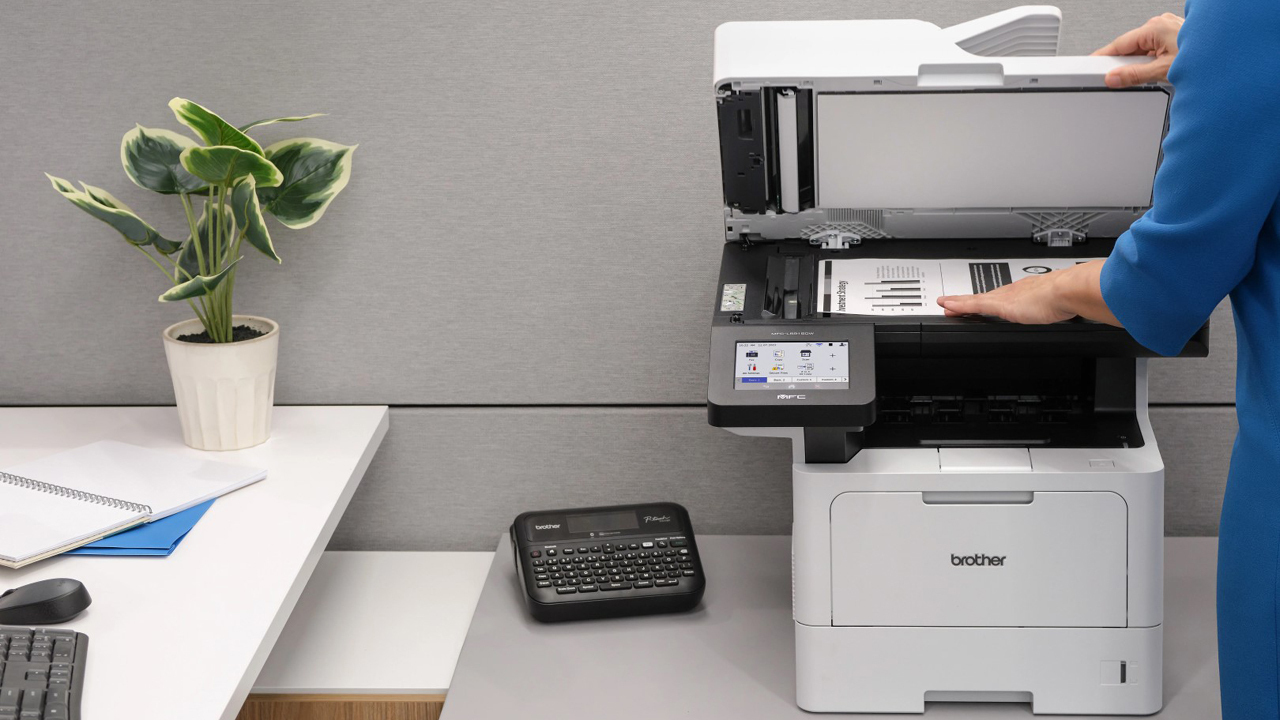

A small business printer has to do more than put ink on paper. It needs to handle invoices, contracts, shipping documents, presentations, and the occasional color handout without turning a simple task into a maintenance project. The wrong model can also waste desk space with a shallow tray or slow down a team with a tiny automatic document feeder.
Our Best best printer for small business picks cover compact inkjets, high-volume ink tank models, monochrome lasers, and color lasers. The right choice depends mainly on whether your work is text-heavy, how often you scan multi-page documents, and whether color is central to your workflow.
For most small offices, the Brother DCP-L2640DW is the single best pick, while the rest of this list covers faster office machines, color specialists, and compact home-office alternatives.
Comparison table
| # | Product | Award | Print type | Print speed | Paper or ADF capacity | Connectivity | Best for |
|---|---|---|---|---|---|---|---|
| 1 | Brother DCP-L2640DW | Best overall | Monochrome laser | Up to 36 ppm | 50-sheet ADF | Dual-band Wi-Fi, Ethernet, USB | Text-heavy small offices |
| 2 | HP OfficeJet Pro 8139 | Best color office printer | Color inkjet | Up to 20 ppm black, 10 ppm color | 225-sheet tray, ADF | Dual-band Wi-Fi | Home offices needing color and fax |
| 3 | HP OfficeJet Pro 9125 | Best for busy color workflows | Color inkjet | Up to 22 ppm black, 18 ppm color | 250-sheet tray, ADF | Dual-band Wi-Fi | Small teams printing color documents |
| 4 | HP LaserJet Pro 3101fdw | Best monochrome office laser | Monochrome laser | Up to 35 ppm | ADF | Wi-Fi, Ethernet, Bluetooth | Small teams sharing a black-and-white printer |
| 5 | Brother INKvestment 5110 | Best high-capacity color inkjet | Color inkjet | Up to 28 ppm black, 26 ppm color | 500-sheet capacity, 50-page duplex ADF | Wi-Fi Direct, Wi-Fi, Ethernet, USB | Offices with frequent mixed printing |
| 6 | HP Color LaserJet Pro 3301sdw | Best color laser | Color laser | Up to 26 ppm black and color | 250-sheet tray, ADF | Wireless | Color reports and office documents |
| 7 | Epson EcoTank ET-4800 | Best cartridge-free all-in-one | Color ink tank | Not stated | ADF | Wi-Fi, Ethernet | Color printing with refillable tanks |
| 8 | Brother Work Smart 1360 | Best compact color all-in-one | Color inkjet | Up to 16 ppm black, 9 ppm color | 150-sheet tray, 20-sheet ADF | Wi-Fi, USB | Small home offices |
| 9 | Epson EcoTank ET-2800 | Best compact ink tank | Color ink tank | 10 ISO ppm | Not stated | Wireless | Light color printing and scanning |
| 10 | Canon PIXMA TS6520 | Best compact desktop printer | Color inkjet | Not stated | Not stated | Dual-band Wi-Fi | Occasional documents and photos |
1. Brother DCP-L2640DW: Best Overall
Pros
- Fast black-and-white output
- 50-page automatic document feeder
- Duplex printing, copying, and scanning
- Ethernet and dual-band Wi-Fi
- Compact multifunction design
Cons
- Monochrome printing only
- No fax function
- Larger and heavier than compact inkjets
Best for: a small office that mostly prints contracts, invoices, forms, and other text documents.
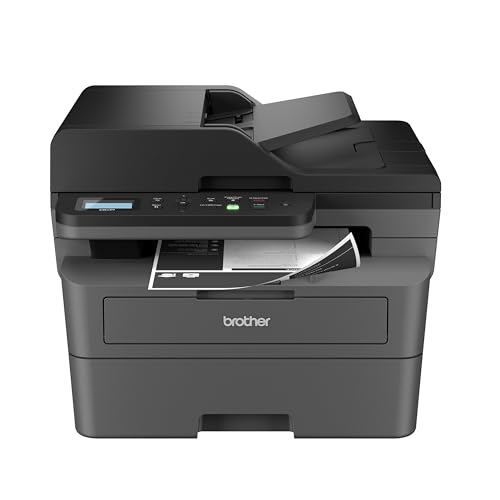
The Brother DCP-L2640DW is the printer we would put in the busiest small office first. It focuses on the jobs that tend to clog up a workday: printing several-page documents, making copies, and scanning a stack without feeding every sheet by hand. Its monochrome laser engine prints up to 36 pages per minute, giving it a clear speed advantage over the color inkjets here when the queue is made up of black text.
The 50-page automatic document feeder is just as important as the print speed. It gives the DCP-L2640DW enough capacity for routine contracts, receipts, and forms without becoming a bottleneck. Automatic duplex printing also helps when documents need to be printed on both sides, while the scanner and copier turn it into a practical three-in-one office machine rather than a printer with a few extras.
Connection options are unusually flexible for a compact model. Dual-band wireless supports both 2.4GHz and 5GHz networks, and Ethernet gives a shared office a more direct connection. There is also USB for a local computer, plus the Brother Mobile Connect app for printing, scanning, printer management, and toner monitoring from a phone. If your team is still deciding how much wireless convenience matters, the ways mobile printing changes a shared office workflow is a useful question to settle.
The limitation is obvious: it prints only in black and white, and it does not include faxing. That makes the HP OfficeJet Pro 8139 a better fit for flyers, charts, and color-heavy client documents, while the HP LaserJet Pro 3101fdw is the stronger step-up for a larger shared monochrome workload. The Brother remains the more balanced choice for most small teams because it combines speed, duplex work, a useful feeder, and office-friendly connectivity without making color capability the center of the design.
Choose it if your business runs on text. Skip it if color proofs, customer-facing graphics, or faxing are regular parts of the job.
2. HP OfficeJet Pro 8139: Best Color Office Printer

Pros
- Prints, scans, copies, and faxes
- Automatic two-sided printing
- 225-sheet input tray
- 2.7-inch color touchscreen
- Dual-band Wi-Fi and smartphone control
Cons
- Color speed is slower than black-and-white speed
- Uses original HP cartridge circuitry
- No Ethernet connection listed
Best for: a home office or small business that needs color documents, an ADF, and fax capability in one machine.
The HP OfficeJet Pro 8139 is the most approachable all-in-one here for a home office that still has serious office chores. It handles printing, scanning, copying, and faxing, so there is no need to keep a separate device around for an occasional signed form or multi-page copy job. The 225-sheet input tray is also large enough to avoid constant refilling during a normal workweek.
Its rated speed reaches 20 pages per minute in black and 10 pages per minute in color. That split tells you how to use it. It is quick enough for routine text documents, but color reports and presentations will take longer than they would on a laser model. Automatic two-sided printing reduces manual page turning, and the automatic document feeder makes copying and scanning several pages much less tedious.
A 2.7-inch color touchscreen gives the printer a more direct control surface than the small monochrome displays on many office machines. Dual-band Wi-Fi is designed to maintain the connection across common office networks, and the HP app covers printing, scanning, copying, and faxing from a smartphone. HP also includes an AI feature intended to remove unwanted content and improve the formatting of web pages and emails before printing. That is most useful for people who regularly turn online material into clean paper handouts.
The main concern is cartridge control. The listing says the printer is intended to work only with cartridges using original HP chips or circuitry, and firmware updates maintain that restriction. That does not make the machine unusable, but it does make supply planning part of ownership. The Brother Work Smart 1360 is smaller and simpler, while the HP OfficeJet Pro 9125 is quicker in color and has a slightly larger tray.
The 8139 is the better fit when faxing, a touchscreen, and a broad all-in-one feature set matter more than maximum throughput. It is a sensible pick for a consultant, contractor, or home-based office that needs polished color documents without stepping up to a color laser.
3. HP OfficeJet Pro 9125: Best for Busy Color Workflows
Pros
- Fast color inkjet printing
- Automatic duplex printing and scanning
- 250-sheet input tray
- Fax, copy, scan, and print functions
- HP Wolf Pro Security
Cons
- Original HP cartridge circuitry is required
- Heavier than the smaller OfficeJet model
- No Ethernet connection listed
Best for: a small team that prints color presentations, brochures, flyers, and reports regularly.
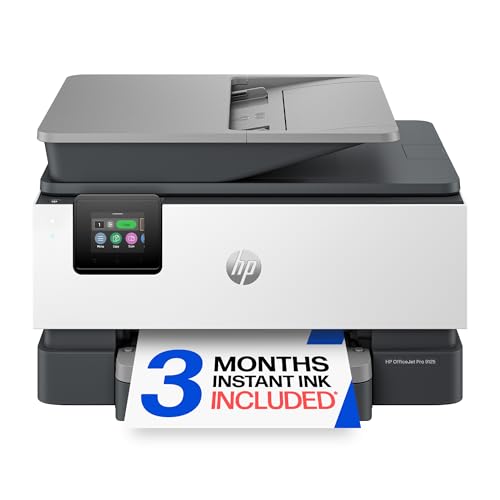
The HP OfficeJet Pro 9125 is the more office-focused sibling to the 8139. It has the same basic all-in-one formula, including print, scan, copy, fax, a touchscreen, and dual-band Wi-Fi, but its numbers are better suited to a shared color workflow. The printer reaches up to 22 pages per minute in black and 18 pages per minute in color, a meaningful improvement when several people are waiting for presentation pages or customer documents.
Its 250-sheet input tray gives it a little more breathing room than the 8139, and automatic duplex printing and scanning reduce the amount of hands-on work for two-sided documents. The automatic document feeder is especially useful when scanning signed forms or copying a packet. Those features make the 9125 more than a fast color printer. It is a document-handling machine for a small office.
The 2.7-inch color touchscreen keeps common controls accessible from the printer itself. HP's app extends those controls to a phone, while the printer's AI feature is intended to clean up web pages and emails by removing unwanted material and improving print formatting. HP Wolf Pro Security is also aimed at office networks, with customizable security settings intended to protect the printer and connected information.
The weaknesses are the same trade-offs that affect the 8139, but they matter more in a shared office. The printer is tied to cartridges with original HP chips or circuitry, and the listing says firmware updates maintain that limitation. Its 20.48-pound body also needs a sturdy, permanent location. The Brother INKvestment 5110 goes further for paper handling with two trays and a 500-sheet total capacity, while the HP LaserJet Pro MFP 3101fdw is a better match for black-and-white queues.
Between the two OfficeJet models, choose the 9125 when color volume and duplex scanning matter. Choose the 8139 when the workload is lighter and the smaller, home-office orientation is more appealing.
4. HP LaserJet Pro 3101fdw: Best Monochrome Office Laser

Pros
- Up to 35 black-and-white pages per minute
- Automatic two-sided printing
- Automatic document feeder
- Wi-Fi, Ethernet, and Bluetooth
- HP Wolf Pro Security
Cons
- Black-and-white output only
- Larger footprint
- No print speed listed for scanning
Best for: a small team that shares a fast black-and-white printer for reports and routine business documents.
The HP LaserJet Pro 3101fdw is built around speed and shared-office access. It prints up to 35 black-and-white pages per minute, putting it close to the Brother DCP-L2640DW in practical text-document performance. The difference is that HP positions this model for teams of up to seven people, and it adds faxing to the print, scan, and copy functions.
Automatic two-sided printing and an automatic document feeder take care of the repetitive work. A team can send a report from a computer, copy a form, or scan a packet without turning the printer into a one-person station. The listing does not provide a feeder capacity or scanning speed, so buyers should not assume it has the same document-handling figures as the Brother DCP-L2640DW.
Connectivity is one of its stronger points. Intelligent Wi-Fi is designed to look for the best connection, while Ethernet and Bluetooth give an office more ways to place and share the printer. It supports wireless printing from phones, tablets, PCs, Chromebooks, and other compatible devices, with AirPrint included among the listed platforms. HP Wolf Pro Security adds customizable settings for protecting the printer and the information moving through it.
Its chief weakness is the lack of color. A small company that sometimes prints client-facing charts or promotional pages will need another device, and the HP Color LaserJet Pro MFP 3301sdw is the more complete office choice for that work. The Brother DCP-L2640DW is more compact and publishes a specific 50-page ADF capacity, which makes it easier to evaluate for smaller document batches.
Pick the 3101fdw when several people need quick, clean black-and-white output and faxing still has a place in the workflow. It is overkill for a desk that prints only a few pages a week.
5. Brother INKvestment 5110: Best High-Capacity Color Inkjet

Pros
- 500-sheet capacity across two trays
- 100-sheet multipurpose tray
- Single-pass duplex copying and scanning
- Fast black-and-color printing
- 4.3-inch color touchscreen
Cons
- Heavy 37.7-pound design
- Uses Brother Genuine LC506 ink
- Larger footprint than compact inkjets
Best for: a growing small office that prints a steady mix of color and black-and-white documents.
The Brother INKvestment 5110 is the most serious inkjet office machine in this group. Its defining feature is not a clever app or a compact enclosure. It is the paper system. Two trays provide a combined 500-sheet capacity, and a separate 100-sheet multipurpose tray gives the office room to keep different media or paper sizes ready. That changes how often someone has to stop a job to reload the printer.
It also has the strongest stated inkjet speed combination here, reaching up to 28 pages per minute in black and 26 pages per minute in color. Single-pass duplex copying and scanning can handle up to 50 pages through the automatic document feeder, so two-sided packets do not need to be flipped manually. Automatic duplex printing rounds out the productivity features and makes this the closest inkjet alternative to a small departmental printer.
The 4.3-inch color touchscreen is larger and more useful than the displays on the smaller Brother Work Smart 1360 and the Epson machines. It supports printing from and scanning to popular cloud apps directly, while Wi-Fi Direct, wireless networking, Ethernet, and USB cover different office layouts. The Brother Mobile Connect app adds mobile control and device management.
There are two practical drawbacks. First, the 37.7-pound body is not something to move casually, so it needs a dedicated stand or sturdy desk. Second, the machine is intended for Brother Genuine LC506 ink, and the listing specifically recommends that supply line. Those constraints are easier to accept in a busy office than in a spare-room workspace. The HP OfficeJet Pro 9125 is smaller and more focused on color documents, but it cannot match this model's paper capacity.
The 5110 is the right choice when paper handling is the daily frustration. It is not the printer to buy for occasional home-office use, but it is the inkjet on this list best equipped to keep a small team moving.
6. HP Color LaserJet Pro 3301sdw: Best Color Laser

Pros
- Color laser output for reports and presentations
- Up to 26 ppm in black and color
- Automatic two-sided printing
- Automatic document feeder
- 250-sheet input tray
Cons
- Large and heavy
- Uses HP toner with chip requirements
- Wireless connectivity is the only connection listed
Best for: small teams that need consistent color documents and laser-style office throughput.
The HP Color LaserJet Pro 3301sdw is the straightforward choice for a business that wants color without using an inkjet platform. It prints in both black and color at up to 26 pages per minute, so a mixed document queue does not suffer the large black-to-color speed gap seen on many inkjets. That makes it well suited to reports, proposals, and presentations that need a consistent office finish.
The printer includes scanning, copying, automatic two-sided printing, and an automatic document feeder. Its 250-sheet tray is a useful middle ground for a small team, giving it more capacity than compact desktop models without reaching the two-tray system of the Brother INKvestment 5110. HP's TerraJet toner is intended to produce more vivid color, which is a meaningful advantage when documents represent the business to clients.
There is less information here about mobile and wired connections than on some of the other picks. The listing identifies wireless printing, but does not specify Ethernet, USB, or Bluetooth. That is not automatically a problem for a wireless office, though it is worth checking the connection requirements before placing a shared printer on a network with fixed cabling.
The 3301sdw is also physically substantial. At 37.7 pounds, it needs a permanent home, and its 16.5-inch height makes it less suited to a narrow shelf. It uses Original HP 218A or 218X toner, and the listing says cartridges with non-HP chips or circuitry can be blocked by the printer and its firmware. The HP OfficeJet Pro 9125 is more flexible for a home office, while the HP LaserJet Pro MFP 3101fdw is the better fit if color is not needed.
Choose this model when color consistency and laser operation matter more than a small footprint. It is a specialized office tool, not a casual desktop printer.
7. Epson EcoTank ET-4800: Best Cartridge-Free All-in-One

Pros
- Refillable cartridge-free ink tanks
- Print, scan, copy, and fax functions
- Automatic document feeder
- Ethernet and wireless connectivity
- Micro Piezo Heat-Free technology
Cons
- Print speed is not stated
- Smaller paper capacity details are not provided
- Better suited to moderate than high-speed office work
Best for: a home office that wants refillable color ink and an all-in-one design with faxing.
The Epson EcoTank ET-4800 takes a different approach from the cartridge-based HP and Brother inkjets. Its high-capacity tanks are filled from Epson EcoFit bottles, which removes the need to swap small cartridges. That is the feature to focus on here. It suits an office that prints color regularly and prefers to monitor visible reservoirs rather than wait for a cartridge warning.
This is a full all-in-one with a scanner, copier, fax, and automatic document feeder. The flatbed scanner is intended for higher-resolution work, while the color display provides control at the machine. Epson's Micro Piezo Heat-Free technology is used for sharp text and color graphics, and the listing says it can print on virtually any paper type. The data does not state a print speed, so it would be a mistake to position the ET-4800 as a fast queue printer.
Ethernet is a welcome addition for a small office that does not want every device on Wi-Fi. Wireless connectivity covers flexible placement, while the tank design reduces cartridge waste. The printer measures 14.8 inches wide and 11.8 inches deep, with an 11-pound listed weight, so it is considerably easier to place than the larger laser models and the Brother INKvestment 5110.
The weakness is throughput information and likely workflow fit. If your business routinely prints dozens of pages at a time, the Brother DCP-L2640DW or HP LaserJet Pro MFP 3101fdw gives a clearer speed advantage. The ET-4800 is also more involved than a cartridge machine when it needs attention, since bottle refilling requires care. Epson recommends genuine ink for print quality and warranty support.
For a low to moderate volume office that wants color, faxing, Ethernet, and refillable tanks, this is the Epson model to choose. It is less convincing as the only printer for a team with a constant document queue.
8. Brother Work Smart 1360: Best Compact Color All-in-One

Pros
- Compact 16.8-pound design
- Automatic two-sided printing
- 150-sheet paper tray
- 20-sheet automatic document feeder
- Cloud app and mobile printing support
Cons
- Slower than office-focused color models
- Smaller ADF
- No fax function listed
Best for: a small home office that needs color printing, scanning, copying, and simple wireless control.
The Brother Work Smart 1360 is a good reminder that not every small business needs a large office machine. At 13.5 inches long, 15.4 inches wide, and 7.2 inches high, it is easier to fit on a compact desk than nearly every other printer in this roundup. Its 16.8-pound listed weight also makes repositioning less of a chore.
It prints at up to 16 pages per minute in black and 9 pages per minute in color. Those figures are modest beside the Brother INKvestment 5110, but they are adequate for routine invoices, letters, forms, and occasional color pages. Automatic duplex printing helps with two-sided documents, while the 150-sheet tray avoids the need to reload after every short batch.
The 20-sheet single-sided automatic document feeder is useful for small scanning and copying jobs. A compact office will appreciate it, but it is not designed for a large packet. The 1.8-inch color display supports cloud connections to services such as Google Drive, Dropbox, Box, and OneDrive, and the Brother Mobile Connect app handles printing, copying, scanning, and device management from a phone.
The key limitation is that the 1360 is a light-duty machine. It does not have the paper capacity or color speed of the 5110, and the HP OfficeJet Pro 8139 is a better choice when faxing is part of the routine. It uses LC501 series inks, and the listing also promotes Brother's page monitoring tools, so supply awareness is built into the companion app.
Choose it when desk space matters as much as printing capability. If several employees will share the printer throughout the day, move up to the DCP-L2640DW for text or the INKvestment 5110 for color.
9. Epson EcoTank ET-2800: Best Compact Ink Tank

Pros
- Cartridge-free refillable tank system
- Print, scan, and copy functions
- Up to 4, 500 black or 7, 500 color pages listed
- Micro Piezo Heat-Free technology
- Compact 11.4-pound design
Cons
- Slower 10 ISO pages-per-minute rating
- No fax or ADF listed
- Epson recommends genuine ink
Best for: a solo operator who prints color documents occasionally and wants a small tank-based all-in-one.
The Epson EcoTank ET-2800 is the compact tank printer for a desk that does not have room for an office-sized machine. It combines printing, scanning, and copying in a body that is about 16 inches wide, 17 inches deep, and 9.3 inches high, with a listed weight of 11.4 pounds. That footprint is easy to live with in a home office or a small workroom.
Its appeal is the refillable system. Epson lists up to 4, 500 black pages and 7, 500 color pages, and says the included ink can last up to two years. Those figures make the ET-2800 better suited to an owner who wants fewer interruptions from small cartridge changes. The transparent tank approach also makes ink levels easier to check at a glance.
The trade-off is speed. Epson lists a 10 ISO pages-per-minute rate, which is fine for a short document but slow beside either laser pick or the faster color inkjets. There is no automatic document feeder or fax function listed, so scanning and copying several pages requires more manual handling. For a business with frequent paperwork, that becomes a bigger inconvenience than the small footprint solves.
The ET-4800 is the stronger Epson choice when faxing, an ADF, and Ethernet are needed. The Brother Work Smart 1360 is a better alternative for a compact office that scans multi-page documents and wants a feeder. The ET-2800 makes more sense when the work is mostly individual pages, occasional color material, and basic copying.
Select it for a solo business with modest print volume and limited space. Skip it if several people will be waiting on the printer or if multi-page scanning is routine.
10. Canon PIXMA TS6520: Best Compact Desktop Printer

Pros
- Compact all-in-one design
- Automatic two-sided printing
- Dual-band Wi-Fi
- Scanner and copier included
- 1.42-inch OLED display
Cons
- Print speed is not stated
- No ADF or fax listed
- Two-cartridge ink system
Best for: a small desk that needs occasional color documents, photos, scans, and copies.
The Canon PIXMA TS6520 is the smallest-feeling option in this group, even though its listed weight is 15.3 pounds. Its 14-inch width and 14.8-inch depth make it a practical fit for a crowded desk, and it still includes printing, scanning, and copying. Automatic two-sided printing gives it a useful office feature that is often missing from basic compact machines.
Canon uses a two-cartridge hybrid ink system designed for sharp text and vivid color. The printer can handle documents and photos up to 8.5 by 11 inches, with or without borders. Canon does not provide a print-speed figure in the supplied data, so this should be treated as a convenience printer rather than a throughput purchase.
The 1.42-inch monochrome OLED display shows ink levels and printer status, while the control panel is intended to keep basic settings accessible. Dual-band Wi-Fi supports both 2.4GHz and 5GHz networks, and the Canon PRINT app, Apple AirPrint, and Mopria Print Service cover common phone and tablet workflows. Setup is positioned as simple for both smartphones and computers.
The TS6520 lacks an automatic document feeder and fax function in the listed features. That is the dividing line between this Canon and the HP OfficeJet Pro 8139 or Epson EcoTank ET-4800. Its two-cartridge setup is also less suited to an office that prints large amounts of color, while the Epson ET-2800 offers a tank system and stated page yields.
Buy this Canon when space and occasional color output are the priorities. It is not the right foundation for a growing team, but it can serve a solo operator who mainly prints one document at a time.
How to choose best printer for small business
The right office printer comes down to the documents you produce most often, the number of people sharing the machine, and how much scanning and paper handling the printer must manage.
Print technology
Monochrome laser printers such as the Brother DCP-L2640DW and HP LaserJet Pro MFP 3101fdw are the strongest choices for contracts, invoices, forms, and reports. They offer the fastest stated black-and-white speeds in this group and avoid the slower color cycle of an inkjet when every page is text.
Color inkjets are more flexible for charts, flyers, and mixed documents. Color lasers such as the HP Color LaserJet Pro MFP 3301sdw are better suited to a business that wants consistent color output with laser-style office operation, but they are larger and heavier.
Print speed
Look at separate black and color speeds instead of relying on a single headline number. The Brother INKvestment 5110 reaches up to 28 pages per minute in black and 26 in color, while the HP OfficeJet Pro 8139 lists 20 black and 10 color. That difference is noticeable when a team prints presentations or reports in batches.
A stated speed does not tell the whole story, but it is a useful warning sign. The Epson ET-2800's 10 ISO pages-per-minute rate suits occasional printing, not a shared queue.
The best small-business printer is usually the one that keeps the slowest recurring task from becoming someone’s daily interruption.
Paper capacity and document feeders
A larger paper tray means fewer interruptions, but the automatic document feeder often matters more in an office. The Brother INKvestment 5110 has a 500-sheet total capacity, a 100-sheet multipurpose tray, and a 50-page feeder for duplex copying and scanning. The Brother DCP-L2640DW has a 50-page ADF, while the Brother Work Smart 1360 has a 20-sheet feeder.
If your business scans signed forms, receipts, or customer paperwork, prioritize the ADF. If you print long documents but rarely scan, prioritize the input tray and duplex printing.
Ink and toner system
Cartridge-based inkjets are represented by the HP OfficeJet and Brother Work Smart models. The Epson EcoTank printers use refillable tanks, and the Brother INKvestment 5110 uses a high-capacity ink approach with specified LC506 supplies. These systems are different in how they handle replacement and monitoring, so choose based on the workflow your team will actually maintain.
The HP models in this list require cartridges with original HP chips or circuitry according to their listings. Epson recommends genuine ink for its tank printers, while Brother identifies its genuine ink or toner lines for the matching machines. Read those supply restrictions before committing to a printer.
Connectivity and security
Dual-band Wi-Fi is useful when a printer must serve phones, laptops, and desktops on a modern network. Ethernet is more important when a printer will sit in a fixed office location, and it is included on the Brother DCP-L2640DW, Brother INKvestment 5110, Epson ET-4800, and HP LaserJet Pro MFP 3101fdw.
Security features deserve attention when the printer handles customer documents. HP Wolf Essential Security appears on the OfficeJet Pro 8139, while HP Wolf Pro Security is listed on the OfficeJet Pro 9125 and both HP LaserJet models. For a home-based operation, how a printer fits into a home office setup can help clarify which connections and features are genuinely necessary.
Frequently asked questions
Should a small business choose a laser or inkjet printer?
Choose a monochrome laser if most documents are black text and speed matters. Choose an inkjet if color output is frequent or you want a smaller all-in-one design. A color laser is the most direct fit for a business that needs both color and a traditional office printing workflow.
Is an automatic document feeder important for business use?
It is important if you scan or copy multi-page documents. The Brother DCP-L2640DW and Brother INKvestment 5110 have 50-page feeders, while the Brother Work Smart 1360 has a 20-sheet feeder. Models without an ADF are better for occasional single-page scanning.
Which printer is best for black-and-white documents?
The Brother DCP-L2640DW is the most balanced pick for many small offices because it combines up to 36 pages per minute with duplex printing, scanning, copying, a 50-page ADF, and multiple connection options. The HP LaserJet Pro MFP 3101fdw is a stronger fit for a team that needs faxing and up to 35 black-and-white pages per minute.
Are refillable ink tank printers suitable for a small business?
They can be, especially when the office prints color regularly but does not need laser-level speed. The Epson EcoTank ET-4800 adds an ADF, fax, and Ethernet, while the ET-2800 is smaller but slower and lacks those listed features. Tank printers are less suitable when several employees need fast output throughout the day.
Do all of these printers support two-sided printing?
No. Automatic duplex printing is listed for the Brother DCP-L2640DW, Brother Work Smart 1360, Brother INKvestment 5110, both HP OfficeJet models, both HP LaserJet models, and the Canon PIXMA TS6520. The Epson ET-4800 and ET-2800 feature lists supplied here do not state automatic duplex printing.
Which model is easiest to fit on a small desk?
The Brother Work Smart 1360, Canon PIXMA TS6520, and Epson EcoTank ET-2800 have the most compact profiles in this group. The Brother Work Smart 1360 is particularly useful when a small ADF and automatic duplex printing are also needed. The Canon is better for occasional work, while the Epson adds a refillable tank system.
The bottom line
The Best best printer for small business is the Brother DCP-L2640DW for most text-focused offices. Its fast monochrome printing, 50-page ADF, duplex functions, Ethernet, Wi-Fi, and mobile controls cover the routine work that slows a small team down.
For color-heavy documents, the HP OfficeJet Pro 9125 is the stronger all-in-one, while the Brother INKvestment 5110 is the more capable choice when paper capacity and duplex scanning are the priority. The HP Color LaserJet Pro MFP 3301sdw is the specialist option for teams that want color laser output.
If you are undecided, choose the Brother DCP-L2640DW for text or the HP OfficeJet Pro 9125 for color.
As an Amazon Associate we earn from qualifying purchases.