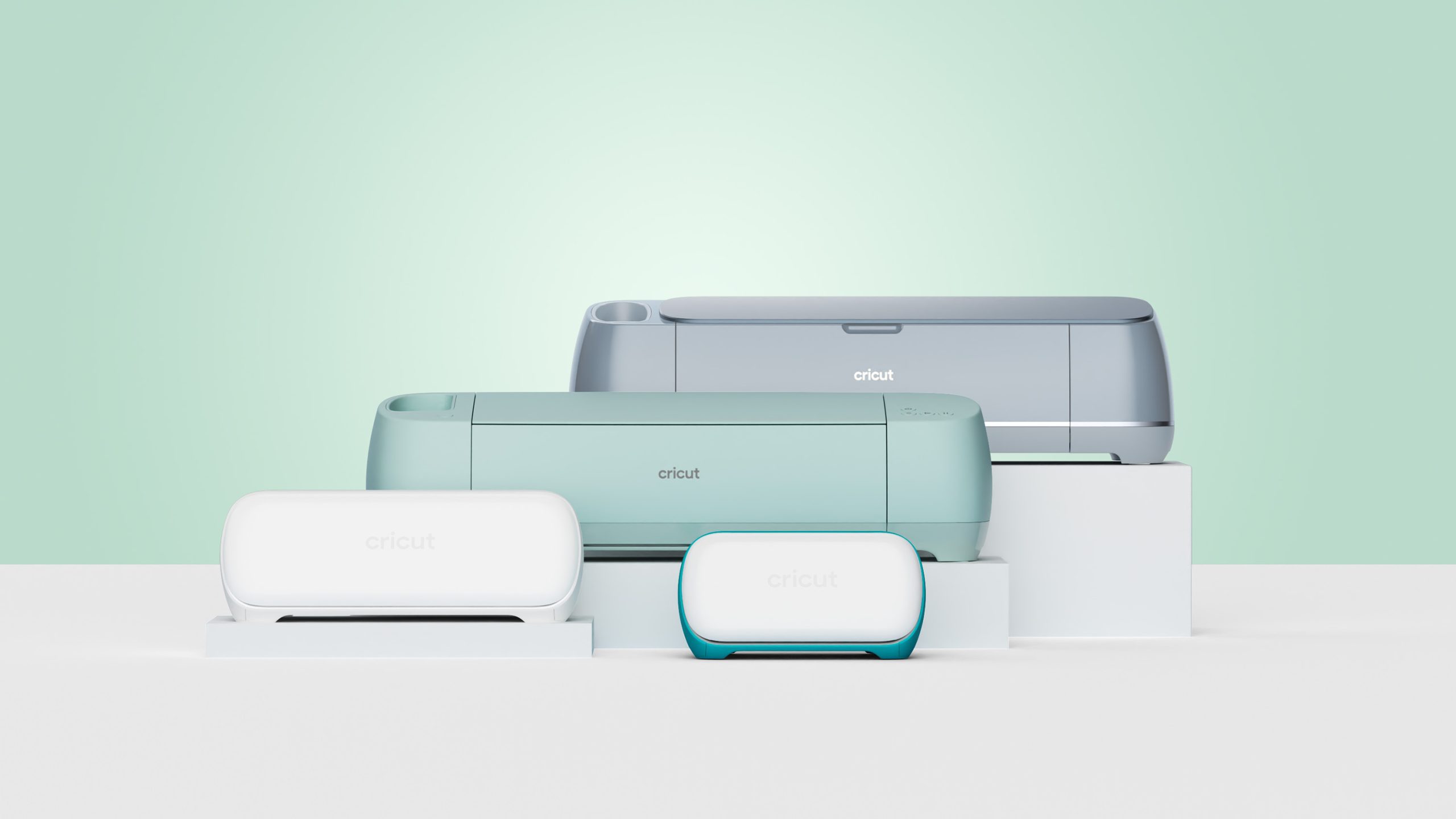

A cutting machine can turn a blank sheet of vinyl into a neat decal, but the wrong model quickly becomes a cramped tool for the projects you actually want to make. The biggest divide here is cutting width and material support. A compact machine is easy to store, while a full-size model gives you room for apparel, signs, cards, and more ambitious work.
Our top pick is the Cricut Explore 5 Essential Bundle. It combines a full 12-inch cutting width, support for more than 100 materials, beginner-friendly software, and enough included supplies to make the first several projects without assembling a separate shopping list. The rest of this guide ranges from the portable Cricut Joy 2 to the more capable Maker 4, including bundles aimed at stickers, general crafting, and shirts.
Comparison table
| # | Product | Award | Cutting width | Material support | Best for |
|---|---|---|---|---|---|
| 1 | Cricut Explore 5 Essential Bundle | Best overall | 12 in | 100+ materials | First-time crafters |
| 2 | Cricut Explore 5 Rainbow Bundle | Best ready-to-create bundle | 12 in | 100+ materials | Varied starter projects |
| 3 | Cricut Maker 4 Starter Kit | Best for creative range | Not stated | 300+ materials | Growing makers |
| 4 | Cricut Maker 4 Digital Bundle | Best for advanced materials | Not stated | 300+ materials | Detailed craft work |
| 5 | Cricut Maker 4 T-Shirt Bundle | Best for apparel | Not stated | 300+ materials | Shirts and tote bags |
| 6 | Cricut Explore 5 Deluxe Bundle | Best for a large project supply | 12 in | 100+ materials | Frequent home crafting |
| 7 | Cricut Maker 4 Engagement Bundle | Best for tool variety | Not stated | 300+ materials | Multi-technique projects |
| 8 | Cricut Joy 2 Digital Bundle | Best compact machine | 4.5 in | 75+ materials | Cards and small labels |
| 9 | Cricut Explore 5 Deluxe Content Bundle | Best digital-content bundle | 12 in | 100+ materials | Printable projects |
| 10 | Cricut Joy 2 Rainbow Bundle | Best small-space starter | 4.5 in | 75+ materials | Portable crafting |
1. Cricut Explore 5 Essential Bundle: Best Overall
Pros
- Full 12-inch cutting performance
- Handles more than 100 materials
- Includes vinyl, iron-on, cardstock, and printable materials
- Bluetooth connection and guided Design Space projects
Cons
- Deep Cutting Tool is sold separately
- Less capable with specialty materials than Maker 4
Best for: first-time crafters who want a full-size machine and a useful supply collection.
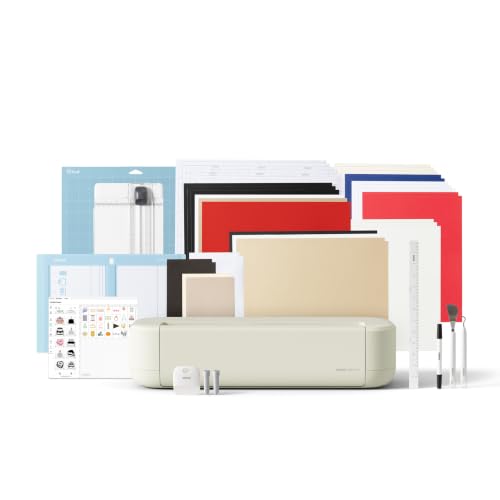
The Cricut Explore 5 Essential Bundle is the easiest machine in this group to recommend to someone who has a long list of ordinary craft projects but no interest in learning a complicated setup. It has the familiar 12-inch, or 30.5 cm, cutting width, yet Cricut says the machine is 30% more compact than previous models. That combination matters. You get enough room for shirts, signs, cards, and larger decals without making the machine feel like it owns the craft table.
Explore 5 works with more than 100 materials, including vinyl, iron-on, cardstock, printable materials, paper, and felt. It can also write, draw, foil, score, and cut intricate designs when paired with the appropriate tools. The snap-in pen holder should make switching into writing projects less fussy, and Bluetooth keeps the connection to Design Space simple from a phone, tablet, or computer. Print-Then-Cut support lets a home inkjet printer produce a full-color design that the Cricut then cuts around.
The Essential Bundle is a particularly sensible starting point because it includes Smart Vinyl, Smart Iron-On, Value Cardstock, insert card sets, and printable vinyl. Cricut says the contents are enough for up to 65 projects, and the bundle includes 25 additional premium images plus one font. There is also access to more than 3, 000 images, 100 fonts, and 1, 000 projects in the free out-of-the-box Design Space library. That is enough structure for a beginner without forcing every first project to start from a blank canvas.
The limitation is capability beyond the everyday materials. Explore 5 supports six tools, but the Deep Cutting Tool is sold separately, and it does not offer the Maker 4's support for 300-plus materials or operations such as engraving and debossing. Choose the Cricut Maker 4 Digital Bundle if leather, wood, or specialty techniques are central to your plans. For decals, stickers, cards, and shirts, this is the best cricut machine in the lineup for keeping the learning curve manageable.
2. Cricut Explore 5 Rainbow Bundle: Best Ready-to-Create Bundle

Pros
- 12-inch cutting width in a compact body
- Includes a broad mix of project materials
- Six Smart Vinyl and six Smart Heat Transfer Vinyl sheets
- Includes access to more than 400 projects and how-to guides
Cons
- Specialty cutting tools are not included
- The bundle is less focused than the apparel kit
Best for: beginners who want to try several types of crafts immediately.
The Cricut Explore 5 Rainbow Bundle has the same core machine as the top pick, but its appeal is the way the materials invite experimentation. Instead of committing immediately to cards, stickers, or clothing, you can move between them. The box includes Smart Vinyl, Smart Iron-On, printable vinyl, cardstock, insert cards, and project inspiration, so the first weekend can include labels, a greeting card, and an iron-on design rather than three versions of the same test cut.
Its 12-inch cutting performance is the important hardware detail. Explore 5 can make larger decals and apparel designs than the 4.5-inch Joy 2, while its 30% smaller design than earlier Explore models should make storage less awkward. Smart Materials allow matless cuts up to 12 feet long, which is useful for banners, wall decals, and repeated labels. That long-format capability is not something the compact Joy 2 can replace.
The machine cuts more than 100 materials and supports writing, drawing, foiling, scoring, and Print-Then-Cut. The included six Smart Vinyl sheets measure 9.5 by 13 inches, as do the six Smart Heat Transfer Vinyl sheets. Cricut also lists access to more than 400 projects and how-to instructions, alongside the free Design Space library. Bluetooth connectivity and guided project flows make this a friendly choice for a household where different people may use the machine.
The trade-off is that the rainbow assortment does not turn Explore 5 into a specialty machine. The Maker 4 Starter Kit is the stronger route for anyone already planning to work with leather, wood, or other demanding materials. Pick this bundle when variety is the point and the recipient needs a practical introduction to stickers, cards, apparel, and decorations. It is especially appealing as a shared family or classroom machine because there is no single project style baked into the supplies.
3. Cricut Maker 4 Starter Kit: Best for Creative Range

Pros
- Supports 300-plus materials
- Includes a mat, blade, tools, vinyl, and iron-on samples
- Covers stickers, shirts, cards, and gifts
- Beginner-focused setup and Design Space guidance
Cons
- The listing does not specify a cutting width
- Starter materials are sampler sheets rather than a broad project collection
Best for: beginners who want room to move from simple vinyl work into advanced crafts.
The Cricut Maker 4 Starter Kit makes sense for the beginner who already knows that simple decals may not be the end of the story. It includes the Maker 4 cutting machine, a cutting mat, blade, tools, vinyl, iron-on sampler sheets, and project inspiration. That keeps the first setup approachable while giving the machine a much higher ceiling than Explore 5.
Cricut says Maker 4 works with more than 300 materials. The list includes leather, wood, vinyl, iron-on HTV, cardstock, and stickers, which covers both routine projects and more specialized work. The machine can cut, draw, foil, score, engrave, deboss, and perforate. Those extra operations are the reason to step up from Explore 5, not simply a desire for a newer-looking machine. A maker who plans to create dimensional leather pieces or engraved projects will have far more room to grow here.
The included vinyl and heat transfer vinyl make it possible to start with familiar projects such as stickers and shirts. Design Space and the instructional guides are designed for first-time users, so this is not an advanced-only machine. Still, the broader tool ecosystem means the owner will eventually need to learn more about blades, mats, and material settings than an Explore 5 owner would.
The weakness is the less generous starter assortment. It gives you the essentials, but it does not promise the same broad selection of card, printable, and Smart Material projects found in the Explore bundles. The Cricut Maker 4 Digital Bundle adds a more varied sampler and 30 bonus images, while the Cricut Explore 5 Essential Bundle is simpler for ordinary craft work. Choose this kit if capability matters more than having a large pile of coordinated starter materials.
4. Cricut Maker 4 Digital Bundle: Best for Advanced Materials

Pros
- Works with more than 300 materials
- Supports engraving, debossing, perforating, foiling, and scoring
- Includes vinyl, iron-on, cardstock, transfer tape, and tools
- Print-Then-Cut works with most inkjet printers
Cons
- Heavier and more demanding than Joy 2
- Specialty techniques require additional learning and compatible tools
Best for: makers who want one machine for routine crafts and ambitious material experiments.
The Cricut Maker 4 Digital Bundle is the most capable general-purpose cutter here, and it feels designed for the person who keeps adding new ideas to the project list. It comes with a Fine-Point Blade, materials sampler, fine-point pen, light-grip mat, weeder, and 30 bonus images in Design Space. The sampler includes Smart Vinyl, matless vinyl, Smart Iron-On, matless heat transfer vinyl, cardstock, and transfer tape.
Maker 4's defining feature is its 300-plus material compatibility. Vinyl and cardstock are only the beginning. The machine can work with leather and wood, while its tool system supports cutting alongside drawing, foiling, scoring, engraving, debossing, and perforating. That range gives it a meaningful advantage over both Explore 5 models, which support more than 100 materials and a narrower tool set.
Print-Then-Cut is available for full-color stickers and other printed designs, using most inkjet printers. Design Space remains approachable for beginners, with guided flows, customizable templates, and AI generation tools. The free library includes more than 3, 000 images, 100 fonts, and 1, 000 projects. This bundle also includes 30 additional premium images, while the optional paid library expands the available content much further.
The practical downside is that capability can create clutter and indecision. Maker 4 is also listed at roughly 21.15 pounds, with dimensions of 22.1 inches wide, 7.1 inches long, and 6.2 inches high, so it needs a dedicated place to live. If the main goal is labels, cards, and shirts, the Explore 5 Essential Bundle is easier to justify. If you want to understand which materials suit more advanced cutting projects before buying more tools, Maker 4 is the machine with the strongest long-term creative range.
5. Cricut Maker 4 T-Shirt Bundle: Best for Apparel

Pros
- Combines Maker 4 cutting with an EasyPress SE
- Includes vinyl, HTV, tools, and accessories
- Built around shirts, hoodies, and tote bags
- Heat press includes auto-shutoff and a heat base
Cons
- Large setup needs substantial workspace
- Less useful if apparel is not the main project type
Best for: creators who want a coordinated system for designing and pressing custom apparel.
The Cricut Maker 4 T-Shirt Bundle is not simply a cutting machine with a few shirt blanks in the box. It pairs the Maker 4 with an EasyPress SE heat press, making the workflow clear: design, cut, press, and apply. That focus is helpful for someone who wants to make custom shirts, hoodies, tote bags, and gifts without piecing together a cutting setup and a pressing setup separately.
The Maker 4 brings the same broad material support as the other Maker 4 packages, including more than 300 materials and operations such as cutting, drawing, scoring, foiling, engraving, debossing, and perforating. For apparel, the most relevant part is its handling of vinyl and iron-on HTV. The included materials and tools let a new user start with familiar lettering and graphics rather than first learning the machine with unrelated paper projects.
The EasyPress SE is the differentiator. The listing describes even heat and consistent pressure, along with a heat base and auto-shutoff. Those details matter because an iron can leave uneven pressure across a transfer, while a dedicated press makes the application step more repeatable. It is a more complete apparel workflow than the Cricut Maker 4 Starter Kit, which includes vinyl and iron-on but no heat press.
The obvious weakness is the physical footprint. The listed bundle dimensions are 34 inches wide, 14 inches long, and 13 inches high, so this is not a casual machine for a tiny craft shelf. It is also over-specialized for someone mainly making cards or labels. Readers comparing pressing options can use this guide to choose the right heat press setup for apparel projects. For a shirt-focused hobby or a small custom apparel operation, this is the most coherent package in the group.
6. Cricut Explore 5 Deluxe Bundle: Best for a Large Project Supply
Pros
- Full 12-inch cutting width
- Supports more than 100 materials
- Supplies are listed for up to 100 projects
- Includes printable materials and digital content
Cons
- Does not match Maker 4 for specialty materials
- The larger supply package may be unnecessary for occasional users
Best for: active crafters who want a full-size Explore machine with a substantial materials assortment.
The Cricut Explore 5 Deluxe Bundle is the practical choice for someone who expects to use the machine often. The machine itself is the same 12-inch Explore 5 platform found in the Essential bundles, with a 30% more compact design than previous models. What changes is the scale of the included project supply. Cricut says this bundle contains enough materials for up to 100 projects.
That means the core experience remains broad and beginner-friendly. Explore 5 cuts vinyl, iron-on, cardstock, printable materials, paper, and felt, while also writing, drawing, foiling, scoring, and cutting intricate designs. Smart Materials support matless cuts up to 12 feet long, useful for banners, long labels, and wall decorations. The machine can also recognize and cut around full-color designs printed by a home inkjet printer.
The bundle includes Smart Vinyl, Smart Iron-On, Value Cardstock, insert card sets, and printable vinyl. It also includes 25 additional premium-quality images and one font. Bluetooth connectivity and Design Space's guided templates keep the software side accessible, even when the owner is moving between cards, stickers, apparel, and home decor.
The trade-off is that the extra materials do not change what Explore 5 can do. Someone who wants to engrave, deboss, or work with wood should choose the Cricut Maker 4 Engagement Bundle instead. This Deluxe package is the stronger fit for a busy household, classroom, or prolific card and sticker maker that will actually use the assortment. If you are unsure whether your projects need more room for detailed craft techniques, stay with Explore 5 unless those specialty materials are already on your list.
7. Cricut Maker 4 Engagement Bundle: Best for Tool Variety

Pros
- Supports 300-plus materials
- Includes pens, scoring stylus, scraper, spatula, and weeding tools
- Covers engraving, debossing, foiling, and perforating
- Includes vinyl, iron-on, cardstock, and transfer tape
Cons
- The machine is listed at nearly 23 pounds
- More tools mean a steeper learning curve
Best for: experienced or ambitious makers who want a broad selection of tools in one bundle.
The Cricut Maker 4 Engagement Bundle is aimed at the maker who wants to sample the full Cricut tool ecosystem. Its box includes a Fine-Point Blade, light-grip mat, two fine-point pens, a mini weeder, scoring stylus, scraper, spatula, weeder, Smart Iron-On, Smart Vinyl, cardstock sampler, transfer tape, and a practice-cut selection. That is a more tool-oriented starting point than the Digital Bundle.
The machine supports more than 300 materials and can cut, draw, foil, score, engrave, deboss, and perforate. Those functions make it suitable for more than flat vinyl graphics. Leather, wood, cardstock, and HTV all appear in Cricut's compatibility list. The broader tool selection also makes it easier to move from a greeting card to a scored box, a detailed label, or a textured project without replacing the machine.
Design Space works on desktop and mobile and includes guided design flows, customizable templates, and AI generation tools. The bundle adds 30 premium images, while the free library includes more than 3, 000 images, 100 fonts, and 1, 000 projects. Print-Then-Cut support with a compatible inkjet printer extends the machine into full-color sticker work.
The cost of that flexibility is bulk and complexity. Product information lists the weight at about 22.95 pounds, and a beginner may not use half the included tools for months. The Cricut Maker 4 Digital Bundle is a cleaner fit when the priority is a balanced sampler, while the Cricut Maker 4 T-Shirt Bundle is better for apparel. Choose this one when the fun is in trying different techniques, not simply repeating one kind of project.
8. Cricut Joy 2 Digital Bundle: Best Compact Machine

Pros
- Weighs just over 2 pounds
- 4.5-inch cutting width fits small workspaces
- Supports more than 75 materials
- Includes digital content and supplies for up to 35 projects
Cons
- Narrow cutting width limits large designs
- Less suitable for large shirts, banners, and wall decals
Best for: apartment dwellers, casual crafters, and anyone focused on cards and small labels.
The Cricut Joy 2 Digital Bundle is the machine to choose when storage space matters more than a large cutting area. It weighs just over 2 pounds, or 0.91 kg, and has a 4.5-inch, or 11.4 cm, cutting width. It can sit on a shelf between projects and come out quickly for a card, label, small decal, or short iron-on design.
Despite its size, Joy 2 supports more than 75 materials, including vinyl, iron-on, printable materials, and cardstock. It can write, draw, foil, score, and cut intricate designs. Print-Then-Cut support also lets a home inkjet printer produce full-color stickers that the machine can recognize and trim around. That makes it more flexible than a simple label maker, though the narrow opening remains the main boundary.
The Essential Bundle includes Smart Vinyl, Smart Iron-On, Value Cardstock, insert card sets, and printable vinyl. Cricut lists enough material for up to 35 projects, plus 25 premium images and one font. Bluetooth and Design Space's guided project flows make it less intimidating than a larger craft machine, especially for someone who wants a short path from idea to finished card.
The 4.5-inch width is the weakness you should decide on before buying. It makes large shirt graphics, broad signs, and long wall decals awkward or impossible compared with the Explore 5's 12-inch width. The Cricut Joy 2 Rainbow Bundle includes a broader project assortment, but both Joy 2 versions share the same compact limitations. Pick this bundle when the machine needs to disappear into a small home and most projects will stay small too.
9. Cricut Explore 5 Deluxe Content Bundle: Best Digital-Content Bundle

Pros
- 12-inch cutting width
- More than 100 compatible materials
- Includes supplies for up to 100 projects
- Adds 100 dollars of bonus digital content
Cons
- Specialty materials remain outside the Explore 5's range
- The digital content may matter less to users who create their own designs
Best for: crafters who want a full-size Explore machine and a large design library starting point.
The Cricut Explore 5 Deluxe Content Bundle is built around the same straightforward Explore 5 experience as the other full-size Explore packages. It cuts at 12 inches, works with more than 100 materials, and is 30% more compact than previous models. The appeal here is the combination of physical supplies and a substantial bonus digital-content allowance.
Explore 5 handles vinyl, iron-on, cardstock, printable materials, paper, and felt. It can also write, draw, foil, score, and cut detailed designs. Smart Materials support matless cuts up to 12 feet long, which gives this machine a useful advantage for long banners and repeated labels. Print-Then-Cut works with a home inkjet printer for full-color stickers, decals, and apparel graphics.
The Deluxe bundle includes Smart Vinyl, Smart Iron-On, Value Cardstock, insert card sets, and printable vinyl, with materials listed for up to 100 projects. It also includes 100 dollars in bonus digital content. Design Space connects over Bluetooth and offers guided projects, templates, AI-image generation, and a free library with more than 3, 000 images, 100 fonts, and 1, 000 projects.
That digital allowance is less compelling for someone who prefers drawing every design from scratch or already has a well-stocked image library. The Cricut Explore 5 Deluxe Bundle offers a similar physical project focus with 25 extra images and one font, while the Cricut Maker 4 Digital Bundle is the better hardware step-up for engraving and specialty materials. Choose this version when ready-made designs are a major part of how you plan to craft.
10. Cricut Joy 2 Rainbow Bundle: Best Small-Space Starter

Pros
- Compact 4.5-inch cutting width
- Weighs just over 2 pounds
- Includes supplies for up to 75 projects
- More than 400 projects and how-to instructions included
Cons
- Cannot match Explore 5 for full-width designs
- The listed white finish may not suit every workspace
Best for: small-space users who want a portable machine with a broad starter assortment.
The Cricut Joy 2 Rainbow Bundle shares the same compact machine as the Digital Bundle, but its supply assortment makes it the more inviting pick for someone who wants to explore several project types. Smart Vinyl, Smart Iron-On, Value Cardstock, insert card sets, and printable vinyl are included, along with access to more than 400 projects and how-to instructions.
Joy 2 weighs just over 2 pounds and cuts up to 4.5 inches wide. That is enough for cards, labels, small decals, and compact stickers, and the machine can work with more than 75 materials. It also writes, draws, foils, scores, and cuts intricate designs. Print-Then-Cut compatibility with a home inkjet printer allows full-color stickers, which adds a useful dimension to a machine this small.
Cricut says the Rainbow Essential Bundle contains enough supplies for up to 75 projects. The guided Design Space software is available on mobile and desktop, and Bluetooth keeps the physical setup simple. For a first-time user who is more interested in making personalized cards and labels than learning advanced blades, the package provides a clear starting point.
Its narrow width remains the decisive limitation. Explore 5 is a much better fit for broad apparel graphics, long banners, or larger wall decals, and Maker 4 is the obvious choice for leather, wood, engraving, and debossing. Choose this Joy 2 bundle when portability and a colorful assortment matter more than project scale. It is the best cricut machine here for a small craft corner that cannot spare room for a full-size cutter.

How to choose best cricut machine
The right Cricut depends less on the bundle name than on the size, materials, and techniques you expect to use repeatedly.
Cutting width
Cutting width determines the size of the design you can make in one pass. Explore 5 provides a 12-inch cutting width, which is a strong fit for shirt graphics, larger decals, cards, and home decorations. Joy 2's 4.5-inch width is much easier to store but better suited to small labels, cards, and compact stickers.
A wide machine also makes repeated projects less frustrating because you can arrange more pieces across a larger sheet. If your plans include banners or broad wall decals, start with Explore 5 rather than trying to work around Joy 2's narrow opening.
Choose the cutting width for your biggest regular project, not the smallest space where the machine will be stored.
Material compatibility
Explore 5 supports more than 100 materials, including vinyl, iron-on, cardstock, printable materials, paper, and felt. Joy 2 supports more than 75 materials and covers the common small-project materials well. Maker 4 supports more than 300 materials, including leather and wood, and adds operations such as engraving and debossing.
Do not choose Maker 4 simply because the number is larger. Its advantage matters when you will actually use specialty materials or need a broader tool system. For ordinary decals, shirts, cards, and stickers, Explore 5 covers the central tasks with less complexity.
Cutting and finishing tools
The machines can do more than cut, but the available tool range differs. Explore 5 can write, draw, foil, and score, and it supports six tools. Its Deep Cutting Tool is sold separately. Maker 4 expands into engraving, debossing, perforating, and other techniques, but those functions require learning the correct tool and material settings.
Look at the projects you want to finish, not the tool count alone. A card maker may care most about scoring and pen work, while a leather crafter will benefit from Maker 4's wider material and technique support.
Software and digital content
Design Space works with the machines through Bluetooth and is available on mobile and desktop. Guided design flows, templates, AI-image generation, and a free library with more than 3, 000 images, 100 fonts, and 1, 000 projects help beginners start without designing everything from nothing.
Bundles differ in their included content. Some provide 25 additional images and one font, others include 30 premium images, and the Explore 5 Deluxe Content Bundle adds 100 dollars of digital content. Digital extras are most useful when you expect to use ready-made designs regularly. They matter less if you already create your own artwork.
Included materials
The bundle can shape the first few weeks of ownership. The Explore 5 Essential Bundle includes Smart Vinyl, Smart Iron-On, cardstock, insert cards, and printable vinyl. The Rainbow version adds six Smart Vinyl sheets and six Smart Heat Transfer Vinyl sheets. The Deluxe packages are listed for up to 100 projects, while the Joy 2 bundles cover smaller projects with supplies listed for up to 35 or 75 projects.
Check whether the included materials match your intended work. A shirt maker should prioritize HTV and a pressing solution, while a card maker will get more from cardstock and insert cards. If you are also comparing equipment for fabric-based projects, consider how other machines handle detailed textile work before expanding your craft setup.

Frequently asked questions
Which Cricut machine is easiest for a beginner?
The Cricut Explore 5 is the easiest full-size starting point in this group. It supports more than 100 common materials, connects to Design Space over Bluetooth, and includes guided project flows. The Cricut Joy 2 is simpler to store and use for small cards and labels, but its 4.5-inch width limits the projects it can handle.
Is Cricut Joy 2 suitable for making shirts?
Joy 2 can work with iron-on material and is suitable for small shirt designs. Its 4.5-inch cutting width makes it less practical for large front graphics or broad back designs. Choose Explore 5 if apparel is a regular part of your plans.
What is the difference between Explore 5 and Maker 4?
Explore 5 supports more than 100 materials and is aimed at common projects such as stickers, cards, decals, and apparel. Maker 4 supports more than 300 materials and adds techniques including engraving, debossing, and perforating. Maker 4 is the better fit for specialty materials, while Explore 5 is easier to match to everyday crafting.
Can these machines make full-color stickers?
Yes. The Explore 5 and Joy 2 listings describe Print-Then-Cut compatibility with home inkjet printers. You print the design first, then the Cricut recognizes the printed image and cuts around it. The Maker 4 bundles also list compatibility with most inkjet printers.
Do Cricut machines need a computer?
Design Space is available on desktop and mobile, and the machines connect through Bluetooth. A computer is not the only option, although the larger screen of a desktop or laptop can make detailed design work easier. The exact experience depends on the device you prefer for editing and sending projects.
Which bundle is best for making shirts?
The Cricut Maker 4 T-Shirt Bundle is the most complete apparel package because it includes an EasyPress SE heat press along with the Maker 4, vinyl, HTV, tools, and accessories. The Explore 5 bundles can also cut iron-on designs, but they do not include the same dedicated pressing system.

The bottom line
The Cricut Explore 5 Essential Bundle is our top recommendation for most people searching for the best cricut machine. Its 12-inch width, support for more than 100 materials, compact redesign, and useful mix of starter supplies make it capable without overwhelming a first-time owner. Choose the Cricut Maker 4 Digital Bundle instead if you already know that leather, wood, engraving, or debossing will be part of your regular work.
For small spaces, the Cricut Joy 2 Digital Bundle is the more sensible choice, especially for cards, labels, and small stickers. Apparel makers should move directly to the Cricut Maker 4 T-Shirt Bundle because the included EasyPress SE makes the design-to-shirt process much more complete.
If you are undecided, choose Explore 5 for full-size everyday projects, Joy 2 for compact crafting, and Maker 4 only when its specialty material and tool support will genuinely be used.
As an Amazon Associate we earn from qualifying purchases.