
AI workloads do not all ask for the same kind of desktop. Running a large local model needs generous unified memory or a strong graphics card, while Copilot, image tools, and everyday productivity can work well on a compact mini PC. The Best desktop for AI depends on where your workload sits on that spectrum.
I ranked these systems by the hardware that matters for local AI, their expandability, display support, operating system, and how clearly each one fits a real desk-based use case. The list includes serious AI hardware, gaming towers with discrete GPUs, business desktops, mini PCs, an all-in-one, and two unusual AI desk companions that need a different set of expectations.
The NVIDIA DGX Spark is the single best pick for serious local AI development, while the rest of the list covers gaming, office work, compact multitasking, and more casual AI-assisted desk setups.
Comparison table
| # | Product | Award | Processor or AI hardware | Memory and storage | Display or connectivity | Best for |
|---|---|---|---|---|---|---|
| 1 | NVIDIA DGX Spark | Best overall | GB10 Grace Blackwell, up to 1 petaFLOP AI performance | 128GB unified memory | Compact 9.5 by 9.5 by 6 inch design | Local model development |
| 2 | MSI Aegis R2 | Best gaming tower | Core Ultra 9 285, GeForce RTX 5070 Ti | 32GB DDR5, 2TB NVMe SSD | Four cooling fans, USB-C | AI, gaming, and creation |
| 3 | Dell Pro Tower Plus | Best business tower | Core Ultra 7 265, 13 TOPS NPU | 32GB DDR5, 1TB NVMe SSD | Three 4K DisplayPort outputs | Office AI and multitasking |
| 4 | HP OmniStudio 27 | Best all-in-one | Ryzen AI 7 445, Radeon 840M | 16GB DDR5, 512GB SSD | 27-inch FHD display | Clean home workspaces |
| 5 | LOOI Desktop Companion | Best AI companion | ChatGPT and Gemini voice interaction | Not specified | Visual understanding, wireless charging | Interactive desk setups |
| 6 | GMKtec K15 | Best expandable mini PC | Core Ultra 5 125U, AI Boost | 48GB DDR5, 1TB SSD | OCuLink, USB4, four-display support | Compact local workflows |
| 7 | WEWAHIVER AI Tracking Fan | Best AI desk accessory | Head movement tracking | 5000mAh battery | USB-C, 150-degree tracking | Cooling a focused workspace |
| 8 | Lenovo ThinkCentre Neo 55s | Best small business desktop | Ryzen 7 250, up to 5.10GHz | 16GB DDR5, 512GB SSD | HDMI 2.1, DisplayPort, Wi-Fi | Small office productivity |
| 9 | MSI Codex R2 | Best renewed AI gaming PC | Core Ultra 7 265K, RTX 5060 8GB | 32GB DDR5, 2TB NVMe SSD | Windows 11 Home | GPU-assisted desktop work |
| 10 | GEEKOM A7 MAX | Best quiet mini PC | Ryzen 9 7940HS, Radeon 780M | 16GB DDR5, 1TB NVMe SSD | Dual USB4, dual HDMI, dual 2.5G LAN | Quiet multitasking |
1. NVIDIA DGX Spark: Best Overall

Pros
- GB10 Grace Blackwell architecture is built around AI workloads
- Up to 1 petaFLOP of AI performance
- 128GB of unified memory supports unusually large local models
- Compact 9.5 by 9.5 by 6 inch footprint
- NVIDIA AI software stack is designed for local development
Cons
- Purpose-built AI hardware is less versatile than a conventional gaming tower
- The dataset does not specify ordinary desktop ports or upgrade options
- Excessive for basic office AI features
Best for: developers, researchers, and advanced enthusiasts running or fine-tuning large models locally.
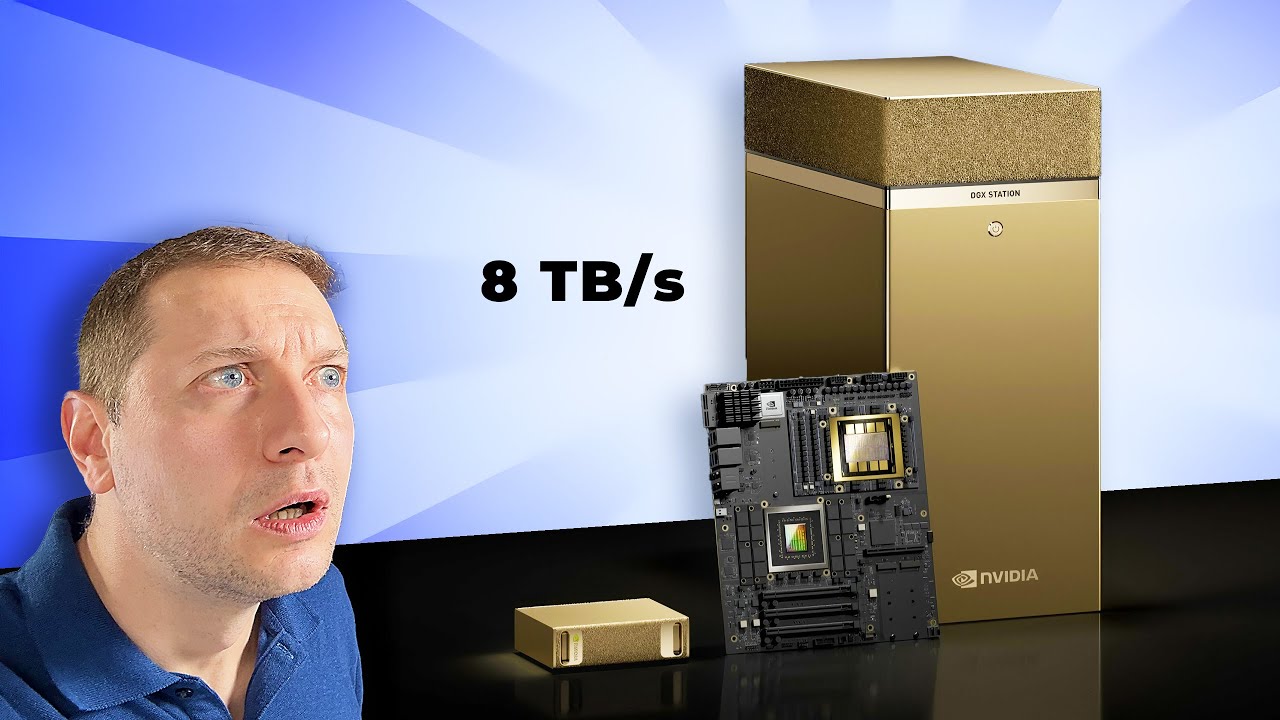
The NVIDIA DGX Spark is the only machine here that feels designed from the ground up around local AI rather than adapted to it. Its compact enclosure hides the important part: a GB10 Grace Blackwell chip with up to 1 petaFLOP of AI performance and 128GB of unified memory. That combination changes the ceiling for local experimentation. You are not simply adding an AI feature to a standard desktop. You are getting a small development machine intended for fine-tuning, inference, and analytics.
The 128GB memory pool is the headline specification because large models can become constrained by memory before they run out of ordinary processor capacity. NVIDIA says DGX Spark can work with models up to 200 billion parameters at FP4. That does not mean every model or workflow will behave identically, but it gives this system a much wider lane for local experimentation than the 32GB gaming systems in this roundup. The full NVIDIA AI software stack also matters for people who want a workflow that can move from local development toward deployment elsewhere.
Its physical design makes the hardware easier to place than the MSI Aegis R2 or MSI Codex R2. At 9.5 by 9.5 by 6 inches and about 2.65 pounds, it is a compact desk computer rather than a large tower. That matters when the machine is part of a development setup with monitors, storage, and other equipment. The trade-off is that the supplied details do not identify the usual desktop ports, expansion slots, or upgrade path, so conventional PC buyers should not assume it behaves like a tower.
The DGX Spark is far more specialized than the Dell Pro Tower Plus, which is the better fit for office applications and three-display work. It also is not the obvious choice for someone who wants a gaming machine with a discrete GeForce card. The MSI Aegis R2 gives you a broader mix of gaming and GPU-accelerated creative work, but it does not match the Spark's unified memory capacity or AI-first software design.
The weakness is specialization. People who mostly use browser assistants, Copilot, office software, and occasional image tools will not make good use of its unusual architecture. Developers working with large models, local inference, or repeatable AI experiments are the right audience. For those buyers, the NVIDIA DGX Spark is the clearest Best desktop for AI in this group.
2. MSI Aegis R2: Best Gaming Tower

Pros
- Intel Core Ultra 9 285 processor
- GeForce RTX 5070 Ti for GPU-assisted workloads
- 32GB DDR5 memory and 2TB M.2 NVMe SSD
- Four system cooling fans
- USB Type-C and VR-ready design
Cons
- Large 19 by 19.4 by 9.1 inch footprint
- Air cooling and multiple fans can be audible under load
- Windows 11 Home is less suited to managed business environments
Best for: buyers who want one tower for local AI tools, gaming, and demanding creative software.
The MSI Aegis R2 is the most balanced conventional desktop here for someone who wants AI capability without giving up gaming or general-purpose PC flexibility. Its Core Ultra 9 285 processor handles the broad desktop workload, while the GeForce RTX 5070 Ti supplies the kind of dedicated graphics hardware that many creative and AI applications can use. That makes it a more versatile buy than the highly specialized NVIDIA DGX Spark, even though the Spark remains the stronger AI development machine.
The 32GB of DDR5 memory gives the system room for heavy multitasking, and the 2TB M.2 NVMe SSD is a practical starting point for games, project files, applications, and model-related data. The listing does not specify the graphics card's memory capacity, so it would be a mistake to treat this as a replacement for a dedicated AI workstation with a large unified memory pool. Still, a discrete GeForce GPU gives the Aegis R2 a clear advantage over the integrated graphics in the Dell Pro Tower Plus and Lenovo ThinkCentre Neo 55s.
Cooling is a major part of the design. MSI pairs an RGB CPU air cooler with four system fans, with three at the front and one at the rear. That arrangement is intended to pull cool air through the chassis and exhaust warm air during gaming or sustained workloads. It is a sensible setup for a high-performance tower, though buyers who want a near-silent office computer should look first at the GEEKOM A7 MAX or a business-focused system.
The Aegis R2 is physically substantial at 19 inches high, 19.4 inches long, and 9.1 inches wide. It needs a proper tower location, not a narrow shelf. Its RGB lighting and MSI Center customization also make it visually louder than the restrained Dell and Lenovo desktops. That is a feature for a gaming desk and a distraction for a quiet office.
Compared with the renewed MSI Codex R2, the Aegis R2 has the stronger listed GeForce GPU and a new system configuration, while the Codex counters with the same memory capacity and a 2TB SSD. The Aegis R2 is the better pick when gaming and graphics performance matter first. It is the Best desktop for AI for a buyer who wants AI tools to share space with games, video work, and other GPU-heavy applications.
3. Dell Pro Tower Plus: Best Business Tower

Pros
- Core Ultra 7 265 with a 13 TOPS NPU
- 20-core processor with up to 5.3GHz turbo speed
- 32GB DDR5 memory and 1TB NVMe SSD
- Supports three simultaneous 4K displays
- Windows 11 Pro with BitLocker, Remote Desktop, and Hyper-V
Cons
- No built-in Wi-Fi
- No HDMI output
- 260W Bronze power supply limits the upgrade picture
Best for: professionals who need a secure Windows 11 Pro desktop and several high-resolution displays.
The Dell Pro Tower Plus is the sensible office pick for AI-assisted productivity. It does not have the dedicated graphics hardware of the MSI Aegis R2, but its Core Ultra 7 265 includes a 13 TOPS NPU, and its Windows 11 Pro feature set is much better suited to a managed work environment. This is the system to choose when AI means transcription, office automation, data analysis, local productivity features, and heavy multitasking rather than large-model experimentation.
The processor has 20 cores, 20 threads, a maximum turbo speed of 5.3GHz, and a 30MB cache according to the listing. Those numbers are relevant to workloads that move between many applications, particularly alongside 32GB of DDR5 memory. The 1TB PCIe NVMe SSD should keep startup and application loading responsive, while the included DVD-RW drive gives the tower an old-fashioned but useful option for legacy media and archival workflows.
Display support is unusually strong for an integrated-graphics business desktop. Three DisplayPort 1.4a outputs can drive three 4K displays at the same time. That is useful for dashboards, spreadsheets, development windows, and reference material. The limitation is equally clear: there is no HDMI output, so a monitor setup must use DisplayPort or an appropriate adapter.
Connectivity is otherwise generous, with two USB-C ports, several USB 3.2 ports, Gigabit Ethernet, and front and rear expansion for peripherals. There is no built-in Wi-Fi, so this desktop belongs on a wired network or needs a separate adapter. Windows 11 Pro adds BitLocker, Remote Desktop, domain join, and Hyper-V, features that separate it from the HP OmniStudio 27 and its Windows 11 Home installation.
The Dell cannot compete with the NVIDIA DGX Spark for large local models or the MSI Aegis R2 for graphics-heavy work. It is also less convenient than the Lenovo ThinkCentre Neo 55s if wireless networking is essential. For an office with wired Ethernet, several 4K screens, and a preference for professional Windows controls, the Dell Pro Tower Plus is the Best desktop for AI.
4. HP OmniStudio 27: Best All-in-One

Pros
- 27-inch FHD display in a single chassis
- Ryzen AI 7 445 processor
- 16GB DDR5 memory and 512GB NVMe SSD
- FHD IR camera with HDR auto switch
- AI noise reduction and Windows Hello support
Cons
- Integrated Radeon 840M graphics are not aimed at demanding local AI
- 16GB memory is less generous than the leading towers
- Windows 11 Home lacks the business controls of Dell's Pro system
Best for: home users who want a tidy all-in-one with built-in camera and AI-assisted communication features.
The HP OmniStudio 27 removes the mess that often comes with a desktop setup. The computer and display share one enclosure, so the buyer gets a 27-inch FHD screen without a separate monitor taking up another section of the desk. Its adjustable stand, built-in camera, and integrated audio make it especially easy to place in a home office or shared family workspace.
The Ryzen AI 7 445 processor is the reason this all-in-one belongs in an AI desktop roundup. The listing does not provide a TOPS figure for its AI engine, so there is no basis for comparing its raw AI throughput directly with the Dell's 13 TOPS NPU. What is clear is that HP positions the chip for advanced computing and pairs it with Microsoft Copilot in Windows 11 Home. The Radeon 840M graphics handle display output and everyday visual work, but this is not a discrete-GPU machine for serious local model workloads.
HP includes 16GB of DDR5 memory and a 512GB PCIe NVMe M.2 SSD. That is enough for ordinary multitasking, documents, video calls, browser work, and AI-assisted applications, but it gives less headroom than the 32GB systems in this list. The storage capacity also calls for some discipline if the desktop becomes a media or project archive. The 27-inch FHD panel is spacious for documents and side-by-side windows, though the listing does not specify a higher-resolution display.
The camera features are more useful than a generic AI label. The FHD IR camera has HDR auto switch for challenging backlight conditions and supports Windows Hello facial recognition. AI noise reduction is intended to filter background sound during conversations. Buyers who spend much of the day on calls may prefer this integrated approach, and our guide to keeping a home desktop setup clear on video calls covers the related placement decisions.
The HP is a poor match for anyone who needs a discrete GPU, a large memory pool, or extensive internal expansion. The Dell Pro Tower Plus is the stronger office workstation, while the GEEKOM A7 MAX is more flexible for compact multi-monitor work. The HP OmniStudio 27 remains the Best desktop for AI for a home user who values a clean desk, a large integrated screen, and built-in communication hardware more than maximum local model performance.
5. LOOI Desktop Companion: Best AI Companion

Pros
- ChatGPT voice interaction
- Gemini voice interaction listed
- Visual understanding through a vision-language model
- Short-term and long-term memory features
- 10W wireless charging
Cons
- This is a companion device, not a general-purpose desktop computer
- Voice interaction currently supports English only
- Requires a 9V/2A or higher adapter for wireless charging
Best for: people who want an expressive AI presence on the desk rather than a conventional computer for local models.
The LOOI Desktop Companion is the most important exception in this roundup. It is not a Windows desktop, mini PC, or workstation. It is a small AI companion designed to make conversation and visual interaction feel physical. Calling it a Best desktop for AI in the same sense as the NVIDIA DGX Spark would be misleading, but it does fit a reader searching for an AI-powered object that lives on a desk.
LOOI supports voice interaction with ChatGPT and Gemini, and the listing says it can recognize objects, interpret room layouts, understand multiple people, and respond to gestures and facial cues. Those capabilities point toward an interactive companion rather than a productivity appliance. Its 4.33 by 4.33 by 3.86 inch dimensions also make it easy to place beside a monitor, keyboard, or notebook.
Memory is part of the appeal. The device is described as having short-term memory for ongoing conversations and long-term memory for faces and identity notes. It can learn routines and preferences over time, while its animated expressions and autonomous behavior aim to make the interaction less predictable than a conventional voice assistant. That will be charming for some users and distracting for others.
The practical extras help it feel less like a novelty. LOOI includes reminders, weather, a standby clock, games, a face-tracking camera, and 10W wireless charging. The charging feature requires a 9V/2A or higher adapter, so the adapter requirement should be settled before treating it as a cable-free desk accessory. The listing also says voice interaction currently supports English only.
This device should not be compared directly with the GMKtec K15 or GEEKOM A7 MAX. Those mini PCs run ordinary desktop workflows and can connect to several displays. LOOI is for interaction, personality, and visual awareness. Buyers who want a computer should skip it, but readers building a playful AI desk setup will find it more distinctive than another small black box.
6. GMKtec K15: Best Expandable Mini PC

Pros
- Core Ultra 5 125U with Intel AI Boost
- 48GB DDR5 memory
- 1TB SSD with three M.2 2280 expansion slots
- OCuLink for an external GPU setup
- Four-display support and dual 2.5GbE ports
Cons
- Integrated graphics are not a substitute for a dedicated GPU
- OCuLink adds another component to an expanded setup
- The listing uses both Ryzen and Intel references in its cooling description
Best for: users who need a small desktop with substantial memory, storage expansion, and unusual networking options.
The GMKtec K15 is the mini PC to choose when a small enclosure should not mean a fixed configuration. Its Core Ultra 5 125U is a 15W processor with 12MB of L3 cache, up to 4.3GHz boost speed, and 14 threads according to the listing. The low-power design suits an always-ready desk computer, while Intel AI Boost gives it an AI accelerator for supported tasks.
The unusually strong part of the configuration is memory. The K15 includes 48GB of DDR5 4800MHz RAM, split across two 24GB SO-DIMMs. That gives it more multitasking room than the GEEKOM A7 MAX as supplied and more breathing space than the HP OmniStudio 27 or Lenovo ThinkCentre Neo 55s. The 1TB PCIe 4.0 SSD is also only the starting point because three M.2 2280 expansion slots are listed, with each slot supporting capacities up to 8TB.
Display and external expansion are equally ambitious. HDMI 2.1 supports 8K at 60Hz, DisplayPort 1.4 supports 4K at 60Hz, and USB-C supports data, power delivery, and DisplayPort functions. The system can drive four displays. OCuLink is the more interesting addition for AI enthusiasts because it provides a PCIe x4 connection for an external GPU setup, offering a route beyond the integrated graphics without turning the K15 into a full tower.
Networking is a strong point for technical users. Two 2.5GbE ports can support firewall, software routing, storage server, or network isolation projects, while Wi-Fi 6E and Bluetooth 5.2 handle ordinary wireless connections. The listing also describes dual cooling fans, heat pipes, and a 35dB quiet mode. Its cooling copy includes a Ryzen reference despite the Intel processor, so buyers should treat the stated acoustic figure as a product claim rather than a guarantee for every workload.
The K15 is more expandable than the GEEKOM A7 MAX, while the GEEKOM has the stronger listed CPU and Radeon 780M graphics. The MSI towers remain better for a built-in discrete GPU. For a small desk, a home lab, or a user who wants to grow storage and possibly attach external graphics, the GMKtec K15 is the most adaptable Best desktop for AI in mini PC form. Readers weighing compact systems can also compare how much expansion a small desktop really needs before choosing an enclosure.
7. WEWAHIVER AI Tracking Fan: Best AI Desk Accessory

Pros
- Tracks head movement from 20cm to 2m
- 150-degree horizontal tracking
- 200 airflow speed levels
- 5000mAh rechargeable battery
- USB-C operation and ambient lighting
Cons
- It is a desk fan, not an AI computer
- Tracking works best in daylight
- The listing does not specify fan runtime at each speed
Best for: a hot desk user who wants automated airflow while working at a computer.
The WEWAHIVER AI Tracking Fan is another category outlier, but its reason for appearing here is straightforward. It uses head movement tracking to follow the person sitting at the desk, rather than requiring repeated manual adjustment. It belongs beside a desktop, not underneath a monitor, and it addresses comfort during long computer sessions rather than AI computing.
The tracking range is listed as 20cm to 2m, with 150 degrees of horizontal movement. A press and hold activates tracking, while a single press controls oscillation. The daylight qualification matters because a camera-based tracking feature that works best in bright conditions will be less dependable in a dim office or bedroom.
Airflow control is unusually fine-grained. The fan has 200 adjustable speed levels and a digital display showing current wind speed and battery status. That allows small adjustments between a soft breeze and stronger cooling instead of forcing the user to choose from a few broad presets. At 1.32 pounds and about 5.91 by 7.99 by 4.41 inches, it should fit on a desk without competing with a full-size tower.
The 5000mAh battery supports cordless use, and the listing claims six to eight hours of operation with a two to three hour charge time. USB-C operation also lets it draw power from a laptop, power bank, or car charger. An ambient light feature changes color for low-light use, though buyers who find desk lighting distracting may prefer to switch it off.
There is no honest comparison between this fan and any of the actual computers above. The Dell Pro Tower Plus and Lenovo ThinkCentre Neo 55s are designed for work, while this accessory only improves the environment around them. Skip it if you are looking for an AI machine. Choose it if your Best desktop for AI setup already exists and staying cool is the problem.
8. Lenovo ThinkCentre Neo 55s: Best Small Business Desktop

Pros
- Ryzen 7 250 with eight cores and 16 threads
- Up to 5.10GHz maximum boost speed
- HDMI 2.1 and DisplayPort 1.4
- Supports expanded multi-display setups
- Includes wired keyboard, mouse, Wi-Fi, and Windows 11 Pro
Cons
- 16GB memory and 512GB storage leave less headroom
- No dedicated graphics processor is listed
- Original seal was opened for upgrades
Best for: small offices that need a compact Windows 11 Pro desktop with familiar connectivity.
The Lenovo ThinkCentre Neo 55s makes a strong case for the compact business desktop. Its small-form-factor enclosure is 13.24 inches long, 10.83 inches high, and only 3.5 inches wide, so it fits where the Dell Pro Tower Plus cannot. It also includes wired keyboard and mouse, Wi-Fi, and Windows 11 Pro, which keeps the initial office setup uncomplicated.
The Ryzen 7 250 has eight cores, 16 threads, a 16MB cache, and a maximum boost speed of 5.10GHz. Those are useful foundations for office multitasking, browser applications, coding environments, and AI-assisted software that does not require a dedicated graphics card. The 16GB of DDR5 memory is adequate for ordinary work, though developers with large datasets or many virtual machines should look toward the Dell's 32GB or the GMKtec K15's 48GB.
Lenovo provides HDMI 2.1 and DisplayPort 1.4, and the listing describes support for multiple 4K displays. The port selection also includes front USB-C, two front USB-A ports, four rear USB-A ports, audio connections, and Ethernet. That makes it easier to build a practical dual-screen office than the HP OmniStudio 27, though the HP includes its display and camera in the same chassis.
The configuration has an unusual history. The original seal was opened for upgrade work, and PCOnline US covers the upgraded RAM and SSD for one year while the remaining components retain their manufacturer's coverage. That is not automatically a problem, but buyers who want a factory-sealed system should understand the distinction. The included 64GB A-DATA USB flash drive is a useful bundle item, though it does not change the desktop's core performance.
The Lenovo is less powerful than the MSI Aegis R2 and less expandable in the supplied information than the GMKtec K15. It is a better office fit than either if small dimensions, Wi-Fi, and Windows 11 Pro matter most. For routine AI-assisted work and a tidy small-office installation, it is the Best desktop for AI among the compact business choices.
9. MSI Codex R2: Best Renewed AI Gaming PC

Pros
- Core Ultra 7 265K processor
- GeForce RTX 5060 with 8GB graphics memory
- 32GB DDR5 6000 memory
- 2TB M.2 NVMe Gen4 SSD
- Suitable mix of gaming and general desktop hardware
Cons
- Renewed condition requires closer attention to coverage
- RTX 5060 is below the Aegis R2's listed GPU tier
- Windows 11 Home is less suited to managed business use
Best for: buyers who want a conventional gaming tower with a discrete GPU and ample storage.
The MSI Codex R2 is the straightforward GPU desktop in the second half of this list. Its Core Ultra 7 265K processor, 32GB of DDR5 6000 memory, 2TB M.2 NVMe Gen4 SSD, and GeForce RTX 5060 with 8GB graphics memory give it a familiar performance shape for gaming, creative applications, and AI tools that use NVIDIA graphics acceleration.
The 8GB graphics memory is the detail to focus on for local AI. It offers a dedicated space for GPU workloads, but it cannot approach the 128GB unified memory in the NVIDIA DGX Spark. Model size, precision, and application support will determine what is practical. The MSI is better understood as a general PC with useful AI hardware, not a specialized model-development workstation.
The 2TB Gen4 SSD is generous for a desktop in this group. It gives room for games, creative files, applications, and local project data without immediately relying on external storage. The 32GB DDR5 6000 configuration also matches the Dell Pro Tower Plus on capacity, while its faster listed memory specification and discrete GPU make it more appealing for graphics-led work.
The main caveat is condition. This listing identifies the Codex R2 as renewed, so the buyer should review the available coverage and condition details before ordering. That matters more here than with a new tower because a desktop can have a history that is not visible in a specification list. Windows 11 Home also makes it less attractive for organizations that need the security and management features in Dell's Windows 11 Pro setup.
The MSI Aegis R2 is the stronger choice for buyers who want the higher listed GeForce tier and a new gaming-oriented configuration. The Codex R2 makes more sense when its 2TB storage, 8GB graphics memory, and Core Ultra 7 265K combination fit the workload. It is a capable Best desktop for AI for a buyer who wants GPU acceleration without stepping up to a specialized workstation.
10. GEEKOM A7 MAX: Best Quiet Mini PC

Pros
- Ryzen 9 7940HS with eight cores and 16 threads
- Radeon 780M integrated graphics
- Dual USB4 and dual HDMI outputs for four displays
- Dual 2.5G LAN ports
- 16GB DDR5 and 1TB NVMe Gen4 SSD
Cons
- Supplied memory is lower than the GMKtec K15
- Integrated graphics cannot match the MSI towers' discrete GPUs
- Several performance claims depend on workload and software support
Best for: users who want a quiet, compact multitasking computer with four-display support.
The GEEKOM A7 MAX is a polished alternative to a traditional tower when desk space and noise matter. Its aluminum mini PC enclosure measures 5.47 by 5.2 by 1.71 inches, making it dramatically smaller than the MSI gaming desktops and slimmer than the GMKtec K15. The Ryzen 9 7940HS gives it a serious processing base for office work, content creation, and multitasking.
The processor has eight cores, 16 threads, and boost speeds up to 5.2GHz. GEEKOM also pairs it with Radeon 780M graphics and says its Ryzen AI hardware can help with 4K video editing in DaVinci Resolve or Premiere Pro. The graphics are integrated, so this is not the right choice for large GPU-dependent local models, but it is more capable for visual work than the business desktops that rely on basic integrated graphics.
The supplied configuration includes 16GB of DDR5 memory, with dual slots and support for expansion up to 128GB according to the listing. Storage starts with a 1TB M.2 NVMe Gen4 x4 SSD and can be upgraded to 4TB, while a UHS-II SD card slot supports cards up to 2TB. That upgrade route makes the A7 MAX more useful to creators than a sealed all-in-one.
Connectivity is a highlight. Two USB4 ports and two HDMI 2.0 outputs can support four displays, and the USB4 ports support data, display, and power functions. Dual 2.5G LAN ports support network isolation, NAS use, failover, and software routing. The IceBlast 2.0 cooling system uses dual copper heat pipes and a quiet fan, with GEEKOM listing operation under 36dB.
The GMKtec K15 has more memory out of the box, three M.2 expansion slots, OCuLink, and HDMI 2.1. The GEEKOM counters with the stronger Ryzen 9 processor, Radeon 780M graphics, four-display support through a clean USB4 and HDMI arrangement, and a stated three-year coverage period. Readers who are building a small workstation should also consider how much room compact computers leave for future upgrades.
The A7 MAX is not a substitute for the NVIDIA DGX Spark or MSI Aegis R2 when local AI performance is the central requirement. It is the Best desktop for AI for a quiet, compact workspace where AI-assisted applications share time with video editing, office multitasking, and multi-monitor work.
How to choose best desktop for ai
Start with the workload, not the AI label. A desktop for local model development needs very different hardware from one intended for Copilot, video calls, and AI-assisted office applications.
AI memory and graphics
Memory determines how much data and how large a model the system can keep available at once. The NVIDIA DGX Spark stands apart with 128GB of unified memory, while the GMKtec K15 provides 48GB of DDR5 and the gaming towers provide 32GB.
A discrete NVIDIA GPU can help applications that use CUDA or other supported acceleration, but graphics memory is not interchangeable with ordinary system memory. The MSI Aegis R2 and MSI Codex R2 are the obvious graphics-focused picks. Integrated graphics and an NPU are more appropriate for lighter AI functions, productivity acceleration, and supported creative tools.
For local AI, memory capacity sets the ceiling before processor speed becomes the deciding factor.
Processor and NPU
Look for the processor family, core count, boost speed, and whether an NPU or other AI accelerator is listed. Dell identifies a 13 TOPS NPU in the Core Ultra 7 265, while the GMKtec K15 identifies Intel AI Boost and HP uses a Ryzen AI 7 445.
An NPU can handle supported low-power AI tasks efficiently, but it does not automatically make a desktop suitable for large local language models. CPU cores remain important for preprocessing, multitasking, compilation, and applications that do not use the NPU.
Memory and storage expansion
A desktop with 16GB of memory can handle ordinary office work, but 32GB or more is preferable for heavier multitasking and local experimentation. The GMKtec K15 supports three M.2 2280 drives, and the GEEKOM A7 MAX has dual memory slots, a replaceable M.2 drive, and an SD card slot.
The NVIDIA DGX Spark is more specialized and its supplied information does not detail conventional upgrade options. Tower desktops usually provide more physical room, though the Dell's 260W Bronze power supply is a reminder that a large case does not guarantee unlimited expansion.
Graphics and workload support
Choose a discrete GPU when gaming, 3D work, video effects, or GPU-accelerated AI applications are central. The MSI Aegis R2 has a GeForce RTX 5070 Ti, while the MSI Codex R2 has a GeForce RTX 5060 with 8GB graphics memory.
The Radeon 780M in the GEEKOM A7 MAX is useful for integrated graphics work and supported video applications, but it is not equivalent to a discrete RTX card. The Dell, Lenovo, and HP are better suited to office and communication tasks than to graphics-heavy local AI.
Display and desk layout
A desktop may be powerful but awkward if it cannot connect to the screens you already use. Dell supports three 4K displays through DisplayPort, Lenovo provides HDMI 2.1 and DisplayPort, and the GMKtec K15 and GEEKOM A7 MAX support four displays through combinations of HDMI, DisplayPort, and USB4.
Check the connector type before ordering. Dell has no HDMI output and no built-in Wi-Fi, while the HP OmniStudio 27 solves the display question by integrating the 27-inch screen into the computer.
Operating system and support
Windows 11 Pro adds BitLocker, Remote Desktop, domain join, and Hyper-V on the Dell and Lenovo systems. Windows 11 Home is sufficient for many personal setups but is less suited to managed business environments.
Condition and coverage also matter. The MSI Codex R2 is listed as renewed, Lenovo's seal was opened for upgrades, and the GEEKOM A7 MAX lists three-year coverage. Those details should shape the buying decision alongside processor and memory specifications.
Frequently asked questions
What is the best desktop for AI development?
The NVIDIA DGX Spark is the strongest fit for serious local AI development because it combines the GB10 Grace Blackwell architecture, up to 1 petaFLOP of AI performance, 128GB of unified memory, and an NVIDIA AI software stack. It is far more specialized than a conventional Windows tower.
Is a gaming desktop good for AI?
A gaming desktop can be a good AI machine when the software supports its discrete GPU. The MSI Aegis R2 and MSI Codex R2 both pair Intel processors with NVIDIA GeForce graphics, making them more suitable for GPU-assisted workloads than desktops with only integrated graphics.
How much memory does an AI desktop need?
The right amount depends on the model and application. The 128GB in the NVIDIA DGX Spark is intended for unusually large local models, while 32GB is a stronger general-purpose starting point for multitasking and supported AI applications than 16GB.
Are mini PCs suitable for AI work?
Mini PCs are suitable for AI-assisted productivity, coding, content creation, and smaller local workloads. The GMKtec K15 is the most expandable mini PC here, while the GEEKOM A7 MAX offers a faster listed Ryzen processor, Radeon 780M graphics, and four-display support.
Should I choose an NPU or a dedicated GPU?
An NPU is useful for supported low-power AI functions and can reduce the workload on the CPU. A dedicated GPU is the better choice for applications that use GPU acceleration, gaming, 3D work, and some local model workloads. The NVIDIA DGX Spark uses a specialized AI architecture rather than fitting neatly into that basic NPU versus GPU choice.
Is an all-in-one desktop suitable for AI?
An all-in-one can suit everyday AI-assisted work, calls, writing, and productivity. The HP OmniStudio 27 has a Ryzen AI 7 445, a 27-inch FHD display, AI noise reduction, and an FHD IR camera, but its integrated Radeon 840M graphics and 16GB memory make it less suitable for demanding local model work.
Can these desktops run large language models locally?
The NVIDIA DGX Spark is specifically designed for large local AI experimentation and is listed as supporting models up to 200 billion parameters at FP4. The other desktops may run smaller models or supported AI applications, but their practical limits depend on system memory, graphics memory, model format, and software compatibility.
The bottom line
The Best desktop for AI is the NVIDIA DGX Spark when local model development, fine-tuning, and inference are the priority. Its 128GB unified memory and AI-first Grace Blackwell design put it in a different class from ordinary towers. For a broader computer that can handle games and GPU-assisted creative work, the MSI Aegis R2 is the better all-purpose choice.
For office AI and multi-display productivity, choose the Dell Pro Tower Plus. For a compact setup, the GMKtec K15 offers the strongest expansion story, while the GEEKOM A7 MAX is the quieter mini PC with the more powerful listed Ryzen platform.
If you are undecided, match the machine to the largest AI workload you genuinely expect to run, then buy the smallest and simplest system that can handle it.
As an Amazon Associate we earn from qualifying purchases.