

A paper notebook is wonderfully simple until you need to search a meeting note, mark up a PDF, or remember which page contains the idea you had three weeks ago. The Best digital notebook options solve that problem in very different ways. Some are focused E Ink writing tablets, some are full Android devices, and others keep real paper while copying every stroke to a phone.
We ranked these 10 products by how well their writing experience, software, portability, document tools, and meeting features fit the job. The Amazon Kindle Scribe 64GB is our top pick, while the list also includes strong choices for AI transcription, distraction-free writing, drawing, and phone-based syncing.
Comparison table
| # | Product | Award | Display or paper system | Pen input | Storage or sync | Best for |
|---|---|---|---|---|---|---|
| 1 | Amazon Kindle Scribe 64GB | Best overall | 11-inch glare-free display | Premium Pen, pressure-sensitive | 64GB | Reading and writing in one device |
| 2 | Amazon Kindle Scribe 16GB | Best established option | 10.2-inch, 300 ppi front-lit display | Premium Pen | 16GB | Kindle readers who annotate |
| 3 | reMarkable Paper Pure | Best distraction-free design | 10.3-inch black-and-white display | Marker | App and plugin sync | Focused handwriting |
| 4 | reMarkable Paper Pure Marker Plus | Best complete reMarkable set | 10.3-inch black-and-white display | Marker Plus | App and plugin sync | Writing with a folio |
| 5 | XPPen Magic Note Pad | Best Android color tablet | 10.95-inch LCD, 90Hz | X3 Pro Pencil 2 | 128GB, cloud options | Color notes and Android apps |
| 6 | Penstar eNote2 | Best large E Ink workspace | 10.3-inch E Ink | 8, 192 pressure levels | 128GB | Reading and split-screen notes |
| 7 | iFLYTEK AINOTE Air 2 | Best meeting transcription | 8.2-inch E Ink | 4, 096 pressure levels | App-based AI tools | Multilingual meetings |
| 8 | HUION Note E | Best compact Android option | 8.4-inch LCD, 1920 x 1200 | 8, 192 pressure levels | 128GB, cloud backup | Portable color note-taking |
| 9 | HUION Note | Best paper-to-phone system | A5 refillable notepad | Battery-free pen | Bluetooth 5.0, mobile app | Keeping real paper |
| 10 | Ophayapen Smart Pen | Best smart pen setup | 60-sheet paper notebook | Smart pen | Bluetooth, iOS and Android | Real-time phone capture |
1. Amazon Kindle Scribe 64GB: Best Overall

Pros
- Spacious 11-inch paper-like writing surface
- Front light adapts to changing rooms
- Fast writing and page turns
- Works with books, documents, and notebooks
- Pen needs no charging
Cons
- Less flexible than an Android tablet
- E Ink is not suited to colorful, fast-moving content
- The larger format is not the smallest option for commuting
Best for: readers and note-takers who want one focused device for books, documents, and handwriting.
The Amazon Kindle Scribe 64GB is the easiest device here to recommend to someone who wants to replace a stack of notebooks without turning their writing tool into another distracting tablet. Its 11-inch display gives handwriting and document markup enough room to feel deliberate, while the Kindle software keeps the experience centered on reading and writing instead of notifications and app switching.
The display is glare-free and paper-like, with a front light that automatically adjusts brightness. It also lets you change warmth for evening reading. That combination matters more than a long feature list: you can write beside a window, read in a dim room, or annotate a document without the glossy reflections common on LCD tablets. The screen is 11 inches, yet the device is only 5.4mm thick and weighs 400g, so it is unusually easy to hold for a large writing surface.
The included Premium Pen has an eraser and a shortcut button for tools such as the highlighter. It never needs charging, which removes one of the small but persistent annoyances of digital writing. Amazon also claims writing and page turns are 40% faster than the previous model. The practical effect is a more immediate page-turning and note-taking rhythm, though it remains an E Ink reader rather than a fast general-purpose tablet.
This Scribe is particularly strong when your notes live alongside reading. Active Canvas creates room for notes on book pages, and margins can expand or collapse so annotations do not permanently obscure the original text. Files can arrive through Google Drive or Microsoft OneDrive, and marked-up documents can be exported as PDFs or sent to Microsoft OneNote. If your workflow depends heavily on OneNote, the way cloud notebooks move between devices deserves a closer look before you choose.
Its main weakness is the same thing that makes it pleasant: the closed environment. You do not get the broad Android app library or the color flexibility of the XPPen Magic Note Pad. The 64GB model is also more capacity than many simple note-takers need. Choose it if reading, document review, and focused handwriting matter most. Skip it if you want drawing apps, rich media, or a tablet that behaves like a small computer.
2. Amazon Kindle Scribe 16GB: Best Established Option

Pros
- 10.2-inch glare-free display
- Sharp 300 ppi text
- Built-in handwriting tools and summaries
- Excellent Kindle reading integration
- Weeks of writing and months of reading
Cons
- Less writing room than the newer 11-inch model
- Smaller storage ceiling
- Limited app ecosystem
Best for: Kindle users who want handwritten notes, document markup, and book annotations in one familiar device.
The Amazon Kindle Scribe 16GB remains a sensible digital notebook for readers who think in the margins. It is not trying to be an iPad substitute. Instead, it gives you a calm, glare-free surface for books, PDFs, and handwritten notebooks, with enough built-in organization to keep those three activities connected.
Its 10.2-inch display uses 300 ppi resolution, which keeps book text and fine pen marks crisp. The front light makes it usable in low light, while the glare-free surface remains comfortable outdoors. The slightly smaller panel than the newer Kindle Scribe 64GB gives up some room for large documents, but it still feels much closer to a sheet of paper than a phone-sized reader.
The Premium Pen is ready without charging and supports the central writing functions. Amazon's built-in AI notebook tools can turn handwriting into typed text, summarize notes, and change their length and tone. Those functions are more useful after a meeting or brainstorming session than during one, when the priority is getting ideas down quickly. The device also supports direct PDF markup through Send to Kindle.
Active Canvas is the standout reading feature. Start writing on a Kindle book's page and the text can make room for your note. You can expand the margins for a longer thought and collapse them when you want to return to the original page. It is a more natural reading workflow than exporting a document to another app. Readers who want to compare different tablet-style approaches can also consider how a larger writing screen changes note-taking habits.
The compromise is capacity and flexibility. The 16GB model has less room than the 64GB Kindle Scribe, and neither model offers the open app ecosystem found on Android hardware. The newer Scribe also has a larger display, faster writing and page turns, and a thinner, lighter design. Pick this version if Kindle books are central to your routine and you prefer a proven reading-first interface. Choose the newer model when document space and long-term capacity matter more.
3. reMarkable Paper Pure: Best Distraction-Free Design

Pros
- Uncluttered writing interface
- 10.3-inch black-and-white display
- 21ms digital ink response
- Handwriting conversion and document markup
- Folders and tags help organize work
Cons
- Black-and-white display
- Fewer general-purpose tablet functions
- The basic Marker bundle lacks the Marker Plus extras
Best for: writers, students, and professionals who want a quiet place to think without social apps or notifications.
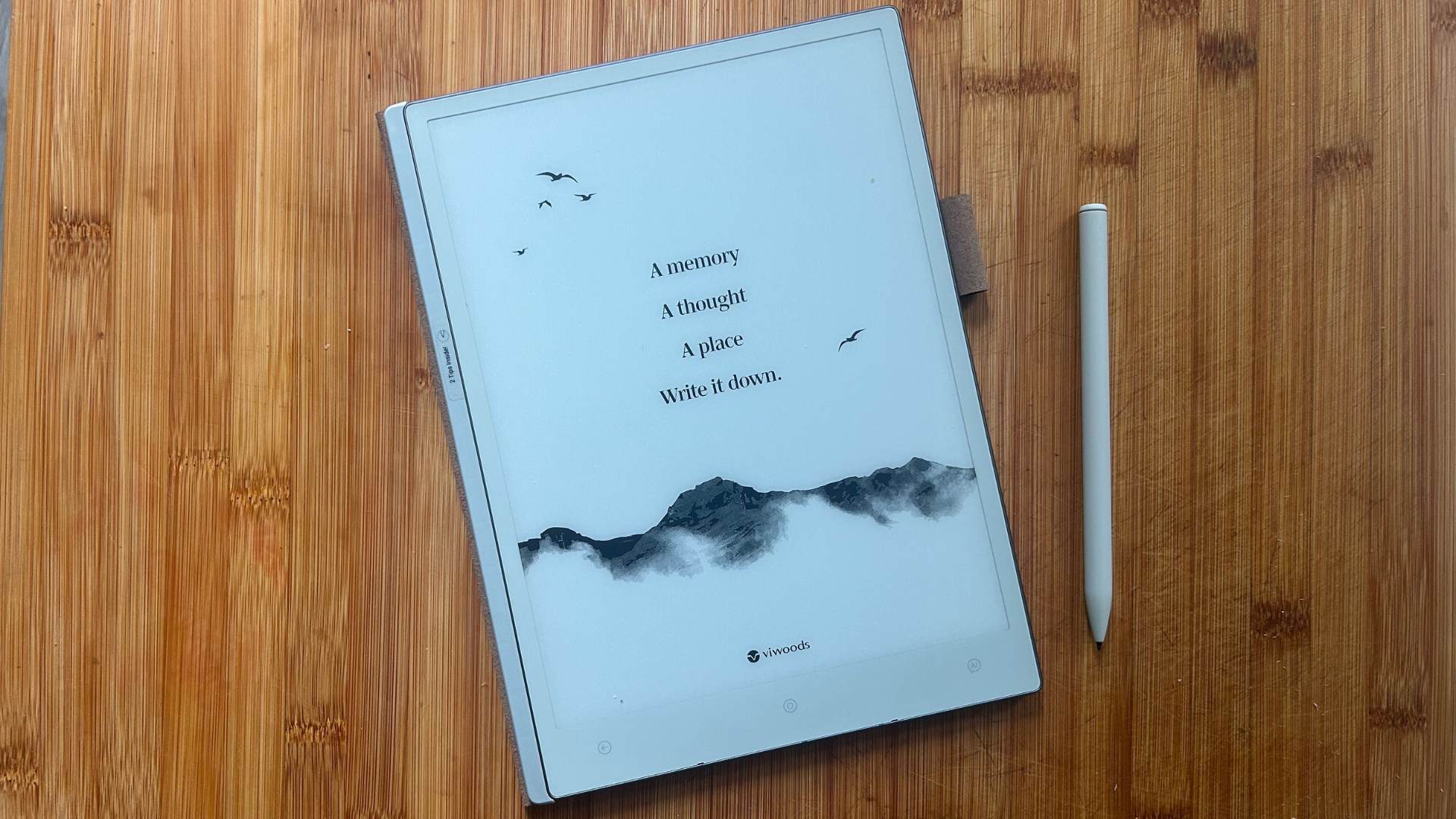
The reMarkable Paper Pure has the clearest point of view in this roundup. It is built to remove friction between thought and handwriting. Turn it on, choose a notebook or document, and start writing. There is no attempt to compete with a full tablet, and that restraint is precisely why it works for people who find general-purpose devices distracting.
Its third-generation 10.3-inch display is black and white, with improved whiteness and contrast. Digital ink appears in 21ms, which should make pen strokes feel immediate rather than visibly trailing the Marker. The screen is large enough for PDFs and sketches without becoming cumbersome, and the 0.79-pound listed weight makes it one of the more comfortable choices to carry or hold for longer writing sessions.
The software provides dozens of templates, folders, and tags. Handwritten notes can be turned into text, while documents and PDFs can be marked up directly. The reMarkable apps and plugins support sending material from Google Drive, Dropbox, Microsoft Word, and other services. Finished notes can be shared by email, which keeps the path from handwritten thought to a usable document straightforward.
Compared with the Amazon Kindle Scribe 64GB, the Paper Pure is less capable as a reading platform but more focused as a writing surface. Compared with the HUION Note E, it gives up color, Android apps, and a higher-resolution LCD, yet its simpler interface is less likely to pull you away from the page. The Marker bundle is also more basic than the Marker Plus package, so the companion reMarkable option is worth considering if you want a fuller carry setup.
There are clear reasons to skip it. The absence of color makes it less suitable for color-coded study notes, illustrations, or documents where color carries meaning. It also is not the right tool for browsing, video, or app-heavy workflows. For someone who wants a digital version of a quiet writing desk, however, this is one of the most coherent products here.
4. reMarkable Paper Pure Marker Plus: Best Complete reMarkable Set

Pros
- Same responsive 10.3-inch writing display
- Marker Plus included
- Sleeve folio included
- Clean interface for notes and documents
- Strong folder and tag organization
Cons
- Still limited to black-and-white content
- No broad tablet app ecosystem
- Folio bundle adds bulk when you want the lightest setup
Best for: people who want the focused reMarkable experience with the more complete pen and protection setup included.
The reMarkable Paper Pure Marker Plus is the same kind of focused writing instrument as the standard Paper Pure, but the bundle makes more sense for someone buying a complete setup from the start. The Marker Plus and sleeve folio remove two decisions that otherwise come later, while the core tablet retains the same uncluttered approach.
The 10.3-inch third-generation display is designed for black-and-white writing, reading, and sketching. Its improved contrast helps the page look cleaner, and the 21ms ink response keeps handwriting from feeling disconnected from the pen. There is no front light or color layer listed here, so this is a device for rooms and routines where you can supply the lighting yourself.
The useful features are organizational rather than flashy. Templates provide structure for meeting notes, planners, sketches, and freeform pages. Tags and folders make older work easier to find, and handwriting conversion can turn a page into editable text. Documents and PDFs can move through the reMarkable apps and plugins from services such as Google Drive, Dropbox, and Microsoft Word.
The Marker Plus package is a better fit than the standard reMarkable Paper Pure when you want the protective sleeve included and prefer the upgraded pen experience. It still falls behind the Amazon Kindle Scribe 16GB for reading books, front lighting, and Kindle integration. It also lacks the color and Android flexibility of the XPPen Magic Note Pad, but the reMarkable interface is much less busy.
The limitation is not hidden: this is a deliberately narrow tool. You cannot treat it like an Android tablet, and black-and-white pages will frustrate anyone who relies on colored diagrams or highlights. It is also worth remembering that the folio changes the carry experience, even though the tablet itself weighs about 0.79 pounds. Choose this package when your priority is a polished writing system rather than a do-everything screen.
5. XPPen Magic Note Pad: Best Android Color Tablet

Pros
- 10.95-inch color display
- 90Hz refresh rate
- Android 14 and Google Play access
- 16, 384 pressure levels
- Strong meeting hardware
Cons
- LCD is not E Ink
- Narrow viewing angle works best from the front
- Android multitasking should be kept modest
Best for: students and professionals who need color, Android apps, cameras, and a more conventional tablet experience.
The XPPen Magic Note Pad is the outlier in this group because it is not an E Ink device at all. It is a normal Android tablet with a paper-like LCD treatment. That distinction matters. It can show color, run Google Play apps, handle video calls, and scroll smoothly, but it will look and behave differently from the Kindle and reMarkable models.
The 10.95-inch AG nano-etched display uses TCL NXTpaper 3.0 technology and is designed to reduce ambient light interference. It supports 16.7 million colors, 400 nits of brightness, and a 90Hz refresh rate. The faster refresh rate helps page movement, app scrolling, and general navigation feel more fluid than on an E Ink tablet. The tradeoff is that the LCD surface still emits light, even with TÜV SÜD low-blue-light and paper-like display certifications.
The X3 Pro Pencil 2 offers 16, 384 pressure levels, a soft nib, magnetic attachment, and a shortcut key. Those pressure levels are useful for varied line weight and color depth, especially when notes turn into diagrams or sketches. The native XPPen Notes app supports handwriting conversion, audio recording, PDF import and editing, multiple brushes, automatic saving, and cloud uploads to OneDrive or Google Drive. A system upgrade unlocks MyScript Notes and MyScript Math features, including recognition across 66 languages and handwritten equation tools.
The tablet also has an 8000mAh battery, a 20W charger, 128GB of storage, Android 14, a 13-megapixel front camera, two speakers, and two microphones. At 495g and 7mm thick, it is reasonably portable for a large tablet and better equipped for remote meetings than the focused E Ink products. Anyone deciding between this and a more conventional slate should think about how screen size affects a note-taking setup rather than assuming every paper-like display works the same way.
The biggest weakness is the viewing angle. The etched glass is designed to limit glare and scattering, but the listing specifically recommends viewing it from the front because of the narrow-angle design. It is also not ideal to run many apps at once. Pick it over the Kindle or reMarkable when color, Android software, and video meetings are essential. Skip it if your main goal is the calmest possible E Ink writing experience.
6. Penstar eNote2: Best Large E Ink Workspace

Pros
- Clear 10.3-inch E Ink display
- 8, 192 pressure levels
- Split-screen reading and note-taking
- 128GB storage
- Large 6, 500mAh battery
Cons
- Heavier than the lightest picks
- Less established software ecosystem
- E Ink is not suited to fast tablet-style content
Best for: readers who want a generous E Ink page, extensive local storage, and note-taking beside books or PDFs.
The Penstar eNote2 is aimed at people who want their library and their handwritten work on one broad E Ink surface. Its most appealing quality is not a single AI feature. It is the combination of a large page, a display intended to look clean in sunlight, and enough storage to keep a substantial collection of notes and documents close at hand.
Penstar says the screen removes the capacitive touch layer to reduce haze and refraction. That should help text look whiter and blacks look stronger than on a hazier E Ink panel. The 10.3-inch display is paired with an updated pen system offering 8, 192 pressure levels and reduced latency. The pen can be used on books and PDFs, so the device is more than a blank notebook.
The software includes split-screen reading and notes, voice-to-text, handwriting conversion, summaries, folders, and tags. Split-screen is especially useful for study: reference material can remain visible while you write, rather than forcing repeated page changes. The 128GB storage gives room for documents and books, while the 6, 500mAh battery supports the portable, low-maintenance character expected from an E Ink reader.
At 409g and 5.5mm thick according to the feature listing, it is slim for its screen size. The bundle includes a stylus, spare marker tips, a magnetic folio cover, a charging cable, and a quick start guide. The listed product dimensions and weight fields are less consistent with those feature claims, so buyers who care about exact carry weight should verify the current listing details before ordering.
The Penstar is more expansive than the reMarkable Paper Pure, with voice tools and split-screen functions, but the reMarkable software feels more clearly defined. The Amazon Kindle Scribe 64GB remains the stronger choice for Kindle books and established document workflows. Choose Penstar if screen area, storage, and split-screen reading are the priorities. Avoid it if you want the most polished ecosystem or a lighter, simpler writing device.
7. iFLYTEK AINOTE Air 2: Best Meeting Transcription

Pros
- Real-time voice-to-text features
- Transcribes 17 languages
- Converts handwriting into 83 languages
- AI meeting summaries and planning tools
- Paper-like 8.2-inch E Ink screen
Cons
- Smaller writing surface
- AI features may matter less for solo writers
- Less general reading flexibility than larger devices
Best for: multilingual meetings, lectures, and professionals who want notes turned into searchable action items.
The iFLYTEK AINOTE Air 2 is the specialist in this roundup. Its reason to exist is not simply to imitate paper. It is designed to listen, transcribe, translate, summarize, and turn notes into tasks. That makes it a more focused meeting tool than the Kindle Scribe or reMarkable models, even though its 8.2-inch page is less comfortable for long documents.
The E Ink display is compact and the writing system supports 4, 096 pressure levels with near-zero latency. That should be enough for normal handwriting and annotation, while the smaller footprint makes the device easier to place beside a laptop or carry into a meeting. The included folio case adds protection without changing the central paper-like workflow.
The standout feature is language support. The device can transcribe speech in 17 languages and convert handwriting to text in 83 languages. It also offers multilingual translation, ChatGPT-supported meeting summaries, schedule management, and automatic to-do lists. Those tools can reduce the work that usually happens after a meeting, when rough notes need to become a clean summary with assigned actions.
The smaller display is the price of that portability. The Penstar eNote2 and both Kindle Scribe models provide more room for documents and extended handwriting. The XPPen Magic Note Pad is a better choice for color, apps, and video calls. Choose AINOTE Air 2 when language handling and meeting capture are central, not as a general replacement for every screen in your bag.
It also deserves a little caution around AI workflows. Transcription and summaries are useful aids, but important meeting details still need review. Someone who mostly writes private notes may find its specialist tools excessive. For students attending multilingual lectures, international teams, healthcare conversations, and other speech-heavy settings, it is the most targeted option here.
8. HUION Note E: Best Compact Android Option

Pros
- Compact 8.4-inch Android tablet
- 1920 x 1200 resolution
- 8, 192 pressure levels and over 400 PPS
- 128GB storage and 6GB RAM
- Cloud backup and handwriting conversion
Cons
- Smaller page than full-size writing tablets
- LCD display is not E Ink
- The compact format may feel tight for large PDFs
Best for: commuters and mobile workers who want Android features, color, and handwriting in a smaller package.
The HUION Note E takes the Android tablet route while keeping handwriting at the center. Its 8.4-inch size is easier to slip into a smaller bag than the 11-inch models, and the streamlined startup interface is intended to get you into a note or task list quickly. It is a good fit for someone who moves between rooms, trains, classrooms, and client meetings rather than working at one desk.
The LCD has 1920 x 1200 resolution, 270 ppi pixel density, a 60Hz refresh rate, and 300 nits of brightness. HUION adds AG nano-etching, full lamination, DC dimming, and soft-light features to reduce reflections and blue-light exposure. The display supports 16.7 million colors, so diagrams, highlights, and ordinary Android content have more range than they do on a black-and-white E Ink device.
The battery-free magnetic pen uses PenTech 3.0, 8, 192 pressure levels, and a report rate above 400 PPS. You do not need to charge or pair it, and the pressure response should cover everything from light annotations to bolder sketches. The device also supports handwriting conversion in 34 languages, PDF and document annotation, and portrait or landscape use.
HUION gives the Note E 6GB of RAM, 128GB of storage, an 8-core processor, and a 4500mAh battery with 18W fast charging. Notes can back up to Google Drive, OneDrive, or Dropbox, and the software can turn quick notes into tasks with priorities, deadlines, recurring reminders, and shareable PDF, video, JPG, or HUION files. That is a broader productivity package than the reMarkable Paper Pure, though it comes with a busier tablet environment.
The compromise is page size. An 8.4-inch screen is portable, but large PDFs and handwritten diagrams will feel more constrained than on the Amazon Kindle Scribe 64GB or XPPen Magic Note Pad. It also uses an LCD rather than E Ink, so readers seeking a reflective paper display should look elsewhere. Pick it for compact Android productivity and color note-taking, especially if cloud backup is part of your routine.
9. HUION Note: Best Paper-to-Phone System

Pros
- Keeps the feel of an ordinary A5 notebook
- Captures handwriting through the mobile app
- Audio syncs with written notes
- Refillable paper format
- Can work as a drawing tablet
Cons
- Requires a phone or tablet for the digital view
- Not a standalone display
- Mobile app workflow is less immediate than an all-in-one tablet
Best for: people who want genuine paper in hand while automatically keeping a digital copy on a mobile device.
The HUION Note takes a different approach from every screen-based notebook here. You write on a regular A5 notepad with a digital pen, and the companion app captures the strokes as vector lines. The page feels like paper because it is paper. There is no display to glare, no E Ink refresh behavior, and no need to change the way you write.
The app transfers writing to an iOS or Android mobile device through Bluetooth 5.0. Notes can be organized by merging, splitting, moving, and grouping pages, then shared as images, PDFs, or MP4 files. The system also records audio and links it to the writing process, allowing you to revisit what was said around a particular note. That can be more useful in a meeting than a simple scanned page.
The physical set includes an A5 notebook with 50 pages, a USB-C cable, a magnetic pen sleeve, ballpoint refills, plastic pen nibs, and the hardware needed to use the system. The notebook is refillable, but the digital experience depends on the app and the compatible paper-and-pen arrangement. It is not a standalone reader, and you will not browse PDFs on the notebook itself.
Battery life is listed at 18 hours of use with about 30 days of standby. Replace the inner pages with the included panel and the device can also connect to a PC as a drawing tablet. That makes it more versatile than the Ophayapen Smart Pen, though the Ophayapen is also designed around real paper and phone syncing.
The weakness is the extra step. You need a phone or tablet to search, review, and share your work, while the Amazon Kindle Scribe 16GB puts writing and digital documents on the same surface. Choose HUION Note if the tactile feel of paper is non-negotiable. Skip it if you want to leave your phone in your pocket during note-taking or read documents directly on the notebook.
10. Ophayapen Smart Pen: Best Smart Pen Setup
Pros
- Real-time mobile syncing
- Works with iOS and Android phones and tablets
- OCR creates editable text
- Audio links to the moment of writing
- Offline writing syncs later
Cons
- Requires proprietary paper
- App is not compatible with computers
- Smaller paper-based workflow than a full tablet
Best for: people who want to write on ordinary-feeling paper and capture notes directly on a phone.
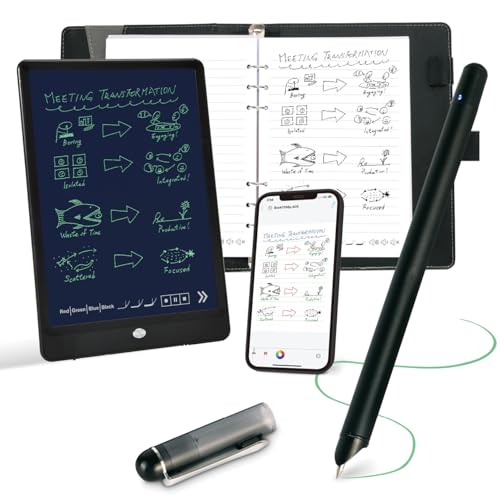
The Ophayapen Smart Pen is the smallest and most traditional setup in this roundup. The pen writes on the included 60-sheet notebook while the Ophaya Pro+ app creates a digital copy in real time. It is a smart choice for someone who dislikes writing on glass or E Ink but still needs searchable, shareable notes after the meeting.
The app supports iOS and Android phones and tablets through Bluetooth, without requiring cables or Wi-Fi for the live connection. Notes can be saved, searched, and shared, while OCR converts handwriting into editable Word documents. Keywords, tags, and timestamps provide a practical way to find an old note without leafing through the physical book.
Audio sync is the most interesting feature. Record while writing, then tap a word to jump to the part of the recording associated with it. For lectures and meetings, that creates context a basic handwriting scan cannot provide. Offline writing is also supported, with notes saving automatically and synchronizing once the connection returns.
The set includes the smart pen, a PU notebook with 60 sheets, a writing board, ballpoint refills, plastic pen nibs, and charging cables. The limitation is important: the pen requires Ophaya proprietary paper, and the app does not work with computers. That makes it more dependent on a phone-centered workflow than the HUION Note, which also offers a broader drawing-tablet mode.
This is not a substitute for the reMarkable Paper Pure or Amazon Kindle Scribe 64GB when you need a large digital page, document reading, or a self-contained device. It is a better fit for quick capture, phone-first sharing, and people who want to preserve the physical act of writing. Choose it when the pen is the product you want to carry, not another tablet.
How to choose the Best digital notebook
The right digital notebook depends on whether you want a standalone writing tablet, a reading device, an Android slate, or real paper connected to a phone.
Display type
E Ink screens are reflective and designed for reading and handwriting, making them comfortable in bright environments and naturally restrained for focused work. The Kindle Scribe, reMarkable Paper Pure, iFLYTEK AINOTE Air 2, and Penstar eNote2 use this approach. LCD models such as the XPPen Magic Note Pad and HUION Note E provide color, faster scrolling, and Android apps, but they do not have the same reflective paper display.
Writing surface
A larger screen gives you more room for diagrams, PDFs, and two-page workflows. The 11-inch Kindle Scribe 64GB and 10.3-inch models are better for full-page writing, while the 8.2-inch iFLYTEK and 8.4-inch HUION Note E are easier to carry. Paper-based systems such as the HUION Note and Ophayapen feel most natural, but the phone becomes part of the writing workflow.
The best pen experience is useless if the page is too small for the work you actually do.
Pen response
Pressure sensitivity controls how naturally the pen responds to light and firm strokes. The XPPen reaches 16, 384 levels, while the Penstar and HUION Note E list 8, 192 levels. The iFLYTEK lists 4, 096 levels, which is still suited to ordinary handwriting. A battery-free or no-charge pen is convenient for daily notes, while smart pens require charging but can preserve writing on real paper.
Document and reading tools
If you read books or annotate PDFs, look for a device that handles both without forcing constant exports. Kindle Scribe models are the strongest match for Kindle books, Active Canvas, and Send to Kindle documents. The reMarkable models focus on document markup and integrations with cloud services. Penstar adds split-screen reading and note-taking, while the Android devices offer broader app flexibility.
Transcription and organization
Meeting-heavy users should pay attention to speech capture, handwriting conversion, search, folders, tags, and exports. iFLYTEK AINOTE Air 2 is the most specialized for multilingual transcription and summaries. HUION Note E, HUION Note, and Ophayapen also support useful conversion or audio-linked notes. Choose a simpler device if you prefer to keep your own workflow rather than have software turn every note into a task.
Frequently asked questions
Is a digital notebook the same as an E Ink tablet?
Not always. The Kindle Scribe, reMarkable Paper Pure, iFLYTEK AINOTE Air 2, and Penstar eNote2 use E Ink, but the XPPen Magic Note Pad and HUION Note E use LCD screens with paper-like treatments. The HUION Note and Ophayapen use real paper with digital capture, so the category includes several different designs.
Which digital notebook is best for reading books?
The Amazon Kindle Scribe 64GB is the strongest fit for reading and writing together. It has an 11-inch glare-free display, adjustable front-light warmth, Kindle book integration, and Active Canvas for notes beside text. The 16GB Kindle Scribe is also a good choice if you prefer its smaller display and established format.
Can these devices convert handwriting to text?
Several can. Kindle Scribe models include handwriting conversion, reMarkable supports turning handwritten notes into text, and XPPen adds handwriting tools through its note apps. HUION Note E, Penstar, iFLYTEK, and Ophayapen also list handwriting conversion, with language coverage differing by product.
Which model is best for meetings?
The iFLYTEK AINOTE Air 2 is the most meeting-focused option because it supports real-time speech transcription, multilingual translation, summaries, and task creation. The HUION Note and Ophayapen are strong alternatives if you prefer writing on physical paper while syncing audio or notes to a phone.
Do digital notebooks need internet access?
It depends on the model and feature. The Ophayapen supports offline writing and syncs later, while paper-based systems can continue to capture notes without a display connection. Cloud backups, app downloads, document transfers, and some AI services may require an internet connection.
Are Android digital notebooks better than E Ink models?
Android models are more versatile because they can run apps and show color, but they can also introduce more distractions and require more battery. E Ink models are usually better for focused writing and reading. Choose Android for app access, color, and media, and choose E Ink for a calmer paper-like workflow.
Can I use a digital notebook for drawing?
The XPPen Magic Note Pad is the strongest drawing-oriented choice because it has a color LCD, Android access, and a pressure-sensitive X3 Pro Pencil 2. The HUION Note can also become a drawing tablet when its inner pages are replaced with the included panel and it is connected to a PC. E Ink devices are better suited to sketches and annotations than color artwork.
The bottom line
The Best digital notebook for most readers is the Amazon Kindle Scribe 64GB. Its 11-inch glare-free display, front light, Kindle integration, document markup, fast writing response, and generous storage make it the most complete standalone option. The Amazon Kindle Scribe 16GB is the better fit for readers who want a smaller established model centered on Kindle books.
Choose the reMarkable Paper Pure Marker Plus if distraction-free handwriting matters more than color, apps, or front lighting. For color and Android flexibility, the XPPen Magic Note Pad is the clear alternative, while the iFLYTEK AINOTE Air 2 is the specialist pick for multilingual meetings and transcription.
If you are undecided, choose the Kindle Scribe 64GB for reading and documents, or the reMarkable Paper Pure for the quietest writing experience.
As an Amazon Associate we earn from qualifying purchases.