

A phone can hold thousands of family photos and still leave them invisible most of the time. A digital frame fixes that by putting changing memories somewhere people actually see them, but the experience varies sharply between a simple slideshow and a frame relatives can update from anywhere.
The Best digital photo frame options here include large 15.6-inch displays, compact 10.1-inch models, cloud-based sharing, local storage, auto-rotation, calendars, and video support. We ranked them by the usefulness of those features and how clearly each one suits a particular home.
Our top pick is the Aura HD Digital Frame, while the Pastigio 15.6-inch Frame is the better fit for shoppers who want a large, high-resolution screen and offline transfer options.
Comparison table
| # | Product | Award | Display | Storage and sharing | Best for |
|---|---|---|---|---|---|
| 1 | Aura HD Digital Frame | Best overall | 10-inch HD | Unlimited cloud storage, app, email, text | Gifting and effortless sharing |
| 2 | Pastigio 15.6-inch Frame | Best large frame | 15.6-inch, 1920 x 1080 IPS | 32GB, SD card, USB, Frameo app | Large family photos |
| 3 | BIGASUO 15.6-inch Frame | Best for storage | 15.6-inch, 1920 x 1080 IPS | 64GB, SD card, USB, Frameo app | Large collections and video |
| 4 | Skylight 10-inch Frame | Easiest setup | 10-inch, 1280 x 800 | Cloud storage, phone sharing | Simple remote gifting |
| 5 | MaxAngel 10.1-inch Frame | Best family features | 10.1-inch, 1280 x 800 IPS | 32GB, microSD, Frameo app | Calendars, collages, and albums |
| 6 | AEEZO 10.1-inch Frame | Best auto-brightness | 10.1-inch, 1280 x 800 IPS | 32GB, SD card, AiMOR app | Mixed lighting |
| 7 | Pastigio 10.1-inch Frame | Best offline option | 10.1-inch, 1280 x 800 | 32GB, microSD, USB-C, Frameo app | Homes with unreliable Wi-Fi |
| 8 | Akimart 10.1-inch Frame | Best organizer | 10.1-inch, 1280 x 800 IPS | 32GB, microSD, Frameo app | Albums and calendar syncing |
| 9 | FLYRUIT 15.6-inch Frame | Best offline large frame | 15.6-inch, 1920 x 1080 IPS | 32GB, SD card, USB, Frameo app | Large displays without app dependence |
| 10 | Akimart 10.1-inch Frame with Calendar | Best interactive features | 10.1-inch, 1280 x 800 IPS | 32GB, microSD, Frameo app | Reactions, greetings, and collages |
1. Aura HD Digital Frame: Best Overall

Pros
- Gift Mode lets the sender preload photos and a message
- Unlimited photo and video storage is included
- Supports app, email, text, iCloud, and Google Photos sharing
- Automatic brightness adjustment suits changing room light
Cons
- The HD display has no stated resolution in the supplied details
- The frame weighs 3.7 pounds
- New photos require Wi-Fi
Best for: families who want to give a frame that can be prepared before it is opened.
The Aura HD is the frame we would choose when the recipient should not have to become the household technician. Its strongest feature is not a storage number or a screen measurement. It is the gifting workflow. Gift Mode allows photos, videos, and a message to be loaded before the frame is opened, so the first experience can be personal instead of a setup screen and a request for a Wi-Fi password.
Aura also takes a broad approach to importing memories. The supplied details list the Aura app, email, text, iCloud, Google Photos, and other routes, and family members can be invited to share from anywhere. That makes it more flexible than the Frameo models when a group includes people who use different photo services. The company also describes a one-minute Wi-Fi setup, though the frame still needs an internet connection to receive new content.
The display is described as HD and calibrated for color, clarity, and saturation. It also adjusts brightness automatically for the room, a useful touch for a frame that might sit in a bright kitchen by day and a dim bedroom by night. Portrait pairing helps avoid awkward empty space when showing vertical phone photos, while adjustable slideshow speed gives the owner some control over how often the image changes.
Compared with the Skylight 10-inch Frame, Aura offers more ways to send photos and a more polished gifting system. The Akimart 10.1-inch Frame with Calendar offers more organizer-style tools, including calendar syncing and collage mode, but Aura keeps its focus on photographs and sharing. Aura also supports iOS Live Photos, videos up to 30 seconds with sound, and wireless screen mirroring from a Windows PC, giving it a wider media brief than most of this group.
The limitation is straightforward: this is a connected frame first. It is not the pick for someone who wants to copy pictures from a USB drive and never use an app. It is also heavier than the smaller frames, so its 12.5 by 9.25 by 3.5-inch dimensions deserve a stable surface. For a parent, grandparent, or relative who should receive a finished gift rather than a project, the Aura HD is the most complete package.
2. Pastigio 15.6-inch Frame: Best Large Frame

Pros
- Large 15.6-inch 1920 x 1080 display
- Frameo sharing works from anywhere
- 32GB internal storage plus external storage support
- SD card, USB drive, and Windows computer transfer
- Supports 15-second videos
Cons
- The Windows computer transfer requires a USB-C cable
- USB drives must use FAT32
- Its large footprint needs a dedicated surface
Best for: anyone who wants family photos to have the visual presence of a small television.
The Pastigio 15.6-inch Frame is a different kind of object from the compact models below it. At 15.6 inches, it makes group photos, pets, and landscape images visible from across a room rather than from the nearest chair. The 1920 x 1080 IPS panel gives those images considerably more room and detail than the 1280 x 800 screens used by the 10.1-inch frames.
The screen is touch-sensitive, and the frame can auto-rotate between portrait and landscape. That matters in a household where photos arrive from several phones and nobody wants to crop every vertical image manually. Brightness and volume are adjustable, while Fill Frame mode lets the owner choose how an image occupies the display. JPG, JPEG, BMP, and PNG photos are supported, as is MP4 video.
Its 32GB internal storage is paired with support for up to 32GB of external storage. The useful distinction is that this frame does not make Wi-Fi the only path. Full-sized SD cards and FAT32 USB drives can be used directly, and photos can be transferred from a Windows computer over USB-C. That gives it a practical advantage over Aura, which is built around cloud and app sharing, and over Skylight, which does not list removable storage.
Frameo handles remote sharing, with invited users able to send photos and videos from elsewhere. Videos sent through the app can run up to 15 seconds, and the frame includes a React feature for sending emojis back to the person who shared a picture. That small interaction makes the screen feel less like a passive slideshow. The BIGASUO 15.6-inch Frame has more internal storage and a speaker for video with sound, but Pastigio is the cleaner choice for people who care about both remote sharing and no-Wi-Fi transfer.
The weakness is physical rather than functional. Its listed dimensions are about 15.75 inches wide, 9.84 inches long, and just under an inch thick, so it will dominate a narrow shelf. The frame also has fewer described lifestyle features than MaxAngel or Akimart. Choose it for visual impact and transfer flexibility, not for calendars or elaborate album organization.
3. BIGASUO 15.6-inch Frame: Best for Storage

Pros
- 64GB internal storage
- 15.6-inch 1920 x 1080 IPS display
- USB and SD card imports work without Wi-Fi
- Built-in speaker supports video with sound
- Includes weather, clock, and sleep settings
Cons
- The USB port does not transfer photos from a computer
- External storage compatibility has format and capacity caveats
- The Type-C connector requires careful insertion
Best for: households with a very large photo library and frequent video clips.
The BIGASUO is the large-frame alternative for people who do not want to curate their collection down to a few hundred favorites. Its 64GB of built-in storage is the highest stated capacity in this group, and the listing says it can hold about 100, 000 photos. That is useful when several relatives contribute images or when the frame is meant to show years of family history rather than a rotating monthly selection.
The 15.6-inch IPS panel has a 1920 x 1080 resolution and a stated 178-degree viewing angle. In practice, that combination is aimed at a living room or dining area where people will see the frame from the side, not just straight on. Its touchscreen handles setup and controls, and auto-rotation works with desktop or wall mounting. The frame accepts JPG, JPEG, BMP, and PNG images, along with MP4 video.
BIGASUO gives video more attention than most of the list. A built-in speaker can play video with sound, and videos imported from an SD card or USB drive do not have the app's 15-second upload limit. Remote uploads through Frameo still top out at 15 seconds, so longer clips need to be moved locally. That distinction makes the frame a better fit for someone who has family movies or longer phone recordings to display.
The Frameo app supports invited friends and relatives, while the frame adds weather, clock, brightness, playback order, hiding and publishing controls, and sleep mode. Compared with Pastigio 15.6-inch Frame, BIGASUO wins on internal capacity and described video playback. Pastigio is more convenient for Windows computer transfer, since BIGASUO specifically says its USB port supports flash drives but not computer photo transfer.
The main caution is connection care. The supplied details warn that inserting or removing the Type-C plug at the wrong angle can damage the port contacts and cable connection. External drives also need FAT32, and the listing recommends smaller compatible storage rather than assuming every large card will work. Skip this one if the recipient needs the simplest possible gift. Pick it if storage headroom and local video playback matter more than a streamlined setup.
4. Skylight 10-inch Frame: Easiest Setup

Pros
- Plug in, connect to Wi-Fi, and choose a Skylight email address
- Gift Mode supports preloading before unboxing
- Offline mode displays existing photos
- Cloud storage avoids SD cards
Cons
- New photos require Wi-Fi
- No removable storage is listed
- The display is smaller than the large Frameo models
Best for: sending a photo frame to someone who needs the least complicated setup.
Skylight's appeal is immediate clarity. The setup flow is described in plain terms: plug it in, connect to Wi-Fi, and select a unique Skylight email address. Once that address is ready, people can send photos and videos to the frame remotely. That is a much easier explanation for a relative than asking them to manage storage cards, file formats, or a collection of app invitations.
The 10-inch color touchscreen uses a 1280 x 800 resolution. It is not as expansive as the 15.6-inch FHD displays from BIGASUO or Pastigio, but the smaller size makes Skylight easier to place on a side table. Its listed dimensions are 11.81 inches long, 8.66 inches high, and just over 0.9 inches wide, with a weight of about 1.5 pounds.
Cloud-based storage is the defining trade-off. There is no SD card to misplace and no need to maintain a local photo folder, but the frame is more dependent on its connected service than the Pastigio and FLYRUIT models. Offline mode can show photos already stored on the frame, yet Wi-Fi is still needed to receive or upload new ones. The Aura HD Digital Frame is more flexible about importing sources, while Skylight is easier to explain to a first-time recipient.
Gift Mode is especially useful when the frame is being sent directly to someone else. The sender can personalize it before the box is opened, turning setup into part of the gift rather than an obligation. Skylight also positions the frame as a bridge for relatives who are not active on social media, since the photo exchange happens through the frame's own system.
Its limitation is the narrow storage story. The supplied details do not state an internal capacity or removable-storage option, so this is not the frame to choose for a carefully organized offline archive. It is best when remote family sharing and simple operation outrank file-management control. If that sounds like the right balance, the frame's straightforward workflow is hard to argue with.
5. MaxAngel 10.1-inch Frame: Best Family Features

Pros
- 32GB internal memory
- Calendar, weather, clock, and sleep settings
- Collage mode displays up to six photos
- Frameo app supports remote photo and video sharing
- Wall mount and auto-rotation support
Cons
- App videos are limited to 15 seconds
- microSD compatibility is limited to cards up to 32GB
- The 1280 x 800 display is smaller than the large-frame options
Best for: families that want a photo display with a few useful household tools built in.
The MaxAngel is more than a slideshow surface. Its calendar sync, custom albums, collage mode, themed greetings, weather, and clock make it a small family information panel as well as a way to display photos. Those additions are useful when the frame sits in a common area and needs to earn its place between photo updates.
The 10.1-inch IPS touchscreen uses 1280 x 800 resolution. That is the familiar size and format across several Frameo models here, and it should suit a bedside table, kitchen counter, or desk. The IPS panel is intended to keep images clear from different viewing angles, while the touchscreen provides direct control for a recipient who may not want to use the phone app.
Remote sharing works through the Frameo app for iOS and Android. Invited family and friends can send photos and videos from anywhere, with app videos limited to 15 seconds. The built-in 32GB memory is described as holding over 80, 000 photos, and a microSD slot can be used for transfers, backups, and longer videos. The listing recommends FAT32 cards up to 32GB, so storage expansion is useful but not limitless.
The calendar is the feature that separates MaxAngel from Pastigio 10.1-inch Frame and AEEZO 10.1-inch Frame. Those models focus more on transfer flexibility and automatic display behavior, while MaxAngel gives the recipient a reason to interact with the frame every day. Readers who also want a dedicated date display can compare how that idea works in a display designed around shared schedules and reminders, though MaxAngel keeps the photo slideshow at the center.
The drawback is that its extra features add complexity. Someone who only wants new family pictures may find calendars, collages, and themed greetings unnecessary. It also remains a 10.1-inch display, so it cannot create the same across-the-room effect as the 15.6-inch frames. Choose MaxAngel for a shared family space where organization and interaction matter as much as image rotation.
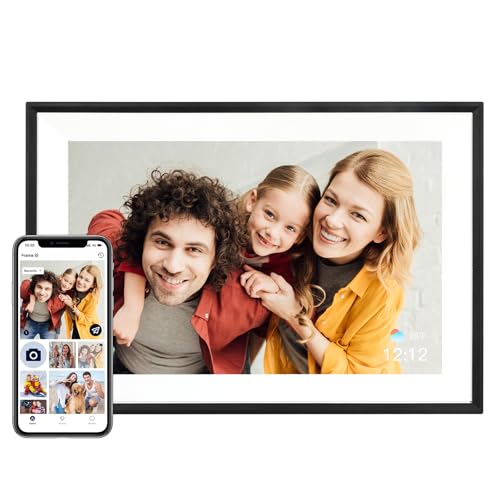
6. AEEZO 10.1-inch Frame: Best Auto-Brightness
Pros
- Ambient light sensor adjusts screen brightness
- 32GB internal storage
- Supports up to a 64GB SD card for file management
- Auto-rotation handles portrait and landscape placement
- AiMOR app supports family sharing
Cons
- Photos and videos on an SD card must be imported first
- The screen is limited to 1280 x 800
- It uses AiMOR rather than the Frameo app
Best for: a frame that can adapt to changing light without constant manual adjustment.
AEEZO's most meaningful distinction is the built-in light sensor. A frame near a window can look too bright in the morning and too subdued later in the day, so automatic adjustment is more useful than a brightness control that nobody remembers to touch. The sensor is paired with a 10.1-inch 1280 x 800 HD IPS touchscreen and manual brightness controls for situations where the automatic setting is not quite right.
The frame includes 32GB of internal memory and supports an SD card up to 64GB for file management. There is an important operational detail here: photos and videos cannot play directly from the card. They must be imported into the frame first. That is less immediate than simply leaving a card inserted, but it also gives the owner a more controlled local library.
Auto-rotation uses a gravity sensor to adjust the display when the frame is placed in portrait or landscape orientation. The frame also offers Fill Frame mode, brightness and volume adjustments, slideshow controls, sleep mode, and optional time and weather displays. The AiMOR app lets people share photos and videos from anywhere and grant upload access to family members and friends.
The MaxAngel 10.1-inch Frame provides a richer set of family-facing extras, including calendar syncing and six-photo collage mode. AEEZO is more focused on viewing comfort and basic management. It also differs from the many Frameo products in this roundup because it uses AiMOR, so an existing Frameo household may prefer a frame that shares the same app.
Its weakness is the import process and the smaller display. If a relative expects to swap cards and immediately browse them, the required import step may be confusing. If the frame will sit in a room with changing daylight, however, the light sensor is a practical advantage that the other compact picks do not describe. AEEZO suits a recipient who wants the frame to quietly manage itself.
7. Pastigio 10.1-inch Frame: Best Offline Option

Pros
- 32GB internal storage
- Frameo app sharing from anywhere
- Supports microSD, USB-C drive, and Windows computer transfer
- Magnetic stand supports portrait and landscape use
- Wall-mounting options are available
Cons
- Computer transfer is Windows-only
- External storage must use FAT32
- The 1280 x 800 display is not Full HD
Best for: families that want remote sharing but need a dependable local transfer path too.
The Pastigio 10.1-inch Frame makes a strong case for keeping two photo pipelines available. Family members can send images through Frameo from anywhere, while a person standing beside the frame can use a microSD card, a USB-C drive, or a Windows computer. That combination is useful for a recipient who is comfortable receiving updates remotely but does not want every picture to pass through an app.
Its 1280 x 800 touchscreen is smaller and less detailed than the 15.6-inch Pastigio's 1920 x 1080 panel, but the compact format is easier to place. The magnetic support stand can switch between portrait and landscape, and wall mounting is also listed. Auto-rotation helps when the frame changes orientation or receives a mixture of vertical and horizontal phone photos.
Pastigio describes 32GB of internal storage and support for more than 50, 000 photos. File formats include JPG, JPEG, BMP, and PNG, with MP4 video support. Brightness, volume, sleep mode, and display adjustment are available, and the frame's embossed design gives it a more decorative appearance than a plain black tablet-like screen.
Compared with AEEZO 10.1-inch Frame, Pastigio offers more explicit no-Wi-Fi transfer routes. AEEZO has an ambient light sensor and supports a larger SD card, but its files must be imported from the card and it does not list the same USB-C drive and Windows computer workflow. Compared with MaxAngel 10.1-inch Frame, Pastigio gives up calendar and collage features in exchange for simpler offline access.
The caveat is that the offline route is not universal. Computer transfer is specified for Windows only, the USB-C drive must use FAT32, and the accessories are not included in the supplied details. This is also not the right frame for someone who wants the largest possible image. It is the sensible pick when connection flexibility matters more than smart extras.
8. Akimart 10.1-inch Frame: Best Organizer

Pros
- Calendar sync supports iCloud, Google, Outlook, and Yahoo
- Custom albums and collage mode
- Displays up to six photos at once
- 32GB storage with microSD support
- Emoji reactions and auto-rotation
Cons
- App-shared videos are limited to 15 seconds
- The display is 1280 x 800
- Calendar and collage tools may be excessive for a simple slideshow
Best for: households that want photos, schedules, and organized albums on one screen.
The original Akimart 10.1-inch Frame is the organizer's choice among the compact Frameo models. It can show a regular slideshow, but it also syncs calendars from iCloud, Google, Outlook, and Yahoo. That gives the frame a useful second job in a kitchen or home office, where a glance can reveal both a family photo and the day's schedule.
The screen is a 10.1-inch 1280 x 800 IPS touchscreen with auto-rotation. A detachable holder supports either portrait or landscape viewing, and the image controls include zooming, brightness, sleep mode, display captions, weather, and clock settings. The frame supports JPG, JPEG, BMP, and PNG photos and MP4 video.
The built-in 32GB memory can be supplemented with a microSD card, and the frame supports importing and exporting pictures or videos. Frameo handles private sharing from anywhere, with invited friends and family able to send photos or short videos. Emoji reactions let the recipient respond on the frame, a small feature that gives remote sharing a conversational quality.
The Akimart 10.1-inch Frame with Calendar below has a similar feature set and a newer product entry, but this model explicitly lists calendar compatibility across several services and includes custom albums in the supplied details. MaxAngel 10.1-inch Frame is the better match for themed greetings and a broader smart-home-style display, while Akimart is the better fit for someone who wants to organize memories by event, date, or theme.
Its weakness is that the feature-rich interface may not be ideal for a person who only wants pictures to change automatically. The screen also cannot compete with the large FHD models for viewing across a room. For a desk, kitchen, or family command center, though, Akimart makes more sense than a frame that only cycles through images.
9. FLYRUIT 15.6-inch Frame: Best Offline Large Frame

Pros
- 15.6-inch 1920 x 1080 IPS touchscreen
- Frameo app supports remote sharing
- SD card, USB drive, and USB-C computer transfer
- 32GB internal storage
- Supports photos and MP4 videos without Wi-Fi
Cons
- External storage is limited to up to 32GB
- Frameo app videos are limited to 15 seconds
- The frame weighs about 3.5 pounds
Best for: a large wall or tabletop display that can still accept local files when Wi-Fi is unavailable.
FLYRUIT combines the room-filling format of a 15.6-inch frame with a practical offline transfer mode. Its 1920 x 1080 Full HD IPS touchscreen is designed for detailed photos and broad viewing angles, while the Frameo app keeps remote family sharing available. The result is a frame that can serve both a connected household and a relative who would rather use a drive.
The app supports photos and videos from anywhere and works with unlimited members, according to the supplied details. The frame has 32GB built-in storage and supports up to 32GB of external storage through a full-sized SD card or USB drive. A Windows computer can transfer files through USB-C, and the frame accepts JPG, JPEG, BMP, PNG, and MP4 files.
FLYRUIT also includes familiar interaction features. Photos can auto-rotate between portrait and landscape, the image can be adjusted to fit the display, and the React function allows emoji responses. Greeting features are aimed at occasions such as birthdays, while sleep mode can keep the screen dark during chosen hours. These are useful touches, though the model's strongest reason to exist is still its large display and transfer flexibility.
The Pastigio 15.6-inch Frame offers a similar 15.6-inch 1920 x 1080 experience and also supports no-Wi-Fi transmission. Pastigio has the clearer claim for support of external storage alongside a 32GB internal memory, while FLYRUIT emphasizes its large screen, 32GB capacity, and Frameo experience. BIGASUO 15.6-inch Frame goes further with 64GB internal storage and speaker-supported video with sound.
The frame is substantial at about 16 inches wide and 3.5 pounds. It needs a stable shelf or suitable wall placement, and its app-uploaded videos remain limited to 15 seconds. Pick FLYRUIT if the frame's size is central to the decision and local file transfer is a requirement. If long videos and maximum storage matter more, BIGASUO is the stronger large-screen alternative.
10. Akimart 10.1-inch Frame with Calendar: Best Interactive Features

Pros
- 32GB internal storage
- Calendar syncing and custom albums
- Collage mode displays up to six photos
- Greetings and emoji reactions
- Auto-rotation and microSD support
Cons
- No display resolution beyond 1280 x 800 is supplied
- App videos are limited to 15 seconds
- The extra interactive features are not essential for every recipient
Best for: families that want a photo frame to become an active part of daily communication.
This Akimart frame has the same broad 10.1-inch 1280 x 800 IPS format as the other compact models, but its emphasis is interaction. It can display up to six photos in collage mode, organize images into custom albums, add greetings for occasions, and let the recipient respond with emojis. Those tools make it more suitable for an active family exchange than a frame that only receives pictures.
The Frameo app sends photos and short videos from anywhere, while the frame's 32GB memory and microSD support provide local storage. Auto-rotation handles portrait and landscape placement, and the detachable stand lets the frame change orientation. The listing also includes controls for brightness, image zooming, play order, captions, weather, clock, and sleep mode.
Calendar syncing adds another layer. Google Calendar, Outlook, Yahoo, and other services can show schedules alongside the slideshow. This is the model to choose when the frame will sit somewhere people already look for reminders. The Akimart 10.1-inch Frame is similarly strong for calendar and album organization, but this version foregrounds greetings, reactions, and collage mode more clearly in its feature set.
The trade-off is focus. A recipient who wants a quiet, uncluttered slideshow may not use most of these functions, and the display remains much smaller than the 15.6-inch options. It also does not have the ambient light sensor found on AEEZO 10.1-inch Frame, or the offline computer-transfer emphasis of Pastigio 10.1-inch Frame.
For families who enjoy sending reactions and assembling albums around events, the feature mix is unusually engaging. It is less compelling for a minimalist photo display, but that is precisely why it earns this award.

How to choose best digital photo frame
The right frame depends less on the word “smart” and more on how photos will arrive, where the frame will sit, and who will manage it.
Screen size and resolution
A 10.1-inch display fits comfortably on a side table, desk, or kitchen counter. The 1280 x 800 resolution used by most compact models is suitable for ordinary phone photos, but a 15.6-inch screen makes group shots and details easier to see from across a room.
Full HD 1920 x 1080 is the stronger match for a large frame. A bigger screen with a lower resolution can make images look less crisp, so match the resolution to the physical size rather than treating inches alone as the deciding factor.
A large frame earns its footprint only when people can see the photo clearly from several steps away.
Remote sharing
Frameo models use the Frameo app to let invited people send photos from anywhere. Aura supports a broader set of routes, including its app, email, text, iCloud, and Google Photos. Skylight uses a dedicated email address and cloud storage, which keeps its sharing concept easy to explain.
Check the video limit carefully. Several Frameo listings specify a maximum of 15 seconds for videos sent through the app, while Aura lists support for videos up to 30 seconds with sound.
Local storage and file transfer
Built-in storage matters when the frame should continue showing a substantial library without constant cloud access. The products here range from 32GB to 64GB, while Aura describes unlimited cloud storage rather than a conventional internal-capacity figure.
If the recipient may struggle with apps, choose a model with a clear local route. Pastigio supports SD cards, USB drives, and Windows computer transfer. FLYRUIT also supports local transfer, while AEEZO requires files on an SD card to be imported into the frame first.
Orientation and mounting
Portrait support is essential because many phone photos are vertical. Auto-rotation reduces manual adjustments, and a detachable or magnetic stand makes it easier to switch between orientations. Wall mounting is useful for larger models, but check the frame's dimensions and weight before choosing a wall location.
A large frame such as BIGASUO or FLYRUIT needs more stable placement than a compact 10.1-inch model. The screen size should match the room, not just the available photo library.
Smart extras
Calendars, weather, clocks, collages, greetings, emoji reactions, and sleep modes can make a frame more useful in a shared room. They can also make the interface busier. MaxAngel and Akimart are the strongest choices for calendar and album tools, while Aura keeps the experience more focused on sharing and gifting.
Brightness automation is another useful distinction. AEEZO's ambient light sensor can adjust the screen as room lighting changes, which is more convenient than relying on manual controls.

Frequently asked questions
Do digital photo frames need Wi-Fi?
Most connected frames need Wi-Fi to receive new photos remotely. Some models can continue showing stored photos offline, and Pastigio and FLYRUIT list SD card, USB, or computer transfer options that do not require Wi-Fi.
How do family members send photos to a frame?
Frameo models use the Frameo app, where the frame owner can invite family members to share. Aura lists several routes, including its app, email, text, iCloud, and Google Photos. Skylight uses a unique frame email address.
What size digital photo frame should I buy?
A 10.1-inch frame is easier to place on a desk, shelf, or counter. A 15.6-inch frame is better for a living room or wall where viewers will stand farther away. The larger models in this roundup also use 1920 x 1080 resolution, which suits their bigger displays.
Can these frames play videos?
Yes, several models support MP4 video. Frameo app uploads are limited to 15 seconds on the listed Frameo products, while BIGASUO says videos imported through an SD card or USB drive can play without that app limit. Aura lists videos up to 30 seconds with sound.
Can a digital frame show portrait photos?
The Frameo models, AEEZO, Aura, and others here list portrait and landscape support through auto-rotation or portrait pairing. A frame with a detachable or magnetic stand makes it easier to position the display correctly.
Is local storage better than cloud storage?
Local storage is useful when you want the frame to keep showing a library without relying on a connection or account. Cloud-based sharing is simpler for relatives who frequently send new photos. Aura and Skylight emphasize cloud workflows, while Pastigio, BIGASUO, AEEZO, and FLYRUIT provide more explicit local-storage options.
Which frame is easiest to give as a gift?
Aura is the strongest gifting choice because Gift Mode lets the sender preload photos, videos, and a message before the recipient opens the package. Skylight also emphasizes simple setup and a preloaded Gift Mode, while the Frameo models are better when several family members will continue sending photos.

The bottom line
The Best digital photo frame for most families is the Aura HD Digital Frame. Its Gift Mode, broad sharing options, automatic brightness adjustment, and unlimited cloud storage make it unusually easy to prepare and maintain. Choose the Pastigio 15.6-inch Frame instead when a large Full HD screen and local transfer options matter more than a polished cloud-first experience.
For a frame that needs calendars, albums, collages, and reactions, the MaxAngel 10.1-inch Frame and Akimart 10.1-inch Frame with Calendar are the more engaging picks. For large libraries and local video playback, BIGASUO 15.6-inch Frame has the most storage and the clearest speaker support.
If you are undecided, choose Aura for gifting, Pastigio for a large display, and MaxAngel for a family space that needs more than a slideshow.
As an Amazon Associate we earn from qualifying purchases.