
A DJ mixer can mean two very different things. Some models are hands-on controllers built around software, while others are traditional hardware mixers for turntables, microphones, instruments, or multiple audio sources. Choosing the wrong type can leave you with the wrong connections, too little control, or a layout that fights the way you want to mix.
Our Best DJ Mixer picks cover both camps, from the flexible Pioneer DJ DDJ-FLX4 to compact party controllers, full analog mixers, and a child-friendly VTech unit. The Pioneer is the strongest all-rounder, while the rest target more specific setups, including four-deck mixing, karaoke, live audio, and beginner practice.
Comparison table
| # | Product | Award | Channels or decks | Standout feature | Best for |
|---|---|---|---|---|---|
| 1 | Pioneer DJ DDJ-FLX4 | Best overall | 2 channels, 2 decks | Smart Fader and 16 pads | Learning and growing DJs |
| 2 | Yamaha MG10XU | Best traditional mixer | 10 inputs | USB and SPX effects | Live sound and recording |
| 3 | Numark Party Mix III | Best party controller | 2 decks | Beat-synchronized lights | Casual parties |
| 4 | Hercules DJControl Inpulse 200 MK3 | Best learning tools | 2 channels | Beatmatch Guide LEDs | First-time DJs |
| 5 | Numark Mixtrack Platinum FX | Best four-deck controller | 4 decks | 6-inch display jog wheels | Serato users |
| 6 | Numark Mixtrack Pro FX | Best two-deck Numark | 2 decks | 6-inch capacitive jog wheels | Scratching and beatmatching |
| 7 | Riworal 6-Channel Mixer | Best compact audio mixer | 6 channels | Bluetooth and 16 DSP effects | Karaoke and small setups |
| 8 | VTech Kidi Star DJ Mixer | Best for children | 1 toy-style deck | 2, 000-plus sound combinations | Children aged 5 and up |
| 9 | Numark M6 USB | Best four-channel hardware mixer | 4 channels | Phono, line, mic, and USB | Traditional DJ rigs |
| 10 | Pyle 8-Channel DJ Mixer | Best for many inputs | 8 channels | Bluetooth and phantom power | Karaoke and live events |
1. Pioneer DJ DDJ-FLX4: Best Overall

Pros
- Friendly layout based on professional Pioneer DJ gear
- Smart Fader simplifies transitions
- 16 pads support cues, effects, beat jumps, and samples
- Works with computers, mobile devices, and streaming services
Cons
- Limited to two channels and two decks
- Its software-centered design is not a traditional standalone mixer
- Bluetooth and USB connectivity may require setup for different devices
Best for: someone who wants a controller that is easy to learn but does not feel disposable as their skills improve.
The DDJ-FLX4 is the one we would put in front of most new DJs. Its layout makes sense immediately, with two decks, a central mixer section, performance pads, and controls that resemble the arrangement used on larger Pioneer DJ equipment. It feels like a proper introduction to DJing rather than a toy with a few buttons added for decoration.
The two-channel design supports two-deck control, and the 16 Performance Pads give each deck hands-on access to Hot Cues, Pad FX, Beat Jump, and the Sampler. That matters because a beginner can start with simple fades and gradually add cue points, loops, and performance tricks without changing controllers. Pioneer’s Smart Fader can also adjust volume, bass, and BPM as you move one fader, which lowers the barrier to making a clean transition while you learn what the separate controls are doing.
The controller measures 18.98 inches wide, 10.74 inches deep, and 2.33 inches high, with a listed weight of about 6.17 pounds. That is compact enough for a desk or small performance table, but it gives you more physical separation than the smallest party controllers. A built-in sound card handles the connection to speakers, and the controller can connect to a PC, Mac, iPhone, iPad, or Android device through USB or Bluetooth. It also supports mixing from Apple Music, Tidal, and Beatport, according to the listed features.
The DDJ-FLX4 is a better long-term learning platform than the Numark Party Mix III, while the Hercules DJControl Inpulse 200 MK3 offers more explicit guidance for someone starting from zero. The Numark Mixtrack Platinum FX goes further for four-deck work and display information, but it is larger and more specialized. If you want to understand the fundamentals and still have room to grow, the FLX4 strikes the best balance.
Its weakness is the two-deck ceiling. DJs who already know they need four-deck mixing, several physical inputs, or a traditional hardware signal path should choose the Yamaha MG10XU or Numark M6 USB instead. For everyone else, this is the clearest starting point in the roundup and the Best DJ Mixer for learning software-based mixing without immediately outgrowing the hardware.
2. Yamaha MG10XU: Best Traditional Mixer

Pros
- Ten inputs provide room for several sources
- USB connectivity supports computer use
- SPX digital effects add onboard processing
- Three-band EQ and high-pass filters support detailed control
- Rugged powder-coated metal chassis
Cons
- Not a software DJ controller with jog wheels or performance pads
- Its many inputs can feel excessive for simple two-track mixing
- The listed dimensions are inconsistent across the supplied product information
Best for: a DJ, performer, or small venue that needs a conventional mixer for microphones, instruments, and playback sources.
The MG10XU is the serious hardware option here. It is not designed to control Serato or provide jog wheels for scratching. Instead, it gives you a conventional mixer layout for combining multiple audio sources, making level adjustments, shaping tone, and adding effects. That makes it a much better fit for a live rig, rehearsal space, or small recording setup than a laptop-centered DJ controller.
Its 10-input layout leaves space for a more complicated setup than the Pioneer DJ DDJ-FLX4. The Yamaha includes USB connectivity and SPX digital effects, while the three-band EQ and high-pass filters let you remove unwanted low-frequency material or shape individual sources. The one-knob compressors are aimed at making guitars, bass, snares, and vocals easier to manage, so this board can serve a small live band as readily as a DJ who also handles announcements.
The listed chassis dimensions are 9.6 by 2.8 by 11.6 inches in the features, and the product information gives a listed weight of about 7.72 pounds. Its powder-coated metal chassis is described as rugged and impact resistant. That construction is reassuring for equipment that may be carried to gigs, though the board is less convenient to carry than the 2.42-pound Numark Party Mix III or the roughly 2.2-pound Hercules controller.
The MG10XU also makes more sense than a controller when the setup includes several microphones or instruments. The Riworal 6-Channel Mixer and Pyle 8-Channel DJ Mixer offer more consumer-focused extras such as Bluetooth, but Yamaha’s feature set is more focused on controlled live mixing. For anyone comparing traditional boards, the practical difference between a mixer and a computer controller is important before choosing a format.
The main limitation is its lack of DJ-specific performance controls. There are no jog wheels, performance pads, or software-style deck displays in the supplied features. A DJ who wants to manipulate tracks directly should choose the Pioneer or one of the Numark controllers. Choose the Yamaha when your priority is clean, flexible signal management across many connected sources.
3. Numark Party Mix III: Best Party Controller

Pros
- Beat-synchronized LED light show is built in
- Bluetooth MIDI works with iOS and Android devices
- Serato DJ Lite and Algoriddim djay support are included
- Eight performance pads per deck
- Compact USB-powered design
Cons
- Two-deck layout is aimed at casual use
- Built-in lights add atmosphere but not mixing depth
- Main output is RCA and headphone output is 1/8 inch
Best for: casual DJs who want a compact controller that can make a room feel like a party with minimal setup.
The Party Mix III understands that some people want to make a party more lively, not build a studio. Its defining feature is the built-in beat-synchronized LED light show, which projects colorful patterns in time with the music. That gives it an immediate appeal the more restrained Pioneer DJ DDJ-FLX4 does not have.
The controller offers two decks, two large touch-capacitive jog wheels, dedicated three-band EQ and filter controls for each channel, and a crossfader. Each deck gets eight backlit performance pads for Hot Cues, Auto Loops, Samples, and effects. Dedicated controls for stems can isolate or remove vocals, drums, and instruments during a mix, adding an expressive option that is unusual in a controller this compact.
At 13.31 inches wide, 8.07 inches deep, and 1.85 inches high, the Party Mix III is easy to fit on a small table. Its listed weight is about 2.42 pounds, and it is USB-C powered, so the setup can use a laptop, tablet, smartphone, or standard power bank. Bluetooth MIDI allows wireless control from iOS and Android devices through the Algoriddim djay app, while the included Serato DJ Lite support covers Mac and Windows users.
The connections are simple: a main RCA output for speakers and a 1/8-inch headphone output for previewing and cueing tracks. That is adequate for a casual room setup, but it is less flexible than the Pioneer’s broader device compatibility or the Yamaha’s multiple-input hardware design. The supplied package also includes a smartphone or tablet stand and a 1/8-inch to stereo RCA adapter.
Its weakness is that the party features can distract from the fundamentals. The Hercules DJControl Inpulse 200 MK3 gives a learner more direct guidance, and the Numark Mixtrack Pro FX offers larger jog wheels for a more deliberate performance. The Party Mix III is the better pick when portability, lights, and quick fun matter more than a traditional learning path.
4. Hercules DJControl Inpulse 200 MK3: Best Learning Tools
Pros
- Beatmatch Guide LEDs show when tracks are aligned
- Step-by-step DJ Academy tutorials are included
- Intelligent Music Assistant suggests tracks using BPM and energy
- Supports stems and streaming services
- Lightweight, portable design
Cons
- Two-channel design limits more advanced setups
- Compact controls may feel cramped for larger hands
- The feature set depends heavily on compatible software
Best for: a complete beginner who wants visible guidance while learning beatmatching and transitions.
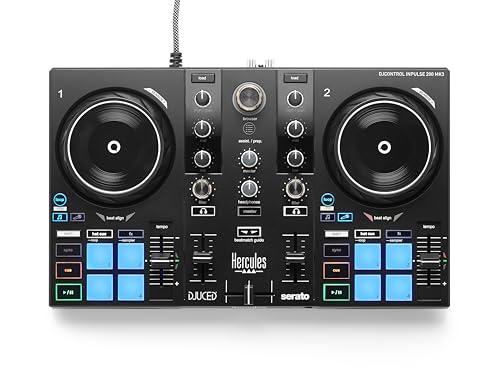
The Inpulse 200 MK3 is built around the moment when a beginner asks, “How do I know these tracks are lined up?” Its Beatmatch Guide LEDs sit near the jog wheels and tempo faders, providing visual help with timing. The included DJ Academy tutorials take the same approach, turning the first sessions into guided practice rather than a search through a manual.
The controller has two channels and is designed to get connected through USB quickly. Its Intelligent Music Assistant can suggest the next track based on BPM and energy, which helps a new DJ think about set flow instead of choosing songs at random. Hercules also lists stem separation, allowing vocals and instrumentals to be isolated for mashups and transitions.
The listed dimensions are 15.6 inches wide, 10.4 inches deep, and 3.7 inches high, with a listed weight of about 2.2 pounds. That makes it lighter than the Pioneer DJ DDJ-FLX4 and much lighter than the Numark M6 USB. It can fit in a backpack, making it suitable for bedroom practice, small gatherings, or streaming from a compact desk.
The controller supports streaming from Spotify, Apple Music, Beatport, SoundCloud GO+, TIDAL, and Beatsource through the compatible DJ software. A built-in virtual sound card supports live streaming without another piece of DJ hardware. Those features give it an accessible route into streaming, although the software relationship is central to how much of the controller you can use.
The Numark Party Mix III is more entertaining out of the box because of its light show, while the Pioneer DJ DDJ-FLX4 feels more like a bridge to professional Pioneer layouts. The Hercules is the one to choose when learning support matters most. Skip it if you already know you want large jog wheels, four-deck control, or independent hardware inputs.
5. Numark Mixtrack Platinum FX: Best Four-Deck Controller

Pros
- Four decks of Serato DJ Lite control
- Large 6-inch jog wheels with color displays
- Six effects with dual paddle triggers
- Eight performance pads per deck
- Microphone, headphone, and RCA outputs
Cons
- Larger footprint than the beginner controllers
- Four-deck features add complexity
- Serato DJ Lite is the included software
Best for: DJs who want to layer four decks and see track information directly on the jog wheels.
The Mixtrack Platinum FX is the most performance-oriented controller in the Numark group. Its defining advantage is four-deck control, which opens up more elaborate transitions, layered samples, and extended mixes than the two-deck Mixtrack Pro FX. It is a better fit for someone who has moved past basic crossfades and wants more tracks available at once.
The two 6-inch capacitive jog wheels have high-resolution color displays. Those displays show BPM, platter position, beats remaining, pitch adjustment, or key, putting useful information directly under your hands. That is more informative than a simple jog wheel and can reduce the need to look back and forth between the controller and computer.
Numark includes six quick-launch effects with dual paddle triggers, instant loop controls, and eight performance pads per deck. The pads cover cues, loops, fader cuts, and samples. A built-in 24-bit audio interface connects through USB to Mac and Windows, and the controller has a microphone input, headphone output, and RCA output for speakers.
At 21.61 inches wide, 9.48 inches deep, and 2 inches high, this is a broad controller that needs a proper table. Its listed weight is about 5.29 pounds. It is still manageable to move, but the footprint is significantly larger than the Party Mix III. DJs who are building a compact setup should consider the Pioneer or Hercules instead.
The Mixtrack Pro FX shares the same broad dimensions and 6-inch jog-wheel concept but stops at two decks. The Platinum FX earns its place when four-deck control is a genuine need, not simply an attractive feature on a list. It is less suitable for a first-time DJ who would benefit from the clearer learning aids on the Hercules.
6. Numark Mixtrack Pro FX: Best Two-Deck Numark

Pros
- Large 6-inch capacitive jog wheels
- Built-in 24-bit audio interface
- Six effects with dual paddle triggers
- Eight performance pads on each deck
- Three-band EQ, filters, and dedicated loop controls
Cons
- No four-deck control
- Large footprint for a two-deck controller
- Included Serato DJ Lite may feel limited as skills advance
Best for: a DJ who wants physical jog-wheel control for scratching and beatmatching without moving to four decks.
The Mixtrack Pro FX is the sensible middle ground between the entry-level controllers and the four-deck Platinum FX. It gives each deck a large 6-inch capacitive jog wheel, so scratching, cue placement, and manual beatmatching feel more deliberate than they do on the Party Mix III. It is also less complicated than the Platinum FX because it focuses on two decks.
Its feature set is still substantial. Each deck gets eight performance pads for cues, loops, fader cuts, and samples, while six effects can be launched through dual paddle triggers. Dedicated instant loop controls sit alongside the mixer section, and each channel has a three-band EQ, filter knobs, channel faders, and a crossfader.
The built-in 24-bit audio interface handles the computer connection through USB. The listed outputs include RCA for speakers and a headphone output for cueing, while a microphone input gives the controller a useful role at small events. It supports Serato DJ Lite and can access music through services including Apple Music, Tidal, Spotify, SoundCloud, Beatport Link, and Beatsource Link through the software.
Its listed dimensions are 21.61 inches wide, 9.48 inches deep, and 2 inches high. At about 5.07 pounds, it is not especially heavy, but its width makes it a table-first controller rather than something to casually use anywhere. The Pioneer DJ DDJ-FLX4 is more compact and offers a more broadly recognizable beginner layout, while the Platinum FX wins for DJs who need four decks.
The Pro FX is not the right choice for someone who wants visible, step-by-step beatmatching guidance. The Hercules has that advantage, and the Numark Party Mix III is more playful in a party setting. Choose the Pro FX for hands-on two-deck mixing, especially if large jog wheels matter more than lights or automatic assistance.
7. Riworal 6-Channel Mixer: Best Compact Audio Mixer

Pros
- Six-channel layout
- Four XLR inputs with 48V phantom power
- Bluetooth and USB playback
- Three-band EQ on each channel
- 16 built-in DSP effects
Cons
- Traditional analog mixer rather than a software DJ controller
- The feature list warns that incorrect operation can result in no sound
- No jog wheels or deck controls
Best for: karaoke, small live setups, and users who need several microphones or instruments connected at once.
The Riworal 6-Channel Mixer is aimed at the person who needs to combine audio sources, not manipulate digital decks. It has four XLR and 1/4-inch inputs, with channels 5 and 6 using stereo 1/4-inch connections. That arrangement gives a small karaoke or live setup room for microphones, instruments, and playback.
Four XLR inputs support condenser or dynamic microphones, and the listed +48V phantom power can be switched for channels 1 through 4. Each channel includes three-band equalization and gain control. The mixer also provides independent channel, master output, and effects faders, so the operator can balance the sources while adding processing.
The built-in Bluetooth feature can stream music from a phone or tablet, while the USB interface supports a USB stick, MP3 playback, or recording and mixing through a computer. Its 16 DSP effects include options such as delay and reverb. Those extras make it more flexible for karaoke and live announcements than either of the Numark software controllers.
The listed dimensions are 13.77 inches wide, 11.61 inches deep, and 11.61 inches high, with a listed weight of about 5.07 pounds. The supplied dimensions are unusually presented, so buyers should allow generous space around the board. The Yamaha MG10XU is the more established choice for a larger, more demanding live setup, while the Pyle offers eight channels and a similar focus on Bluetooth and karaoke features.
The Riworal is not a replacement for the Pioneer DJ DDJ-FLX4. It has no jog wheels, performance pads, or two-deck software control. It also requires careful attention to gain staging and the manual, since the supplied feature description specifically warns that operating errors can result in no sound. Choose it when microphone and instrument inputs matter more than DJ deck control. For a setup that must also record through a computer, the connections that matter in a mixer with computer audio deserve close attention.
8. VTech Kidi Star DJ Mixer: Best for Children

Pros
- Designed for children aged 5 and up
- 15 built-in songs and more than 2, 000 sound combinations
- Bluetooth and audio-cable connections
- Built-in speaker and headphone connection
- Music game encourages practice
Cons
- Not a conventional DJ mixer
- Music player, audio cable, and headphones are not included
- Requires four AA batteries
Best for: a child who wants a playful introduction to mixing sounds, songs, and light effects.
The Kidi Star DJ Mixer belongs in this roundup for a very specific reason: it is a child-focused way to explore the idea of DJing. It is not a serious controller for Serato, rekordbox, or another desktop DJ platform. Instead, it combines a turntable-style control with built-in songs, sound combinations, music games, and light effects.
VTech lists 15 built-in songs and more than 2, 000 sound combinations. Children can create custom effects, mix them into songs, save music samples, and add light effects. The built-in music game gives the child something structured to do rather than leaving them with a collection of buttons and no idea how they work.
Bluetooth and an audio cable can connect an external music source. The resulting mash-ups can play through the built-in speaker, or the child can use headphones. The source music player, audio cable, and headphones are not included, so the setup depends on what the family already has.
The unit measures 14.37 inches wide, 9.25 inches high, and 3.62 inches deep, with a listed weight of 2.8 pounds. It uses four AA batteries, and the supplied batteries are intended for demonstration, so new batteries are recommended for regular use. That is a different ownership pattern from the USB-powered Party Mix III or computer-connected Hercules.
Adults shopping for a real DJ setup should skip this product. The Pioneer DJ DDJ-FLX4 and Hercules DJControl Inpulse 200 MK3 teach transferable software DJ skills, while the VTech is designed for imaginative play. For a child aged 5 or older who wants to perform, experiment, and make noise without a complex computer setup, it is the appropriate pick here.
9. Numark M6 USB: Best Four-Channel Hardware Mixer

Pros
- Four independent channels
- Phono, line, and microphone inputs
- Master, record, booth, and headphone outputs
- Replaceable crossfader
- USB mixing and recording for Mac and PC
Cons
- Heavy compared with the controller picks
- Traditional mixer layout lacks jog wheels and pads
- Its design is older than the newer software controllers
Best for: a traditional DJ setup with several source devices, recording needs, and separate booth monitoring.
The M6 USB is for DJs who want a central hardware mixer between decks or other sources. Its four-channel layout gives each source its own level fader, three-band EQ, cue control, and crossfader assignment. That makes it a natural fit for a multi-source setup, especially when the operator wants physical control without relying on a software controller layout.
Connectivity is its strongest feature. The M6 includes multiple phono, line, and microphone inputs, plus master RCA, record RCA, booth RCA, and 1/4-inch stereo headphone outputs. A separate booth output is useful when the DJ needs to monitor a room or monitor system independently from the main audience output.
The crossfader is replaceable, and each channel has slope controls. Those details matter to DJs who care about fader response or expect a component to remain serviceable over time. USB connectivity works with Mac and PC, allowing music from a laptop to enter the mix or sets to be recorded through a compatible audio recording application.
The mixer measures 14 inches wide, 12.5 inches deep, and 4 inches high, and its listed weight is 9 pounds. That makes it the heaviest product in this roundup by a clear margin. It is not the board to carry casually between rooms, but the weight can suit a permanent booth or table setup. The Yamaha MG10XU offers more inputs and live-audio processing, while the M6 is more specifically organized around DJ channels.
The absence of jog wheels and performance pads is not a flaw if the rest of the system already supplies decks. It is a problem if you want a single box that controls digital tracks. In that case, the Numark Mixtrack Platinum FX or Pioneer DJ DDJ-FLX4 is a better match. Pick the M6 when dedicated inputs, outputs, and four-channel hardware mixing are the center of the setup.
10. Pyle 8-Channel DJ Mixer: Best for Many Inputs

Pros
- Eight-channel layout
- Bluetooth wireless streaming
- XLR and 1/4-inch inputs
- +48V phantom power
- Three-band EQ and LED peak indicators
Cons
- Not a software DJ controller
- The feature list does not specify the number of onboard DSP effects
- Compact layout may require careful cable management
Best for: karaoke, small live events, and setups that need several audio sources with Bluetooth playback.
The Pyle 8-Channel DJ Mixer is a conventional audio mixer with a broad set of connections. Its eight-channel layout gives it more source capacity than the Riworal 6-Channel Mixer, although the supplied feature list does not spell out every input assignment. It is designed for live gigs, karaoke, and general audio mixing rather than software deck control.
Bluetooth streaming allows music to come directly from a smartphone. The mixer also supports XLR and unbalanced 1/4-inch plugs, with a +48V phantom button for compatible condenser microphones. Every channel has a three-band EQ, and the LED peak indicator gives the operator a visual warning when a signal is approaching an undesirable level.
Pyle describes the board as a high-headroom, low-noise mixer with sealed rotary controls. The steel chassis is intended to resist dust and grime, which is useful for a device that may be used in party or performance spaces. The listed dimensions are 10.83 inches wide, 9.26 inches high, and 2.56 inches deep, with a listed weight of about 3.97 pounds.
The feature list also mentions USB, an audio interface, and DSP effects, but it does not provide a specific count for the effects. That makes the Pyle less clear than the Riworal, which explicitly lists 16 DSP effects. The Yamaha MG10XU is the stronger choice when recording and more controlled live mixing are priorities, while the Pyle is easier to justify when Bluetooth and a larger input count are central.
Like the Riworal, this is not a replacement for a two-deck controller. There are no jog wheels, performance pads, or software deck controls in the listed features. Choose the Pyle for microphones, playback sources, and karaoke duties. If your main goal is manipulating digital tracks, start with the Pioneer or one of the Numark controllers instead.

How to choose best dj mixer
The right Best DJ Mixer depends first on whether you need a software controller for digital decks or a traditional board for several physical audio sources.
Controller or traditional mixer
A controller gives you jog wheels, performance pads, deck controls, and a software connection. That is the right format for learning beatmatching, scratching, looping, and digital transitions. The Pioneer DJ DDJ-FLX4, Hercules, and Numark models all fit this approach.
A traditional mixer combines external sources through physical inputs. The Yamaha, Riworal, Numark M6 USB, and Pyle are better suited to microphones, turntables, instruments, karaoke, or a multi-device booth. Do not choose by the word “DJ” alone. Check whether the product actually controls software decks.
Choose the signal path first. Extra effects cannot compensate for a mixer that lacks the inputs or deck controls your setup requires.
Channels and decks
Two decks are enough for learning standard transitions and handling most straightforward sets. Four decks make layered mixes, samples, and more complex arrangements possible, but they also add buttons and decisions. The Mixtrack Platinum FX provides four decks, while the Mixtrack Pro FX and DDJ-FLX4 stay with two.
Traditional channel counts describe connected audio sources rather than software decks. The Yamaha has 10 inputs, the Pyle has eight channels, and the Riworal has six channels. More channels help only if you have the microphones, instruments, playback devices, or decks to use them.
Inputs and outputs
Look for phono inputs if you are connecting turntables, microphone inputs for announcements or singing, and line inputs for external playback devices. Outputs matter just as much. A master output feeds the main speakers, while booth, record, and headphone outputs give a traditional DJ setup more control.
The Numark M6 USB is particularly flexible with phono, line, microphone, master, record, booth, and headphone connections. The controllers are simpler, with the Party Mix III using a main RCA output and 1/8-inch headphone output.
Software and streaming
Software compatibility determines how useful a controller will be after setup. The Pioneer supports mixing from Apple Music, Tidal, and Beatport, while the Hercules lists Spotify, Apple Music, Beatport, SoundCloud GO+, TIDAL, and Beatsource. The Numark controllers include Serato DJ Lite and list several streaming services through that software.
Streaming support can make it easier to access a library, but it should not replace checking the actual app and device combination you plan to use. A controller that works with a computer may not offer the same controls on a phone or tablet.
Effects and performance controls
Performance pads handle cues, loops, samples, and effects on controllers. The DDJ-FLX4 has 16 pads, while the Numark Party Mix III, Mixtrack Platinum FX, and Mixtrack Pro FX list eight pads per deck. Jog wheels are important for manual cueing and scratching, with the Numark models using 6-inch capacitive jog wheels.
Traditional mixers take a different route. The Yamaha provides SPX digital effects, the Riworal lists 16 DSP effects, and the Pyle lists DSP FX without stating a count. Treat effect counts as secondary to clean channel control, useful EQ, and the connections your system actually needs.
Frequently asked questions
What is the best DJ mixer for a beginner?
The Pioneer DJ DDJ-FLX4 is the strongest general starting point because its two-deck layout is approachable and leaves room to develop. The Hercules DJControl Inpulse 200 MK3 is better if you want Beatmatch Guide LEDs, tutorials, and track suggestions to provide more direct assistance.
Is a DJ controller the same as a DJ mixer?
No. A DJ controller usually connects to software and gives you physical control over digital decks, while a traditional DJ mixer combines signals from connected sources. Some controllers include a mixer section, but they are still designed around software and deck control.
How many channels should a DJ mixer have?
Two channels or decks are enough for standard beginner mixing and most basic transitions. Four channels are useful for layered sets or multiple decks, while six to 10 inputs make more sense for microphones, instruments, karaoke, and live sound rather than ordinary two-track DJing.
Do I need a computer with a DJ controller?
Most software-based controllers in this roundup are designed to work with a computer or mobile device. The Pioneer can connect to PC, Mac, iPhone, iPad, or Android, while the Numark controllers are described as USB devices for Mac and Windows. A traditional mixer such as the Yamaha or Numark M6 can operate as the physical center of a setup without acting as a software deck controller.
What connections matter for karaoke?
Microphone inputs, phantom power when using compatible condenser microphones, a music playback input, and a master speaker output are the key considerations. The Riworal and Pyle both provide Bluetooth, while the Yamaha offers a broader live-mixer feature set and the Numark M6 provides several traditional DJ connections.
Are built-in DJ effects necessary?
No. Effects can add reverb, delay, filters, or transitions, but they do not replace good level control and beatmatching. They are most useful when you already understand the basic mix and want to add performance texture.
Can children use a regular DJ controller?
A child can explore a regular controller with supervision, but the controls and software may be too complicated for younger users. The VTech Kidi Star DJ Mixer is designed for ages 5 and up and uses built-in songs, sound combinations, a music game, Bluetooth, and light effects instead of a full desktop DJ workflow.
The bottom line
The Best DJ Mixer for most people is the Pioneer DJ DDJ-FLX4. Its two-deck layout, 16 performance pads, Smart Fader, built-in sound card, and broad device compatibility make it the most balanced route from first transitions to more involved digital sets. Choose the Yamaha MG10XU instead when you need a traditional board with 10 inputs, USB, EQ controls, compression, and SPX effects for live audio or recording.
The Numark Party Mix III is the more entertaining party option, while the Hercules DJControl Inpulse 200 MK3 offers the clearest guided learning experience. For physical audio sources, the Numark M6 USB, Riworal, and Pyle each make more sense than a controller, with the Yamaha offering the most polished live-mixer approach.
If you are undecided, choose the Pioneer for digital DJing and choose the Yamaha for a setup built around microphones, instruments, or multiple external sources.
As an Amazon Associate we earn from qualifying purchases.