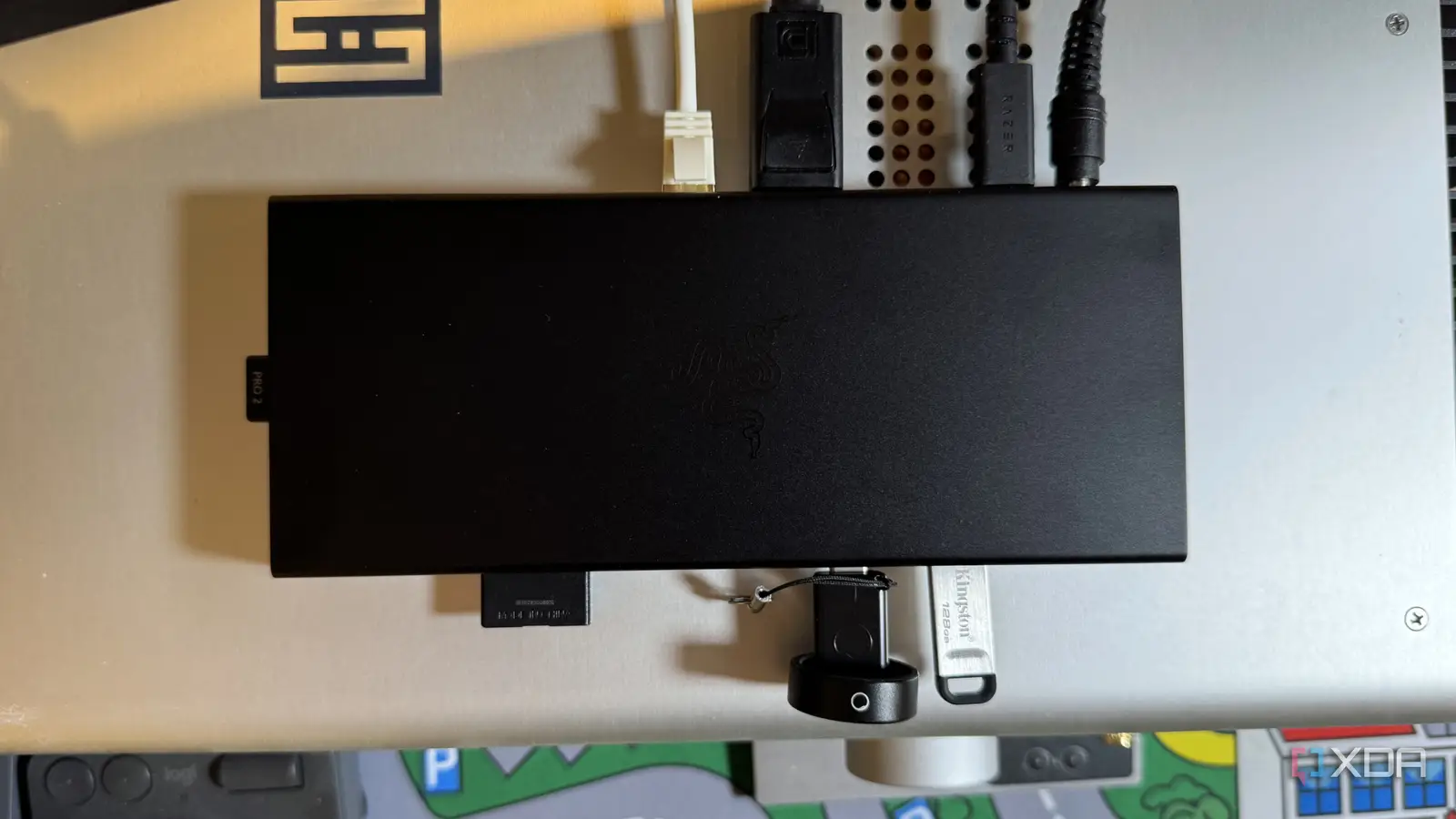

A laptop can replace a desktop until the ports run out. Then a monitor, wired network connection, memory card, keyboard, and charger become a pile of adapters that must be unplugged one by one. The best docking station turns that mess into one cable between your laptop and your desk.
The 10 docks below range from compact dual-display hubs to serious triple-monitor workstations. Some are native USB-C docks, while others use DisplayLink and require software. Our top pick is the Anker Nano 13-in-1, with the Anker PowerExpand 8-in-1 as the simpler choice for a compact dual-monitor desk.
| # | Product | Award | Displays | Charging | Best for |
|---|---|---|---|---|---|
| 1 | Anker Nano 13-in-1 | Best overall | Up to three, 4K single | Up to 100W | Full home office setups |
| 2 | Anker PowerExpand 8-in-1 | Best compact dock | Up to two, 4K | Up to 85W | Simple dual-monitor desks |
| 3 | Dell Pro WD25 | Best for business PCs | Up to four high-resolution displays | Up to 100W | Managed office workspaces |
| 4 | Anker Prime DL7400 | Best premium triple-display dock | Three 4K displays | Up to 140W | Windows power users |
| 5 | Anker Prime Dual Display | Best charging dock | Two, up to 2K at 60Hz | Up to 160W total | Multi-device charging |
| 6 | Plugable UD-ULTC4K | Best triple-4K flexibility | Three 4K at 60Hz | Up to 100W | Mixed HDMI and DisplayPort desks |
| 7 | Anker Triple Display Dock | Best vertical design | Three at 1080p | Up to 85W | Space-conscious Windows desks |
| 8 | Acer Triple Monitor Dock | Best native display range | Up to three | Up to 85W to laptop | High-resolution mixed displays |
| 9 | LIONWEI 13-in-1 Dock | Best port variety | Up to three on Windows | Up to 87W | Port-heavy Windows setups |
| 10 | Selore 14-in-1 Dock | Best VGA flexibility | Up to three on Windows | Up to 87W | Older and newer displays |
1. Anker Nano 13-in-1: Best Overall

Pros
- Detachable hub works at a desk or on the road
- Three display outputs with a useful range of modes
- 100W laptop charging and 10Gbps data
- Includes a 140W power adapter
Cons
- macOS mirrors multiple external displays
- Requires a compatible USB-C video connection
- The dock only activates when connected to a laptop
Best for: someone who wants one dock for a permanent desk and mobile work.
The Anker Nano 13-in-1 is the most thoughtfully versatile dock here. Its defining feature is not simply the number of ports, but the detachable 6-in-1 hub that snaps away from the 13-in-1 desktop unit. Leave the larger section beside your monitors, then take the smaller hub with a laptop when the workday moves to another room.
The display selection is broad enough for a serious workstation. Two HDMI ports and one DisplayPort can run one display at up to 4K at 60Hz, two at 2K at 60Hz, or three at 1080p at 60Hz. That makes the dock a better fit for three ordinary office monitors than for a desk built around three high-resolution panels. Windows users get the most flexibility, while macOS mirrors multiple external screens.
Anker also gives the dock a sensible power and data foundation. It can send up to 100W to the laptop, and one USB-C data port reaches 10Gbps. The two other USB-C data ports, three USB-A ports, Gigabit Ethernet, audio, SD, and TF card slots cover the usual desk equipment without forcing a second hub into the setup. The included 140W adapter helps the dock maintain that arrangement when several peripherals are connected.
The weakness is compatibility nuance. A laptop must support USB-C video output, and macOS does not gain independent extended displays from this dock. The Anker PowerExpand 8-in-1 is smaller and simpler for two-screen desks, while the Anker Prime DL7400 is stronger for three 4K screens on Windows. Choose the Nano if you want a flexible home office dock that can also become a travel hub.
2. Anker PowerExpand 8-in-1: Best Compact Dock

Pros
- Small 0.2-pound design
- Two HDMI outputs
- SD and microSD card access
- Supports up to 85W pass-through charging
Cons
- Dual displays are limited to 4K at 30Hz
- macOS mirrors both external monitors
- No Linux support
Best for: a laptop user who needs two screens and a small collection of essential ports.
The Anker PowerExpand 8-in-1 is the easiest dock to understand in this group. It is a slim gray hub measuring about 4.65 by 2.01 by 0.69 inches and weighing 0.2 pounds, so it can sit behind a laptop or travel in the same sleeve. It does not attempt to replace a full desktop dock. It focuses on two screens, storage cards, wired networking, and a few USB accessories.
Its two HDMI ports can drive one display at 4K at 60Hz or two displays at 4K at 30Hz. The single-screen mode is the better match for a sharp modern monitor. Dual 4K at 30Hz remains usable for documents, email, and browser windows, but moving content will not look as smooth as it does at 60Hz. On macOS, both external monitors show the same image, so Mac owners should treat this as a mirrored dual-screen hub rather than an independent multi-monitor solution.
The rest of the port layout is practical: two USB-A data ports, an Ethernet port, SD and microSD readers, and a USB-C power input. Pass-through charging reaches 85W, provided the user supplies a 100W power adapter and USB-C cable. Windows 10 and 11, ChromeOS, USB4, and Thunderbolt connections are supported when the laptop provides DisplayPort Alt Mode and Power Delivery.
This is a better fit than the Anker Nano 13-in-1 when portability and simplicity matter more than three-monitor expansion. The Nano offers much faster data options and a detachable travel hub, while this Anker is less demanding on desk space. Skip it if you need Linux support, independent Mac displays, or high-refresh dual-monitor output.
3. Dell Pro WD25: Best for Business PCs
Pros
- Up to 100W power delivery
- Native support for up to four high-resolution displays
- Reversible cable routing
- Durable USB-C connector design
- Built for modern manageability
Cons
- Larger and heavier than compact USB-C hubs
- The feature set is aimed at office deployments
- Display details are less specific than on several consumer docks
Best for: an office or home office built around Dell and other mainstream business laptops.
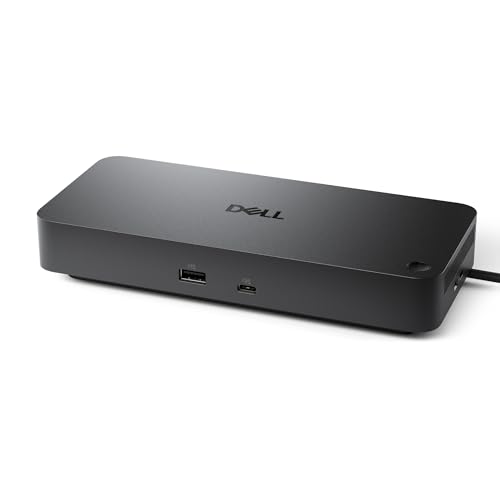
The Dell Pro WD25 feels like a desk appliance rather than a travel accessory. Its 8.07-inch length, 3.54-inch width, 1.39-inch height, and 1.21-pound weight give it a more substantial footprint than the Anker PowerExpand 8-in-1. That extra size makes sense for a permanent workstation, particularly one where the dock will stay connected to several displays and a wired network.
Dell specifies up to 100W of power for new mainstream Dell AI PCs and non-Dell PCs. That is enough headroom for many productivity laptops while the dock handles connected accessories. The dock also supports up to four high-resolution displays, a notable advantage over the dual-monitor limit of the PowerExpand. Dell does not provide the same detailed resolution combinations here as Anker and Plugable, so buyers should confirm the display capabilities of their laptop and monitors before building a four-screen setup.
The physical design is unusually considerate. The USB-C cable can route to the left or right, which helps when the laptop sits on either side of a monitor stand. Dell also highlights a robust USB-C connector, a useful detail for a dock that may be plugged and unplugged repeatedly in a shared workspace. Standby power consumption can be reduced by up to 72 percent, and the enclosure uses at least 65 percent postconsumer recycled materials.
The Dell is a stronger office choice than the Anker Triple Display Dock when four high-resolution screens and manageability matter. The Anker is smaller and gives more explicit port and resolution details, but the WD25 has the more business-focused design. Choose Dell for a fixed workstation and a laptop fleet. It is less compelling for a user who simply needs a lightweight hub in a laptop bag.
4. Anker Prime DL7400: Best Premium Triple-Display Dock

Pros
- Drives three 4K displays on Windows
- Up to 140W laptop charging
- 2.5Gbps Ethernet
- Smart display and active cooling
- Extensive USB-C connectivity
Cons
- DisplayLink driver is required
- Protected streaming can show a black screen
- USB-C front ports do not carry monitor video
Best for: a Windows workstation that needs three 4K screens and unusually high power output.
The Anker Prime DL7400 is the dock for someone who has outgrown ordinary USB-C expansion. It is a substantial 1.84-pound unit with a built-in fan, active cooling, and a smart display that shows charging power, display performance, and cooling information. That is more equipment than most laptop users need, but it makes sense when three high-resolution displays and many connected devices must remain stable through a long workday.
Its 14 connections include two HDMI ports, one DisplayPort, 2.5Gbps Ethernet, SD and TF readers, audio, two 5Gbps USB-A ports, a slower 480Mbps USB-A port, and several USB-C connections. The 140W upstream port can power the laptop, while the front USB-C ports provide up to 100W for compatible accessories. The port guidance is sensible too: Anker recommends the slower USB-A port for a keyboard or mouse receiver, leaving the faster connections available for storage and other demanding peripherals.
Three external 4K displays are the headline feature, but DisplayLink changes the setup process. Windows 10 and 11 users must install the current DisplayLink driver. The dock is therefore not as plug-and-play as the Anker Nano 13-in-1 or the Acer Triple Monitor Dock. The front USB-C ports also do not support video output for USB-C monitors, so displays need to use the HDMI and DisplayPort outputs.
The biggest drawback is streaming compatibility. Anker warns that DRM-protected services such as Netflix, Prime Video, and Disney+ may show a black screen while audio continues through a DisplayLink-connected display. The Plugable UD-ULTC4K has a similar HDCP limitation, but gives more HDMI and DisplayPort outputs. Pick the DL7400 for a Windows desk that prioritizes three 4K screens, high charging capacity, cooling information, and abundant ports. Skip it if media streaming or a driver-free setup is central to the workstation.
5. Anker Prime Dual Display: Best Charging Dock

Pros
- 160W total output
- Three USB-C ports with up to 100W each
- Dual HDMI display outputs
- Up to 10Gbps data
- Supports USB-C, USB4, and Thunderbolt connections
Cons
- Dual displays mirror on macOS
- Resolution depends on DP 1.4 or DP 1.2 support
- Does not support a 5120 by 1440 monitor
Best for: a desk with a laptop, phone, tablet, and other devices that need simultaneous charging.
The Anker Prime Dual Display is built around power management. Its total output reaches 160W, with three USB-C ports rated up to 100W each and one USB-A port rated up to 12W. That arrangement is useful when the laptop is only one part of the desk. A phone, tablet, portable drive, and other USB-C equipment can remain connected without turning the dock into a tangle of separate chargers.
The display side is more restrained. The two HDMI outputs can run dual displays at up to 2K at 60Hz when paired with a DP 1.4 laptop, or 1080p at 60Hz with a DP 1.2 laptop. The dock supports streaming or mirroring across the two screens, but macOS mirrors both external displays. Anker also calls out a specific limitation for 5120 by 1440 monitors, so owners of ultrawide panels should look elsewhere.
Data connectivity is strong, with 11 ports dedicated to data and display functions and speeds reaching 10Gbps. USB-C, USB4, and Thunderbolt connections are supported when the computer also provides DisplayPort Alt Mode and Power Delivery. The included upstream cable supports 100W and 10Gbps, which avoids a common problem where an otherwise capable dock is paired with a cable that cannot carry its full signal.
Compared with the Dell Pro WD25, the Anker places more emphasis on charging several devices than on four-display office deployment. The Anker Prime DL7400 is the better match for three 4K monitors, while this model suits a dual-screen desk with a crowded charging shelf. Its weight is nearly 2.82 pounds, so it belongs beside a monitor, not in a travel pouch.
6. Plugable UD-ULTC4K: Best Triple-4K Flexibility
Pros
- Three 4K displays at 60Hz
- Three HDMI and three DisplayPort outputs
- Up to 100W laptop charging
- Supports Windows, macOS, and ChromeOS
- Lifetime support
Cons
- DisplayLink drivers are required
- macOS needs Screen Recording permission
- HDCP is not supported
Best for: a mixed-monitor workstation where connection flexibility matters as much as screen count.
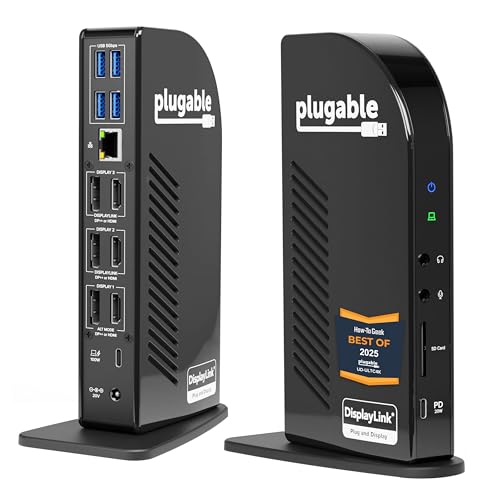
The Plugable UD-ULTC4K is refreshingly clear about its purpose. This is a workstation dock for three monitors, not a casual USB-C hub. It provides three HDMI and three DisplayPort outputs, giving an office the freedom to mix monitor types without adding video adapters. The enclosure weighs about 1.07 pounds and measures 6.89 by 4.72 by 2.64 inches, so it is substantial without being difficult to place.
Each of the three connected displays can reach 4K at 60Hz, a much stronger specification than the 1080p triple-screen ceiling on the older Anker Triple Display Dock. A 10Gbps USB-C connection carries the dock link, while the rear USB-C host connection can provide up to 100W Power Delivery, with 96W certified. The front USB-C port is for accessories, supporting up to 10Gbps data and up to 20W charging for compatible devices.
Compatibility is broad, but the setup is not driver-free. Plugable lists supported Windows 10 or later, macOS 11 or later, and ChromeOS 100.x or later systems with Thunderbolt, USB4, or USB-C. DisplayLink drivers are required on macOS, and Screen Recording permission must be granted for external displays to work. Plugable says that permission enables the display function and does not mean the driver records the screen.
There is a real media limitation: HDCP is not supported, so protected streaming content may fail on connected displays. The Anker Prime DL7400 has a similar warning, but adds a smart display and higher upstream charging. The Plugable is the better pick when the office has a mix of HDMI and DisplayPort monitors, and its lifetime support is reassuring for a deployment. It is not the right dock for a streaming-first setup.
7. Anker Triple Display Dock: Best Vertical Design

Pros
- Compact vertical enclosure
- Three 1080p displays on Windows
- One 4K display at 60Hz
- 85W laptop charging
- Includes a 135W power adapter
Cons
- macOS limits external monitors to mirrored mode
- Triple-display resolution is limited to 1080p
- Designed primarily for Windows workflows
Best for: a Windows user who wants three screens without a wide dock taking over the desk.
The Anker Triple Display Dock earns its place through restraint. Its compact vertical design measures about 4.9 by 3.5 by 1.6 inches and weighs 0.82 pounds, keeping the ports upright rather than spreading them across the desk. It is a good physical match for a narrow workstation, especially when a monitor stand already occupies most of the available depth.
The dock offers two HDMI ports and one DisplayPort. Windows 10, Windows 11, and ChromeOS systems with MST can run three external monitors at 1080p at 60Hz, or one screen at 4K at 60Hz through HDMI or DisplayPort. That makes it ideal for three text-heavy work areas, not three 4K editing panels. The Anker Nano 13-in-1 has a more modern three-screen arrangement, while the Plugable UD-ULTC4K is in another class for triple 4K.
Its 13 ports also include three USB-C connections, three USB-A ports at 5Gbps, Gigabit Ethernet, SD and microSD readers, a 3.5mm audio connection, and DC input. Laptop charging reaches 85W, and the included 135W adapter means the dock is ready for a fixed desk setup. A USB-C connection carrying video, data, and Power Delivery remains essential, so a basic charging-only USB-C port will not be enough.
The key limitation is the operating system. Mac users get charging and data, but macOS restricts the monitors to mirrored mode. That is a deal-breaker for many Mac workstations, while Windows users get the intended extended desktop. If three 1080p displays and a tidy vertical shape are the priority, this is more sensible than carrying a larger high-end dock.
8. Acer Triple Monitor Dock: Best Native Display Range

Pros
- Two HDMI ports and one DisplayPort
- Single-display output up to 8K at 30Hz on DisplayPort
- Dual 4K at 60Hz support
- 10Gbps USB-C data
- Gigabit Ethernet
Cons
- Power adapter and cable are not included
- Laptop output is limited to 85W
- macOS mirrors external displays
Best for: a laptop with DisplayPort Alt Mode that needs flexible native HDMI and DisplayPort expansion.
The Acer Triple Monitor Dock stands out for its display claims. Its DisplayPort output can reach 8K at 30Hz with a single screen, while either HDMI output can reach 4K at 60Hz. With two displays connected, it supports 4K at 60Hz on both. That is a more ambitious native display range than the Anker Triple Display Dock, although the laptop's own graphics output and port version still determine what actually works.
Three screens are possible, but the resolution allocation depends on the monitors and total bandwidth. Acer gives a typical arrangement of 4K at 60Hz, 4K at 60Hz, and 1080p at 60Hz. The dock needs a laptop USB-C port with DisplayPort Alt Mode, and Acer recommends an HDMI 2.0 or newer source for optimal results. This is the sort of dock where checking the laptop specification first saves frustration.
The port mix includes two USB-C ports at 10Gbps, two USB-A ports at 5Gbps, SD and microSD readers rated at 104Mbps, Gigabit Ethernet, and USB-C Power Delivery. The dock accepts up to 100W but sends 85W to the laptop. A 100W or higher power adapter and cable are required, and they are not included. That omission makes the setup less complete than the Anker Triple Display Dock, which includes a power adapter.
Acer supports Windows and macOS laptops with DisplayPort Alt Mode, but Mac users can only mirror the same content across external screens. The Selore 14-in-1 Dock adds VGA for older displays, while the Acer is the sharper choice for newer HDMI and DisplayPort monitors. Pick it when native display output and high single-screen resolution matter more than an all-in-one package.
9. LIONWEI 13-in-1 Dock: Best Port Variety

Pros
- Three video outputs
- Two USB-C ports with data and Power Delivery
- Gigabit Ethernet and audio
- Multiple USB-A speeds
- Supports up to 100W input
Cons
- Windows is required for full extended triple-display support
- Laptop charging is limited to 87W after dock power use
- Very slim shape may require careful cable placement
Best for: a Windows desk that needs many legacy USB ports alongside multiple displays.
The LIONWEI 13-in-1 Dock takes a familiar USB-C hub and expands the port count aggressively. It has two HDMI outputs, one DisplayPort, two USB-C ports that support 100W Power Delivery and 10Gbps data, one USB 3.1 port at 10Gbps, three USB 3.0 ports, two USB 2.0 ports, Gigabit Ethernet, and a combined audio and microphone jack. That is a useful spread when a desk includes older USB peripherals.
Windows systems support MST and SST, with the HDMI and DisplayPort outputs reaching up to 4K at 60Hz when the laptop provides a DP 1.4 source. On macOS, the dock can extend only one monitor, while the other external screens mirror. This is a familiar limitation in this category, but it matters more here because the product emphasizes triple-display use.
Power delivery is rated at 100W input, but the dock uses about 13W itself, leaving up to 87W for the laptop. That is enough for many productivity machines, though it gives less headroom than the Dell Pro WD25 or the Anker Nano 13-in-1. The extra USB 2.0 ports are best reserved for keyboards, mice, and similar low-bandwidth devices, while fast storage belongs on the USB-C or USB 3.1 connections.
The slim enclosure is convenient but feels more like a multiport hub than a dedicated office dock. The Acer Triple Monitor Dock offers a stronger high-resolution display story, and the Anker Nano adds a detachable travel section. Choose LIONWEI when the important question is not just how many monitors connect, but how many different USB generations and accessories the dock can absorb.
10. Selore 14-in-1 Dock: Best VGA Flexibility

Pros
- HDMI, VGA, and multiple USB ports
- Three 10Gbps USB-C or USB-A connections
- 1000Mbps Ethernet
- SD and microSD readers
- Driver-free setup
Cons
- VGA is limited to older display hardware
- macOS does not provide independent multi-monitor extension
- Laptop charging is limited to 87W after dock power use
Best for: a Windows workstation that mixes a modern HDMI screen with an older VGA monitor.
The Selore 14-in-1 Dock is defined by the port that newer docks increasingly omit: VGA. It combines two HDMI outputs with VGA, allowing a Windows laptop to connect to three displays when the computer and monitors support the necessary DP 1.4 arrangement. The USB ports do not carry video, so the display connections must use those dedicated outputs.
The dock also provides three 10Gbps USB-C or USB-A connections, four additional USB-A ports, SD and microSD card readers, a 3.5mm audio port, and 1000Mbps Ethernet. The two USB 2.0 ports are sensibly suited to keyboards and mice, while the faster ports can handle storage and other demanding accessories. Card readers reach up to 200Mbps, according to the product information.
Power input is rated at 100W, with up to 87W available to the laptop after the dock reserves power for itself. The USB-C charging port requires a compatible Power Delivery device, and a 100W charger is recommended. Selore says the dock works without installing a driver, which is simpler than the DisplayLink-based Anker Prime DL7400 and Plugable UD-ULTC4K.
Compatibility still depends on the laptop's USB-C port supporting Thunderbolt or DisplayPort Alt Mode. Windows users can mirror or extend to three screens, while Mac users generally receive mirrored output. The Acer Triple Monitor Dock is the better match for current high-resolution HDMI and DisplayPort displays. Choose Selore when VGA compatibility is the deciding factor, not when the goal is a clean modern workstation.
How to choose best docking station
The right dock depends on the laptop's video output, the number and resolution of the displays, and the peripherals that need to stay connected.
Laptop compatibility
A USB-C shape does not guarantee video, charging, or high-speed data. The laptop must support DisplayPort Alt Mode, USB4, or Thunderbolt for many of these docks to drive external displays. Power Delivery support matters too, since a charging-only USB-C port cannot turn a hub into a full workstation.
Windows laptops generally offer the broadest extended-display support in this group. Mac compatibility is more limited on several models, with multiple screens mirroring rather than extending. Linux support is specifically absent on the Anker PowerExpand 8-in-1.
Display outputs
Count the physical monitor outputs and check the resolution combination, not just the maximum resolution printed for one screen. A dock may handle one 4K display at 60Hz but drop to 1080p when three screens are connected. Native HDMI and DisplayPort docks avoid some software complications, while DisplayLink models can provide more screens through a driver.
For a desk with mixed cables, the Plugable UD-ULTC4K is unusually adaptable because it offers three HDMI and three DisplayPort outputs. For an older VGA monitor, the Selore 14-in-1 Dock is the more practical fit. A clean multi-screen setup also benefits from a monitor stand that leaves room for several screens.
The laptop's USB-C capabilities matter more than the dock's port count.
Charging capacity
A dock's headline charging figure is not always what reaches the laptop. The dock itself consumes some power, and accessories may draw from the same adapter. The LIONWEI and Selore docks accept 100W but reserve about 13W, leaving up to 87W for the laptop. The Anker Nano can provide up to 100W, while the Anker Prime DL7400 reaches up to 140W through its upstream port.
Also check whether the power adapter is included. The Anker Nano, Anker Prime models, Anker Triple Display Dock, and Plugable include power hardware described in their listings. The Acer requires the user to supply a 100W or higher adapter and cable.
Data and network ports
Fast USB-C ports are valuable for external solid-state drives and large file transfers, while USB 2.0 is adequate for a keyboard, mouse, or wireless receiver. Memory card readers matter to photographers and creators, and Gigabit Ethernet is useful when Wi-Fi is inconsistent. The Anker Prime DL7400 goes further with 2.5Gbps Ethernet, while most of the other full-size docks use Gigabit Ethernet.
Audio is another small detail that can prevent a second adapter. The Anker Nano, Anker Prime DL7400, Anker Prime Dual Display, LIONWEI, and Selore models include audio connections described in their features.
Native video and DisplayLink
Native video output uses the laptop's graphics path and usually needs less software. DisplayLink can expand the number of screens, but it requires a driver and may have limitations with protected streaming. The Anker Prime DL7400 and Plugable UD-ULTC4K both clearly disclose DisplayLink requirements and media restrictions.
If the dock will be used for streaming video on an external display, investigate HDCP and DRM behavior before buying. If it will be used for spreadsheets, code, documents, and browser windows, DisplayLink's extra screen capacity may be more useful.
Frequently asked questions
Can any USB-C laptop use a docking station?
No. The laptop should support DisplayPort Alt Mode, USB4, or Thunderbolt for video output, and Power Delivery if the dock will charge it. A USB-C port that only handles data may still work with some peripherals, but it will not provide the full docking experience.
How many monitors can these docks run?
It depends on the dock, laptop, operating system, and display resolution. The Anker Nano supports up to three displays with a listed combination of one 4K, two 2K, or three 1080p screens. The Plugable UD-ULTC4K supports three 4K displays through DisplayLink on compatible systems, while the Anker PowerExpand 8-in-1 is intended for one or two displays.
Do these docks work with MacBooks?
Several support Mac laptops for charging and data, but multi-monitor behavior varies. The Anker PowerExpand 8-in-1, Anker Prime Dual Display, Anker Triple Display Dock, Acer Triple Monitor Dock, LIONWEI dock, and Selore dock list mirroring limitations for multiple external displays. DisplayLink models can extend more screens through software, but they require drivers and may restrict protected streaming.
Do I need a separate charger?
Not always. The Anker Nano, Anker Prime DL7400, Anker Prime Dual Display, Anker Triple Display Dock, and Plugable listings include power hardware. The Acer Triple Monitor Dock requires a 100W or higher adapter and cable, while other models should be checked carefully to confirm what is in the package.
Can a dock charge a laptop and connected devices at the same time?
Yes, within its power limits. The Anker Nano can provide up to 100W to the laptop, while its USB ports handle connected accessories. The Anker Prime Dual Display offers up to 160W of total output across multiple ports. A dock's own power draw and the needs of attached devices reduce the amount available to the laptop.
Will a docking station improve a laptop's graphics performance?
No. A dock expands connections and can route video to additional displays, but it does not add a dedicated graphics processor. The laptop's graphics hardware, USB-C video capabilities, and available bandwidth still determine the practical display limits.
Are DisplayLink docks suitable for gaming?
They are mainly designed for productivity and multi-screen office work. DisplayLink adds software processing and can have limitations with protected video, so a native HDMI or DisplayPort connection is preferable for latency-sensitive gaming or media playback. Check the laptop and monitor connections before choosing a DisplayLink model.
The bottom line
The Best docking station for most people here is the Anker Nano 13-in-1. Its detachable 6-in-1 hub makes it more useful away from the desk, while three display outputs, 100W laptop charging, 10Gbps data, Ethernet, audio, and card readers cover a complete home office. The Anker PowerExpand 8-in-1 is the better fit for a smaller dual-monitor setup that does not need three screens or a large port array.
For specialist workstations, choose the Plugable UD-ULTC4K for three 4K monitors and mixed HDMI and DisplayPort connections, or the Dell Pro WD25 for a business-focused setup with up to four high-resolution displays. Windows users who need a three-screen 4K arrangement and substantial charging capacity should consider the Anker Prime DL7400, provided the DisplayLink and protected-streaming limits are acceptable.
If you are undecided, check your laptop's USB-C video support first, then count the displays and ports you will actually use.
As an Amazon Associate we earn from qualifying purchases.