
The difficult part of starting a shirt-printing operation is rarely the artwork. It is keeping white ink moving, feeding film without wrinkles, and curing transfers without turning every order into a maintenance project. The Best DTF printer for small business needs to fit the work area while handling the kind of jobs you actually sell.
We ranked these nine machines by production capability, print width, maintenance features, included workflow equipment, and the level of support described for each one. The list includes serious A3 systems, compact A4 printers, a conversion kit, and one conventional wide-format ink tank printer that makes sense only for a very specific buyer.
The Lancelot M1630 Pro Auto-Maintenance is our top pick. The rest range from a more complete shaker-and-dryer station to compact starter machines and lower-commitment alternatives.
Comparison table
| # | Product | Award | Format | Print width or resolution | Workflow | Best for |
|---|---|---|---|---|---|---|
| 1 | Lancelot M1630 Pro Auto-Maintenance | Best overall | A3 Plus | Up to double L1800 and R1390 speed | Auto-cut, roll or sheet film, white circulation | Small apparel businesses |
| 2 | Lancelot M1630 Pro Shaker Bundle | Best complete station | A3 Plus | Up to 720 x 1440 dpi | Printer, shaker, dryer, workstation | Organized production |
| 3 | InkSonic R1390 A3 Printer | Best support package | A3 | 13-inch width, up to 2880 dpi | Oven, CISS, white circulation, auto clean | First apparel business |
| 4 | Carbcolords A4 Starter Bundle | Best compact setup | A4 | Up to 8.27-inch roll film | Oven, roll feeder, mixing system | Home studios |
| 5 | Epson EcoTank ET-8550 | Best conventional printer alternative | Wide format | Six-color Claria ET Premium ink | Print, scan, copy, wireless | Artwork and general printing |
| 6 | DSV F1080 A3 Printer | Best for speed | A3 | 13-inch width, 2880 x 1440 dpi | Shaker, purifier, touch screen | Busy workshops |
| 7 | Generic DTF Conversion Kit | Best conversion starting point | Converted ink tank printer | 5760 x 1440 optimized dpi | Wireless print, scan, copy, photo | DIY experimentation |
| 8 | KOMHOW L1800 A3 Printer | Best maintenance automation | A3 | Up to 13-inch height, 2880 dpi | Oven, RIP software, air suction | Hands-off upkeep |
| 9 | DXZ A4 XP600 Printer | Best small-footprint speed | A4 | 8.27-inch width, 2800 x 1400 dpi | Roll or sheet film, oven, built-in cutter | Small-batch orders |
1. Lancelot M1630 Pro Auto-Maintenance: Best Overall

Pros
- Handles A3 Plus sheets and rolls
- Automatic film cutting simplifies repeat jobs
- Holiday Mode and white ink circulation reduce idle-period maintenance
- Includes a Windows laptop with drivers and software
Cons
- Large and heavy for a home workspace
- Not compatible with Mac systems
- Does not include the shaker and dryer station found with the second Lancelot
Best for: a small apparel business that wants a broad, ready-to-run A3 Plus printer with automated upkeep.
The Lancelot M1630 Pro Auto-Maintenance is the printer we would keep for a growing custom apparel operation. Its appeal is not one flashy feature. It is the way several practical details fit together: A3 Plus support, sheet and roll feeding, automatic film cutting, white ink circulation, a preloaded Windows computer, and a maintenance mode aimed at periods when the machine is not printing every day.
Lancelot says the M1630 Pro runs at double the speed of L1800 and R1390 models. That comparison is useful for a business moving beyond occasional shirts, although the listing does not provide a precise pages-per-hour figure. The printer also supports A3 and A4 sheets as well as rolls, so the workflow can shift from a single chest logo to repeated designs without forcing the operator into one film format. Automatic cutting matters here because it reduces a small but persistent manual step between a print and the next job.
White ink is the part of DTF ownership that often needs the most attention. This model uses white ink circulation and a patented Holiday Mode auto-cleaning function to keep ink moving during downtime. Its waste ink alerts are intended to make maintenance more predictable, while the listing claims the printhead can last 40 percent longer than a standard DTG machine. That is a manufacturer claim rather than a guarantee, but the underlying features are directly relevant to a small business that may print heavily one week and lightly the next.
Compared with the InkSonic R1390 A3 Printer, the Lancelot offers a larger A3 Plus format and a more flexible sheet and roll setup. The InkSonic counters with a clearly stated 13-inch print width, matched consumables, and unusually detailed support. The Lancelot M1630 Pro Shaker Bundle is the better choice if you want powdering and curing integrated into one station, but it occupies much more floor space. This version is the more balanced choice for a business that already has a heat press or prefers to arrange curing separately.
There are real limits. The 167.55-pound weight and 35 by 29.6 by 14-inch dimensions make this a dedicated piece of equipment, not something to move onto a desk after each order. It also supports Windows 7, 10, and 11 but not Mac. Choose it when you can give the printer a permanent workstation and can work within the Windows requirement.
2. Lancelot M1630 Pro Shaker Bundle: Best Complete Station

Pros
- Combines printing, powdering, and curing
- Includes shaker, dryer, workstation, and Windows laptop
- XP600 printhead supports up to 720 x 1440 dpi
- Accepts both roll and sheet film
Cons
- Very large footprint
- More equipment than a casual maker needs
- The listing does not state a print width
Best for: an apparel operation that wants one organized production station instead of separate printer and curing equipment.
The Lancelot M1630 Pro Shaker Bundle is the most complete physical workflow in this roundup. It pairs the A3 Plus printer with a powder shaker, dryer, mobile workstation, and laptop. That makes a meaningful difference when orders are moving through several stages. Film comes out of the printer, receives powder, and moves toward curing in a setup designed to keep those steps together.
Its XP600 printhead is specified at up to 720 x 1440 dpi. Resolution alone does not decide transfer quality, but that figure indicates the machine is designed for detailed graphics, smooth gradients, and saturated apparel designs rather than basic single-color lettering. Roll and sheet support also gives it room to handle both one-off designs and small batches. The product description specifically mentions shirts, hoodies, bags, and other compatible items.
The maintenance package is well suited to a small business with uneven demand. Holiday Mode, white ink circulation, and auto-cleaning are intended to make restarts easier after the printer has been idle. That does not remove the need for cleaning and careful ink handling, but it addresses the most common concern with a machine that may not run continuously. The included Windows laptop and mobile workstation create a dedicated file and equipment area, which is useful when the printer is part of a repeatable production process.
Compared with the Lancelot M1630 Pro Auto-Maintenance, this version makes more sense when the business needs a complete print-to-cure path. The first Lancelot is easier to fit into an existing workspace and still supports roll and sheet film. The DSV F1080 A3 Printer offers a stated 13-inch area, a 5-inch touch panel, and a speed claim of up to 10 A3 prints per hour, but it is also a substantial machine. Lancelot's advantage is the way its accessories and workstation are assembled as one system.
The drawback is size. The listed dimensions are 48.43 inches long, 42.52 inches wide, and 31 inches high. That is closer to a small production station than a spare-room appliance. Skip it if your order volume is occasional or if you already own a dependable powdering and curing setup. For a shop that wants an orderly, dedicated workflow, it is one of the most convincing packages here.
3. InkSonic R1390 A3 Printer: Best Support Package
Pros
- 13-inch print width
- Up to 2880 dpi resolution
- White ink circulation, mixing, and filtration
- Includes oven, ink, film, powder, and maintenance supplies
- 24/7 technical guidance is included
Cons
- R1390 platform is not the fastest option in this group
- Printer and oven still need a dedicated setup
- The brand name and title information are inconsistent in the listing
Best for: a new apparel seller who values setup help and a clearly described starter workflow.
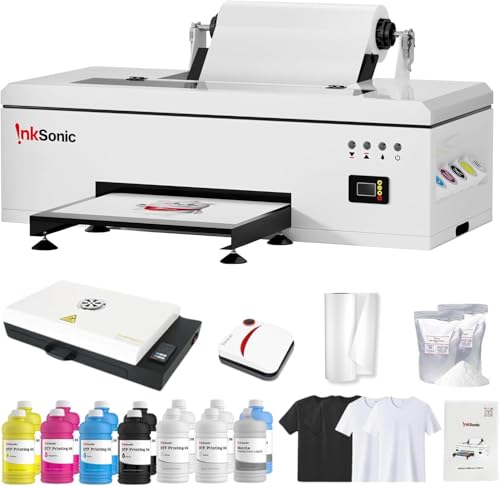
The InkSonic R1390 A3 Printer is a sensible first serious machine because its package explains what happens after unboxing. It includes a printer, oven, 3, 500 ml of ink, transfer film, hot melt powder, and maintenance supplies. That is more useful than a bare printer for someone building a workflow from scratch, especially when the first challenge is getting compatible materials to behave consistently.
The 13-inch print width gives it room for standard shirt graphics, hoodie designs, tote bags, and larger chest or back transfers. The claimed 2880 dpi resolution is aimed at sharp edges and detailed artwork. Continuous ink supply keeps the tanks fed during longer jobs, while adjustable air suction helps hold film flat as it feeds. Those details matter more than resolution by itself because wrinkles and inconsistent ink delivery can ruin a transfer before the artwork gets a chance to look good.
Its white ink protection system is one of the stronger features in this tier. Circulation, mixing, and filtration work together to reduce pigment settling, and a printhead moisturizing unit is intended to help during longer idle periods. The printer also includes automatic cleaning. None of these systems means maintenance can be ignored, but they make more sense for a home studio or side business than a printer that assumes constant daily production.
The InkSonic is easier to recommend than the Carbcolords A4 Starter Bundle when designs need a full 13-inch width. Carbcolords is much easier to place in a compact room and includes an oven, but its roll film is limited to 8.27 inches. The Lancelot M1630 Pro Auto-Maintenance is more ambitious and supports A3 Plus media, while the InkSonic has the clearer beginner support story. Its listing promises one-on-one guidance, phone assistance, installation videos, manuals, and a California-based service center.
The listing also says it supports cotton, polyester, denim, canvas, leather, athletic mesh, and blended fabrics. That gives an apparel seller more room to experiment, though actual transfer performance still depends on film, powder, pressing, and curing technique. The printer measures 31.5 inches long, 9.4 inches wide, and 13 inches high according to the product information, but the oven and operating clearance add to the practical footprint. It is the pick for buyers who want A3 capability without giving up structured support.
If you are still deciding between a conventional office printer and a transfer machine, the equipment needs of a small printing business are a useful comparison point. DTF production adds film, powder, curing, and heat pressing to the workflow, so the printer is only one part of the setup.
4. Carbcolords A4 Starter Bundle: Best Compact Setup

Pros
- Compact A4 format
- Includes oven, ink, film, and powder
- XP600 printhead
- White ink mixing system
- Roll feeder supports film up to 8.27 inches wide
Cons
- Narrower print area than the A3 and A3 Plus models
- Printhead warranty is six months
- Not intended for large graphics
Best for: a home studio making small transfers, logos, and short apparel runs.
The Carbcolords A4 Starter Bundle is the easiest machine here to imagine in a craft room. The printer itself measures 14.17 inches long, 15.75 inches wide, and 5.91 inches high. It includes a curing oven, roll film, four 250 ml bottles of color ink, 500 ml of white ink, and DTF powder, so the box is aimed at a complete first setup rather than an equipment upgrade.
Its A4 format is the central trade-off. The roll feeder accepts film up to 8.27 inches wide, which is enough for logos, chest prints, sleeve designs, kidswear graphics, and many small custom orders. It is not the right format for broad back prints or large hoodie artwork. The InkSonic R1390 A3 Printer is the better fit if large graphics are part of the business plan, while the Carbcolords makes more sense when most designs are modest in size.
The XP600 printhead is specified for detailed designs, smooth gradients, and vibrant output. A built-in white ink mixing system helps reduce settling in the white channel, which is particularly important on dark garments. The roll feeder should also reduce the interruptions that come with repeatedly loading individual sheets. Those features make the printer more practical for repeated small jobs than a basic conversion setup.
Carbcolords includes an oven, but the transfer process still requires a heat press for application. That distinction is easy for a new buyer to miss. The printer's listed dimensions do not include the full operating area around the oven, film, and finishing equipment, so measure the room rather than relying on the machine body alone. The one-year warranty for non-consumable parts and six-month printhead warranty provide a defined support window, with setup and software guidance available from the support team.
This is not the most flexible printer in the roundup. The DXZ A4 XP600 Printer also uses an A4 format and offers a built-in cutter, roll or sheet feeding, and a stated 2800 x 1400 dpi resolution. DXZ claims twice the speed of L1800 and L805 printheads, while Carbcolords is the more straightforward starter bundle. Choose Carbcolords when space and a simple print, powder, cure path matter more than large-format capacity.
5. Epson EcoTank ET-8550: Best Conventional Printer Alternative

Pros
- Six-color Claria ET Premium ink system
- Wireless printing
- Prints, scans, and copies
- Wide-format design
- Large ink capacity
Cons
- Not a purpose-built DTF printer
- No DTF-specific white ink circulation or curing workflow
- Included features focus on photos and general documents
Best for: a business that needs a conventional wide-format printer for artwork and office tasks rather than a dedicated DTF production machine.
The Epson EcoTank ET-8550 is the outlier in this list, and that is exactly why it needs careful explanation. It is a wireless wide-format all-in-one tank printer designed for photos, graphics, creative projects, scanning, and copying. It is not presented as a dedicated DTF printer, does not include an oven or powder system, and does not list DTF white ink circulation.
Its six-color Claria ET Premium ink system is designed for vibrant photos and sharp text. The printer can produce up to 6, 200 color pages according to the supplied product information, and Epson says the box includes up to two years of ink under its stated conditions. Those capabilities can be useful around an apparel business for artwork proofs, labels, order documents, and promotional material. They do not turn the ET-8550 into a direct-to-film production system.
The practical reason to consider it is versatility. The printer, scanner, and copier combination can serve a home office or design station, while wireless printing keeps it separate from the main computer. Its dimensions are 29.8 inches long, 20.6 inches wide, and 16.9 inches high, with a listed weight of 24.5 pounds. That is a very different kind of equipment from the 160-pound DSV F1080 A3 Printer or the 167.55-pound Lancelot M1630 Pro Auto-Maintenance.
Do not choose this model expecting to print DTF film, circulate white ink, or cure transfers. The Generic DTF Conversion Kit is closer to a DIY transfer path because its supplied feature describes DTF ink, film, powder, and a printer conversion, although it carries more uncertainty around the underlying platform. Dedicated options such as the KOMHOW L1800 A3 Printer provide automatic white ink circulation, cleaning, and air suction that the Epson does not claim.
For a small apparel company, the ET-8550 works best as a companion printer. It can handle design proofs and general documents while a real DTF machine handles transfers. If you need one device to produce finished apparel transfers, skip it. If your business needs a capable wireless creative printer and your DTF equipment is separate, its broad office and photo functions are the reason to consider it.
6. DSV F1080 A3 Printer: Best for Speed

Pros
- 13-inch printing area
- 2880 x 1440 dpi resolution
- Includes shaker, purifier, and touch screen
- Timed printhead cleaning
- Low-ink and waste-ink alarms
Cons
- Large 160-pound machine
- Printhead warranty is six months
- Speed claims are manufacturer specifications
Best for: a workshop that needs a faster A3 workflow and has room for a dedicated production station.
The DSV F1080 A3 Printer is aimed at the busiest operation in this group. Its listing says an A3 print can be completed in three minutes, with up to 10 prints per hour, and describes the F1080 printhead as twice as fast as the classic L1800 or XP600. Those are useful targets for comparing the machine, but they are not a promise that every design and production condition will reach that rate.
The printer offers a 13-inch printing area and 2880 x 1440 dpi resolution. That combination gives a small apparel business room for larger shirt graphics while retaining the detail expected from complex artwork. An electric roller helps secure film during loading, and the printer includes a shaker and purifier to support a more continuous print, powder, and cure workflow.
Maintenance controls are unusually prominent. A timed printhead self-cleaning function can be scheduled through the 5-inch LED touch screen. Color-coded low-ink alerts identify the channel that needs attention, while a waste-ink overflow warning is intended to prevent spills and interruptions. Those features do not eliminate daily care, but they can reduce the amount of guesswork during a long work session.
The DSV also advertises a two-year ink and supply plan, with refill packs described as five 250 ml bottles of DTF ink, cleaning solution, and powder supplied every two months in the United States, with shipping paid by the customer. That is a specific program condition worth checking before ordering because availability and terms can change. The printer itself measures roughly 39.37 inches long, 46.26 inches wide, and 22.64 inches high, and weighs 160 pounds.
Compared with the Lancelot M1630 Pro Shaker Bundle, the DSV puts more emphasis on speed, alarms, and touch-screen control. Lancelot offers a workstation and laptop as part of its organized station. The Lancelot M1630 Pro Auto-Maintenance is easier to place because it does not include the same shaker and purifier arrangement, though it still needs substantial floor space. Pick DSV for production rhythm, not because a large resolution number alone guarantees better finished transfers.
7. Generic DTF Conversion Kit: Best Conversion Starting Point

Pros
- Includes CMYK DTF ink, film, and powder
- Wireless print, scan, copy, and photo functions
- 5760 x 1440 optimized dpi specification
- Smaller 20-pound printer body
- Supports small, medium, and large transfer sizes
Cons
- Not a purpose-built DTF printer
- Product details do not identify the underlying printer model
- No stated white ink circulation system
Best for: an experienced DIY user who wants to explore a converted printer rather than buy a dedicated DTF machine.
The Generic DTF Conversion Kit is the most uncertain recommendation here, but it fills a real niche. It is described as a printer conversion package with four-color CMYK DTF ink, DTF film, powder, and a wireless ink tank printer that can print, copy, scan, and handle photos. That makes it fundamentally different from the dedicated machines above. The buyer is not getting an integrated A3 printer, powder shaker, or curing station.
The supplied feature lists a 5760 x 1440 optimized dpi maximum resolution, black print speed of 15.8 ISO pages per minute, and color speed of 11.3 ISO pages per minute. It also mentions two picoliter droplet sizes. Those figures come from the printer description and are more familiar in a conventional inkjet context than a DTF production specification. They should not be compared directly with the DSV's A3 print time or the Lancelot's speed claim.
The smaller body is easier to accommodate. The listed dimensions are 20 inches long, 11 inches wide, and 17 inches high, with a weight of 20 pounds. It handles small, medium, and large shirt sizes according to the feature text, but the listing does not provide a precise film width or identify the underlying Epson-style printer model. That missing information makes consumable compatibility, maintenance, and software support harder to evaluate.
This kit is a very different proposition from the Carbcolords A4 Starter Bundle. Carbcolords states its format, XP600 printhead, roll width, white ink mixing system, oven, and warranty. The Generic kit offers more general office functions but gives far less detail about white ink handling and transfer production. It may appeal to someone comfortable troubleshooting a conversion, while a new business should favor the InkSonic R1390 A3 Printer or another machine with dedicated support.
There is no stated white ink circulation system in the supplied details, and no oven is identified. That means finishing equipment and white-layer management remain open questions. Treat it as a DIY experiment or secondary setup, not the safest foundation for customer deadlines.
8. KOMHOW L1800 A3 Printer: Best Maintenance Automation

Pros
- A3 format with up to 13-inch print height
- 2880 dpi resolution
- Automatic white ink circulation and agitation
- Scheduled 10-hour cleaning cycle
- Adjustable air suction
- Includes oven and RIP software
Cons
- L1800 platform is not the newest design in this group
- Print jobs can take as long as 10 minutes
- No stated shaker and dryer station
Best for: a small business that prioritizes automated cleaning and broad material support over top production speed.
The KOMHOW L1800 A3 Printer is built around a familiar small-business concern: the printer should not become unusable after a few quiet days. Its automatic white ink circulation, printhead cleaning, and ink agitation systems are designed to reduce settling and clogs. A scheduled cleaning cycle runs every 10 hours and uses 1 ml of ink daily according to the listing.
It supports printing up to 13 inches in height and specifies 2880 dpi resolution. That makes it suitable for shirts, hoodies, bags, and other projects using cotton, polyester, leather, denim, and similar materials. The printer also uses adjustable air suction to hold film flat, limit wrinkles and warping, and keep the film from contacting the printhead. That is a practical feature when film feeding is inconsistent.
The printer includes an oven and RIP software, but the data does not identify a powder shaker or dryer station. The finishing process therefore needs more hands-on organization than the Lancelot M1630 Pro Shaker Bundle or DSV F1080 A3 Printer. KOMHOW says a design can take as little as 10 minutes, but actual time depends on the artwork, settings, and workflow. The machine is better understood as a maintenance-focused A3 printer than a high-throughput production line.
Its support package includes a six-month printhead warranty, one-year coverage for other accessories, setup guides, remote troubleshooting, and 24/7 personalized assistance. That is helpful for a first-time owner, although the warranty periods are not as broad as some buyers may expect from larger equipment. The automatic cleaning does not excuse cleaning the capping station, checking film, or managing waste ink.
The DXZ A4 XP600 Printer is smaller and claims twice the speed of L1800 and L805 printheads, but it gives up the KOMHOW's A3 format. The InkSonic R1390 A3 Printer has a similarly broad 13-inch working area and more clearly described included consumables. Choose KOMHOW if scheduled upkeep is the feature that will keep your business running, especially when orders are irregular.
9. DXZ A4 XP600 Printer: Best Small-Footprint Speed

Pros
- Compact A4 format
- Roll and sheet film support
- Built-in film cutter
- XP600 printhead
- White ink mixing and semi-automatic cleaning
- Includes oven
Cons
- 8.27-inch maximum film width
- Heavy for a compact printer at 151 pounds
- Printhead warranty is six months
Best for: a small workspace producing logos, small graphics, and other A4 transfers.
The DXZ A4 XP600 Printer is compact in format but not lightweight equipment. Its listed body dimensions are 14.96 inches long, 15.76 inches wide, and 5.91 inches high, while the listed weight is 151 pounds. That unusual combination means it may fit on a smaller surface than an A3 system, but it is not something most owners will move around casually.
The printer accepts rolls or sheets up to 8.27 inches wide and includes a built-in cutter. The upgraded roller feeder is intended to reduce film feeding problems and jams, while the cutter can save film when a job does not use a full sheet. For logos, sleeve designs, children's clothing, and short runs, this format is practical. It is not suitable for broad back graphics that need the 13-inch area offered by the InkSonic R1390 A3 Printer or DSV F1080 A3 Printer.
DXZ specifies an XP600 six-color printhead, 2800 x 1400 dpi resolution, a white ink mixing system, and semi-automatic cleaning. It claims twice the printing speed of L1800 and L805 printheads, though no precise output rate is supplied. The combination should appeal to a buyer who wants an A4 machine with more automation than a basic conversion printer, while the included oven gives the workflow a clear curing step.
The package also describes two years of ink, with five 250 ml bottles and 500 g of powder supplied on a two-month schedule. The terms say shipping is covered by the buyer, and the support program is described as applying to the United States. Check the current conditions before treating that supply plan as part of the long-term workflow. DXZ provides a one-year warranty for non-consumable parts and six months for the printhead, plus technical support within 24 hours.
Compared with the Carbcolords A4 Starter Bundle, DXZ adds a built-in cutter and claims a faster XP600 setup, while Carbcolords provides a more explicitly itemized starter package and a one-year printhead warranty. The KOMHOW L1800 A3 Printer is the better fit for larger designs and scheduled automatic cleaning. DXZ is the pick for a small operation that can live with A4 graphics and wants roll handling in a compact format.

How to choose best dtf printer for small business
The right machine is determined by the size of the transfers, the number of steps you want connected, and how much maintenance your business can handle between orders.
Print format and working width
A4 printers support film up to roughly 8.27 inches in the two compact models here. That covers logos, sleeve designs, children's apparel, and many chest graphics. A3 and A3 Plus printers provide more room for large shirt and hoodie artwork, with the InkSonic and DSV listings specifically identifying a 13-inch area.
The cheapest mistake to avoid is buying an A4 printer for a business that already accepts large hoodie graphics.
Look at the actual print width rather than assuming that A3 in a product title guarantees a specific usable area. If your work is mostly small logos, A4 is easier to place. If customers ask for full front or back designs, choose a clearly specified A3 or A3 Plus model.
White ink management
White ink settles more readily than the color channels, so circulation, mixing, agitation, filtration, and moisturizing systems matter. The Lancelot models use white ink circulation, InkSonic combines circulation with mixing and filtration, and the DXZ and Carbcolords machines specify mixing systems.
A printer with no stated white ink management, such as the Generic conversion kit, requires more investigation before it becomes the center of a customer-facing operation. Ask how the machine handles idle periods, cleaning, waste ink, and white-layer consistency.
Film feeding
Roll support reduces repeated loading for batches, while sheet support is convenient for one-off jobs. Rollers, air suction, and automatic cutters can reduce wrinkles, film waste, and manual trimming. Lancelot supports both rolls and sheets, while Carbcolords, DXZ, and KOMHOW highlight different approaches to keeping film flat or moving it consistently.
The best choice depends on the work pattern. Roll feeding is useful for repeated designs. Sheet handling is convenient for mixed orders. A built-in cutter is especially useful when the printer can stop close to the end of a design rather than wasting unused film.
Print, powder, and curing workflow
A DTF printer is only one stage of the process. Powder must be applied evenly, excess powder removed, and the adhesive cured before the transfer reaches a heat press. The Lancelot shaker bundle and DSV package connect more of these stages, while the InkSonic, Carbcolords, KOMHOW, and DXZ listings include an oven.
An included oven does not mean a heat press is included. Check the complete workflow before ordering, and make sure there is ventilation, operating clearance, and a safe place for hot materials.
Maintenance and support
Automatic cleaning helps, but it is not a replacement for routine maintenance. Holiday Mode, scheduled cleaning, white ink circulation, waste ink alerts, and printhead moisturizing can make idle periods easier to manage. A support team that provides setup instructions and remote troubleshooting can also shorten the learning curve.
The InkSonic R1390 A3 Printer stands out for its stated one-on-one guidance, manuals, installation videos, and phone support. Lancelot, DSV, KOMHOW, Carbcolords, and DXZ also describe technical assistance. Buyers who want more general office printing alongside apparel work can compare the practical features a home office printer should cover, but DTF maintenance remains a separate concern.
Frequently asked questions
Can a DTF printer handle dark shirts?
Yes. DTF systems use a white ink layer beneath the color image, allowing transfers to be applied to dark fabrics. White ink circulation, mixing, and filtration are important because settled white pigment can cause inconsistent output.
Is A4 large enough for a small apparel business?
A4 can be enough for logos, chest prints, sleeve designs, children's clothing, and small-batch orders. It becomes limiting when customers request large front or back graphics. Choose an A3 or A3 Plus printer if larger artwork is part of the expected order mix.
Does an oven replace a heat press?
No. An oven cures the adhesive powder on the printed film. A heat press is still needed to apply the finished transfer to a shirt, bag, hoodie, or other compatible item.
Do DTF printers require regular cleaning?
Yes. White ink systems need attention even when the printer is not producing daily orders. Automatic cleaning, Holiday Mode, agitation, and circulation can reduce the risk of clogs, but they do not remove the need to follow the manufacturer's maintenance routine.
Can the Epson EcoTank ET-8550 print DTF transfers?
The supplied information describes the ET-8550 as a wireless wide-format photo and all-in-one tank printer, not as a dedicated DTF machine. It does not list DTF white ink circulation, film handling, powder, or curing equipment. It is better suited to artwork proofs, documents, and general creative printing alongside a dedicated DTF setup.
Is a converted printer suitable for customer orders?
A conversion kit can work for an experienced DIY operator who understands ink compatibility, software, cleaning, and troubleshooting. It carries more uncertainty than a dedicated DTF machine because the supplied listing may not identify the underlying platform or white ink system. A business with firm delivery deadlines should favor a clearly supported dedicated printer.
What should a new business print first?
Start with the sizes and materials you expect to sell, then check color, white-layer coverage, powder curing, and pressing. Test cotton, polyester, and blends separately because fabric surfaces can affect the finished transfer. Keep a consistent record of film, ink, powder, temperature, and pressing settings.
The bottom line
The Best DTF printer for small business is the Lancelot M1630 Pro Auto-Maintenance for most growing apparel operations. It combines A3 Plus flexibility, sheet and roll feeding, automatic cutting, white ink circulation, idle-period cleaning, and a Windows computer in one capable setup. It is large and Windows-only, but those weaknesses are easier to plan around than a printer that lacks the format or maintenance features your orders require.
Choose the Lancelot M1630 Pro Shaker Bundle if you want the more complete print-to-cure station, or the InkSonic R1390 A3 Printer if hands-on support and a clearly itemized starter workflow matter most. The Carbcolords and DXZ are better suited to compact A4 work, while DSV is the specialist pick for faster workshop production.
If you are undecided, choose your largest expected transfer size first, then buy the printer whose maintenance and curing workflow you can realistically support.
As an Amazon Associate we earn from qualifying purchases.