

A missing optical drive becomes a problem at the least convenient moment: an old software disc, a family DVD, a music collection, or a backup that never made it to the cloud. The right external unit should connect cleanly, read and burn common discs, and avoid turning a simple task into a hunt for drivers or adapters.
Our Best external dvd drive picks range from compact USB-A and USB-C readers to larger hub-equipped models with card slots. We also included established options from ASUS and HP, while separating useful extras from features that look better on a product page than they work on a desk.
The Amicool External DVD Drive is our top pick, with the strongest combination of modern connections, broad computer compatibility, practical portability, and clearly stated disc speeds. The rest of the lineup covers card transfer, extra USB ports, slim designs, archival features, and straightforward optical reading and writing.
Comparison table
| # | Product | Award | Interface | Max optical speed | Best for |
|---|---|---|---|---|---|
| 1 | Amicool External DVD Drive | Best overall | USB 3.0, USB-C | 8x DVD, 24x CD | Most laptops and desktops |
| 2 | ORIGBELIE External DVD Drive | Best hub-equipped model | USB 3.0, USB-C | 8x DVD, 24x CD | Cards and multiple peripherals |
| 3 | Alronly External DVD Drive | Best compact basic drive | USB 3.0, USB-C | 8x DVD, 24x CD | Portable disc access |
| 4 | ASUS ZenDrive | Best for archival features | USB 2.0, USB-C cables | 8x DVD | M-Disc and protected files |
| 5 | Rioddas External DVD Drive | Best for stable everyday use | USB 3.0 | Not stated | Windows, Mac, and Linux computers |
| 6 | BPAKDU External DVD Drive | Best built-in connectivity mix | USB 3.0, USB-C, USB hub, SD/TF | 8x DVD, 24x CD | Users who need ports and cards |
| 7 | ASHDOL 8-in-1 DVD Drive | Best for included power backup | USB 3.0, USB-C | 8x DVD, 24x CD | Computers with uncertain USB power |
| 8 | GODBPNYMU 5-in-1 DVD Drive | Best warranty coverage | USB 3.0, USB-C, USB hub, SD/TF | Not stated | Buyers wanting a long warranty |
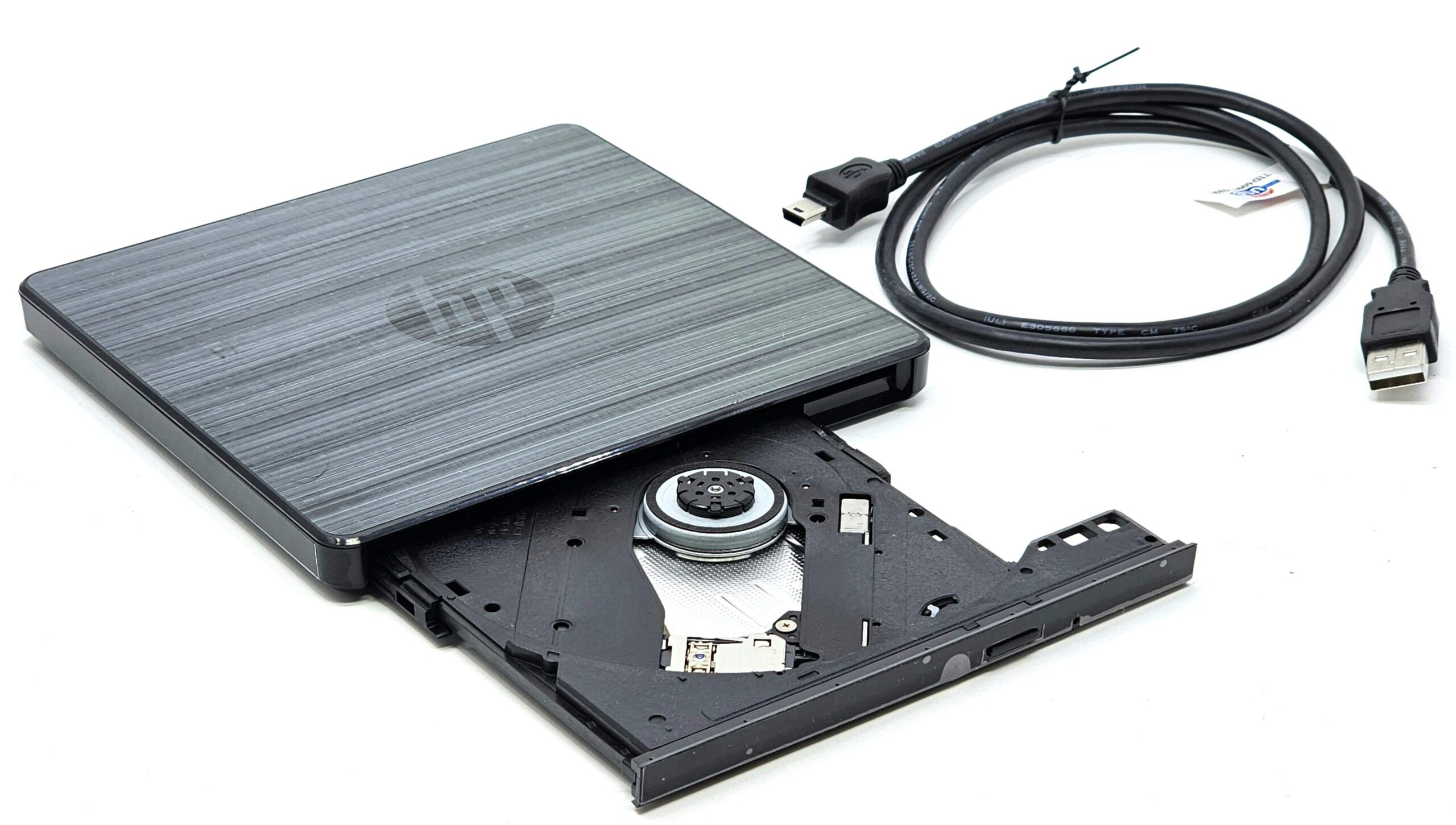
| 9 | HP USB External DVDRW Drive | Best simple branded option | USB | Not stated | Basic HP computer setups |
1. Amicool External DVD Drive: Best Overall

Pros
- USB 3.0 and USB-C connections
- 8x DVD read speed and 24x CD read/write speed
- Supports reading, writing, and burning
- Built-in cable keeps the setup tidy
- Works with Windows, macOS, and Linux computers
Cons
- Direct computer connection is recommended
- Not compatible with Blu-ray, ChromeOS, tablets, TVs, or game consoles
- Mac users may need VLC for media playback
Best for: someone who wants one portable optical drive for a mixed collection of computers.
The Amicool External DVD Drive gets the important things right without making the optical drive feel like a project. Its USB 3.0 and USB-C interfaces let it connect to older desktops and newer laptops, and the cable is built into the body instead of floating loose in a laptop bag. That combination makes it a particularly sensible choice for households with more than one type of computer.
The stated maximum speed is 8x for DVD reading and 24x for CD reading and writing. Those figures suit the usual jobs for this category: opening software discs, watching or accessing DVD content, importing music, and burning ordinary CD or DVD media. It supports DVD+R, DVD-R, CD-R, and CD-RW, while the listing also makes clear that it does not support DVD-RAM or Blu-ray. That last limitation matters if your collection includes more than standard CD and DVD formats.
Compatibility is unusually well explained. The drive supports Windows 11, 10, 8.1, and 7, Linux, and macOS on both Intel and Apple Silicon Macs. Mac users should insert the disc before connecting in some situations, and the listing points to VLC for media playback rather than Apple DVD Player. The drive is intended for computers, not iPads, iPhones, televisions, cars, consoles, or standalone Blu-ray players. For more specialized optical formats, the differences between ordinary DVD drives and Blu-ray-capable models are worth understanding before buying.
At about 5.51 inches square and 0.67 inches high, it is easy to carry, and the anti-shock and error-correction features should help with ordinary playback and reading. The catch is power. Amicool recommends a direct USB connection, especially on desktops, and warns that hubs and extension cables can cause recognition problems. Apple Silicon Mac users may need a powered USB-C hub if the computer cannot supply enough power. The Alronly External DVD Drive is similarly portable, while the ORIGBELIE External DVD Drive adds more ports, but neither is as balanced for ordinary disc work.
Choose this one if you want a compact drive that can move between USB-A and USB-C computers and still has clearly stated reading and writing capabilities. Skip it if you need Blu-ray, ChromeOS support, or a drive that can run reliably through an unpowered hub.
2. ORIGBELIE External DVD Drive: Best Hub-Equipped Model

Pros
- USB 3.0 and USB-C connectivity
- One USB 3.0 port and three USB 2.0 ports
- SD and TF card slots
- 8x DVD and 24x CD maximum speeds
- Embedded cable and anti-skid feet
Cons
- SD and TF cards cannot be used at the same time
- Not compatible with Blu-ray, ChromeOS, tablets, TVs, or cars
- The extra ports make it less minimal than a basic drive
Best for: laptop owners who need optical media access and a small desktop hub in the same device.
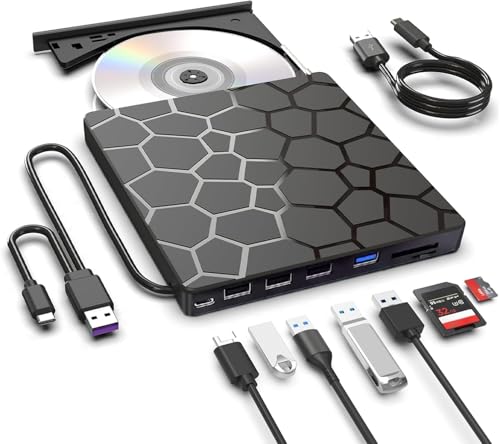
The ORIGBELIE External DVD Drive is the one to choose when a disc drive is only part of the problem. It combines the optical mechanism with a surprisingly useful selection of connections: one USB 3.0 port, three USB 2.0 ports, a USB-C port, and separate SD and TF card slots. That gives a laptop with limited connectivity a way to handle discs, memory cards, a mouse, or a keyboard without carrying a separate hub.
For optical work, it supports CD and DVD reading and writing, including CD±R/RW, CD-ROM, DVD±R/RW, DVD-RAM, VCD, and SVCD. The listed maximums are 8x for DVD reading and 24x for CD reading and writing. Those speeds are in line with the Amicool and Alronly drives, so the meaningful difference here is not faster disc handling. It is the collection of additional ports around the drive.
The USB 3.0 connection is backward compatible with USB 2.0 and 1.1, while the drive also supports USB-C computers. The manufacturer describes it as plug and play across Windows 11, 10, 8, 7, XP, Vista, Linux, and Mac OS 10.6 or later. It is designed for laptops and desktops, though, not tablets, phones, televisions, projectors, vehicles, or Blu-ray discs. Card photographers should note that the SD and TF slots cannot operate simultaneously.
The 6 by 5.6 by 0.7-inch body is slim enough for a laptop bag, and the embedded data cable helps avoid losing the one accessory that makes the drive useful. Rubber feet are intended to stop it sliding around during use. The extra hardware makes it a little less clean and simple than the ASUS ZenDrive, and the USB 2.0 peripheral ports are not a substitute for a fast multi-port dock. Still, for transferring camera cards while reading a DVD or connecting a wired accessory, this layout is far more practical than a drive with no expansion at all.
Power and compatibility restrictions remain the main caveats. The listing recommends a direct USB connection and notes that the drive cannot serve as a general media player for a TV or car. If you already own a capable hub, the Amicool External DVD Drive is the more focused pick. If your laptop is short on ports, ORIGBELIE earns its place.
3. Alronly External DVD Drive: Best Compact Basic Drive

Pros
- USB 3.0 and USB-C interfaces
- 8x DVD and 24x CD maximum speeds
- Built-in cable
- Lightweight 0.55-pound design
- Supports reading and burning
Cons
- Not compatible with Chromebooks, tablets, TVs, or cars
- Direct connection is preferred
- No card reader or extra USB hub ports
Best for: a traveler who wants a small, uncomplicated drive for common CD and DVD tasks.
The Alronly External DVD Drive is a straightforward portable drive with a useful modern connection layout. It includes both USB-A and USB-C interfaces, and the data cable is built into the unit. There are no card readers or extra ports competing for attention, which is exactly what some people want when the job is simply reading or burning a disc.
Its stated maximum is 8x for DVD rewrite and reading, with 24x for CD writing and reading. The listing describes support for CD and DVD burning, playback, software installation, and data transfer. USB 3.0 is rated for transfers up to 5Gbps, though optical discs themselves remain the limiting part of the system. In practical use, the connection standard is most helpful because it avoids an extra adapter on a laptop with USB-C.
Alronly lists compatibility with PCs and Macs, while excluding Chromebooks, cars, tablets, and televisions. The drive is described as plug and play, with no driver installation required. That does not mean every disc or operating system will handle playback identically, so media software can still matter. It is best understood as a computer accessory rather than a universal DVD player.
The body measures 6.7 by 6.5 by 0.6 inches and weighs 0.55 pounds. That puts it among the thinner and lighter options here, though the ASUS ZenDrive is specifically described as 13mm and weighs less according to its listed specifications. Alronly's built-in cable is convenient, but a permanently attached cable also means the drive is less flexible if that cable is damaged or if a desktop's port position is awkward.
There is also the familiar USB power warning. Alronly recommends connecting directly to the computer, and its listing says the drive uses a high-quality build and supports multiple disc formats without naming every format in the same detail as Amicool. The Rioddas External DVD Drive offers a more established-feeling feature set for stable everyday use, while the Alronly External DVD Drive is the cleaner choice when portability and dual connector support matter more than extras.
4. ASUS ZenDrive: Best for Archival Features

Pros
- Slim 13mm design
- M-Disc support
- USB 2.0 and USB-C cables included
- Mac and Windows support
- DISC Encryption II and Nero BackItUp features
Cons
- Uses USB 2.0 for the drive connection
- Its feature set is more specialized than basic drives
- The listing does not state CD read/write speeds
Best for: someone who wants an established brand and disc-archiving features rather than a hub.
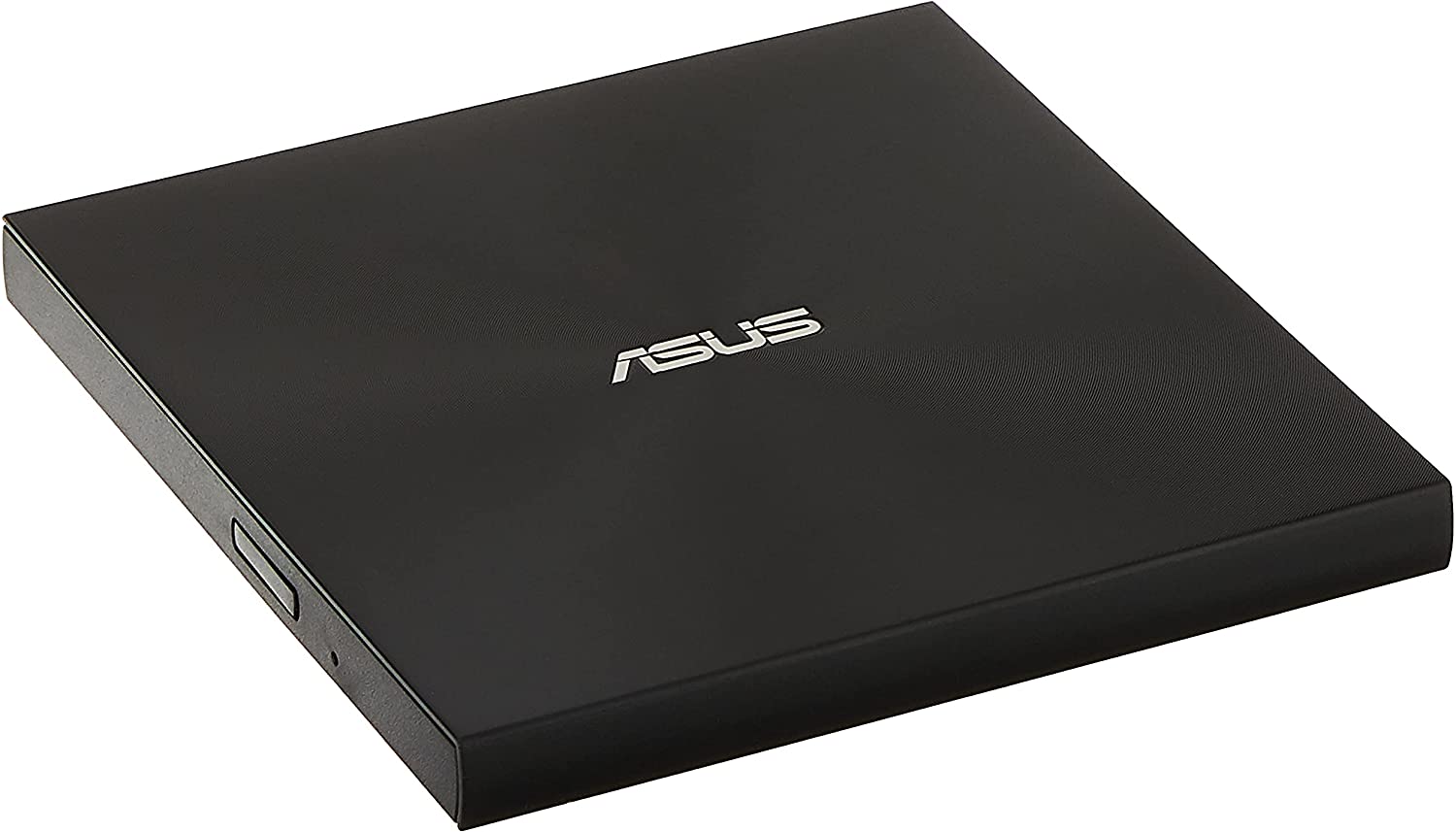
The ASUS ZenDrive takes a different approach from the many generic dual-interface drives here. Its attraction is not a pile of ports. It is the combination of a slim 13mm profile, Mac and Windows support, M-Disc support, and software-oriented features such as DISC Encryption II and Nero BackItUp for Android devices.
The drive is specified for 8x DVD operation, and its USB 2.0 connection is the main technical compromise. USB 2.0 is adequate for an optical drive whose disc mechanism is the bottleneck, but the newer USB 3.0 models in this roundup provide a faster host connection and more flexible modern connectivity. ASUS includes both USB 2.0 and Type-C cables, so the drive can connect to a newer laptop without relying on a separate adapter.
M-Disc support is the reason to look closely at this model. It gives users who deliberately create long-term optical archives a feature missing from several of the simpler drives. The ASUS also lists DISC Encryption II for password-controlled and hidden files. Those features appeal to someone who treats discs as a backup medium, not just as a way to watch an old movie or install legacy software.
At 7.09 by 7.9 by 2.36 inches in the product information and with a listed weight of about 0.44 pounds, the supplied dimensions are presented differently from the compact square measurements used by several competitors. The headline 13mm thickness is the clearest portability detail. This is a drive to carry with a laptop, though it lacks the card slots of the ORIGBELIE External DVD Drive and the direct USB 3.0 connection of the Amicool External DVD Drive.
The ASUS is not the right pick if you need the highest stated CD speeds, a built-in hub, or the broadest list of supported disc formats. It is also not a Blu-ray drive. Choose it for M-Disc, encryption, and the reassurance of a recognizable computer hardware brand. For ordinary disc reading and burning, the Amicool is more flexible. For intentional archival work, the ZenDrive is the more distinctive option.
5. Rioddas External DVD Drive: Best for Stable Everyday Use

Pros
- USB 3.0 with USB 2.0 backward compatibility
- Physical eject button
- Built-in cable storage
- Error-correction and fault-tolerance features
- Supports Windows, macOS, and Linux
Cons
- No USB-C interface is listed
- Not compatible with ChromeOS, tablets, TVs, cars, or Blu-ray
- Maximum optical speeds are not stated
Best for: users who want a no-fuss USB drive with physical controls and broad computer operating system support.
The Rioddas External DVD Drive is built around the kind of practical detail that matters after the first connection. It has a physical eject button, a cable that stores inside the body, and a brushed-texture shell. If a computer fails to recognize a disc, the physical button can still release the media, which is a more useful feature than it sounds.
The drive uses USB 3.0 and works backward with USB 2.0. Rioddas describes data transfer up to 5Gbps and lists support for CD-ROM, CD-R, CD-RW, DVD-ROM, DVD-R, DVD+RW, DVD±DL, and VCD formats. It does not state a maximum DVD or CD read/write speed, so it is not possible to make the same speed comparison available for Amicool, Alronly, or BPAKDU. The supported format list is still helpful for anyone with mixed discs.
Compatibility covers Windows 11, 10, 8.1, 7, Vista, XP, Linux, and macOS 10.16 or later. The drive is intended for laptops and desktops, and Rioddas recommends a rear motherboard port on desktop PCs for stronger power delivery. It does not work with ChromeOS, smartphones, tablets, TVs, projectors, vehicles, Blu-ray discs, or 4K discs. Those limits are common in this category, but they deserve attention before a purchase.
The product information lists a 6.5 by 6.4 by 1-inch body and a weight of 0.4375 pounds. It is not the thinnest design here, yet the integrated cable makes it tidy to store. Copper mesh technology is described as helping maintain stable data transmission, while fault-tolerance features are intended to reduce freezing, skipping, and errors during playback or burning. These are sensible priorities for an everyday drive, though they do not remove the need for clean, compatible discs.
The lack of USB-C on the drive itself is the clearest reason to choose the Amicool External DVD Drive instead. Users of newer laptops may need an adapter, while the ASUS ZenDrive includes a Type-C cable. Rioddas makes more sense for a USB-A computer where physical controls, broad operating system support, and stored cable management matter more than connector variety.
6. BPAKDU External DVD Drive: Best Built-In Connectivity Mix

Pros
- USB 3.0 and USB-C connectivity
- One USB 3.0 and three USB 2.0 hub ports
- SD and TF card reading
- 8x DVD and 24x CD maximum speeds
- Supports DVD-RAM
Cons
- SD and TF slots cannot be used together
- Extra power cable may be needed
- Not compatible with Blu-ray, TVs, tablets, or cars
Best for: laptop users who need card transfers and several low-bandwidth USB accessories beside the optical drive.
The BPAKDU External DVD Drive is a hybrid device. Its optical drive handles the usual disc jobs, but the real distinction is the built-in collection of expansion ports. It includes one USB 3.0 hub port, three USB 2.0 ports, an SD or TF card reader, and a USB-C port. That can turn a laptop with limited connections into a workable transfer station.
BPAKDU states an 8x maximum DVD read speed and 24x maximum CD read and write speed. It supports CD±R/RW, CD-ROM, DVD±R/RW, DVD-RAM, VCD, and SVCD. DVD-RAM support separates it from the Amicool and ASHDOL listings, which specifically exclude that format. The drive also supports USB 3.0 transfer rates up to 5Gbps, though the optical mechanism and the connected media will determine how quickly a task actually finishes.
The drive is listed as compatible with Windows 11, 10, 8, 7, XP, Vista, Linux, and Mac OS 10.6 or later. It works with USB-A and USB-C computers, and the maker describes it as plug and play. Windows 11 may require a media player and network according to the listing. The card slots cannot read an SD card and a TF card at the same time, so photographers should treat the two slots as alternatives rather than independent readers.
The listed body measures 6.57 by 6.56 by 0.98 inches. It is portable enough for a laptop bag, but its extra ports make it broader than a basic optical drive. BPAKDU also includes troubleshooting guidance for computers that fail to recognize the drive because of insufficient power, including connecting an extra power cable. That caveat is important because the GODBPNYMU 5-in-1 DVD Drive also includes a separate power cable, while the Rioddas External DVD Drive keeps its design simpler.
BPAKDU is not a good fit for a television, tablet, smartphone, projector, car system, or Blu-ray collection. It is a computer hub with an optical mechanism, not a general-purpose media accessory. Pick it when the ports and DVD-RAM support solve a real problem. If you only need to read a disc occasionally, the lighter Alronly External DVD Drive is easier to justify and carry.
7. ASHDOL 8-in-1 DVD Drive: Best for Included Power Backup
Pros
- USB 3.0 and USB-C interfaces
- Included USB power cable
- 8x DVD and 24x CD maximum speeds
- Anti-shock and error-correction technology
- Supports Windows, macOS, and Linux computers
Cons
- The extra power cable carries power only
- Not compatible with TVs, tablets, or car systems
- Heavier than the lightest drives here
Best for: anyone whose laptop or desktop may need a separate power connection for reliable disc operation.
The ASHDOL 8-in-1 DVD Drive follows the familiar slim-drive design but takes USB power issues seriously. It includes an extra power cable for cases where the computer does not provide enough power through the main connection. That cable is not a second data path, and the listing explicitly says it is for power only, but having it included can save troubleshooting when a disc drive lights up without appearing in the operating system.
Optical performance is clearly stated. The drive reaches up to 8x for DVD reading and 24x for CD reading and writing, and it supports DVD+R, DVD-R, CD-R, and CD-RW. ASHDOL excludes DVD-RAM, Blu-ray, and proprietary formats. Its USB 3.0 and Type-C interfaces support transfers up to 5Gbps, giving it the same basic connection flexibility as the Amicool and Alronly models.
The compatibility list is broad for computer operating systems, covering Windows XP through Windows 11, Linux, and all macOS versions according to the listing. It works with laptops, desktops, all-in-one PCs, and mini PCs. It does not work with televisions, tablets, or in-car entertainment systems. Direct connection to the computer is recommended, especially on desktop systems where a rear USB port may provide a steadier supply.
The body measures 6 by 5.63 by 0.63 inches and weighs 0.7 pounds. That is a compact footprint, but it is heavier than the ASUS, Rioddas, and Alronly listings. The built-in cable tucks away, and the matte finish, pop-up button, anti-shock protection, and error correction aim to make everyday handling less frustrating. The physical design is close in spirit to the Amicool External DVD Drive, though Amicool provides a more detailed warning about Apple Silicon power requirements.
The extra power cable is the reason to choose ASHDOL, not the number in its name. It does not add card slots or a USB hub, and it will not help with unsupported devices. If your computer already powers optical drives reliably, the ASUS ZenDrive is slimmer and more focused on archival features. If you have had recognition problems with bus-powered accessories, ASHDOL is the more practical bet.
8. GODBPNYMU 5-in-1 DVD Drive: Best Warranty Coverage

Pros
- USB-A and USB-C connectivity
- Two USB 2.0 ports
- SD and TF card slots
- Included power cable
- 24-month warranty
Cons
- The power cable does not transfer data
- SD and TF slots are presented as card-reader extras, not simultaneous use
- Maximum optical speeds are not stated
Best for: someone who wants a versatile computer accessory backed by a stated 24-month warranty.
The GODBPNYMU 5-in-1 DVD Drive is designed for a laptop that needs more than an optical mechanism. Alongside CD and DVD reading and burning, it provides two USB 2.0 ports and SD and TF card slots. The built-in cable stores underneath, while the included power cable is available when the computer cannot provide enough power for stable reading.
Its listing does not state maximum DVD or CD speeds, so it is not possible to put it on the same speed footing as Amicool, BPAKDU, or ASHDOL. The important confirmed capabilities are reading and burning CD and DVD media, USB 3.0 and USB-C connectivity, and support for the common Windows, Linux, and macOS families. The drive is meant for laptops, desktops, all-in-one PCs, and mini PCs, not televisions, tablets, or car entertainment systems.
The expansion ports are useful for a mouse, keyboard, external storage, or a camera card, but USB 2.0 is the standard for the two peripheral ports. That is fine for basic accessories and less demanding transfers, but it is not the right configuration for treating the drive as a high-speed dock. The SD and TF readers add convenience for moving photos and video to a computer, though anyone who needs simultaneous card workflows should check the exact use case before relying on them.
The product information lists a 6.1 by 5.87 by 0.59-inch body. That is a slim shape for a device with this many functions, and the integrated cable helps keep the kit together. A stated 24-month warranty is the strongest coverage claim among the products here, giving the GODBPNYMU 5-in-1 DVD Drive a clear reason to stand apart even though its optical speed information is less complete than the ORIGBELIE External DVD Drive.
Its limitations are straightforward. The extra cable supplies power only, and the drive is restricted to computer use. If you want the most transparent disc specifications, choose Amicool. If warranty length and a compact hub-style accessory matter more, this is the better fit.
9. HP USB External DVDRW Drive: Best Simple Branded Option

Pros
- Simple external DVDRW design
- HP branding
- Compact listed profile
- Lightweight listed weight
Cons
- Product information provides very few operating details
- No USB-C, disc-speed, or format details are stated
- No compatibility list is provided
Best for: an HP computer owner who wants a basic branded optical drive and does not need extra ports.
The HP USB External DVDRW Drive is the least documented product in this comparison, but its purpose is easy to understand. It is an external USB DVDRW drive from HP, aimed at users who want a plain optical accessory without the card readers and hub ports found on several of the other entries.
The available product data does not state DVD or CD speeds, supported formats, operating systems, USB generation, or whether a USB-C cable is included. That makes it impossible to give the same level of capability detail available for the Amicool, ASUS, or BPAKDU models. The absence of a stated feature is not proof that the drive lacks it, but a buyer should not assume compatibility or performance details that are not supplied.
The listed dimensions are 9.7 inches wide, 6.5 inches high, and 1.1 inches long, with a weight of about 0.44 pounds. Those measurements are presented in an unusual orientation compared with most external drives, so they are more useful as a general indication than as a clear desk footprint. The product data also lists the size as HP Computer, without further explanation.
That sparse specification makes the HP difficult to recommend over a dual-interface model for a newer laptop. The ASUS ZenDrive provides a USB 2.0 cable and a Type-C cable along with M-Disc support, while the Rioddas External DVD Drive states its operating system and disc-format compatibility in much greater detail. HP's advantage is the familiar brand and uncluttered purpose, not a richer feature set.
Choose this drive only when the HP identity and simple USB DVDRW role are more important than knowing the exact disc speeds and compatibility boundaries. For everyone else, the Amicool External DVD Drive offers a much clearer set of capabilities and a more adaptable connection layout.
How to choose best external dvd drive
A good external optical drive is less about flashy extras than matching the connection, disc formats, power needs, and computer platform to the job.
USB connections
USB-A remains useful for older laptops and desktop PCs, while USB-C makes a drive easier to use with newer thin laptops. A drive with both, such as the Amicool External DVD Drive, Alronly External DVD Drive, or ASHDOL 8-in-1 DVD Drive, avoids carrying an adapter.
USB 3.0 offers a faster host connection than USB 2.0, but it does not make the optical mechanism exceed its own rated speed. USB 2.0 can still be adequate for reading discs. The main question is convenience and compatibility, not just the largest transfer number on the product page.
Disc formats and speeds
Check whether the drive reads and writes the formats you actually own. CD-R, CD-RW, DVD-R, DVD+R, and rewritable DVD formats cover many common tasks. DVD-RAM support is less common, while Blu-ray support is absent from every product in this lineup.
The stated 8x DVD and 24x CD figures on several models are useful reference points. They describe maximum optical speeds, not guaranteed results with every disc. A scratched disc, older media, or an operating system that needs separate playback software can still affect the experience.
A DVD drive cannot replace a Blu-ray drive, no matter how fast its USB connection is.
Computer compatibility
These products are computer accessories. The listings generally support Windows, macOS, and Linux, but they commonly exclude televisions, tablets, phones, cars, projectors, game consoles, and Chromebooks. Check the operating system and device type before buying, particularly if the drive is intended for an Apple Silicon Mac or a device with only USB-C ports.
For Windows 11, some models mention the need for media-player software and a network connection. Mac playback can also depend on the software installed. Reading files from a disc is a different task from playing commercial video content.
Power delivery
Slim optical drives usually draw power from USB. A direct connection to the computer is safer than an unpowered hub, and desktop users may get more reliable results from a rear motherboard port. Amicool, BPAKDU, and ASHDOL all call attention to power or connection issues.
Some models include an extra power cable. That cable may stabilize the drive, but it is not always a second data connection. The ASHDOL 8-in-1 DVD Drive and GODBPNYMU 5-in-1 DVD Drive both clarify that the additional cable is for power only.
Hubs and card readers
A drive with extra USB ports or SD and TF slots can be useful when a laptop has limited connectivity. ORIGBELIE and BPAKDU provide the broadest selection, while GODBPNYMU offers a smaller set of hub features.
These extras also make the unit larger and more complex. Card slots may not support simultaneous SD and TF use, and USB 2.0 hub ports are best for basic peripherals. If your main need is disc access, a simple drive is easier to pack and set up. If you regularly move camera files, the extra ports can justify the larger footprint. For larger non-optical backups, choosing the right kind of external storage for your files is a separate decision.
Portability and cable storage
A built-in cable prevents the common problem of having the drive but not its cable. It also reduces loose pieces in a laptop bag. Thin bodies around 0.6 to 0.7 inches are common in this group, though a hub-equipped model can be heavier and broader.
Cable storage is convenient, but a permanently attached cable cannot be replaced as easily as a detachable one. We prefer an integrated cable for travel and a detachable connection when a drive will stay on a desk.
Frequently asked questions
Can an external DVD drive play DVDs on a laptop?
It can read DVD media, but video playback also depends on the computer's operating system and media software. Several models are designed for Windows, macOS, and Linux computers, but none is a standalone DVD player for a television.
Do these external drives work with USB-C laptops?
Models that list USB-C or Type-C interfaces can connect directly to compatible USB-C laptops. The ASUS ZenDrive includes a Type-C cable, while the Amicool, Alronly, BPAKDU, ASHDOL, and GODBPNYMU models list USB-A and USB-C connectivity. A USB-A-only model may require an adapter.
Can these drives read Blu-ray discs?
No. The products in this roundup are CD and DVD drives, and the listings specifically exclude Blu-ray for several models. You need a separate Blu-ray drive for Blu-ray or 4K discs.
Can an external DVD drive burn discs?
Several can. Amicool, Alronly, BPAKDU, ORIGBELIE, ASHDOL, and GODBPNYMU list CD and DVD reading and burning capabilities. The HP listing identifies the product as a DVDRW drive, but the available data does not provide the same detailed format and speed information.
Why is a drive not showing up on my computer?
Insufficient USB power is a common possibility with slim bus-powered drives. Connect it directly to the computer rather than an unpowered hub, try another USB port, keep a laptop connected to power, and use an included power cable when the model provides one.
Can these drives work with a TV, tablet, or car stereo?
The listings generally say no. These products are designed for Windows, macOS, Linux, and other computer systems, not TVs, tablets, phones, projectors, vehicles, or game consoles.
Is M-Disc support useful?
M-Disc support matters if you intentionally create archival discs using M-Disc media. The ASUS ZenDrive is the only product here that specifically lists M-Disc support. It is not necessary for ordinary CD and DVD playback or routine disc burning.

The bottom line
The Amicool External DVD Drive is the Best external dvd drive for most laptop and desktop owners because it combines USB 3.0 and USB-C, clear 8x DVD and 24x CD capabilities, a built-in cable, and broad Windows, Mac, and Linux support. Its direct-connection power requirement and lack of Blu-ray support are real limitations, but they are easy to understand before buying.
Choose the ORIGBELIE External DVD Drive if your laptop also needs card slots and extra USB ports. The ASUS ZenDrive is the more specialized pick for M-Disc and encryption features, while the Alronly External DVD Drive is a cleaner choice for lightweight, uncomplicated travel use.
If you are undecided, buy Amicool unless you specifically need a hub, archival features, or a separate power cable.
As an Amazon Associate we earn from qualifying purchases.