
A full photo library, video archive, or game collection can overwhelm a laptop long before the computer itself feels outdated. The right portable SSD gives those files a fast second home without the noise, bulk, and moving parts of a traditional hard drive. The main question is not simply how much space you need. It is also how fast your computer can connect, how often the drive will travel, and whether it needs protection from drops and weather.
Our top pick for the best external SSD for storage is the Samsung T7 1TB, thanks to its balanced size, speed, compatibility, and sturdy aluminum body. The nine drives below range from compact SSK models for smaller backups to the high-speed Samsung T9 for demanding creative work.
| # | Product | Award | Capacity | Interface and rated speed | Best for |
|---|---|---|---|---|---|
| 1 | Samsung T7 1TB | Best overall | 1TB | USB 3.2 Gen 2, up to 1, 050MB/s read | Everyday backups and media |
| 2 | SSK Portable SSD 1TB | Best cross-device option | 1TB | USB 3.2 Gen 2, up to 1, 050MB/s read | Computers, phones, and tablets |
| 3 | SanDisk Extreme 2TB | Best rugged design | 2TB | USB 3.2 Gen 2, up to 1, 050MB/s read | Travel and outdoor work |
| 4 | SanDisk Portable SSD 1TB | Best simple portable drive | 1TB | USB 3.2 Gen 2, up to 800MB/s read | Light travel and backups |
| 5 | Samsung T7 2TB | Best high-capacity T7 | 2TB | USB 3.2 Gen 2, up to 1, 050MB/s read | Large working libraries |
| 6 | Lexar ES3 1TB | Best compact encrypted option | 1TB | USB 3.2 Gen 2, up to 1, 050MB/s read | Pocketable file storage |
| 7 | SSK Portable SSD 500GB | Best smaller backup drive | 500GB | USB 3.2 Gen 2, up to 1, 050MB/s read | Documents and smaller media sets |
| 8 | SSK Portable SSD 250GB | Best compact starter drive | 250GB | USB 3.2 Gen 2, up to 1, 050MB/s read | Essential files and transfers |
| 9 | Samsung T9 1TB | Best high-speed performer | 1TB | USB 3.2 Gen 2x2, up to 2, 000MB/s read and write | Large creative projects |
1. Samsung T7 1TB: Best Overall

Pros
- Up to 1, 050MB/s read and 1, 000MB/s write speeds
- Compact aluminum unibody design
- Shock resistance and fall protection up to 6 feet
- Broad compatibility with computers and mobile devices
Cons
- 1TB capacity can fill quickly with 4K video
- USB 3.2 Gen 2 limits it below the Samsung T9
- No weather-resistance rating is listed
Best for: someone who wants a dependable everyday drive for backups, photos, and working files.
The Samsung T7 1TB is the drive we would hand to most people who want external storage without a long list of compromises. It is small enough to live in a laptop bag, fast enough that copying a large folder does not feel like a chore, and familiar enough to fit naturally into a mixed-device setup. The aluminum body gives it a more reassuring feel than a bare plastic enclosure, while the 0.13-pound weight keeps it easy to carry.
Its USB 3.2 Gen 2 connection supports read speeds up to 1, 050MB/s and write speeds up to 1, 000MB/s. Those figures make a meaningful difference when moving photo libraries, project folders, or game data, although the host computer and cable still determine what you actually see. Samsung also says the T7 can record 4K 60fps video directly from supported cameras and mobile devices, including iPhone 15 ProRes workflows. That makes this more than a passive archive drive for creators who need extra working space.
The T7 is also unusually easy to recommend across devices. Its features describe compatibility with PCs and mobile phones, and its small 3.3 by 2.2 by 0.3-inch body takes up little room beside a laptop or console. The claimed shock resistance and fall protection up to 6 feet add useful reassurance in a bag. If your computer is a Mac, the broader question of drive formats and device compatibility belongs alongside the practical differences between storage options for Mac users.
The limitation is straightforward: this is a 1TB drive, and large video libraries can consume that space faster than expected. It also uses the slower interface found on most of the list, so the Samsung T9 can move compatible workloads substantially faster. Choose the T7 1TB when you want a polished general-purpose drive, not the fastest possible option or the most rugged enclosure.
2. SSK Portable SSD 1TB: Best Cross-Device Option

Pros
- Up to 1, 050MB/s read and 1, 000MB/s write speeds
- Includes USB-C and USB-A cables
- SLC caching supports larger transfers within the cache
- Lightweight 36.6-gram aluminum design
Cons
- No drop or water-resistance rating is listed
- Capacity may display as about 931GB on Windows
- Heat can matter during sustained transfers
Best for: people moving files among USB-C phones, tablets, and older USB-A computers.
The SSK Portable SSD 1TB makes its strongest case with the accessories and device flexibility it brings to a basic storage job. It includes both USB-C and USB-A cables, so it is better prepared for a household with a newer laptop and an older desktop than the Samsung T7. The drive itself weighs 36.6 grams and measures 2.7 by 1.48 by 0.49 inches, making it one of the easier options to leave in a small pouch.
SSK rates it for read speeds up to 1, 050MB/s and write speeds up to 1, 000MB/s over USB 3.2 Gen 2. It also assigns 25 percent of the currently available capacity to SLC caching, intended to keep transfers moving at a high rate within that cache. That detail matters most when you regularly copy large batches instead of a handful of documents. S.M.A.R.T. health diagnostics and adaptive TRIM are included as part of its data-management feature set.
Phone users get a useful extra angle here. The drive is described as supporting 4K60Hz ProRes HDR video capture on iPhone, and its power consumption is listed as less than 2.4 watts. That does not guarantee compatibility with every phone or cable, but it gives the SSK a clearer mobile role than many generic portable SSDs. An activity LED also shows when the drive is working, which is a small but helpful detail during transfers.
The aluminum case is only 2mm thick, and SSK lists a peak case temperature of 105.58 degrees Fahrenheit. There is no stated IP rating or drop-protection figure, so the drive deserves a sleeve if it will travel beside camera gear. The Samsung T7 1TB has the more established-feeling physical design, while the SSK wins on its included cable flexibility. Pick the SSK when the drive must serve several types of devices and you want the full 1TB capacity tier.
3. SanDisk Extreme 2TB: Best Rugged Design
Pros
- 2TB capacity for large photo and video libraries
- Up to 1, 050MB/s read and 1, 000MB/s write speeds
- IP65 water and dust resistance
- Up to 3-meter drop protection
- Password protection with 256-bit AES hardware encryption
Cons
- Larger than the smallest drives here
- The listing identifies it as an old model
- USB 3.2 Gen 2 is slower than the Samsung T9 interface
Best for: photographers, videographers, and travelers who need capacity with stronger physical protection.
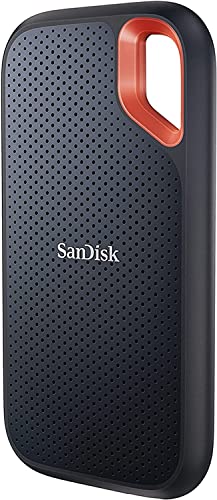
The SanDisk Extreme 2TB is the clear choice when a portable SSD will spend time outside a desk drawer. Its rubberized body has a carabiner loop for attaching it to a bag, and the stated protection is more serious than what most of the other drives provide. SanDisk lists up to 3-meter drop protection plus IP65 water and dust resistance, so this is the one to consider when a drive may encounter rough handling, dust, or splashes.
Its performance is still competitive for standard USB 3.2 Gen 2 hardware. The drive is rated for read speeds up to 1, 050MB/s and write speeds up to 1, 000MB/s, enough for quick backups and active photo projects on a compatible host. The 2TB capacity gives it room for a substantial working library, and the 3.97 by 2.07 by 0.38-inch dimensions remain manageable in a camera bag. It weighs 0.11 pounds.
Security features add another useful layer. The drive includes password protection with 256-bit AES hardware encryption, while the SanDisk Memory Zone app can help manage files and automatically free up space. Those tools make more sense for a travel drive that may leave your immediate control. Anyone building a camera workflow should also think about removable media, since choosing storage that can keep up with modern camera recording affects the whole chain, not just the archive drive.
The weakness is that this is identified as an old model, and the enclosure is not as slim as the SSK or Samsung options. It also cannot match the Samsung T9 when a computer supports USB 3.2 Gen 2x2. Still, neither the Samsung T7 nor the Lexar ES3 offers the same stated water, dust, and drop protection. Choose the SanDisk Extreme 2TB when the drive's surroundings are as important as its transfer speed.
4. SanDisk Portable SSD 1TB: Best Simple Portable Drive

Pros
- Lightweight 0.09-pound design
- Up to 800MB/s read speed
- Up to 2-meter drop protection
- Rubber hook for a belt loop or backpack
Cons
- Slower rated read speed than most picks here
- Capacity is limited to 1TB
- No water or dust rating is listed
Best for: users who want a small, uncomplicated drive for routine backups and travel.
The SanDisk Portable SSD 1TB is a simpler product than the SanDisk Extreme 2TB, and that distinction matters. It is aimed at carrying files rather than surviving every condition. At 3.81 by 1.85 by 0.39 inches and 0.09 pounds, it slips easily into a laptop sleeve or camera pouch. A rubber hook gives you a way to secure it to a belt loop or backpack.
The rated read speed is up to 800MB/s, which is a step below the 1, 050MB/s class represented by the Samsung T7, SSK 1TB, and Lexar ES3. For documents, music, ordinary photo backups, and moving a moderate folder, that difference may not change the routine. It becomes more noticeable when you regularly move very large video files or use the SSD as active project storage.
SanDisk gives this model up to 2-meter drop protection, so it is not fragile despite its basic design. The feature set also leans on the brand's reputation with professional photographers, though no water or dust-resistance rating is provided here. That makes the small rubber hook useful, but it is not a substitute for the tougher sealing found on the SanDisk Extreme.
The main reason to skip it is speed. The SSK Portable SSD 1TB offers a higher rated read speed and includes both USB-C and USB-A cables, while the Samsung T7 adds a stronger aluminum unibody design and higher write rating. The SanDisk Portable SSD 1TB remains a sensible pick for straightforward storage, especially when light weight and a simple travel-friendly body matter more than maximum throughput.
5. Samsung T7 2TB: Best High-Capacity T7
Pros
- 2TB capacity in the compact T7 body
- Up to 1, 050MB/s read and 1, 000MB/s write speeds
- Aluminum unibody construction
- Fall protection up to 6 feet
- Supports compatible 4K 60fps video recording workflows
Cons
- Same interface speed class as the 1TB T7
- No stated water or dust resistance
- Larger capacity does not make it faster
Best for: anyone who likes the T7 design but needs substantially more room for active files.
The Samsung T7 2TB is the roomy version of our top pick, and its appeal is simple: it keeps the familiar compact T7 design while giving large libraries more breathing room. The 3.3 by 2.2 by 0.3-inch enclosure is unchanged in character from the 1TB model, and the 0.13-pound weight remains easy to live with. If you regularly work with photos, video, game data, or several computer backups, the extra capacity changes how often you have to reorganize files.
Samsung rates this drive for up to 1, 050MB/s read and 1, 000MB/s write speeds through USB 3.2 Gen 2. It uses PCIe NVMe technology, and the company says it is nearly twice as fast as the older T5. In practical terms, the T7 2TB is a good fit for moving large folders and keeping an active media library nearby, provided the host computer supports the same connection class.
It also shares the T7's broad compatibility with PCs and mobile phones. Samsung lists direct recording of Ultra High Resolution 4K 60fps video from supported cameras and mobile devices, including iPhone 15 ProRes 4K at 60fps. The aluminum unibody is designed for shock resistance and fall protection up to 6 feet. Those are useful protections for a working drive, though they do not amount to a water-sealing rating.
The trade-off is that capacity is the only major difference from the Samsung T7 1TB. It does not gain a faster interface, and the SanDisk Extreme 2TB is a better fit for wet, dusty, or rough environments. Choose this model when your priority is keeping more working material in the same compact T7 format. It is especially well suited to people who would otherwise split one library across several smaller drives.
6. Lexar ES3 1TB: Best Compact Encrypted Option

Pros
- Up to 1, 050MB/s read and 1, 000MB/s write speeds
- 42-gram pocketable design
- Lexar DataShield 256-bit AES encryption software
- Compatible with computers, phones, cameras, and consoles
- Type-C cable included
Cons
- MagSafe is not available on this version
- USB 3.2 Gen 2 requires a compatible host for full speed
- No drop or water-resistance figure is listed
Best for: users who want a slim 1TB drive with software-based file protection.
The Lexar ES3 1TB is a pocket-first SSD with a clear focus on mobility. It weighs 42 grams and is 10.5mm thick, according to the product features, with a body measuring about 3.94 by 1.97 by 0.39 inches. That makes it slim enough for a pocket or the narrow compartment of a laptop bag. The included Type-C cable keeps the basic setup simple.
Its USB 3.2 Gen 2 connection is rated for read speeds up to 1, 050MB/s and write speeds up to 1, 000MB/s. Lexar notes that performance can be lower on Macs and other systems that do not support USB 3.2 Gen 2, which is a reminder that the SSD cannot overcome a slower port. With the right host, the ES3 sits alongside the Samsung T7 and SSK 1TB rather than the slower 800MB/s SanDisk Portable SSD.
The compatibility list is broad. Lexar describes support for Android mobile devices, laptops, cameras, Xbox X|S, PS4, PS5, and more. The listing specifically says it supports the iPhone 17 series but not iPhone 14 and older models, so Apple users need to check the phone generation before choosing it. The ES3 also includes Lexar DataShield software with 256-bit AES encryption for protecting files.
The missing MagSafe feature is explicitly called out for this version, and there is no stated drop or water-resistance rating. That leaves the Samsung T7 with a more reassuring physical design and the SanDisk Extreme with a much stronger outdoor profile. The Lexar ES3 is the better fit for a slim everyday carry drive when encryption software and broad device support matter more than rugged sealing.
7. SSK Portable SSD 500GB: Best Smaller Backup Drive

Pros
- Up to 1, 050MB/s read and 1, 000MB/s write speeds
- Includes USB-C and USB-A cables
- S.M.A.R.T. diagnostics and adaptive TRIM
- 36.6-gram aluminum design
- Supports mobile 4K60Hz ProRes HDR capture
Cons
- 500GB leaves less room for large media libraries
- No stated drop or water resistance
- Sustained transfers can generate heat
Best for: keeping documents, selected photos, and a focused backup set on a small drive.
The SSK Portable SSD 500GB has the same basic character as the SSK 1TB, but its smaller capacity changes the role it plays. This is a focused backup drive rather than a complete home for a large video archive. It makes sense for a work folder, a document backup, a curated photo set, or a portable collection that does not need the room of a full media library.
The performance rating remains strong for its size. SSK lists read speeds up to 1, 050MB/s and write speeds up to 1, 000MB/s over USB 3.2 Gen 2. It also uses SLC caching, with 25 percent of current available capacity allocated as high-speed cache, and includes S.M.A.R.T. health diagnostics plus adaptive TRIM. Those features are more relevant when the drive sees regular writes than when it sits as a once-a-month archive.
The 500GB model includes USB-C and USB-A cables, which gives it the same cross-device advantage as the larger SSK. It is listed as supporting computers, smartphones, tablets, and iPhone, along with 4K60Hz ProRes HDR capture on iPhone. Its 2mm aluminum alloy case weighs 36.6 grams and measures 2.5 by 1.31 by 0.43 inches, though SSK lists the same peak case temperature of 105.58 degrees Fahrenheit as the other capacities.
The obvious weakness is headroom. The Samsung T7 1TB and Lexar ES3 1TB are better for growing libraries, while the SSK 250GB is easier to justify only when the file set is genuinely small. Windows may show about 465GB of usable capacity because of the stated binary calculation difference. Pick the 500GB SSK when you know your backup set fits and you want the same high-speed, cable-friendly design in a smaller capacity.
8. SSK Portable SSD 250GB: Best Compact Starter Drive
Pros
- Up to 1, 050MB/s read and 1, 000MB/s write speeds
- USB-C and USB-A cables included
- Very light portable design
- S.M.A.R.T. diagnostics and adaptive TRIM
- Supports compatible iPhone video capture
Cons
- Limited 250GB capacity
- No stated drop or water-resistance rating
- Less suitable for large photo and video collections
Best for: essential documents, short-term transfers, and small backup sets.
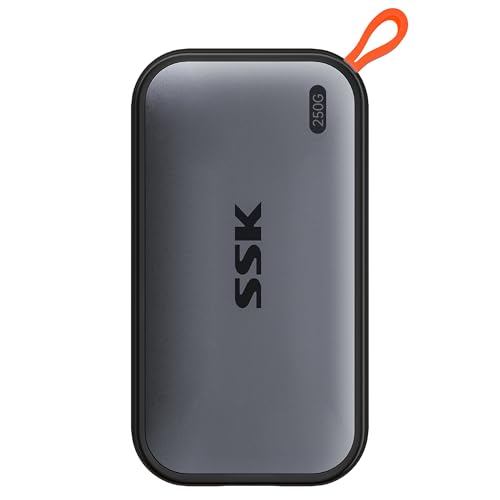
The SSK Portable SSD 250GB is the smallest drive here, and it should be chosen with a specific file list in mind. It works well as a compact transfer drive for documents, presentations, selected media, or a small computer backup. It is not the drive we would choose for an expanding photo library, but its limited capacity can be perfectly sensible when the job is narrow.
Despite the capacity, its rated performance matches the other SSK models. Read speeds reach up to 1, 050MB/s and write speeds up to 1, 000MB/s, with USB 3.2 Gen 2 providing the connection. SSK includes SLC caching, S.M.A.R.T. health diagnostics, and adaptive TRIM. As with any portable SSD, actual performance depends on the connected device and cable, but the specifications do not put this model in a slower class simply because it holds less data.
The drive includes both USB-C and USB-A cables and is described as compatible with computers, phones, tablets, and iPhone. SSK also lists support for 4K60Hz ProRes HDR capture on iPhone, although the amount of footage 250GB can hold will be limited. The body measures about 2.7 by 1.48 by 0.5 inches and weighs 36.6 grams. Windows may show roughly 232GB because of the capacity-display calculation described in the product information.
There is no stated drop or water protection, so it needs ordinary care. The SSK 500GB is the more comfortable choice if your files are likely to grow, and the SSK 1TB is better suited to a complete everyday archive. Choose the 250GB model only when portability and a tightly defined file set matter more than future room.
9. Samsung T9 1TB: Best High-Speed Performer

Pros
- Up to 2, 000MB/s sustained read and write speeds
- USB 3.2 Gen 2x2 interface
- Dynamic Thermal Guard for heat management
- Compatible with desktops, cameras, and consoles
- Magician Software supports firmware updates and drive monitoring
Cons
- Requires a compatible USB 3.2 Gen 2x2 host for its headline speed
- Heavier and thicker than the Samsung T7
- No stated water or dust-resistance rating
Best for: creators and power users moving large files on compatible high-speed computers.
The Samsung T9 1TB is the specialist in this group. Its reason for existing is speed, not maximum capacity or outdoor protection. Samsung rates it for sustained read and write speeds up to 2, 000MB/s, nearly twice the headline read speed of the T7 and most of the other drives here. That can shorten large project transfers and make the SSD more suitable as active storage for demanding creative work.
The catch is the connection. The T9 uses USB 3.2 Gen 2x2, so a computer with a slower USB port will not provide the advertised top speed. This is the most important detail to check before buying. On a compatible desktop or laptop, the interface gives the T9 a clear performance advantage. On an ordinary USB 3.2 Gen 2 connection, the Samsung T7 1TB is the more balanced choice because its rated speed already matches what that interface can provide.
Samsung gives the T9 a dynamic thermal solution intended to control heat during heavy use. It is also described as compatible with desktops, cameras, and gaming consoles, and it supports iPhone 15 ProRes 4K at 60fps video with the recommended included cable. Magician Software provides firmware updates, extra encryption, and drive-health monitoring. The body measures about 3.46 by 2.36 by 0.55 inches and weighs 0.27 pounds, making it noticeably more substantial than the T7.
The T9 is not ruggedized with a stated IP rating, and its 1TB capacity is no larger than the standard T7 1TB. It is also more drive than many ordinary backups require. Choose it when your computer supports USB 3.2 Gen 2x2 and you routinely work with large files. If not, the Samsung T7 2TB offers more storage space and a more universally sensible design.
How to choose best external ssd for storage
The right external SSD comes down to matching capacity, connection speed, portability, and protection to the work you actually do.
Capacity
Capacity determines how much of your library can stay together. A 250GB drive suits essential documents and short-term transfers, while 500GB works for a focused backup set. The 1TB models are more flexible for everyday photos, applications, and project folders, and 2TB makes more sense for extensive media collections.
Remember that the usable figure can look smaller on Windows than the advertised capacity. SSK specifically notes that its 250GB, 500GB, and 1TB drives may appear as approximately 232GB, 465GB, and 931GB respectively because of the calculation method used by the operating system.
Interface speed
The connector matters as much as the SSD inside. USB 3.2 Gen 2 drives such as the Samsung T7, SSK Portable SSD, SanDisk Extreme, SanDisk Portable SSD, and Lexar ES3 reach their stated speeds only when connected to a suitable host. The Samsung T9 uses USB 3.2 Gen 2x2 and is the only drive here rated up to 2, 000MB/s.
A faster SSD connected to a slower port will not deliver its headline figure. Check the computer, phone, camera, or console port before choosing a drive for performance-sensitive work.
Buy the interface your computer can actually use, not the fastest number printed on the box.
Sustained transfers and heat
Short transfers can make nearly any modern SSD feel fast. Long video exports, large backups, and repeated project copies are more demanding. SSK uses SLC caching and lists a peak case temperature of 105.58 degrees Fahrenheit, while Samsung highlights dynamic thermal management on the T9.
For ordinary documents, heat is rarely the deciding factor. For sustained creative workloads, look for a drive with clear thermal features and leave room around the enclosure so heat can escape.
Physical protection
A portable SSD will eventually be bumped, dropped, or carried in poor weather. The SanDisk Extreme 2TB has the strongest stated protection here, with IP65 water and dust resistance, up to 3-meter drop protection, and a carabiner loop. The Samsung T7 models offer shock resistance and fall protection up to 6 feet, while the SanDisk Portable SSD lists up to 2-meter drop protection.
The SSK and Lexar drives are compact, but their listed features do not include a water-resistance rating. Use a protective pouch if the drive will travel regularly.
Security and compatibility
Encryption is useful when an SSD contains personal documents, client files, or work in progress. The SanDisk Extreme includes password protection with 256-bit AES hardware encryption, the Lexar ES3 includes DataShield 256-bit AES encryption software, and the Samsung T9 supports extra encryption through Magician Software.
Compatibility also deserves attention. The SSK models include USB-C and USB-A cables, while the Lexar ES3 includes a Type-C cable and has specific iPhone compatibility notes. If the drive will connect to older computers, mobile devices, cameras, and consoles, confirm the required cable and file-system support before moving your archive.

Frequently asked questions
Is an external SSD good for long-term storage?
An external SSD is useful for active backups and frequently accessed files because it is compact, quiet, and fast. It should not be the only copy of irreplaceable material. Keep important files in at least two locations, preferably with one copy stored separately.
Which capacity should I choose?
Choose 250GB for a small set of documents and transfers, 500GB for a focused backup, 1TB for general-purpose storage, and 2TB for large photo or video libraries. Leave extra space for new files rather than buying a drive that is nearly full on day one.
Is the Samsung T9 faster than the T7?
Yes, the Samsung T9 is rated for read and write speeds up to 2, 000MB/s, while the T7 models are rated for up to 1, 050MB/s read and 1, 000MB/s write. The T9 needs a USB 3.2 Gen 2x2 host to reach its headline performance.
Can these SSDs connect to a phone?
The product features describe phone compatibility for the SSK drives, Samsung T7, Samsung T9, and Lexar ES3, with specific iPhone video workflows listed for several models. Compatibility depends on the phone, cable, power requirements, and file system, so check those details before recording directly to the drive.
Are portable SSDs waterproof?
Not all portable SSDs are waterproof. The SanDisk Extreme 2TB is the only model here with a stated IP65 water and dust-resistance rating. The other drives should be protected from water unless their documentation says otherwise.
Do I need USB 3.2 Gen 2x2?
Most people do not need it for ordinary backups, documents, and photo transfers. It matters when you move very large files often and have a computer with a compatible USB 3.2 Gen 2x2 port. Without that port, the Samsung T9 cannot reach its full rated speed.

The bottom line
The Samsung T7 1TB is the strongest all-purpose answer for the best external SSD for storage. Its 1, 050MB/s class performance, compact aluminum body, broad compatibility, and stated fall protection make it easy to recommend for everyday backups and working files. Choose the Samsung T7 2TB instead when your library needs more room without changing the basic design.
For outdoor work and travel, the SanDisk Extreme 2TB is the better fit because it adds IP65 protection, stronger stated drop protection, a carabiner loop, and 2TB of capacity. Creative professionals with compatible USB 3.2 Gen 2x2 computers should choose the Samsung T9 1TB for its much higher transfer ceiling.
If you are undecided, buy the Samsung T7 1TB for general storage, or move to the SanDisk Extreme 2TB when the drive will face dust, water, or rough handling.
As an Amazon Associate we earn from qualifying purchases.