

A gaming mouse can make a fast game feel sluggish when its shape fights your grip, its cable catches on the desk, or its buttons are in the wrong place. The right model should disappear under your hand while giving every movement and click a predictable response.
Our Best gaming mice picks range from lightweight esports designs to feature-heavy ergonomic mice with extra controls, RGB lighting, and long wireless runtimes. The Logitech G Pro X2 Superstrike is the best overall pick, while the rest cover compact travel, wired simplicity, MMO-style controls, and long battery life.
Comparison table
| # | Product | Award | Connection | Sensor | Weight | Best for |
|---|---|---|---|---|---|---|
| 1 | Logitech G Pro X2 Superstrike | Best overall | LIGHTSPEED wireless | HERO 2, up to 44, 000 DPI | 0.134 lb | Competitive players |
| 2 | Logitech G305 Lightspeed | Best compact wireless | LIGHTSPEED wireless | HERO, up to 12, 000 DPI | 3.4 oz | Travel and small hands |
| 3 | Logitech G502 Hero | Best wired control | Wired | HERO, up to 25, 600 DPI | 0.27 lb | Button-heavy setups |
| 4 | Logitech G502 Lightspeed | Best wireless control | LIGHTSPEED wireless | HERO 25K, up to 25, 600 DPI | 0.81 lb | Wireless productivity and gaming |
| 5 | Razer Basilisk V3 | Best wired ergonomic | Wired | Focus+ 26K | 0.2225 lb | Palm grip players |
| 6 | Logitech G502 X Plus | Best premium all-rounder | LIGHTSPEED wireless | HERO 25K | 0.23 lb | Feature-rich wireless play |
| 7 | Logitech G703 Lightspeed | Best comfortable wireless | LIGHTSPEED wireless | HERO 25K, up to 25, 600 DPI | 95 g | Larger hands |
| 8 | Razer Cobra Pro | Best RGB wireless | HyperSpeed and Bluetooth | Focus Pro 30K | 0.17 lb | RGB-focused setups |
| 9 | Razer Viper V3 HyperSpeed | Best battery life | HyperSpeed wireless | Focus Pro 30K | 82 g | Esports and travel |
| 10 | Razer Basilisk V3 X HyperSpeed | Best wireless ergonomics | HyperSpeed and Bluetooth | 5G Advanced 18K | Not listed | Wireless palm grip |
1. Logitech G Pro X2 Superstrike: Best Overall

Pros
- Highly adjustable click actuation
- Haptic feedback adds useful confirmation
- HERO 2 sensor supports up to 44, 000 DPI
- 8 kHz wireless polling
- Compatible with POWERPLAY 2
Cons
- Advanced controls require Logitech G HUB
- POWERPLAY charging is sold separately
- The high-performance feature set is more than many players need
Best for: competitive players who want the fastest and most adjustable Logitech design.
The Logitech G Pro X2 Superstrike feels built around one question: how much control should a player have over a click? Its Haptic Inductive Trigger System gives feedback as the button actuates, and the actuation point can be adjusted across 10 levels. The rapid trigger reset has five levels, so players can tune the feel to suit fast shooters or a more deliberate strategy game.
The HERO 2 sensor is equally ambitious. It tracks at more than 888 IPS, withstands 88 g-force, and reaches up to 44, 000 DPI. Most people will never use that maximum sensitivity, but the important point is that the sensor has substantial headroom for low-sensitivity play and quick, wide swipes. At 0.134 pounds, the mouse also avoids the heavy feel of the G502 family.
LIGHTSPEED wireless keeps the connection responsive, with up to 8 kHz polling and a claimed battery range of 60 to 90 hours. The thin-wall 0.7 mm case and large UHMWPE feet are aimed at reducing drag, while POWERPLAY 2 compatibility allows charging during use with the separate system. The included USB-A to USB-C cable handles ordinary charging.
This is a more focused competitive tool than the Logitech G502 X Plus, which offers more controls and lighting but a busier ergonomic shape. The Pro X2 Superstrike's weakness is its dependence on G HUB for advanced features, plus the fact that its specialized haptic controls will not matter to everyone. Skip it if you want a simple, inexpensive wireless mouse with no learning curve. For players chasing precise click behavior and fast tracking, it is the one we'd keep.
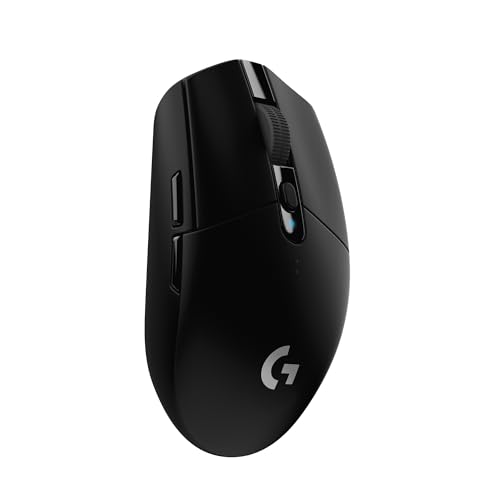
2. Logitech G305 Lightspeed: Best Compact Wireless
Pros
- Compact, portable design
- 1 ms LIGHTSPEED report rate
- Up to 250 hours from one AA battery
- HERO sensor reaches 12, 000 DPI
- Receiver stores inside the mouse
Cons
- AA battery adds weight compared with rechargeable models
- Fewer controls than ergonomic alternatives
- No RGB lighting
Best for: laptop gamers, smaller hands, and anyone who wants a dependable wireless mouse for travel.
The Logitech G305 Lightspeed is the straightforward pick in this group. It has a compact shape, a built-in storage slot for its nano receiver, and a mechanical design that keeps the wireless hardware manageable. It is easy to move between a desktop and laptop without carrying a charging cable.
Its HERO sensor reaches 12, 000 DPI and tracks up to 400 IPS. Those figures are less extreme than the Pro X2 Superstrike's, but they are more than enough for ordinary competitive play. The 1 ms LIGHTSPEED report rate keeps cursor response immediate, and the compact body makes quick repositioning comfortable for players who prefer a smaller mouse.
The standout feature is endurance. Logitech rates it for up to 250 hours of continuous gameplay from a single AA battery, while Endurance mode in G HUB can extend use to as much as nine months. That makes it a very different proposition from rechargeable picks such as the Razer Cobra Pro, even though both avoid a cable during play.
The G305 is not the choice for someone who wants a thumb rest, a deep palm-supporting shell, or a cluster of programmable buttons. Its 3.4-ounce weight is light enough for easy movement, but the battery prevents it from feeling as airy as modern rechargeable esports mice. Readers comparing several shapes may also want to consider how grip style changes the right mouse shape. Choose the G305 when portability and battery simplicity matter more than lighting or elaborate controls.
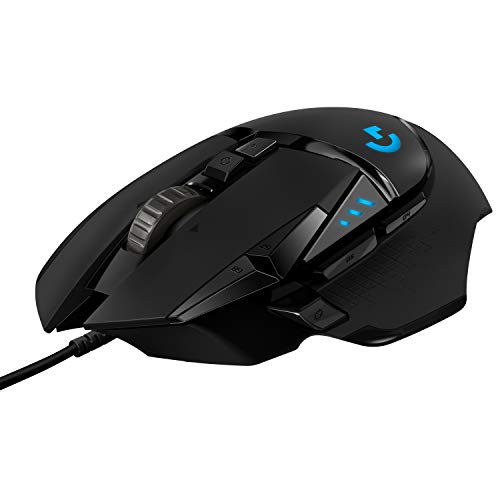
3. Logitech G502 Hero: Best Wired Control
Pros
- 11 programmable buttons
- Adjustable weight and balance
- HERO sensor reaches 25, 600 DPI
- Dual-mode scroll wheel
- Mechanical button tensioning
Cons
- Wired connection limits desk flexibility
- Heavier than lightweight competitive mice
- Shape and button count can feel busy
Best for: players who want extensive controls and do not mind keeping a cable on the desk.
The Logitech G502 Hero is the classic control-first design here. Its body gives the hand a substantial place to rest, while 11 programmable buttons put macros, push-to-talk commands, and game actions close to the thumb and fingers. That layout suits strategy, RPG, and action games where access to several commands matters as much as raw swipe speed.
The HERO sensor tracks up to 25, 600 DPI without smoothing, filtering, or acceleration. That is more than most players need, but the sensor's consistent tracking is useful when moving between different sensitivity settings. Mechanical spring tensioning in the primary buttons gives them a crisp feel, and the dual-mode scroll wheel can switch from precise ratcheting to fast free-spinning.
Five optional 3.6 g weights let you adjust the balance and total mass. That flexibility is unusual among modern lightweight mice, but it also explains why the G502 Hero feels more planted than the Razer Viper V3 HyperSpeed. The cable is the main compromise. It avoids battery management, yet it can catch or pull during wide movements unless the desk is arranged around it.
The wired G502 Hero makes more sense than the wireless Logitech G502 Lightspeed for players who want the same control philosophy without depending on wireless charging accessories. It is not a good fit for a minimalist setup or very low-sensitivity players who need unrestricted arm movement. Buy it for buttons, weight adjustment, and a familiar ergonomic shape rather than for speed records.
4. Logitech G502 Lightspeed: Best Wireless Control

Pros
- 11 customizable buttons
- HERO 25K sensor with 1:1 tracking
- Hyper-fast scroll wheel
- POWERPLAY compatibility
- Pro-level LIGHTSPEED connection
Cons
- Very heavy at 0.81 pounds
- POWERPLAY charging system is separate
- Large body will not suit every grip
Best for: gamers who want the G502 layout without a permanent cable.
The Logitech G502 Lightspeed takes the familiar wired G502 formula and removes the cable. Its 11 programmable buttons, thumb controls, and hyper-fast scroll wheel make it useful beyond gaming, especially for people who assign shortcuts to creative or office software. The shape has a broad, supported feel rather than the low, neutral profile favored by esports mice.
Its HERO 25K sensor offers 1:1 tracking, more than 400 IPS, and sensitivity from 100 to 25, 600 DPI. Logitech also specifies no smoothing, filtering, or acceleration. Those details matter most when a player uses a low sensitivity and expects the cursor to follow a long physical movement exactly.
The chief trade-off is mass. At 0.81 pounds, it is dramatically heavier than the Logitech G703 Lightspeed and the G502 X Plus listed below. That weight can feel steady for controlled aiming, but it is tiring for repeated rapid swipes. POWERPLAY compatibility lets the mouse charge while resting or playing with the separate charging system, though the ordinary wireless design still needs a charging routine without it.
The G502 Lightspeed is the better fit than the wired Logitech G502 Hero for a clean desk and the better fit than the G305 when you need many buttons. It is a poor choice for anyone specifically seeking a light competitive mouse. If you are weighing a cable against wireless convenience, the trade-offs of wired and wireless control are worth considering before choosing this heavier design.
5. Razer Basilisk V3: Best Wired Ergonomic

Pros
- Comfortable ergonomic shape with thumb rest
- 11 programmable buttons
- Free-spin and tactile scroll modes
- 11-zone Chroma RGB
- Focus+ 26K sensor
Cons
- Wired cable limits movement
- Larger shape is not ideal for fingertip grips
- Synapse is needed for deeper customization
Best for: palm and relaxed claw grips that benefit from a thumb rest and easy-access buttons.
The Razer Basilisk V3 is shaped for support rather than minimal contact. Its thumb rest gives the hand a stable ledge, and the button placement makes common commands easy to reach without shifting the grip. It feels more natural for palm users than the flatter Razer Viper V3 HyperSpeed, while the wired connection keeps the mouse ready without battery concerns.
Razer fits 11 programmable buttons into the shell, making this a useful choice for games with ability wheels, inventory actions, or frequent communication commands. The HyperScroll tilt wheel has both free-spin and tactile modes. Free-spin is handy for long documents and menus, while the notched mode gives better control when cycling weapons or abilities.
The Focus+ optical sensor reaches 26, 000 DPI and is designed to track without smoothing. Gen 2 optical switches are rated for up to 70 million clicks and have a stated 0.2 ms actuation speed. Those figures support quick input, but the Basilisk's real appeal is the combination of shape and access rather than a specification race.
The 11-zone Chroma RGB system is more elaborate than the lighting on the Logitech G502 Hero, and it can react to compatible games. The weakness is the cable, which matters more in a low-sensitivity setup, along with the software required to tune the mouse. Choose it when hand support and command access matter more than an uncluttered, lightweight shell.
6. Logitech G502 X Plus: Best Premium All-Rounder

Pros
- LIGHTFORCE hybrid switches
- 13 customizable controls
- HERO 25K sensor
- Dual-mode tilt scroll wheel
- POWERPLAY compatible
Cons
- RGB affects battery optimization
- Large feature set may be excessive
- Wireless charging requires a separate system
Best for: players who want a wireless mouse with extensive controls, lighting, and a familiar ergonomic layout.
The Logitech G502 X Plus is the modern interpretation of the G502, with a lighter 0.23-pound body and a revised control layout. It still feels like an ergonomic, button-rich mouse, but it is less imposing than the G502 Lightspeed. The removable and reversible DPI-shift button is a useful touch for adapting the shell to different grips.
LIGHTFORCE switches combine optical actuation with a mechanical feel. They are intended to provide fast response while retaining a crisp click, which gives the G502 X Plus a more immediate character than the older G502 Hero. The HERO 25K sensor handles precise tracking without smoothing, filtering, or acceleration.
The wireless protocol is updated for a 68 percent faster response rate than the previous generation, according to Logitech. Its eight-LED LIGHTSYNC RGB system can use startup and power-down effects and adapt lighting during play. The dual-mode wheel adds free-spin, ratcheting, and left and right tilt inputs, so it offers more practical control than a basic center wheel.
Compared with the Logitech G Pro X2 Superstrike, the G502 X Plus gives up lightweight simplicity for buttons and ergonomic support. Compared with the Razer Basilisk V3, it offers wireless freedom and POWERPLAY compatibility, but its software ecosystem is just as important to the experience. Skip it if you want a bare, symmetrical esports mouse. It is a strong all-rounder for players who want one device for games, shortcuts, and everyday desktop work.
7. Logitech G703 Lightspeed: Best Comfortable Wireless

Pros
- Comfortable design with rubber side grips
- 6 programmable buttons
- HERO 25K sensor
- Optional 10 g weight
- POWERPLAY compatibility
Cons
- Battery lasts up to 35 hours with default RGB
- Less button access than G502 models
- Heavier than lightweight esports mice
Best for: right-handed players who want a supported, comfortable wireless shape for long sessions.
The Logitech G703 Lightspeed is the comfort specialist in Logitech's lineup here. Its rubber side grips and rounded body encourage a palm or relaxed claw grip, and the six programmable buttons provide useful access without making the sides feel crowded. The optional 10 g weight lets you make its movement more deliberate.
The HERO 25K sensor tracks at more than 400 IPS and up to 25, 600 DPI, with 1:1 tracking and no smoothing, filtering, or acceleration. That puts its sensor performance close to the G502 Lightspeed, but the G703 has a simpler control layout and a more hand-filling shape. It is easier to settle into than an aggressively low-profile mouse.
LIGHTSPEED wireless keeps the connection responsive. Battery life reaches up to 35 hours with default LIGHTSYNC RGB, which is noticeably shorter than the G305's 250-hour AA endurance and the Viper V3 HyperSpeed's 280-hour rating. POWERPLAY support can reduce charging interruptions, although it depends on a separate charging system.
The G703 makes more sense than the G502 models for someone who wants comfort without 11 buttons. It is not the right pick for players who make huge, fast swipes or want the lowest possible weight. For larger hands and long sessions, though, the supported shape and predictable clicks are its reason to exist.
8. Razer Cobra Pro: Best RGB Wireless

Pros
- Focus Pro 30K sensor
- 10 customizable controls
- 11 Chroma RGB lighting zones
- Bluetooth and HyperSpeed wireless
- USB-C charging
Cons
- Battery life depends on connection and lighting
- Smaller body may not suit large hands
- Synapse is needed for profile management
Best for: players who want strong wireless performance and extensive RGB customization in a compact shape.
The Razer Cobra Pro is the most visually expressive wireless mouse in this group. Its 11 Chroma RGB zones can be customized independently, and compatible games can make the lighting react to events on screen. That is more than a decorative strip, though the lighting also makes battery expectations more complicated.
The Focus Pro 30K optical sensor is designed to track across a wide range of surfaces, including glass, with intelligent functions intended to maintain control. Gen 3 optical switches have a stated 0.2 ms actuation time and a 90-million-click lifecycle. Those details make the Cobra Pro a serious gaming mouse rather than an RGB accessory with ordinary internals.
It supports HyperSpeed wireless for low-latency play and Bluetooth for longer runtime. Razer rates battery life at up to 100 hours on HyperSpeed or 170 hours on Bluetooth, with USB-C charging. That flexibility is useful for a laptop and desktop setup, but Bluetooth is not the mode competitive players will usually choose.
The Cobra Pro has more lighting than the Razer Basilisk V3 X HyperSpeed, while the Basilisk offers a more pronounced ergonomic form. The Cobra's compact 0.17-pound body is easier to move, but larger hands may prefer the G703 or a Basilisk. Choose this one when customizable lighting and multi-device wireless connectivity are part of the appeal, not merely extras you plan to disable.
9. Razer Viper V3 HyperSpeed: Best Battery Life

Pros
- Lightweight 82 g design
- Up to 280 hours from one AA battery
- Focus Pro 30K sensor
- On-mouse DPI control
- Stable HyperSpeed wireless
Cons
- No RGB lighting
- AA battery design is less convenient than USB-C
- Fewer programmable controls than ergonomic alternatives
Best for: competitive players who want a lightweight wireless mouse with exceptional battery endurance.
The Razer Viper V3 HyperSpeed is built around controlled, repeatable swipes. Its mass-centralized 82 g design avoids the top-heavy sensation that some battery-powered mice create, and the shape is more focused on movement than on supporting a broad palm. It is a sensible wireless alternative to the rechargeable Pro X2 Superstrike for players who do not want to think about charging.
Its Focus Pro 30K optical sensor uses a forward placement and intelligent functions to maintain accurate tracking across different surfaces, including glass. The on-mouse DPI button can cycle through five stages or be remapped to another command. That makes quick sensitivity changes possible without opening software.
The single AA battery supports up to 280 hours of high-performance gaming, according to Razer. That is an impressive endurance figure, though the battery adds a maintenance task and keeps the design from reaching the very lowest weight category. Gen 2 mechanical switches are rated for 60 million clicks and use gold-plated contacts intended to resist wear.
The Viper V3 HyperSpeed is a cleaner competitive design than the button-heavy Razer Basilisk V3 X HyperSpeed. It gives up the Basilisk's thumb-rest shape and extra controls, but it is easier to move quickly and lasts longer between battery changes. Skip it if RGB or USB-C charging is essential. For a player who values low drag and long tournaments, it is one of the most practical choices here.
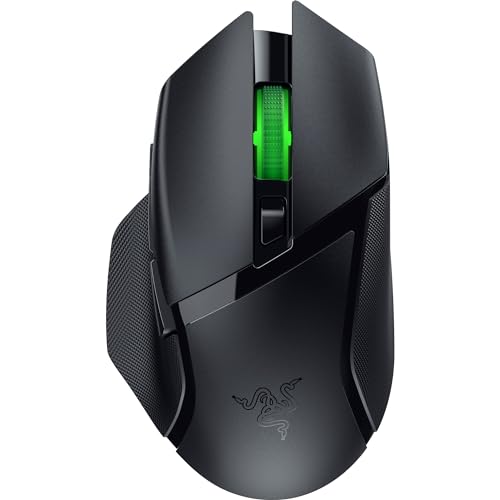
10. Razer Basilisk V3 X HyperSpeed: Best Wireless Ergonomics
Pros
- Ergonomic form with thumb rest
- 9 customizable controls
- HyperSpeed and Bluetooth
- Up to 285 hours on HyperSpeed
- Chroma RGB lighting
Cons
- Weight is not listed
- Requires batteries rather than USB-C charging
- Larger shape is not suited to every grip
Best for: palm-grip players who want wireless freedom and several easy-access commands.
The Razer Basilisk V3 X HyperSpeed gives the Basilisk family its recognizable ergonomic profile without a cable. The thumb-rest shape supports a relaxed palm grip, and nine customizable controls provide more game commands than the Viper V3 HyperSpeed. It is the better fit for players who want support and access rather than a minimalist shell.
Razer's 5G Advanced 18K optical sensor offers pixel-precise aim and tracking designed to avoid spinouts. That maximum sensitivity is lower than the Cobra Pro's 30K sensor, but the difference will not matter to most players. The Gen 2 mechanical switches are rated for up to 60 million clicks and use gold-plated contacts for resistance against wear.
Wireless options are a major strength. HyperSpeed provides the low-latency connection expected for gaming, while Bluetooth supports longer use and multi-device setups. Battery life reaches up to 285 hours on HyperSpeed and 535 hours on Bluetooth, though the mouse uses batteries rather than USB-C charging. Chroma RGB adds customizable lighting for players who want the setup to match.
The Basilisk V3 X HyperSpeed is more comfortable for palm users than the Viper V3 HyperSpeed, while the wired Razer Basilisk V3 offers more elaborate lighting and a different switch design. The missing weight specification makes direct comparison harder, and battery replacement is less convenient than charging the Cobra Pro. Choose it when the shape matters most and you want wireless control without abandoning a thumb rest.

How to choose best gaming mice
The right gaming mouse depends less on headline sensitivity than on how its shape, weight, controls, and connection match the way you play.
Shape and grip
Shape determines whether your hand stays relaxed or constantly adjusts. Palm grips usually benefit from a taller shell and thumb rest, as seen on the Basilisk and G703, while fingertip and claw grips often suit lower, more centered designs such as the Viper V3 HyperSpeed.
Look at the mouse's width, length, and support points rather than assuming every medium-sized model feels alike. A broad ergonomic design can be comfortable for long sessions but restrictive during wide aim movements.
Weight and movement
Lighter mice require less effort during repeated swipes, which helps competitive shooters and low-sensitivity players. The Pro X2 Superstrike is particularly light, while the G502 Lightspeed is intentionally much heavier and more planted.
Weight is not automatically a quality marker. A heavier mouse can feel stable for strategy games or users who prefer a controlled hand, but it should not be chosen by someone who regularly lifts and repositions the mouse.
Choose the lightest shape you can control comfortably, not the lightest number on the box.
Sensor tracking
A modern optical sensor should track consistently without unwanted smoothing, acceleration, or filtering. The models here offer high sensitivity ceilings, from the G305's 12, 000 DPI to the Cobra Pro and Viper V3 HyperSpeed at 30, 000 DPI, but most players will use far less.
Sensor placement and surface compatibility also matter. Razer specifies glass tracking for the Focus Pro sensors, while Logitech emphasizes 1:1 tracking and high IPS figures on its HERO models. Treat those claims as indicators of capability, then prioritize consistent movement at your own sensitivity.
Buttons and scroll wheel
Extra buttons are useful for games with abilities, inventory shortcuts, macros, and communication commands. The G502 Hero, G502 Lightspeed, G502 X Plus, and Basilisk models offer more command access than the Pro X2 Superstrike or Viper V3 HyperSpeed.
A dual-mode wheel adds another decision. Tactile scrolling helps with weapon selection and controlled menu movement, while free-spin is faster for long pages. Do not choose a button-heavy mouse if your thumb repeatedly hits controls by accident.
Wired and wireless connection
Wired mice avoid battery management and keep the connection simple, but the cable can interfere with large movements. Wireless models such as the G305, G703, and Viper V3 HyperSpeed remove that physical drag, while Bluetooth adds flexibility for laptops and multiple devices.
Rechargeable models need charging habits. AA battery models such as the G305 and Viper V3 HyperSpeed can run for very long periods, but replacing a battery is a different routine from plugging in USB-C.
Software and profiles
Logitech G HUB and Razer Synapse unlock button remapping, lighting, sensitivity stages, and profile controls on many of these mice. Onboard memory is especially useful when moving between computers, and the Cobra Pro supports five preset profiles.
Check how much customization you actually want. Software is worthwhile when you use macros or multiple profiles, but it adds setup and another background utility for a mouse that may otherwise work immediately.

Frequently asked questions
What is the best gaming mouse for competitive shooters?
The Logitech G Pro X2 Superstrike is the strongest fit for competitive players who want a lightweight body, highly adjustable click actuation, haptic feedback, and 8 kHz polling. The Razer Viper V3 HyperSpeed is a simpler alternative with an 82 g design and very long AA battery life.
Is a wired gaming mouse better than a wireless one?
Neither connection is automatically better. Wired models such as the Logitech G502 Hero and Razer Basilisk V3 do not need charging, while wireless models remove cable drag and make it easier to reposition the mouse. Desk layout and playing style should decide the choice.
How many buttons should a gaming mouse have?
Two main buttons and a scroll wheel are enough for many shooters. Extra buttons help in games with macros, abilities, inventory actions, or communication commands, but too many controls can clutter the grip. The G305 and Viper V3 HyperSpeed are simpler, while the G502 and Basilisk models offer much broader access.
Does a higher DPI make a mouse more accurate?
A higher DPI setting does not automatically improve accuracy. A consistent sensor matters more, and most players use a sensitivity far below the maximum advertised by these mice. The useful benefit of a high DPI ceiling is the ability to adjust sensitivity without reaching the sensor's limits.
Which gaming mouse is best for large hands?
The Logitech G703 Lightspeed and the G502 family provide more hand support than the compact G305 or low-profile Viper V3 HyperSpeed. The G703 is the simpler comfort choice, while the G502 models suit players who also want many programmable buttons.
Do gaming mice work on Mac computers?
The product data identifies the Logitech G Pro X2 Superstrike as compatible with PC and Mac. Other models may function as basic pointing devices on a Mac, but advanced button, lighting, and profile features can depend on the manufacturer's software support.

The bottom line
The Best gaming mice pick is the Logitech G Pro X2 Superstrike. Its light body, adjustable actuation, haptic feedback, HERO 2 sensor, and fast LIGHTSPEED connection make it the most capable choice for competitive players, though its advanced features require setup.
For a different kind of buyer, the Logitech G305 Lightspeed is the practical compact option, while the Razer Basilisk V3 and Logitech G502 X Plus are better for players who want a thumb rest and many controls. The Razer Viper V3 HyperSpeed is the standout for long battery life and focused movement.
If you are undecided, choose the Pro X2 Superstrike for competitive play, the G305 for simple wireless portability, or a Basilisk model when hand support matters most.
As an Amazon Associate we earn from qualifying purchases.