

A monitor can show every detail in a game while its built-in speakers flatten gunfire, dialogue, and music into a thin blur. The right desktop speakers add width and bass without forcing a headset over your ears every evening. The Best gaming speakers also need to fit around a keyboard, connect cleanly to a PC or console, and avoid turning a small desk into a cable management project.
The Edifier G2000 is our top pick for its flexible inputs, useful sound modes, compact two-speaker layout, and lighting that feels designed rather than tacked on. The rest of the list ranges from slim USB soundbars and simple wired pairs to the powerful Logitech G560 and the more refined Edifier M60.
Comparison table
| # | Product | Award | Connection | Power | Best for |
|---|---|---|---|---|---|
| 1 | Edifier G2000 | Best overall | Bluetooth, USB, 3.5mm AUX | 16W RMS, 32W peak | Most gaming desks |
| 2 | Bluedee Sound Bar | Best compact soundbar | Bluetooth 5.0, 3.5mm | 15W | Small desks |
| 3 | Redragon GS520 | Best RGB controls | USB, 3.5mm | Not listed | Simple RGB setups |
| 4 | Nylavee PC Speakers | Best easy controls | USB power, 3.5mm audio | Not listed | Desktop music and games |
| 5 | Edifier M60 | Best audio quality | Bluetooth 5.3, USB-C, AUX | 66W RMS | Gaming and music |
| 6 | Edifier G2000 Pro | Best surround features | Bluetooth 5.4, USB-C, AUX | 32W RMS, 64W peak | PC gaming immersion |
| 7 | LENRUE G11 | Best slim wired pair | USB, 3.5mm | Not listed | Cluttered desks |
| 8 | Logitech G560 | Best for big rooms | USB, Bluetooth | 240W peak | Powerful PC setups |
| 9 | Logitech Z313 | Best subwoofer system | Wired audio | 25W RMS | Desktop bass |
| 10 | Redragon GS550 | Best flexible placement | USB, 3.5mm | Not listed | Basic stereo setups |
1. Edifier G2000: Best Overall

Pros
- Bluetooth, USB, and 3.5mm AUX inputs
- Three sound modes for games, music, and movies
- 12 RGB lighting effects
- Compact angled cabinets with anti-slip feet
Cons
- No listed wireless surround feature
- The small cabinets cannot match a dedicated subwoofer for deep bass
- Subwoofer output is included, but a subwoofer is not
Best for: PC players who want one compact speaker pair for games, music, and several devices.
The Edifier G2000 is the easiest speaker set here to recommend to a mixed-use gaming desk. It sounds like a deliberately designed desktop system rather than a pair of generic USB speakers, and its controls do not force you into one connection method. Use USB as a computer sound card, 3.5mm AUX for a console or monitor, or Bluetooth when you want to stream from a phone. That flexibility matters when a desk has a PC, a console, and more than one source competing for space.
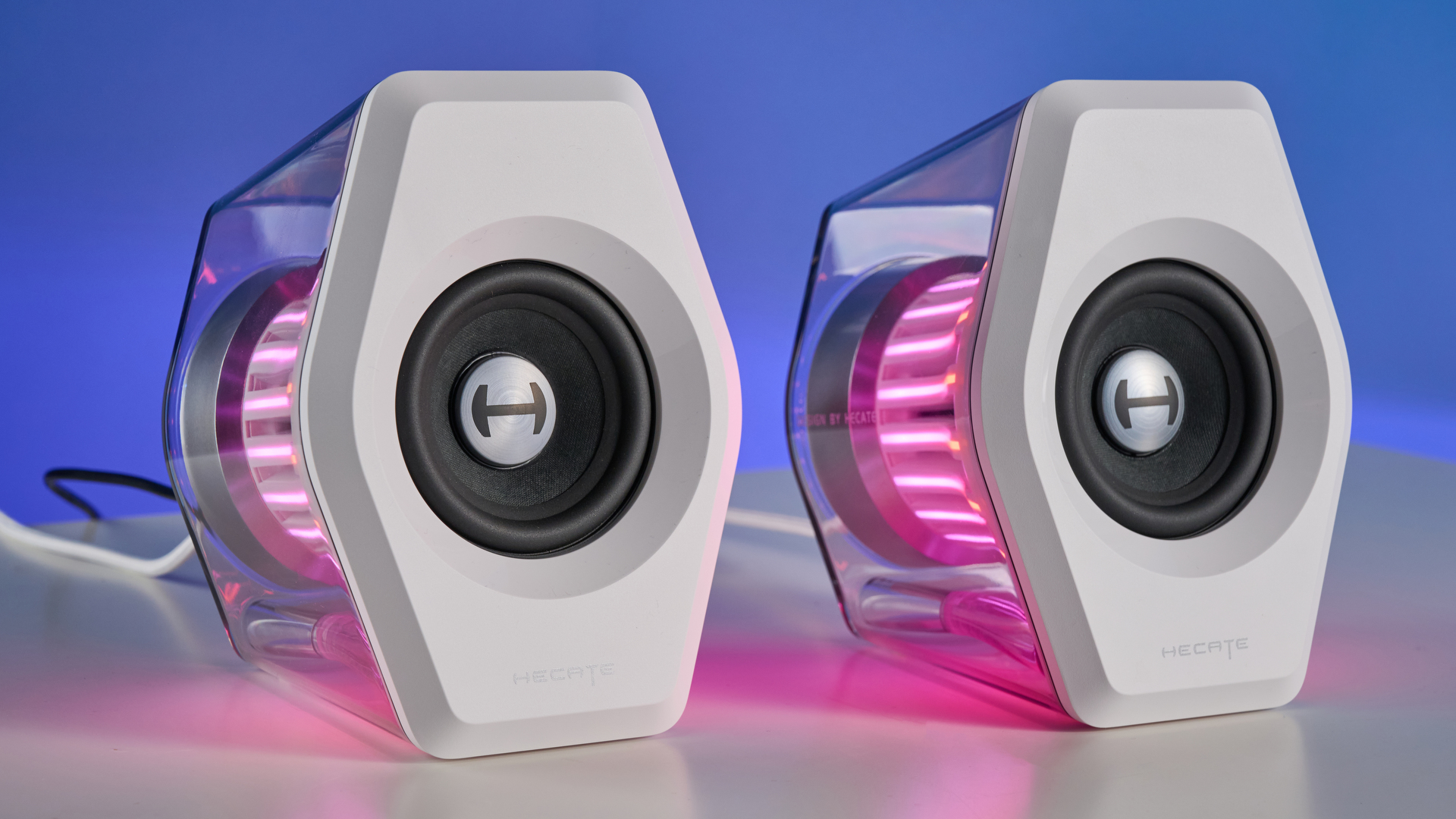
Its two 2.75-inch full-range drivers are supported by a rear bass port, with 16W RMS output and 32W total peak power. Those numbers place it comfortably above the smallest USB-powered pairs in this list, particularly for game sound effects and dialogue. The rear port helps give explosions and soundtrack bass more body, while the 10-degree elevation points the cabinets toward the listener instead of firing straight across the desktop. The enclosure has a 0.65-liter cavity, anti-slip feet, and a column-like shape that takes up less visual space than a separate subwoofer system.
The three EQ modes are practical rather than ornamental. Game mode is the obvious starting point for action titles, while Music and Movie modes make the speakers more useful after the game is closed. Twelve RGB effects add atmosphere without becoming the entire personality of the system. The lights can suit a gaming setup, but the G2000 does not require them to be on, which is a welcome choice for a darker office or bedroom.
Compared with the Bluedee Sound Bar, the G2000 occupies more desk area but gives you proper left and right separation. Compared with the Redragon GS520, it adds Bluetooth, USB audio, more sound modes, and a more substantial acoustic design. It still has a real limitation: small full-range cabinets will not create the low-end impact of the Logitech G560 or Logitech Z313 with its dedicated subwoofer. The G2000 is the wrong pick for someone who wants room-filling bass, but it is the one we'd keep for a normal PC desk where connection options and balanced capability matter most.
2. Bluedee Sound Bar: Best Compact Soundbar

Pros
- Slim 16.4-inch-wide soundbar profile
- Bluetooth 5.0 and 3.5mm connectivity
- USB-powered plug-and-play setup
- Braided Y-cable helps keep the desk tidy
Cons
- One bar provides less stereo separation than two speakers
- No USB audio input listed
- Limited control compared with the Edifier G2000
Best for: a small workstation where a pair of speakers would crowd the monitor and keyboard.
The Bluedee Sound Bar solves a very particular desktop problem: there is no room for two speakers on either side of the display. Its 16.4-inch width, 2.6-inch depth, and 2.6-inch height let it sit beneath a monitor without swallowing the front edge of the desk. The shape also keeps the setup visually calm. If your keyboard already nearly touches the monitor stand, this is a more sensible arrangement than trying to squeeze in a left and right cabinet.
Inside are dual drivers and dual diaphragms, with an advertised 15W size rating in the product information. The design aims for a blend of high notes and bass, and anti-magnetic construction is intended to reduce static interference. It is a straightforward gaming speaker for dialogue, menu music, and general desktop audio, though the single-bar layout cannot create the same left-right image as the Edifier G2000 or Nylavee PC Speakers. Directional audio in games is consequently less convincing.
Connection is simple. Bluetooth 5.0 handles wireless playback, while the 3.5mm headphone plug covers a conventional computer or monitor output. Power comes from USB, and the bar needs no drivers or software, so it is well suited to a laptop that moves between a desk and another room. The braided Y-cable combines power and audio runs into a tidier path, a small detail that makes more difference than another lighting mode.
The trade-off is capability. There is no listed USB sound-card input, and the compact single-bar cabinet has less physical room to build bass than the Edifier G2000 or Logitech Z313. It also cannot match the speaker placement or output of the Logitech G560. Choose the Bluedee when desk width is the deciding factor, not when you want the biggest game soundstage. For a broader look at the trade-offs between compact desktop audio and larger systems, the space a speaker setup needs around a monitor is a useful place to start.
3. Redragon GS520: Best RGB Controls
Pros
- Six touch-controlled RGB modes
- Separate volume up and volume down buttons
- USB power and 3.5mm audio
- Up to 31 inches of cable between speakers
Cons
- No Bluetooth or USB audio input listed
- Output specification is not listed
- Less flexible than the Edifier G2000
Best for: a wired PC setup that wants adjustable lighting and direct volume buttons.
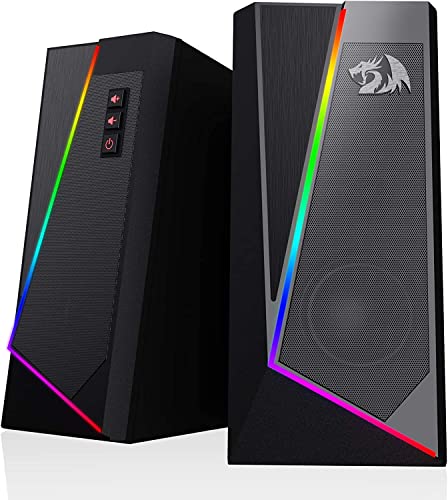
The Redragon GS520 is a clean, uncomplicated stereo pair with more attention paid to lighting controls than most basic computer speakers. The speakers use a full-range 2.0 stereo core, and the two cabinets can sit on either side of a monitor with up to 31 inches of cable between them. That distance is enough for many desks, though it is worth checking your layout before buying if the tower sits far from the display.
Six RGB modes are controlled by touch, and the lighting can be switched off. That is a better arrangement than an always-on light strip for anyone who plays in a dim room. The brushed-style finish and seamless shape give the GS520 a more intentional appearance than its simple wiring suggests. It looks like a gaming accessory without needing software running in the background.
The connection setup is equally direct. USB provides power, while the 3.5mm audio and microphone cables handle the signal. Individual volume up and volume down buttons make small adjustments easier than reaching for an operating system slider, especially during a game. The broad compatibility claim covers PCs, laptops, and TVs, but the data does not list Bluetooth, USB audio, or a power output figure, so this is best treated as a conventional analog desktop pair.
The Edifier G2000 is the stronger all-rounder, with Bluetooth, USB audio, selectable sound modes, and a stated 16W RMS output. The GS520 is more appealing than the Nylavee PC Speakers if separate volume buttons matter more than a single knob, but the Nylavee offers a similar six-mode lighting concept and bass-port design. Skip the GS520 if you need wireless playback or want to tune sound through software. It makes sense for a player who wants an affordable, tidy wired pair and cares about controlling the lights without opening an app.
4. Nylavee PC Speakers: Best Easy Controls
Pros
- Six touch-controlled lighting modes
- Simple top-mounted volume knob
- Dual-magnet full-range speaker units
- Two bass ports and plug-and-play wiring
Cons
- No Bluetooth
- USB carries power only
- No headphone output listed
Best for: someone who wants simple analog speakers with physical control and customizable desk lighting.
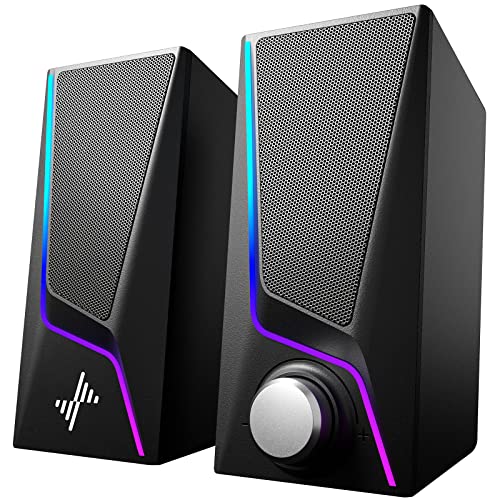
The Nylavee PC Speakers are built around a useful idea: keep the controls on the speakers and make the setup obvious. A single knob handles power and volume, while touch controls switch between six lighting modes. That combination is less fussy than a speaker system that expects a remote, desktop software, or a phone app for everyday adjustments.
Each speaker uses a full-range dual-magnet unit, and two speaker ports are designed to reinforce bass. The product information describes a pair measuring about 3.23 by 4.21 by 7 inches, with a combined listed weight of 1.94 pounds. That is a reasonably upright shape for a monitor-side placement, though the dimensions should be checked against a low shelf or a display with wide feet. The ports are intended to add richness to games, videos, and music, but there is no separate subwoofer or stated power figure.
This is a strictly wired arrangement. USB provides power, and the 3.5mm cable carries audio. There is no Bluetooth, and the product specifically says the USB connection is power only. That removes wireless convenience but also keeps the setup driver-free. Compatibility is broad across computers, laptops, phones, and tablets with an appropriate 3.5mm output, but there is no listed headphone port for late-night listening.
The Redragon GS520 is the closest alternative if you prefer dedicated volume buttons and a pair of RGB controls with six modes. The Nylavee is the better fit for anyone who wants a single knob and more emphasis on bass ports. The Edifier G2000 remains more versatile because it adds Bluetooth, USB audio, and three EQ modes. Avoid the Nylavee if wireless playback or a headphone connection is essential. For a wired desk that needs an uncomplicated volume control, it is a neat, approachable choice.
5. Edifier M60: Best Audio Quality
Pros
- 66W RMS two-way output
- USB-C, AUX, and Bluetooth 5.3
- LDAC support for compatible Android devices
- Included angled aluminum stands
- DSP and Hi-Res Audio certification
Cons
- Larger and heavier than compact gaming pairs
- Lighting is not a central feature
- Extra audio processing features may be unnecessary for a basic PC
Best for: listeners who want their gaming speakers to handle music with serious clarity.
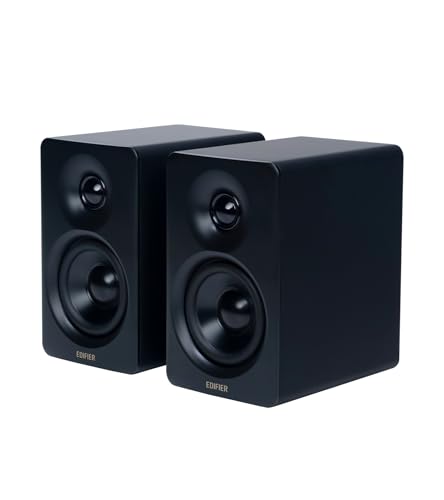
The Edifier M60 is the most grown-up speaker system in this group. It does not lean on aggressive RGB effects or a gamer-shaped enclosure. Instead, it uses a two-way design, proper stands, and enough connection flexibility to work as the main audio system for a desk. Games sound clear, but the M60 is especially compelling for someone who listens to music, watches films, or wants speakers that do not feel out of place in a shared room.
Each cabinet combines a 1-inch silk dome tweeter with a 3-inch long-throw aluminum diaphragm mid-low driver. The system is rated at 66W RMS, split between 18W plus 18W for mid-low output and 15W plus 15W for treble. A built-in DSP handles digital processing, dynamic range control, and the active two-way crossover. Those details matter because the tweeter and mid-low driver can divide the work instead of asking one small driver to reproduce every part of a soundtrack.
The M60 is also unusually well equipped for sources. Bluetooth 5.3 supports LDAC with compatible Android devices, while USB-C and AUX cover wired use. The included aluminum stands angle each speaker by 15 degrees, directing sound toward ear level and helping the pair work on a flat desktop. Each speaker measures 100mm wide, 168mm high, and 147mm deep. That is compact for the output, but the pair's listed weight is about 9.7 pounds, so this is not a system you casually move around every day.
The Edifier G2000 is easier to place and has more obvious gaming flair, while the Edifier G2000 Pro adds virtual 7.1 through USB and HECATE software. The M60 wins when tonal balance, wired audio quality, and music playback matter more than synchronized lighting. Its weakness is simple: it does not offer the bass-heavy room impact of the Logitech G560, and its extra capability is wasted if you only need basic game audio. If your desk is also your listening station, the M60 is the refined pick.
6. Edifier G2000 Pro: Best Surround Features

Pros
- 32W RMS and 64W peak power
- Virtual 7.1 through USB and HECATE software
- Bluetooth 5.4, USB-C, and AUX
- Seven lighting modes with 270-degree illumination
- Game, Movie, and Music modes
Cons
- PC surround features depend on USB and HECATE software
- Larger than the standard G2000
- High output is more than some desks need
Best for: PC gamers who want software-assisted surround effects and extensive RGB customization.
The Edifier G2000 Pro takes the compact gaming-speaker formula and turns up nearly every setting. Its 3-inch full-range drivers, dual bass reflex ports, and DSP chip are housed in a two-speaker system rated at 32W RMS and 64W peak power. It has more headroom than the standard G2000, and the extra output is useful when a game needs a larger sense of scale rather than just louder desktop audio.
Its main attraction is the virtual 7.1 surround mode, which works over USB with HECATE software on a PC. The intended benefit is clearer positional separation, particularly for footsteps and environmental effects. There are also Game, Movie, and Music modes, with the option to save EQ presets. That makes this system more adjustable than the Edifier G2000, although the experience is tied to the software and USB connection when you want the full surround feature set.
The lighting is far more elaborate than the G2000's. Twenty LED strips and 100 RGB beads create a 270-degree glow, with seven modes controlled through HECATE or physical buttons. The transparent enclosure amplifies the illumination, while anti-slip feet help limit vibration on the desk. Bluetooth 5.4 is available for wireless playback, and the 3.5mm AUX input covers devices such as an Xbox or Switch. USB-C is positioned for low-latency computer and console use, with a USB-C to USB-A cable included.
The Logitech G560 creates a larger sound field and adds a dedicated subwoofer, while the Edifier M60 is the more natural choice for serious music listening. The standard G2000 is smaller and less complicated. The G2000 Pro makes sense for a PC gamer who will actually use HECATE, switch modes, and enjoy the lighting. Skip it if you want an uncomplicated plug-and-play pair, or if virtual surround effects are less important than a clean, neutral presentation.
7. LENRUE G11: Best Slim Wired Pair

Pros
- Slim 14.96-inch-wide soundbar-style layout
- USB power and 3.5mm audio
- One-touch angular lighting
- Top volume knob
- USB-C adapter included
Cons
- No Bluetooth
- No headphone port or microphone
- Not compatible with TVs according to the product information
Best for: a narrow desk that needs a basic computer speaker system beneath the monitor.
The LENRUE G11 is a narrow, under-monitor speaker designed to disappear into a busy workstation. Its listed width is 14.96 inches, while the height and depth are about 2.55 and 2.48 inches. That footprint makes it easier to place beneath a display than two separate cabinets, and the joined cables are intended to reduce clutter around the back of the desk.
LENRUE describes the G11 as using four amplifier IC horns for a clear, low-noise stereo effect. There is no stated wattage, driver size, or frequency range in the supplied product information, so the sensible expectation is straightforward computer audio rather than a system built for deep, room-filling bass. The top-mounted volume knob is convenient, and the one-touch angular lighting gives the bar a gaming identity without requiring software.
Setup is intentionally simple. Plug the USB cable into a computer for power, connect the 3.5mm audio cable, and play. A USB-C adapter is included for compatible newer devices. There are no drivers to install, but the limitations are explicit: the G11 has no Bluetooth, headphone port, microphone, or TV compatibility. It is designed for a computer desk, and it works best when treated as such.
The Bluedee Sound Bar is a close rival with Bluetooth 5.0, a slightly wider 16.4-inch body, and dual-driver construction. The LENRUE is the more compact choice, while the Redragon GS550 gives you separate speakers that can stand beside the monitor or merge under it. The G11 should be skipped by anyone who wants wireless playback or a private listening connection. For a computer-only setup where every inch of desk space matters, it is a sensible minimalist solution.
8. Logitech G560: Best for Big Rooms

Pros
- 240W peak power
- DTS:X Ultra surround sound
- LIGHTSYNC RGB with four lighting zones
- USB and Bluetooth support
- Front and rear light projection
Cons
- Much larger than the other systems here
- DTS:X is not supported on Mac OS X
- Dedicated subwoofer needs substantial floor or desk space
Best for: PC gamers who want powerful, room-filling sound and extensive lighting effects.
The Logitech G560 is the most ambitious system in this roundup. It is not a discreet monitor accessory. The system uses a pair of speakers and a subwoofer to create a much larger presentation than the compact two-speaker designs, with 240W peak power and a maximum sound-pressure figure listed at 97 decibels. That is the kind of setup intended to make a room feel involved in the game, not merely to improve the sound directly in front of the keyboard.
DTS:X Ultra provides 3D positional audio, with the goal of placing effects around the player rather than leaving everything on a flat left-right plane. The result depends on the game, operating system, and software configuration, but the feature gives the G560 a stronger gaming focus than the Logitech Z313. It is especially well matched to a desktop where external speakers can be spaced apart and the subwoofer has a stable place to sit.
LIGHTSYNC is the other major feature. Four speaker lighting zones can be customized through Logitech software, with front and rear light projection and a choice of 16.8 million colors. Supported games can drive colors and effects from audio or gameplay, which creates a more active atmosphere than the static or touch-selected modes on the Redragon GS520 and Nylavee PC Speakers. Bluetooth support also makes the system useful for music from a phone or tablet, though the DTS:X feature does not work on Mac OS X.
The drawbacks are physical as much as technical. The listed system weight is 12.1 pounds, and the product dimensions show a much larger footprint than the Edifier G2000 or Edifier G2000 Pro. It can overpower a small room, annoy nearby sleepers, and complicate cable routing. If you are building around a smaller desk, how much room a full desktop audio setup really needs should be settled before choosing it. The G560 is the pick for spectacle and scale, not subtlety.
9. Logitech Z313: Best Subwoofer System

Pros
- Dedicated compact subwoofer
- 25W RMS output
- Convenient wired control pod
- Straightforward 2.1 layout
Cons
- Older, basic connection design
- No Bluetooth or RGB lighting listed
- Subwoofer adds another box and cable
Best for: players who want stronger bass than small stereo pairs can provide without moving to a large gaming system.
The Logitech Z313 takes a different route from almost every other product here. Instead of trying to make two small desktop speakers handle the full range, it adds a compact subwoofer. That gives explosions, engine noise, and electronic music a physical low-end presence that the Edifier G2000 and Redragon GS520 cannot fully reproduce from their small cabinets alone.
The system is rated at 25W RMS, which sits below the Logitech G560's huge peak figure but is more relevant to a normal desk than a headline power number. The 2.1 arrangement separates bass duties from the satellite speakers, and the compact subwoofer is easier to place than a large home-audio unit. The supplied product information does not list driver sizes or frequency response, so there is no reason to assume the Z313 provides the same detail or control as the two-way Edifier M60.
A wired control pod handles convenient adjustments, keeping the volume within reach without leaning toward the speakers. The connection system is basic, and the data does not list Bluetooth, USB audio, or RGB lighting. That simplicity can be an advantage if you want to connect one computer and stop thinking about configuration, but it makes the Z313 less adaptable than the Edifier G2000 or Bluedee Sound Bar.
The subwoofer also changes the placement equation. A pair of small stereo speakers can sit beside a monitor, while the Z313 needs a sensible spot for the bass unit and extra cable. Choose it over the Redragon GS550 if low-end impact matters more than flexible placement. Choose the Logitech G560 if you want surround processing and much more output. The Z313 is best for a player who wants a familiar 2.1 layout and physical bass without chasing lighting or software features.
10. Redragon GS550: Best Flexible Placement

Pros
- Can stand separately or combine beneath a monitor
- USB powered with 3.5mm audio
- Volume knob includes power switch
- Extra audio and microphone ports
- Red LED backlight
Cons
- No Bluetooth
- Only basic 2.0 stereo
- Output specification is not listed
Best for: a simple wired setup where speaker placement may change from desk to desk.
The Redragon GS550 is the most physically adaptable pair in the list. The speakers can stand individually on either side of a monitor, or sit together beneath it as a compact bar. That makes it useful for desks that change shape, displays with wide stands, or players who want to try a different arrangement without buying another system.
It uses a full-range 2.0 stereo core, with no dedicated subwoofer and no listed output figure. The design is therefore aimed at everyday game audio, voice chat, video, and music rather than deep bass or cinema-scale effects. The listed dimensions are about 7.48 inches high, 8.66 inches wide, and 3.43 inches deep, though the product describes the combined and individual placement options separately. Measure the available area before choosing the merged arrangement.
A physical volume knob also serves as the power switch, and the system includes extra audio and microphone ports for connecting peripherals. USB supplies power, while 3.5mm audio carries the sound. The cable between the speakers can reach up to 31 inches, matching the GS520 and giving it enough room for many conventional PC layouts. A red LED backlight adds a restrained gaming accent rather than a configurable RGB show.
The Redragon GS520 has more elaborate lighting and separate volume buttons, while the Nylavee PC Speakers offer six lighting modes and bass ports. The Edifier G2000 is the better choice if you want Bluetooth or USB audio, and the Logitech Z313 has the stronger low-end case because of its subwoofer. The GS550 remains appealing when placement flexibility, a microphone connection, and a straightforward knob matter most. It is a basic speaker pair, but it does not force one desk layout.
How to choose best gaming speakers
The right computer speakers depend less on flashy lighting than on where they will sit, how they connect, and what kind of sound you expect from a small desktop system.
Speaker layout
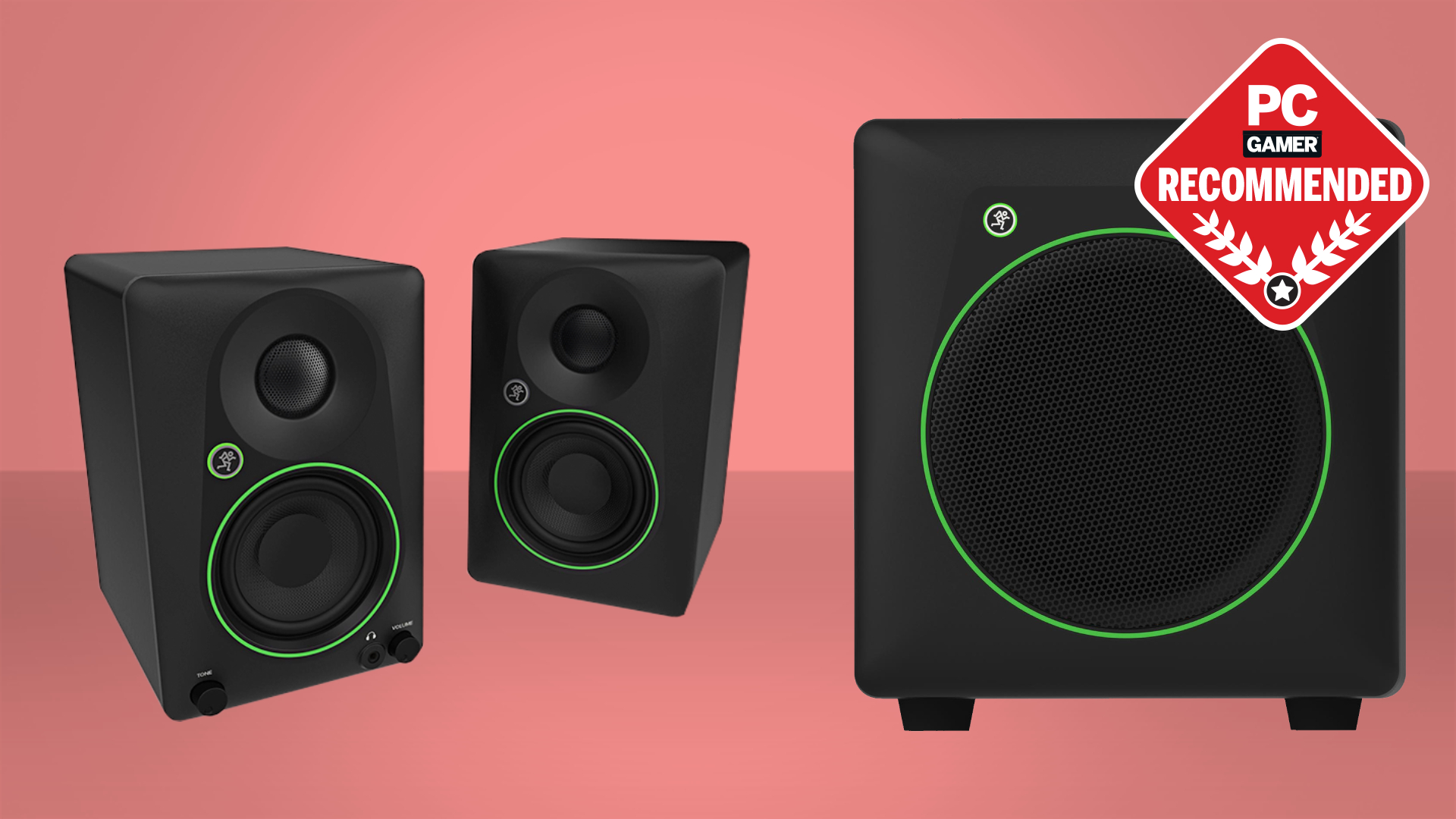
A 2.0 pair places separate left and right speakers around the display, which usually creates better stereo separation than a single soundbar. A 2.1 system adds a subwoofer for stronger low frequencies, as seen with the Logitech Z313 and Logitech G560. A soundbar saves width and simplifies cable management, but it cannot create the same physical left-right spacing.
Power and bass design
Power figures can suggest how much headroom a system has, but they do not describe sound quality on their own. The Edifier G2000 lists 16W RMS and 32W peak power, while the Edifier M60 lists 66W RMS and uses separate tweeters and mid-low drivers. Bass ports can add weight from compact cabinets, while a dedicated subwoofer generally creates deeper impact.
For game audio, speaker placement and clear midrange matter before maximum volume.
Connection options
USB audio can avoid the noise sometimes introduced by a computer's analog output, while 3.5mm AUX remains useful for consoles, monitors, and older devices. Bluetooth is convenient for phones and tablets, but it may not be the first choice for latency-sensitive PC play. The Edifier G2000 has USB, Bluetooth, and AUX, while the LENRUE G11 and Nylavee PC Speakers are wired only.
Desk footprint
Measure the space beside and beneath the monitor before choosing a system. The Bluedee Sound Bar and LENRUE G11 fit beneath many displays, while the Edifier M60 needs room for two cabinets and its angled stands. The Logitech G560 needs substantially more space because its subwoofer and larger speaker system are part of the arrangement.
Lighting and controls
RGB lighting is useful when it can be switched off, changed without friction, or synchronized with the rest of a setup. The Redragon GS520 and Nylavee PC Speakers offer six touch-controlled modes, while the Logitech G560 provides four zones through software. Physical knobs and buttons are often more useful than extra effects when you need to adjust volume during a game.
Frequently asked questions
Are gaming speakers better than a headset?
They are better for players who dislike wearing a headset for long sessions or want sound that can fill the desk area. A headset still provides more private listening and can make voice chat easier in a shared room. If you alternate between both, choose speakers with a convenient volume control and a simple connection to your computer.
Do gaming speakers need a subwoofer?
No. Compact 2.0 speakers can handle dialogue, music, and game effects without a separate bass unit. A subwoofer such as the one included with the Logitech Z313 adds more low-frequency impact, but it also needs extra floor or desk space.
Is Bluetooth suitable for gaming speakers?
Bluetooth is useful for music, mobile devices, and casual playback. Wired USB or 3.5mm connections are usually the safer choice when you want the most direct computer connection and the least concern about wireless delay. The Edifier G2000 and Edifier G2000 Pro provide both wireless and wired options.
What is the difference between 2.0 and 2.1 speakers?
A 2.0 system has two full-range speakers, one for each side of the stereo image. A 2.1 system adds a subwoofer dedicated to lower frequencies. The extra bass unit can make explosions and music feel fuller, but a 2.1 system is less compact and requires another cable and placement decision.
Can these speakers work with a laptop?
Most of these models can work with a laptop through USB, 3.5mm audio, or Bluetooth, depending on the product. The LENRUE G11 uses USB for power and 3.5mm for audio, while the Bluedee Sound Bar supports USB power, 3.5mm, and Bluetooth 5.0. Check the connection details if your laptop lacks a headphone socket.
Do RGB speaker lights affect sound?
The lighting itself does not change the speaker layout or driver design. It can affect the atmosphere of a gaming desk, but it should not be the main reason to choose a system. Look at the speaker construction, connection options, and controls first, then treat lighting as a secondary feature.
Can speakers replace gaming headphones for voice chat?
Speakers can play game audio while a separate microphone handles voice chat, but open speakers may create echo or allow other people in the room to hear the conversation. A headset remains more private and usually simplifies microphone use. For a mixed setup, how to separate game sound from team chat can help you decide what equipment belongs on the desk.
The bottom line
The Best gaming speakers for most PC desks are the Edifier G2000. Its 16W RMS output, three sound modes, 12 RGB effects, and choice of Bluetooth, USB, and AUX connections cover more situations than the smaller wired pairs. It cannot match the deep bass of a subwoofer system, but its size and flexibility make that limitation easier to live with.
Choose the Edifier M60 if music quality and two-way audio matter as much as gaming. Its 66W RMS design, DSP, USB-C, Bluetooth 5.3 with LDAC, and angled aluminum stands make it the most sophisticated listening system here. For a larger room and a much more forceful gaming presentation, the Logitech G560 is the specialist pick, provided you have space for the subwoofer and do not rely on Mac DTS:X support.
If you are undecided, buy the Edifier G2000 for a normal desk, the M60 for mixed gaming and music, or the Logitech G560 only when room-filling sound is the priority.
As an Amazon Associate we earn from qualifying purchases.