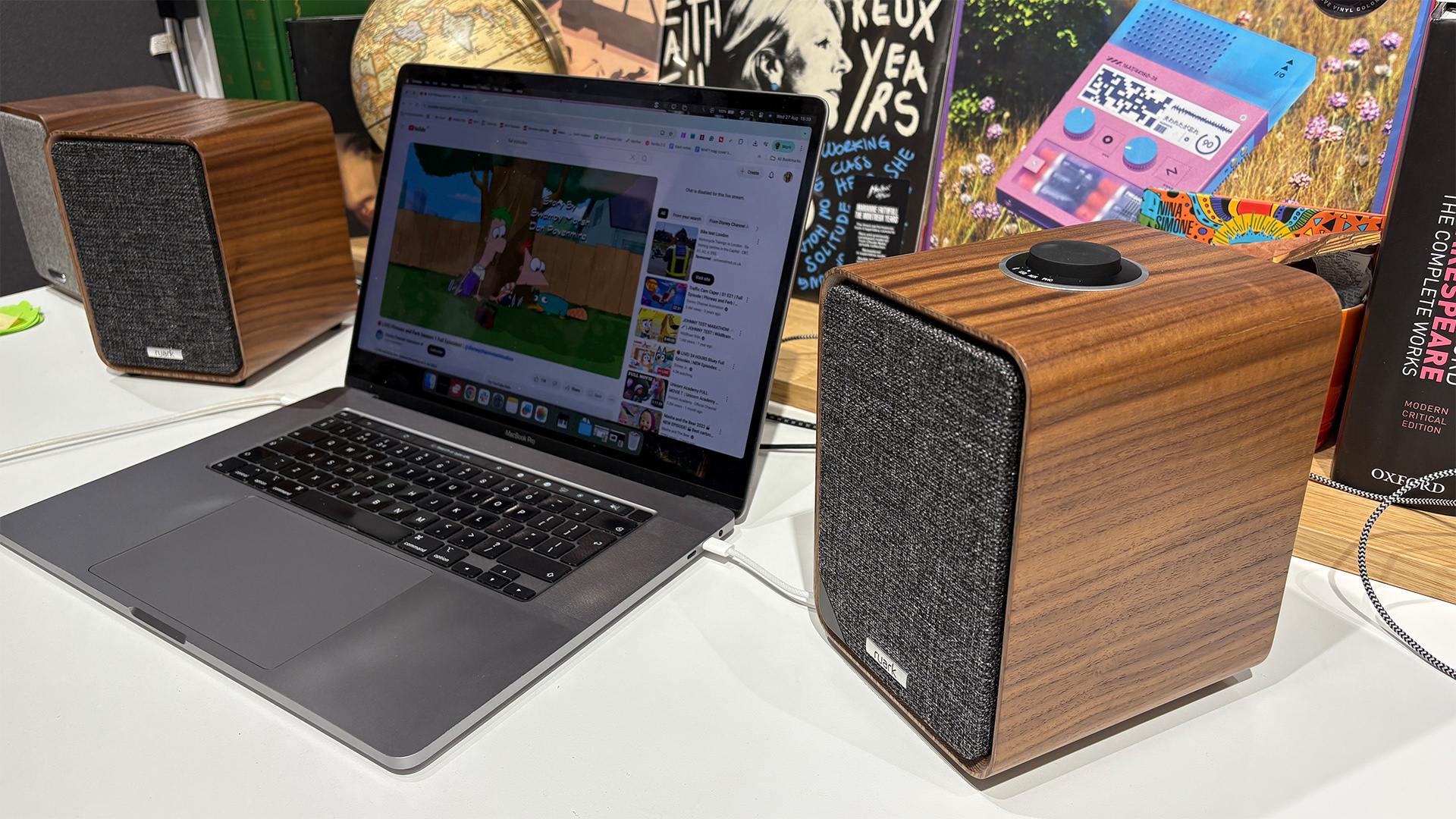

A laptop can handle a video call, but its built-in speakers rarely make music, games, or dialogue sound involving. The right desktop pair can also solve a practical problem: giving your desk a wider, clearer soundstage without forcing you to wear headphones all day. Our Best computer speakers picks cover compact USB models, Bluetooth stereo pairs, and full 2.1 systems with dedicated subwoofers.
The Edifier M60 is our top pick for most people who want clean, detailed desktop audio, while the Klipsch ProMedia 2.1 is the more exciting choice for big bass and room-filling sound. The rest of the field includes simple wired speakers, monitor-mounted designs, and flexible options for gaming and music.
Best computer speakers at a glance
| # | Product | Award | Drivers / power | Connectivity | Best for |
|---|---|---|---|---|---|
| 1 | Edifier M60 | Best overall | 3-inch mid-low drivers, 1-inch tweeters, 66W RMS | Bluetooth 5.3 with LDAC, USB-C, AUX | Detailed desktop listening |
| 2 | Klipsch ProMedia 2.1 | Best for bass | 3-inch satellites, 6.5-inch subwoofer, 200W peak | 3.5mm input | Gaming and movies |
| 3 | Edifier G2000 | Best gaming design | 2.75-inch full-range drivers, 32W peak | Bluetooth, USB, 3.5mm AUX | Gaming desks |
| 4 | OHAYO 60W Speakers | Best input selection | 3-inch full-range drivers, 0.75-inch tweeters, 30W per channel | Bluetooth 5.3, RCA, AUX, USB | Mixed audio setups |
| 5 | Logitech Z533 | Best control pod | 2.25-inch full-range drivers, 60W RMS | 3.5mm, RCA | Powerful desktop audio |
| 6 | Creative Pebble V3 | Best compact stereo pair | 2.25-inch full-range drivers, 8W RMS | USB-C, Bluetooth 5.0, 3.5mm AUX | Small desks |
| 7 | Logitech Z207 | Best easy wireless setup | Active drivers with passive radiators | Bluetooth 4.2, 3.5mm | Simple device switching |
| 8 | Logitech Z313 | Best simple 2.1 system | 25W RMS, compact subwoofer | Wired connection with control pod | Basic bass upgrade |
| 9 | XKX Monitor Soundbar | Best space saver | Dual drivers with passive radiators | USB, USB-C adapter | Monitor-mounted audio |
| 10 | Amazon Basics Stereo Speakers | Best basic USB pair | Full-range stereo drivers with bottom radiators | USB power, 3.5mm AUX | Straightforward computer audio |
1. Edifier M60: Best Overall
Pros
- 66W RMS output from a two-way active design
- USB-C, Bluetooth 5.3, and AUX inputs
- LDAC support for compatible Android devices
- Angled aluminum stands aim sound toward ear level
- Compact cabinets for a full-featured stereo pair
Cons
- Heavier and more substantial than basic desktop speakers
- No dedicated subwoofer
- Best wireless features depend on compatible devices
Best for: listeners who want refined stereo sound and flexible connections in a compact desktop system.
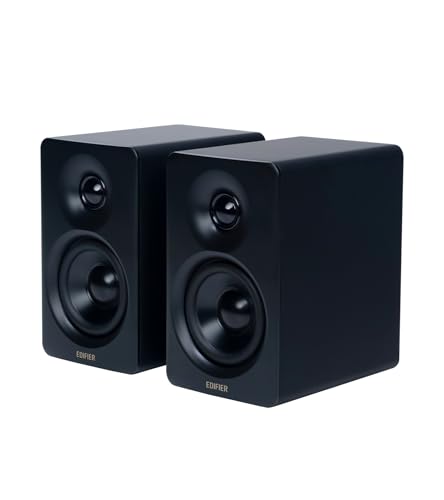
The Edifier M60 is the pair we would keep on a desk that has to handle everything from music and films to work calls. It feels more like a carefully designed stereo system than a generic computer accessory. The two speakers sit on supplied aluminum stands angled at 15 degrees, a thoughtful touch that points the sound toward your ears instead of across the desktop.
Its amplification and driver arrangement are unusually serious for this size. Each speaker uses a 3-inch long-throw aluminum diaphragm mid-low driver and a 1-inch silk dome tweeter, with the system producing 66W RMS in total. That two-way layout gives vocals and instruments more separation than the single full-range drivers used by the Edifier G2000 or Creative Pebble V3. The built-in DSP, digital processing, and active crossover are designed to keep those drivers working in their proper ranges.
Connectivity is another reason it leads this group. USB-C handles a direct wired computer connection, AUX covers analog sources, and Bluetooth 5.3 supports wireless listening. Compatible Android devices can use LDAC with transmission up to 24-bit/96kHz, though that feature should be treated as a bonus rather than a requirement. The touch-sensitive control panel and optional EDIFIER ConneX app make the system feel modern, but the controls may take a moment to become familiar.
The M60's weakness is its lack of a dedicated subwoofer. It can produce convincing mid-bass, but the Klipsch ProMedia 2.1 and Logitech Z533 go lower and create more physical impact in games and action films. The M60 is also one of the heavier sets here, at 9.7 pounds for the pair, so it is not the pick for a cramped or frequently rearranged desk.
Choose the M60 if clarity, flexibility, and a polished stereo presentation matter more than maximum bass. It is the strongest all-rounder in this group and the easiest recommendation for someone who wants computer speakers to replace several other listening setups.
2. Klipsch ProMedia 2.1: Best for Bass

Pros
- THX-certified 2.1 system
- 6.5-inch side-firing, ported subwoofer
- Horn-loaded satellites emphasize clarity
- Separate volume and subwoofer gain controls
- 3.5mm connection works with computers and consoles
Cons
- Requires room for a large subwoofer
- Wired-only connectivity
- Bass can be more prominent than some desks need
Best for: gamers and movie watchers who want strong low-end impact from a computer audio system.
The Klipsch ProMedia 2.1 is the obvious choice when a desktop setup needs to sound bigger than it looks. This is a three-piece system with two satellite speakers and a substantial subwoofer, so it does not disappear into a tidy office arrangement. In return, it produces the kind of bass that makes explosions, kick drums, and game soundtracks feel physical.
The satellites use 3-inch midrange drivers and Klipsch MicroTractrix horn technology. The horn design is intended to control dispersion and send sound toward the listener, which helps voices and effects stay present when the system is played loudly. The 6.5-inch side-firing, ported subwoofer handles the low end, giving the ProMedia a much deeper foundation than the Edifier M60's two-speaker design.
Klipsch lists 200 watts of peak power and an in-room maximum output of 110dB. Those figures suggest considerable headroom, but the more useful feature for daily use is the wired control pod. It provides main volume and subwoofer gain controls, so you can rein in the bass for late-night listening or add more weight for a film without reaching behind the desk.
The trade-off is simplicity. There is only a 3.5mm input, and there is no Bluetooth, USB audio, RCA input, or second source connection in the supplied feature set. The subwoofer also measures 9.5 by 9.8 by 10.2 inches, making it a poor fit for a desk with limited floor or shelf space. Someone who mostly listens to speech or acoustic music may prefer the more balanced Edifier M60.
For games, films, and energetic music, the ProMedia 2.1 remains the most dramatic pick here. It is the system to choose when the words “computer speakers” really mean a small room audio system with a dedicated bass engine.
3. Edifier G2000: Best Gaming Design

Pros
- Three selectable sound modes for games, music, and movies
- Bluetooth, USB sound card, and 3.5mm AUX
- 2.75-inch full-range drivers
- 12 RGB lighting effects
- Subwoofer output is included
Cons
- No dedicated subwoofer in the box
- RGB lighting will not suit every desk
- Less detailed than the two-way Edifier M60
Best for: gaming setups that need multiple inputs, selectable sound modes, and built-in lighting.
The Edifier G2000 makes its priorities clear. Its column-shaped cabinets, 10-degree elevation, anti-slip feet, and RGB lighting are built for a gaming desk rather than a traditional hi-fi arrangement. The lighting offers 12 effects, so it can be a subtle accent or a prominent part of the setup depending on the selected mode.
Each speaker uses a 2.75-inch full-range driver, with 16W RMS and 32W total peak power listed for the pair. A rear bass port helps the small cabinets produce more low-end presence, while the three sound modes let you tailor the presentation for games, music, or movies. These controls are useful for a shared desk, although the single full-range driver does not separate treble and mid-bass as distinctly as the M60's two-way design.
The G2000 is particularly adaptable on the connection side. USB works as a sound card connection, Bluetooth handles phones and other wireless sources, and 3.5mm AUX supports traditional analog devices. A subwoofer output is also included, leaving room to expand the system later. That combination gives it more flexibility than the wired-only Klipsch ProMedia 2.1, even though Klipsch produces deeper bass without an added subwoofer.
The main limitation is that the G2000 does not include a separate bass unit. Its 0.65-liter isometric cavity and rear port help, but they cannot create the same low-frequency impact as the ProMedia 2.1 or Z533. The RGB treatment is another matter of taste, and listeners who want a discreet office system may find the gaming styling distracting.
This is the right Edifier for a gaming-first desk, particularly one that switches between a PC, console, and phone. Pick the M60 for more refined music playback, but choose the G2000 when lighting, sound modes, and gaming-friendly connections matter more.
4. OHAYO 60W Speakers: Best Input Selection

Pros
- 30W per channel output
- Bluetooth 5.3, RCA, AUX, and USB inputs
- Separate tweeter and full-range driver
- MDF enclosures help reduce cabinet resonance
- Front volume control
Cons
- Larger cabinets than compact desktop pairs
- No dedicated subwoofer included
- Brand and long-term support may matter to some buyers
Best for: users connecting computers, phones, TVs, and other sources to one stereo pair.
The OHAYO 60W Speakers are aimed at people whose computer audio setup extends beyond a single laptop. Their four input types make them unusually accommodating: Bluetooth 5.3, RCA, AUX, and USB are all available. That is useful if the same speakers need to serve a desktop, a television, a phone, or another component without constantly swapping cables.
The driver arrangement is more ambitious than the small price-category desktop pairs in this list. Each cabinet has a 0.75-inch carbon fiber silk dome tweeter and a 3-inch carbon fiber full-range driver. OHAYO lists 30W per channel, while a rear bass port is intended to add low-end depth. This should give the speakers a broader and more controlled presentation than the Amazon Basics pair, though the Logitech Z533 and Klipsch ProMedia still have the advantage when a separate subwoofer is the priority.
The MDF wooden enclosure is a practical design choice. A rigid cabinet can help reduce unwanted resonance, and the front-mounted volume knob is easier to use than controls hidden at the rear. Bluetooth 5.3 is current enough for convenient wireless streaming, while RCA gives the speakers a useful role in a small media setup rather than limiting them to computer duty.
The cabinets are not particularly tiny. The listed dimensions are 11.54 inches high, 6.89 inches long, and 9.37 inches wide, so a shallow desk may struggle to accommodate them comfortably. The feature set also does not mention a dedicated headphone output or subwoofer connection, which may matter more to a gaming desk than to a general music setup.
The OHAYO is a compelling choice when connection flexibility outranks compactness. It is more versatile than the Edifier G2000 and more substantial than the Creative Pebble V3, while the M60 remains the safer choice for listeners who put refined processing and app support first.
5. Logitech Z533: Best Control Pod
Pros
- 60W RMS output
- Front-facing subwoofer
- Wired control pod with bass adjustment
- 3.5mm and RCA inputs
- Headphone jack on the control pod
Cons
- Large 12.3-pound system
- Wired connectivity only
- Takes more desk and floor space than stereo pairs
Best for: desktop users who want a powerful 2.1 system with easy physical controls.
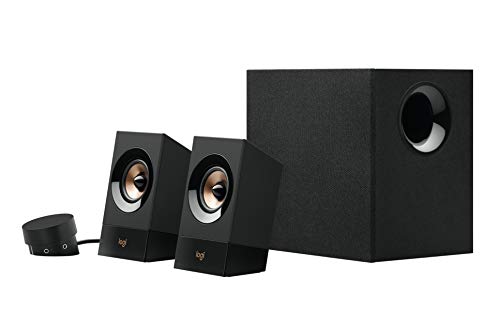
The Logitech Z533 is built around convenience and scale. Its front-facing subwoofer gives music and games more weight than a pair of compact full-range speakers, while the wired control pod keeps everyday adjustments close at hand. It is a more imposing arrangement than the Z313, but it also offers considerably more output and connection flexibility.
Logitech lists 60W RMS and 120W peak power for the system. The two satellites use 2.25-inch full-range drivers designed to direct sound across a room, and the front-facing subwoofer handles the low end. That balance makes the Z533 a strong fit for a desktop that also acts as a small entertainment center. It will not offer the M60's two-way detail, but it has more authority in bass-heavy material.
The control pod is the standout feature. It provides power and volume controls, a bass control, an extra 3.5mm jack, and a headphone jack. The pod can sit wherever it is most useful, which is far more practical than reaching behind a speaker or subwoofer. RCA and 3.5mm inputs also make it easy to connect more than one type of source.
The cost of that power is physical bulk. The system weighs 12.3 pounds, and the listed dimensions reach 10.5 inches in height, 10.1 inches in length, and 7.7 inches in width. It is not the right choice for a narrow laptop stand or minimalist workstation. There is also no Bluetooth, so wireless phone streaming is not part of the experience.
Choose the Z533 if you want bass, a proper control pod, and easy access to headphones without moving away from wired connections. The Klipsch ProMedia 2.1 sounds more expansive, while the Z533 is easier to live with for listeners who value hands-on controls.
6. Creative Pebble V3: Best Compact Stereo Pair

Pros
- USB-C audio and power with USB-A adapter
- Bluetooth 5.0 and 3.5mm input
- 2.25-inch full-range drivers
- 45-degree elevated drivers
- Clear Dialog processing
Cons
- 8W RMS is modest beside larger systems
- AUX cable is not included
- No dedicated subwoofer
Best for: small desks that need clear, flexible stereo sound without a bulky system.
The Creative Pebble V3 is one of the easiest systems to fit into a crowded workspace. Its compact two-speaker layout keeps the desk clear, and the 45-degree elevated drivers aim sound toward the listener. That angle matters more than a decorative design flourish because it helps the speakers sound directed rather than lost below monitor level.
Creative uses larger 2.25-inch custom-tuned full-range drivers here and lists 8W RMS with peak power up to 16W. A gain switch can increase output when the speakers are connected to a 10W USB-C or USB-A port. It will not compete with the 66W RMS Edifier M60 or 60W RMS Logitech Z533 for scale, but it is better suited to close-range desk listening than those larger systems.
USB-C provides both audio and power through one cable, and the included USB-C to USB-A converter keeps it compatible with older computers. Bluetooth 5.0 is useful for a phone or tablet, while the 3.5mm AUX input covers analog sources. Creative also adds Clear Dialog processing, intended to make speech easier to understand without forcing the rest of a film or video into the background.
The limitations are predictable for a compact design. Bass has physical limits without a subwoofer, and the 8W RMS output leaves less headroom than the Edifier G2000. The AUX cable is not included, so anyone planning an analog connection should account for that extra requirement.
The Pebble V3 is the sensible pick for a small desk, laptop station, or office where clean wiring matters. It offers more connection choices than the Amazon Basics speakers and more useful wireless support than the simple Logitech Z313, without demanding the room of a 2.1 system.
7. Logitech Z207: Best Easy Wireless Setup

Pros
- Bluetooth and 3.5mm wired connections
- Easy-Switch device switching
- Headphone jack on a speaker
- Passive radiators add bass extension
- Straightforward on-speaker controls
Cons
- Older Bluetooth 4.2 connectivity
- No USB audio
- No dedicated subwoofer
Best for: households that switch between a computer, phone, tablet, or other Bluetooth device.
The Logitech Z207 is a practical pair for people who do not want their computer to be the only source. Its active drivers produce full-range audio, while passive radiators provide bass extension without adding a separate subwoofer. The system is simple, but the useful part is how easily it moves between wired and wireless listening.
Bluetooth 4.2 handles wireless playback, and a 3.5mm cable supports computers, televisions, tablets, music players, and other analog sources. Logitech's Easy-Switch feature lets you pause audio on one device and press play on another to change sources. That is less elaborate than a multi-input system such as the Edifier M60, but it avoids reaching behind the desk to swap cables.
Controls for pairing, power, and volume sit on the speaker, and there is a headphone jack for private listening. Those small details make the Z207 a better work companion than a speaker pair that requires software controls for every adjustment. Its listed dimensions are about 9.5 by 3.5 by 4.9 inches, so it remains reasonably easy to place beside a monitor.
The Z207 does not offer USB audio, modern Bluetooth 5.3, selectable sound modes, or a subwoofer output. The Creative Pebble V3 is the stronger compact choice if USB-C matters, while the OHAYO 60W Speakers are better for users who need RCA and USB alongside Bluetooth. The Z207's advantage is its uncomplicated device switching.
Pick it for a mixed-device desk where convenience matters more than maximum detail or bass. It is a comfortable middle ground between basic wired computer audio and a more elaborate stereo system.
8. Logitech Z313: Best Simple 2.1 System

Pros
- 25W RMS output
- Dedicated compact subwoofer
- Simple control pod
- Straightforward 2.1 arrangement
Cons
- No Bluetooth
- No USB audio
- Fewer connection and adjustment options than larger systems
Best for: users who want a simple wired bass upgrade for a computer.
The Logitech Z313 is an uncomplicated answer to thin computer audio. It uses two satellite speakers and a compact subwoofer, so it adds low-end presence without the larger footprint of the Klipsch ProMedia 2.1 or Logitech Z533. The supplied control pod keeps volume adjustment close to the listener.
Its 25W RMS output is enough to move beyond basic laptop playback, and the dedicated subwoofer gives music, films, and games more body than the Z207's passive radiators can provide. The system is not built around elaborate processing or multiple listening modes. That simplicity can be a benefit for an office computer that needs better everyday sound without a complicated setup.
The Z313 is also relatively straightforward to place. Logitech lists the system as a compact 2.1 package, and the supplied control pod provides the primary day-to-day control. There are no wireless pairing steps or app features to manage, which makes it easy to hand over to someone who simply wants the speakers to work.
The feature list is sparse compared with the other 2.1 options. There is no listed Bluetooth, USB audio, RCA input, bass control, or headphone jack on the control pod. The Logitech Z533 is a much better fit for a desk that needs multiple sources and more powerful playback, while the Creative Pebble V3 is tidier for a small workspace.
The Z313 makes sense when the brief is narrow: add stereo separation and a subwoofer to a computer, then leave the system alone. It is not the most flexible pick, but it avoids unnecessary complexity.
9. XKX Monitor Soundbar: Best Space Saver
Pros
- Clips to the top, side, or bottom of a monitor
- USB connection with included USB-C adapter
- Touch mute and volume controls
- Adaptive channel switching with a G-sensor
- Dual drivers and passive radiators
Cons
- Not compatible with monitors, TVs, or projectors according to its listed features
- USB audio depends on correct computer settings
- Soundbar format is less spacious than separated stereo speakers
Best for: monitor setups where desktop space is more valuable than speaker separation.
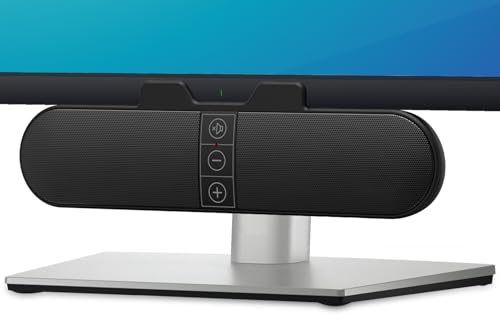
The XKX Monitor Soundbar solves a different problem from the other products here. Instead of placing two speakers beside the display, it clips onto the top, side, or bottom of a monitor, or rests on the desk. That makes it a useful option for a narrow workstation, a dual-monitor setup, or anyone who wants to keep the area beneath the screen clear.
Its dual ultra-magnetic drivers and dual passive radiators are intended to produce loud sound with deeper bass than the slim enclosure suggests. The built-in G-sensor handles adaptive channel switching, keeping left and right channels correctly positioned when the bar is moved from the top to the bottom of a monitor. That is a thoughtful solution to a problem conventional stereo pairs do not have.
The connection is USB, with a built-in USB-C to USB adapter for newer computers and devices. Three touch buttons on the front provide mute and volume adjustment. The listed compatibility includes Windows, macOS, ChromeOS, and Linux, but the product specifically says it is incompatible with monitors, televisions, and projectors. It should therefore be treated as a computer USB speaker, not a universal display soundbar.
There is a setup caveat. The manufacturer advises checking the computer's audio settings, volume mixer, playback device, audio driver, and USB interface if sound does not appear immediately. The 9.17-inch-wide bar also cannot create the same left-right separation as the Edifier M60 or Creative Pebble V3, even if its forward-facing arrangement is convenient.
Choose the XKX when space and mounting flexibility are the main concerns. If the desk can accommodate two separate speakers, the Pebble V3 will usually create a more convincing stereo image, but the XKX is much easier to fit around a monitor-heavy workspace.
10. Amazon Basics Stereo Speakers: Best Basic USB Pair

Pros
- USB-powered design
- 3.5mm AUX input
- Inline volume control
- Bottom radiators add bass
- Compact padded bases
Cons
- No Bluetooth
- Small full-range presentation
- No dedicated subwoofer
Best for: basic computer audio when a simple USB-powered pair is all that is needed.
The Amazon Basics Stereo Speakers keep the assignment narrow and clear. They are a pair of external speakers for amplifying computer or laptop audio, powered through USB and controlled with an inline volume unit. There is no wireless setup, app, or separate bass module to complicate the installation.
The speakers use full-range drivers with bottom radiators intended to add a springy bass character. That will give music and video more presence than many built-in laptop speakers, but the small cabinets cannot compete with the dedicated subwoofers in the Logitech Z313, Z533, or Klipsch ProMedia 2.1. They are better understood as a basic stereo improvement than a room-filling system.
A 3.5mm AUX input handles the audio signal, while USB supplies power. The metal finish, blue LED lights, and scratch-free padded bases give the pair a little more visual polish than a plain plastic design. At roughly 2.88 inches high, 3.94 inches long, and 2.6 inches wide per listed dimensions, they are also easy to place beside a monitor.
The trade-offs are clear. There is no Bluetooth, no USB audio signal, and no headphone jack listed in the features. The Creative Pebble V3 offers broader connectivity and a more deliberate driver angle, while the XKX Monitor Soundbar takes up even less conventional desk space. Both are better fits for users with specific placement or connection needs.
The Amazon Basics pair is the right choice for someone who wants external stereo sound and nothing more. It is small, simple, and easy to understand, though listeners who care about music detail, wireless playback, or deep bass should move up the list.

How to choose best computer speakers
The right computer speaker depends less on a single headline specification than on how much room, bass, connectivity, and control your desk actually allows.
Stereo layout
Two separate speakers create left-right separation, which helps music, games, and films feel wider. A monitor soundbar such as the XKX is easier to place, but its channels are physically closer together. A 2.1 system adds a subwoofer and keeps the satellites focused on the rest of the frequency range.
A dedicated subwoofer changes the physical feel of a soundtrack, but two well-placed stereo speakers usually make voices easier to place.
For a small desk, the Creative Pebble V3 or Amazon Basics pair is easier to position. The Edifier M60 and OHAYO speakers need more room, but their separated cabinets offer a more convincing stereo presentation.
Driver design and output
Full-range drivers keep a system compact, while two-way designs split duties between a tweeter and a mid-low driver. The M60 uses 3-inch mid-low drivers and 1-inch tweeters, while the OHAYO pair combines 3-inch full-range drivers with 0.75-inch tweeters. These arrangements are better suited to detailed music than a tiny single-driver speaker.
Power figures can indicate headroom, but they do not tell the whole story. The M60 lists 66W RMS, the Z533 lists 60W RMS, and the G2000 lists 16W RMS with 32W total peak power. Match the system to the room and listening distance instead of assuming the largest number automatically sounds best.
Bass and subwoofer design
A subwoofer is the clearest route to deep, physical bass. The Klipsch ProMedia 2.1 uses a 6.5-inch side-firing, ported subwoofer, while the Logitech Z313 includes a compact subwoofer in a simpler system. Stereo speakers without a subwoofer can still sound balanced, but they will not create the same low-frequency impact.
Rear ports and passive radiators can extend bass from compact cabinets. They help the Edifier G2000, Creative Pebble V3, Logitech Z207, and Amazon Basics speakers sound fuller, but they are not a substitute for a large dedicated bass driver.
Connections
USB is convenient for computer audio and can reduce cable clutter. USB-C is especially useful on newer laptops, with the Creative Pebble V3 and Edifier M60 offering direct USB-C connections. The XKX includes a USB-C adapter, though its listed compatibility is limited to computers.
Bluetooth is useful when a phone or tablet will share the speakers. The Edifier M60 and OHAYO pair use Bluetooth 5.3, while the Edifier G2000, Logitech Z207, and Creative Pebble V3 also support wireless playback through earlier Bluetooth versions. RCA and AUX matter when the speakers will connect to a television, console, or other analog source.
Desk placement and controls
Measure the space beside or beneath the monitor before choosing a system. Large 2.1 systems need room for a subwoofer, while the XKX attaches to a monitor and the Pebble V3 stays compact. Angled designs such as the M60's 15-degree stands and Pebble V3's 45-degree drivers can help direct sound toward the seated listener.
Physical controls are valuable for everyday use. The Logitech Z533 and Klipsch ProMedia 2.1 place volume controls on wired pods, the M60 uses a touch panel, and the Amazon Basics pair uses an inline volume control. Choose the arrangement that will be easiest to reach from your normal seating position.
For listeners focused on music, the differences between bass-heavy systems and detailed stereo pairs matter more than gaming styling. These small changes that make desktop listening clearer can help narrow the choice before you decide on a speaker layout.
If your setup includes a monitor arm, laptop dock, or limited depth, consider how much room a desktop audio system really needs before buying a large 2.1 system. Users who specifically want low-end impact should also compare the advantages of adding a dedicated bass unit.

Frequently asked questions
Do computer speakers need a subwoofer?
No. A good stereo pair can provide clear vocals, music, and game audio without a separate bass unit. A subwoofer is most useful when you want deeper, more physical bass for films, games, and electronic or bass-heavy music.
Are USB computer speakers better than AUX speakers?
USB speakers can be convenient because the computer sends audio through the USB connection, while USB may also power the speakers. AUX remains useful because it works with a broad range of devices, including computers, phones with the appropriate output, and other analog sources. The better connection is the one that matches your equipment and cable preferences.
Can Bluetooth speakers work with a desktop computer?
Yes, if the desktop has Bluetooth support or a compatible adapter. The Edifier M60, Edifier G2000, Logitech Z207, Creative Pebble V3, and OHAYO speakers all list Bluetooth connectivity, but the specific Bluetooth version differs between models.
Are 2.1 speakers better for gaming?
A 2.1 system can make explosions, engine sounds, and soundtrack bass feel more substantial because it has a dedicated subwoofer. A stereo pair can still be better for positional detail and dialogue, especially when the speakers are placed at equal distances from the listener.
Which speakers are easiest to use with multiple devices?
The Edifier M60 offers Bluetooth 5.3, USB-C, and AUX, while the OHAYO pair adds RCA to Bluetooth, AUX, and USB. The Logitech Z207 is also convenient for switching between Bluetooth and 3.5mm sources with its Easy-Switch feature.
Can computer speakers be mounted on a monitor?
The XKX Monitor Soundbar is designed to clip to the top, side, or bottom of a monitor, or sit on a desk. Its listed features say it is intended for computers and is incompatible with monitors, televisions, and projectors as audio sources, so check the connection and playback device requirements carefully.
The bottom line
The Edifier M60 is our top recommendation among the Best computer speakers because it combines a capable two-way design, 66W RMS output, USB-C, Bluetooth 5.3, AUX, and thoughtful angled stands. It is the strongest choice for music, films, work, and general desktop listening, though the Klipsch ProMedia 2.1 is better if deep bass is the priority.
Choose the Klipsch ProMedia 2.1 for a larger, more forceful gaming and movie system, or the Creative Pebble V3 when desk space is tight and USB-C plus Bluetooth matter. The Edifier G2000 is the more fitting gaming design, while the Logitech Z533 suits anyone who wants a powerful 2.1 system with a convenient control pod.
If you are undecided, choose the Edifier M60 for balanced detail, or the Klipsch ProMedia 2.1 when bass matters more than compact placement.
As an Amazon Associate we earn from qualifying purchases.