

A laptop's built-in speakers can make a song sound flat, thin, and oddly distant. The right desktop pair adds separation, bass, and enough clarity to make familiar recordings feel more involving without taking over the room. The Best computer speakers for music range from tiny USB models to proper powered monitors, so the real choice is how much space, control, and low-end impact you need.
We ranked these 10 products by their audio design, connection options, desktop practicality, and the kind of listening each one suits. PreSonus Eris 3.5 is the best pick for balanced music playback, while the rest cover strong alternatives for bass, Bluetooth, compact desks, gaming setups, and simple plug-in listening.
Comparison table
| # | Product | Award | Power and format | Inputs | Best for |
|---|---|---|---|---|---|
| 1 | PreSonus Eris 3.5 | Best overall | 50W, 3.5-inch stereo pair | TRS, RCA, aux, headphone | Accurate music playback |
| 2 | Edifier M60 | Best compact premium pair | 66W RMS, two-way stereo | USB-C, AUX, Bluetooth 5.3 | High-resolution desktop listening |
| 3 | Edifier R1280T | Best bookshelf-style pair | 42W RMS, two-way stereo | Two AUX inputs | Warm, adjustable near-field sound |
| 4 | OHAYO 60W Speakers | Best wired and wireless flexibility | 60W, two-way stereo | Bluetooth 5.3, RCA, AUX, USB | Multi-device desks |
| 5 | Klipsch ProMedia 2.1 | Best bass-heavy system | 2.1, 200W peak | 3.5mm | Room-filling music and games |
| 6 | Edifier G2000 | Best for gaming desks | 32W peak, stereo pair | USB, AUX, Bluetooth | Music, games, and RGB setups |
| 7 | Logitech Z313 | Best simple 2.1 setup | 25W RMS, subwoofer system | Wired control pod | Easy desktop bass |
| 8 | Logitech Z207 | Best Bluetooth convenience | 2.0 stereo pair | Bluetooth 4.2, 3.5mm | Switching between devices |
| 9 | Amazon Basics Stereo Speakers | Best tiny desktop pair | USB-powered, 2.0 | 3.5mm aux, USB power | Very small workspaces |
| 10 | Logitech S150 | Best ultra-simple USB pair | 1.2W RMS, 2.0 | USB-A | Basic computer audio |
1. PreSonus Eris 3.5: Best Overall

Pros
- 3.5-inch woven-composite woofers give music tighter bass
- 1-inch silk-dome tweeters keep vocals clear
- High- and low-frequency controls help adapt the sound
- TRS, RCA, aux, and headphone connections
Cons
- Larger than compact USB pairs
- No Bluetooth connection listed
- Studio presentation may sound less bass-forward than a 2.1 system
Best for: listeners who want balanced, adjustable sound from a real stereo pair.
The PreSonus Eris 3.5 is the pair we'd put in front of someone who cares about hearing a song clearly rather than simply making the desk louder. Its presentation is built around a stereo pair, with enough separation for vocals, guitars, and percussion to occupy distinct places instead of collapsing into a single boxy image. It is also sold as a complete pair, which keeps the setup straightforward.
The hardware is unusually well suited to music in this group. Each speaker uses a 3.5-inch woven-composite woofer and a 1-inch silk-dome tweeter, with a stated frequency range of 80 Hz to 20 kHz. That does not promise subwoofer-level rumble, but it points to a more controlled balance through the bass and treble than the tiny Amazon Basics Stereo Speakers or Logitech S150 can provide. The built-in 50 watts of amplification gives the pair room to play dynamically without making the stated use case feel limited to quiet desktop listening.
Connection choices are a major reason to choose it over Edifier R1280T. The Eris 3.5 includes balanced TRS, RCA, and a front-panel aux input, plus a front headphone jack. The high- and low-frequency acoustic controls let you adjust the presentation for a bright room, a close desk, or a setup where the speakers sit farther away. They are practical controls, not decorative extras, because small changes in placement and room reflections can make desktop speakers sound noticeably different.
There are limits. The data lists no Bluetooth, and the design is less compact than Edifier M60. Its studio-monitor approach may also be less immediately booming than Klipsch ProMedia 2.1, whose dedicated subwoofer has a much stronger low-end role. Pick the Eris 3.5 if you want to hear detail and adjust the response to your space. Skip it if wireless streaming or cinematic bass matters more than balance.
2. Edifier M60: Best Compact Premium Pair
Pros
- 66W RMS output from a compact two-way design
- LDAC support is useful for compatible Android devices
- USB-C and AUX cover wired desktop use
- Included angled aluminum stands aim sound toward the listener
Cons
- No dedicated subwoofer
- LDAC benefits require a compatible Android device
- Touch controls may not suit everyone
Best for: listeners who want a compact pair with strong digital processing and wireless support.
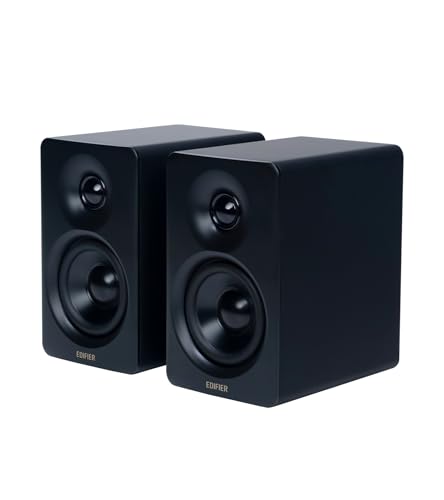
The Edifier M60 is the most polished compact option here. Each speaker measures about 3.94 inches wide, 5.79 inches high, and 6.61 inches deep, so it occupies less visual and physical space than the larger bookshelf-style models. Edifier also includes aluminum stands angled at 15 degrees. On a desk, that angle can help point the drivers toward your ears instead of sending the sound across your knees.
Its two-way arrangement uses a 1-inch silk-dome tweeter and a 3-inch long-throw aluminum diaphragm mid-low driver. The pair is rated for 66W RMS, divided between the mid-low and treble sections. That combination gives the M60 a more serious foundation than Logitech Z207, while its compact footprint is easier to live with than Edifier R1280T. The built-in DSP, digital processing, and active two-way crossover are designed to keep those drivers working in their intended ranges.
Connectivity is the M60's strongest practical advantage. USB-C and AUX support wired listening, while Bluetooth 5.3 handles wireless playback. The receiver supports LDAC, with a maximum transmission bitrate of up to 990 kbps and high-resolution audio up to 24-bit/96kHz from Android 8.0 or later devices. Those details matter only when the source and streaming setup support them, but they make this a more capable wireless pair than the Bluetooth 4.2 Logitech Z207.
The M60 does not offer the physical low-end weight of Klipsch ProMedia 2.1, and its touch-sensitive controls may be less immediate than a conventional knob. It is also a heavier pair at about 9.7 pounds according to the listed product information. Choose it for a clean desk, multiple input types, and high-resolution wireless playback. It is the right fit for someone who wants sophisticated compact speakers, not a separate subwoofer system.
3. Edifier R1280T: Best Bookshelf-Style Pair

Pros
- 4-inch full-range drivers give music a fuller foundation
- 13mm silk-dome tweeters support clear high frequencies
- Two AUX inputs allow two wired sources at once
- Bass and treble controls are on the active speaker
Cons
- No Bluetooth listed
- Takes more desk space than compact pairs
- Wood-effect enclosure is a traditional rather than minimal look
Best for: listeners who prefer fuller near-field sound and physical tone controls.
The Edifier R1280T feels less like a computer accessory and more like a small stereo system that happens to sit beside a monitor. Its wood-effect MDF enclosure gives it a traditional bookshelf-speaker appearance, and the pair has enough physical presence to sound more substantial than the small plastic systems below it. For music, that extra cabinet volume and larger driver are meaningful advantages.
Each speaker combines a 4-inch full-range unit with a 13mm silk-dome tweeter. Edifier rates the system at 42W RMS, and the design is described as an active near-field studio monitor. That makes the R1280T a natural step up from Logitech Z313 when the listener wants a more even two-speaker presentation rather than a compact subwoofer and satellites. It also gives the R1280T a more relaxed, full-bodied character than the smaller Edifier G2000.
The connection layout is simple but useful. Two AUX inputs let you connect two devices with a 3.5mm headphone output or dual RCA output without constantly unplugging cables. Volume, bass, and treble controls provide direct adjustment, with the bass and treble knobs positioned on the side of the active speaker. A remote control handles volume from a distance, which is helpful when the pair is used across a room rather than directly under a monitor.
The obvious omission is Bluetooth. Edifier M60 is the better choice for wireless streaming and USB-C desktop audio, while PreSonus Eris 3.5 offers a more studio-oriented set of connections and room adjustment. The R1280T also takes up more room, measuring about 9.5 inches wide, 5.8 inches high, and 6.9 inches deep in the listed dimensions. Choose it when a warm, substantial stereo pair and hands-on tone controls matter more than wireless convenience.
4. OHAYO 60W Speakers: Best Wired and Wireless Flexibility

Pros
- 60W total output in a two-way stereo design
- Bluetooth 5.3, RCA, AUX, and USB inputs
- Carbon fiber silk-dome tweeter and full-range driver
- Front volume control is easy to reach
Cons
- No dedicated subwoofer
- Large footprint for a desktop pair
- Bluetooth high-resolution codec support is not listed
Best for: households or desks that switch between computers, phones, TVs, and other wired sources.
The OHAYO 60W Speakers are built for a setup where the speakers need to do more than play audio from one computer. They accept Bluetooth 5.3, RCA, AUX, and USB, so the same pair can sit between a desktop, a phone, a TV, or another wired source without requiring a separate switcher. That broad compatibility is the product's defining advantage.
The audio hardware is more ambitious than the small 2.0 systems. OHAYO lists a 0.75-inch carbon fiber silk-dome tweeter and a 3-inch carbon fiber full-range driver, with 30W per channel and a rear bass port. The port is intended to add low-end depth, while the MDF wooden enclosure is designed to reduce cabinet resonance. On paper, this gives it a stronger music-focused foundation than Logitech Z207, even though neither system uses a dedicated subwoofer.
The front volume knob is a welcome choice for a desktop speaker. You do not need to reach behind the enclosure or rely on a keyboard control when a quick adjustment is needed. The listed dimensions are about 9.37 inches wide, 11.54 inches high, and 6.89 inches deep, so the OHAYO pair needs considerably more vertical and lateral clearance than Edifier M60.
That size is the main reason to skip it. Edifier R1280T offers a more established bookshelf-style approach, while PreSonus Eris 3.5 is the stronger choice for acoustic adjustment and studio-oriented connections. The OHAYO pair makes sense when input flexibility is the priority and the desk has room for tall speakers. It is less convincing for a minimalist setup or anyone specifically seeking deep subwoofer bass.
5. Klipsch ProMedia 2.1: Best Bass-Heavy System

Pros
- Dedicated 6.5-inch side-firing, ported subwoofer
- Two-way satellites use 3-inch midrange drivers
- THX certification and horn technology
- Control pod includes main volume and subwoofer gain
Cons
- Subwoofer requires substantial floor or desk space
- Only a 3.5mm input is listed
- Bass-heavy presentation is not ideal for every recording
Best for: listeners who want powerful low end for music, movies, and games.
The Klipsch ProMedia 2.1 is the obvious pick for anyone who wants the bass line to announce itself. This is a three-piece system with two satellites and a separate subwoofer, not a pair of compact desktop boxes trying to create low-end weight from small drivers. Music with kick drums, synth bass, and electric bass gets a physical sense of scale that PreSonus Eris 3.5 and Edifier M60 approach differently.
The satellites use 3-inch midrange drivers, while the side-firing, ported subwoofer uses a 6.5-inch driver. Klipsch lists 200 watts of peak power and a maximum in-room output of 110 dB. Those figures describe a system intended to fill more than the narrow space directly in front of a monitor. Its MicroTractrix horn technology is designed to control dispersion and direct sound toward the listener, helping the satellites retain clarity while the subwoofer handles the lowest frequencies.
The control pod keeps the system approachable. It provides main volume and subwoofer gain, so you can reduce the low end when a recording sounds too thick or increase it for a more forceful presentation. The system has a 3.5mm input and is described as compatible with computers, TVs, music players, and game consoles. Compared with Logitech Z313, the ProMedia has a much more substantial subwoofer and greater stated output, but it also asks for more room.
This is not the neutral choice. The subwoofer can dominate a small room, and the limited input selection is less flexible than OHAYO 60W Speakers or Edifier M60. Its satellite dimensions are listed as 8.5 by 4.2 by 5.67 inches, while the subwoofer measures 9.5 by 9.8 by 10.2 inches. Choose it for energetic listening and skip it if your priority is a restrained, monitor-like balance.
6. Edifier G2000: Best for Gaming Desks

Pros
- USB, AUX, and Bluetooth support
- Three sound modes for games, music, and movies
- Twelve RGB lighting effects
- Rear bass port and subwoofer output
Cons
- 2.75-inch drivers cannot match larger bookshelf speakers
- RGB lighting is unnecessary for a music-first setup
- Listed power is lower than the leading pairs
Best for: gaming desktops that also need capable music and movie playback.
The Edifier G2000 is the most obviously gaming-oriented design in the group, but it is not limited to game audio. The compact column-shaped cabinets have a 10-degree elevation and anti-slip feet, which helps them aim sound upward from a desk. Twelve RGB lighting effects add visual flair behind the display, though they will matter far less to music listeners than the speaker's inputs and sound modes.
A 2.75-inch full-range driver sits in each speaker, supported by a rear bass port. Edifier lists 16W RMS power and 32W total peak power, along with a subwoofer output interface. That is enough to make the G2000 more versatile than a basic USB pair, but the smaller drivers cannot produce the same lower-register authority as Edifier R1280T or the dedicated subwoofer in Klipsch ProMedia 2.1.
The connection range is strong for a compact pair. USB acts as a sound card input, while 3.5mm AUX and Bluetooth support devices such as computers, consoles, TVs, phones, and music players. Game, Music, and Movie modes offer different tuning choices. The music mode is the obvious starting point for songs, while the others make the G2000 easier to share across a mixed-use desk.
The compromise is its emphasis on features and appearance over scale. Edifier M60 has a more sophisticated two-way design and higher RMS output, while PreSonus Eris 3.5 gives a more useful set of acoustic controls. The G2000 is the better fit when gaming is part of the brief and lighting is welcome. Music-only listeners with enough room should move up to a larger stereo pair.
7. Logitech Z313: Best Simple 2.1 Setup

Pros
- Dedicated compact subwoofer
- 25W RMS output
- Convenient wired control pod
- Straightforward 2.1 arrangement
Cons
- Only a 3.5mm input is listed
- Less detailed than the powered monitor-style pairs
- Three-piece layout needs more cable and placement planning
Best for: anyone who wants simple desktop speakers with more bass than a two-speaker pair.
The Logitech Z313 takes a familiar approach: two small satellites, one subwoofer, and a wired control pod. It is easy to understand and easy to place, with no wireless setup or audio software required. The subwoofer gives music more low-end presence than the basic 2.0 pairs, especially when listening at a desk rather than across a room.
Logitech lists 25W RMS output and describes the subwoofer as compact. The system's appeal is not fine-grained detail or a large soundstage. It is the ability to add bass to a computer without moving to the much larger Klipsch ProMedia 2.1. That makes it a more sensible match for casual playlists, video, and games than the very small Logitech S150.
The control pod is the best everyday feature. It puts volume adjustment within easy reach and avoids the need to use a computer's on-screen controls for every change. The listed product dimensions are about 12.9 inches long, 9.4 inches wide, and 6.2 inches high, though the data does not separate the dimensions by component. The system should still be treated as a three-piece setup with a subwoofer that needs a suitable spot.
The narrow connectivity is the catch. There is no Bluetooth, USB audio, RCA, or multiple-input system listed, so OHAYO 60W Speakers and Edifier M60 are better for mixed devices. Choose the Z313 when the goal is uncomplicated wired 2.1 sound. Skip it if music detail, wireless streaming, or room-filling output is the main priority.
8. Logitech Z207: Best Bluetooth Convenience

Pros
- Bluetooth and 3.5mm wired connections
- Easy-Switch technology handles two audio devices
- Passive radiators extend bass
- Headphone jack on the speaker
Cons
- Bluetooth 4.2 is older than the newer wireless options
- No dedicated subwoofer
- Full-range drivers are less substantial than larger pairs
Best for: shared desks where switching between a computer and mobile device matters.
The Logitech Z207 is about convenience rather than audiophile ambition. It is a 2.0 pair with one active driver and one passive radiator in each speaker, giving it a little more bass extension than a basic single-driver desktop box. The design stays relatively narrow, measuring about 3.54 inches wide, 9.49 inches high, and 4.88 inches deep according to the listed product information.
Bluetooth and 3.5mm input make it useful for a computer that shares a desk with a phone or tablet. Logitech's Easy-Switch feature lets you pause audio on one device and press play on the other to change sources. That is a practical advantage over Logitech Z313, which is wired only, though the Z207's Bluetooth 4.2 is less current than the Bluetooth 5.3 support in Edifier M60 and OHAYO 60W Speakers.
The on-speaker controls include Bluetooth pairing, power, and volume, and there is a headphone jack for private listening. Those details make the Z207 a pleasant general desktop companion. It does not require the separate subwoofer placement of Logitech Z313, and it is easier to move around a desk than the larger bookshelf-style alternatives.
Music specialists should know what it cannot do. The Z207 has no stated RMS output, no USB audio input, and no dedicated low-frequency driver. PreSonus Eris 3.5 has better connection flexibility and acoustic adjustment, while Edifier R1280T offers a fuller bookshelf-style presentation. Pick the Z207 for simple device switching and skip it when low-end depth or recording detail comes first.
9. Amazon Basics Stereo Speakers: Best Tiny Desktop Pair

Pros
- Very compact two-speaker design
- USB-powered from a computer
- 3.5mm aux input
- In-line volume control
Cons
- Small cabinets limit bass and scale
- No Bluetooth connection listed
- Blue LED may not suit every workspace
Best for: small desks that need a basic stereo pair with minimal setup.
The Amazon Basics Stereo Speakers are tiny enough to solve a space problem that larger models cannot. Each speaker is listed at about 3.94 inches long, 2.6 inches wide, and 2.88 inches high, with a combined listed weight of about 1.43 pounds. They are a sensible option when a monitor stand, notebook, or other desk equipment leaves almost no room for conventional speakers.
Power comes from a computer's USB port, while audio enters through a 3.5mm aux connection. That split is worth understanding: USB supplies power, and the analog aux cable carries the sound. An in-line volume control keeps the adjustment point close to the listener, and the set includes blue LED lights and padded bases intended to resist scratches and movement.
The speakers use a bottom radiator to add what the listing calls springy bass. It can give the pair more body than a bare laptop speaker, but the small enclosures cannot compete with Logitech Z313 or Klipsch ProMedia 2.1 for bass extension. They are also far less capable for detailed music than PreSonus Eris 3.5, whose larger drivers and separate tweeters cover a wider range of listening needs.
The right reason to buy these is convenience in a cramped setup. Logitech S150 is even simpler, but the Amazon Basics pair adds a 3.5mm audio connection and a little more physical presence. Choose it for podcasts, casual music, and everyday computer sound where space is the limiting factor. Skip it if your desk can accommodate a larger pair or if music is the primary reason for upgrading.
10. Logitech S150: Best Ultra-Simple USB Pair

Pros
- Single USB-A connection
- Front volume and mute controls
- Slim, lightweight design
- 1.2W RMS output
Cons
- No 3.5mm input
- No Bluetooth
- Limited output and bass compared with every larger option
Best for: basic computer audio when one USB cable is the main requirement.
The Logitech S150 is the least complicated product here. Connect the USB-A cable to a computer and the speakers receive both power and digital audio. There is no separate analog cable, wireless pairing step, or subwoofer to place. For a small office setup or a desktop that needs sound immediately, that simplicity is the point.
The pair produces 1.2W RMS, with 2W peak power listed. Those figures place it well below Amazon Basics Stereo Speakers, Logitech Z207, and the larger powered models for volume and scale. The S150 is better understood as an upgrade from silent or weak built-in computer audio rather than a serious stereo system for concentrated music listening.
Controls sit on the front of the right speaker, including volume and mute. The speakers are described as slim and lightweight, and the listed dimensions are about 2.68 inches wide, 6.22 inches high, and 2.52 inches deep, with a listed weight of 0.4 pounds. They are easy to reposition when a desk changes, and disconnecting the USB-A cable powers them off.
The limitations are decisive for music. There is no 3.5mm input or Bluetooth, and the small output leaves little room for bass or dynamic impact. Logitech Z207 is the better general desktop pair, while PreSonus Eris 3.5 is the proper choice for listeners who want their speakers to reveal more of a recording. Pick the S150 only when USB simplicity and a tiny footprint outweigh everything else.

How to choose best computer speakers for music
The right desktop speaker depends on the sound you want, the space available, and the devices you plan to connect.
Driver arrangement
A two-way speaker separates duties between a woofer or mid-low driver and a tweeter. That usually gives music more controlled vocals and high-frequency detail than a single small full-range driver. A 2.1 system adds a dedicated subwoofer for deeper bass, but it needs more room and can sound less restrained in a small workspace.
Power and cabinet size
Power affects how much headroom a speaker has before the sound becomes strained, while cabinet size influences how much bass and scale the design can produce. The 50W PreSonus Eris 3.5 and 66W RMS Edifier M60 have more room for dynamic music than the 1.2W RMS Logitech S150. Treat power figures as one part of the picture, since driver design and tuning matter just as much.
Connection options
A 3.5mm input works with most computers and simple audio sources. USB can reduce analog noise and may act as a built-in sound card, while Bluetooth is useful for phones and tablets. If multiple devices share the desk, look at models such as OHAYO 60W Speakers, which combine Bluetooth 5.3, RCA, AUX, and USB, or Edifier M60, which adds USB-C and LDAC support.
Bass design
A rear port, passive radiator, or larger woofer can add bass extension without a separate subwoofer. The 2.1 systems go further by assigning low frequencies to a dedicated unit. Think about placement before choosing one. A subwoofer hidden under a desk can produce a very different result from a pair of near-field speakers aimed directly at your ears.
For music, a larger driver and careful placement usually matter more than decorative lighting or a longer feature list.
Room adjustment
Desktop speakers sit close to walls, monitors, and hard surfaces, so their sound can change with only a small movement. High- and low-frequency controls, such as those on PreSonus Eris 3.5, help compensate for a bright or boomy setup. If the speakers have no tone controls, start by separating them, aiming them toward your listening position, and keeping them at a similar height.
For a broader look at how speaker size and placement affect a workstation, the practical limits of a small desktop setup are useful to settle before choosing a pair. Listeners who want more low-end impact can also compare how a separate bass channel changes desktop listening. If wireless playback is central to your routine, the trade-offs between wired and wireless music playback are worth considering.

Frequently asked questions
Do computer speakers need a subwoofer for music?
No. A good two-way pair such as the PreSonus Eris 3.5 or Edifier M60 can produce balanced music without a separate subwoofer. A 2.1 system is preferable when deep bass and physical impact matter more than a compact layout.
Are studio monitors good computer speakers for music?
Yes, provided you want a relatively balanced presentation. The PreSonus Eris 3.5 includes separate woofers and tweeters, acoustic tuning controls, and several wired inputs, making it especially adaptable to desktop listening.
Is Bluetooth useful on desktop speakers?
Bluetooth is useful when you regularly stream from a phone, tablet, or another wireless device. It is not required for a computer that stays connected by USB, AUX, RCA, or TRS. Bluetooth 5.3 models such as the Edifier M60 and OHAYO 60W Speakers offer newer wireless connectivity than the Bluetooth 4.2 Logitech Z207.
Are USB speakers suitable for listening to music?
USB speakers can work well for casual listening and basic desktop audio. Their limitations usually come from small drivers and low output rather than USB itself. The Logitech S150 is convenient, but larger powered pairs provide more bass, separation, and headroom.
How far apart should desktop speakers be?
The speakers should be separated enough to create a left and right image while still pointing toward your listening position. Keep them at a similar height and avoid pushing them tightly against a wall when possible. The exact spacing depends on the desk and speaker design.
Which computer speakers are best for bass?
The Klipsch ProMedia 2.1 is the strongest bass-focused option because it uses a dedicated 6.5-inch subwoofer. The Logitech Z313 also adds a subwoofer in a simpler system. For a two-speaker design, larger models such as the Edifier R1280T have more cabinet and driver area than compact USB pairs.

The bottom line
The Best computer speakers for music are the PreSonus Eris 3.5 for listeners who want clear, balanced sound, useful tone controls, and broad wired connectivity. The Edifier M60 is the better alternative for a compact desk that also needs Bluetooth 5.3, USB-C, and high-resolution wireless playback.
Choose the Klipsch ProMedia 2.1 when bass and room-filling energy are the priority, or the Edifier R1280T when you want a fuller bookshelf-style pair with physical bass and treble controls. For a very small desk, the Amazon Basics Stereo Speakers are easier to place, while the Logitech S150 is the simplest USB-only solution.
If you are undecided, choose the PreSonus Eris 3.5 unless wireless convenience or dedicated subwoofer bass matters more.
As an Amazon Associate we earn from qualifying purchases.