
A gigabit internet plan does not help much when the signal fades in the office, stalls upstairs, or forces every device onto a distant extender. The right mesh system needs enough wireless capacity for busy homes, useful Ethernet ports, and coverage that fits the floor plan rather than merely looking impressive on the box.
The Best gigabit mesh wifi system choices below range from compact single-unit expansion to tri-band Wi-Fi 7 hardware. TP-Link Deco X55 3-Pack is our top pick for its balance of Wi-Fi 6 capacity, coverage, device support, and three Gigabit ports on every unit. The list also includes strong alternatives for Wi-Fi 6E, smart-home integration, older devices, and smaller homes.
| # | Product | Award | Wi-Fi standard | Coverage | Best for |
|---|---|---|---|---|---|
| 1 | TP-Link Deco X55 3-Pack | Best overall | Wi-Fi 6 AX3000 | Up to 6, 500 sq. ft. | Large homes with gigabit service |
| 2 | TP-Link Deco S4 3-Pack | Best for simple coverage | Wi-Fi 5 AC1900 | Up to 5, 500 sq. ft. | Straightforward whole-home roaming |
| 3 | TP-Link Deco X15 3-Pack | Best compact Wi-Fi 6 system | Wi-Fi 6 AX1500 | Up to 5, 600 sq. ft. | Smaller nodes and connected homes |
| 4 | TP-Link Deco X55 2-Pack | Best two-node setup | Wi-Fi 6 AX3000 | Up to 4, 500 sq. ft. | Medium homes |
| 5 | TP-Link Deco X55 Single Unit | Best expandable starter | Wi-Fi 6 AX3000 | Up to 2, 500 sq. ft. | Adding one node at a time |
| 6 | Deco 7 Pro | Best Wi-Fi 7 upgrade | Wi-Fi 7 BE10000 | Up to 7, 600 sq. ft. | Multi-gigabit networks |
| 7 | Amazon eero 6+ 3-Pack | Best for easy management | Wi-Fi 6 | Up to 4, 500 sq. ft. | Households that want simple setup |
| 8 | TP-Link Deco M5 3-Pack | Best for basic controls | Wi-Fi 5 | Up to 5, 500 sq. ft. | Older networks and family controls |
| 9 | TP-Link Deco XE70 Pro | Best Wi-Fi 6E system | Wi-Fi 6E | Up to 7, 200 sq. ft. | Homes with compatible 6 GHz devices |
| 10 | Amazon eero 6 3-Pack | Best for slower plans | Wi-Fi 6 | Up to 4, 500 sq. ft. | Internet service up to 500 Mbps |
1. TP-Link Deco X55 3-Pack: Best Overall

Pros
- Wi-Fi 6 AX3000 capacity
- Coverage up to 6, 500 square feet
- Three Gigabit Ethernet ports on every unit
- Supports wired Ethernet backhaul
- Supports up to 150 devices
Cons
- Larger than the X15 nodes
- HomeShield's listed no-cost features are more limited than the full service
- A modem is required for most internet providers
Best for: large homes with gigabit service and several wired devices.
The TP-Link Deco X55 3-Pack is the easiest system here to recommend without a long list of conditions. Three matching nodes give it broad coverage, while the AX3000 class provides considerably more headroom than the older Deco S4 and M5. It feels like a sensible centerpiece for a home that has streaming TVs, work laptops, consoles, cameras, and smart-home gear all active at once.
Its wireless rating combines 2.4 GHz connectivity at up to 574 Mbps with a 5 GHz band rated up to 2, 402 Mbps using 2x2 HE160. Those are theoretical figures, not a promise that a phone in a back bedroom will see the same result, but the extra 5 GHz capacity matters when several devices are competing for airtime. The system is designed for up to 150 connected devices and covers up to 6, 500 square feet according to the product information.
The port layout is a practical advantage. Each node has three Gigabit Ethernet ports, and any unit can act as the router. If the home has Ethernet wiring, wired backhaul can keep the nodes from using wireless bandwidth to talk to one another. That is the kind of installation detail that can matter more than moving from one wireless generation to another. For a different approach to the main router, the connection types that suit fiber service can help clarify what the system needs upstream.
TP-Link's Deco app handles setup and remote management, while AI-driven mesh is intended to learn the home's network environment and manage roaming. HomeShield includes basic network security, quality of service, and parental controls without the premium features listed for the paid service. The weakness is that this is not the newest wireless generation, and its square nodes are less discreet than the small eero units. Still, the X55 3-Pack beats the X15 on wireless capacity and the S4 on modern-device support. It is the system we'd keep for a large home with a gigabit connection and a mix of wireless and wired clients.
2. TP-Link Deco S4 3-Pack: Best for Simple Coverage

Pros
- Covers up to 5, 500 square feet
- Supports up to 100 devices
- Six Gigabit ports across the three units
- Wired Ethernet backhaul support
- Alexa guest Wi-Fi control
Cons
- Uses older Wi-Fi 5 technology
- Lower wireless capacity than the Deco X55
- Tall cylindrical units need more vertical space
Best for: households that want broad roaming coverage without a complicated network setup.
The TP-Link Deco S4 3-Pack makes a strong case for keeping mesh networking simple. Its three units work as one network name and password, so a phone can move through the home without the awkward handoff associated with many basic extenders. The system is particularly easy to understand for someone replacing a router and extender combination.
This is an AC1900 Wi-Fi 5 system with three-stream wireless capability. TP-Link says it can connect up to 100 devices and cover up to 5, 500 square feet. That is enough for a connected family home, but its wireless ceiling is lower than the Wi-Fi 6 systems here. Newer phones and laptops can still connect, yet the X55 and X15 have more modern efficiency features for crowded networks.
Each S4 unit has two Gigabit Ethernet ports, giving the three-pack six ports in total. Ethernet backhaul is supported, which can improve consistency when the nodes are placed in rooms connected by network cable. The Alexa integration is unusually clear: guest Wi-Fi can be turned on or off with voice commands, and the Deco app guides setup on Android or iOS.
The S4 loses ground to the TP-Link Deco X15 3-Pack when many newer devices are active, and it is not the right match for someone trying to make full use of a fast gigabit plan over Wi-Fi. Its real appeal is dependable coverage and a less demanding feature set. If the home has ordinary streaming, browsing, video calls, and smart-home devices, the S4 is a calm, uncomplicated choice. Skip it if the network has heavy simultaneous transfers or a large number of Wi-Fi 6 clients.
3. TP-Link Deco X15 3-Pack: Best Compact Wi-Fi 6 System

Pros
- Wi-Fi 6 AX1500 wireless
- Up to 5, 600 square feet of coverage
- Supports up to 120 devices
- Compact nodes
- Alexa and Google Assistant support
Cons
- Two Gigabit ports per unit
- Less wireless capacity than the Deco X55
- Dual-band design has less dedicated wireless capacity for busy mesh links
Best for: homes that want Wi-Fi 6 coverage from small, easy-to-place nodes.
The TP-Link Deco X15 3-Pack is the understated option in this group. Its units are much smaller than the X55 and S4 hardware, so they are easier to position on a shelf, desk, or narrow hallway surface. That matters because mesh placement often decides whether a system works well, and a node that fits the room is more useful than one left behind a cabinet.
The X15 uses dual-band Wi-Fi 6 AX1500, with a stated 1, 201 Mbps on 5 GHz and 300 Mbps on 2.4 GHz. Those figures place it below the X55's AX3000 class, but Wi-Fi 6 still brings a newer foundation than the S4 or M5. TP-Link lists capacity for up to 120 devices and coverage up to 5, 600 square feet, so the system is aimed at a busy home rather than a single apartment.
Two Gigabit ports sit on each node, and wired Ethernet backhaul is supported. The arrangement works well for a wired TV, game console, or desktop at each mesh location, although the X55 gives you an extra port per unit. The Deco app handles setup, security, optimization, and remote management. HomeShield includes basic network security, basic parental controls, quality of service, and network reports.
The X15 also supports Alexa and Google Assistant commands, including guest network control and router restart. Its main limitation is capacity: the TP-Link Deco X55 2-Pack is a better fit for demanding gigabit use, especially if the home has many high-bandwidth devices. Choose the X15 when compact hardware and broad coverage matter more than maximum wireless throughput. It is a good fit for a multi-room home with a moderate number of active devices and a preference for unobtrusive nodes.
4. TP-Link Deco X55 2-Pack: Best Two-Node Setup

Pros
- AX3000 Wi-Fi 6 capacity
- Coverage up to 4, 500 square feet
- Three Gigabit ports per unit
- Supports up to 150 devices
- Wired backhaul support
Cons
- Less coverage than the three-unit X55 package
- Larger nodes than the Deco X15
- No dedicated wireless backhaul band
Best for: medium-size homes that need X55 performance without a third node.
The TP-Link Deco X55 2-Pack is the version to choose when two well-placed nodes can cover the floor plan. It has the same core hardware and software features as the three-unit X55 package, but the smaller count makes sense for a medium home, an apartment with difficult walls, or a two-level layout where the router and one satellite have a clear relationship.
Its AX3000 rating combines a 2.4 GHz stream rated at 574 Mbps with a 5 GHz stream rated at 2, 402 Mbps. The 5 GHz figure uses 2x2 HE160, which gives compatible devices a wider channel option. The product supports up to 150 devices and covers up to 4, 500 square feet. Actual performance still depends on walls, placement, interference, and the device connecting to it, but the specifications give this model substantial room for simultaneous use.
Three Gigabit ports on every node are the standout practical feature. Any unit can function as the router, and Ethernet backhaul is available when running cable between locations is possible. That makes it useful around a home office, media cabinet, or wired gaming setup. If the alternative is a traditional extender, how wired and wireless coverage differ in real homes is worth considering before deciding where the second unit belongs.
The two-pack is not automatically better than the three-pack. Homes with long hallways, thick masonry, or several separated floors may need the extra node. It also remains a dual-band system, so wireless backhaul shares airtime with client devices. Compared with the X15, though, it offers substantially more wireless capacity and three ports per unit. For a medium home with a gigabit plan and a sensible node layout, this is the most focused X55 configuration.
5. TP-Link Deco X55 Single Unit: Best Expandable Starter

Pros
- AX3000 Wi-Fi 6 wireless
- Coverage up to 2, 500 square feet
- Three Gigabit Ethernet ports
- Can expand with additional Deco units
- HomeShield basic security tools
Cons
- One unit does not create a multi-node mesh by itself
- Coverage is limited compared with the multi-unit packages
- Dual-band wireless leaves no separate backhaul band
Best for: a smaller home that may need additional Deco coverage later.
The TP-Link Deco X55 Single Unit is not a full multi-node system in the usual sense, but it is a useful way to start with the X55 platform. One unit can act as a standalone Wi-Fi router and is rated to cover up to 2, 500 square feet. That makes it suitable for a smaller home where the existing router has weak software or poor placement, with the option to add more Deco hardware if the layout demands it.
Wireless capacity remains the same AX3000 class as the larger X55 packages. The 5 GHz band is rated up to 2, 402 Mbps and the 2.4 GHz band up to 574 Mbps, using the same 2x2 HE160 description. It supports up to 150 devices, though one unit's physical location and the walls between it and those devices will matter more than the headline capacity.
Three Gigabit Ethernet ports make this more flexible than many compact standalone routers. Any of the ports can be used as part of the router arrangement, and the system supports wired Ethernet backhaul after additional Deco units are added. The Deco app provides guided setup, remote management, AI-driven mesh features, and basic HomeShield network security, quality of service, and parental controls.
The catch is simple: one box cannot repair a dead zone on the far side of the house. The TP-Link Deco X55 2-Pack is the more direct answer for a home that already needs multiple access points. This single unit makes sense for a smaller space, a first step away from an aging router, or an installation where expansion will happen later. It is also a useful choice for someone who wants to keep future nodes within one Deco family.
6. Deco 7 Pro: Best Wi-Fi 7 Upgrade
Pros
- Tri-band Wi-Fi 7
- Coverage up to 7, 600 square feet
- Supports more than 200 devices
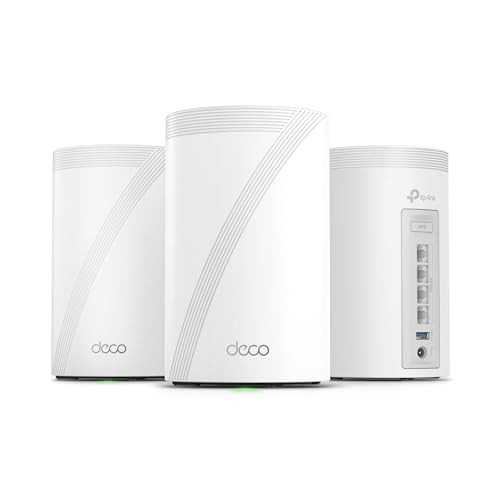
- Four 2.5G WAN or LAN ports per unit
- 10G networking and USB 3.0
Cons
- More hardware than most gigabit homes need
- Wi-Fi 7 benefits require compatible clients
- Larger units than the compact Deco models
Best for: homes preparing for multi-gigabit networking and newer Wi-Fi 7 devices.
The Deco 7 Pro is the clear performance specialist. It is a tri-band Wi-Fi 7 system with a 10G WAN or LAN port, four 2.5G WAN or LAN ports, and a USB 3.0 port. Those connections give it a much longer runway than the Gigabit-only systems in this roundup. For a normal gigabit plan, its wired hardware is mostly preparation for what comes next rather than something every household will use immediately.
The wireless figures are unusually high: up to 5, 188 Mbps on 6 GHz, 4, 324 Mbps on 5 GHz, and 574 Mbps on 2.4 GHz. The three-pack is listed for up to 7, 600 square feet and more than 200 devices. Those numbers describe the system's capacity under stated conditions, not a guaranteed speed through several walls, but the tri-band design gives the mesh more room to distribute traffic than the dual-band X55, X15, S4, and M5.
The system supports simultaneous wired and wireless backhaul, with at least two Deco units required for backhaul. AI-driven roaming keeps a unified network name while adapting to the home's conditions. HomeShield adds network protection, parental controls, and IoT security, and the system supports VPN client and server functions. Setup and firmware management run through the Deco app.
This is a poor fit for a small home with a modest internet connection and only a few older devices. The TP-Link Deco XE70 Pro is a more focused Wi-Fi 6E alternative, while the Deco 7 Pro makes more sense when 10G and 2.5G networking are part of the plan. Buyers who want the best gigabit mesh wifi system today but also expect their network to grow into multi-gigabit service should consider this one. Everyone else should be comfortable paying for capability they may not use yet.
7. Amazon eero 6+: Best for Easy Management

Pros
- Supports internet plans up to a gigabit
- Coverage up to 4, 500 square feet
- Supports 75 or more devices
- Simple app-guided setup
- Built-in Thread and Zigbee smart-home hub
Cons
- Extra management features require a separate subscription
- Less detailed hardware information is listed than for some Deco models
- No multi-gigabit port mentioned in the product information
Best for: households that prioritize an uncomplicated app and smart-home integration.
The Amazon eero 6+ is the most approachable system here for people who do not want to manage wireless settings every week. The app guides setup, lets you manage the network from anywhere, and uses eero TrueMesh to route traffic intelligently around drop-offs and dead spots. That simplicity is the main reason to choose it over a specification-heavy Deco system.
It supports internet plans up to a gigabit and covers up to 4, 500 square feet with the three-pack. The system is based on Wi-Fi 6 and adds support for the 160 MHz channel, which can give compatible clients more bandwidth. Eero lists support for 75 or more connected devices, enough for a typical family network with streaming hardware, computers, phones, and smart-home products.
The built-in smart-home hub is a genuine differentiator. The eero 6+ can connect compatible Thread and Zigbee devices with Alexa, reducing the need for separate hubs. Automatic updates help maintain the network over time, and US customer support is available by phone or email. These features make it a more hands-off choice than many conventional routers.
The trade-off is less control over the network's finer details, and online security plus additional management features are available through a separate subscription. The TP-Link Deco X55 3-Pack offers more clearly listed Ethernet ports and more explicit device capacity, while the eero 6+ is easier for a household that wants the app to handle the decisions. Choose eero when setup and smart-home convenience matter more than extensive manual tuning.
8. TP-Link Deco M5 3-Pack: Best for Basic Controls

Pros
- Coverage up to 5, 500 square feet
- Supports more than 100 devices
- Six Gigabit ports across three units
- Wired Ethernet backhaul
- HomeCare antivirus and parental controls
Cons
- Older Wi-Fi 5 platform
- Lower wireless capacity than the Wi-Fi 6 picks
- Less suitable for maximizing a gigabit plan over Wi-Fi
Best for: families that want established mesh features and straightforward network controls.
The TP-Link Deco M5 3-Pack is an older but still coherent mesh system. Its three small, low-profile units are easy to place, and the single network name avoids the separate-network problem common with basic extenders. The M5 is most interesting for families that care about built-in controls and do not need the newer wireless capacity of the X55 or XE70 Pro.
TP-Link lists coverage up to 5, 500 square feet and support for more than 100 devices. Adaptive Routing selects a path for connected devices, while the app handles setup and network management. The product uses Wi-Fi 5, so it does not have the efficiency improvements or higher capacity associated with the Wi-Fi 6 systems. That difference becomes more visible when many newer devices compete at once.
Each node has two Gigabit Ethernet ports, for six across the package, and wired Ethernet backhaul is supported. HomeCare includes a free lifetime subscription with antivirus protection, parental controls, and quality of service tools. Those controls are the M5's strongest reason to remain on a shortlist, particularly for households that want profiles and scheduling without sorting through complex router menus.
The TP-Link Deco S4 3-Pack offers a similar older-generation approach, but the M5 brings a more explicit security package and a smaller footprint. Neither is our first choice for a gigabit plan where wireless speed is central. Pick the M5 for a stable family network, wired backhaul, and control features. Skip it if the home is packed with Wi-Fi 6 clients or large wireless file transfers.
9. TP-Link Deco XE70 Pro: Best Wi-Fi 6E System

Pros
- Tri-band Wi-Fi 6E with a 6 GHz band
- Up to 4.9 Gbps wireless capacity
- 2.5 Gigabit port plus two Gigabit ports per unit
- Supports up to 200 devices
- Wired and wireless backhaul support
Cons
- 6 GHz range is more affected by walls
- Compatible 6 GHz clients are needed to benefit fully
- Coverage information in the listing is inconsistent
Best for: homes with newer 6 GHz devices and a need for less congested wireless spectrum.
The TP-Link Deco XE70 Pro sits between the mainstream Wi-Fi 6 systems and the forward-looking Deco 7 Pro. Its key feature is the 6 GHz band from Wi-Fi 6E. That band can be much cleaner than 5 GHz in a crowded neighborhood, but it is not magic: 6 GHz has shorter practical reach through walls, and older phones and laptops cannot use it.
The system is rated for up to 4.9 Gbps across six streams and can handle up to 200 devices. TP-Link lists coverage up to 7, 200 square feet in the title, while a feature description gives a 2, 900 square foot figure for a particular coverage statement. Because those claims do not align, buyers should plan around their home's walls and layout rather than treating the larger number as a guarantee.
Every unit includes one 2.5 Gigabit port and two Gigabit ports. That is a meaningful step beyond the X55 for a NAS, gaming PC, or other device with faster wired networking. The XE70 Pro can use wired and wireless backhaul together, and the Deco app provides setup, remote management, AI roaming, and HomeShield security features.
The system's value depends on the clients connected to it. A household full of Wi-Fi 6E devices can make better use of the extra band, while a home with older Wi-Fi hardware will see less distinction from the X55. The Deco 7 Pro is more ambitious and offers faster wired connections, but the XE70 Pro is the more sensible specialist for current 6 GHz use. It is a good match for a large, device-heavy home with compatible equipment and Ethernet available for at least part of the network.
10. Amazon eero 6 3-Pack: Best for Slower Plans

Pros
- Wi-Fi 6 coverage up to 4, 500 square feet
- Supports internet plans up to 500 Mbps
- Supports 75 or more devices
- Alexa smart-home hub
- Automatic updates and simple setup
Cons
- Not intended for full gigabit service
- Two units are extenders rather than full routers
- Less capacity than the eero 6+
Best for: homes with internet service up to 500 Mbps that want simple whole-home coverage.
The Amazon eero 6 3-Pack is a practical system, but it is the least natural fit for this roundup's gigabit focus. The package contains one router and two extenders, covers up to 4, 500 square feet, and supports internet service up to 500 Mbps. That makes its target clear: a home that needs reliable coverage more than it needs to make full use of a gigabit connection.
Wi-Fi 6 allows the system to handle more connected equipment than older wireless standards, and eero lists support for 75 or more devices. The eero app guides installation and lets owners manage the network remotely. Automatic updates help keep the system current, while Alexa integration lets the eero 6 work as a Zigbee smart-home hub for compatible devices.
The three-unit arrangement can help with dead zones across a multi-room home, and eero says the hardware is cross-compatible for later expansion. Its small units are easy to place, which can be useful in rooms where a larger Deco node would look awkward. The system is less compelling for a home with a fast gigabit plan, where the eero 6+ is the more suitable eero option.
The TP-Link Deco X15 3-Pack offers a higher stated wireless class and similar broad coverage, while the eero 6 wins on its guided software experience. Choose the eero 6 when the service plan is within its stated range and the priority is simple coverage. If the connection is gigabit now or likely to become gigabit soon, move up to the eero 6+ or one of the higher-capacity Deco systems.
How to choose best gigabit mesh wifi system
A gigabit mesh system should be judged by the connection between nodes as much as by the advertised maximum speed. Focus on wireless capacity, backhaul, Ethernet ports, coverage, and the devices that will actually connect.
Wi-Fi generation and bands
Wi-Fi 6 is the sensible baseline for a busy gigabit home. It handles crowded networks more efficiently than Wi-Fi 5, while Wi-Fi 6E adds a 6 GHz band for compatible devices. Wi-Fi 7 goes further with higher capacity and newer client support, but its benefits are limited if most phones, laptops, and televisions use older Wi-Fi standards.
Dual-band systems share 2.4 GHz and 5 GHz between clients and mesh communication. Tri-band systems add another band, which can give the nodes more room to move traffic. A system with a high wireless rating is not automatically faster in every room, especially when thick walls separate the nodes.
Wired backhaul
Ethernet backhaul lets mesh units communicate through network cable instead of using wireless airtime. It is often the cleanest way to stabilize a large home, especially when the nodes sit near a home office, media cabinet, or network switch.
The X55, X15, S4, M5, XE70 Pro, and Deco 7 Pro support wired backhaul. If the home has Ethernet cable in the walls, give that capability serious weight. Wireless backhaul is more convenient, but its quality depends heavily on node placement and the distance between units.
A mesh node works best where the main router still has a strong signal, not in the dead zone it is supposed to repair.
Ethernet ports
Count the ports on each unit, not only the total in the box. Three Gigabit ports on every X55 node make it easier to connect a desktop, television, console, or switch. The XE70 Pro adds a 2.5 Gigabit port, while the Deco 7 Pro includes four 2.5G ports and a 10G WAN or LAN port.
A single Gigabit port may be enough for a basic room, but a crowded entertainment center can use several. Port flexibility also matters if the system will later use wired backhaul.
Coverage and placement
Coverage figures are estimates based on an open layout. Walls, floors, appliances, neighboring networks, and node height all change the result. A three-pack is not always better than a two-pack if the extra unit must be placed too far from the others.
Place the main unit in a central, open location. Put additional nodes between the main unit and the weak area, not inside the weak area. For large or unusually shaped homes, wired backhaul is a stronger solution than simply adding more wireless nodes.
Device capacity
A home with several 4K streams, video calls, game downloads, cameras, phones, and smart speakers needs more than basic coverage. Device capacity figures are useful for comparing models, but they are not a guarantee of identical performance for every device.
The X55 supports up to 150 devices, the X15 up to 120, the S4 and M5 around 100, and the eero systems list 75 or more. The XE70 Pro lists up to 200, while the Deco 7 Pro lists more than 200. Match those claims to the household rather than choosing the largest number by default.
Frequently asked questions
Can a mesh system use a gigabit internet connection?
Yes. The Deco X55, eero 6+, Deco XE70 Pro, and Deco 7 Pro are the clearest matches for gigabit service in this group. Actual wireless speed depends on the client, distance, interference, walls, and whether the mesh nodes use wired or wireless backhaul.
Is Wi-Fi 6 better than Wi-Fi 5 for a mesh network?
Wi-Fi 6 is generally better suited to busy homes because it is designed to manage many connected devices more efficiently. Wi-Fi 5 systems such as the Deco S4 and Deco M5 can still provide broad coverage, but they have less capacity for newer, device-heavy networks.
Does every mesh unit need an Ethernet cable?
No. These systems can use wireless backhaul, which is easier to install. Ethernet backhaul is preferable when available because it avoids using wireless airtime for communication between nodes.
How many mesh units does a house need?
That depends on the layout, construction, and node placement. The single Deco X55 is aimed at up to 2, 500 square feet, while the larger packages use two or three units for broader coverage. A two-unit system can be better than a three-unit system if the floor plan is compact and the nodes have a clear connection.
Can different Deco models work together?
The product information for the Deco X15 says Deco products can work together and are backward compatible with Wi-Fi generations. Mixing models can reduce the network to the capabilities of the less capable unit, so matching units is usually simpler when consistent performance matters.
Do I still need a modem?
Most internet providers require a modem or another upstream service device. The Deco product information states that a modem is required for most providers, and the Deco 7 Pro listing makes the same distinction.
Is Wi-Fi 6E worth choosing over Wi-Fi 6?
Wi-Fi 6E is most useful when the home has compatible 6 GHz phones, laptops, or other clients and suffers from congestion on 5 GHz. The 6 GHz signal does not travel through walls as effectively, so a Wi-Fi 6E system is not automatically the better choice for every floor plan.
The bottom line
The TP-Link Deco X55 3-Pack is the Best gigabit mesh wifi system for most large homes because it combines Wi-Fi 6 AX3000 capacity, three Gigabit ports per unit, wired backhaul support, and coverage up to 6, 500 square feet. The TP-Link Deco X55 2-Pack is the more focused choice for a medium home, while the X15 gives similar broad coverage in smaller nodes.
For a newer network, the TP-Link Deco XE70 Pro adds tri-band Wi-Fi 6E and a 2.5 Gigabit port, and the Deco 7 Pro is the specialist pick for Wi-Fi 7 and multi-gigabit connections. The eero 6+ remains the easiest choice for hands-off management, while the eero 6 is better reserved for service up to 500 Mbps.
If you are undecided, choose the X55 package that matches your floor plan, and use wired backhaul whenever the home makes it possible.
As an Amazon Associate we earn from qualifying purchases.