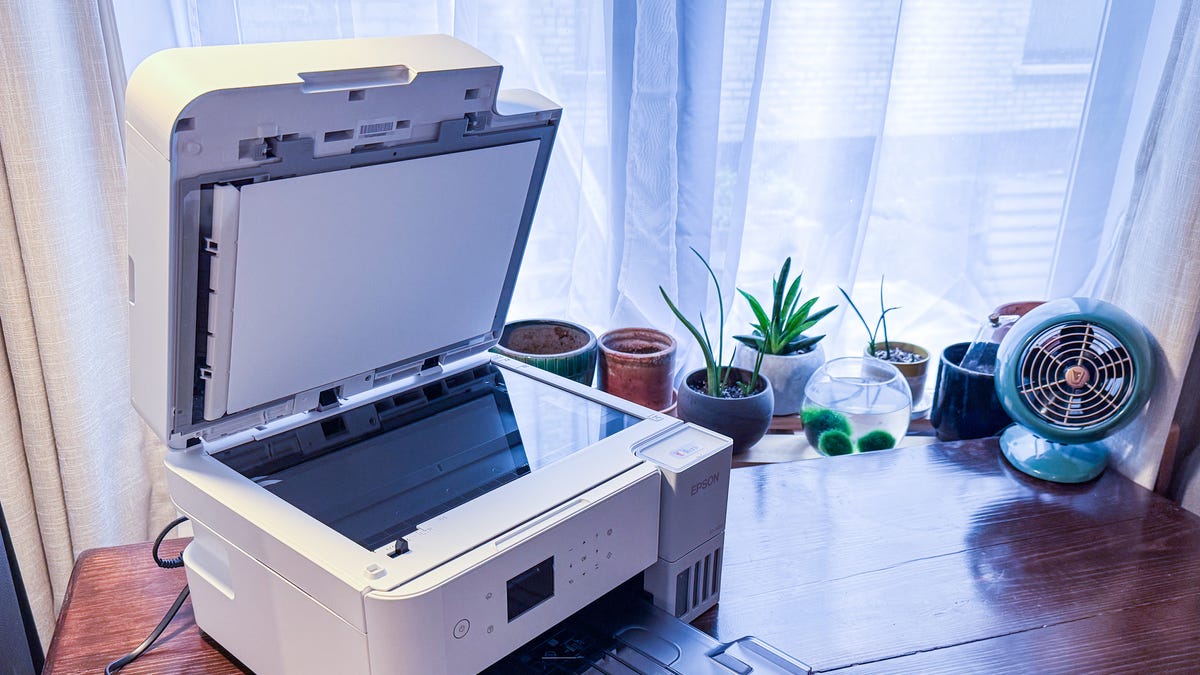

A printer that sits idle for weeks still needs to work when a return label, signed form, or presentation is suddenly due. The trouble is choosing between compact cartridge models, faster office all-in-ones, and refillable tank printers without buying more machine than your desk needs.
This guide to the Best home office printer options focuses on the details that change daily use: automatic document feeding, two-sided printing, wireless controls, print speed, and the practical differences between inkjet and laser.
The HP OfficeJet Pro 8139 is our top pick, with the Epson EcoTank ET-2800, Canon PIXMA TS6520, and Brother DCP-L2640DW covering lower-maintenance, compact, and black-and-white work styles.
Comparison table
| # | Product | Award | Print type | Print speed | Paper handling | Best for |
|---|---|---|---|---|---|---|
| 1 | HP OfficeJet Pro 8139 | Best overall | Color inkjet | Up to 20 ppm black, 10 ppm color | 225-sheet tray, ADF, automatic 2-sided printing | Busy home offices |
| 2 | Canon PIXMA TS6520 | Best compact color all-in-one | Color inkjet | Not specified | Automatic 2-sided printing | Small desks and mixed documents |
| 3 | Epson EcoTank ET-2800 | Best refillable ink tank | Color inkjet tank | Up to 10 ISO ppm | Ink bottles, all-in-one scanner and copier | Frequent color printing |
| 4 | Brother Work Smart 1360 | Best cloud-friendly inkjet | Color inkjet | Up to 16 ppm black, 9 ppm color | 150-sheet tray, 20-sheet ADF, automatic 2-sided printing | Home offices using cloud storage |
| 5 | Brother DCP-L2640DW | Best monochrome laser | Monochrome laser | Up to 36 ppm | 50-page ADF, automatic 2-sided printing | Text-heavy workloads |
| 6 | HP OfficeJet Pro 8125 | Best HP alternative | Color inkjet | Up to 20 ppm black, 10 ppm color | 225-sheet tray, ADF, automatic 2-sided printing | Full-featured home offices |
| 7 | HP OfficeJet Pro 8125e | Best connected HP model | Color inkjet | Up to 20 ppm black, 10 ppm color | 225-sheet tray, ADF, automatic 2-sided printing | App-first printing |
| 8 | Canon PIXMA TS4320 | Best simple Canon | Color inkjet | Not specified | Automatic 2-sided printing | Occasional home printing |
| 9 | HP Envy 6155 | Best for photos and homework | Color inkjet | Up to 10 ppm black, 7 ppm color | 100-sheet tray, automatic 2-sided printing | Families and photo printing |
| 10 | HP DeskJet 2955 | Best basic printer | Color inkjet | Up to 7.5 ppm black, 5.5 ppm color | 60-sheet tray | Light everyday printing |
1. HP OfficeJet Pro 8139: Best Overall

Pros
- Fast black and color print speeds
- 225-sheet input tray reduces refills
- Automatic document feeder and 2-sided printing
- Useful 2.7-inch color touchscreen
- Print, scan, copy, and fax functions
Cons
- Cartridge restrictions limit ink flexibility
- Larger than compact home printers
- Wireless model depends on HP's software ecosystem
Best for: a busy home office that needs color, scanning, copying, faxing, and dependable paper handling.
The HP OfficeJet Pro 8139 is the printer we'd put at the center of a home office that handles more than the occasional school worksheet. Its combination of print, scan, copy, and fax functions means fewer separate devices, while the automatic document feeder and automatic 2-sided printing address the two chores that make basic printers feel slow.
Its rated speed is up to 20 pages per minute in black and 10 pages per minute in color. That is a meaningful step ahead of the Epson EcoTank ET-2800 and the HP DeskJet 2955 for batches of documents. The 225-sheet input tray also suits a desk where printing happens throughout the week rather than in one short session.
The 2.7-inch color touchscreen makes printer-side tasks less awkward than relying on a phone for every setting. Dual-band Wi-Fi is built in, and HP's app handles printing, scanning, copying, and faxing from a smartphone. HP also includes a web and email formatting feature powered by its AI tools, intended to remove unwanted page content and avoid awkward layouts.
This is not the smallest model here. At 18.12 inches wide, 13.29 inches long, and 9.17 inches high, it needs a proper shelf or section of desk, and its 17.6-pound weight makes moving it around a chore. The printer is also intended to work with cartridges that use original HP chips or circuitry, so shoppers who want broad cartridge flexibility should look elsewhere.
The HP OfficeJet Pro 8125 is the closest alternative, but the 8139 is the more compelling choice for a busier workflow because it includes the same core office features and a longer included Instant Ink trial. For a straightforward look at the broader category, how a home office printer should handle scanning and document work is a useful starting point. Choose the 8139 if you want one capable color machine and have room for it.
2. Canon PIXMA TS6520: Best Compact Color All-in-One

Pros
- Compact 14.8-inch length
- Automatic 2-sided printing
- Dual-band Wi-Fi
- Integrated scanner and copier
- Supports borderless documents and photos up to 8.5 by 11 inches
Cons
- Print speed is not specified
- Two-cartridge system is less flexible than an ink tank
- Small monochrome display
Best for: a small workspace that still needs color documents, scanning, copying, and occasional photos.
The Canon PIXMA TS6520 gets the basic home office brief right without taking over the desk. It prints, scans, copies, and handles automatic 2-sided printing, while its 14-inch width and 6.7-inch height make it easier to place on a shallow shelf than the OfficeJet Pro models.
Canon uses a two-cartridge hybrid ink system, which is designed to produce sharp text and vivid color. The printer supports documents and photos up to 8.5 by 11 inches, with or without borders. That gives it a wider role than a text-only machine, although the data does not specify a print speed, so it is not the model to choose for large batches.
The 1.42-inch monochrome OLED display is small, but it shows ink levels and printer status and provides basic settings access. A compact control panel is useful when the printer is across the room, while the Canon PRINT app, Apple AirPrint, and Mopria support make mobile printing less dependent on a single device.
Dual-band Wi-Fi supports both 2.4GHz and 5GHz connections. That is a practical advantage in a crowded home network, though the smaller display and lack of a stated speed rating make this feel more like a personal printer than a shared production machine. The scanner and copier add flexibility, but there is no listed ADF for handling a stack of originals.
Compared with the Canon PIXMA TS4320, the TS6520 is the more polished pick for a compact desk, with the same general color and 2-sided printing focus but a newer control experience. The HP OfficeJet Pro 8139 is much better for volume and multi-page documents. Pick the TS6520 when footprint and easy everyday color matter more than office throughput.
3. Epson EcoTank ET-2800: Best Refillable Ink Tank

Pros
- Cartridge-free refillable design
- Ink bottles can replace many cartridge changes
- Up to 4, 500 black or 7, 500 color pages stated
- Scanner and copier included
- Heat-free Micro Piezo printing
Cons
- Slower than the office-focused inkjets
- Bottles require careful filling
- Epson recommends genuine ink
Best for: households and home offices that print color regularly and want fewer ink replacement interruptions.
The Epson EcoTank ET-2800 is different from nearly every other printer here because its central feature is not a cartridge bay. It uses refillable ink tanks, so the ownership experience revolves around checking visible ink levels and adding bottles rather than swapping small cartridges. That makes sense for a home office with a steady stream of color pages.
Epson says the included ink can cover up to 4, 500 black pages or 7, 500 color pages, and that an ink bottle set is equivalent to about 90 individual cartridges. Those are the figures that make the ET-2800 interesting, but they should be read as capacity claims rather than a promise about every household's results. Print coverage and document type affect how quickly ink is used.
The compromise is speed. Its rated output is up to 10 ISO pages per minute, well behind the 36 ppm Brother DCP-L2640DW and behind the 20 ppm black rating of the HP OfficeJet Pro 8139. Micro Piezo Heat-Free technology is used for vivid, detailed documents and photos, but the ET-2800 is better suited to measured home printing than a queue of large office jobs.
It is an all-in-one printer, scanner, and copier, and it measures roughly 17 inches long, 16 inches wide, and 9.3 inches high. At 11.4 pounds, it is lighter than the office-oriented HP and Brother models. Epson strongly recommends genuine ink and warns that non-genuine ink can damage the printer in ways not covered by its limited warranty, a restriction worth understanding before buying.
The Canon PIXMA TS6520 is easier for an occasional user who wants a compact cartridge printer, while the Epson is the more sensible design for regular color output. It does not offer the HP 8139's listed fax function or its faster office pace. Choose the ET-2800 if refillable ink and fewer replacement events matter more than rapid pages.
4. Brother Work Smart 1360: Best Cloud-Friendly Inkjet

Pros
- Automatic 2-sided printing
- 20-sheet automatic document feeder
- Direct cloud app connections
- 150-sheet paper tray
- USB and wireless connectivity
Cons
- Smaller tray than the HP OfficeJet Pro models
- Color speed is lower than the top HP models
- Uses a cartridge-based ink system
Best for: a home office that prints from cloud storage and wants a compact color all-in-one with useful paper handling.
The Brother Work Smart 1360 is built around the routine tasks that make a home office printer useful: print, copy, scan, and manage documents without walking back to a computer. Its 1.8-inch color display provides access to cloud connections, including Google Drive, Dropbox, Box, and OneDrive.
Paper handling is stronger than the compact Canon models. The 150-sheet tray is enough for a normal work session, and the 20-sheet single-sided ADF can take a small stack of originals for copying or scanning. Automatic 2-sided printing cuts down on manual page turning for longer documents.
Brother rates it at up to 16 pages per minute in black and 9 pages per minute in color. That puts it below the HP OfficeJet Pro 8139 and HP OfficeJet Pro 8125, but ahead of the Epson EcoTank ET-2800 on black document speed. It is a useful middle ground for a home office that needs some productivity features without moving to a larger machine.
Wireless and USB connections give it a little flexibility, while the Brother Mobile Connect app supports printing, copying, scanning, and device management. The app's Page Gauge can help monitor ink use. At 15.4 inches wide, 13.5 inches long, and 7.2 inches high, it is compact enough for a dedicated shelf while still offering an ADF.
Its weakness is capacity relative to the HP models, and the 20-sheet ADF is better for short batches than a large filing project. The Brother DCP-L2640DW is a much faster choice when color is unnecessary. If your documents live in several cloud services, the connection options that make scanning less tedious matter more than a larger screen, and this Brother is a strong fit.
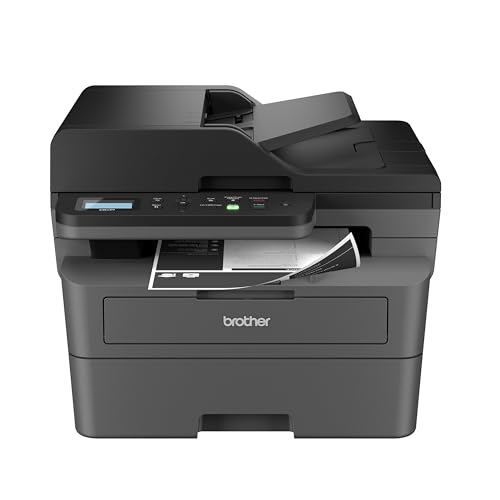
5. Brother DCP-L2640DW: Best Monochrome Laser
Pros
- Fast 36 ppm black-and-white printing
- 50-page automatic document feeder
- Automatic 2-sided printing
- Dual-band Wi-Fi, Ethernet, and USB
- Scanner and copier included
Cons
- Black-and-white output only
- Heavier and taller than the inkjet options
- No color printing for charts or photos
Best for: a home office that mainly produces forms, contracts, invoices, and other black-and-white documents.
The Brother DCP-L2640DW is the obvious specialist in this group. It gives up color, but in return it offers the speed and document handling that inkjet all-in-ones often lack. If most of your work is black text on white paper, this is the printer that feels least likely to hold up your day.
Its print speed reaches 36 pages per minute, and Brother lists scan speeds of up to 23.6 images per minute in black and 7.9 images per minute in color. The 50-page ADF is more useful for multi-page copying and scanning than the 20-sheet feeder on the Brother Work Smart 1360. Automatic 2-sided printing also makes longer documents easier to manage.
Connectivity is unusually flexible for a compact home office machine. It supports dual-band wireless at 2.4GHz and 5GHz, Ethernet for a wired network, and USB for a direct computer connection. The Brother Mobile Connect app handles printing, scanning, and device management, while the printer works with Brother's TN830 or TN830XL toner supplies.
This is not a small lightweight desktop accessory. It is 16.1 inches wide, 15.7 inches long, 12.5 inches high, and weighs 25 pounds. The monochrome-only output is the larger limitation, especially if your work includes color presentations or photos. A laser machine also makes less sense for someone who prints only a handful of pages a month and wants color available on demand.
For a deeper look at this category, the features that matter in a home office laser setup include speed, feeder capacity, and network options. The HP OfficeJet Pro 8139 is more versatile because it prints color and includes fax, but the DCP-L2640DW wins decisively for fast black-and-white work. Choose it when color is a rare exception, not a regular requirement.
6. HP OfficeJet Pro 8125: Best HP Alternative

Pros
- Up to 20 ppm black and 10 ppm color
- 225-sheet input tray
- Automatic document feeder
- Automatic 2-sided printing
- 2.7-inch color touchscreen
Cons
- Cartridge chip restrictions
- Large desktop footprint
- No listed fax function
Best for: a home office that wants the core OfficeJet Pro workflow without needing fax.
The HP OfficeJet Pro 8125 is a capable office all-in-one with a clear focus on routine productivity. It prints, scans, copies, and feeds originals automatically, while automatic 2-sided printing removes a common source of wasted time. The 225-sheet input tray is one of its strongest practical features.
Its output rating reaches 20 pages per minute in black and 10 pages per minute in color, matching the listed speed of the HP OfficeJet Pro 8139. A 2.7-inch touchscreen gives the printer a usable standalone control surface, and dual-band Wi-Fi is designed to maintain a reliable wireless connection.
HP's app supports printing, scanning, copying, and faxing from a phone, and the printer includes HP's AI formatting feature for cleaning up web pages and emails before printing. HP Wolf Essential Security is also included for network protection. These features make it more comfortable in a shared home office than a basic printer with only a few physical buttons.
The 8125 is 18.11 inches wide, 13.29 inches long, and 9.17 inches high, with a listed weight of 17.6 pounds. That is a substantial footprint, although it is reasonable for a machine with a large tray and ADF. As with the 8139, the printer is designed to block cartridges that do not use original HP chips or circuitry, and firmware updates maintain that restriction.
The HP OfficeJet Pro 8139 is the better pick if fax hardware matters or if the longer included service trial is relevant to your setup. The 8125 makes sense when those differences are not important and you want the same rated print speeds, screen, tray, and document feeder. Skip both OfficeJet Pro models if your desk cannot accommodate a wide machine.
7. HP OfficeJet Pro 8125e: Best Connected HP Model

Pros
- Automatic 2-sided color printing
- 225-sheet input tray
- Automatic document feeder
- Dual-band wireless connectivity
- HP app and AI formatting tools
Cons
- HP+ activation is part of the included service setup
- Cartridge chip restrictions
- Large footprint
Best for: users who prefer managing printing from a phone, tablet, or PC.
The HP OfficeJet Pro 8125e sits close to the HP OfficeJet Pro 8125 in everyday hardware. It prints, scans, copies, feeds documents automatically, and supports automatic 2-sided printing. That makes it a sensible shared printer for a household where several people send jobs from different devices.
The listed speed is up to 20 pages per minute in black and 10 pages per minute in color. Its 225-sheet tray is better suited to recurring paperwork than the 60-sheet tray in the HP DeskJet 2955, and the ADF makes multi-page scanning less dependent on placing each sheet by hand.
Wireless connectivity uses dual-band Wi-Fi, and the HP app supports printing, scanning, copying, and faxing from a smartphone, PC, or tablet. HP's AI-enabled formatting is intended to remove unwanted web and email content before a page is printed. Those controls are most useful for people who do much of their work away from the printer itself.
The 8125e measures 18.11 inches wide, 13.29 inches long, and 9.17 inches high, so it has the same space demands as the other OfficeJet Pro options. Its service setup includes HP+ activation and a three-month Instant Ink trial. After the trial, a monthly fee applies unless canceled, so users should pay attention to the terms rather than treating the trial as a permanent feature.
The standard HP OfficeJet Pro 8125 is the more straightforward comparison, while the 8139 is the stronger top pick in this list. The 8125e is worth considering when app-first management and the specific HP+ setup are central to your workflow. It is not the right choice for a buyer seeking cartridge independence or a narrow desktop printer.
8. Canon PIXMA TS4320: Best Simple Canon

Pros
- Automatic 2-sided printing
- Compact 14-inch width
- Wireless and mobile printing
- Scanner and copier included
- Supports borderless printing up to 8.5 by 11 inches
Cons
- Print speed is not specified
- Two-cartridge ink system
- No listed automatic document feeder
Best for: occasional printing, scanning, and copying in a small home workspace.
The Canon PIXMA TS4320 is a compact color all-in-one for people who want the printer available without building the office around it. It handles printing, copying, and scanning, and its automatic 2-sided mode is a welcome feature for a model aimed at light home use.
Canon lists a two-cartridge hybrid ink system designed for sharp text and vivid color. The TS4320 supports documents and photos up to 8.5 by 11 inches, with or without borders, so it can handle family photos as well as ordinary paperwork. The data does not specify a print speed, which makes it difficult to recommend for repeated multi-page jobs.
Dual-band Wi-Fi supports 2.4GHz and 5GHz networks, and mobile printing works through the Canon PRINT app, Apple AirPrint, and Mopria Print Service. Setup is intended to be quick from a smartphone or computer. That combination is more useful than a printer that works only when connected to one desktop.
Its dimensions are 14 inches wide, 14.8 inches long, and 6.7 inches high, with a weight of 14.8 pounds. The footprint is easier to place than the HP OfficeJet Pro range, but there is no listed ADF, so multi-page copies and scans require more hands-on attention. The two-cartridge design is also less appealing for someone printing color frequently.
The Canon PIXMA TS6520 is the better choice if you want a more polished display and a slightly more capable compact Canon. The HP DeskJet 2955 is smaller and more basic, while the TS4320 has a stronger case for occasional photo and 2-sided printing. Choose it when simplicity and size take priority over speed and batch handling.
9. HP Envy 6155: Best for Photos and Homework

Pros
- P3 technology for vibrant documents and photos
- 2.4-inch color touchscreen
- Automatic 2-sided printing
- Wireless printing and HP app support
- At least 60% recycled plastic content
Cons
- No listed ADF
- 100-sheet input tray
- Slower than the OfficeJet Pro models
- Cartridge chip restrictions
Best for: a family printer that handles homework, everyday color documents, and borderless photos.
The HP Envy 6155 is aimed at the home rather than the high-volume office. Its mix of color printing, copying, scanning, and automatic 2-sided printing covers the tasks most families actually send to a printer. HP also gives it a 2.4-inch color touchscreen, which is more approachable than a basic icon-only panel.
The printer is rated for up to 10 pages per minute in black and 7 pages per minute in color. That is enough for homework, forms, and short documents, but it trails the OfficeJet Pro 8139 and 8125 by a wide margin for office batches. The 100-sheet input tray reinforces its role as a lighter-duty machine.
HP's P3 technology is intended to produce documents and photos that look vibrant relative to what appears on screen. The printer supports borderless photos according to its feature set, and wireless printing works through dual-band Wi-Fi and the HP app. HP's AI formatting tools can also help clean up web pages and emails before printing.
At 17.05 inches long and 5.35 inches wide, the published dimensions suggest a narrow profile, though its 14.21-inch height should be considered when choosing a shelf. It weighs 11.2 pounds. There is no listed ADF, so scanning or copying a stack of pages is slower than it is on the HP OfficeJet Pro models.
The HP Envy 6155 is more appealing for photos and family documents than the HP DeskJet 2955, thanks to its touchscreen, automatic 2-sided printing, and P3 feature. The Canon PIXMA TS6520 is a better compact alternative if you want Canon's mobile ecosystem. If your main concern is keeping photo output sharp while printing at home, the Envy is the more focused HP choice, but office-heavy users should step up to the 8139.
10. HP DeskJet 2955: Best Basic Printer

Pros
- Compact all-in-one design
- Wireless and mobile printing
- Color printing, scanning, and copying
- 70% recycled plastic content
- ENERGY STAR and EPEAT certified
Cons
- Slowest listed print speeds here
- 60-sheet input tray
- No automatic 2-sided printing listed
- Basic icon LCD
Best for: light printing of lists, letters, recipes, and everyday household documents.
The HP DeskJet 2955 is the least complicated printer in this roundup. It is built for basic color documents, scanning, and copying, with a small control panel and wireless printing rather than the office controls found on the OfficeJet Pro range.
Its rated speed reaches 7.5 pages per minute in black and 5.5 pages per minute in color. Those are the lowest listed speeds in this group, so patience is part of the deal when printing several pages. For a recipe, letter, to-do list, or financial document, that limitation is less important.
The 60-sheet input tray is also intended for light use. HP's app handles mobile printing and the printer supports dual-band wireless connections. HP AI formatting tools are included for web pages and emails, with the goal of removing unwanted content before printing.
The DeskJet measures 16.73 inches wide, 11.97 inches long, and 6.06 inches high, and weighs 7.55 pounds. That makes it easy to move and place, even if its footprint is wider than the compact Canons in one direction. Its design uses at least 70% recycled plastic, and the printer is ENERGY STAR and EPEAT certified.
The HP Envy 6155 is the better family option when photos, a touchscreen, and faster output matter. The Canon PIXMA TS4320 is a stronger compact alternative for automatic 2-sided printing. Choose the DeskJet 2955 only when your print queue is light and you value a simple, portable all-in-one over productivity features.

How to choose best home office printer
The right printer depends less on a long feature list than on the kind of documents you produce and how often you need to handle several pages at once.
Print type
Color inkjet models such as the HP OfficeJet Pro 8139 and Canon PIXMA TS6520 handle documents, graphics, and photos in one machine. A monochrome laser such as the Brother DCP-L2640DW is better when nearly everything is black text and speed matters more than color. Refillable ink tanks such as the Epson EcoTank ET-2800 suit people who regularly print color and want to avoid frequent cartridge changes.
Print speed
Print speed matters when a home office produces reports, forms, or packets rather than one page at a time. The Brother DCP-L2640DW leads this group with up to 36 pages per minute in black, while the HP OfficeJet Pro models list up to 20 black pages per minute. Models with lower or unspecified speeds are fine for occasional jobs but less suitable for a shared queue.
Automatic document feeder
An ADF lets you scan or copy multiple originals without placing every page on the scanner glass. The Brother DCP-L2640DW has a 50-page ADF, the HP OfficeJet Pro models include an ADF, and the Brother Work Smart 1360 has a 20-sheet ADF. If you digitize receipts, forms, or signed paperwork, this feature is more important than a decorative control panel.
A printer without an ADF is manageable until the first ten-page form arrives.
Paper capacity and duplex printing
A larger tray reduces interruptions, especially when several people share the printer. The HP OfficeJet Pro 8139, 8125, and 8125e each list a 225-sheet tray, while the HP DeskJet 2955 lists 60 sheets. Automatic 2-sided printing saves manual page turning and is particularly useful for reports, instructions, and school documents.
Wireless and mobile controls
Dual-band Wi-Fi can help a printer fit into a modern home network, and mobile apps make it easier to send a document from a phone or tablet. The Canon models support Canon PRINT, Apple AirPrint, and Mopria, while the HP and Brother models provide their own app ecosystems. Ethernet on the Brother DCP-L2640DW is useful if wireless reliability is not enough for a busy office.

Frequently asked questions
Is an inkjet or laser printer better for a home office?
An inkjet is the more flexible option if you need color documents and photos. A monochrome laser printer is a better fit for frequent black-and-white work because the Brother DCP-L2640DW is rated for up to 36 black pages per minute. Choose based on the documents you actually produce, not just the printer's category.
Do all of these printers print on both sides automatically?
No. Automatic 2-sided printing is listed for the HP OfficeJet Pro models, both Canon PIXMA models, the Epson EcoTank ET-2800 is not listed with that feature, the Brother Work Smart 1360, the Brother DCP-L2640DW, and the HP Envy 6155. The HP DeskJet 2955 does not list automatic 2-sided printing in its features.
Which printer is best for scanning several pages?
The Brother DCP-L2640DW has the largest listed ADF at 50 pages. The HP OfficeJet Pro models also include automatic document feeders, and the Brother Work Smart 1360 has a 20-sheet ADF. The compact Canon models, Epson ET-2800, HP Envy 6155, and HP DeskJet 2955 do not list an ADF.
Can these printers print photos?
The color inkjet models can print color photos, and the Canon PIXMA TS6520 and TS4320 specifically support borderless documents and photos up to 8.5 by 11 inches. The HP Envy 6155 is positioned for homework and borderless photos and includes P3 technology. The Brother DCP-L2640DW is monochrome laser, so it is not suitable for color photos.
Which models support phone printing?
All of the listed wireless models include mobile or app-based printing support. Canon supports the Canon PRINT app, Apple AirPrint, and Mopria, while HP provides the HP app. Brother provides Brother Mobile Connect, and the Brother DCP-L2640DW also supports wireless, Ethernet, and USB connections.
Are refillable ink tanks different from cartridges?
Yes. The Epson EcoTank ET-2800 uses refillable bottles rather than conventional small ink cartridges. Epson states that the included ink can produce up to 4, 500 black pages or 7, 500 color pages, though actual results vary with coverage and document type. Bottle filling also requires more care than replacing a cartridge.
Does a larger paper tray matter for occasional printing?
It matters less if you print only a few pages at a time. A 225-sheet tray is helpful for a shared home office because it reduces refills, while a 60-sheet tray keeps the HP DeskJet 2955 suited to lighter workloads. Consider the number of people using the printer and the length of your normal print jobs.
The bottom line
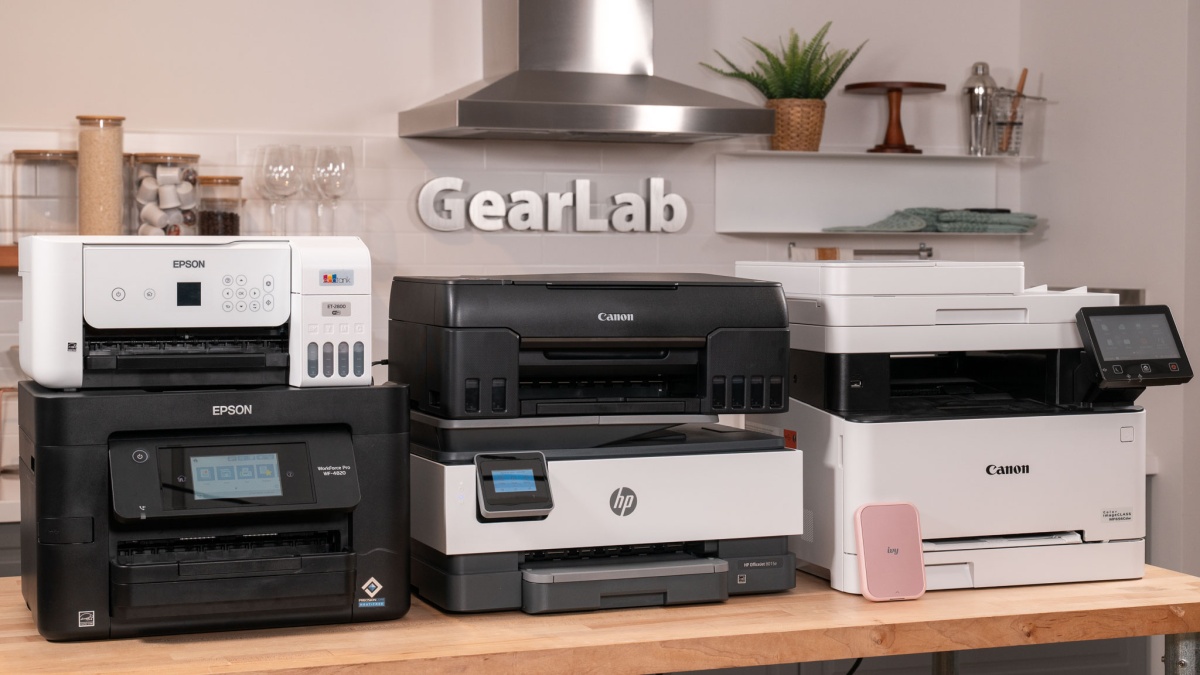
The Best home office printer in this group is the HP OfficeJet Pro 8139 because it combines color printing, scanning, copying, faxing, a 225-sheet tray, an ADF, automatic 2-sided printing, and fast listed output. It is not compact, and its cartridge restrictions deserve attention, but it is the most complete fit for a busy home office.
Choose the Epson EcoTank ET-2800 for regular color printing with a refillable tank, or the Brother DCP-L2640DW when your work is mostly black-and-white and speed is the priority. The Canon PIXMA TS6520 is the better compact all-in-one for mixed occasional use.
If you are undecided, choose the HP OfficeJet Pro 8139 for broad office duties, the Epson EcoTank ET-2800 for frequent color, or the Brother DCP-L2640DW for fast text documents.
As an Amazon Associate we earn from qualifying purchases.