

A laser engraver can be a compact craft tool or a serious cutting machine, and the difference becomes obvious when a small diode struggles with thick plywood, a work area cannot fit a sign, or smoke control turns a hobby room into a workshop. The right machine depends on what you plan to cut, how much workspace you have, and how much setup you are willing to manage.
Our Best laser engraver picks range from the enclosed xTool M2 for home crafting to the powerful xTool S1 40W for large projects. There are also open-frame machines with generous work areas, dual-laser models for metal marking, and small units for testing the hobby without giving up an entire desk.
The xTool S1 40W is the top pick for serious cutting and larger projects, while the xTool M2 is the easier fit for enclosed home crafting. The list also includes capable alternatives for metal marking, portable work, beginner projects, and larger open-frame designs.
Comparison table
| # | Product | Award | Laser power | Work area | Speed | Best for |
|---|---|---|---|---|---|---|
| 1 | xTool S1 40W | Best overall | 40W | 23.93 x 15.16 in | 600mm/s | Large projects and deep cuts |
| 2 | Twotrees TTS-10 Pro | Best open-frame power | 10W | 300 x 300mm | 30, 000mm/min | DIY cutting and flexible software |
| 3 | xTool M2 | Best enclosed craft machine | 10W | Not specified | Not specified | Home crafters and guided projects |
| 4 | Longer Ray5 20W | Best large-format alternative | 20W | 400 x 365mm | 24, 000mm/min | Studio projects and batch work |
| 5 | xTool F2 | Best dual-laser desktop | 15W diode, 5W IR | Not specified | 6, 000mm/s | Metal marking and portable work |
| 6 | BlazeX M3 | Best starter bundle | 10W | Not specified | Not specified | Beginners and small projects |
| 7 | Longer Ray5 10W | Best large-area starter | 10W | 400 x 400mm | 10, 000mm/min | Oversized craft pieces |
| 8 | ACMER S1 | Best compact engraver | 2.5W | 130 x 130mm | 10, 000mm/min | Small desktop projects |
| 9 | ATOMSTACK A20 Pro V2 | Best high-power open frame | 20W | Not specified | 400mm/s | Cutting and personalized gifts |
| 10 | Twotrees TTS-55 Pro | Best compact workhorse | 5.5W | 300 x 300mm | 30, 000mm/min | Hobby projects and small business work |
1. xTool S1 40W: Best Overall

Pros
- 40W laser supports demanding cutting work
- Large 23.93 x 15.16-inch bed
- Enclosed Class 1 design
- Rotary bundle supports curved projects
- Auto-focus and guided software reduce setup work
Cons
- Large footprint needs a dedicated workspace
- The 40W model is more machine than casual users need
- Some advanced capabilities depend on the included bundle and workflow
Best for: makers who want one enclosed machine for large signs, deep cuts, and varied projects.
The xTool S1 40W is the machine that makes the most sense when an engraver needs to do more than decorate small blanks. Its 23.93 x 15.16-inch bed gives a project considerably more breathing room than the 300 x 300mm work areas found on the Twotrees TTS-10 Pro and Twotrees TTS-55 Pro. That extra surface matters for door signs, batches of smaller pieces, and any design that would otherwise need to be split.
The headline specification is the 40W laser, and the listed cutting capability is unusually ambitious for a diode machine. xTool says it can cut 18mm cherry wood in a single pass. The machine also reaches 600mm/s, so it is not relying on raw power alone. In practical terms, that combination is aimed at reducing repeated passes on substantial materials while keeping engraving jobs moving quickly. The machine supports wood, metal, acrylic, and tumbler work, and the rotary bundle makes curved objects part of the intended workflow rather than an afterthought.
This is also one of the more approachable machines here. Auto-focus removes a fiddly adjustment from the beginning of each project, while xTool Creative Space includes material settings and more than 1, 000 project tutorials. Its Pin-point Positioning system is designed for placing work accurately, and AutoPassthrough can handle projects up to 118 inches long. That is a different class of capability from the compact ACMER S1, whose 130 x 130mm work area is specifically suited to small pieces.
Safety and enclosure design separate the S1 from most open-frame alternatives. The cover filters 99% of laser light, and the machine includes five flame sensors, an emergency stop, and a lid-open stop. The enclosure is also intended to contain smoke and noise. Those details do not remove the need for proper ventilation or careful material selection, but they make the S1 more realistic for a dedicated home craft space than an uncovered frame.
The weakness is obvious: this is a large, specialized machine. Someone who mainly wants small leather tags or occasional test engravings will not make good use of its bed or cutting power. The xTool M2 is easier to justify for guided craft projects, and the xTool F2 is much more portable. Choose the S1 when large workpieces, deep cuts, and a more controlled enclosure matter more than keeping the setup small.
2. Twotrees TTS-10 Pro: Best Open-Frame Power

Pros
- 10W output supports cutting and engraving
- 300 x 300mm working area
- 30, 000mm/min maximum engraving speed
- Supports computer, mobile, and TF card workflows
- Air assist nozzle is ready for an upgrade
Cons
- Class IV laser requires disciplined safety practices
- Open-frame format is less convenient indoors
- No enclosure is listed as part of the machine itself
Best for: experienced DIY users who want strong cutting capability and broad software support.
The Twotrees TTS-10 Pro is a straightforward open-frame machine with a strong emphasis on speed and cutting. Its 10, 000mW output and 300 x 300mm work area put it in the middle of the field for both power and size, but the listed 30, 000mm/min maximum engraving speed is unusually high among these picks. That makes it attractive to someone who already knows how to prepare files and wants the machine to move quickly through repeated work.
Twotrees lists single-pass cutting of 8mm plywood and 5mm black acrylic. Those figures make the TTS-10 Pro more suited to structural craft pieces than a small engraving-only unit. Its LD, FAC, and C-Lens compressed spot technology is intended to concentrate the beam for sharper engraving and more capable cutting. The supplied metal air assist nozzle provides a practical path toward cleaner cuts, since moving smoke and dust away from the cut line can help maintain visibility and penetration.
The control setup is flexible. A 32-bit dual-core MCU handles online engraving, while a TF card allows offline operation. There is also an Android and iOS mobile app, a computer web interface, LaserGRBL support on Windows, and LightBurn support on Windows and Mac. That range is useful for a maker who does not want to be locked into one design program. The xTool S1 is more polished as an enclosed system, but the TTS-10 Pro gives a hands-on user more freedom to assemble a preferred workflow.
Safety is the serious consideration. The listing identifies the laser as Class IV and includes a red magnetic laser filter hood for eye protection. An open-frame laser still demands careful material handling, a controlled workspace, and appropriate ventilation. This is not the machine we would place casually on a family-room table and leave unattended. Buyers should also remember that the stated work area is 300 x 300mm, so the xTool S1 and both Longer Ray5 models are better fits for oversized designs.
The TTS-10 Pro is a better match for a confident hobbyist than a first-time user seeking a guided experience. The xTool M2 is easier to approach, while the ATOMSTACK A20 Pro V2 provides more listed laser output for cutting. The Twotrees model earns its place through the combination of speed, software choice, and air-assist readiness.
3. xTool M2: Best Enclosed Craft Machine

Pros
- Fully enclosed Class 1 design
- Built-in dual cameras for material placement
- xTool Studio includes templates and an AI image generator
- Designed for wood, leather, felt, fabric, and paper
- Supports an optional color-printing module
Cons
- The CMYK module and RA3 Lite rotary are sold separately
- The standard 10W diode is not aimed at the deepest cuts
- The listed work area and speed are not specified
Best for: home crafters who prioritize guided placement and an enclosed machine.
The xTool M2 is the least intimidating machine in this group because it treats placement and project setup as part of the product, not as chores the user must solve alone. Its fully enclosed Class 1 design makes it a natural fit for home crafters working with paper, felt, fabric, leather, and wood. The built-in dual cameras show the workspace in real time, so positioning a design on a blank should involve less guesswork than it does on an open-frame engraver.
Its standard laser is a 10W diode. That is enough to make the M2 a capable craft cutter and engraver, but it is not positioned like the 40W xTool S1 or 20W Longer Ray5 20W for demanding thick-material work. The M2 instead focuses on accuracy, templates, and a print-to-cut style workflow. xTool says it can work with more than 300 materials, including cardstock, felt, leather, and wood. Those materials are a better indication of its intended role than the headline output figure.
The dual-mode architecture is the interesting part. The standalone machine includes the 10W diode laser, while a separately sold CMYK inkjet module can add full-color printing. A separately sold 3W IR laser can extend fine engraving to metal and plastic. That upgrade route gives the M2 room to grow, but it also means the base unit should be judged on what is included, not on every capability associated with the broader M2 platform.
The software experience is built around xTool Studio, with hundreds of templates and an integrated AI image generator. That is useful for personalized gifts and home decor, where the design and placement stage can consume as much time as the engraving itself. A maker who prefers LightBurn-style control or who wants to tune a fast open-frame cutting process may prefer the Twotrees TTS-10 Pro or Longer Ray5 20W.
The main limitation is cutting ambition. The M2 is not the pick for large signs, thick plywood, or a production bench centered on raw throughput. It is the one we would point a new home crafter toward when a safe enclosure, camera-assisted placement, and a guided software workflow matter more than maximum cutting depth. For more ideas about choosing a machine around a particular type of work, the trade-offs between machine size and engraving projects are useful to settle before buying.
4. Longer Ray5 20W: Best Large-Format Alternative

Pros
- 20W laser with a 400 x 365mm work area
- 24, 000mm/min maximum speed
- Touchscreen and offline controls
- USB, TF card, Wi-Fi, and app connectivity
- Enclosure and multiple safety protections are included
Cons
- Open-frame workflow takes more setup than the xTool M2
- The listed spot dimensions are not as small as some lower-power models
- Large footprint is not ideal for a crowded desk
Best for: creators who need a broad work surface and strong cutting performance without moving to the xTool S1.
The Longer Ray5 20W makes a strong case for choosing work area before chasing compactness. Its 400 x 365mm surface is substantially larger than the Twotrees machines, and it gives studio users room for larger signs, batches, and materials that are awkward on a small frame. The 20W module also places it closer to the cutting-focused end of this roundup.
Longer lists single-pass cutting of 15mm pine, 0.05mm stainless steel, and 8mm acrylic, with higher thicknesses possible over multiple passes. Those are manufacturer capability claims rather than guarantees for every material and setting, but they clearly describe the Ray5 20W's purpose. It can engrave wood, leather, glass, acrylic, metal, and cotton fabric, while the 0.08 x 0.1mm spot is designed to keep detail under control. The listed maximum speed is 24, 000mm/min, which should help when a large design contains broad areas rather than only fine linework.
The 3.5-inch touchscreen is a meaningful convenience. It can monitor progress and adjust parameters without requiring a computer to remain connected. USB, TF card, Wi-Fi, and app connections provide several ways to send work, and compatibility with LaserGRBL and LightBurn gives the machine a familiar software path for both beginners and advanced users. The ESP32 chipset is also described as supporting control of multiple engraving machines, a detail aimed more at a studio than at an occasional weekend project.
Longer includes a protective enclosure and goggles, along with emergency stop, motion protection, overheating protection, and active cooling. The laser head shield filters more than 95% of laser radiation according to the listing. Those measures improve the setup, though they do not make material safety or ventilation irrelevant. The xTool S1 remains the cleaner all-in-one choice because its enclosure and positioning system are more tightly integrated.
The Ray5 20W is not as approachable as the xTool M2 and is too large for someone making only small tags. It is also not as powerful as the S1 40W for the hardest cuts. Its appeal is the middle ground: a substantial work surface, strong diode power, offline control, and a feature set that can serve a growing studio.
5. xTool F2: Best Dual-Laser Desktop

Pros
- Combines a 15W diode laser with a 5W IR laser
- 50MP camera supports accurate positioning
- Listed speed reaches 6, 000mm/s
- Enclosed and portable desktop design
- Designed for metal color marking and small batches
Cons
- Smaller desktop format is not for large signs
- Class 4 classification requires careful operation
- Some expansion features use optional accessories
Best for: mobile personalization work and creators who need both diode cutting and infrared metal marking.
The xTool F2 is the specialist pick here. Instead of using one diode for every task, it combines a 15W diode laser with a 5W infrared laser. That split gives it a much clearer reason to exist than simply adding another open-frame diode machine to the desk. The diode handles cutting, engraving, and 3D embossing, while the IR laser is intended for deep, dark, vivid color marking on metal.
A built-in 50MP camera is central to the F2's workflow. xTool lists alignment accuracy of up to 0.1mm on small pieces and motion accuracy of 0.00199 inches. Those figures are aimed at the kind of work where a logo or name needs to land in a precise spot on a small object. Its listed maximum speed of 6, 000mm/s is also designed around quick personalization, with the manufacturer citing a three-second card engraving. The speed is most useful when paired with repeatable designs and batch work, not as a promise that every material will process at the same rate.
The machine weighs 4.6kg and is designed for on-site use in workshops, stores, fairs, pop-ups, and markets. A built-in fan and optional purifier address fumes, while the enclosed leak-proof design gives the F2 a cleaner footprint than the open-frame ATOMSTACK or Twotrees models. Accessories such as the RA3 and Slide Extension can broaden the types of objects and batch layouts it handles, but the basic unit is already focused on compact personalization.
The F2's classification needs attention. The listing identifies it as a Class 4 laser engraver, with 15, 000mW diode output and 5, 000mW infrared output. That makes safety procedures especially important even though the machine is enclosed. It is also not the machine to buy for a large sheet of plywood. The xTool S1 has the much larger bed and substantially more diode power, while the M2 is the more natural choice for family-oriented craft work.
Pick the F2 when metal marking is central and portability has real practical value. It is a more specialized tool than the Longer Ray5 20W, but its dual-laser design solves a different problem. Anyone planning mostly wood signs should choose a larger cutting platform instead.
6. BlazeX M3: Best Starter Bundle

Pros
- 10W laser with listed 0.01mm precision
- Protective enclosure and honeycomb bed included
- Comes with 13 engraving materials
- Class 1 design with tilt and lid sensors
- Supports LightBurn, LaserGRBL, and CutLabX
Cons
- Work area and maximum speed are not specified
- Cutting power is below the 20W and 40W options
- Rotary, air assist, and purifier are optional upgrades
Best for: beginners who want an enclosed starter setup with materials included.
The BlazeX M3 is packaged around the first successful project. It includes a protective enclosure, a honeycomb bed, a tool kit, and 13 engraving materials, so a beginner does not have to solve every accessory question before learning the basics. The 10W laser is intended for wood, leather, glass, and coated metal, with the listing describing the machine as suitable for engraving and cutting.
BlazeX claims 0.01mm precision and compatibility with more than 200 materials. The precision figure is best understood as an indication of the machine's positioning capability, not a guarantee that every material or design will show detail at that scale. The honeycomb bed has a practical role: it supports the workpiece, improves airflow below it, and helps protect the surface underneath from laser damage. That is more useful on a starter machine than a long list of software features with no stable work surface.
The M3 supports LightBurn, LaserGRBL, and CutLabX across Windows, macOS, iOS, and Android. That gives it a wider control path than some inexpensive entry-level machines. The listing also describes automatic stops if the machine tilts or the lid opens, plus a fan for smoke and odor reduction. It carries a Class 1 safety designation. Those features make the M3 easier to place in a home studio than an uncovered Class IV machine, though ventilation and material awareness remain essential.
Its missing numbers are important. The listing does not specify a work area or maximum engraving speed, so it is difficult to position the M3 against the 400 x 400mm Longer Ray5 10W or the 30, 000mm/min Twotrees TTS-55 Pro on throughput. That uncertainty is not a deal breaker for small craft projects, but it makes the M3 a poor pick for a buyer planning production quantities or large-format signs.
The M3 is a sensible starting point for someone who wants the enclosure and basic materials handled from the beginning. The xTool M2 offers stronger camera-guided placement and a more developed template workflow, while the ACMER S1 is dramatically smaller and simpler. Choose the BlazeX when the included honeycomb bed, materials, and beginner-oriented safety features are more useful than a large work area.
7. Longer Ray5 10W: Best Large-Area Starter
Pros
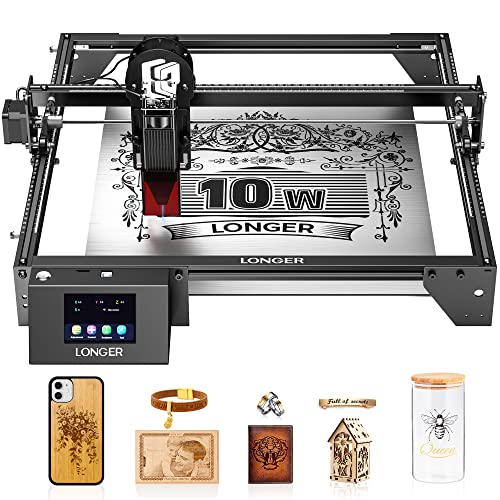
- Very large 400 x 400mm work area
- 10W laser and 0.06 x 0.06mm spot
- Touchscreen and offline operation
- USB, TF card, Wi-Fi, and app control
- Supports LightBurn and LaserGRBL
Cons
- Open-frame design needs a carefully controlled workspace
- Slower and less powerful than the Ray5 20W
- Safety cover and goggles do not replace good ventilation
Best for: makers who want to work on large pieces without moving to a higher-power laser.
The Longer Ray5 10W has one defining advantage: its 400 x 400mm working area. That is larger than the work surface on the TTS-10 Pro and TTS-55 Pro, and it gives a beginner room to grow into signs, wall decor, and multiple small pieces in one layout. Its frame is still a desktop-style open design, but the footprint is aimed at projects that need width more than extreme cutting power.
The 10W output is paired with a listed 0.06 x 0.06mm laser point and 0.01mm precision. Longer says the machine can cut wood up to 20mm and acrylic up to 30mm, although actual results depend heavily on material, settings, focus, and the number of passes. The maximum engraving speed is 10, 000mm/min. That is adequate for personal projects, but it sits below the Twotrees models' listed 30, 000mm/min and the 20W Ray5's 24, 000mm/min.
Control options are generous for a machine in this class. The 3.5-inch touchscreen allows offline control, while USB, TF card, Wi-Fi, and an app support different working styles. Its 240MHz ESP32 processor is described as supporting multi-device control, and the machine works with both LaserGRBL and LightBurn. Someone who is learning can begin with a simpler setup and move to more advanced software later without replacing the machine.
Longer includes a protective cover and safety goggles, plus emergency stop, motion protection, heat protection, and hidden active cooling. The laser class is listed as Class II. That is a more reassuring package than an unprotected frame, but the cover is not a substitute for a sensible workspace. Smoke extraction, supervision, and careful material choices still matter, especially during cutting.
The Ray5 10W is not the fastest machine here, nor is it the most convenient for a first project. The xTool M2 is more polished and enclosed, while the Ray5 20W cuts with more authority. Its reason to choose it is simple: a large 400 x 400mm surface at a lower output level. If large layouts matter more than deep cuts, this is the Longer model to get.
8. ACMER S1: Best Compact Engraver

Pros
- Compact 130 x 130mm working area
- Weighs 2kg
- Arrives 99% preassembled
- Supports LightBurn and LaserGRBL
- Works with Windows, macOS, and Linux
Cons
- 2.5W laser is the least powerful in this roundup
- Small work area rules out larger signs
- Class 4 classification calls for careful handling
Best for: small tags, cards, jewelry pieces, and makers with very limited desk space.
The ACMER S1 is the tiny specialist of the group. Its 130 x 130mm work area is not a compromise hidden in the fine print, it is the entire point. This is a machine for small wood pieces, leather items, cards, and compact decorative work, not a general-purpose sign cutter. At 2kg and 250 x 250 x 162mm, it is also far easier to carry and store than the larger Longer and xTool machines.
The 2, 500mW diode laser has a 455 plus or minus 5nm wavelength and a 2mm focal length. ACMER lists a 10, 000mm/min maximum engraving speed and 0.01mm repeatable positioning accuracy. It supports engraving on wood, bamboo, leather, plastic, PCB, aluminum oxide, ceramics, and other materials, with cutting intended for thin plywood, MDF, and acrylic. The lower output means buyers should keep their expectations focused on detail and small work rather than thick cuts.
Setup is a strong point. ACMER says the S1 arrives 99% preassembled and needs only a one-minute laser-head installation. Its free Acmerstudio software is ready to use, while LightBurn and LaserGRBL provide alternatives. The machine can handle NC, DXF, BMP, JPG, and PNG files, and support extends across Windows, macOS, and Linux. That makes it more flexible than its small physical footprint suggests.
The safety description deserves careful reading. The product is listed as Class 4 and compliant with IEC 60825-1, so it should not be treated like an enclosed Class 1 appliance. The compact aluminum-alloy frame is convenient, but it does not change the need for eye protection, ventilation, and supervision. The BlazeX M3 is a better match for someone who wants an enclosure included from the start.
The ACMER S1 makes sense when storage is the limiting factor or when the work is genuinely small. It is not the machine we would choose for a growing gift business that may soon need larger blanks. For that kind of path, choosing materials that engrave cleanly without excessive trial and error can matter as much as the machine itself.
9. ATOMSTACK A20 Pro V2: Best High-Power Open Frame

Pros
- 20W laser output
- Up to 400mm/s engraving speed
- Dot compression technology for focused marks
- Modular aluminum-alloy frame
- Supports app, LightBurn, and LaserGRBL workflows
Cons
- Class 4 open-frame design needs strict safety habits
- Work area is not specified in the listing
- Removable cover offers less integration than a fully enclosed machine
Best for: makers who want high diode power for cutting and do not need a fully enclosed chassis.
The ATOMSTACK A20 Pro V2 is built around a 20W laser and a modular open-frame design. That puts it in direct competition with the Longer Ray5 20W, but the two machines emphasize different strengths. Longer provides a specified 400 x 365mm work area, touchscreen, and multiple offline controls. ATOMSTACK instead highlights its independently developed motherboard, linear guide structure, and quick assembly.
Its dot compression technology produces a listed 0.08 x 0.1mm spot, while engraving speed reaches 400mm/s. ATOMSTACK also lists 0.01mm engraving accuracy, limit switches, and a cross-line light for positioning. The 20, 000mW output is intended for strong cutting and engraving across wood, acrylic, metal, and leather. Since the work area is not specified in the supplied data, buyers should confirm that dimension before committing to a particular project size.
The control options are broad. The machine supports Type-C or USB-stick interaction, the ATOMSTACK app and PC software, LightBurn, and LaserGRBL. Its aluminum-alloy frame and integrated linear guide structure are designed to make assembly straightforward while maintaining movement accuracy. ATOMSTACK also states a lifespan of up to 10, 000 hours, though that kind of figure should be viewed as a manufacturer claim rather than a prediction for every operating environment.
Safety is where the A20 Pro V2 asks more from the owner. It is identified as a Class 4 laser, and its removable magnetic protective cover and safety glasses are part of the safety package. The machine also has a tilt-angle safety beep above 15 degrees and built-in limit switches. Those protections are useful, but the open-frame form still requires a controlled area and careful supervision. The xTool S1 and xTool M2 are better choices for people who want enclosure-first operation.
The A20 Pro V2 is most appealing to a maker who understands open-frame diode systems and wants the cutting headroom of 20W. The Longer Ray5 20W is easier to recommend when its larger specified work area and touchscreen matter. Choose ATOMSTACK when modular construction, software choice, and high output take priority.
10. Twotrees TTS-55 Pro: Best Compact Workhorse

Pros
- 5.5W laser with a 300 x 300mm work area
- 30, 000mm/min maximum speed
- Air-assist nozzle support
- TF card, Wi-Fi, app, and web control
- Compatible with LightBurn and LaserGRBL
Cons
- Less cutting power than the TTS-10 Pro
- Open-frame Class II setup still needs care
- Listed spot dimensions are not uniform in both axes
Best for: hobbyists who want a practical work area and fast motion for routine projects.
The Twotrees TTS-55 Pro is the sensible smaller sibling to the TTS-10 Pro. It keeps the 300 x 300mm work area and 30, 000mm/min maximum speed, but uses a 5.5W laser. That makes it better suited to ordinary hobby engraving and lighter cutting than to thick plywood or demanding acrylic work. The distinction matters because the two Twotrees models look similar on paper until laser output becomes the deciding factor.
Twotrees lists cutting for 5mm plywood, 3mm acrylic, and 0.7mm leather. Its 0.08 x 0.46mm spot uses a 23mm focal length, and the listing gives up to 0.1mm engraving accuracy. The machine is designed for wood, leather, acrylic, paper, stainless steel, and related materials. Those figures describe a useful range for personalized gifts and small business pieces, but the TTS-10 Pro is the better Twotrees pick for deeper cuts.
The 32-bit dual-core control board supports online and TF card offline engraving, with built-in Wi-Fi for mobile-app or computer-web control. LightBurn works on Windows, macOS, and Linux, while LaserGRBL is supported on Windows. That combination is unusually accommodating for a hobby machine. The included metal air-assist nozzle also makes it easier to add air assist later, which can help produce cleaner edges during cutting.
The TTS-55 Pro is listed as a Class II laser and includes a red laser shield. It is still an open-frame tool, so the owner needs a stable workspace, sensible ventilation, and attentive operation. The xTool M2 offers a much more contained experience, and the BlazeX M3 includes an enclosure and honeycomb bed. Those are better fits when the machine will be used around other household activity.
Choose the TTS-55 Pro for its combination of speed, software flexibility, and a useful 300 x 300mm surface. It is not the most powerful machine here, but it is more capable than a tiny engraving unit and less demanding than a high-power open frame. It is the right Twotrees model for routine projects where maximum cutting depth is not the goal.
How to choose the best laser engraver
The best laser engraver for one workshop may be the wrong tool for another, so start with the materials, project size, and safety setup you can realistically support.
Laser power
Laser output determines how aggressively a machine can cut, though it does not tell the whole story. The 40W xTool S1 is designed for thick wood and large projects, while the 2.5W ACMER S1 is better for small, shallow work. Machines such as the 10W Twotrees TTS-10 Pro and 20W Longer Ray5 20W sit between those extremes.
Higher power can reduce the number of passes needed on suitable materials. It does not make every material safe or automatically produce a cleaner engraving. Look for a stated material capability that resembles your projects, then leave room for the fact that settings, focus, airflow, and material composition affect results.
Work area
A 130 x 130mm work area is enough for jewelry pieces and small tags, but it becomes restrictive for signs and wide layouts. The ACMER S1 is deliberately compact, while the Longer Ray5 10W offers 400 x 400mm. The xTool S1 combines a 23.93 x 15.16-inch bed with AutoPassthrough for long work.
Measure the machine's footprint as well as the usable bed. An open-frame engraver may need room around the workpiece, ventilation, and protective equipment. A large bed is useful only if the machine can live somewhere stable and accessible.
Enclosure and laser class
An enclosure changes the ownership experience. The xTool M2 is a Class 1 enclosed machine, and the xTool S1 uses a cover that filters 99% of laser light. The BlazeX M3 also includes an enclosure. Open-frame machines can be capable, but they require a more deliberate workspace and closer attention to eye protection, smoke, and supervision.
Laser class is not a marketing footnote. The Twotrees TTS-10 Pro, xTool F2, ACMER S1, and ATOMSTACK A20 Pro V2 carry Class IV listings, while the TTS-55 Pro is listed as Class II. Follow the supplied safety guidance and do not assume a cover, shield, or goggles makes unattended operation acceptable.
A larger laser is useful only when your workspace can safely support the material, smoke, heat, and movement it creates.
Software and controls
Software determines how quickly an idea becomes a finished file. xTool M2 buyers get camera-assisted placement, templates, and xTool Studio. Open-frame options often support LaserGRBL and LightBurn, which provide more control but can require more learning.
Offline controls are helpful when a computer cannot remain connected. The Longer Ray5 models support touchscreen operation, TF cards, USB, Wi-Fi, and app connections. The Twotrees machines also support TF card workflows and wireless control. If you already use LightBurn, confirm that the machine and your operating system are supported before choosing a model.
Material handling and airflow
Air assist helps move smoke and debris away from the cutting area and can improve edge visibility. The Twotrees TTS-10 Pro and TTS-55 Pro include metal nozzles that make air-assist upgrades easier. The BlazeX M3 includes a honeycomb bed to support airflow under the workpiece and protect the surface below.
A rotary setup matters for tumblers and other cylindrical objects. The xTool S1 listing includes a rotary bundle, while the xTool F2 can expand with accessories such as the RA3 and Slide Extension. If curved objects are central to your plans, treat rotary compatibility as a core requirement rather than an optional extra.
Frequently asked questions
What materials can a laser engraver handle?
The answer depends on the laser type and power. The machines in this roundup list wood, leather, acrylic, metal, glass, paper, fabric, and related materials, but each model has different cutting limits. Always verify that a material is appropriate for laser use before running it.
Is an enclosed laser engraver safer for home use?
An enclosed Class 1 machine is easier to manage in a home setting than an open-frame design because it limits direct exposure to the beam. The xTool M2 and xTool S1 are examples of enclosed machines in this list. Enclosure does not eliminate the need for ventilation, supervision, and safe material choices.
How much laser power is needed to cut wood?
There is no single answer because wood species, thickness, focus, and speed all affect the cut. The xTool S1 lists single-pass cutting of 18mm cherry wood, while the Twotrees TTS-55 Pro lists 5mm plywood. Use the manufacturer's material guidance as a starting point and expect to tune settings for the specific sheet.
Can these machines engrave metal?
Some can mark metal, but diode and infrared lasers behave differently. The xTool F2 includes a 5W IR laser specifically for color marking on metal, while several diode models list stainless steel, coated metal, or aluminum oxide among supported materials. Bare-metal engraving performance varies, so check the exact material and finish before assuming a dark or deep mark is possible.
Do I need LightBurn?
No. Several machines include or support other software, including xTool Studio, Acmerstudio, LaserGRBL, mobile apps, and web controls. LightBurn is useful for people who want a more advanced design and machine-control workflow, but a beginner may prefer a bundled interface with templates and presets.
What is the benefit of a honeycomb bed?
A honeycomb bed supports the material while leaving open space beneath it. That can improve airflow and reduce the chance of marking the surface under the workpiece. The BlazeX M3 includes one, while other machines may require a separate bed or compatible accessory.
The bottom line
The xTool S1 40W is the strongest all-around recommendation for large projects, deep cuts, and a more controlled enclosed setup. Its large bed, 600mm/s listed speed, AutoPassthrough, rotary bundle, and 40W laser give it capabilities the smaller machines cannot match. The xTool M2 is the better fit for home crafters who want camera-guided placement, templates, and a Class 1 enclosure rather than maximum cutting power.
The Longer Ray5 20W is the open-frame alternative to consider when a large work area and strong cutting matter, while the xTool F2 is the specialist choice for portable work and metal color marking. The Twotrees and ATOMSTACK models suit makers who are comfortable managing an open frame, and the ACMER S1 is the clear choice for very small projects and limited storage.
If you are still undecided, choose the xTool S1 for ambitious projects, the xTool M2 for guided home crafting, and the ACMER S1 only when compact size is the deciding factor.
As an Amazon Associate we earn from qualifying purchases.