

A ThinkPad can mean a featherweight executive laptop, a large desktop replacement, or a renewed business machine with several years of service behind it. The difficult part is separating those use cases before you choose, especially when several models share similar names.
Our Best Lenovo ThinkPad picks range from the remarkably light X1 Carbon Aura Edition to the spacious 16-inch T16 and L16. There are also sensible choices for office work, travel, programming, school, and buyers who prefer a renewed machine.
The Lenovo ThinkPad X1 Carbon Aura Edition is the best overall pick, while the rest cover large-screen productivity, maximum memory, portability, and straightforward everyday work.
Comparison table
| # | Product | Award | Display | Processor | Memory and storage | Best for |
|---|---|---|---|---|---|---|
| 1 | Lenovo ThinkPad X1 Carbon Aura | Best overall | 14-inch 2.8K OLED, 120Hz | Intel Core Ultra 7 258V | 32GB, 2TB SSD | Premium travel and creative work |
| 2 | ThinkPad E14 Gen 7 | Best everyday 14-inch | 14-inch WUXGA IPS, 300 nits | AMD Ryzen 7 250 | 16GB, 512GB SSD | General office work |
| 3 | ThinkPad X1 Carbon Gen 13 | Best lightweight power | 14-inch 2.8K OLED, 500 nits | Intel Core Ultra 7 258V | 32GB, 1TB SSD | Executives and frequent travelers |
| 4 | ThinkPad T16 Gen 4 32GB | Best large business laptop | 16-inch WUXGA IPS, 300 nits | Intel Core Ultra 7 255U | 32GB, 1TB SSD | Desk-based productivity |
| 5 | ThinkPad L16 Touch | Best touchscreen work laptop | 16-inch WUXGA IPS touch, 400 nits | Intel Core Ultra 5 225U | 32GB, 1TB SSD | Data entry and office multitasking |
| 6 | ThinkPad E16 Touch | Best AMD option | 16-inch WUXGA IPS touch, 300 nits | AMD Ryzen 7 250 | 32GB, dual 512GB SSD | Multitasking and light creation |
| 7 | ThinkPad T14 Renewed | Best renewed compact laptop | 14-inch HD anti-glare | Intel Core i5-10310U | 16GB, 256GB SSD | Basic office work |
| 8 | ThinkPad T14 Gen 6 | Best modern 14-inch business laptop | 14-inch WUXGA IPS, 400 nits | Intel Core Ultra 5 225U | 32GB, 1TB SSD | Secure hybrid work |
| 9 | ThinkPad L14 Renewed | Best renewed AMD laptop | 14-inch FHD IPS, non-touch | AMD Ryzen 5 PRO 7530U | 16GB, 256GB SSD | Practical business computing |
| 10 | ThinkPad T16 Gen 4 64GB | Best maximum-memory option | 16-inch WUXGA IPS, 300 nits | Intel Core Ultra 7 255U | 64GB, 1TB SSD | Heavy multitasking |
1. Lenovo ThinkPad X1 Carbon Aura: Best Overall

Pros
- Extremely light 2.4-pound design
- Sharp 2.8K OLED screen with 120Hz VRR
- Wi-Fi 7, Thunderbolt 4, and HDMI 2.1
- 1080p IR webcam and Windows Hello support
Cons
- OLED finish and high resolution can increase power demands
- Memory and storage are a fixed configuration
- The premium chassis leaves little room for casual upgrades
Best for: professionals who travel often but still want a high-end display and generous storage.
The Lenovo ThinkPad X1 Carbon Aura is the one that feels easiest to recommend after looking at the whole group. It is thin enough to carry with one hand, weighs 2.4 pounds, and measures 0.6 inches wide. That changes the daily experience more than another small processor improvement. It slips into a work bag without making the laptop the heaviest thing inside.
Its 14-inch OLED panel is the standout feature. The 2880 by 1800 resolution gives text and fine interface elements a clean, precise appearance, while 500 nits, 100% DCI-P3 coverage, Dolby Vision, and DisplayHDR True Black 500 make photos and video look far more polished than the ordinary 300-nit IPS screens on the T16 models. The 120Hz variable refresh rate also makes scrolling and window movement feel smoother. This is the screen to choose for design review, presentations, and long stretches of mixed work.
The Core Ultra 7 258V, 32GB of DDR5 memory, and 2TB Gen 5 SSD give it a notably complete configuration. Wi-Fi 7 is useful for newer networks, and two Thunderbolt 4 ports, two USB-A ports, HDMI 2.1, and a headset jack mean it is not dependent on a dock for basic desk connections. It can drive up to three external displays through HDMI or Thunderbolt 4, according to the listing.
The weakness is the same thing that makes it special: the OLED display and ultra-thin chassis are aimed at buyers who care about portability and visual quality, not maximum upgrade flexibility. The ThinkPad X1 Carbon Gen 13 is the better match if its 1TB drive is sufficient and its listed 15-hour battery claim matters more than the 2TB configuration. Choose this Aura Edition if you want the most complete premium ThinkPad in the group.
2. ThinkPad E14 Gen 7: Best Everyday 14-Inch

Pros
- Ryzen 7 250 processor for busy office workloads
- Compact 14-inch form factor
- Thunderbolt 4, HDMI, Ethernet, and fingerprint reader
- MIL-STD-810H testing and backlit keyboard
Cons
- The listed configuration has less memory and storage than several rivals
- Display is limited to 300 nits and 60Hz
- The machine has been opened for a memory and SSD upgrade
Best for: office users who want a compact Windows 11 Pro laptop with a practical port selection.
The ThinkPad E14 Gen 7 is a sensible middle ground for people who do not need the X1 Carbon's OLED screen or the T16's large keyboard deck. Its 14-inch body is easier to carry than a 16-inch machine, yet the Ryzen 7 250 is positioned for multitasking rather than just email and documents. Browser tabs, video calls, spreadsheets, and office applications are the natural workload here.
The listing describes a 14-inch WUXGA IPS screen with a 1920 by 1200 resolution, 60Hz refresh rate, anti-glare coating, and 300 nits of brightness. The taller 16:10 shape gives documents a little more vertical room than a traditional 16:9 panel. It is a practical display for indoor desks, but the X1 Carbon models are substantially more compelling for color-sensitive work or bright rooms.
Connectivity is a strong point. The E14 includes Thunderbolt 4, USB 3.2 Type-C, USB-A, HDMI, Ethernet, Wi-Fi 6, Bluetooth 5.3, and a headphone and microphone combo jack. A 5MP RGB webcam and fingerprint reader are useful for meetings and login, while the backlit keyboard helps in dim rooms. The listed configuration uses 16GB of DDR5 memory and a 512GB PCIe NVMe SSD, enough for ordinary business use but less headroom than the 32GB models above it.
This model is also listed as having its original seal opened for a memory and SSD upgrade, with separate warranty coverage described for the upgraded components. That is a detail to read carefully before ordering. Buyers who want a brighter screen and 32GB of memory should move to the ThinkPad T14 Gen 6. Buyers who want a simple 14-inch office machine with useful ports and a sturdy design should keep the E14 Gen 7 on the shortlist.
3. ThinkPad X1 Carbon Gen 13: Best Lightweight Power
Pros
- Exceptionally light 2.17-pound chassis
- 2.8K OLED panel with 500 nits and 120Hz VRR
- 32GB memory and 1TB PCIe NVMe storage
- Wi-Fi 7 and support for three external monitors
Cons
- 1TB storage is less generous than the Aura Edition
- Ultra-thin design prioritizes portability over expansion
- The listing describes a resealed SSD upgrade
Best for: travelers and executives who want a light laptop with serious display and connectivity features.
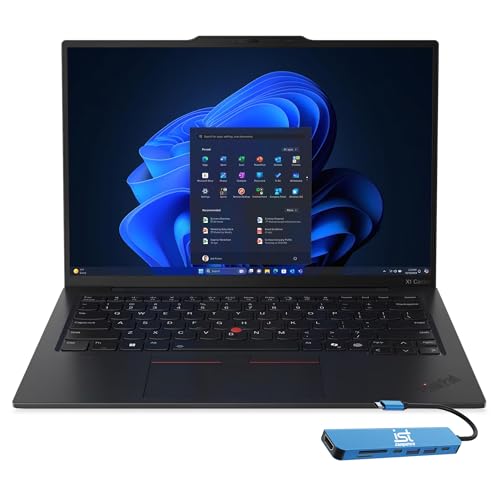
The ThinkPad X1 Carbon Gen 13 is almost the same kind of laptop as the Aura Edition, but its configuration makes the distinction clear. At 2.17 pounds, it is the lightest model in this roundup, and its 0.67-inch profile remains easy to carry. The compact 12.31 by 8.45-inch footprint is especially useful for narrow airplane tables and crowded conference rooms.
The 14-inch OLED screen uses 2880 by 1800 resolution, 500 nits, 100% DCI-P3 color, Dolby Vision, and a 120Hz variable refresh rate. Those features give it a much more refined visual experience than the 300-nit non-touch IPS displays on the T16 and E14. It also supports up to three external monitors through HDMI and Thunderbolt 4, including up to 8K at 60Hz through Thunderbolt 4 according to the listing.
Inside, the Intel Core Ultra 7 258V runs at up to 4.8GHz with eight cores and a dedicated 47 TOPS NPU. The 32GB of DDR5 memory is a good fit for large spreadsheets, development tools, and simultaneous communication apps, while the 1TB PCIe NVMe SSD gives enough room for a typical professional library. Two Thunderbolt 4 ports, two USB-A ports, HDMI 2.1, Wi-Fi 7, Bluetooth 5.4, a fingerprint reader, and a 1080p IR webcam make it unusually well equipped for a thin laptop.
The Lenovo ThinkPad X1 Carbon Aura wins if you need 2TB of storage and its bundled hub is useful, while this version is the more focused travel pick. The listing says the SSD upgrade involved resealing the new computer, with separate warranty coverage for the upgraded drive. Skip it if you need a large built-in display or frequent internal expansion. For someone who values light weight, a beautiful panel, and fast wireless connectivity, it is one of the strongest choices here.
4. ThinkPad T16 Gen 4 32GB: Best Large Business Laptop

Pros
- Large 16-inch 16:10 work area
- 32GB DDR5 memory and 1TB NVMe storage
- Ethernet, HDMI, Thunderbolt, and Wi-Fi 6E
- Backlit spill-resistant keyboard and fingerprint reader
Cons
- Listed weight is 6 pounds
- Display is 300 nits and non-touch
- Not as portable as the 14-inch ThinkPads
Best for: desk-based professionals who want a spacious screen and full business connectivity.
The ThinkPad T16 Gen 4 32GB is built around the idea that a laptop can function as the main office computer. Its 16-inch screen gives spreadsheets, timelines, documents, and side-by-side windows more breathing room than any 14-inch model here. The tradeoff is obvious when you carry it: the listed weight is 6 pounds, so this is better moved between a home office and a meeting room than taken on every trip.
The WUXGA panel has a 1920 by 1200 resolution, IPS technology, a 16:10 layout, and 300 nits of brightness. That resolution is appropriate for work at this screen size, though it does not have the high contrast or rich color range of the X1 Carbon OLED panels. The integrated Intel graphics are intended for office work, streaming, presentations, and ordinary creative tasks rather than demanding 3D production.
The Core Ultra 7 255U reaches up to 5.2GHz and is paired here with 32GB of DDR5 memory and a 1TB NVMe SSD. That is ample room for heavy browser use, large office files, virtual meetings, and multiple productivity applications. Its backlit, spill-resistant keyboard, fingerprint reader, Wi-Fi 6E, Bluetooth 5.3, RJ-45 Ethernet, HDMI, USB-A, USB-C, Thunderbolt, and headphone jack make it easy to plug into an established desk setup.
The ThinkPad L16 Touch is a more flexible choice if touch input and a brighter 400-nit panel matter more than this T16's processor tier. The ThinkPad T16 Gen 4 64GB is the better choice for unusually large working sets, but it has the same basic display and chassis limitations. Choose this 32GB model when a wide workspace and practical ports matter more than carrying comfort.
5. ThinkPad L16 Touch: Best Touchscreen Work Laptop

Pros
- Bright 400-nit 16-inch touchscreen
- 32GB memory and 1TB SSD
- Numeric keypad and backlit keyboard
- 5MP IR camera, Ethernet, and Thunderbolt 4
Cons
- Nearly 4 pounds before accessories
- Ultra 5 processor is less powerful than the T16 Ultra 7
- The listing says the upgraded unit was resealed
Best for: spreadsheet-heavy work, data entry, and users who want touch interaction on a large screen.
The ThinkPad L16 Touch makes a persuasive case for choosing the L-series over a more expensive-feeling chassis. It provides the large keyboard and broad workspace of a 16-inch business laptop, but its 3.96-pound listed weight is much easier to manage than the T16's listed 6 pounds. It remains a large laptop, yet it is not tied as firmly to a desk.
Its 16-inch WUXGA IPS touchscreen runs at 1920 by 1200 with 400 nits of brightness, anti-glare treatment, and Eyesafe Certified 2.0. The extra brightness helps in rooms where the 300-nit T16 can look subdued. Touch input is useful for scrolling through long documents, signing into web tools, and navigating presentation material, although buyers who never touch their laptop may get more from the non-touch T16 design.
The Core Ultra 5 225U has 12 cores and reaches up to 4.8GHz. Here it is supported by 32GB of DDR5 memory and a 1TB SSD, so the system has enough working room for large spreadsheets, programming tools, remote sessions, and many browser tabs. Two Thunderbolt 4 ports, two USB-A ports, USB-A 2.0, Ethernet, HDMI 2.1, Wi-Fi 6E, Bluetooth 5.3, and a headphone jack give it a strong office setup. The 5MP IR camera, privacy shutter, fingerprint reader, and numeric keypad are thoughtful business additions.
The ThinkPad E16 Touch uses an AMD Ryzen 7 250 and also offers a touchscreen, but the L16 has the brighter panel, 5MP camera, and more enterprise-oriented feature set. The listing notes a resealed unit with separate coverage for upgraded memory and storage, so check those terms carefully. This is the pick for someone who wants a full-sized work laptop that is easier to carry than the T16.
6. ThinkPad E16 Touch: Best AMD Option

Pros
- Ryzen 7 250 with eight cores
- 32GB DDR5 memory
- Dual 512GB SSD arrangement
- 1080p IR webcam and 16-inch touchscreen
Cons
- Display brightness is limited to 300 nits
- Dual-drive arrangement may be less convenient than one larger SSD
- The unit was opened for a memory and SSD upgrade
Best for: users who want AMD performance, a large touchscreen, and separate system and storage drives.
The ThinkPad E16 Touch is a capable large-format work machine with a slightly different personality from the Intel L16. Its Ryzen 7 250 has eight cores and reaches up to 5.1GHz, while Radeon 780M graphics give it more graphical capability on paper than the integrated graphics listed for several Intel alternatives. It is suited to office work, programming, video calls, and light photo or content editing.
The 16-inch WUXGA touchscreen uses a 1920 by 1200 resolution, 300 nits, anti-glare treatment, and TÜV Rheinland Low Blue Light certification. The 16:10 shape is helpful for documents and spreadsheets, while touch support makes navigation more direct. The ThinkPad L16 Touch is the better choice for bright rooms because its display reaches 400 nits, but the E16 remains a comfortable indoor work screen.
This configuration includes 32GB of DDR5 memory and two separate 512GB PCIe NVMe SSDs. Keeping system and storage drives separate can make file organization easier and may help isolate work files from the operating system. It also means the arrangement is not quite as simple as a single 1TB drive. Connectivity covers Thunderbolt 4, USB-C, two USB-A ports, Ethernet, HDMI 2.1, Wi-Fi 6E, Bluetooth 5.3, and an audio combo jack.
The 1080p IR webcam includes a privacy shutter, and the fingerprint reader and TPM 2.0 add useful security features. The listing describes a resealed computer with separate coverage for upgraded memory and storage. Buyers who want an AMD-based ThinkPad with a large touch panel should consider it, but people who need a brighter display or a 5MP camera should choose the L16 instead.
7. ThinkPad T14 Renewed: Best Renewed Compact Laptop

Pros
- Compact 14-inch business design
- Wide selection of ports
- Windows 11 Pro
- 16GB memory and an SSD
Cons
- Older Core i5-10310U processor
- HD display is less sharp than newer WUXGA panels
- Renewed condition requires realistic expectations
Best for: basic office tasks, remote access, and buyers who prefer a compact renewed ThinkPad.
The ThinkPad T14 Renewed is the most clearly different laptop in this group. It is an older business machine in renewed condition, not a contemporary AI-focused model. That distinction matters, but it does not make the laptop irrelevant. For writing, web applications, email, remote desktop, and light office work, the familiar T14 shape remains practical.
Its 14-inch HD anti-glare display uses a 16:9 layout. The lower resolution is a visible step behind the 1920 by 1200 screens on the newer T14 Gen 6 and E14 Gen 7, particularly when working with large spreadsheets or multiple windows. The anti-glare treatment should help with reflections, but this is not the screen to choose for detailed photo work or a high-density text experience.
The Intel Core i5-10310U has four cores and eight threads, with speeds listed from 1.7GHz to 4.4GHz. It comes with 16GB of DDR4 memory and a 256GB SSD. That combination is appropriate for basic productivity, but it has less storage and less processing headroom than the modern Ultra 5 and Ryzen 7 models. Ports are a strong point: USB-A, two USB-C ports including Thunderbolt 3, HDMI 1.4b, microSD, Ethernet, a headset jack, and a docking connector are all listed.
The ThinkPad L14 Renewed is a better alternative if you want AMD processing and a sharper FHD IPS panel, while the ThinkPad T14 Gen 6 is the clear step up for current software and longer-term multitasking. Choose this renewed T14 when compact size, familiar business connectivity, and straightforward office work matter more than modern display quality.
8. ThinkPad T14 Gen 6: Best Modern 14-Inch Business Laptop

Pros
- 32GB DDR5 memory and 1TB SSD
- 400-nit anti-glare WUXGA panel
- 5MP IR webcam with facial login
- Wi-Fi 6E, Ethernet, Thunderbolt 4, and HDMI
Cons
- Less screen space than the 16-inch models
- Ultra 5 processor is not the fastest chip here
- The listing describes a resealed memory and SSD upgrade
Best for: hybrid workers who want a compact business laptop with modern security and connectivity.
The ThinkPad T14 Gen 6 is the practical modern alternative to the older renewed T14. Its 3.06-pound listed weight keeps it portable, while the 14-inch shape is still large enough for daily documents, browser work, and calls. It does not have the visual drama of the X1 Carbon OLED, but it is easier to frame as a dependable working tool.
The 14-inch WUXGA IPS display has a 1920 by 1200 resolution, 400 nits of brightness, and an anti-glare finish. That combination makes it a better fit for varied office lighting than the 300-nit displays in the E14 and T16. Dual Thunderbolt 4 ports and HDMI can connect up to three external 4K monitors at 60Hz without a docking station, according to the listing.
Its Intel Core Ultra 5 225U uses 12 cores and reaches up to 4.8GHz. The 32GB of DDR5 memory and 1TB PCIe NVMe SSD provide plenty of space for multitasking, quick application launches, and large work files. Wi-Fi 6E, Bluetooth 5.3, Ethernet, two USB-A ports, HDMI, and an audio combo jack cover the connections most business users need. The 5MP IR webcam supports sharp video calls and facial login, while a fingerprint reader and backlit keyboard handle security and low-light typing.
The ThinkPad E14 Gen 7 is a more compact everyday option, but this T14 has the brighter screen, more memory, and stronger business feature set. The T16 models are better for a wide desktop-style workspace. Because the listing notes that the computer was resealed for upgrades, buyers should review the stated warranty arrangement. For hybrid work and frequent travel, this is one of the most balanced modern ThinkPads here.
9. ThinkPad L14 Renewed: Best Renewed AMD Laptop

Pros
- Six-core Ryzen 5 PRO 7530U processor
- FHD IPS non-touch display
- Wi-Fi 6E, Ethernet, HDMI 2.1, and microSD
- Compact 3-pound listed weight
Cons
- Renewed condition
- 16GB DDR4 memory rather than DDR5
- 256GB SSD leaves less room for large files
Best for: everyday business work where a renewed AMD laptop and broad port selection are the priority.
The ThinkPad L14 Renewed is a straightforward work laptop with fewer modern flourishes than the new L16 and E16. Its 3-pound listed weight is manageable, and the 14-inch format works well for commuting, classroom use, and office desks. This is the kind of ThinkPad that makes sense when a reliable business layout matters more than a premium screen.
The AMD Ryzen 5 PRO 7530U has six cores, 12 threads, a 2.0GHz base speed, and a listed boost speed of up to 4.5GHz. It is paired with 16GB of DDR4 memory and a 256GB PCIe SSD. Those specifications are well suited to office applications, web work, video meetings, and moderate multitasking. The newer T14 Gen 6 has twice the memory and four times the listed storage, so it is a better fit for heavier workloads.
The FHD 1920 by 1080 IPS non-touch screen should produce a cleaner text workspace than the HD panel on the renewed T14. The listing also includes Wi-Fi 6E, Bluetooth 5.3, two USB-A ports, two USB-C ports, HDMI 2.1 with support up to 4K at 60Hz, Ethernet, a headset jack, and a microSD card reader. A standard keyboard with TrackPoint and a 65W adapter are included in the listed feature set.
The main limitation is not an individual port or processor. It is the renewed condition combined with modest storage and DDR4 memory. If you want a current machine with more working room, the ThinkPad E14 Gen 7 is a better direction. If you want a sensible compact computer for documents, browser work, and business software, this L14 remains an honest, capable option.
10. ThinkPad T16 Gen 4 64GB: Best Maximum-Memory Option

Pros
- 64GB DDR5 memory
- Large 16-inch WUXGA work area
- 1TB NVMe SSD
- Ethernet, HDMI, Thunderbolt, and Wi-Fi 6E
Cons
- Listed weight is 6 pounds
- Screen is non-touch and limited to 300 nits
- Maximum memory is unnecessary for ordinary office work
Best for: demanding multitaskers who keep many large applications and files open at once.
The ThinkPad T16 Gen 4 64GB is the same broad concept as the 32GB T16, but its memory configuration changes who should consider it. Sixty-four gigabytes of DDR5 is useful for large datasets, development environments, virtual machines, and workflows that keep many demanding applications active. For email, documents, and ordinary browser work, it is more capacity than most people need.
The 16-inch WUXGA IPS display uses 1920 by 1200 resolution and 300 nits of brightness. Its 16:10 shape is excellent for long documents and spreadsheets, but the non-touch panel and ordinary brightness make it less versatile than the 400-nit touchscreen on the L16. Integrated Intel graphics are suited to presentations, streaming, and daily computing rather than serious graphics production.
The Intel Core Ultra 7 255U reaches up to 5.2GHz and is paired with a 1TB NVMe SSD. The listed connectivity includes Wi-Fi 6E, Bluetooth 5.3, RJ-45 Ethernet, USB-A, USB-C, USB-4 Thunderbolt, HDMI, and a 3.5mm jack. A backlit spill-resistant keyboard and fingerprint reader suit office use, while the listed 5MP webcam is useful for video meetings and secure login.
The ThinkPad T16 Gen 4 32GB is the better match for nearly every ordinary professional workload because it keeps the same large format without pushing memory beyond what most applications require. The 64GB version earns its place for technical users who know they need that capacity. Skip it if mobility or screen quality matters more than keeping unusually large workloads open.

How to choose best lenovo thinkpad
The right Best Lenovo ThinkPad depends less on the name on the lid than on the balance between screen size, portability, workload, and business features.
Screen size and panel
A 14-inch ThinkPad is easier to carry and works well for travel, meetings, and shared desks. A 16-inch model gives spreadsheets and side-by-side documents more room, but it is physically larger and heavier. Resolution also matters: WUXGA at 1920 by 1200 is a useful modern baseline, while the X1 Carbon's 2.8K OLED panel is aimed at buyers who care about sharpness, contrast, and color.
Brightness changes where you can work comfortably. The 300-nit panels are suited to ordinary indoor rooms, while the 400-nit and 500-nit displays are better for brighter spaces. Touch is useful for scrolling and direct navigation, but it adds no benefit if you mainly use a keyboard and TrackPoint.
Processor and memory
The Core Ultra 5 and Ryzen 5 models handle standard office work, calls, research, and moderate multitasking. Core Ultra 7 and Ryzen 7 options are more appropriate for heavier spreadsheets, development tools, local AI workloads, and light creative applications. Memory is just as important as the processor when many applications stay open. 16GB is workable for ordinary tasks, 32GB is a strong general target, and 64GB is for specialized multitasking.
Portability and chassis
The X1 Carbon models are the clear travel choices, with listed weights of 2.17 and 2.4 pounds. The T14 and L14 sit in the middle, while the 16-inch models favor workspace over carrying comfort. A lighter laptop is easier to use in transit, but a larger model can reduce the need for an external monitor at a desk.
Pick the screen and weight you can live with every day, then choose the processor. A fast laptop that stays at home may be the wrong ThinkPad for your routine.
Ports and connectivity
Business laptops remain useful when they connect directly to office equipment. Ethernet is helpful for fixed desks, HDMI works with many existing displays, and Thunderbolt 4 supports fast peripherals and external monitors. Wi-Fi 6E is already well suited to modern networks, while Wi-Fi 7 on the X1 Carbon models is a forward-looking feature.
If you frequently move between rooms, count the ports you use rather than assuming a dock will solve everything. The T14 and T16 models offer a particularly practical mix of USB, HDMI, Ethernet, and display connectivity. Readers comparing broader laptop categories may also want to consider how business-focused machines handle office and travel work.
Webcam and security
A 5MP IR webcam is a meaningful upgrade for frequent video meetings, especially when paired with facial login. The 1080p IR cameras on the X1 Carbon Aura and E16 are also useful for calls and Windows Hello. Fingerprint readers, privacy shutters, TPM 2.0, and Windows 11 Pro add layers of convenience and security for work accounts.
New, upgraded, and renewed condition
Several listings describe computers that were resealed for memory or SSD upgrades. That does not automatically make them a poor choice, but it means the warranty language for the upgraded components deserves attention. The T14 and L14 renewed models are a separate category, with older hardware and a prior ownership history. Buyers who want current processors and more storage should focus on the new-generation models.
For a wider look at choosing a laptop around workload and portability, the trade-offs between different laptop sizes and daily uses can help narrow the field.
Frequently asked questions
Which Lenovo ThinkPad is best for travel?
The ThinkPad X1 Carbon Gen 13 is the strongest travel option in this group. Its listed weight is 2.17 pounds, and it combines a 14-inch screen with 32GB of memory, Wi-Fi 7, and multiple display outputs. The Aura Edition is also very light at a listed 2.4 pounds and includes 2TB of storage.
Which ThinkPad has the largest screen?
The ThinkPad T16 Gen 4 and ThinkPad L16 Touch both use 16-inch displays. The T16 favors a large non-touch workspace, while the L16 adds touch input, a brighter 400-nit panel, and a numeric keypad.
Is 32GB of memory enough for business work?
For most office work, programming, video meetings, research, and large browser sessions, 32GB is more than adequate. The T16 model with 64GB is aimed at users running virtual machines, large datasets, or unusually demanding multitasking workloads.
Which ThinkPad has the best display?
The ThinkPad X1 Carbon Aura and ThinkPad X1 Carbon Gen 13 have the strongest displays in this roundup. Both use 14-inch 2.8K OLED panels with 120Hz variable refresh, while the Gen 13 listing also specifies 500 nits and 100% DCI-P3 color.
Are renewed ThinkPads suitable for office work?
The renewed T14 and L14 can handle documents, web applications, email, and video calls. Their older processors, smaller SSDs, and lower memory ceilings make them less suitable for demanding modern workloads than the new T14 Gen 6, E14 Gen 7, and L16.
Which ThinkPad is best for spreadsheets?
A 16-inch model is the easiest to use for large spreadsheets because it provides more visible rows and columns. The L16 Touch is particularly useful for data entry because it combines a large touchscreen with a numeric keypad, while the T16 models offer a broad non-touch workspace.
Do these ThinkPads support external monitors?
The listings identify HDMI and USB-C or Thunderbolt connections on every modern model in the roundup. The X1 Carbon, T14 Gen 6, L16, and E16 listings specifically describe support for up to three external monitors, though the exact resolution depends on the connection used.
The bottom line
The Best Lenovo ThinkPad for most demanding buyers is the Lenovo ThinkPad X1 Carbon Aura. It combines a 2.4-pound listed weight with a 2.8K OLED display, 32GB of memory, 2TB of storage, Wi-Fi 7, and a strong selection of ports. Its weakness is that the premium thin design is less suited to buyers who want easy internal expansion.
For a large working area, choose the ThinkPad L16 Touch if you want a 400-nit touchscreen and numeric keypad, or the ThinkPad T16 Gen 4 32GB if a traditional non-touch business laptop suits you better. The ThinkPad T14 Gen 6 is the most balanced modern 14-inch alternative, while the renewed T14 and L14 make sense only when their older hardware fits the workload.
If you are undecided, choose the X1 Carbon for travel, the L16 for a large touch workspace, and the T14 Gen 6 for everyday hybrid work.
As an Amazon Associate we earn from qualifying purchases.