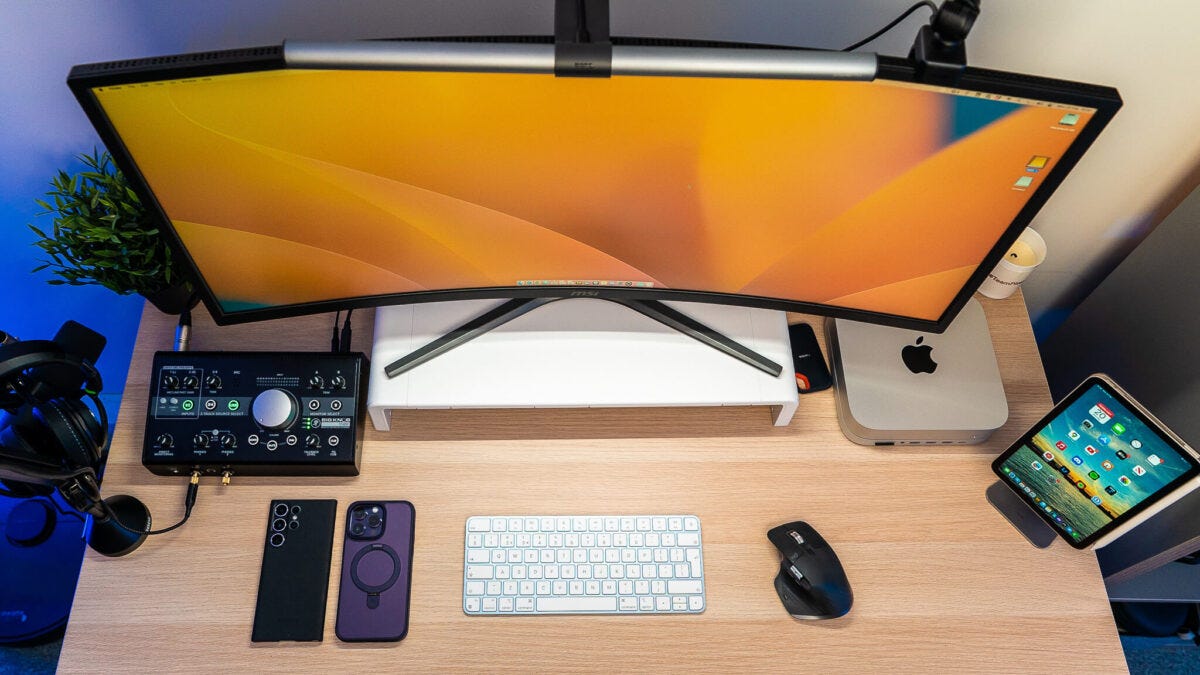

The Mac mini M4 is small enough to disappear behind a monitor, but its limited front connectivity and awkward underside power button make a bare setup less convenient than it should be. Adding the right dock can turn it into a proper desktop workstation, while the wrong one can create port confusion, Wi-Fi interference, or compatibility problems.
Our Best Mac Mini Accessories picks include storage docks, display-focused hubs, a travel case, a cooling-friendly mount, and one particularly unusual dock with its own screen. UGREEN Mac mini M4 Dock & Stand is the best all-around choice, while the rest cover more specific needs from high-refresh-rate monitors to portable protection.
Comparison table
| # | Product | Award | Storage support | Key connectivity | Best for |
|---|---|---|---|---|---|
| 1 | UGREEN Mac mini M4 Dock & Stand | Best overall | M.2 NVMe, up to 8TB | 11 ports, 10Gbps USB, SD and TF | Most M4 desktops |
| 2 | Satechi Mac mini M4 Hub & Stand | Best refined design | M.2 NVMe, up to 4TB | 5 front ports, UHS-II SD | Clean creative setups |
| 3 | RayCue Mac mini Dock | Best HDMI hub | M.2 NVMe or SATA, up to 8TB | HDMI 4K at 60Hz, 10Gbps USB | One external display |
| 4 | Wokyis Retro Dock | Best feature-packed dock | M.2 NVMe, up to 8TB | 14-in-1 hub, 5-inch display | Retro desktop setups |
| 5 | Stouchi Mac mini M4 Dock | Best practical hub | M.2 NVMe or SATA, up to 8TB | HDMI 4K at 60Hz, eight ports | Storage and peripherals |
| 6 | UGREEN Mac mini DP Hub | Best high-refresh hub | M.2 NVMe, up to 8TB | DisplayPort up to 4K at 144Hz | High-refresh displays |
| 7 | GEEKRIA Mac mini Travel Case | Best travel protection | Not applicable | Accessory storage, shoulder strap | Mobile Mac mini users |
| 8 | TotalMount Mac mini Mount | Best hidden mount | Not applicable | Desk, wall, or monitor mounting | Cable-free workspaces |
| 9 | Satechi M1 and M2 Hub | Best for older Mac mini models | M.2 NVMe or SATA, up to 10Gbps | Seven front ports, audio | M1 and M2 owners |
1. UGREEN Mac mini M4 Dock & Stand: Best Overall

Pros
- Combines a stand, storage enclosure, and 11-port hub
- Supports M.2 NVMe drives up to 8TB
- Offers several 10Gbps USB-A and USB-C ports
- Includes SD and TF card readers
- Power button lever avoids lifting the Mac mini
Cons
- SSD is not included
- External power is recommended for several connected devices
- Designed for the Mac mini M4
Best for: M4 owners who want one expandable dock to handle storage, peripherals, and media cards.
The UGREEN Mac mini M4 Dock & Stand is the one that makes the most sense for a typical M4 desktop. It adds the ports people immediately miss, gives the Mac mini a stable raised position, and leaves room for an internal-style external SSD without turning the desk into a stack of adapters. The short 4cm cable is a small but meaningful touch because it keeps the dock close to the computer instead of leaving a loose cable loop behind it.
Storage expansion is the headline feature. The enclosure accepts M.2 NVMe drives in 2230, 2242, 2260, and 2280 sizes, with support for up to 8TB. The dock advertises 10Gbps transfers, which is fast enough to make large photo libraries, project files, and backups feel much less cumbersome than they do on ordinary USB 3.0 storage. The drive is not supplied, and the dock is not a substitute for a faster Thunderbolt enclosure, but it is a tidy way to add substantial working space.
The 11-port layout is unusually generous here. Three USB-A 3.2 ports and two USB-C 3.2 ports reach 10Gbps, while two USB-A 3.0 ports run at 5Gbps. The UHS-I SD and TF readers are rated up to 170MB/s, giving photographers and video editors a convenient front connection for cards. The dock can draw power from the Mac mini, though UGREEN recommends an external adapter when several devices are connected. That is a sensible limitation rather than a reason to treat every port as a full desktop replacement.
Compared with the Satechi Mac mini M4 Hub & Stand, UGREEN gives you more ports and more advertised storage capacity. Satechi counters with a more polished aluminum build and a faster UHS-II card reader. The RayCue Mac mini Dock is the better fit if HDMI output is central to your setup, while UGREEN is more flexible for mixed USB storage and accessories.
The weakness is compatibility. This is built for the Mac mini M4, and its storage enclosure needs a bare supported M.2 drive because an SSD is not included. Heavy multi-device users may also need the recommended external power arrangement. For most M4 owners, though, this is the most complete single upgrade and the easiest one to recommend.
2. Satechi Mac mini M4 Hub & Stand: Best Refined Design

Pros
- Clean aluminum construction with a recessed top
- Fast UHS-II SD card reader
- Two 10Gbps USB-A ports
- Built-in ventilation and accessible power button
- Supports several common M.2 NVMe sizes
Cons
- Fewer ports than the UGREEN Mac mini M4 Dock
- USB-A 2.0 port is slow for storage
- Does not accept heatsink-equipped or double-sided SSDs
Best for: M4 owners who care about a neat aluminum finish and fast front-facing media access.
The Satechi Mac mini M4 Hub & Stand feels more like a finished part of the Mac mini than a generic USB hub placed underneath it. Its aluminum body measures about 5 by 5 inches and is roughly 0.8 inches high, so it adds little visual bulk while giving the computer a more deliberate home. The recessed top and bottom vents are designed to preserve airflow around the Mac mini's fan, which matters when the dock stays under the computer permanently.
Its storage enclosure supports M.2 NVMe drives in 2230, 2242, 2260, and 2280 formats, up to 4TB, with transfer speeds up to 10Gbps. Satechi specifically warns that drives with heatsinks or double-sided construction are incompatible. That detail should be checked before ordering an SSD, since a physically unsuitable drive will not become usable just because it has the right M.2 label. The included screw, screwdriver, and thermal pad make installation less fiddly.
The front port selection is narrower than UGREEN's, but it is thoughtfully arranged. Two USB-A 3.2 ports reach 10Gbps, a USB-A 2.0 port runs at 480Mbps, and the UHS-II SD reader is rated up to 312MB/s. That reader is the star for anyone moving camera files regularly. The slower USB-A port is fine for a keyboard, mouse, or other low-bandwidth accessory, but it should not be your destination for a fast external drive.
Satechi also places a dedicated power button on the dock and includes a two-year limited warranty. Its single bus-powered-device limitation and lack of support for Apple SuperDrive or iPad charging make it less suitable for a complicated accessory chain. The RayCue Mac mini Dock adds HDMI, and the UGREEN Mac mini M4 Dock provides a much broader port mix, but neither has quite the same restrained, furniture-like presentation.
The main reason to skip it is that its elegance comes with fewer expansion options. It is exclusively for the Mac mini M4, not an adaptable dock for multiple Mac generations. Choose it when fast card access, aluminum construction, and a tidy desk matter more than having every possible connector.
3. RayCue Mac mini Dock: Best HDMI Hub

Pros
- Supports M.2 NVMe and SATA drives
- HDMI output reaches 4K at 60Hz
- Includes 10Gbps USB-A and USB-C
- Adds two 5Gbps USB-A ports
- Compatible with Mac mini M4 and M4 Pro
Cons
- Supports only one external monitor
- Extra USB-C power is needed for stable drive operation
- The product description lists many connections that need careful planning
Best for: Mac mini M4 or M4 Pro users who want HDMI output and expandable storage in one stand.
The RayCue Mac mini Dock is the practical pick when your monitor uses HDMI and you do not want to add a separate video adapter. It combines an aluminum stand with a 10-in-1 hub and an M.2 enclosure, giving the Mac mini M4 or M4 Pro a straightforward route to a display, storage, card readers, and common USB accessories. The brushed silver finish should sit comfortably beside the computer rather than looking like an unrelated add-on.
The HDMI port supports 4K at 60Hz, which is the right target for a sharp office monitor, television, or projector without dropping to a lower refresh rate. RayCue states that the dock supports only one external monitor, so it is not the right answer for a multi-screen workstation. For a single display, that limitation is easy to live with. Readers comparing displays can also settle the desk and panel side of the setup with the practical distance between your chair and a Mac mini display.
The enclosure accepts M.2 NVMe or SATA drives in 2230, 2242, 2260, and 2280 sizes, with support up to 8TB. Its 10Gbps USB-A and USB-C connections are useful for fast storage, while two additional USB-A ports run at 5Gbps for lower-demand peripherals. There are also SD and TF card readers, a USB-C charging connection, and audio support. The extra USB-C power input on the rear is important when a drive disconnects under load, so this is not a dock to treat as entirely self-powered in every setup.
Against the UGREEN Mac mini M4 Dock & Stand, RayCue has a stronger case for HDMI users and accepts both NVMe and SATA M.2 drives. UGREEN offers more USB ports and a slightly more expansive general-purpose layout. The Satechi Mac mini M4 Hub & Stand has the more convincing aluminum refinement, but it does not provide the same HDMI convenience.
RayCue's weakness is that its feature list can make the dock seem more universal than it is. One external display is the ceiling, and storage performance depends on the drive and the additional power arrangement. Pick it when one 4K HDMI screen is the center of your desk, especially if you also need card readers and a drive bay.
4. Wokyis Retro Dock: Best Feature-Packed Dock

Pros
- Built-in 5-inch 1280 by 720 display
- 14-in-1 connectivity concept
- Supports M.2 NVMe drives up to 8TB
- Includes SD and microSD readers
- Distinctive retro-inspired desktop design
Cons
- Larger and more visually prominent than ordinary docks
- The listed model is the 10Gbps USB-C version
- Some advertised future and alternate features are not part of this model
Best for: users who want a Mac mini dock to become a visible centerpiece rather than disappear under the computer.
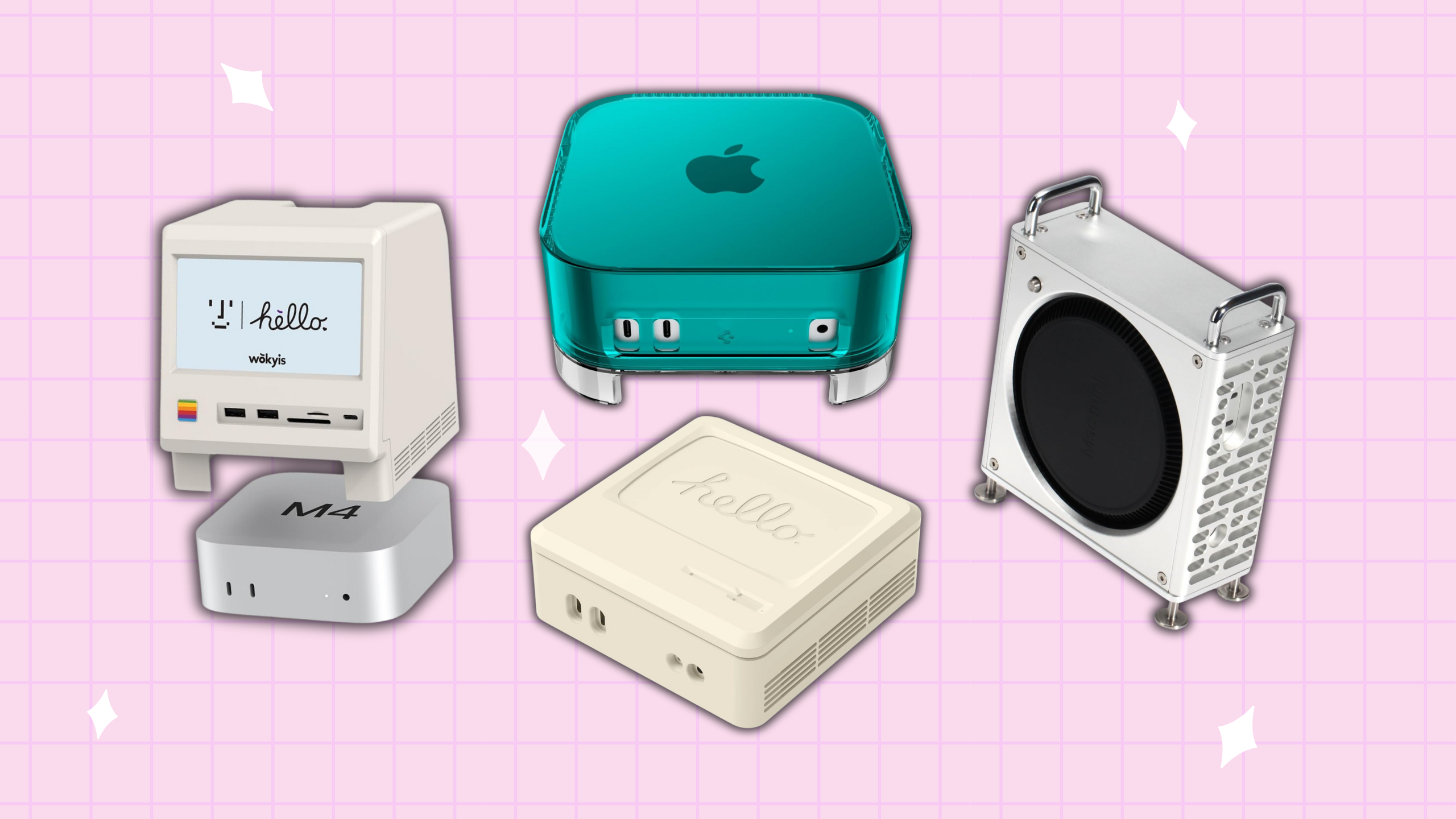
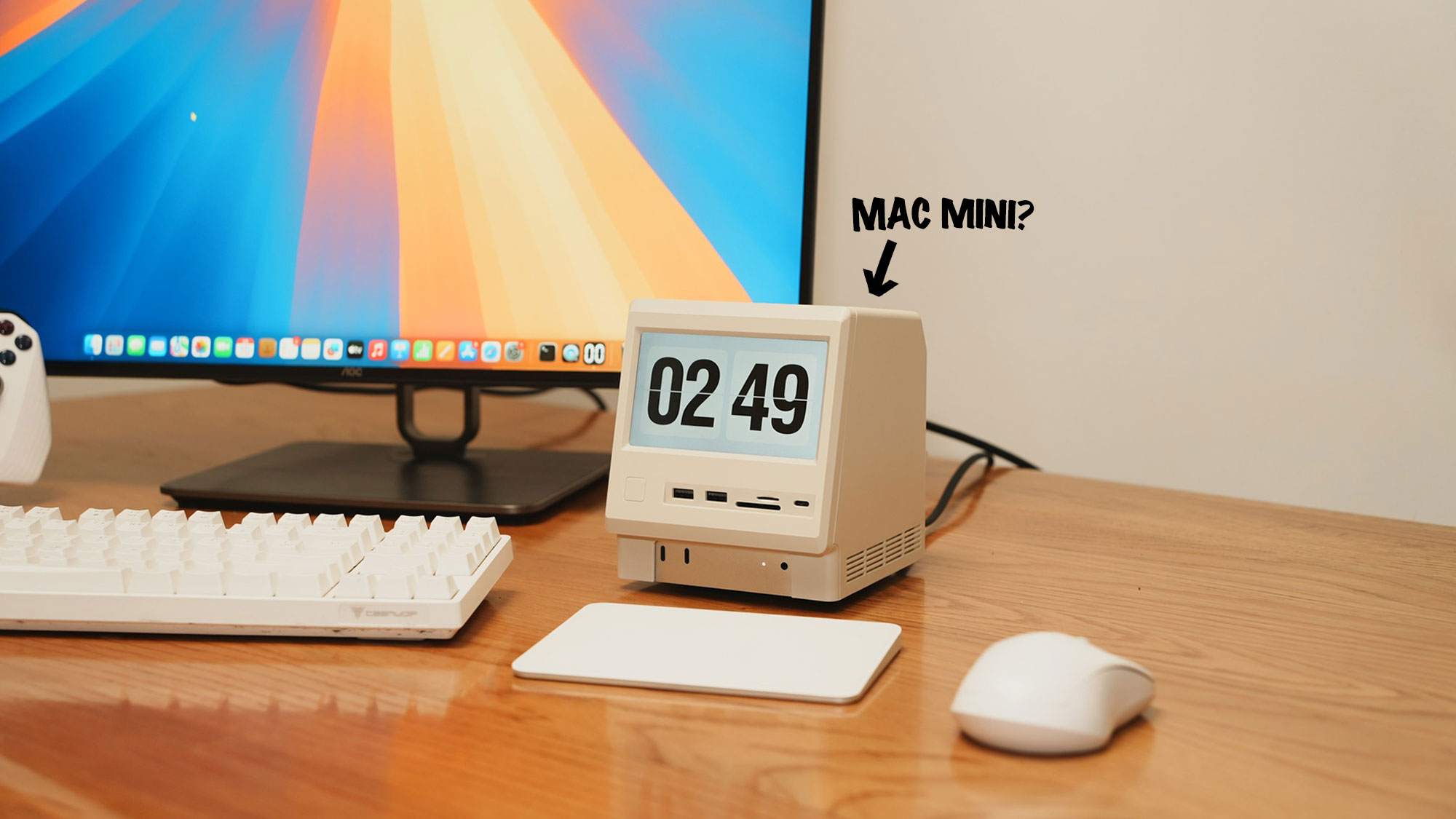
The Wokyis Retro Dock is not trying to be invisible. Its Macintosh-inspired styling and built-in screen make it the conversation piece of this group, and the 5-inch display is genuinely more useful than a decorative badge. It can show notifications, monitoring information, music lyrics, a clock, or a photo frame, giving the otherwise headless Mac mini a small secondary surface for information.
That display runs at 1280 by 720 with approximately 290 PPI clarity. It is not a replacement for a full monitor, but it can keep low-priority information away from the main workspace. The integrated dock design also lets the Mac mini slide directly into the station, which reduces cable clutter and makes the whole assembly feel more intentional than a loose hub and computer sitting side by side.
The storage bay accepts M.2 NVMe drives in 2230, 2242, 2260, and 2280 sizes, with capacity up to 8TB. The listing describes the enclosure as fanless, and the available model uses 10Gbps USB-C connectivity. The hub includes USB-A and USB-C connections, SD and microSD readers, an 8K DisplayPort connection, HDMI input, and a 3.5mm audio jack. That is a broad set of functions, although the exact behavior of each display and data connection deserves attention before building a specialized workstation around it.
This dock is a very different proposition from the Stouchi Mac mini M4 Dock or UGREEN Mac mini DP Hub. Those products focus on adding conventional ports and storage while staying visually quiet. Wokyis adds an interface surface and a retro object to the desk. It also lists compatibility with MacBook, Windows, and Android devices that support the DP protocol, but the physical fit and integrated design are most compelling with the Mac mini.
The drawback is the same feature that makes it interesting: the design takes up attention and space. Users who want a hidden computer or an uncluttered professional desk may find the screen unnecessary. The listing also mentions an 80Gbps Thunderbolt 5 version planned for a later launch, but the model covered here is the 10Gbps version. Choose Wokyis for the display and personality, not for a simple port expansion job.
5. Stouchi Mac mini M4 Dock: Best Practical Hub

Pros
- Combines eight ports with an SSD enclosure
- Accepts NVMe and SATA M.2 drives up to 8TB
- Includes HDMI 4K at 60Hz and audio
- Integrated power button and locking points
- Elevated vented design
Cons
- Lightweight plastic construction
- Built specifically for the Mac mini M4
- SSD is not included
Best for: M4 owners who want a straightforward dock for storage, displays, card readers, and everyday peripherals.
The Stouchi Mac mini M4 Dock takes a sensible approach to the common Mac mini problem: put the storage bay, useful ports, and power button in one place, then keep the computer held securely above them. Its four built-in anchor points are meant to prevent sliding, and the silicone pads add protection where the dock meets the desk. The orange-button version also makes the normally hidden Mac mini power control easy to find.
The enclosure supports M.2 NVMe and SATA drives in 2230, 2242, 2260, and 2280 formats, with capacity up to 8TB and transfer speeds up to 10Gbps. That makes it suitable for large project folders and backups, provided the installed drive itself can perform at that level. The SSD is not included, so installation is part of the setup rather than something that happens immediately after opening the box.
Its eight-port selection covers the basics well. Two USB-A 3.2 ports run at 10Gbps, two USB-A 2.0 ports are better reserved for a keyboard and mouse, and SD and TF readers are rated at 170MB/s. HDMI output reaches 4K at 60Hz, and a 3.5mm audio jack keeps headphones or speakers from consuming another adapter. Stouchi also claims conductive shielding to help prevent interference with 5GHz Wi-Fi, a useful concern for a dock that may sit directly beneath the computer.
The RayCue Mac mini Dock is more attractive if you need HDMI plus a broader mix of listed connections, while the UGREEN Mac mini M4 Dock & Stand gives you more high-speed USB ports. Stouchi's advantage is the balanced everyday layout and the locking fit. It is less concerned with premium aluminum presentation than Satechi, using lightweight plastic that the company says can also improve Wi-Fi performance.
That plastic body is the main compromise. It may not feel as substantial as the aluminum docks, and users with several fast drives should reserve the 10Gbps ports carefully. The two-year warranty is reassuring, but this is still a Mac mini M4-specific accessory. It is the right choice for a practical home or office desk where stability and a sensible port mix matter more than finish.
6. UGREEN Mac mini DP Hub: Best High-Refresh Hub

Pros
- DisplayPort supports high refresh rates
- M.2 NVMe enclosure supports up to 8TB
- Includes 10Gbps USB-A and USB-C data ports
- Adds SD, TF, and audio connections
- Power button lever and anti-slip pads
Cons
- DisplayPort is the key video connection
- SSD is not included
- The highest refresh capability depends on the Mac mini model
Best for: Mac mini M4 users pairing the computer with a high-refresh DisplayPort monitor.
The UGREEN Mac mini DP Hub is the specialist in this group. It looks like a storage dock at first glance, but its reason to exist is the DisplayPort output. The dock supports up to 4K at 144Hz with the Mac mini M4, while the listing says the Mac mini M4 Pro can reach 4K at 240Hz. That makes it a much more interesting fit for a fast monitor than a dock whose video connection stops at 4K and 60Hz.
The distinction between models matters here. A display must support the relevant resolution and refresh rate, and the Mac mini's own capabilities set the final ceiling. The dock can be combined with the Mac's Thunderbolt connection for a multi-screen setup, but it is not itself a complete multi-monitor command center. If you are still choosing the main panel, think about how refresh rate changes desktop motion and cursor clarity before making the dock the center of your decision.
Storage expansion is handled through an M.2 NVMe enclosure supporting 2230, 2242, 2260, and 2280 sizes, with capacity up to 8TB and 10Gbps transfer speeds. The hub also provides 10Gbps USB-A and USB-C data ports, plus SD and TF card access and audio. That keeps it from being a one-purpose video adapter. The included power button lever is useful when the dock is left in place, and anti-slip silicone pads help keep the computer aligned.
Compared with the RayCue Mac mini Dock, UGREEN is the obvious choice for a DisplayPort monitor, while RayCue is simpler for 4K HDMI at 60Hz. The standard UGREEN Mac mini M4 Dock & Stand is better for users who need a larger number of conventional USB ports. This DP model earns its place by serving a narrower but more demanding display setup.
Skip it if your monitor is HDMI-only or your work does not benefit from refresh rates above 60Hz. The high-refresh capability is also more relevant to the M4 Pro than to every M4 configuration. For the right monitor, though, it adds a cleaner path to smooth 4K desktop output without giving up storage expansion.
7. GEEKRIA Mac mini Travel Case: Best Travel Protection

Pros
- Hard EVA shell resists drops, dust, and splashes
- Holds the Mac mini and several peripherals
- Includes handles and shoulder straps
- Interior mesh pocket organizes cables
- Compatible with Mac mini M4, M4 Pro, and listed M5 models
Cons
- Not compatible with Mac Studio
- Larger than a case made for the computer alone
- Does not expand the Mac mini while in use
Best for: people who regularly move a Mac mini between home, office, studio, or travel locations.
The GEEKRIA Mac mini Travel Case solves a different problem from the docks above. It is for the person who treats the Mac mini as a portable desktop and needs to move the computer, keyboard, mouse, trackpad, charger, and cables together. The hard EVA shell is designed to protect against drops, scratches, bumps, splashes, and dust, while the soft textile interior keeps the computer from rubbing against the case.
The internal arrangement is more useful than a simple padded pouch. A zippered mesh pocket handles cables and cords, and an expanded side area can hold a Magic Keyboard, Magic Mouse, Magic Trackpad, charger, and other accessories. The case measures 13.1 by 6.7 by 3.1 inches, so it is clearly sized around a complete kit rather than only the small computer.
Handles and shoulder straps make the case easier to carry through an office or between work locations. Dual zippers are described as smooth and easy to use, though the trade-off for a full accessory load is a larger case. Users who only carry the Mac mini and one cable may find the extra space unnecessary. Those who routinely forget one peripheral will appreciate that the storage is built into the case instead of relying on a second bag.
Unlike the dock stands, GEEKRIA does not add ports, storage, cooling, or a power button. It complements a dock rather than replacing one. A portable setup could pair the case with the UGREEN Mac mini M4 Dock & Stand at the destination, then leave that dock on the desk while the computer travels separately.
The compatibility wording covers the 2024 Mac mini M4, M4 Pro, and the listed 2026 Mac mini M5, but not Mac Studio. That is the detail to check before ordering. Choose this case if the Mac mini is part of a mobile workstation, and skip it if the computer will never leave its desk.
8. TotalMount Mac mini Mount: Best Hidden Mount
Pros
- Supports desk, wall, and monitor mounting
- Metal-free construction avoids blocking Wi-Fi antennas
- Ventilation channels promote airflow
- Leaves access to the underside power button
- Includes screws, straps, and rubber inserts
Cons
- Adds no ports or storage
- Installation location requires careful planning
- Not compatible with Mac mini models purchased before October 2024
Best for: users who want the Mac mini off the desk without restricting cooling or wireless performance.
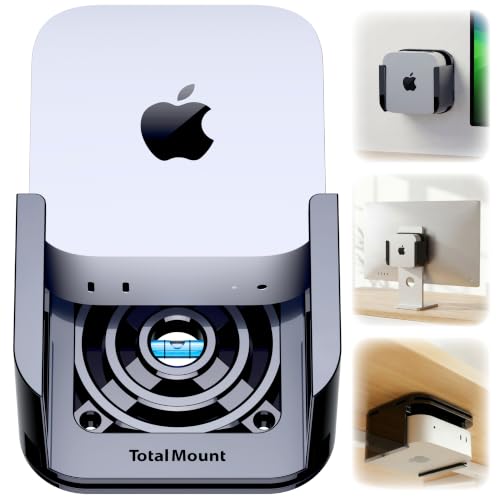
The TotalMount Mac mini Mount is the cleanest answer for a desk where every inch matters. Instead of putting the computer under a hub, it holds the Mac mini beneath a desk, on a wall, or against a monitor. That can make cables easier to route and leave the work surface open for a keyboard, notebook, or external drive.
The mount uses metal-free pro-grade resin, rubber inserts, and a glossy piano-black exterior. The nonmetal construction is important because the product is designed not to block the Mac mini's Wi-Fi antenna. It also protects the computer from direct contact with the mount. For monitor installation, included straps are used instead of VESA holes, which helps with displays that do not provide a standard mounting pattern.
Cooling is another reason to choose it over an improvised adhesive mount. TotalMount describes patented ventilation channels that allow air to flow around the Mac mini. The mount leaves enough space to reach the underside power button, so turning the computer on does not require removing it. Desk screws and rubber bumpers provide a more secure attachment than adhesive, while wall screws are included for wall installation.
This is not a competitor to the Satechi Mac mini M4 Hub & Stand or Stouchi Mac mini M4 Dock in terms of connectivity. It is better viewed as the physical foundation for a separate hub or drive. If you want to build a compact workstation, planning where the computer, display, and cables should sit can prevent the awkward reach and cable tension that appear after mounting.
The biggest limitation is that installation commits you to a location. Moving the computer later means removing screws or repositioning straps, and the mount does not solve the Mac mini's lack of front ports. It is a strong choice for a fixed desk, wall-mounted media setup, or monitor-back installation, but not for anyone who regularly rearranges their workspace.
9. Satechi M1 and M2 Hub: Best for Older Mac mini Models

Pros
- Supports both NVMe and SATA M.2 storage
- Adds seven front-facing connections
- Includes USB-C, USB-A, card readers, and audio
- Aluminum stand includes ventilation
- Two-year limited warranty
Cons
- Not compatible with Mac mini M4
- Storage enclosure does not accept every M.2 size
- USB-A ports do not support Apple SuperDrive or iPad charging
Best for: Mac mini M1 and M2 owners who want a matching stand with storage expansion.
The Satechi M1 and M2 Hub is included for an important reason: it is a good accessory for the previous Mac mini generations, but it is the wrong accessory for the M4. Satechi designed this stand around the Mac mini M1 and M2, and the precise fit is part of its appeal. It gives older machines the same kind of front-access expansion that newer M4 docks provide.
The enclosure accepts M.2 NVMe PCIe, NGFF SATA, and SATA drives in 2242, 2260, and 2280 sizes, with transfer speeds up to 10Gbps. It does not support Mac mini M4, and it also does not accept SSDs with pre-installed heatsinks. Those compatibility notes are not minor details. They should be checked before buying either the stand or a drive for it.
The seven-in-one front expansion includes a 10Gbps USB-C port, one 10Gbps USB-A port, two USB-A ports at 5Gbps, microSD and SD readers rated up to 104MB/s, and a 3.5mm headphone jack. That is enough for a compact office setup, camera cards, headphones, and a fast external device. USB-A ports do not support CD readers, Apple SuperDrive, or iPad charging, and Satechi advises connecting only one bus-powered device at a time.
The aluminum body includes air vents for airflow and is designed to match the M1 and M2 Mac mini or Mac Studio aesthetic. It is a more polished stand than a loose USB hub, and the included screw, screwdriver, and thermal pad make the SSD installation reasonably approachable. For M4 owners, the Satechi Mac mini M4 Hub & Stand is the relevant alternative, with a different fit and a newer port layout.
The deal-breaking weakness is generation compatibility. This is not a universal Mac mini stand, and using it with an M4 is specifically ruled out. For an M1 or M2 owner, it remains a coherent way to add storage and front ports without abandoning the computer's original design.
How to choose Best Mac Mini Accessories
The right Mac mini accessory depends on whether your main problem is missing ports, external storage, display output, cooling, portability, or desk space. These are the factors that separate a useful upgrade from a hub that simply adds clutter.
Mac mini generation
Start with the exact Mac mini generation. The Satechi M1 and M2 Hub is not compatible with the M4, while the Satechi M4 Hub, UGREEN M4 docks, RayCue, and Stouchi are designed around the newer computer. A precise physical fit affects the stand, power button alignment, cable path, and whether the computer sits securely.
Storage enclosure
An integrated M.2 enclosure is useful when you want a permanent working drive beneath the computer. Check whether it accepts NVMe, SATA, or both, then confirm the supported drive lengths such as 2230, 2242, 2260, and 2280. Heatsink clearance matters too. Some docks reject double-sided or heatsink-equipped drives, and none of these enclosures includes the SSD itself.
A dock with an empty drive bay is an expansion plan, not extra storage on day one.
Port speeds and layout
Port count alone does not tell you how a dock will behave. A 10Gbps USB-A or USB-C connection is suited to fast storage, while USB-A at 480Mbps is better for a keyboard or mouse. Front-facing card readers are convenient for photographers, and a dedicated audio jack can free a USB port. If you connect several bus-powered devices, check whether the dock needs an external power adapter.
Display output
Choose the video connection around your monitor. RayCue provides HDMI at 4K and 60Hz, while the UGREEN DP Hub is aimed at DisplayPort screens reaching 4K at 144Hz with the M4 and higher capability with the M4 Pro. Confirm the computer, dock, cable, and monitor all support the resolution and refresh rate you want. A dock that supports only one external monitor is not the same as a multi-display station.
Cooling and physical placement
A stand should not block the Mac mini's airflow or make the power button harder to reach. Vented docks such as the Satechi M4 Hub and Stouchi raise the computer while leaving room for air movement. TotalMount takes the more radical approach by moving the Mac mini under a desk, onto a wall, or behind a monitor. Fixed mounting can save space, but it makes later rearrangement less convenient.
Portability
A travel case needs room for the computer and the accessories that make it usable. The GEEKRIA case has separate areas for a keyboard, mouse, trackpad, charger, and cables, but that also makes it larger than a simple computer sleeve. If the Mac mini stays put, a dock is more useful. If it moves between locations, organized protection matters as much as desk expansion.
Frequently asked questions
Which dock is best for a Mac mini M4?
The UGREEN Mac mini M4 Dock & Stand is the strongest all-purpose option because it combines an M.2 NVMe enclosure, 11 ports, card readers, a power button lever, and support for up to 8TB. Choose the Satechi M4 Hub instead if you prefer a more refined aluminum body and a faster UHS-II SD reader.
Can these Mac mini docks add internal storage?
They add storage through an integrated M.2 enclosure rather than changing Apple's internal storage. The UGREEN, RayCue, and Stouchi options support drives up to 8TB according to their listings, but the SSD must be purchased and installed separately.
Is the Satechi M1 and M2 Hub compatible with Mac mini M4?
No. The Satechi M1 and M2 Hub is designed for Mac mini M1 and M2 and is specifically listed as not compatible with Mac mini M4. M4 owners should use a dock designed around the newer chassis.
Which Mac mini accessory supports a high refresh rate?
The UGREEN Mac mini DP Hub is the high-refresh option in this group. Its DisplayPort connection is listed for up to 4K at 144Hz with Mac mini M4 and up to 4K at 240Hz with Mac mini M4 Pro, assuming the monitor and the rest of the connection support those modes.
Do Mac mini docks support more than one external monitor?
Not all of them do. RayCue states that its HDMI connection supports one external monitor, while the UGREEN DP Hub can be combined with the Mac's Thunderbolt connection for a multi-screen setup. Check the computer's display capability and the dock's specific video connections before planning a multi-monitor desk.
Does a Mac mini dock include an SSD?
No. The docks with M.2 enclosures provide the enclosure, mounting hardware, and in some cases a thermal pad, but the SSD is not included. Check the supported interface, length, and heatsink restrictions before buying a drive.
What is the safest way to mount a Mac mini under a desk?
A purpose-built mount such as TotalMount is preferable to adhesive because it uses desk screws and rubber bumpers, leaves access to the power button, and includes ventilation channels. Plan the cable route first so the power and display leads are not pulled sideways after installation.
The bottom line
The UGREEN Mac mini M4 Dock & Stand is the best starting point for most M4 owners because it covers storage, fast USB connections, card readers, and everyday desk organization in one compact accessory. The Satechi Mac mini M4 Hub & Stand is the better alternative when aluminum construction and a fast UHS-II card reader matter more than having the largest port selection.
For a more specific setup, choose the UGREEN Mac mini DP Hub for a high-refresh DisplayPort monitor, the GEEKRIA Mac mini Travel Case for a mobile workstation, or TotalMount Mac mini Mount for a hidden installation. These Best Mac Mini Accessories are not interchangeable, so the right choice follows the problem you are trying to solve.
If you are undecided, start by confirming your Mac mini generation, monitor connection, and SSD format before choosing a dock.
As an Amazon Associate we earn from qualifying purchases.