

Xfinity customers face one easy-to-miss decision before they connect a new modem: do they need a modem only, or a complete gateway with Wi-Fi built in? The distinction affects every device in the home, from a single desktop to a house full of streaming boxes, phones, consoles, and smart-home gear. A modem also has to match the cable plan, since an older DOCSIS 3.0 model can become the bottleneck long before the service itself does.
We compared ten compatible cable modems and modem router combos, including multi-gig DOCSIS 3.1 models, straightforward gigabit choices, and a DOCSIS 3.0 option for more modest plans. NETGEAR CAX30 is the single best pick for most Xfinity households, while the rest of the list covers dedicated modem setups, higher upload capacity, and simpler systems.
Comparison table
| # | Product | Award | Technology | Maximum stated plan | Ethernet | Best for |
|---|---|---|---|---|---|---|
| 1 | NETGEAR CAX30 | Best overall | DOCSIS 3.1, Wi-Fi 6 | 2.7 Gbps | Four 1 Gigabit ports | Homes replacing both modem and router |
| 2 | ARRIS SB8200 | Best dedicated modem | DOCSIS 3.1 | Up to 2 Gbps | Two 1 Gigabit ports | Existing router owners |
| 3 | NETGEAR CM3000 | Best for fastest plans | Mid/high-split DOCSIS 3.1 | Up to 2.5 Gbps | One 2.5 Gigabit, two Gigabit | Multi-gig Xfinity service |
| 4 | Hitron CODA56 2.5Gbps | Best simple multi-gig modem | DOCSIS 3.1 | Up to 2.5 Gbps | One 2.5 Gigabit | Separate router setups |
| 5 | Hitron CODA56 Black | Best for router upgrades | DOCSIS 3.1 | Up to 2.5 Gbps | One 2.5 Gigabit | Homes with a 2.5GbE router |
| 6 | NETGEAR CM2500 | Best mid-range multi-gig modem | Mid/high-split DOCSIS 3.1 | Up to 2 Gbps | Two Gigabit with aggregation | Faster plans below 2.5 Gbps |
| 7 | NETGEAR CM3000 Retail | Best future-ready modem | Mid/high-split DOCSIS 3.1 | Up to 2.5 Gbps | One 2.5 Gigabit, two Gigabit | Existing Wi-Fi 6E or Wi-Fi 7 routers |
| 8 | ARRIS SB8200 Renewed | Best renewed option | DOCSIS 3.1 | Up to 1 Gbps | Two 1 Gigabit ports | Basic cable plans |
| 9 | Hitron CODA Renewed | Best compact gigabit modem | DOCSIS 3.1 | Up to 1 Gbps | One 1 Gigabit port | Small homes with a separate router |
| 10 | NETGEAR CM500 | Best for slower plans | DOCSIS 3.0 | Up to 400 Mbps | One 1 Gigabit port | Older, slower Xfinity service |
1. NETGEAR CAX30: Best Overall

Pros
- Combines a DOCSIS 3.1 modem and Wi-Fi 6 router
- Four 1 Gigabit Ethernet ports
- Supports up to 25 concurrent devices
- Covers up to 2, 000 square feet
- Includes a USB 3.0 port
Cons
- Not compatible with fiber, DSL, or bundled voice service
- NETGEAR Armor protection starts with a 30-day trial
- No multi-gig Ethernet port is listed
Best for: households that want one device to handle both cable access and home Wi-Fi.
The NETGEAR CAX30 is the easiest recommendation because it removes the most common source of setup confusion: buying a modem and then discovering that a separate router is still required. Its DOCSIS 3.1 modem sits alongside a dual-band Wi-Fi 6 router, so one unit handles the coax connection, wireless network, and wired devices. That makes it especially practical for an apartment or a moderate-size home where a separate mesh system would be unnecessary.
The wireless side is rated as AX2700, and the listed coverage is up to 2, 000 square feet with up to 25 concurrent devices. Those figures do not guarantee identical performance in every floor plan, but they explain the role of this gateway. It is aimed at a busy household with phones, laptops, streaming players, game consoles, and smart-home equipment rather than a single wired workstation. Four 1 Gigabit Ethernet ports leave room for consoles, a desktop, and other fixed devices, while the USB 3.0 port can connect compatible storage or peripherals.
The stated combined throughput is 2.7 Gbps, but the wired ports are 1 Gigabit connections, so this is not the right design for someone building around a 2.5 Gigabit Ethernet router or a multi-gig wired backbone. That is where the dedicated NETGEAR CM3000 and Hitron CODA56 have a clear advantage. The CAX30 wins on simplicity, not on the highest ceiling for a future wired network. Its Nighthawk app is intended for setup and management, which is useful when the alternative is juggling separate modem and router interfaces.
There are two important limits. This is for cable service, not Verizon, AT&T, CenturyLink, DSL, fiber, or satellite, and the data lists it as incompatible with bundled voice service. The NETGEAR Armor feature also includes a 30-day trial rather than a permanently included subscription. Xfinity customers who already own a capable router should skip this combo and choose the ARRIS SB8200 or another modem-only model instead.
For everyone else, the CAX30 is the most coherent package in the group. It gives a household a modern DOCSIS 3.1 connection, Wi-Fi 6, four wired ports, and a manageable footprint without requiring a networking project. Readers deciding between a gateway and separate devices can also see how a single gateway changes the setup before choosing.
2. ARRIS SB8200: Best Dedicated Modem

Pros
- DOCSIS 3.1 support
- Supports cable plans up to 2 Gbps
- Two 1 Gigabit Ethernet ports
- Compact 5.25 by 5.13-inch footprint
- Compatible with Xfinity, Cox, and Spectrum
Cons
- Requires a separate Wi-Fi router
- Not compatible with fiber, DSL, or satellite
- Does not provide wireless coverage by itself
Best for: Xfinity customers who already have a router or mesh system they want to keep.
The ARRIS SB8200 is the classic separate-modem choice in this group. It does one job and leaves Wi-Fi to the router you select. That division is useful when the existing router already handles coverage, parental controls, guest networks, or a wired setup that would be awkward to replace. It also avoids paying attention to the wireless features of a combo unit that may sit next to a stronger mesh system.
ARRIS lists DOCSIS 3.1 performance for cable plans up to 2 Gbps, while the product title references plans up to 1 Gbps. The important practical point is that the modem is designed for current DOCSIS 3.1 service, but Xfinity still needs to approve the exact model for the customer’s plan. It has two 1 Gigabit Ethernet ports, giving it more flexibility than a basic one-port modem, although the data does not state that those ports can be aggregated for a faster single connection.
The compact body measures 5.25 inches high, 5.13 inches wide, and 1.75 inches long. Discrete LEDs show power, upstream and downstream activity, and online status without turning the modem into a bright piece of furniture. Setup follows the familiar sequence: connect coax, power it on, activate it with the provider, then attach a router. That last step is not optional. The SB8200 is a modem only.
Compared with the CAX30, the SB8200 is less convenient on day one but more adaptable if the wireless network is already settled. The Hitron CODA56 models offer a 2.5 Gigabit Ethernet port for a newer multi-gig router, while the SB8200 makes more sense for a household whose network remains within Gigabit Ethernet. It also does not support fiber, DSL, or satellite service, so the cable connection type must be confirmed first.
The weak point is simple: buying it alone does not create Wi-Fi. Anyone replacing an all-in-one gateway will need a separate router or mesh system and another activation step. For readers who want to understand the trade-offs among standalone cable models, the modem features that shape everyday use are more important than the status lights or exterior styling.
3. NETGEAR CM3000: Best for Fastest Plans

Pros
- Mid/high-split DOCSIS 3.1 support
- Up to 2.5 Gbps download and 1 Gbps upload
- One 2.5 Gigabit port
- Two Gigabit ports can support link aggregation
- Designed for high-speed Xfinity plans
Cons
- Requires a separate router
- Made for use in the US only
- More capability than slower plans can use
Best for: Xfinity customers with multi-gig service and a router that has a 2.5 Gigabit WAN port.
The NETGEAR CM3000 is the modem to choose when upload performance matters nearly as much as downloads. Its mid/high-split DOCSIS 3.1 design is built around newer cable network capacity, with stated support for up to 2.5 Gbps download and 1 Gbps upload. That makes it a different class of device from the SB8200, even though both are modem-only products.
The hardware has a 2.5 Gigabit port for a compatible router. That single port is the cleanest way to connect a multi-gig Wi-Fi 6E or Wi-Fi 7 system, since the router can receive more than a Gigabit from the modem. NETGEAR also lists two Gigabit ports that can be connected to a router with link aggregation for up to 2 Gbps. The right approach depends on the ports available on the router, and a standard 1 Gigabit WAN port will not expose the modem's full potential.
The high upload ceiling is meaningful for households that send large files, run remote access to a NAS, upload video, use home security cameras, or hold several video calls while other people are online. NETGEAR specifically positions the modem for Xfinity's faster service tiers and other major US providers. The capacity is not just a download figure printed on the box, although the provider and local network still determine what service is actually available.
The drawback is the equipment around it. There is no Wi-Fi, so a separate router is required, and the router must have a suitable multi-gig WAN connection to make the most of the 2.5 Gigabit port. The Hitron CODA56 also offers 2.5 Gigabit Ethernet, but the CM3000 provides the more capable upload-oriented mid/high-split design and a second connection method through aggregation. Customers on a slower plan should not buy this modem simply because the headline number is larger.
This is the strongest dedicated modem here for a demanding Xfinity setup. It is the right foundation for a multi-gig network with serious uploads, provided the router and service plan match it. Anyone building a complete wireless system should first consider which router features matter after the modem.
4. Hitron CODA56 2.5Gbps: Best Simple Multi-Gig Modem
Pros
- Up to 2.5 Gbps service support
- 2.5 Gigabit Ethernet port
- DOCSIS 3.1 with 32x8 channel bonding
- Compact 6.73-inch square footprint
- Supports Xfinity, Spectrum, and Cox cable service
Cons
- One Ethernet port
- No Wi-Fi or voice service
- Not compatible with fiber, DSL, or satellite
Best for: users who want a straightforward multi-gig modem for a separate router.
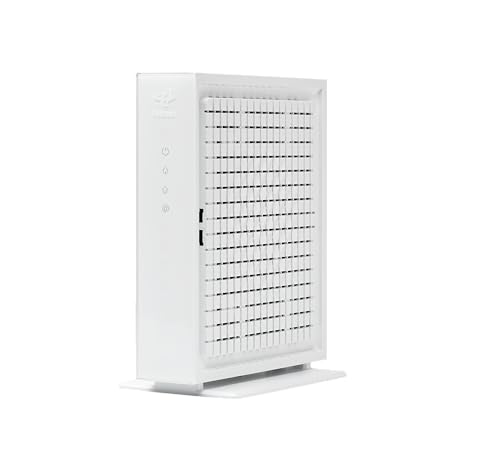
The Hitron CODA56 2.5Gbps keeps the modem role deliberately narrow. It connects to the coax line and passes the connection to a separate router through a 2.5 Gigabit Ethernet port. There is no wireless network to configure and no second Ethernet port to wonder about. For someone who already owns a suitable router, that can be exactly the right amount of hardware.
Hitron states support for plans up to 2.5 Gbps and identifies the modem for cable providers including Xfinity, Spectrum, and Cox. DOCSIS 3.1 and 32x8 channel bonding provide the underlying cable technology, while the 2.5 Gigabit port keeps the Ethernet connection from becoming an immediate limit on a multi-gig plan. A router with only a 1 Gigabit WAN port will still work, but it cannot use the modem's full connection capacity.
The physical design is compact at 6.73 inches long and wide and 2.03 inches high. The modem weighs about 1.02 pounds according to the listed product information. Those dimensions make it easy to place beside a router or on a shelf, though the square body occupies more surface area than some slim modem designs. Hitron also lists technical support seven days per week and warranty coverage, useful considerations for a device that sits at the center of the home connection.
The limitation is not hidden, but it is easy to overlook when shopping. The CODA56 has one Ethernet port and no Wi-Fi, voice support, or router function. It also will not work with fiber, DSL, satellite, or fixed wireless service. The NETGEAR CM3000 is the better technical fit for the fastest upload-focused plans, while the CODA56 is a simpler choice when the need is a 2.5 Gigabit handoff to an existing router.
Choose this model when the network plan is already clear and the router is ready. It is less suitable for someone expecting one box to create a wireless network or connect multiple wired devices directly.
5. Hitron CODA56 Black: Best for Router Upgrades

Pros
- DOCSIS 3.1 cable technology
- Supports plans up to 2.5 Gbps
- 2.5 Gigabit Ethernet port
- Designed for Xfinity, Spectrum, and Cox
- Supports gaming, streaming, and video calls
Cons
- Requires a separate Wi-Fi router
- One Ethernet port only
- Not for fiber, DSL, satellite, or fixed wireless
Best for: households upgrading the router separately and needing a 2.5 Gigabit modem connection.
The Hitron CODA56 Black is another modem-only platform built for the point where a Gigabit connection is no longer enough for the network behind it. Its job is to provide a DOCSIS 3.1 cable connection and hand it to a router over 2.5 Gigabit Ethernet. The listed plan support reaches 2.5 Gbps, with Xfinity, Spectrum, and Cox called out among the compatible providers.
This version is especially easy to understand if the router is being upgraded separately. A 2.5 Gigabit WAN port on the router is required for full multi-gig throughput, and the modem cannot create Wi-Fi without that router. The setup is therefore more modular than the CAX30. That is a benefit for someone who wants to change wireless coverage later, but a complication for anyone hoping to replace a single rented gateway with one standalone box.
Hitron describes the modem as suitable for gaming, 4K streaming, and video calls, and notes backward compatibility with DOCSIS 3.0 networks. Those capabilities are useful when several demanding activities overlap, but they do not turn the device into a router. A wired computer can connect through the router, not directly to multiple modem ports, because there is only one Ethernet connection.
The physical layout is unusually long and slim, with listed dimensions of 8.13 inches by 7 inches by 1.77 inches. It weighs about 1.02 pounds. The shape may fit neatly in a horizontal equipment shelf, but it is worth checking the available depth before placing it beside a router. The white CODA56 listed above has a different physical presentation, yet both have the same central requirement: cable service and a separate router.
The real weakness is the one-port design. It is clean for a modern router upgrade, but it offers no fallback for a second wired device and no wireless backup. Choose the NETGEAR CM2500 or CM3000 when mid/high-split upload capability is the priority. Choose this CODA56 when a simple 2.5 Gigabit connection is all the network needs.
6. NETGEAR CM2500: Best Mid-Range Multi-Gig Modem

Pros
- Mid/high-split DOCSIS 3.1 technology
- Up to 2 Gbps download and 1 Gbps upload
- Two Gigabit ports with link aggregation
- Designed for major US cable providers
- Supports high-upload activities
Cons
- No Wi-Fi built in
- Not compatible with Xfinity Voice plans
- Requires a separate router
Best for: Xfinity customers moving to faster service without needing the CM3000's full 2.5 Gbps ceiling.
The NETGEAR CM2500 occupies the useful middle ground between ordinary DOCSIS 3.1 modems and the CM3000. It supports mid/high-split service with stated speeds up to 2 Gbps downstream and 1 Gbps upstream. That upload figure is the reason to look at it instead of a conventional Gigabit modem. Large uploads, cloud backups, remote camera access, and simultaneous video calls benefit from more upstream capacity.
There is no 2.5 Gigabit port listed for this model. Instead, NETGEAR describes two Gigabit ports that can connect to a compatible router using link aggregation for up to 2 Gbps. That arrangement requires router support and more deliberate configuration, so it is not as straightforward as plugging a single 2.5 Gigabit cable into a matching router. Still, it gives this modem a useful path to the stated download ceiling.
The CM2500 is designed for major US internet providers and is specifically associated with faster Xfinity service. It works with a separate Wi-Fi 6E or Wi-Fi 7 router or Orbi system, according to the product details. That makes it a component for a planned network rather than a drop-in replacement for a complete gateway. The modem itself does not provide wireless coverage, and the data calls out that it is not compatible with Xfinity Voice plans.
The CAX30 is easier for a typical family because it includes Wi-Fi and four local Ethernet ports. The Hitron CODA56 is simpler for a router owner who wants one 2.5 Gigabit handoff. The CM2500 earns its place when upload performance and mid/high-split support matter, but the customer does not need the CM3000's 2.5 Gbps port and maximum download figure.
Skip it if the Xfinity plan includes voice service or if the router cannot use link aggregation. For a separate-router household with compatible service, it is a capable bridge between standard gigabit hardware and the fastest modem platforms.
7. NETGEAR CM3000 Retail: Best Future-Ready Modem
Pros
- Up to 2.5 Gbps download and 1 Gbps upload
- Mid/high-split DOCSIS 3.1 support
- 2.5 Gigabit port for a compatible router
- Two Gigabit ports support link aggregation
- Works with major US cable providers
Cons
- Wi-Fi router sold separately
- Needs compatible multi-gig networking hardware
- Made for use in the US only
Best for: buyers who want a high-capacity modem to pair with an existing premium router.
The NETGEAR CM3000 Retail is the alternate listing of the CM3000 platform above, and its role in a home network is the same: a high-capacity modem for a separate router. It supports up to 2.5 Gbps download and 1 Gbps upload through mid/high-split DOCSIS 3.1 technology. For someone planning around a Wi-Fi 6E, Wi-Fi 7, or Orbi system, this is the kind of modem that will not immediately constrain the router's WAN connection.
The 2.5 Gigabit port is the important connection here. It allows a compatible router to receive a multi-gig connection over one Ethernet cable. NETGEAR also lists two Gigabit ports with link aggregation support for up to 2 Gbps, giving owners another path if their router does not have a 2.5 Gigabit WAN port but does support aggregation. Neither feature helps a basic router with a single 1 Gigabit WAN port, so the rest of the network needs to be considered before buying.
This modem is physically larger than the Hitron CODA56, with listed dimensions of 9.21 inches long, 8.74 inches wide, and 4.8 inches high. That can matter in a crowded network cabinet or on a shallow shelf. It is not a wireless product, so placement is more about coax access, ventilation, and a short run to the router than about maximizing radio coverage.
The CM3000 Retail is hard to separate from the other CM3000 listing on capability. The choice should come down to the listing details and the buyer's preferred purchasing arrangement, not to an expectation of different modem technology. Compared with the CM2500, it offers the higher stated download ceiling and a 2.5 Gigabit port. Compared with the CAX30, it gives up all-in-one convenience for greater flexibility and capacity.
Its weakness is the same as its strength: it assumes the owner is building a separate network. If the router is basic or the plan is well below multi-gig, this is unnecessary hardware. If the network is being built around high-speed cable service and a premium router, it is one of the most capable foundations here.
8. ARRIS SB8200 Renewed: Best Renewed Option

Pros
- DOCSIS 3.1 support
- Two 1 Gigabit Ethernet ports
- Approved for Xfinity, Cox, and Spectrum
- Compact design
- Supports plans up to 1 Gbps
Cons
- Does not include Wi-Fi
- Does not support digital voice service
- Renewed condition
Best for: customers who want a basic DOCSIS 3.1 modem for a plan up to 1 Gbps.
The ARRIS SB8200 Renewed is the familiar SB8200 design in a renewed listing. It makes sense for a straightforward cable setup where the plan is capped at 1 Gbps and the owner already has a router. The modem is approved for Xfinity, Cox, Spectrum, and other US cable providers, but it is not a universal broadband device. Fiber, DSL, satellite, and bundled voice service are excluded.
Its technical layout combines 32 downstream by 8 upstream DOCSIS 3.0 bonded channels with two downstream by two upstream OFDM DOCSIS 3.1 channels. That wording matters because it shows how the modem handles both newer and older cable network arrangements. Two 1 Gigabit Ethernet ports provide more connection flexibility than the single port on the Hitron CODA Renewed, though the listing does not promise a faster single connection through aggregation.
The renewed condition is the main distinction from the new ARRIS SB8200 above. That may make this listing appealing to a buyer who wants the SB8200 platform for a conventional gigabit plan, but the unit should be treated as a renewed product rather than assumed to be factory-new. It also lacks Wi-Fi and voice support, so a separate router remains necessary and a household with Xfinity Voice needs another solution.
The CAX30 is a better fit when a single box and wireless coverage are wanted. The newer ARRIS SB8200 is a more natural rival when the buyer wants the same modem-only layout without a renewed listing. The Hitron CODA Renewed offers similar plan capacity but only one 1 Gigabit Ethernet port, while the ARRIS provides two.
Do not choose it for a multi-gig plan or for a phone bundle. For basic Xfinity data service and an existing router, though, it covers the essential DOCSIS 3.1 requirements in a compact enclosure.
9. Hitron CODA Renewed: Best Compact Gigabit Modem

Pros
- DOCSIS 3.1 technology
- Supports plans up to 1 Gbps
- One 1 Gigabit Ethernet port
- Works with Xfinity, Spectrum, and Cox
- Compatible with Wi-Fi routers and mesh systems
Cons
- Does not include Wi-Fi
- Not compatible with voice service
- Renewed condition
Best for: smaller homes with a separate router and a cable plan up to 1 Gbps.
The Hitron CODA Renewed is a modest DOCSIS 3.1 modem for households that do not need multi-gig Ethernet. It supports cable plans up to 1 Gbps and connects to a separate Wi-Fi router or mesh system. The setup is uncomplicated: coax into the modem, Ethernet from the modem to the router, then activation with the provider.
Hitron lists two downstream and two upstream OFDM DOCSIS 3.1 channels, along with backward compatibility with DOCSIS 3.0 networks. That gives the modem a modern cable foundation while keeping it suitable for networks that have not moved entirely to the newest standard. The one 1 Gigabit Ethernet port is enough for the intended plan range, but it leaves no extra wired connection at the modem itself.
The enclosure is listed at 6.73 inches long and wide and 2.03 inches high, with a listed weight of 1.8 pounds. That compact footprint is easy to place beside a router, though the unit is heavier than some of the other small modems here. Hitron also describes a three-step setup and compatibility with Xfinity, Spectrum, Cox, and several other cable providers.
The renewed condition is a meaningful caveat, and the modem has a narrower ceiling than the CODA56 models or the NETGEAR CM2500. It is also not compatible with fiber, DSL, fixed wireless, satellite, or bundled voice service. The ARRIS SB8200 Renewed is the stronger alternative for a buyer who wants two 1 Gigabit Ethernet ports, while the CODA is the more compact single-port choice.
This modem fits a simple network that already has a router and does not need more than Gigabit service. It is not the model to buy in anticipation of a near-term multi-gig upgrade.
10. NETGEAR CM500: Best for Slower Plans

Pros
- DOCSIS 3.0 technology
- 16x4 channel bonding
- One 1 Gigabit Ethernet port
- Works with a separate Wi-Fi router
- Compatible with Xfinity and Cox
Cons
- Limited to slower plan tiers
- Older DOCSIS 3.0 standard
- No Wi-Fi built in
Best for: customers with slower Xfinity service who do not need DOCSIS 3.1 or multi-gig capability.
The NETGEAR CM500 is the outlier in this roundup because it uses DOCSIS 3.0 rather than DOCSIS 3.1. That is not automatically a problem for a slower service tier. NETGEAR lists 16x4 channel bonding and support for Xfinity plans up to 200 Mbps, with Cox support up to 150 Mbps. The product title mentions plans up to 400 Mbps, so customers should confirm the exact supported tier with Xfinity before activation.
One 1 Gigabit Ethernet port connects the modem to a computer or a separate Wi-Fi router. The modem itself does not create wireless coverage, so it is a component rather than a complete home network. For a modest connection and an existing router, the layout is easy to understand. For a new multi-gig plan, it is the wrong starting point because both its DOCSIS generation and stated carrier speeds sit below the rest of this list.
The CM500 measures 7.28 inches wide, 4.88 inches long, and 2.36 inches high according to the listed product information. Its 16x4 channel bonding is an older approach than the DOCSIS 3.1 and OFDM configurations used by the other modems here. That does not prevent normal browsing, streaming, or video calls on a compatible plan, but it leaves less room for faster service tiers and future upgrades.
The weakness is its limited ceiling. The ARRIS SB8200 and Hitron CODA Renewed are more sensible if the Xfinity plan is already near 1 Gbps, while the CAX30 and multi-gig modems are built for more demanding service. Customers with Xfinity Voice also need to check compatibility, since the data provided here only describes internet connectivity.
Choose the CM500 only when the service tier is within its stated range and the goal is a basic modem connected to an existing router. Everyone else should start with a DOCSIS 3.1 model.

How to choose the best modem for xfinity
The right modem depends on the Xfinity plan, the type of home network behind it, and whether voice service is included.
DOCSIS generation
DOCSIS 3.1 is the sensible starting point for current cable service because it supports the newer OFDM channel structure and the higher plan ceilings represented by most models here. DOCSIS 3.0 can still fit a slower plan, as the NETGEAR CM500 shows, but it has less room for an upgrade. A modem cannot make an Xfinity plan faster than the service tier or local network allows.
Download and upload capacity
Look beyond the largest download number. The CM3000 and CM2500 advertise mid/high-split support with up to 1 Gbps upload capacity, which matters for cloud backups, large file transfers, remote cameras, and several simultaneous video calls. A modem with a high download ceiling but a slower upload design may be less suitable for a household that frequently sends data.
The modem should match the router's WAN port, not just the number printed on the internet plan.
Ethernet connection
A 1 Gigabit Ethernet port is appropriate for many ordinary cable plans. A 2.5 Gigabit port, as found on the Hitron CODA56 models and CM3000 listings, is needed to pass more than a Gigabit to a compatible router over one cable. The CM2500 and CM3000 also list link aggregation options through two Gigabit ports, but that requires a router that supports the feature.
Modem-only versus gateway
A modem-only device requires a separate Wi-Fi router or mesh system. That arrangement gives more control over coverage and makes later upgrades easier, but it adds another device and another interface. The CAX30 combines a DOCSIS 3.1 modem with dual-band Wi-Fi 6, four 1 Gigabit LAN ports, and a USB 3.0 port, making it the simpler choice for a household starting from scratch.
Provider and service compatibility
These products are cable modems, not general broadband modems. The listings identify Xfinity, Spectrum, and Cox compatibility, while also excluding combinations such as fiber, DSL, satellite, or fixed wireless. Voice service is another separate check: several modem-only models do not support it, and the NETGEAR CM2500 specifically excludes Xfinity Voice plans. Confirm the exact model and plan with Xfinity before activation.

Frequently asked questions
Can I use these modems with Xfinity?
The product data identifies Xfinity compatibility for all ten models, although the supported plan and service features differ. Confirm the exact model with Xfinity before purchasing or activating it, especially if the account includes voice service or a high-speed tier.
Do these modems provide Wi-Fi?
Only the NETGEAR CAX30 in this group combines a modem with a Wi-Fi router. The ARRIS, Hitron, and other NETGEAR modem-only models require a separate Wi-Fi router or mesh system.
Which modem supports the fastest Xfinity plans?
The NETGEAR CM3000 listings and Hitron CODA56 listings state support for plans up to 2.5 Gbps. The CM3000 adds mid/high-split support with a stated upload ceiling of 1 Gbps, while the CODA56 provides a 2.5 Gigabit Ethernet port for a compatible router.
Can a cable modem work with fiber internet?
No. The products in this roundup are designed for cable internet using a coaxial connection. The listings specifically exclude fiber, and several also exclude DSL, satellite, fixed wireless, or other non-cable services.
Do I need a 2.5 Gigabit router?
Not always. A 1 Gigabit router can work with a 2.5 Gigabit modem, but it will limit the connection between the modem and router to the router's WAN capability. To use the higher stated throughput, pair the modem with a router that has a 2.5 Gigabit WAN port or a compatible link aggregation setup.
Does a modem support Xfinity Voice?
Not every model does. The Hitron CODA56 and ARRIS SB8200 listings describe data-only operation, and the NETGEAR CM2500 is specifically listed as incompatible with Xfinity Voice plans. Check the voice requirement before choosing a modem-only model.
The bottom line
The NETGEAR CAX30 is the best modem for xfinity for most households because it combines DOCSIS 3.1 cable access with Wi-Fi 6, four 1 Gigabit ports, coverage for up to 2, 000 square feet, and support for up to 25 concurrent devices. For an existing router and a multi-gig Xfinity plan, the NETGEAR CM3000 is the stronger dedicated choice because its mid/high-split design, 2.5 Gigabit port, and stated upload capacity are built for a more demanding network.
The ARRIS SB8200 remains a sensible standalone modem for a conventional setup, while the Hitron CODA56 is a clean fit for a separate router with a 2.5 Gigabit WAN port. The renewed ARRIS and Hitron options cover simpler gigabit networks, and the CM500 belongs only with slower compatible plans.
If you are undecided, choose the CAX30 for an all-in-one home network, or choose the CM3000 when you already have a capable multi-gig router.
As an Amazon Associate we earn from qualifying purchases.