

A monitor stand takes up the exact desk space you are trying to reclaim. The right arm moves that bulky base out of the way, raises the screen to eye level, and lets you rotate or tilt the display without wrestling with the original stand. The wrong one droops, shakes, or simply cannot fit the monitor and desk you already own.
The Best monitor arms in this group cover everything from compact single-screen desks to 49-inch curved displays and vertically stacked pairs. Compatibility matters more than brand here, so check your monitor's VESA pattern, weight, and your desk's construction before ordering. Our top pick is the HUANUO FlowLift Single, with the ErGear Single Arm, WALI Ultrawide Arm, and dual-screen mounts covering the rest of the range.
Comparison table
| # | Product | Award | Screen support | Movement | Best for |
|---|---|---|---|---|---|
| 1 | HUANUO FlowLift Single | Best overall | 13 to 32 inches, 4.4 to 19.8 lb | Tilt, swivel, 360-degree rotation | Most single-monitor desks |
| 2 | HUANUO FlowLift Pro | Best mechanical spring arm | 13 to 32 inches, 4.4 to 19.8 lb | Tilt, swivel, 360-degree rotation | Frequent adjustments |
| 3 | ErGear Single Arm | Best reach | 13 to 34 inches, up to 19.8 lb | 17.5-inch height, 18.1-inch reach | Flexible single-screen layouts |
| 4 | WALI Ultrawide Arm | Best for ultrawides | 17 to 49 inches, up to 33 lb | 20.79-inch height, 21.14-inch reach | Large curved monitors |
| 5 | WALI GSMP001N | Best wide-range single arm | 13 to 34 inches, up to 26.4 lb flat | 17.3-inch height, 19.3-inch reach | Heavier regular screens |
| 6 | Acer Single Arm | Best for sit-stand use | 17 to 34 inches, 4.4 to 19.8 lb | 18.1-inch height, 360-degree rotation | Switching desk positions |
| 7 | HUANUO Dual Arm | Best dual-screen flexibility | Two screens, 13 to 32 inches each | Independent tilt, swivel, rotation | Two-screen workstations |
| 8 | ErGear Dual Arm | Best quick-install dual arm | Two screens, 13 to 32 inches each | 17.5-inch height, 18.1-inch reach | Easy dual-monitor setup |
| 9 | NB SmooVex A5 | Best slim mechanical arm | Up to 32 inches | 230mm height travel, 360-degree rotation | Neat compact desks |
| 10 | HUANUO Vertical Dual | Best stacked setup | Two screens up to 32 inches each | 25.19-inch total height, 360-degree rotation | Vertical dual monitors |
1. HUANUO FlowLift Single: Best Overall

Pros
- Supports common 75 by 75mm and 100 by 100mm VESA patterns
- Wide tilt range and full rotation
- Includes C-clamp and grommet mounting options
- One-piece design simplifies installation
Cons
- Limited to screens up to 32 inches
- Curved screens must stay within the stated weight range
- Recommended for wood desks
Best for: most people replacing a standard stand on a single monitor.
The HUANUO FlowLift Single is the arm we would put on the average home-office desk first. It has the useful combination of a broad compatibility range, sensible mounting choices, and enough motion to make a screen feel properly integrated with the desk rather than merely lifted off it. The arm supports 13 to 32-inch displays weighing 4.4 to 19.8 pounds, provided they use a 75 by 75mm or 100 by 100mm VESA pattern.
Its adjustment range is especially practical. The screen can tilt from -50 to 85 degrees, swivel 90 degrees in either direction, and rotate 360 degrees. HUANUO says the screen can rise as much as 39.6cm from the desktop, which gives a seated worker room to set the top edge at a comfortable height. Rotation is useful for portrait work, while the generous tilt range helps when the desk position or lighting changes.
The C-clamp and grommet options make this more adaptable than a mount with only one base style. The listed desk thickness range is 0.59 to 3.54 inches, though the instructions recommend a wood tabletop without an obstructing beam or panel underneath. The one-piece design is intended to reduce setup to three steps, and the arm includes cable routing to keep wires from hanging across the desk.
Compared with the HUANUO FlowLift Pro, this model has a more familiar feature set and a less elaborate adjustment system. The Pro is the more interesting option for someone who moves a monitor constantly, while the ErGear Single Arm reaches farther and supports a 34-inch screen. The weakness here is the upper size limit and the need to confirm that a curved display falls within its supported weight range. Choose it when your monitor is a conventional 13 to 32-inch screen and you want a balanced, easy-to-position mount.
2. HUANUO FlowLift Pro: Best Mechanical Spring Arm

Pros
- Mechanical spring design avoids gas-pressure concerns
- Tool-free VESA plate speeds installation
- Visible tension indicator reduces guesswork
- Supports both clamp and grommet mounting
Cons
- Curved monitors have a lower stated weight limit
- Compatibility is limited to 32-inch screens
- Desk recommendations are relatively specific
Best for: a single-screen user who adjusts monitor position often.
The HUANUO FlowLift Pro takes a more deliberate approach to the single-monitor arm. Its MechaSpring system is designed to keep support consistent without relying on a gas spring, and the LockSteady system is intended to resist drooping during repeated adjustments. That makes this a compelling choice for a desk shared between focused work, gaming, and screen sharing.
The compatibility check is straightforward but important. It accepts 13 to 32-inch flat screens from 4.4 to 19.8 pounds, while curved screens are listed at 4.4 to 15.4 pounds. Both 75 by 75mm and 100 by 100mm VESA patterns are supported. The lower limit is easy to overlook, so especially light displays should be checked before mounting.
Movement includes tilt, swivel, and 360-degree rotation, with the arm designed for one-finger adjustment. The PrecisionView window is a useful touch because it gives a visual cue while tension is being set instead of leaving the user to guess whether the spring is correctly balanced. Its quick-release VESA plate also means you do not have to hold a monitor in place while trying to align every mounting screw.
The HUANUO FlowLift Single remains the better all-round recommendation for a normal fixed workstation, and the ErGear Single Arm gives you more reach and a larger screen limit. The Pro earns its place for people who frequently reposition one display and want a mechanical spring design with a more guided setup. Skip it if your monitor is curved and close to the upper weight boundary, or if your desk is not a suitable wood surface between 0.59 and 3.54 inches thick.
3. ErGear Single Arm: Best Reach

Pros
- Supports screens up to 34 inches
- Reaches 18.1 inches from the base
- Height adjustment reaches 17.5 inches
- Tool-free VESA mounting and cable clips
Cons
- Maximum load is 19.8 pounds
- Desk thickness range is narrower than some rivals
- Recommended for wood desks
Best for: users who need to pull a monitor forward or move it high above the desktop.
The ErGear Single Arm stands out because it gives a single monitor more room to move. It supports flat or curved displays from 13 to 34 inches, up to 19.8 pounds, and extends as far as 18.1 inches. That extra reach matters on a deep desk, when a screen needs to clear a laptop, or when you want to pull the display forward for a closer task and push it back afterward.
The arm raises the monitor as much as 17.5 inches. Its tilt range runs from -50 to 80 degrees, with 90 degrees of swivel in either direction and 360-degree rotation. Those numbers translate into a mount that can handle ordinary seated viewing, a higher display position, and portrait orientation without requiring a different bracket.
The VESA head accepts 75 by 75mm and 100 by 100mm patterns. ErGear also describes a wider head and tighter-fitting VESA panel, along with testing through more than 20, 000 cycles. The cable clips open without tools, and the VESA mount is designed for a three-step installation. The C-clamp fits desks from 0.39 to 2.56 inches thick, while the grommet base covers 0.39 to 2.95 inches.
The WALI GSMP001N supports a heavier flat display, but the ErGear has a taller stated lift and a more generous reach. The HUANUO FlowLift Single has a wider desk thickness range and a broader tilt range. ErGear's limitation is the 19.8-pound ceiling, plus the need for a desk that lets the clamp or grommet seat properly. It is the right pick when positioning freedom matters more than maximum load.
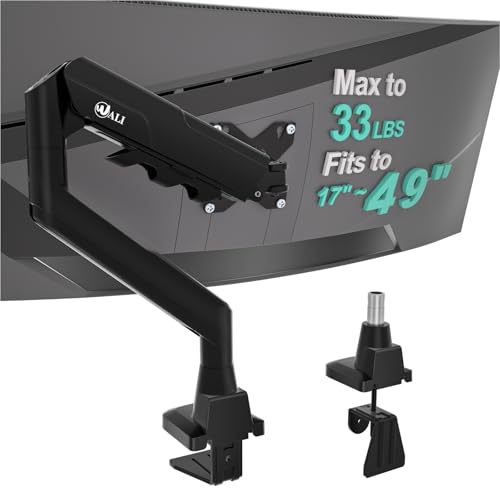
4. WALI Ultrawide Arm: Best for Ultrawides
Pros
- Supports monitors up to 49 inches
- Handles up to 33 pounds
- Long 21.14-inch extension
- Suitable for 1800R curved displays
Cons
- Recommended only for wood desks
- Mounting range stops at 1.96 inches thick
- Requires careful VESA and weight checks
Best for: a large curved or ultrawide display that overwhelms ordinary monitor arms.
The WALI Ultrawide Arm is the obvious specialist in this lineup. It is designed for flat or 1800R curved screens from 17 to 49 inches and supports up to 33 pounds, which puts it in a different class from the single-screen arms limited to about 20 pounds. A large ultrawide can turn a normal arm into a shaky extension, so that additional capacity is the central reason to choose this model.
It also has the movement needed for a broad panel. The arm reaches 21.14 inches and raises the display up to 20.79 inches above the desktop. It tilts 75 degrees in either direction, swivels 90 degrees each way, and rotates 360 degrees. That makes it possible to pull a deep display forward, raise it above accessories, or turn it for installation and maintenance.
The mount uses standard 75 by 75mm and 100 by 100mm VESA patterns. WALI includes cable guidance along the arm, and the VESA head is described as wider with a tighter-fitting panel for improved stability. Installation can use a C-clamp or grommet base on a desk from 0.39 to 1.96 inches thick. The stated recommendation for a wood desk without an obstructing underside crossbeam should be taken seriously with a heavy screen.
The ErGear Single Arm is more suitable for an ordinary 34-inch display, but it cannot match this WALI's load ceiling or reach. The trade-off is a narrower desk thickness range and more responsibility on the buyer to verify the monitor's curvature, VESA layout, and weight. If your display is a 49-inch ultrawide, this is the arm to consider first. Smaller screens do not need its extra bulk.
5. WALI GSMP001N: Best Wide-Range Single Arm

Pros
- Supports up to 26.4 pounds for flat screens
- Fits screens up to 34 inches
- Very broad swivel range
- Includes clamp and grommet options
Cons
- Curved-screen capacity is lower
- Recommended for wood desks
- Larger displays need careful stability checks
Best for: a regular monitor that is heavier than the usual single-arm limit.
The WALI GSMP001N occupies a useful middle ground. It accepts screens up to 34 inches and supports flat displays up to 26.4 pounds, giving it more headroom than the HUANUO and ErGear single arms. Curved screens are listed at up to 19.8 pounds, so this is not a universal heavy-monitor solution, but it is a strong fit for a substantial regular panel.
Its reach extends 19.3 inches, and the arm can raise the display as much as 17.3 inches. Tilt runs from -45 to 70 degrees, while swivel reaches 180 degrees in either direction and rotation is 360 degrees. The wide swivel range is useful when a screen needs to face another part of a room or be moved out of the way, though most desk users will spend more time using the height and tilt adjustments.
WALI uses the familiar 75 by 75mm and 100 by 100mm VESA patterns. Cable management is built into the arm, and the company describes a wider VESA head and tighter panel fit intended to keep the monitor secure. The C-clamp and grommet base work with desks from 0.39 to 2.76 inches thick. A clear underside path is needed for either mounting style.
The WALI Ultrawide Arm is stronger for very large curved screens, while the ErGear Single Arm offers slightly more height and a tool-free VESA setup. The GSMP001N wins when the display is a heavier flat model and the desk does not need the largest possible reach. Avoid it if your curved monitor is near the upper size or weight boundary and you cannot confirm how the arm will balance it.
6. Acer Single Arm: Best for Sit-Stand Use

Pros
- Raises a screen up to 18.1 inches
- Broad tilt range
- Supports 17 to 34-inch displays
- Clamp and grommet mounting included
Cons
- Tension must be tuned for monitor weight
- Not intended for desks with enclosed backs
- Curved-edge desks may not clamp securely
Best for: a monitor that needs to move between seated and standing positions.
The Acer Single Arm is aimed at people who change their working posture rather than leaving the monitor in one position. It supports 17 to 34-inch screens weighing 4.4 to 19.8 pounds and raises the display up to 18.1 inches from the desk. That extra vertical travel gives it a practical advantage for sit-stand setups, where a fixed-height arm can leave the screen too low or too high.
Its movement is broad: tilt from -60 to 90 degrees, 90-degree swivel in both directions, and 360-degree rotation. The monitor can be adjusted with one hand after the gas spring tension is tuned. Acer specifically says to increase tension for heavier monitors and decrease it for lighter ones, so the adjustment is not an optional finishing touch. It is part of getting the arm to hold position correctly.
The VESA compatibility is 75 by 75mm and 100 by 100mm. Both a C-clamp and grommet mount are included for desks from 15 to 80mm thick, or about 0.59 to 3.15 inches. The product is designed for a five-minute installation, but the joints and tension still need adjustment after the monitor is attached. Wood desks are recommended, and enclosed back panels or curved edges can prevent a secure clamp.
The HUANUO FlowLift Single has a lower screen-size ceiling but offers a similarly useful one-hand height adjustment. The ErGear Single Arm reaches farther horizontally, while Acer has the more expansive tilt range. The weakness is that gas-spring balancing takes a little attention, and unsuitable desks are a real deal-breaker. Choose this arm when height changes are central to the setup, not simply an occasional feature.
7. HUANUO Dual Arm: Best Dual-Screen Flexibility

Pros
- Supports two monitors up to 32 inches each
- Each arm supports 4.4 to 19.8 pounds
- C-clamp and grommet bases are included
- Independent tilt, swivel, and rotation
Cons
- Both monitors must meet the same VESA requirements
- Each screen has a relatively narrow weight range
- Two-monitor alignment takes more setup
Best for: a flexible side-by-side dual-monitor workstation.
The HUANUO Dual Arm is built around independent positioning. Each arm supports a 13 to 32-inch display weighing 4.4 to 19.8 pounds, and each screen must use 75 by 75mm or 100 by 100mm VESA holes. That makes it suitable for a matched pair or two screens with similar physical requirements, but it is not forgiving if one display is unusually light, heavy, or missing standard mounting holes.
The pneumatic spring arms let each monitor tilt, swivel, and rotate separately. That is more useful than it sounds: one screen can sit straight ahead while the other angles inward, or both can be rotated for a shared viewing position. The mount is designed to raise screens toward eye level and includes cable management to keep two sets of leads from spreading across the desk.
Installation uses either a C-clamp or grommet base. The supplied mounting hardware and instructions are helpful, but two screens naturally require more alignment than one. HUANUO says the structure is designed to improve stability over hinge-style brackets, and the mount is intended to free substantial desktop space. A solid surface remains important, particularly when both arms are extended.
The ErGear Dual Arm is the closest alternative, with tool-free VESA mounting and clearly stated reach and height figures. HUANUO is more appealing when independent smooth movement is the priority, while the HUANUO Vertical Dual is the better answer for a stacked layout. The main weakness is the shared compatibility boundary: check both monitors separately before buying. It is a strong fit for side-by-side office work, editing, and multitasking.
8. ErGear Dual Arm: Best Quick-Install Dual Arm

Pros
- Tool-free VESA mounting
- Independent positioning for two screens
- Supports 13 to 32-inch monitors
- Easy-opening cable clips
Cons
- Maximum load is 19.8 pounds per monitor
- Recommended for wood desks
- Both displays need standard VESA patterns
Best for: adding two monitors without a complicated mounting process.
The ErGear Dual Arm makes the two-screen installation less intimidating. Its upgraded VESA plates are designed for tool-free mounting, and the mount uses a one-piece C-clamp or an optional bolt-through grommet. That is the main appeal for anyone who wants a dual-monitor setup without spending a long time balancing a screen on the end of an arm while tightening hardware.
It supports two flat or curved monitors from 13 to 32 inches, with a maximum load of 19.8 pounds. Both displays need 75 by 75mm or 100 by 100mm VESA patterns. Each arm can adjust up to 17.5 inches in height and extend 18.1 inches, with tilt from -50 to 80 degrees, 90-degree swivel in either direction, and 360-degree rotation.
The cable clips open without tools, which is a small but meaningful detail when two monitors bring multiple power and video cables to the same base. ErGear also describes a tighter-fitting VESA panel and more than 20, 000 cycles of testing. The clamp suits desks from 0.39 to 2.56 inches thick, while the grommet mount covers 0.39 to 2.95 inches.
The HUANUO Dual Arm offers a more pneumatic-spring-focused design and is the better choice when frequent independent repositioning matters most. ErGear is easier to recommend for a quick, tidy installation, but it does not support larger or heavier screens. If you are comparing how two displays change a desk's working layout, this arm is a practical starting point. Skip it for unusually heavy panels or a desk with an obstructed underside.
9. NB SmooVex A5: Best Slim Mechanical Arm

Pros
- Mechanical spring design
- Slim arm helps preserve desk space
- Fits standard 75 by 75mm and 100 by 100mm VESA
- C-clamp and grommet options
Cons
- Screen support is limited to 32 inches
- The product data does not state a maximum load
- Tilt range is narrower than several rivals
Best for: a compact single-monitor desk where a slim arm matters.
The NB SmooVex A5 is the least specification-heavy arm here, but its design has a clear purpose. It uses a mechanical spring rather than a traditional gas spring and has a slimmer arm intended to save desk space. That makes it appealing for a compact workspace where a thick, extended mount would create its own obstruction.
Compatibility covers most flat and curved monitors up to 32 inches, with 75 by 75mm and 100 by 100mm VESA patterns. The arm offers 230mm of height travel, plus 360-degree rotation, swivel adjustment, and tilt from -25 to 90 degrees. The movement is enough for ordinary portrait and landscape positioning, though the negative tilt range is less generous than the HUANUO FlowLift Single or Acer Single Arm.
NB includes C-clamp and grommet mounting options and describes a three-step installation. The arm is intended to lift the screen to a more natural eye level while leaving room for a keyboard, notebook, or other desk equipment. It is positioned for home offices, study spaces, and general workstations rather than oversized displays.
The important omission is the lack of a stated maximum load in the supplied product information. That makes it harder to compare directly with the 19.8-pound arms, so buyers should verify the monitor's weight and the listing's current compatibility details before ordering. The HUANUO FlowLift Pro is a safer choice for someone who wants clearly stated load limits and visible tension guidance. Choose the SmooVex when slim construction and mechanical support matter more than maximum reach or broad tilt.
10. HUANUO Vertical Dual: Best Stacked Setup

Pros
- Designed for vertically stacked monitors
- Raises screens as high as 25.19 inches
- Supports two screens up to 32 inches each
- 360-degree rotation and cable management
Cons
- Each screen must weigh 4.4 to 19.8 pounds
- Not suitable for screens over 32 inches
- Stacked monitors need careful height and angle alignment
Best for: coding, reading, and other work that benefits from one screen above another.
The HUANUO Vertical Dual solves a different problem from the side-by-side mounts above. Its two screens are stacked, which preserves desk width and gives a tall workspace for code, documents, timelines, or reference material. The additional 17-inch extension raises the monitors as high as 25.19 inches, so it can create a genuinely vertical arrangement rather than simply placing one screen a little above the other.
Each monitor can be up to 32 inches, must weigh between 4.4 and 19.8 pounds, and needs 75 by 75mm or 100 by 100mm VESA holes. Those limits apply to both displays, so check the lighter and heavier monitor independently. The mount offers 90 degrees of tilt, 180 degrees of swivel, and 360-degree rotation, allowing the upper and lower panels to be angled for a more comfortable view.
Cable management helps keep the vertical arrangement from turning into a hanging bundle of wires. The mount can attach with a C-clamp or grommet to desks from 0.39 to 3.54 inches thick. HUANUO recommends solid wood or metal desks and specifically excludes glass. The long upright structure also means the desk needs enough clearance above the work surface for the upper display.
The HUANUO Dual Arm is more flexible for side-by-side screens, and the ErGear Dual Arm is easier to position when both monitors need independent forward reach. This vertical model wins when desk width is scarce or the workflow naturally separates a main display from a reference screen. It is not the right choice for a single ultrawide or a pair of oversized panels. For those, start with the WALI Ultrawide Arm or a side-by-side mount.
How to choose best monitor arms
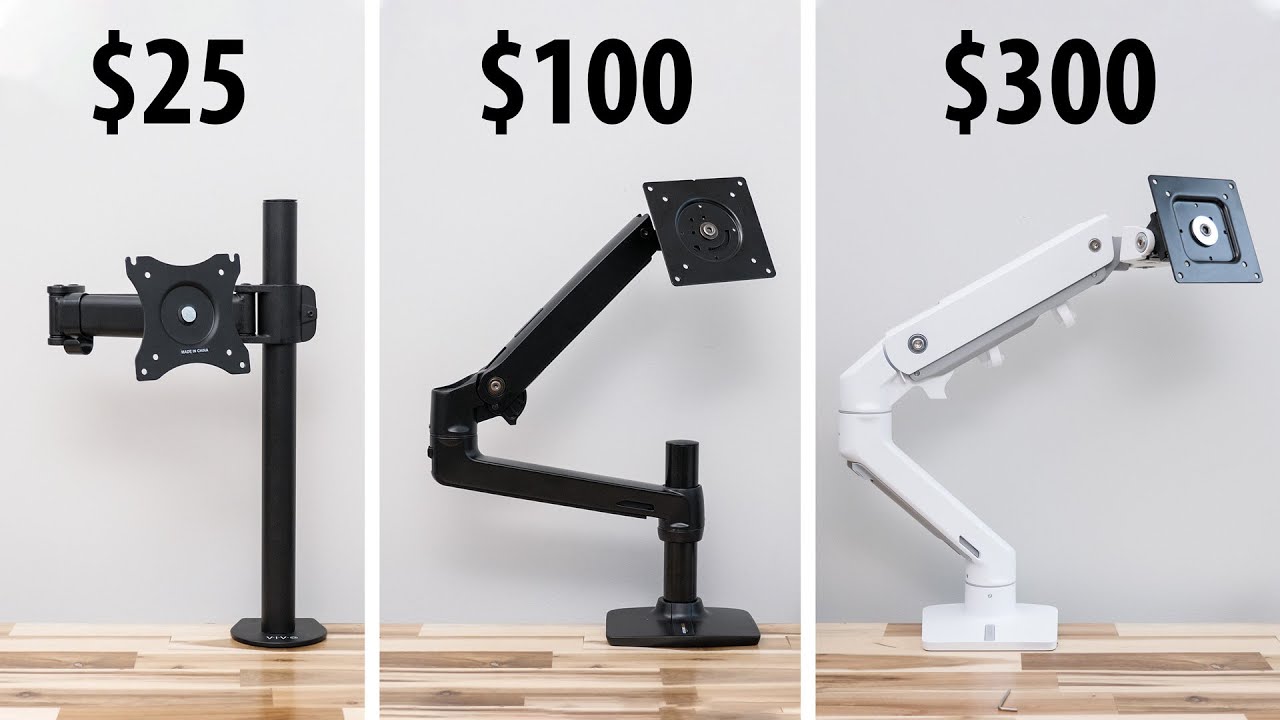
A monitor arm should be chosen from the monitor and desk outward. Start with compatibility, then consider the movement you will actually use, the base's stability, and how much room the arm needs behind the desk.
VESA compatibility
VESA describes the spacing between the mounting holes on the back of the display. Every arm here supports either 75 by 75mm, 100 by 100mm, or both, but that does not mean every monitor fits. Check the monitor manual or measure the hole spacing before ordering.
Monitor weight and screen size
Screen size is only a rough guide. A 32-inch display can weigh very differently from another 32-inch display, and curved screens may have a lower supported weight on some arms. The WALI Ultrawide Arm is the clear choice for a panel up to 49 inches and 33 pounds. For ordinary screens, match the arm's stated load range to the monitor's weight, including the stand only if the manufacturer says that figure includes it.
Height and reach
Height travel determines whether the screen can sit at eye level, while reach determines how far it can move toward or away from you. The ErGear Single Arm reaches 18.1 inches, the WALI Ultrawide Arm reaches 21.14 inches, and the HUANUO Vertical Dual raises stacked displays to 25.19 inches. Measure the desk depth and the clearance behind it, not just the monitor diagonal.
A strong arm is useless if the clamp cannot sit flat against the desk.
Movement range
Tilt helps control glare and viewing angle. Swivel is useful when sharing a screen or moving it aside, while rotation matters for portrait mode. Wide movement is not automatically better, since a fully extended arm puts more leverage on the desk. Choose broad adjustment for changing work positions, and a simpler range for a screen that will stay put.
Mounting surface
Most of these products offer a C-clamp and a grommet mount, but the supported desk thickness differs. The WALI Ultrawide Arm is listed for desks from 0.39 to 1.96 inches thick, while several HUANUO models extend to 3.54 inches. Check for crossbeams, enclosed back panels, curved edges, and glass. The manufacturers generally recommend wood, and a clear underside is essential for a clamp or through-desk bolt.

Frequently asked questions
Do monitor arms fit every monitor?
No. The display needs compatible VESA mounting holes, and its weight and size must fall within the arm's limits. The most common patterns in this group are 75 by 75mm and 100 by 100mm.
Are gas-spring or mechanical-spring monitor arms better?
Neither design is automatically right for every desk. Gas-spring arms can offer smooth movement when tension is correctly adjusted, while mechanical-spring designs such as the HUANUO FlowLift Pro and NB SmooVex A5 are designed to provide consistent support without relying on gas pressure.
Can a monitor arm hold a curved monitor?
Many can, but curved displays may have a lower supported weight than flat screens. The HUANUO FlowLift Pro, for example, lists a lower limit for curved monitors than for flat ones. Check the exact screen weight, VESA pattern, and curvature guidance before mounting.
Is a grommet mount more stable than a clamp?
A grommet mount can create a firm through-desk connection when the desk has a suitable hole and clear underside. A C-clamp is more flexible because it does not require drilling, but it must sit flat and have enough room to grip the desk securely.
Can one arm hold two monitors?
A dual monitor arm can hold two displays when both screens meet its size, weight, and VESA requirements. The HUANUO Dual Arm and ErGear Dual Arm are designed for side-by-side screens, while the HUANUO Vertical Dual arranges two monitors one above the other.
How high should a monitor be mounted?
A useful starting point is to place the top of the screen near eye level, then adjust for posture, screen size, and viewing distance. An arm with more height travel helps when the desk is used from both sitting and standing positions.
The bottom line
The Best monitor arms start with the HUANUO FlowLift Single for a typical single-screen desk. It combines broad compatibility, useful movement, two mounting methods, and a straightforward installation. Choose the HUANUO FlowLift Pro instead if frequent repositioning and a mechanical spring system are more important than the extra features of a conventional arm.
For larger displays, the WALI Ultrawide Arm is the specialist to buy, with support for screens up to 49 inches and 33 pounds. For two screens, the HUANUO Dual Arm is the more flexible side-by-side option, while the HUANUO Vertical Dual makes better use of a narrow desk.
If you are undecided, match the arm to your monitor's weight and VESA pattern first, then choose the model with enough reach for your desk.
As an Amazon Associate we earn from qualifying purchases.