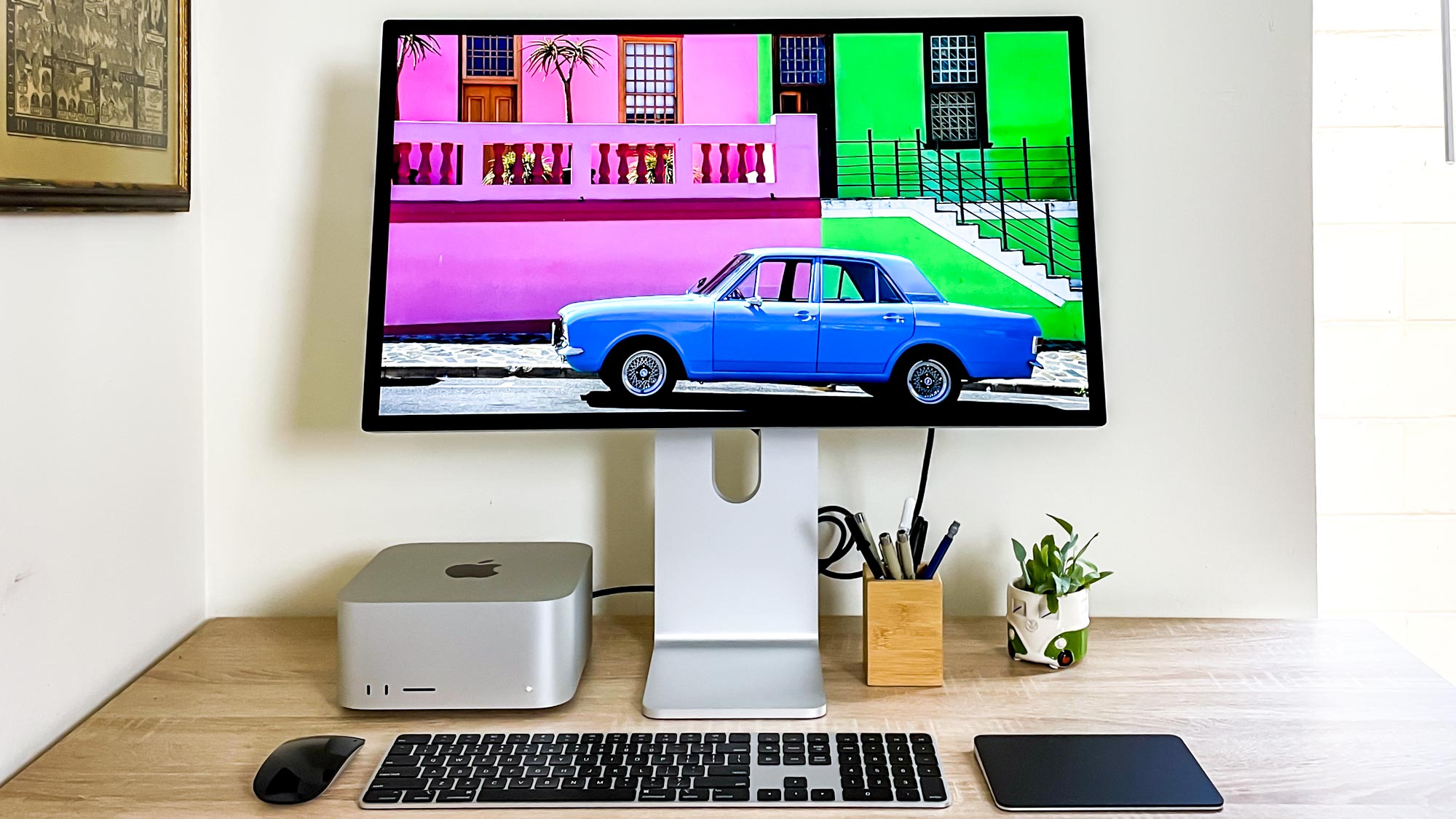

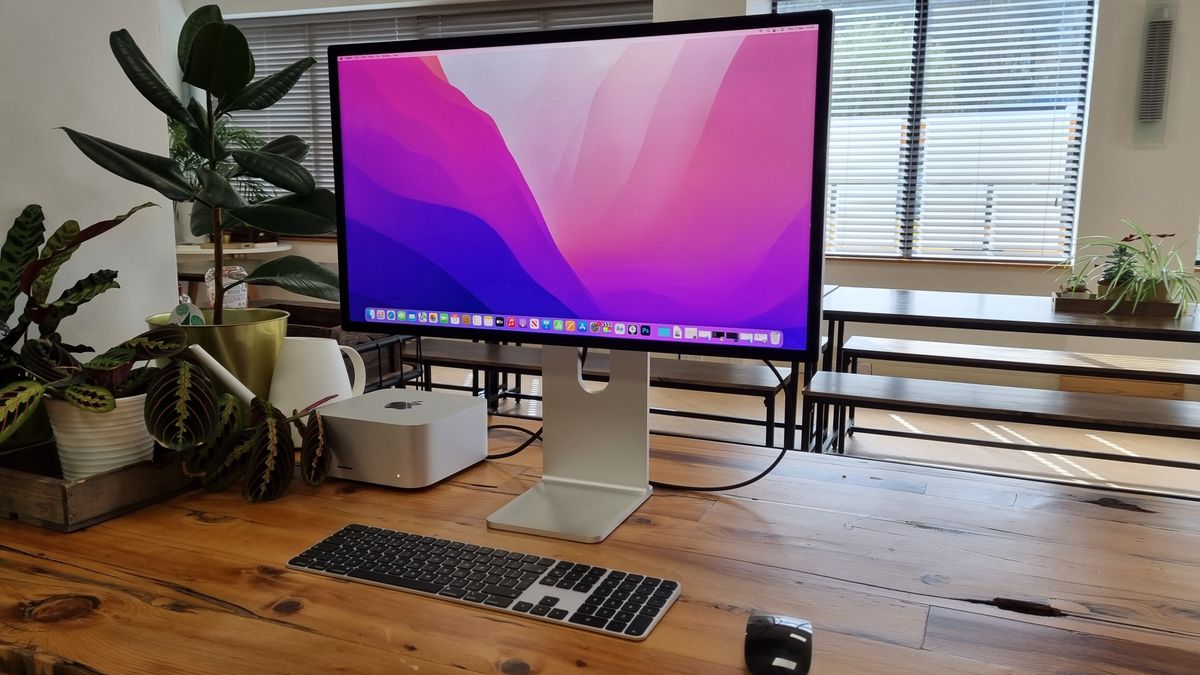
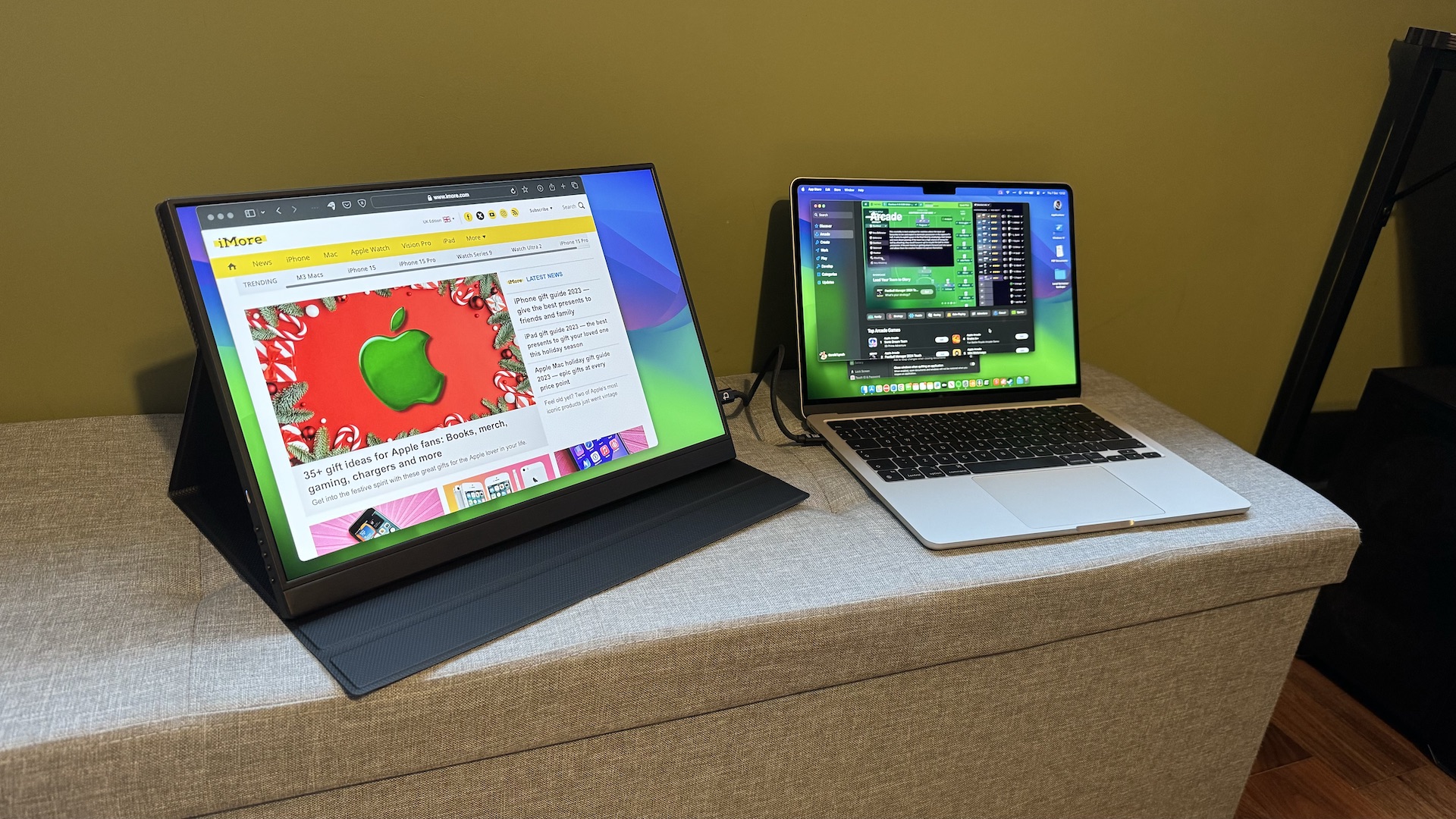
A MacBook Pro has a superb screen, but a laptop display still makes long documents, dense timelines, and side-by-side windows feel cramped. The right external monitor should add space without making the MacBook feel like an awkward accessory.
Our Best monitors for macbook pro picks range from simple Full HD office screens to wide 34-inch panels and Mac-focused 4K displays with USB-C charging. The connection matters almost as much as the panel: a single cable can carry the image while keeping the laptop charged and the desk tidy.
The Dell S2725QC is our top pick for most MacBook Pro owners, while the list also includes a color-focused BenQ, a spacious Dell ultrawide, and several capable lower-resolution options.
Comparison table
| # | Product | Award | Resolution | Refresh rate | MacBook connection | Best for |
|---|---|---|---|---|---|---|
| 1 | Dell S2725QC | Best overall | 4K UHD IPS | Up to 120Hz | USB-C, up to 65W | Most MacBook Pro desks |
| 2 | BenQ MA270U | Best Mac-focused 27-inch | 4K, 3840 x 2160 | Not specified | Dual USB-C, 90W | Native Mac controls |
| 3 | Dell S2725QS | Best 4K image | 4K UHD IPS | Up to 120Hz | Not specified | Sharp office and media work |
| 4 | BenQ MA270UP | Best color workflow | 4K, 3840 x 2160 | Not specified | Dual USB-C, 90W | Mac color matching |
| 5 | Dell S2725DC | Best QHD USB-C | QHD, 2560 x 1440 | Up to 144Hz | USB-C, up to 65W | Smooth general use |
| 6 | Dell S3425DW | Best ultrawide | WQHD VA | Up to 120Hz | USB-C, up to 65W | Wide multitasking |
| 7 | Dell S2425HSM | Best compact adjustable display | Full HD | Up to 144Hz | HDMI | Small desks |
| 8 | Acer KB272 G0bi | Best simple 27-inch | Full HD, 1920 x 1080 | Up to 120Hz | Not specified | Basic office work |
| 9 | Samsung S36GD | Best curved screen | Full HD | 100Hz | Not specified | Immersive everyday viewing |
| 10 | BenQ MA320U | Best large Mac display | 4K, 3840 x 2160 | Not specified | Dual USB-C, 90W | Large creative workspaces |
1. Dell S2725QC: Best Overall

Pros
- 4K IPS image with 99% sRGB coverage
- USB-C connection supplies up to 65W
- 120Hz refresh rate feels fluid
- ComfortView Plus reduces blue light emissions
Cons
- Stand and connectivity are less expansive than the BenQ models
- Its 27-inch canvas is not as wide as the Dell S3425DW
Best for: MacBook Pro owners who want sharp 4K text, smooth motion, and one-cable convenience.
The Dell S2725QC gets the fundamentals right without turning the desk into a docking station project. It is a 27-inch 4K IPS display with a clean, modern frame, and that combination gives macOS text the crispness many laptop owners are looking for. Documents look dense and precise, while the extra desktop area makes it easier to keep a browser, notes, and a working app visible together.
The panel covers 99% of sRGB, and Dell lists a 1500:1 contrast ratio with HDR readiness. Those figures point to a screen suited to office work, browsing, photo sorting, and general media. The IPS panel is also a sensible fit for a shared desk because the image does not depend on sitting directly in front of the screen. The up-to-120Hz refresh rate makes scrolling and window movement noticeably more fluid than a basic 60Hz display, while AMD FreeSync Premium can help smooth compatible motion.
The key MacBook feature is USB-C with up to 65W power delivery. A single cable can handle the display connection and provide power to the laptop, which is a meaningful improvement over a setup that needs separate video and charging leads. Dell also includes ComfortView Plus, which reduces harmful blue light emissions to 35% or less without presenting it as a color-destroying night mode. Its built-in audio has been re-engineered for more detailed sound, though anyone who cares about music or film should still use dedicated speakers or headphones.
The Dell S2725QS has a similar 4K IPS direction and reaches the same 120Hz ceiling, but the S2725QC is the more natural laptop companion because of its USB-C connection. The BenQ MA270U goes further with 90W delivery and Mac keyboard controls, while the S2725QC is easier to recommend when the screen itself matters more than a full Mac-specific hub. Its real weakness is that 65W may not be enough for every demanding MacBook Pro workload, and the feature set is not as deep as BenQ's. Choose it if you want a sharp, comfortable 27-inch monitor that stays straightforward.
2. BenQ MA270U: Best Mac-Focused 27-Inch

Pros
- Mac color tuning with a P3 wide color gamut
- Dual USB-C ports with 90W laptop delivery
- Brightness and volume controls work from the MacBook keyboard
- Height and tilt adjustment
Cons
- Refresh rate is not specified in the product data
- Stand adjustment is less complete than Dell's four-way stands
Best for: MacBook Pro users who want the monitor to behave like a natural extension of macOS.
The BenQ MA270U is the most convincing choice for someone who dislikes the little annoyances that come with mixing a MacBook and a generic external display. Its central idea is integration. The 27-inch 4K panel is calibrated for MacBook use, and BenQ's Mac Color Match tuning is intended to make the external image feel closer to the laptop's display than an ordinary monitor profile would.
Resolution is 3840 x 2160, so fine interface text and detailed images have plenty of room to breathe. BenQ also specifies a P3 wide color gamut, which makes this a more interesting candidate for photographers, designers, and video editors than the basic Full HD choices here. It is not enough information to treat the monitor as a complete professional reference display, but the Mac color focus is a real differentiator.
The connectivity is unusually useful. There are dual USB-C ports, with up to 90W for the MacBook and 15W for an iPad or iPhone, plus two HDMI ports. Brightness and volume can be adjusted from the MacBook keyboard, and the USB hub helps turn the display into a more central part of the workspace. That is the kind of small convenience that matters every day, especially when the laptop sits closed or off to the side.
Compared with the BenQ MA270UP, this model has the same broad Mac-centered feature set, so the choice between them is less about the listed capabilities than the particular model availability and physical arrangement you prefer. The Dell S2725QC is a better fit for someone who wants a 120Hz specification and a simpler conventional monitor, but it does not match the BenQ's 90W delivery or keyboard control. The MA270U's weakness is the absence of a stated refresh rate and its more limited height and tilt stand. Skip it if you need a clearly specified high-refresh display or more stand flexibility. Keep it in mind if the goal is a tidy Mac-first setup.
3. Dell S2725QS: Best 4K Image

Pros
- 4K IPS panel with 99% sRGB
- Up to 120Hz refresh rate
- 1500:1 contrast ratio and HDR readiness
- ComfortView Plus eye-comfort feature
Cons
- No USB-C power delivery is specified
- Less Mac-specific than the BenQ displays
Best for: anyone who prioritizes a detailed 4K picture over integrated Mac controls.
The Dell S2725QS is a straightforward 27-inch screen with a picture that feels much more substantial than its compact footprint suggests. The 4K UHD IPS panel gives spreadsheets, menus, and text a fine-grained look, and the 99% sRGB coverage is a useful baseline for general creative work. It is a particularly sensible shape for a desk where a 32-inch display would dominate.
Dell pairs the resolution with an up-to-120Hz refresh rate and AMD FreeSync Premium. That does not turn this into a dedicated gaming display, but it makes cursor movement, scrolling, and supported video content feel smoother. The listed 0.03ms response figure is a manufacturer feature claim, so I would not use it as a reason to choose this over a faster gaming-oriented monitor. The more important everyday benefit is the high refresh rate.
Color and contrast are well supported on paper. The 1500:1 contrast ratio should give dark interface elements more separation than a very basic IPS panel, while HDR readiness adds compatibility for suitable content. Dell's ComfortView Plus reduces harmful blue light emissions to 35% or less without sacrificing color accuracy. Re-engineered audio is also included, giving the monitor some independence from the MacBook's speakers for ordinary alerts and casual listening.
The Dell S2725QC is the obvious rival. It shares the 4K IPS, 99% sRGB, 120Hz, 1500:1, and HDR-ready recipe, but its USB-C connection and up to 65W power delivery make it more convenient for a MacBook Pro. The S2725QS makes more sense when the monitor will be used with a dock, adapter, or fixed desktop connection already in place. Its weakness is precisely that missing MacBook-friendly cable path. If you want the cleanest one-cable desk, choose the S2725QC instead. If you mainly want a sharp 4K screen and already have connectivity handled, this is the calmer choice.
4. BenQ MA270UP: Best Color Workflow

Pros
- Mac color tuning and P3 wide color gamut
- Dual USB-C with 90W MacBook delivery
- Direct brightness and volume control from the keyboard
- Two HDMI ports and a USB hub
Cons
- Refresh rate is not specified
- Stand offers height and tilt rather than the full adjustment range of some Dell models
Best for: creative MacBook Pro users who want color-focused features and simple cable management.
The BenQ MA270UP is built around a problem that MacBook owners recognize immediately: two screens can look subtly different even when both are set up correctly. BenQ addresses that with Mac color tuning and a P3 wide color gamut. The result is a monitor aimed at people who care about a consistent, lively image across the laptop and the external screen.
Its 27-inch 4K resolution of 3840 x 2160 leaves enough pixel density for detailed creative applications and crisp text. That is a better match for editing large images or reading long timelines than the Full HD models in this guide. BenQ does not provide a refresh-rate figure in the supplied product details, so this is better viewed as a color and workflow monitor than a motion-first gaming purchase.
The dual USB-C arrangement is a major part of its appeal. The monitor can provide up to 90W to a MacBook, while another USB-C connection can supply up to 15W for an iPad or iPhone. Two HDMI inputs broaden its usefulness, and the USB hub reduces the number of accessories that need to reach the laptop directly. The ability to adjust brightness and volume from the MacBook keyboard makes the screen feel less like a separate appliance.
For anyone deciding between a Mac-focused display and a more conventional screen, the color decisions that matter for editing photographs are a useful place to start. The Dell S2725QC offers a specified 120Hz refresh rate and a simpler everyday profile, while the MA270UP trades that clarity of motion specification for stronger Mac workflow features. The MA270U has a very similar feature list, so the two BenQ models are close relatives rather than radically different alternatives. The MA270UP is not for buyers who need a fully adjustable stand or a confirmed high-refresh mode. It is for a creator who values matching color, generous laptop power, and fewer trips to the monitor's buttons.
5. Dell S2725DC: Best QHD USB-C

Pros
- QHD resolution balances workspace and clarity
- USB-C provides up to 65W
- 144Hz refresh rate and 1ms MPRT
- Full height, tilt, pivot, and swivel adjustment
- Integrated dual 3W speakers
Cons
- QHD is less detailed than the 4K models
- P3 color coverage is not specified
Best for: MacBook owners who want smooth motion, broad ergonomics, and one-cable connectivity without moving to 4K.
The Dell S2725DC is the practical middle ground in this group. At 27 inches, its 2560 x 1440 QHD resolution gives more working space than Full HD without demanding the same level of graphics bandwidth as 4K. Text will not be as finely rendered as it is on the BenQ or Dell 4K panels, but the interface still has room for multiple windows and a comfortable document layout.
Motion is where this Dell stands out. Its refresh rate reaches 144Hz, and the listed 1ms MPRT response figure is aimed at keeping moving objects cleaner. AMD FreeSync support helps reduce tearing with compatible sources. Those details are more relevant to fast scrolling, casual games, and video than to a static writing workflow, but they make this screen feel lively when the MacBook is used for more than office applications.
USB-C supplies up to 65W, so one cable can connect the laptop and provide power. There is also HDMI and DisplayPort 1.4, plus a pop-out USB-C port that can provide up to 15W and a USB Type-A connection for accessories. Dell includes dual 3W speakers and a fully adjustable stand with height, tilt, pivot, and swivel movement. That stand range is more useful than it sounds because it lets the screen sit correctly whether you work upright, rotate documents, or share the display with someone nearby.
The Dell S2725QC gives you 4K detail and a 120Hz ceiling, but the S2725DC is the better fit for someone who values 144Hz and broader stand adjustment. The Dell S2425HSM also reaches 144Hz and has the same dual 3W speaker idea, yet it drops to Full HD and uses HDMI rather than the S2725DC's USB-C laptop path. The S2725DC's main weakness is that QHD cannot produce the same fine text as 4K at this size. Pick it when responsive motion and ergonomic flexibility matter more than maximum pixel density.
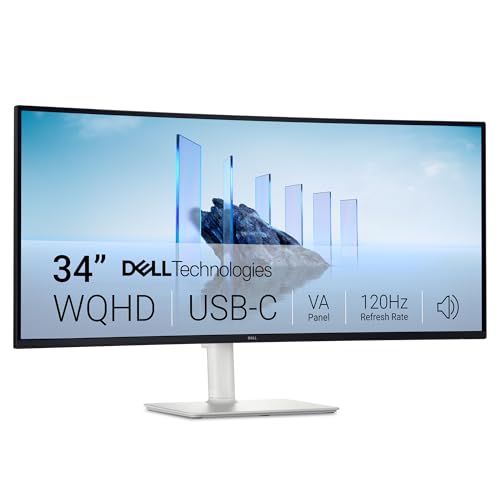
6. Dell S3425DW: Best Ultrawide
Pros
- 34-inch WQHD canvas for side-by-side work
- 120Hz refresh rate
- VA contrast ratio of 3000:1
- 99% sRGB and 95% DCI-P3 coverage
- USB-C with up to 65W delivery
Cons
- Takes substantially more desk space
- VA panel is not the first choice for every viewing angle
- Heavier than the smaller displays
Best for: people who want one wide workspace instead of two separate screens.
The Dell S3425DW changes the question from “How sharp is the picture?” to “How much can I keep open at once?” Its 34-inch ultrawide format gives a MacBook Pro a broad horizontal workspace for a document, browser, and communication app without the visual break between two panels. It is the most natural choice here for project planning, audio timelines, research, and wide spreadsheets.
The resolution is WQHD rather than 4K. That keeps the desktop broad, but the pixels are spread across a large 34-inch panel, so text will not look as finely packed as it does on the 27-inch 4K options. The trade-off is useful rather than inherently bad. The up-to-120Hz refresh rate keeps window movement and scrolling smooth, while the VA panel's 3000:1 contrast ratio gives dark areas more depth than the 1500:1 figures listed for several Dell IPS screens.
Color coverage is stronger than the basic office models suggest. Dell lists 99% sRGB and 95% DCI-P3, along with HDR readiness, so the panel is not limited to dull productivity work. The monitor also includes ComfortView Plus, which reduces harmful blue light emissions to 35% or less, and its re-engineered audio is designed for more detailed sound. USB-C can provide up to 65W, keeping the MacBook connection relatively clean.
The Dell S2725QC is sharper and easier to place on a smaller desk, while the S3425DW wins decisively when a single wide canvas is the priority. A dual-monitor setup can provide even more separation, but it also brings bezels and extra placement decisions. Before choosing this format, consider how much desk depth a second screen really needs, especially if the display will sit close to the MacBook. The S3425DW's weakness is its physical scale and lower pixel density than 4K. Choose it for broad multitasking, not for the most compact high-density text.
7. Dell S2425HSM: Best Compact Adjustable Display

Pros
- 23.8-inch size suits smaller desks
- 144Hz refresh rate and 1ms MPRT
- Height, tilt, pivot, and swivel adjustment
- Integrated dual 3W speakers
- Eye-comfort design
Cons
- Full HD gives less workspace than QHD or 4K
- HDMI is the listed connection
- Smaller screen is less useful for side-by-side applications
Best for: a compact desk where ergonomic movement matters more than high resolution.
The Dell S2425HSM is the smallest display here, and that is its advantage. A 23.8-inch screen can fit in a crowded study area without forcing the keyboard or laptop too far back. It is a good second screen for email, reference material, and communications when the MacBook remains the main display.
The panel is Full HD at 1920 x 1080, with a 1500:1 contrast ratio. That is enough for ordinary documents and streaming, but it does not provide the same dense text or expansive workspace as the Dell S2725DC or the 4K monitors. Dell compensates with a 144Hz refresh rate and 1ms MPRT, so scrolling and moving content should feel much smoother than the resolution alone might suggest.
Ergonomics are unusually complete for a compact office display. The stand supports height, tilt, pivot, and swivel adjustment, which makes it easier to place the screen at the correct eye level or rotate it for a tall document. Dual 3W speakers are built in, and Dell includes an eye-comfort design intended to reduce harmful blue light while preserving image quality. The listed connection is HDMI, so a MacBook Pro may need the appropriate adapter or dock.
The Dell S2725DC is the stronger all-rounder if desk space allows, because it adds QHD resolution, USB-C power, DisplayPort, and the same broad stand adjustment. The S2425HSM is easier to fit and still has the fast 144Hz mode, but it is not the right pick for detailed photo work or a large multi-window layout. Its weakness is the Full HD canvas. Choose it for a compact workstation, a portrait-friendly side screen, or a simple setup where the MacBook supplies most of the visual detail.
8. Acer KB272 G0bi: Best Simple 27-Inch

Pros
- 27-inch IPS screen
- 120Hz refresh rate
- 1ms VRB response specification
- Adaptive-Sync support
- 250-nit brightness
Cons
- Full HD is modest at 27 inches
- Stand and connectivity details are limited
- No USB-C feature is specified
Best for: basic MacBook Pro desk work with a larger screen and uncomplicated requirements.
The Acer KB272 G0bi is the plainspoken option in this lineup. It gives you a 27-inch IPS panel for a larger view of documents and web pages, but it does not try to compete with the Mac-focused BenQ models on integration. For a user who already has the needed adapter and wants a simple external screen, that can be exactly the point.
Its 1920 x 1080 resolution produces a standard 16:9 Full HD image. At 27 inches, that means text will not look as tight as it does on a 4K display, and serious editing work will feel more constrained. The IPS panel is still a sensible foundation for a shared office because it is generally chosen for consistent viewing, while the stated 250-nit brightness suits ordinary indoor conditions better than very bright rooms.
Acer lists up to 120Hz and a 1ms VRB response time. Adaptive-Sync support is compatible with FreeSync, helping the monitor match its refresh behavior to a compatible graphics source. Those features give it smoother movement for scrolling, video, and light gaming. They do not change the fact that this is a Full HD office monitor, so I would not select it as a high-detail creative display.
The Dell S2425HSM is smaller but offers a 144Hz mode, full stand adjustment, and integrated speakers. The Acer is the better fit when the 27-inch size matters and those extra conveniences do not. Its weakness is the sparse feature set around the panel, especially for a MacBook Pro user who may want USB-C charging and a tidy one-cable connection. If you need that, move up to the Dell S2725DC or Dell S2725QC. If you need a larger basic screen for writing, browsing, and routine office applications, the Acer stays refreshingly uncomplicated.
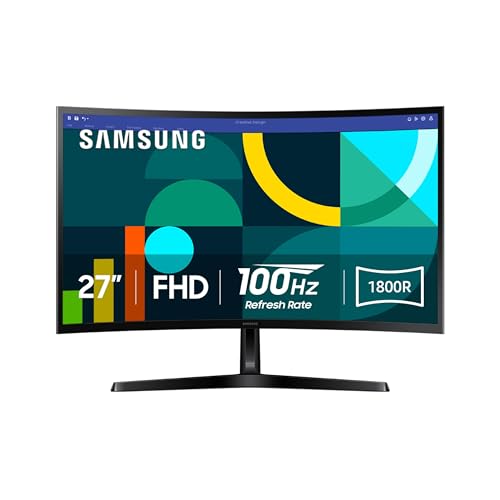
9. Samsung S36GD: Best Curved Screen
Pros
- 1800R curve adds visual immersion
- 100Hz refresh rate
- TÜV-certified eye-comfort technology
- Game Mode and adjustable image settings
- Compact 27-inch footprint
Cons
- Full HD resolution is less detailed than the 4K options
- Curved design is not ideal for every desk or workflow
- Mac-specific connectivity is not specified
Best for: everyday viewing where a curved image and comfortable long sessions matter.
The Samsung S36GD takes a different route from the flat Dell and BenQ displays. Its 1800R curve wraps the 27-inch screen more closely around the viewer's field of vision, which can make games, films, and wide web pages feel more involving. The effect is subtle rather than theatrical, but it gives this monitor a more distinctive character than a standard flat Full HD panel.
Samsung specifies a 100Hz refresh rate, so moving windows and scrolling should look smoother than they do on a basic 60Hz display. Game Mode lets you adjust image and contrast settings for fast content, including darker scenes where visibility matters. Those features are useful extras for a MacBook Pro that doubles as an entertainment machine, although this is not the display to choose for maximum pixel density.
Eye comfort is one of the stronger points. Samsung says its TÜV-certified technology reduces blue light and irritating screen flicker, which is useful for long work sessions. The product also supports direct device connections for added flexibility, though the supplied details do not identify the exact port arrangement or a USB-C power-delivery function. That makes a dock or adapter part of the setup planning.
The Acer KB272 G0bi gives you a flat IPS panel and a slightly faster 120Hz ceiling, while the Samsung brings the curve and stronger emphasis on immersive viewing. The Dell S2425HSM offers a more adjustable stand and built-in speakers, making it easier to position in a conventional office. The S36GD's weakness is that Full HD can feel limiting at 27 inches, especially beside a MacBook Pro's dense display. Choose it when the curved presentation and eye-comfort features appeal more than 4K sharpness.
10. BenQ MA320U: Best Large Mac Display

Pros
- Large 32-inch 4K workspace
- Mac color tuning and P3 wide color gamut
- Dual USB-C with 90W MacBook delivery
- 15W charging for an iPad or iPhone
- Mac keyboard control for brightness and volume
Cons
- Requires substantial desk space
- Refresh rate is not specified
- Height and tilt are listed, but not the broader stand range found on some Dell models
Best for: creative professionals and multitaskers who want a large Mac-centered 4K canvas.
The BenQ MA320U is the display for someone who thinks a 27-inch monitor still feels cramped. Its 32-inch 4K panel gives a large, high-detail workspace for editing applications, large spreadsheets, and multiple windows. It is not merely a bigger version of a basic office monitor because BenQ has built the same Mac-focused color and control ideas into a much larger canvas.
The 3840 x 2160 resolution keeps the image detailed despite the screen size. BenQ's Mac color tuning and P3 wide color gamut are intended to make the display a better visual match for a MacBook Pro, which matters when a project moves between the laptop and the external screen. This is the BenQ in the group I would consider first for anyone who wants space for a substantial timeline or a large image without immediately arranging two monitors.
Connectivity is equally important. The dual USB-C ports can provide up to 90W to a MacBook and up to 15W for an iPad or iPhone, while two HDMI ports support other sources. Brightness and volume can be controlled from the MacBook keyboard, reducing the need to reach for the monitor controls. The stand supports height and tilt adjustment, which helps with a large panel, although it does not list the pivot and swivel range available on the Dell S2725DC or S2425HSM.
The BenQ MA270U is the more sensible BenQ shape for a smaller desk, and the MA270UP offers a closely related 27-inch Mac-focused feature set. The Dell S3425DW gives a wider ultrawide layout and a stated 120Hz refresh rate, but its WQHD resolution is lower than this BenQ's 4K image. The MA320U's real weakness is its physical size. It can overwhelm a shallow desk, and the unspecified refresh rate makes it less compelling for motion-focused use. Choose it when a large, detailed Mac workspace is the priority and you have room to place it comfortably.
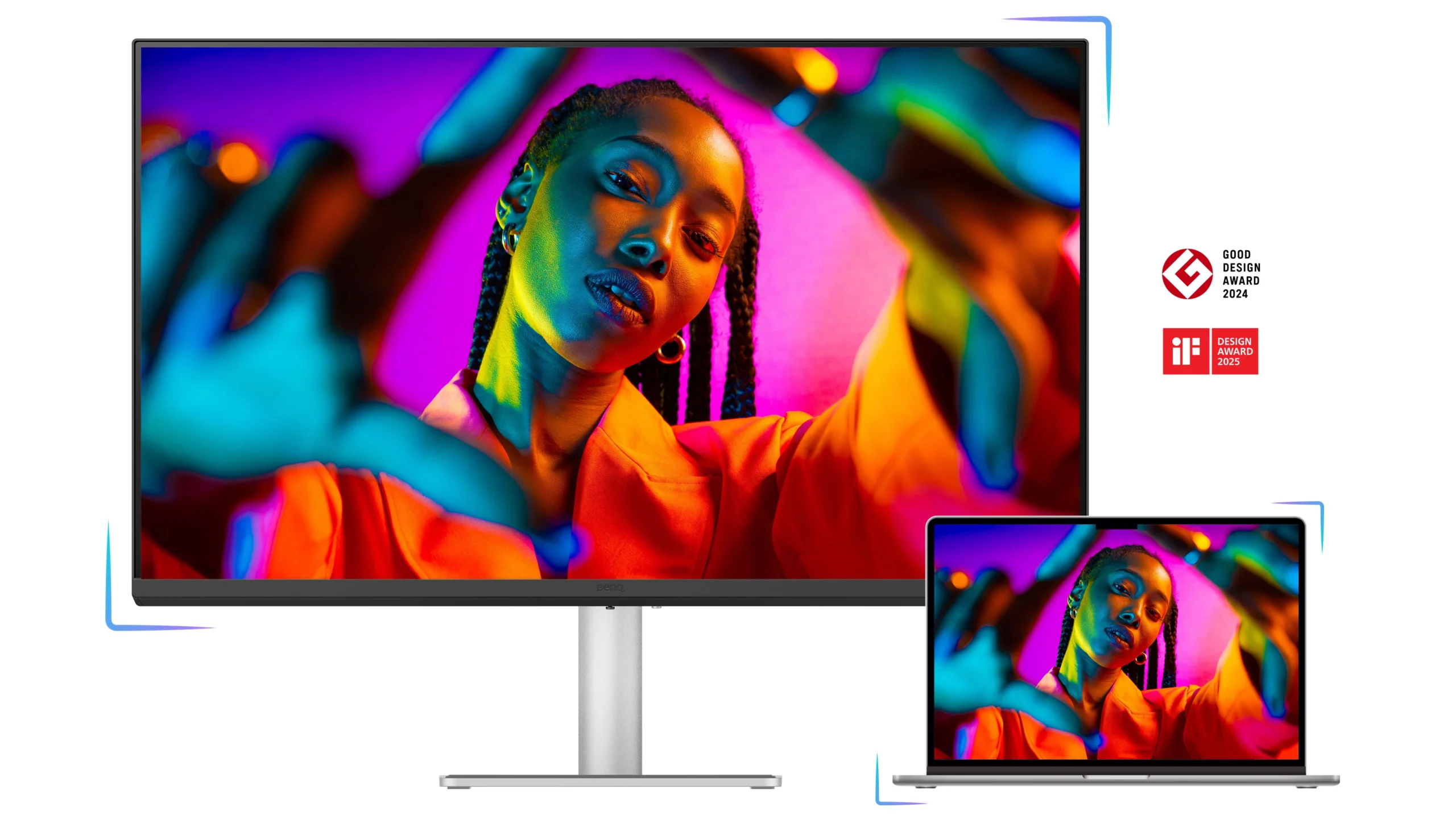
How to choose best monitors for macbook pro
The right external display depends on how much workspace you need, how you plan to connect the MacBook, and whether image accuracy or motion matters most.
Resolution and screen size
Resolution determines how much detail fits into the panel and how much room you have for applications. Full HD is workable for basic documents, but it looks less dense at 27 inches than QHD or 4K. QHD is a useful middle ground, while 4K gives the sharpest text and the most comfortable canvas for detailed creative work.
Screen size changes the character of the desk. A 23.8-inch display is easier to place in a small space, 27 inches is the most balanced size here, and 32 inches or 34 inches needs more viewing distance. A large panel is not automatically better if you sit too close or constantly turn your head.
USB-C power delivery
USB-C is one of the most useful features for a MacBook Pro because it can reduce a video cable, charging cable, and adapter to one connection. Check the stated power delivery rather than assuming every USB-C monitor can fully power every MacBook Pro. The BenQ models list up to 90W, while the Dell S2725QC, S2725DC, and S3425DW list up to 65W.
A display with HDMI can still work well, but it may require an adapter or dock. That is not a problem if your desk already has one, but it is less tidy than a monitor designed to connect directly to the laptop.
Panel type and color
IPS panels are a strong default for office work and shared viewing, while VA panels can offer deeper contrast. The Dell S3425DW combines a VA panel with a 3000:1 contrast ratio and 95% DCI-P3 coverage. The Dell 4K IPS models list 99% sRGB, and the BenQ displays add Mac color tuning with a P3 wide color gamut.
For photo and video work, color coverage is only part of the decision. Consistency between the MacBook and monitor, the ability to control brightness accurately, and the intended color workflow matter too. For general writing and browsing, a comfortable, sharp IPS image is usually more important than chasing the broadest gamut.
Refresh rate and response
A 120Hz or 144Hz monitor makes scrolling and moving windows feel smoother than a conventional 60Hz screen. It is especially noticeable when browsing long pages or using a MacBook for games and video. The Dell S2725DC and S2425HSM reach 144Hz, while several Dell models reach 120Hz and the Samsung S36GD reaches 100Hz.
Response-time claims need context. Figures such as 1ms MPRT or 0.03ms describe particular measurement modes, not every real-world transition. For normal productivity, refresh rate and image clarity matter more than choosing a screen based on the smallest number.
A MacBook monitor should improve the laptop's workflow, not just make the picture bigger.
Stand and eye comfort
A stand that adjusts for height, tilt, pivot, and swivel is easier to live with than one that only tilts. The Dell S2725DC and S2425HSM offer the broadest listed adjustment range in this group. The BenQ models list height and tilt, while the larger MA320U needs careful placement because of its size.
Eye-comfort features can help during long sessions, but they do not replace sensible brightness and regular breaks. Dell's ComfortView Plus reduces harmful blue light emissions to 35% or less, and Samsung lists TÜV-certified technology that reduces blue light and flicker.
Frequently asked questions
Can a MacBook Pro connect to any monitor?
A MacBook Pro can connect to many monitors through USB-C, HDMI, DisplayPort, a dock, or an adapter, depending on the model and available ports. The monitor must support a compatible input, and a USB-C display needs to provide video over that connection if you want a direct one-cable setup.
Is 4K worth choosing for a MacBook Pro?
4K is useful when you care about crisp text, detailed images, or keeping several windows visible at once. A QHD display can still be a good fit for smooth general use, while Full HD works best when the display is smaller or the workload is straightforward.
What does USB-C power delivery do?
USB-C power delivery lets the monitor send electrical power to the connected laptop while carrying the display signal. The BenQ MA270U, MA270UP, and MA320U list up to 90W, while several Dell models list up to 65W. Check the power requirement of your particular MacBook Pro before relying on the monitor as its only charger.
Do MacBook Pro users need a monitor with a high refresh rate?
No. A 60Hz display can handle writing, spreadsheets, and most office work, but higher refresh rates make scrolling, cursor movement, and compatible video or games feel smoother. The Dell S2725DC reaches 144Hz, while the Dell S2725QC and S2725QS reach up to 120Hz.
Is IPS or VA better for a MacBook Pro monitor?
Neither is universally better. IPS is a strong fit for consistent viewing and general creative work, while VA can produce deeper contrast. The Dell S3425DW uses VA with a listed 3000:1 contrast ratio, while the Dell 4K displays use IPS.
Can a 32-inch or 34-inch monitor replace a dual-monitor setup?
A large display can replace the physical separation of two screens and provide a broad workspace with no center bezel. The Dell S3425DW is especially suited to wide multitasking, while the BenQ MA320U combines a large canvas with 4K detail. A dual setup may still be preferable when you want applications separated into fixed physical displays.
The bottom line
The Dell S2725QC is the strongest all-around answer for the Best monitors for macbook pro because it combines 4K IPS detail, 99% sRGB coverage, a 120Hz refresh rate, eye-comfort features, and USB-C power delivery in a sensible 27-inch format. The BenQ MA270U is the better specialist pick for a Mac-first workspace, with 90W charging, Mac color tuning, dual USB-C, and keyboard control over brightness and volume.
Choose the Dell S3425DW if wide multitasking matters more than compact placement, or the BenQ MA320U if you want a large 4K canvas with Mac-specific controls. For an undecided buyer, start with the Dell S2725QC unless a larger workspace or Mac-focused color workflow is the reason you are upgrading.
As an Amazon Associate we earn from qualifying purchases.