
A printer that sits unused for weeks still needs to work the moment an important form, label, or shipping document lands in your inbox. The right monochrome laser printer should wake quickly, connect without drama, and produce clean text without asking you to manage it constantly.
Our Best monochrome laser printer pick is the Brother DCP-L2640DW, because it combines fast printing, automatic duplexing, scanning, copying, a 50-page document feeder, and flexible wired and wireless connections. The rest of this list ranges from tiny personal printers to serious office hardware.
Comparison table
| # | Product | Award | Speed | Duplex | Functions | Best for |
|---|---|---|---|---|---|---|
| 1 | Brother DCP-L2640DW | Best overall | Up to 36 ppm | Automatic | Print, scan, copy | Small offices needing an all-in-one |
| 2 | Brother HL-L2460DW | Best duplex printer | Up to 36 ppm | Automatic | Home offices printing frequently | |
| 3 | Brother HL-L2405W | Best compact printer | Up to 30 ppm | Single-sided | Homes and simple home offices | |
| 4 | HP LaserJet M110w | Best space saver | Up to 21 ppm | Single-sided | Tight desks and light workloads | |
| 5 | HP LaserJet Pro 3001dw | Best for office security | Up to 35 ppm | Automatic | Teams of up to seven people | |
| 6 | Brother MFC-L2820DW | Best all-in-one | Up to 36 ppm | Automatic | Print, scan, copy, fax | Small offices needing fax |
| 7 | HP LaserJet MFP M234sdw | Best HP multifunction printer | Up to 30 ppm | Automatic | Print, scan, copy | Small teams with document feeders |
| 8 | Brother HL-6210DW | Best high-volume printer | Up to 50 ppm | Automatic | Busy offices printing large batches | |
| 9 | HP LaserJet MFP M140w | Best basic multifunction printer | Up to 21 ppm | Single-sided | Print, scan, copy | One to three people |
| 10 | Brother HL-L2480DW | Best flatbed multifunction printer | Up to 36 ppm | Automatic | Print, scan, copy | Work-from-home users needing a scanner |
1. Brother DCP-L2640DW: Best Overall
Pros
- Prints at up to 36 pages per minute
- Automatic document feeder handles multi-page jobs
- Scans and copies as well as prints
- Dual-band Wi-Fi, Ethernet, and USB
- Automatic multi-page duplex printing
Cons
- Larger and heavier than a basic print-only model
- No fax function
- More machine than a light personal workload requires
Best for: small offices that need one dependable printer for everyday documents and occasional scanning or copying.
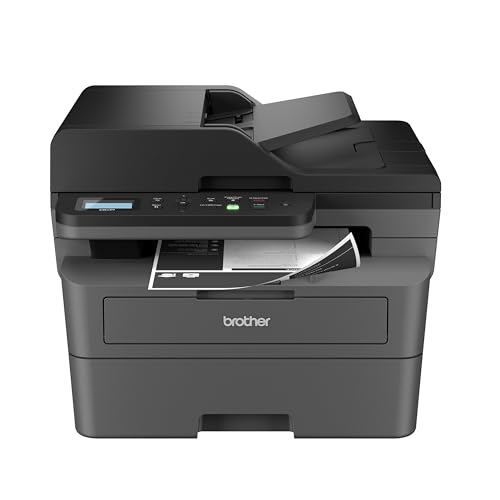
The Brother DCP-L2640DW is the printer we would put in the center of a small office. It handles the routine jobs that make a print-only machine feel limiting: copying a signed form, scanning a stack of pages, and printing a document while someone else is using the network. It is still compact enough for a home office, but its 25-pound body and 16.1-inch width call for a proper stand or a sturdy desk.
Its headline print speed is up to 36 pages per minute, which is fast enough that a multi-page report does not become a reason to leave your desk. The 50-page automatic document feeder is the bigger differentiator. It lets the machine work through a group of pages for scanning or copying instead of forcing you to lift the lid for each sheet. Scan speeds are listed at up to 23.6 images per minute in black and 7.9 images per minute in color, so it is especially suited to text documents rather than a large archive of color material.
Connection options are unusually useful here. Dual-band wireless supports both 2.4GHz and 5GHz networks, while Ethernet gives an office a more fixed connection and USB handles a direct link to one computer. The Brother Mobile Connect app adds printing, scanning, printer management, and toner tracking from a mobile device. Those options make it more adaptable than the Brother HL-L2460DW, while the Brother MFC-L2820DW goes one step further by adding fax and a touchscreen.
The weakness is its straightforward control setup and lack of fax. If you need faxing, the MFC-L2820DW is the more complete Brother choice. If you only print, the HL-L2460DW is smaller and simpler. The DCP-L2640DW is the right fit for anyone who wants the useful middle ground: quick monochrome output with the scanning and copying tools that a household or small team actually reaches for.
2. Brother HL-L2460DW: Best Duplex Printer

Pros
- Up to 36 pages per minute
- Automatic duplex printing
- 250-sheet paper tray
- Dual-band Wi-Fi, Ethernet, and USB
- Manual feed slot for envelopes and specialty paper
Cons
- Prints only, with no scanner or copier
- Slightly less compact than the entry-level Brother
- Toner is tied to Brother Genuine cartridge options
Best for: home offices and small teams that print regularly and want automatic two-sided output.
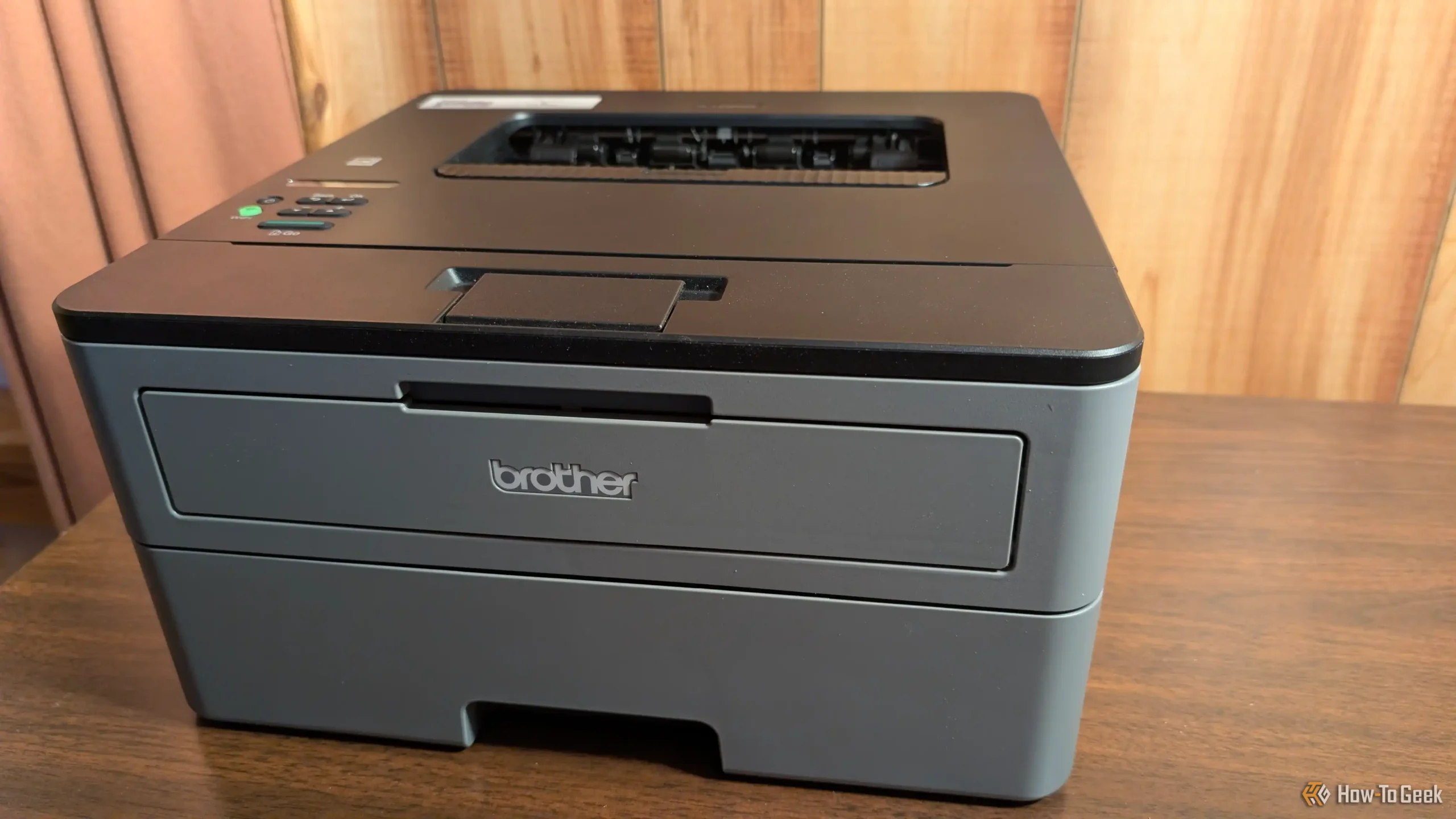
The Brother HL-L2460DW is the cleanest answer for someone who already owns a scanner or simply does not need one. It has the same practical shape as a compact home-office laser printer, but it adds the feature that matters most when documents grow longer: automatic duplex printing. The printer can put text on both sides of the sheet without requiring the user to turn pages around.
Its rated speed reaches 36 pages per minute, and the 250-sheet paper tray means ordinary work does not require constant refilling. A manual feed slot accepts envelopes and specialty paper, which is useful for occasional forms or letters. The printer weighs 15.6 pounds and measures 14 inches wide by 14.2 inches deep, so it is manageable on a desk while still having enough paper capacity for recurring office use.
The connectivity is strong for a print-only machine. Dual-band wireless supports 2.4GHz and 5GHz networks, and Ethernet is available when a shared office connection needs to stay steady. USB provides a direct connection to one computer. Brother Mobile Connect lets users print from a phone and monitor toner usage, making the printer less dependent on a single desktop.
The Brother DCP-L2640DW is more useful if your work includes scanning and copying, but the HL-L2460DW is the better focused tool for straight document output. The Brother HL-L2405W is smaller and simpler, though its listed speed is lower and it prints only one side at a time. Skip the HL-L2460DW if you expect to scan receipts or copy identity documents. Keep it in mind if clean, fast, two-sided pages are the entire brief.
3. Brother HL-L2405W: Best Compact Printer

Pros
- Compact 15.1-pound design
- Up to 30 pages per minute
- 250-sheet paper tray
- Dual-band Wi-Fi and USB
- Manual feed slot for specialty paper
Cons
- Single-sided printing only
- No scanning or copying
- No Ethernet connection listed
Best for: homes and home offices that need reliable wireless printing without multifunction features.
The Brother HL-L2405W gets the basic printer job right without adding a scanner, copier, or fax machine to the desk. It is the kind of model that makes sense for a household printing school forms, return labels, work documents, and the occasional shipping sheet. At 15.1 pounds, it is notably easier to move than the multifunction models lower in this list.
The rated output reaches 30 pages per minute for one-sided documents. That is not as quick as the 36-page-per-minute Brother printers, but it is still brisk for normal household work. Its 250-sheet tray reduces interruptions, and the manual feed slot gives you a way to handle envelopes and specialty paper without emptying the main tray. The 7.2-inch height also helps it fit beneath shelves and cabinets where taller multifunction printers cannot.
Wireless support includes both 2.4GHz and 5GHz bands, and a USB interface is available for a direct computer connection. Brother Mobile Connect can send print jobs from mobile devices, manage the printer remotely, and track toner usage. The Brother HL-L2460DW adds Ethernet, automatic duplexing, and a faster listed speed, so it is the better match for a busier shared office.
The trade-off is clear: this is a one-sided print-only machine. Anyone who regularly turns long documents into two-sided handouts should move up to the HL-L2460DW. Anyone who needs to scan or copy should consider the Brother DCP-L2640DW instead. For a home user who wants a modest footprint and a generous paper tray, the HL-L2405W is a sensible, uncomplicated choice.
4. HP LaserJet M110w: Best Space Saver

Pros
- Very compact 9.02-pound body
- Wireless printing from phones, tablets, and computers
- Works with AirPrint, Android, Chromebook, Mac, and Microsoft systems
- HP Smart app support
- Automatic wireless self-reset
Cons
- Single-sided printing only
- Up to 21 pages per minute
- Print-only design
- Cartridge restrictions may limit supply choices
Best for: a small desk, apartment, or personal workspace with light printing needs.
The HP LaserJet M110w is built around one advantage: it takes up less room than nearly every other printer here. Its 13.63-inch width and 7.45-inch depth make it much easier to place on a shallow desk, while its 9.02-pound weight makes moving it between a shelf and a work surface painless. This is the model to consider when space matters more than office throughput.
Its print speed reaches up to 21 black-and-white pages per minute, with single-sided output. That is enough for a few forms or a short report, but it will feel slow beside the 36-page-per-minute Brother models when a larger document arrives. There is no scanner or copier, so the M110w stays focused on printing rather than trying to replace several devices.
Wireless printing works from mobile devices, PCs, and tablets, with compatibility listed for Microsoft, Mac, AirPrint, Android, and Chromebook. The HP Smart app supports printing and cloud scanning workflows from a phone, although the printer itself does not include a scanner. Its self-reset wireless feature is intended to help it stay connected, which is useful for a printer that may sit idle for days between jobs.
The main weakness is capacity in the broadest sense. The Brother HL-L2405W is a stronger choice for a home office that prints more often, thanks to its 30-page-per-minute speed and 250-sheet tray. HP also states that this printer is intended to work with cartridges containing original HP chips or circuitry, and firmware updates maintain those measures. Choose the M110w when the desk is tight and the workload is light, not when you need automatic duplexing or a multifunction center.
5. HP LaserJet Pro 3001dw: Best for Office Security

Pros
- Up to 35 pages per minute
- Automatic two-sided printing
- Ethernet, Wi-Fi, and Bluetooth
- HP Wolf Pro Security
- Designed for teams of up to seven people
Cons
- Print-only design
- Larger than personal HP printers
- Cartridge restrictions may limit supply choices
Best for: an office that needs fast shared printing and built-in security controls.
The HP LaserJet Pro 3001dw feels like a shared office printer rather than a personal desktop accessory. It is designed for teams of up to seven people, and its strengths show up when several users send documents over the network. Automatic two-sided printing keeps routine reports from becoming unnecessarily bulky, while the listed single-sided speed reaches 35 pages per minute.
The connection choices suit a workplace. Intelligent Wi-Fi searches for the strongest connection, Ethernet offers a fixed network path, and Bluetooth gives another way to connect. It supports printing from mobile devices, PCs, and tablets, with compatibility for Microsoft, Mac, AirPrint, Android, and Chromebook systems. That flexibility makes it easier to share than a printer intended for one computer.
Security is the distinguishing feature. HP Wolf Pro Security includes customizable settings intended to protect the printer and information moving through it. That matters in an office where documents may contain customer records, financial details, or internal material. The Brother HL-6210DW is much faster and carries substantially more paper, but the HP has a more approachable footprint for a smaller team that values security controls.
The limitation is that it cannot scan or copy. If the office needs a document feeder, the HP LaserJet MFP M234sdw or Brother DCP-L2640DW makes more sense. HP also says the printer is intended for cartridges with original HP chips or circuitry, and firmware updates maintain that restriction. Pick the 3001dw for networked, two-sided printing in a small office, especially when security deserves attention alongside speed.
6. Brother MFC-L2820DW: Best All-in-One

Pros
- Prints at up to 36 pages per minute
- Includes print, scan, copy, and fax functions
- 50-page automatic document feeder
- 2.7-inch touchscreen
- Ethernet, dual-band Wi-Fi, and USB
Cons
- Tall 12.5-inch body
- Heavier than print-only models
- More features than a basic home printer needs
Best for: small offices that still need faxing as part of their document workflow.
The Brother MFC-L2820DW is the most complete office machine in the compact Brother family. It prints, scans, copies, and faxes, so it can handle a small office that still exchanges documents by fax or needs a single machine for every paper-based task. It is not small in the same way as the HL-L2405W, but its 22.5-pound body is reasonable for the capabilities included.
Printing reaches up to 36 pages per minute, and the 50-page automatic document feeder supports multi-page copying, scanning, and faxing. Brother lists scan speeds of up to 23.6 images per minute in black and 7.9 images per minute in color. Those figures make it a strong text-document machine, especially when processing several pages at a time rather than a single photo or receipt.
The 2.7-inch touchscreen is a meaningful convenience rather than a decorative extra. It provides direct navigation and supports printing from and scanning to cloud services such as Google Drive, Dropbox, Evernote, and OneNote. Ethernet, dual-band Wi-Fi, and USB cover the main connection scenarios, while Brother Mobile Connect handles mobile printing, scanning, and printer management.
The Brother DCP-L2640DW is the better fit if fax is irrelevant and you want a slightly lighter multifunction printer. The Brother HL-L2480DW also scans and copies, but it uses a flatbed design without the MFC's automatic document feeder. The MFC-L2820DW's weakness is its height and extra complexity. It belongs in a small office that will actually use faxing and batch document handling, not on a minimalist desk that only prints occasional pages.
7. HP LaserJet MFP M234sdw: Best HP Multifunction Printer

Pros
- Prints up to 30 pages per minute single-sided
- Up to 19 images per minute in two-sided printing
- Print, scan, and copy functions
- Automatic document feeder
- Ethernet and dual-band Wi-Fi
Cons
- No fax function
- Larger than a print-only HP model
- Older design than some compact Brother options
Best for: small teams that want an HP multifunction printer with automatic document handling.
The HP LaserJet MFP M234sdw is a practical fit for a team of one to five people that needs more than printing. Its automatic document feeder makes copying and scanning hands-free for multi-page documents, which is a major step up from a flatbed-only machine. The body is 16.46 inches deep and weighs 19 pounds, so it needs more room than the tiny M110w.
HP lists a speed of up to 30 black-and-white pages per minute for single-sided work and up to 19 black-and-white images per minute for two-sided printing. That distinction is useful: two-sided documents naturally take longer, but the machine is built to handle them without requiring manual page turning. It prints, scans, and copies, though it does not include fax.
Dual-band Wi-Fi with self-reset is designed to detect and resolve connection problems, while Ethernet gives a wired alternative. The HP Smart app supports printing, copying, and cloud scanning from a phone. Built-in security features are intended to protect the printer from attacks, which gives it a more office-ready profile than the smaller M140w.
The Brother DCP-L2640DW is faster on paper and adds stronger connection flexibility through USB alongside Ethernet and wireless. The HP counters with a familiar app-centered workflow and automatic wireless recovery. Its weakness is the lack of fax and the fact that its 30-page-per-minute rating trails the fastest Brother multifunction printers. Choose it when HP's software and security approach fit your workplace, and when scanning and copying matter as much as printing.
8. Brother HL-6210DW: Best High-Volume Printer

Pros
- Up to 50 pages per minute
- 520-sheet main tray
- 100-sheet multipurpose tray
- Expandable paper capacity
- Gigabit Ethernet and dual-band Wi-Fi
Cons
- Large 29.8-pound design
- Print-only machine
- Built for office volume, not casual home use
Best for: busy offices that print large batches and need substantial paper capacity.
The Brother HL-6210DW is the specialist in this group. It is not trying to be the smallest printer or the most versatile multifunction device. Its purpose is to keep a busy office supplied with printed documents, and it does that with a listed speed of up to 50 pages per minute. A large report or stack of invoices moves through it far faster than through the compact home-office models.
Paper capacity is just as important as speed for high-volume work. The main tray holds 520 sheets, and the multipurpose tray holds another 100 sheets. Optional trays can expand total capacity up to 1, 660 sheets, giving an office room to grow without replacing the printer. The 11.4-inch height and 29.8-pound weight make it a substantial piece of equipment, so it belongs on a dedicated stand or robust office surface.
Networking is appropriately serious. Built-in Gigabit Ethernet supports a wired office network, and dual-band wireless enables printer sharing and mobile printing. Brother also lists ultra-high-yield replacement toner cartridges capable of up to 18, 000 pages. That is a real operational advantage for an office that would otherwise be stopping often to replace supplies.
Compared with the HP LaserJet Pro 3001dw, the HL-6210DW is faster and carries much more paper, but it takes up more room and does not offer HP's Wolf Pro Security controls. The Brother HL-L2460DW is a better personal-office option because it is far smaller, though it cannot approach the same throughput. Skip the HL-6210DW unless your workload justifies its size. For a department printer, it is the clear performance leader here.
9. HP LaserJet MFP M140w: Best Basic Multifunction Printer

Pros
- Print, scan, and copy functions
- Compact 11.9-pound body
- Wireless self-reset
- HP Smart app support
- Can copy both sides of an ID card onto one side of a sheet
Cons
- Single-sided printing only
- Up to 21 pages per minute
- No automatic document feeder listed
- Cartridge restrictions may limit supply choices
Best for: one to three people who need occasional scanning and copying in a small space.
The HP LaserJet MFP M140w takes the compact approach of the M110w and adds scanning and copying. It measures 10.4 inches wide and weighs 11.9 pounds, making it easier to place in a small home office than the larger automatic-document-feeder models. It is intended for one to three people, which is a sensible limit given its speed and basic paper workflow.
Printing reaches up to 21 black-and-white pages per minute, and output is single-sided. This is fine for forms, occasional reports, and household paperwork, but it is not the right machine for frequent two-sided documents. The scanner and copier add useful flexibility, especially for users who occasionally need to duplicate a page or digitize a document.
A particularly handy feature is the ability to copy both sides of an ID card or another small document onto the same side of one sheet. Wireless printing works from mobile devices, PCs, and tablets, and the printer supports Microsoft, Mac, AirPrint, Android, and Chromebook systems. HP's Smart app adds mobile printing, copying, and cloud scanning workflows.
The HP LaserJet M110w is smaller and lighter if you only print, while the HP LaserJet MFP M234sdw is much better for a team that needs an automatic document feeder and faster output. The M140w's weakness is its limited throughput and lack of duplex printing. It makes sense for a user who wants one compact device for print, scan, and copy tasks but does not expect a large stack of pages every day.
10. Brother HL-L2480DW: Best Flatbed Multifunction Printer

Pros
- Up to 36 pages per minute
- Automatic duplex printing
- Flatbed scanner and copier
- 2.7-inch touchscreen
- 250-sheet tray and manual feed slot
Cons
- No automatic document feeder listed
- Larger than a print-only Brother
- No fax function
Best for: work-from-home users who need scanning and copying but usually handle one page at a time.
The Brother HL-L2480DW is a strong middle option for a home office that needs a scanner but does not routinely process a stack of pages. Its flatbed scan glass is useful for books, receipts, identity cards, and individual documents that cannot pass through a feeder. It also retains the fast print engine and automatic duplexing that make the Brother print-only models appealing.
Print speed reaches up to 36 pages per minute, and the 250-sheet tray handles ordinary office work without constant attention. The manual feed slot accepts envelopes and specialty paper. Automatic duplex printing keeps two-sided reports moving with less paper handling, a feature the smaller Brother HL-L2405W lacks.
The 2.7-inch touchscreen provides direct control and supports print-from and scan-to workflows for cloud services including Google Drive, Dropbox, Evernote, and OneNote. Dual-band Wi-Fi, Ethernet, and USB cover the main connection options, while Brother Mobile Connect allows printing, scanning, and printer management from a mobile device. Its 22.2-pound body is substantial, but the feature set is well organized.
The Brother DCP-L2640DW is the better choice for multi-page scanning because its 50-page automatic document feeder can process a stack without constant lid lifting. The Brother MFC-L2820DW adds fax and a similar document-feeder workflow. The HL-L2480DW is the one to choose when scanning is occasional and the flatbed is more useful than a feeder. It is a capable home-office machine, but buyers with regular batches should move up.

How to choose best monochrome laser printer
The right printer depends less on headline speed than on how documents move through your home or office. Focus on the paper path, the functions you use, and the connections your devices require.
Print speed
Print speed is measured in pages per minute, but the listed figure mainly describes sustained document output. A 21-page-per-minute printer can be perfectly adequate for occasional forms, while a 36 or 50-page-per-minute model makes a noticeable difference for reports, invoices, and office batches. Do not choose the fastest model automatically if your workload is only a few pages at a time.
Automatic duplexing
Automatic duplex printing turns a two-sided document into a mostly hands-off job. It matters for reports, handouts, and long documents because the printer manages the page order for you. The HL-L2405W, HP LaserJet M110w, and HP LaserJet M140w are single-sided models, while the Brother HL-L2460DW and the larger multifunction printers handle duplex output automatically.
If you regularly print more than a few pages, automatic duplexing matters more than a small difference in rated speed.
Scanning and copying
A print-only machine is smaller and simpler, but adding a scanner can prevent frequent trips to another device. Flatbed scanners are better for books, cards, receipts, and individual pages. An automatic document feeder is the feature to look for when you scan, copy, or fax several pages at once. The Brother DCP-L2640DW, Brother MFC-L2820DW, and HP LaserJet MFP M234sdw are better suited to batch work than the flatbed-only Brother HL-L2480DW.
Paper capacity
A 250-sheet tray is a useful baseline for a home office or small team. Larger capacity reduces refills when the printer is shared or used for recurring jobs. The Brother HL-6210DW stands apart with a 520-sheet main tray, a 100-sheet multipurpose tray, and optional expansion up to 1, 660 sheets. Compact printers are easier to place, but their paper handling may require more attention.
Connectivity and security
Dual-band Wi-Fi can help a printer fit into a modern home network, while Ethernet is useful for a fixed office installation. USB remains useful when one computer needs a direct connection. Mobile apps matter when several people print from phones and tablets. For office documents, security features deserve attention too. The HP LaserJet Pro 3001dw includes HP Wolf Pro Security, while the Brother HL-6210DW lists Triple Layer Security.
For a wider look at how monochrome output compares with other office setups, the differences between black and white and color printing can help before you commit to a single-purpose machine. If your office needs a broader feature mix, the connections and workloads that shape a general laser printer are also worth considering.
Frequently asked questions
Are monochrome laser printers good for home use?
Yes. They are particularly useful for text documents, forms, schoolwork, labels, and work paperwork. A compact model such as the Brother HL-L2405W or HP LaserJet M110w makes sense when you do not need color output.
Do monochrome laser printers scan and copy?
Only multifunction models do. The Brother DCP-L2640DW, Brother MFC-L2820DW, Brother HL-L2480DW, HP LaserJet MFP M234sdw, and HP LaserJet MFP M140w include scanning and copying functions. The print-only models cannot scan or copy without a separate device.
Is automatic duplex printing important?
It is important if you print reports, handouts, or other longer documents. Duplexing lets the printer produce both sides of a sheet without manually turning pages. If you mostly print single-page forms, a single-sided model may be sufficient.
Which printer is best for scanning multiple pages?
Choose a model with an automatic document feeder. The Brother DCP-L2640DW, Brother MFC-L2820DW, and HP LaserJet MFP M234sdw include document-feeder functionality for multi-page scanning and copying. The Brother HL-L2480DW uses a flatbed, which is better for individual pages and bound material.
Can these printers print from a phone?
The listed wireless models support mobile printing through their respective apps and compatible mobile platforms. Brother models use Brother Mobile Connect, while HP models use HP Smart. AirPrint, Android, Chromebook, Mac, and Microsoft compatibility is listed for the applicable HP printers.
Should I choose a printer with Ethernet?
Ethernet is useful when a printer will stay in one place and serve several office computers. It can provide a more fixed connection than Wi-Fi. For a personal home printer, wireless and USB may be all you need, while the Brother HL-6210DW and HP LaserJet Pro 3001dw are better equipped for shared office networking.

The bottom line
The Brother DCP-L2640DW is the strongest all-around answer for most small offices and serious home offices. It combines up to 36 pages per minute, automatic duplexing, a 50-page document feeder, scanning, copying, and three connection methods without becoming a full-size departmental machine. For anyone still deciding on the Best monochrome laser printer, this is the safest place to start.
Choose the Brother HL-L2460DW if you only need printing and want fast automatic two-sided pages. Choose the Brother HL-6210DW for a busy office where 50 pages per minute and substantial paper capacity matter more than compact dimensions. The HP LaserJet Pro 3001dw is the better specialist pick when office security controls are a priority.
If you are undecided, buy the Brother DCP-L2640DW unless you know you need only print output or genuinely high-volume office throughput.
As an Amazon Associate we earn from qualifying purchases.