
A graphics card can look perfect on a product page and still be wrong for your PC. A card that is nearly 14 inches long or more than three slots thick can block drive bays, crowd the side panel, or simply refuse to fit in a compact case. The 10 Best nvidia graphics card options below cover that entire spread, from the small ASUS Dual RTX 3050 to enormous RTX 5080 designs.
The strongest choices are not interchangeable. Some prioritize Blackwell performance and DLSS 4, some make a better fit for small-form-factor builds, and others put cooling hardware ahead of case compatibility. ASUS TUF RTX 5080 is our top pick, followed by compact RTX 5070 and RTX 5060 alternatives, with the RTX 3050 as the smallest and least demanding option.
| # | Product | Award | Memory | Dimensions | Best for |
|---|---|---|---|---|---|
| 1 | ASUS TUF RTX 5080 | Best overall | 16GB GDDR7 | 13.7 inches long, 3.6-slot | High-end gaming and creation |
| 2 | ASUS Dual RTX 5060 | Best compact RTX 5060 | 8GB GDDR7 | 9 inches long, 2.5-slot | Small gaming PCs |
| 3 | ASUS Prime RTX 5070 White | Best white compact card | 12GB GDDR7 | 12 inches long, 2.5-slot | Small white builds |
| 4 | PNY RTX 5080 Epic-X | Best creator features | Not specified | 12.9 inches long, triple-fan | Gaming and creative software |
| 5 | ASUS ROG Astral RTX 5080 | Best cooling headroom | 16GB GDDR7 | 14.1 inches long, 3.8-slot | Sustained heavy workloads |
| 6 | ASUS Prime RTX 5060 | Best 5060 flexibility | 8GB GDDR7 | 10.6 inches long, 2.5-slot | Compact mainstream builds |
| 7 | ASUS Prime RTX 5070 | Best compact RTX 5070 | 12GB GDDR7 | 12 inches long, 2.5-slot | SFF performance |
| 8 | Gigabyte RTX 5070 Windforce | Best low-profile 5070 design | 12GB GDDR7 | 11.1 inches long | Tighter 5070 builds |
| 9 | ASUS TUF RTX 5070 | Best rugged RTX 5070 | 12GB GDDR7 | 13 inches long, 3.125-slot | Durable full-size systems |
| 10 | ASUS Dual RTX 3050 | Best small basic upgrade | 6GB GDDR6 | 7.9 inches long, 2-slot | Older or compact PCs |
1. ASUS TUF RTX 5080: Best Overall

Pros
- 16GB of GDDR7 memory
- Blackwell architecture with DLSS 4
- Protective PCB coating and military-grade components
- Phase-change GPU thermal pad
- Three Axial-tech fans and a large fin array
Cons
- 13.7-inch length demands a spacious case
- 3.6-slot thickness limits neighboring expansion space
- Five-pound weight needs careful case support
Best for: a high-end gaming or creative PC with room for a large, heavily cooled graphics card.
The ASUS TUF RTX 5080 is the card we'd keep for a serious desktop build. It has the kind of substantial cooler that makes sense for a high-output GPU, and its 16GB of GDDR7 gives demanding games and creative applications more memory room than the RTX 5070 models here. It feels designed to stay in a system for years rather than simply occupy an open slot.
The Blackwell architecture and DLSS 4 are the important platform features. DLSS 4 uses AI-assisted rendering technologies to improve frame rates and image quality in supported software, while the newer architecture also gives this card a more current foundation than the ASUS Dual RTX 3050. The memory capacity matters when games use detailed textures or when a creator is working with larger scenes, although it does not remove the need for a suitably fast processor and a capable power supply.
ASUS builds the TUF around three Axial-tech fans, a massive fin array, and a 3.6-slot design. The smaller fan hub and barrier ring are intended to increase downward air pressure, so the cooler can move air through that dense heatsink instead of merely stirring air around the card. The phase-change thermal pad is another longevity-minded detail. Protective PCB coating helps guard against moisture, dust, and debris, and the military-grade components are aimed at long-term durability.
The weakness is physical, not conceptual. At 13.7 inches long, 5.7 inches wide, and five pounds, this is not a casual drop-in upgrade. The 3.6-slot footprint can obstruct adjacent slots, and a small case may have no practical way to support it. The much larger ASUS ROG Astral RTX 5080 offers even more cooling hardware, but the TUF is easier to accommodate and avoids turning the build into a specialist project. Choose this one when you want top-tier RTX 5080 capability without going all the way to the oversized Astral design.
2. ASUS Dual RTX 5060: Best Compact RTX 5060

Pros
- Compact 9-inch length
- 2.5-slot design
- 8GB of GDDR7 memory
- Blackwell architecture and DLSS 4
- 0dB technology
Cons
- 8GB memory leaves less room for demanding workloads
- Lower-tier GPU than every RTX 5070 and RTX 5080 here
- Compact cooler leaves less thermal mass than the TUF cards
Best for: a small gaming desktop that needs modern Nvidia features without a long, heavy card.
The ASUS Dual RTX 5060 solves a common upgrade problem: the card has to fit before its performance matters. Its 9-inch length and 1.4-pound weight are notably easier to manage than the full-size RTX 5070 and RTX 5080 cards. For a compact case with limited clearance, those dimensions are more useful than a huge cooler that cannot physically enter the chassis.
It uses 8GB of GDDR7 and the Blackwell architecture, with DLSS 4 included for compatible games and applications. ASUS lists an OC mode of 2565MHz and a default mode of 2535MHz. Those clock figures describe the factory tuning, but the more practical point is that the card is ready to run without requiring manual overclocking. Its 623 AI TOPS specification also reflects the AI-focused hardware in this generation, though real performance still depends on the software using it.
The 2.5-slot design gives the Dual RTX 5060 more cooling room than a basic two-slot card while keeping it much easier to place than the 3.125-slot ASUS TUF RTX 5070. Its Axial-tech fans use a smaller hub and barrier ring to support longer blades and stronger downward airflow. The 0dB technology is useful in light desktop work because the fans can remain stopped when the card does not need active cooling.
This is the sensible compact choice, but it is not the fastest one here. The ASUS Prime RTX 5060 is longer at 10.6 inches and heavier at 1.7 pounds, yet offers a similar 2.5-slot approach and a slightly higher listed OC clock. The Dual model wins on case compatibility. Skip it if your build is ready for an RTX 5070 or if you routinely use applications that can consume more than 8GB of graphics memory. For smaller gaming PCs, it is the cleanest fit in this group.
3. ASUS Prime RTX 5070 White: Best White Compact Card
Pros
- 12GB of GDDR7 memory
- 2.5-slot SFF-ready design
- White finish for coordinated builds
- Dual BIOS
- Blackwell architecture and DLSS 4
Cons
- 12-inch length still needs careful case measurement
- Heavier than the compact RTX 5060 models
- White finish may not suit a dark or understated system
Best for: a small-form-factor or white gaming PC that needs RTX 5070 capability.
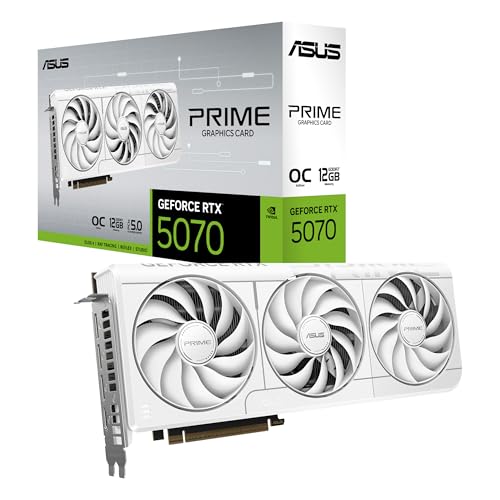
The ASUS Prime RTX 5070 White is the easiest card here to recommend for a coordinated white build. The finish is the obvious visual distinction, but the useful design choice is its 2.5-slot SFF-ready body. That gives it a better chance in a compact enclosure than the 3.125-slot ASUS TUF RTX 5070, while retaining the RTX 5070 class and its 12GB of GDDR7.
ASUS lists an OC mode of 2587MHz and a default mode of 2557MHz. Those are modestly different operating profiles rather than a reason to treat the card as a completely different GPU. More important is the combination of 12GB memory, Blackwell architecture, and DLSS 4. The extra memory over the RTX 5060 cards gives the Prime RTX 5070 more breathing room for high-resolution textures and demanding scenes.
The Axial-tech fans use a smaller hub and barrier ring to direct airflow through the cooler. ASUS also includes Dual BIOS, which gives the builder another firmware mode to use when tuning for a quieter or more performance-focused system. At 12 inches long, two inches high, and 2.3 pounds, this card is not tiny, but its thickness is the part most likely to determine whether it fits beside other expansion hardware.
Compared with the ASUS Prime RTX 5070, the White model has the same core compact format and the same listed dimensions, but it adds a distinct appearance and a specified OC profile. The Gigabyte RTX 5070 Windforce is shorter at 11.1 inches and narrower at 4.33 inches, so it is a stronger choice when clearance is extremely tight. Choose the Prime RTX 5070 White when the case can accept 12 inches and the visual match matters as much as the component layout.
4. PNY RTX 5080 Epic-X: Best Creator Features

Pros
- RTX 5080 performance platform
- Triple-fan cooler
- DLSS 4 and Reflex 2 support
- GeForce RTX features for AI-assisted work
- NVIDIA Studio support for creative applications
Cons
- Nearly 13 inches long
- Product data does not specify memory capacity
- Triple-fan design still requires a roomy case
Best for: gamers and creators who want RTX 5080 features with a strong software-focused feature set.
The PNY RTX 5080 Epic-X stands out because its product information spends as much time on workflows as it does on gaming. DLSS 4, Reflex 2, RTX AI PC features, and NVIDIA Studio support make it a natural fit for someone who switches between games, editing software, 3D work, and AI-assisted creative applications. The card has a triple-fan cooler and a 12.9-inch length, placing it in the same broad physical class as the larger RTX 5080 options.
DLSS 4 is the headline gaming feature. It uses neural rendering technologies to improve frame rates, reduce latency, and refine image quality in supported titles. Reflex 2 is aimed at responsiveness by optimizing the graphics pipeline, which matters most in competitive games where input timing is more important than visual effects. These are software and platform benefits, so they depend on application support rather than appearing automatically in every workload.
For creators, the listed NVIDIA Studio support is the more meaningful distinction. Studio drivers are designed around stability in creative applications, while the RTX hardware can accelerate video editing, 3D rendering, graphic design, and AI-assisted workflows. The product data does not specify this card's memory capacity, so buyers working with especially large projects should confirm that detail before ordering rather than assuming it matches another RTX 5080 model.
The PNY is 12.9 inches long and about 5.39 inches wide, so it is shorter than the ASUS TUF RTX 5080 but still far too large for many compact cases. The ASUS ROG Astral RTX 5080 has a more elaborate four-fan cooler, while the ASUS TUF offers specified protective PCB features and a 16GB memory capacity. Pick the Epic-X when its creator-oriented software features are central to your work and you have already checked the case clearance.
5. ASUS ROG Astral RTX 5080: Best Cooling Headroom

Pros
- 16GB of GDDR7 memory
- Four-fan Axial-tech design
- Patented vapor chamber
- Phase-change GPU thermal pad
- DLSS 4 and Blackwell architecture
Cons
- Largest card in the roundup
- 3.8-slot design can block expansion space
- Five-pound weight requires strong support
Best for: a spacious workstation or gaming tower running sustained, demanding GPU workloads.
The ASUS ROG Astral RTX 5080 is built for the buyer who regards cooling capacity as part of the graphics card's performance. Its four-fan design, vapor chamber, and very large heatsink are not subtle features. They make this the most imposing option in the list, but they also give it the strongest cooling brief among the RTX 5080 cards covered here.
The 16GB of GDDR7 and Blackwell architecture place it alongside the ASUS TUF RTX 5080 at the GPU level. DLSS 4 adds the same generation of AI-assisted rendering features, so the Astral is not buying a different software ecosystem. Its distinction is the thermal design. ASUS says the quad-fan layout can increase airflow and pressure by up to 20 percent, while the patented vapor chamber and milled heatspreader are intended to lower GPU temperatures.
The dimensions are the catch. At 14.1 inches long, 5.9 inches wide, and three inches high, this card needs a case chosen around it. The 3.8-slot footprint can cover neighboring expansion slots, and its five-pound weight is enough to make a support bracket or other form of careful installation sensible. A large cooler can also complicate access to motherboard connectors and make future upgrades less convenient.
The ASUS TUF RTX 5080 is the more balanced purchase for most full-size systems because it is shorter and slightly less thick. The Astral makes more sense when the PC has generous internal space and the GPU will spend long periods rendering, encoding, or running demanding games. Avoid it for compact builds, even if the case technically lists enough length. Width, slot clearance, cable routing, and weight all matter here.
6. ASUS Prime RTX 5060: Best 5060 Flexibility
Pros
- 8GB of GDDR7 memory
- SFF-ready 2.5-slot body
- Dual BIOS
- Blackwell architecture and DLSS 4
- 2595MHz listed OC mode
Cons
- Longer and heavier than the ASUS Dual RTX 5060
- 8GB memory can limit demanding workloads
- Not as compact as the smallest card here
Best for: a mainstream gaming PC that needs more installation flexibility than a full-size card provides.
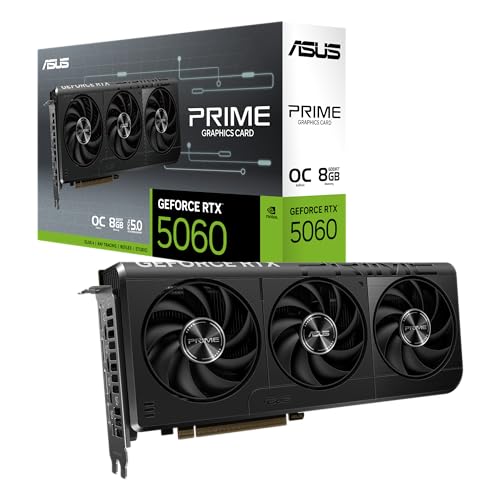
The ASUS Prime RTX 5060 is the middle ground between a truly compact card and a larger enthusiast design. Its 10.6-inch length remains manageable in many smaller cases, while the 2.5-slot body leaves more room for cooling than a basic two-slot model. It weighs 1.7 pounds, which is still easy to install without the support concerns of the RTX 5080 cards.
This model has 8GB of GDDR7 and an OC mode of 2595MHz, with a default mode of 2565MHz. It also uses the Blackwell architecture and DLSS 4, giving it a more current feature set than the ASUS Dual RTX 3050. The 630 AI TOPS specification points to its hardware for AI-related tasks, although the benefit will vary with the software and game engine involved.
Dual BIOS is helpful in a build where the owner wants some firmware flexibility. The Axial-tech fan design uses a smaller hub and barrier ring to produce stronger downward airflow, which is useful when the cooler has to work inside a confined case. The SFF-ready designation is another practical advantage, but it should not replace checking the exact case's GPU length and slot limits.
The ASUS Dual RTX 5060 is the better fit when every inch counts because it is 9 inches long and weighs 1.4 pounds. The Prime model is the one to choose when the extra 1.6 inches are available and you want the listed OC setting, Dual BIOS, and a little more cooler volume. It remains a midrange card with 8GB of memory, so skip it for workloads that routinely need much more graphics memory.
7. ASUS Prime RTX 5070: Best Compact RTX 5070

Pros
- 12GB of GDDR7 memory
- 2.5-slot SFF-ready design
- Dual BIOS
- Phase-change GPU thermal pad
- Axial-tech fans
Cons
- 12-inch length is not suitable for every small case
- 2.3-pound weight is more than compact RTX 5060 models
- Less reinforced than the TUF RTX 5070
Best for: a compact system that needs RTX 5070 capability without a three-slot-plus cooler.
The ASUS Prime RTX 5070 is the straightforward compact RTX 5070 in this roundup. It keeps the 12GB of GDDR7 and Blackwell platform while using a 2.5-slot design instead of the much thicker body on the ASUS TUF RTX 5070. That makes it easier to place in a small-form-factor system, though its 12-inch length still deserves a tape measure before purchase.
The card uses DLSS 4 and an SFF-ready layout, so its main appeal is a combination of current features and physical flexibility. The 12GB memory capacity gives it more room than either RTX 5060 model for high-detail games and larger graphics workloads. It is a better fit for someone who wants to keep the system compact without stepping down to the smaller GPU class.
ASUS uses Axial-tech fans with a smaller hub and a barrier ring, and adds a phase-change GPU thermal pad to support heat transfer and long-term thermal performance. Dual BIOS gives the builder another configuration option. These features do not make the card physically small, but they help explain why ASUS can keep the cooler at 2.5 slots while still targeting a higher-output GPU.
The Prime RTX 5070 is almost the same physical proposition as the white version, with the color and product presentation being the main visible difference. The Gigabyte RTX 5070 Windforce is shorter and narrower, making it more attractive for unusually tight cases. The ASUS TUF RTX 5070 has more rugged construction but occupies 3.125 slots. Choose the Prime model when compact dimensions and a restrained black design matter more than reinforced construction.
8. Gigabyte RTX 5070 Windforce: Best Low-Profile 5070 Design

Pros
- 12GB of GDDR7
- 192-bit memory interface
- 11.1-inch length
- 4.33-inch width
- SFF-ready design
Cons
- Product data does not specify the card's slot thickness
- Fewer cooler details are listed than for the ASUS models
- No listed Dual BIOS feature
Best for: a compact RTX 5070 build where length and width are especially restrictive.
The Gigabyte RTX 5070 Windforce has the most useful dimensions for a tight RTX 5070 installation. It measures 11.1 inches long and 4.33 inches wide, making it shorter and narrower than the ASUS Prime RTX 5070 cards. That difference may decide whether front fans, radiator hardware, or a side panel can coexist with the GPU.
Its core specification is clear: 12GB of GDDR7 on a 192-bit memory interface, PCIe 5.0, and the Blackwell architecture with DLSS 4. The memory interface is the connection between the GPU and its memory, while the 12GB capacity provides room for detailed game assets and graphics applications. The product information does not supply a clock figure, so this is not the card to choose based on a specific factory overclock number.
Gigabyte lists its Windforce cooling system and NVIDIA SFF-ready compatibility. The shorter body should help in compact cases, but the missing slot-thickness detail is important. Buyers should confirm that specification against the case and motherboard layout before ordering. A short card can still block adjacent slots if its cooler extends outward.
The ASUS Prime RTX 5070 offers more clearly listed features, including Axial-tech fans, a phase-change thermal pad, and Dual BIOS. The Gigabyte model wins on the dimensions we can verify, particularly width, while the ASUS TUF RTX 5070 is the more heavily reinforced full-size alternative. Choose Windforce when the build's measurements point to it, not simply because the name says SFF.
9. ASUS TUF RTX 5070: Best Rugged RTX 5070

Pros
- 12GB of GDDR7 memory
- Protective PCB coating
- Military-grade components
- Three Axial-tech fans
- Phase-change GPU thermal pad
Cons
- 13-inch length
- 3.125-slot design
- Heavier than the Prime RTX 5070 cards
Best for: a full-size gaming PC where reinforced construction matters more than compact dimensions.
The ASUS TUF RTX 5070 is the durability-first RTX 5070 in this group. It has the same 12GB of GDDR7 and Blackwell foundation as the compact Prime models, but its 13-inch length and 3.125-slot design leave more room for a substantial fin array and three Axial-tech fans. This is a conventional tower card, not a small-case compromise.
The protective PCB coating is useful for systems exposed to more dust, moisture, or debris than a clean office desktop. ASUS also specifies military-grade components, positioning the card around long-term durability. The phase-change GPU thermal pad is designed to maintain heat transfer under heavy loads and to outlast traditional thermal paste. Those are construction details, not gaming features, but they are the reason to choose TUF over a slimmer Prime model.
The trade-off is easy to see beside the other RTX 5070 cards. The Gigabyte Windforce is 11.1 inches long and 4.33 inches wide, while the Prime RTX 5070 is 12 inches long and 2.5 slots thick. The TUF is 13 inches long, 5.5 inches wide, 2.5 inches high, and 3.4 pounds. It needs more case space and places more strain on the slot, so installation deserves care.
This card makes sense in a roomy system that will run demanding games or GPU workloads for long sessions. It is a poor choice for a compact build, even when the case's length limit appears to allow it, because slot thickness and weight can create separate problems. Pick the TUF RTX 5070 when the reinforced build is a priority and the chassis has room to accommodate it.
10. ASUS Dual RTX 3050: Best Small Basic Upgrade

Pros
- 7.9-inch length
- 2-slot design
- 6GB of GDDR6 memory
- Steel bracket
- Axial-tech fan design
Cons
- Older Ampere architecture
- 6GB memory is the lowest capacity here
- PCIe 4.0 rather than PCIe 5.0
Best for: an older or compact desktop that needs a short, two-slot Nvidia graphics card.
The ASUS Dual RTX 3050 is the outlier, and that is precisely why it remains relevant. Its 7.9-inch length, 1.5-inch height, and 2-slot design make it far easier to install in older desktops or compact cases than any RTX 5070 or RTX 5080 in this roundup. At 0.9 pounds, it also avoids the support and clearance concerns associated with the larger cards.
This model uses 6GB of GDDR6 and Nvidia's Ampere architecture. Its second-generation RT cores and third-generation Tensor cores support ray tracing and DLSS features, but it does not share the newer Blackwell architecture or DLSS 4 platform of the other current-generation options. PCIe 4.0 is also an older interface than the PCIe 5.0 used by the RTX 50-series cards.
The cooler uses ASUS Axial-tech fans, with a smaller hub and barrier ring intended to improve airflow. A steel bracket adds structural support, while the two-slot layout preserves more room for adjacent expansion hardware. Those physical traits are more important here than an elaborate thermal system, because the card's appeal is getting modern graphics support into a constrained desktop.
The performance gap between this card and the ASUS Dual RTX 5060 is substantial enough that the RTX 3050 should be a deliberate compatibility choice, not an automatic recommendation. Choose it for a short, light, two-slot upgrade or an older system whose case and platform rule out the newer cards. If the computer can accept a longer PCIe 5.0 card, the RTX 5060 options are more forward-looking.
How to choose best nvidia graphics card
The right GPU starts with the case and the workload, then moves to memory, cooling, and platform features.
GPU generation and workload
The RTX 50-series cards here use Nvidia's Blackwell architecture and DLSS 4, while the ASUS Dual RTX 3050 uses Ampere. Blackwell is the more current platform for supported games, AI features, and creative applications. DLSS benefits depend on software support, so look at the games and applications you actually use rather than treating the feature name as a guarantee of a particular frame rate.
A useful comparison should account for more than the GPU label. The RTX 5080 cards are aimed at demanding workloads, the RTX 5070 cards sit below them with 12GB of memory, and the RTX 5060 models focus on smaller systems. For another perspective on choosing a GPU around a particular game library, the graphics features that matter most for modern games are a useful place to begin.
Memory capacity
Memory capacity affects how much data the card can hold for textures, frames, scenes, and creative projects. The RTX 5080 models listed here provide 16GB of GDDR7, the RTX 5070 models provide 12GB, the RTX 5060 cards provide 8GB, and the RTX 3050 provides 6GB of GDDR6.
More memory does not turn a lower-tier GPU into a faster one, but it can reduce the chance of running into limits in demanding games or large projects. If your workload involves high-resolution assets, 3D scenes, or AI-assisted applications, start with capacity before comparing small differences in factory clock settings.
A GPU that fits the game you play but not the case you own is not an upgrade.
Card length and slot thickness
Measure the available GPU length from the rear bracket to the front obstruction, not just the empty space visible through the side panel. The ASUS Dual RTX 3050 is only 7.9 inches long, the ASUS Dual RTX 5060 is 9 inches, and the RTX 5070 models range from 11.1 to 13 inches. The RTX 5080 options reach 14.1 inches.
Slot thickness matters just as much. A 2-slot card leaves more room for another expansion card than a 3.125-slot or 3.8-slot design. Check the motherboard layout, front radiator or fan position, power cable bend space, and side-panel clearance together. For a compact system, the case measurements that decide whether a GPU will fit are more useful than a generic size label.
Cooling design
Larger coolers generally provide more fin area and more fan capacity, but they also consume more space. The ASUS TUF RTX 5080 uses three Axial-tech fans, the ROG Astral RTX 5080 uses four, and the ASUS TUF RTX 5070 uses three. The Prime and Dual cards use more compact layouts, while the Gigabyte card lists its Windforce cooling system.
Look for airflow that can move through the heatsink rather than only across the card. Axial-tech designs use a smaller hub and barrier ring, and ASUS's phase-change thermal pads are intended to maintain heat transfer under heavy loads. A compact cooler can be entirely appropriate when the GPU output and case airflow are matched to it.
Build features and firmware
Protective PCB coating, reinforced components, steel brackets, phase-change thermal pads, and Dual BIOS each solve different problems. Protective coating and component selection speak to durability, a steel bracket supports the board, and Dual BIOS gives builders another firmware mode to use when tuning a system.
Do not treat every extra as equally important. A Dual BIOS feature may matter more to a system builder who experiments with settings, while a steel bracket is more useful in a small case where support options are limited. For a broader comparison of graphics card selection across different PC types, the trade-offs between compact and full-size GPU designs can help narrow the shortlist.
Frequently asked questions
Which Nvidia graphics card is best for a high-end PC?
The ASUS TUF RTX 5080 is the strongest all-around pick here for a high-end system. It combines 16GB of GDDR7, Blackwell architecture, DLSS 4, three Axial-tech fans, and a substantial cooling design. The ASUS ROG Astral RTX 5080 is better suited to buyers who have exceptional case space and want the most elaborate cooler.
Which card is easiest to fit in a small PC?
The ASUS Dual RTX 3050 is the smallest card in this selection at 7.9 inches long and two slots thick. Among the newer Blackwell cards, the ASUS Dual RTX 5060 is the easiest fit at 9 inches long and 2.5 slots. The Gigabyte RTX 5070 Windforce is the most compact RTX 5070 by the listed length and width.
Is 8GB of graphics memory enough?
8GB can be suitable for a mainstream gaming system and appears on both ASUS RTX 5060 models here. It provides less headroom than the 12GB RTX 5070 cards and 16GB RTX 5080 cards, particularly for demanding textures, larger scenes, and some creative workloads. Match the capacity to the applications and display settings you intend to use.
What is the difference between the ASUS Prime and TUF designs?
The Prime cards emphasize a smaller SFF-ready format, with the RTX 5070 models using a 2.5-slot design. The TUF RTX 5070 is larger at 3.125 slots and adds military-grade components, protective PCB coating, and a larger fin array. Prime is the better fit for compact cases, while TUF is aimed at a spacious system with a stronger focus on construction and cooling.
Does DLSS 4 work in every game?
No. DLSS features depend on support from the game or application. The RTX 50-series products in this roundup include the Blackwell architecture and DLSS 4, but the benefit varies by software. Check compatibility for the specific games and programs you use.
Should a buyer choose a triple-fan or four-fan card?
A four-fan card such as the ASUS ROG Astral RTX 5080 can provide more airflow and cooling headroom, but it is also larger and more difficult to install. Triple-fan cards can offer a better balance for a conventional full-size case. Cooling capacity only helps if the case has enough airflow and clearance around the card.
The bottom line
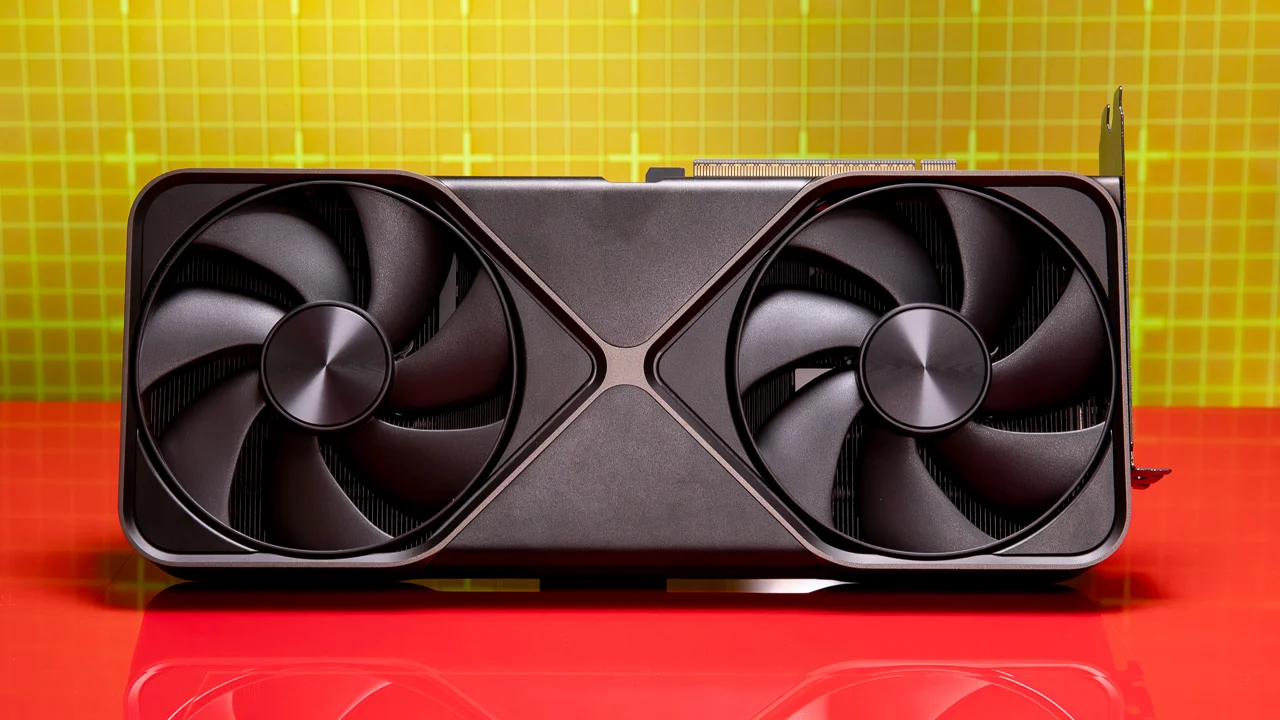
The Best nvidia graphics card in this roundup is the ASUS TUF RTX 5080. It pairs 16GB of GDDR7 and Blackwell features with protective construction and a serious three-fan cooler, making it the most complete pick for a roomy high-end desktop. The ASUS Prime RTX 5070 is the better alternative for a compact system, with 12GB of GDDR7 and a 2.5-slot body.
If the case is especially tight, choose the ASUS Dual RTX 5060 or the ASUS Dual RTX 3050 based on the performance level your system can support. Measure the case, check the slot clearance, and choose the largest card that fits without forcing the rest of the build around it.
As an Amazon Associate we earn from qualifying purchases.