
A family calendar fails when it stays hidden in someone's phone. The useful version is the one everyone can see in the kitchen, update from an app, and understand before the next school run. The Best online calendar displays bring shared events, chores, meal plans, reminders, and photos onto one always-visible screen.
The nine options here range from a compact 10.1-inch touchscreen to large 32-inch wall hubs. Most support two-way syncing with services such as Google, iCloud, Outlook, Cozi, or Yahoo, but their screen layouts, storage, mounting options, and task tools differ sharply. The Westsee 15.6-inch Family Planner is our top pick, with the FULLJA and Nethgrow large-screen models covering bigger rooms and the ArrayPixel serving smaller spaces.
Comparison table
| # | Product | Award | Screen | Sync and storage | Best for |
|---|---|---|---|---|---|
| 1 | Westsee 15.6-inch Family Planner | Best overall | 15.6-inch touchscreen | Google, iCloud, Outlook, 32GB | Most families |
| 2 | DASFIWO 21.5-inch Calendar | Best large mid-size display | 21.5-inch, 1920 × 1080 IPS | Google, iCloud, Outlook, Cozi, Yahoo, 32GB | Shared wall viewing |
| 3 | Airzeen 15.6-inch Calendar | Best customizable dashboard | 15.6-inch 1080p touchscreen | Google, iCloud, Outlook, Cozi, Yahoo | Widget-heavy planners |
| 4 | Nethgrow 15.6-inch Family Planner | Best chore system | 15.6-inch, 1920 × 1080 IPS | eCalendar app, 32GB | Chores and routines |
| 5 | FULLJA 27-inch Calendar Whiteboard | Best office-size planner | 27-inch, 1920 × 1080 IPS | Google, iCloud, Outlook, Cozi, Yahoo | Large shared schedules |
| 6 | FULLJA 32-inch Calendar Whiteboard | Best biggest screen | 32-inch, 1920 × 1080 IPS | Google, iCloud, Outlook, Cozi, Yahoo, 64GB | Large households |
| 7 | Skyzoo 16-inch Calendar Frame | Best photo frame hybrid | 16-inch, 1920 × 1200 touchscreen | Google, iCloud, Outlook, Cozi, 32GB | Calendars that display photos |
| 8 | ArrayPixel 10.1-inch Calendar | Best compact option | 10.1-inch touchscreen | Google, Outlook, Cozi, Yahoo, Teamsanp, iCloud | Desks and small kitchens |
| 9 | Nethgrow 27-inch Calendar Whiteboard | Best task-focused large display | 27-inch, 1920 × 1080 IPS | Outlook and other online calendars, 32GB | Chore charts and lists |
1. Westsee 15.6-inch Family Planner: Best Overall

Pros
- Syncs with Google, iCloud, and Outlook
- Combines schedules, meals, chores, rewards, and grocery lists
- Includes 32GB of built-in storage
- Supports wall mounting and tabletop placement
Cons
- The 15.6-inch screen can feel crowded with a full household schedule
- Advanced AI tools may require a subscription in the future
- The product information does not specify its screen resolution
Best for: families that want one visible hub for schedules, chores, meals, and shared photos.
The Westsee gets the central idea right: it is designed to be looked at, touched, and updated by the whole household rather than treated as a private phone accessory. Its 15.6-inch touchscreen is large enough for a kitchen counter or entryway wall, yet less visually dominant than the 27-inch and 32-inch FULLJA displays. Color-coded tasks make responsibility visible, and the day, week, month, and custom views give the family a practical way to move from a quick glance to detailed planning.
Its strongest feature is the combination of calendar syncing and household organization. Google, iCloud, Outlook, and other calendars can feed into the display, while the Zical app handles updates away from home. That matters when a parent adds an appointment from a phone or a child marks a task complete on the screen. The planner also includes meal planning, grocery lists, notes, birthday reminders, weather updates, and smart sound reminders. Those tools make it more useful than a screen that merely mirrors a calendar.
The 32GB of built-in memory gives the Westsee room to act as a photo and video frame when nobody is checking the schedule. It comes with both a table stand and a wall-mount display kit, so placement is not locked to one room or orientation. At 3.22 pounds, it is a manageable size for a visible family hub, though the display still needs a suitable location near power and within easy reach.
The main limitation is that the listing does not provide a screen resolution, so shoppers who care about pixel density have less information than they get from the DASFIWO, Nethgrow, or FULLJA models. The feature list also says the main functions are available without a subscription but leaves open the possibility that advanced AI Assistant tools may require one later. Skip it if you need the largest possible screen or a clearly specified high-resolution panel. For most households, though, the Westsee is the most balanced Best online calendar pick because it avoids making one feature carry the entire experience.
2. DASFIWO 21.5-inch Calendar: Best Large Mid-Size Display
Pros
- 1920 × 1080 IPS touchscreen
- Supports horizontal and vertical display modes
- Syncs with Google, iCloud, Outlook, Cozi, and Yahoo
- Includes 32GB of storage and a one-year warranty
Cons
- The feature list is less focused on chore rewards than several rivals
- Its nearly 21-inch-wide body needs a deliberate wall location
- Sleep mode turns off the screen but does not replace a detailed household routine
Best for: households that want a readable shared display without moving up to a very large wall panel.
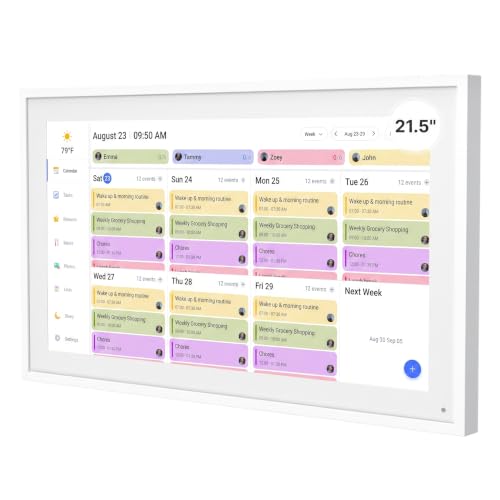
The DASFIWO is the sensible middle ground between compact family planners and oversized wall whiteboards. Its 21.5-inch screen offers more room for a week or month view than the 15.6-inch models, while its listed dimensions of 21.1 by 12.9 by 0.99 inches keep it substantially less imposing than a 27-inch display. That size should suit a kitchen wall where several people need to read the schedule without standing directly in front of it.
The panel specification is one of the clearest in this group. A 1920 × 1080 IPS touchscreen should keep text and family photos reasonably crisp while preserving viewing angles when people approach from the side. Horizontal and vertical modes let the display adapt to the wall rather than forcing the room around it. Its 32GB storage also gives the photo-frame function room to hold a substantial collection, although the listing does not say exactly how many photos or videos that capacity supports.
Calendar integration is broad. The free app supports two-way, real-time synchronization with Google Calendar, iCloud, Outlook, Cozi, and Yahoo, so changes can happen on the device or from a phone. The DASFIWO can switch from calendar mode to a photo frame, and weather updates and sleep mode help it fit into a household rather than staying bright all night. Those details make it a more polished living-space display than a basic tablet left on a stand.
Compared with the Westsee, the DASFIWO gives you more physical screen area and a specified Full HD IPS panel, but the Westsee has a more clearly developed mix of meal planning, grocery lists, task comments, and reward features. The DASFIWO is a better fit when readability is the priority and a household does not need an elaborate chore economy. Its one-year warranty and online support are reassuring, but anyone looking for the biggest calendar canvas should move to the FULLJA 27-inch model instead.
3. Airzeen 15.6-inch Calendar: Best Customizable Dashboard

Pros
- Customizable widgets and multi-page layouts
- Syncs with Google, iCloud, Outlook, Cozi, and Yahoo
- Includes tasks, rewards, meals, lists, photos, and weather
- Works as a wall or desktop display
Cons
- The 15.6-inch screen offers less room than the larger wall models
- Its feature-rich dashboard may take more setup than a simpler calendar
- The listing does not state the built-in storage capacity
Best for: families that want to arrange a shared dashboard around their own mix of schedules, lists, meals, and photos.
The Airzeen is built around flexibility rather than one signature function. Its 15.6-inch display can show a shared calendar, tasks, rewards, meal plans, to-do lists, photos, and weather, with widgets arranged across customizable pages. That makes it appealing to a family that wants the screen to behave like a household dashboard instead of a calendar with a few extra buttons.
The syncing support is unusually broad for this size class. Google, iCloud, Outlook, Cozi, and Yahoo are all listed, and events can be updated from the phone or directly on the display. The practical benefit is less duplicate entry. A shared appointment can live in the online calendar service the family already uses, while the Airzeen turns it into something visible in the home. Color-coded schedules, customizable avatars, and smart reminders should also make a busy screen easier to scan.
Airzeen lists a 1080p HD touchscreen and says it is designed for clear viewing from different angles. The display works on a wall or desktop, and the overall footprint is listed as 15.94 by 8.07 by 0.87 inches. That is a useful fit for an entryway or a narrow stretch of kitchen wall, where a 27-inch panel could overwhelm the room. Photo-frame mode gives the display a second purpose when the schedule is quiet.
The trade-off is that customization can create work before it saves time. A household may need to decide which widgets deserve the first page, which tasks belong to each person, and how much information can remain readable on a 15.6-inch panel. The Westsee is the easier all-round recommendation if you want a more defined family planner, while the Airzeen makes more sense for people who enjoy shaping their own dashboard. It is also a newer listing, so buyers who want a long track record should consider the more established-looking alternatives in this roundup.
4. Nethgrow 15.6-inch Family Planner: Best Chore System

Pros
- Detailed chore chart with color assignments and star rewards
- 1920 × 1080 IPS display
- Supports wall mounting or desk placement in either orientation
- Includes 32GB of storage, grocery lists, timers, and weather
Cons
- The chore and reward tools may be more than adults need
- Its dimensions are substantial for a 15.6-inch class display
- Weather information is listed for the next three days
Best for: parents who want the calendar to make household responsibilities visible and motivating for children.
The Nethgrow stands out because its chore system is not an afterthought. Each family member can receive a color, tasks can be assigned through the family chore chart, and completed responsibilities earn points or stars. That gives children a visual reason to return to the display, while parents get a shared place for routines that would otherwise become repeated reminders.
The 15.6-inch 1920 × 1080 IPS screen should keep the calendar and task cards clear, and the display supports both horizontal and vertical wall mounting. It can also stand on a desk, giving the family some freedom to put it near the place where chores actually happen. The listed dimensions are 15.69 by 21.59 by 0.99 inches, so its orientation and wall footprint deserve attention before mounting.
Nethgrow includes more than scheduling. The eCalendar app syncs events over Wi-Fi, and the display offers day, week, and month views, a parental lock, sleep mode, a multi-mode timer, meal planning, grocery lists, and photo albums. The timing tools are useful for cooking, work sessions, or routines that need a countdown rather than a calendar entry. The 32GB capacity also lets it work as a digital frame between planning sessions.
The Westsee is the stronger general-purpose choice because it combines similar household features with a slightly lighter listed weight and a simpler all-round brief. Nethgrow wins when chores and rewards are the center of the household system. It also gives you more concrete display information than the Westsee. Skip it if your family does not use task rewards or if a plain shared schedule is all you need. For parents trying to build repeatable routines, this is the most purpose-built small family planner here.
5. FULLJA 27-inch Calendar Whiteboard: Best Office-Size Planner

Pros
- Large 27-inch IPS touchscreen
- 1920 × 1080 resolution with day, week, and month views
- Supports chores, stars, meals, lists, weather, and photo display
- Works on a wall or desktop
Cons
- Large footprint needs careful mounting
- Full HD resolution is spread across a much larger panel
- The feature set may feel excessive for a single user
Best for: offices, large kitchens, and households that need a schedule readable from across the room.
The FULLJA 27-inch Calendar Whiteboard changes the role of a digital calendar from personal planner to room-level information board. A 27-inch screen is easier to read from a kitchen island, a hallway, or a shared office than a 15.6-inch panel. That extra surface also gives meal plans, task assignments, and the calendar more breathing room instead of forcing every detail into a small card.
Its 1920 × 1080 IPS display is a sensible specification for a schedule viewed at normal room distances. The IPS panel should help preserve the picture when people are not standing directly in front of it, while the day, week, and month views provide different levels of detail. FULLJA also includes adjustable brightness, sleep and wake scheduling, weather for the next three days, and a photo-frame mode. Those controls help it behave more like a permanent room fixture.
The family tools are broad. It syncs with Google, iCloud, Outlook, Cozi, and Yahoo through the companion app, with two-way updates intended to avoid manual event entry. Chore assignments, stars, meal planning, grocery lists, to-do lists, reminders, and an alarm clock all sit alongside the calendar. The display can also show photos or activities in an office, store, or restaurant, although families are likely to get the most use from its shared schedule and task functions.
The larger panel does not automatically make every detail sharper. Its Full HD resolution is spread over more area than on the smaller Westsee or Nethgrow displays, so the viewing distance matters. It also takes more wall space and is less discreet than the DASFIWO. Choose it when several people need to read the board at once, not simply because a larger number sounds better. If you want the same room-scale idea with maximum physical area, the FULLJA 32-inch model goes further, but this 27-inch version is easier to place.
6. FULLJA 32-inch Calendar Whiteboard: Best Biggest Screen

Pros
- Largest screen in the roundup
- 1920 × 1080 IPS touchscreen
- 64GB of listed storage
- Includes chores, rewards, meals, lists, weather, and sleep mode
Cons
- Needs the most wall space and planning
- Full HD resolution is not higher than the smaller FULLJA
- The large format is unnecessary for many apartments and compact kitchens
Best for: large households that need a calendar and task board visible across a spacious room.
The 32-inch FULLJA is the one to choose when visibility is the problem. A large household can place it in a kitchen, family room, or shared workspace and still read the schedule without crowding around a small display. It is not just a blown-up month view. The system is designed as a multi-page hub for appointments, reminders, tasks, meals, shopping lists, and family photos.
The panel uses 1920 × 1080 resolution and IPS technology, the same basic display resolution listed for the 27-inch FULLJA. That means the bigger model gives you more physical viewing area, not a denser image. At a sensible distance, the size should make text and touch targets easier to see, but people who sit close to the screen may prefer the tighter presentation of a smaller panel. Mounting location matters more here than with any other pick.
The built-in 64GB storage is the clearest hardware advantage over the other products in this list. The feature information does not specify how the storage is divided between the calendar system and photos, but the larger capacity should be useful for a family that wants to keep a sizable photo and video collection on the display. The calendar side supports Google, iCloud, Outlook, Cozi, and Yahoo syncing, while color coding and instant alerts keep each person's schedule visible.
Task management is also substantial. Parents can assign chores, add deadlines, and set star rewards that children redeem for preset rewards such as toys or outings. Meal plans, lists, sleep schedules, weather, and adjustable brightness round out the dashboard. The 27-inch FULLJA offers much of the same capability in a more manageable format, and the Westsee is easier for smaller rooms. Choose this version only when the room and household genuinely benefit from its scale. It is a commanding family board, not a subtle desk calendar.
7. Skyzoo 16-inch Calendar Frame: Best Photo Frame Hybrid

Pros
- 1920 × 1200 touchscreen
- Automatic screen rotation and landscape or portrait placement
- Supports 2.4 GHz and 5 GHz Wi-Fi
- Includes 32GB of storage and a detachable stand
Cons
- The photo-frame identity may appeal more than its scheduling tools
- The display is smaller than the 21.5-inch and larger wall options
- The listing does not detail every compatible calendar service
Best for: homes that want a shared schedule on display without giving up a dedicated family photo frame.
The Skyzoo is the most convincing choice for a room where the screen should look useful even when nobody has an appointment to check. It can display family photos and videos, then switch to schedules, meal plans, reminders, and chores when the household needs them. That makes it easier to justify in a living room or bedroom than a screen that only shows planning information.
Its 16-inch touchscreen uses 1920 × 1200 pixels, giving it a slightly taller canvas than the 16:9 Full HD panels used by several rivals. Skyzoo supports day, week, and month views, so users can move from a quick daily glance to a broader view of the household. Automatic brightness adjustment and sleep mode help keep it from becoming an intrusive light source after hours.
Placement is unusually flexible. The detachable stand supports landscape and portrait positioning, automatic screen rotation adjusts the orientation, and the included wall-mount bracket and screws offer a more permanent option. Wi-Fi support covers both 2.4 GHz and 5 GHz networks. Those details matter because a calendar placed in a kitchen or hallway may need a different orientation than one placed on a desk.
Skyzoo supports two-way synchronization with Google, iCloud, Outlook, Cozi, and another calendar service named in the listing. It also includes a task and reward system, widgets, multi-page layouts, meal plans, and reminders. The Westsee has a more explicit grocery and family-planning workflow, while the Skyzoo makes the better decorative display. Its main weakness is that its product identity is split between a digital photo frame and a calendar, so it is not the most focused choice for families who want an aggressive chore system. Choose it when the screen needs to earn its wall space every day.
8. ArrayPixel 10.1-inch Calendar: Best Compact Option
Pros
- Smallest screen in the roundup
- Includes schedules, chores, meals, lists, reminders, and photos
- Supports wall or desk mounting
- One-year warranty and ongoing customer support
Cons
- The 10.1-inch screen limits how much can be viewed at once
- The listing does not specify screen resolution or Wi-Fi bands
- Less suitable for reading a full household schedule from across a room
Best for: desks, apartments, small kitchens, and households that need a compact shared planner.
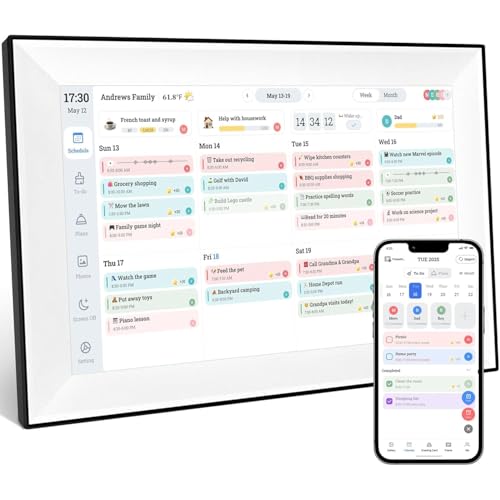
The ArrayPixel solves a different problem from the FULLJA displays. It is for the household that has no spare wall for a 27-inch board, or for someone who wants a calendar near a desk rather than a room-wide command center. Its 10.1-inch touchscreen combines schedules, chores, meal planning, to-do lists, reminders, photo display, and a reward system in a compact frame.
The online calendar support is broad on paper. ArrayPixel lists Google, Outlook, Cozi, Yahoo, Teamsanp, and iCloud, with real-time updates intended to keep events together. That makes it more useful than a small tablet used only as a static reminder. The main calendar, task, meal plan, reward, photo, and synchronization functions are listed as free, which keeps the core experience straightforward.
The dimensions are listed as 8 inches by 14 inches by 8 inches, with a 1-pound weight and an 8 by 14-inch size description. The measurements are not presented consistently, but they clearly describe a much smaller device than the 15.6-inch Westsee or Nethgrow. It can mount on a wall or sit on a desk, so a renter or someone testing the idea of a visible family calendar has more placement choices.
The compromises are equally clear. A 10.1-inch screen cannot show as much information at once, and the product data does not state its resolution, network bands, or storage capacity. It is best for a focused daily view, a short list, or a compact reminder board, not a calendar meant to be read from the other side of a large kitchen. The Westsee is easier to recommend for a full family hub, while ArrayPixel earns its place when space is the deciding factor. Its one-year warranty and 24/7 customer support add useful reassurance for a newer, compact option.
9. Nethgrow 27-inch Calendar Whiteboard: Best Task-Focused Large Display

Pros
- Large 27-inch IPS touchscreen
- Chore chart with color assignments and star rewards
- Includes 32GB of storage
- Supports wall or desk placement and both orientations
Cons
- The product information contains inconsistent screen-size references
- The 27-inch panel needs substantial wall or desk space
- Some listed functions overlap with smaller Nethgrow models
Best for: households that want a large, highly visible chore and task board.
The Nethgrow 27-inch Calendar Whiteboard is aimed at families that want responsibilities to be as visible as appointments. A large touchscreen makes it easier to show a monthly schedule, meal plan, to-do list, and chore chart without hiding one behind another. The star reward system gives children a clear visual marker for completed tasks, while color assignments help adults see who owns each responsibility.
The display is listed as a 27-inch 1920 × 1080 IPS touchscreen, with support for horizontal and vertical mounting. It can also be desk-standing, although a panel this size requires a substantial surface. The product information lists dimensions of 28.75 by 15.45 by 0.99 inches, which is a useful reminder to measure the proposed wall before buying. The feature text also refers to a 15.6-inch screen in one place, so buyers should treat the 27-inch title and size field as the main identification while recognizing that inconsistency.
The Nethgrow uses an eCalendar app for Wi-Fi syncing, and the listing says it can connect with online calendars including Outlook. The family organizer includes 32GB of storage, photo albums, grocery lists, weather, sleep mode, and a Pomodoro timing mode. The screen can show photos when the planning functions are not in use. These are practical extras for a household hub, but the reason to pick this model over the smaller Nethgrow is the ability to read and share the board at room scale.
The FULLJA 27-inch Calendar Whiteboard has more explicitly listed calendar-service compatibility, including Google, iCloud, Outlook, Cozi, and Yahoo, while the Nethgrow puts more emphasis on chores, rewards, timers, and lists. That distinction should guide the choice. Pick Nethgrow if family tasks are the main challenge and the app ecosystem fits your household. Skip it if you need the cleanest, least ambiguous specification sheet or a more compact display. Its large format works best for an active household that will use the board as a daily routine center.

How to choose best online calendar
The right shared calendar is less about adding another screen and more about making information visible without creating another chore.
Screen size and placement
A 10.1-inch panel suits a desk, narrow counter, or small apartment, but it will not be easy to read from across a kitchen. The 15.6-inch and 16-inch models are more flexible for walls and counters, while 21.5-inch to 32-inch displays work best when several people need to read the schedule at once. Measure the wall, check the viewing distance, and leave room for a power cable before choosing a large panel.
Calendar synchronization
Two-way synchronization is the feature that separates a useful online calendar from a static digital planner. Look for compatibility with the services your household already uses, such as Google, iCloud, Outlook, Cozi, or Yahoo. A display that requires every event to be entered twice will quickly become another neglected screen.
Chore and task tools
A family planner should make ownership obvious. Color coding, individual profiles, deadlines, reminders, and star rewards are useful when several people share responsibilities. If the display is mainly for appointments, an elaborate reward system may add clutter. If children need help building routines, the Nethgrow and FULLJA models make tasks more visible than a simple calendar view.
Choose the largest screen your room can comfortably support, not the largest screen you can technically mount.
Resolution and viewing angle
Resolution affects how cleanly text, icons, and photos appear, while IPS technology can help keep the image readable from the side. The DASFIWO, Nethgrow, and FULLJA models list 1920 × 1080 IPS panels. The Skyzoo lists 1920 × 1200, while the Westsee and ArrayPixel listings do not specify resolution. A larger display with the same resolution can be easier to see from far away but less crisp up close.
Storage and photo features
A photo-frame mode can help a calendar blend into a room when nobody is planning. Storage matters if you want to keep photos or videos on the device rather than constantly replacing them. The FULLJA 32-inch model lists 64GB, while several 15.6-inch, 16-inch, and 27-inch models list 32GB. Treat storage as a secondary factor unless the display will spend much of its time as a family photo frame.
For a deeper look at how these displays differ from simpler wall planners, the features that matter in a shared household screen are a useful next step. Buyers deciding between a wall-mounted board and a tabletop unit can also compare how placement changes a family's daily planning habits. If your main interest is showing family memories between appointments, ways to choose a screen for displaying personal photos can help clarify the photo side of the decision.
Frequently asked questions
Do these online calendars require a subscription?
The products in this roundup list their core scheduling, task, meal planning, photo, and synchronization functions as subscription-free or free. The Westsee specifically says advanced AI Assistant tools may require a subscription in the future. Check the current product listing for any changes to optional services before buying.
Can a digital calendar sync with Google Calendar and iCloud?
Several models list support for both Google and iCloud, including the Westsee, DASFIWO, Airzeen, FULLJA, and Skyzoo displays. Nethgrow and ArrayPixel also list multiple online calendar services, but compatibility details vary by model. Confirm that the display supports the exact accounts your household uses.
Can family members update the calendar from their phones?
Yes, the products describe companion apps or Wi-Fi synchronization that allow events to be edited from a phone. Several also support bidirectional updates, so changes made on the display can move back to the connected calendar service. The exact app and supported services differ, so setup will depend on the model.
Are these displays useful for chores?
They can be, especially the Nethgrow and FULLJA models. Their systems assign tasks by person or color and add star or point rewards for completed chores. A household that only needs appointments may prefer a simpler layout without reward features.
Can these calendars show photos?
All of the products listed here include some form of photo display or digital-frame mode. The Skyzoo is particularly focused on the photo-frame side, while the Westsee, Nethgrow, Airzeen, DASFIWO, and FULLJA models treat photos as one part of a broader household dashboard. Storage capacity varies, and some models do not specify it.
Can a digital calendar be wall mounted?
Most of these products support wall placement, and several also include desk or tabletop use. The Westsee includes a wall-mount display kit and a table stand, while Skyzoo lists a wall bracket and detachable stand. Check the dimensions and orientation before mounting, especially with the 27-inch and 32-inch models.
Which screen size works best for a kitchen?
A 15.6-inch or 16-inch display is a practical starting point for many kitchens because it offers a visible schedule without taking over the wall. Choose 21.5 inches or larger if people will read it from across the room. The compact ArrayPixel makes more sense when counter or wall space is limited.

The bottom line
The Best online calendar for most families is the Westsee 15.6-inch Family Planner. It combines broad calendar syncing with meal plans, grocery lists, chores, rewards, reminders, photos, and flexible placement without forcing every household into a huge wall display. The FULLJA 27-inch Calendar Whiteboard is the better choice when a large room needs a schedule that several people can read at once, while the Nethgrow 15.6-inch Family Planner is the sharper pick for chore-heavy routines.
Choose the ArrayPixel for a compact space, the Skyzoo when photo display matters almost as much as scheduling, and the FULLJA 32-inch model only when its room-filling scale and extra storage are genuinely useful. For an undecided buyer, start with the Westsee unless your first requirement is a large shared board or a dedicated chore system.
As an Amazon Associate we earn from qualifying purchases.