

A gaming desk can feel unfinished for surprisingly small reasons. Dust collects under keycaps, a headset has nowhere to go, voice chat sounds distant, and a controller cable cuts across the whole setup. The Best PC gaming accessories are the ones that fix those annoyances without creating new ones.
This list covers practical upgrades rather than a pile of decorative gadgets. The AOC headset, TONOR microphone, FIFINE mixer, two PC controllers, lighting, storage stands, and cleaning tools all solve different problems, so the right pick depends on what is holding your desk back.
The AOC Wireless Gaming Headset is our top pick, with the EasySMX X15, TONOR TC310+, and ManbaOne close behind for different kinds of players.
Comparison table
| # | Product | Award | Connection or control | Key feature | Best for |
|---|---|---|---|---|---|
| 1 | AOC Wireless Gaming Headset | Best overall | 2.4GHz, Bluetooth 6.0, 3.5mm | Up to 45-hour battery | Multi-platform players |
| 2 | EasySMX X15 | Best PC controller | 2.4GHz, Bluetooth, USB-C | Hall effect joysticks | PC and Steam gamers |
| 3 | TONOR TC310+ | Best USB microphone kit | USB | Boom arm, tap mute, RGB | Streamers and chat |
| 4 | ManbaOne Controller | Best customizable controller | Wired, Bluetooth, wireless dongle | 2-inch interactive screen | Tinkerers and competitive players |
| 5 | FIFINE AmpliGame SC3 | Best audio control | USB and XLR | 48V phantom power | Advanced streaming setups |
| 6 | Ledagic Light Bar | Best ambient lighting | USB | App, remote, audio sync | RGB desk setups |
| 7 | KDD RGB Stand | Best charging stand | USB and Type-C | Holds headsets and controllers | Organized gaming desks |
| 8 | KDD Drawer Stand | Best storage stand | Cable organizers | Aluminum frame and drawer | Compact desk storage |
| 9 | Ordilend Cleaning Kit | Best complete cleaning kit | Manual tools | Brushes, cloths, keycap puller | Detailed keyboard cleaning |
| 10 | ColorCoral Cleaning Gel | Best quick cleaner | Manual gel | Reusable dust pickup | Fast surface cleaning |
1. AOC Wireless Gaming Headset: Best Overall

Pros
- Low-latency 2.4GHz wireless connection
- Three connection methods
- Detachable microphone
- Up to 45 hours of battery life
Cons
- RGB lighting reduces battery life to 20 hours
- Bluetooth audio is not supported on PS5 or PS4
- Xbox use is wired only
Best for: players who want one headset for PC, PlayStation, Switch, and everyday listening.
The AOC Wireless Gaming Headset is the easiest recommendation here because it handles the unglamorous parts of gaming audio well. The detachable microphone can stay on for team games or come off when the headset becomes a regular pair of headphones. Its closed over-ear design is also more useful than flashy lighting when you are trying to focus on game sound or a Discord conversation.
The main wireless connection uses 2.4GHz technology with stated latency of 20ms or less. That is the mode to use for PC gaming, PS5, PS4, Mac, and Switch when timing matters. The headset also supports Bluetooth 6.0 and a 3.5mm audio cable, giving it more flexibility than a headset built around one USB dongle. PS5 and PS4 do not support Bluetooth audio with this headset, and Xbox compatibility is through the wired connection, so those limitations need to be understood before buying.
AOC uses 50mm drivers, which are a sensible fit for games that mix dialogue, effects, and positional cues. The breathable memory-protein earmuffs and adjustable headband are designed for long sessions, including use with glasses. Battery life is listed at up to 45 hours, though RGB lighting cuts that figure to 20 hours. A full recharge takes about three hours.
Compared with the EasySMX X15, this is the stronger all-purpose upgrade because it solves communication and game audio in one device. It is less specialized than the TONOR TC310+, which gives a desktop microphone more room to improve voice quality. The AOC's weakness is platform detail: people who need Bluetooth on PlayStation or native Xbox wireless support should skip it.
For a player moving between PC and console, this is the most complete choice in the roundup. Readers focused specifically on microphone performance can also compare the trade-offs in how wireless headsets handle chat and game audio.
2. EasySMX X15: Best PC Controller

Pros
- Three connection modes
- Hall effect joysticks
- Programmable rear buttons
- Up to 20 hours of wireless play
Cons
- Not compatible with Xbox, Luna, PS4, or PS5
- RGB lighting shortens wireless play time
- Feature set is aimed at PC and Switch users
Best for: PC and Steam players who want flexible wireless control and rear buttons.
The EasySMX X15 is the sensible controller for a PC player who wants more flexibility than a basic gamepad. It supports 2.4G wireless, Bluetooth, and wired USB-C, so you can choose low-latency wireless for most games or connect a cable when you want a direct link. Switch and Android support broaden its use, while the textured grips keep the controller from feeling slippery during longer sessions.
Its Hall effect joysticks are the most important feature. The design is intended to reduce the kind of physical wear associated with conventional stick mechanisms, making it a better fit for players who spend a lot of time with racing, action, and shooter games. The controller also includes dual vibration and programmable back buttons, which can put commonly used actions closer to your fingers without removing your thumbs from the sticks.
Battery life is listed at up to 20 hours from the 1000mAh rechargeable battery. The product notes that turning off the RGB lighting helps extend play time. A button combination lets users switch the ABXY layout between PC and Switch modes, a small but useful touch when the on-screen prompts do not match the markings you expect.
The X15 is less ambitious than the ManbaOne Controller, which adds an interactive screen, four saved configurations, macro-capable rear keys, and a six-axis gyroscope. The EasySMX is easier to understand and likely the better fit for someone who wants to play rather than configure. Its major weakness is compatibility. It should be avoided if Xbox, PlayStation, or Luna support is essential.
If your main question is how to choose between rear buttons, wired play, and wireless convenience, the controller features that matter during PC play offer a useful checklist. For most Windows players, the X15 is the straightforward choice.
3. TONOR TC310+: Best USB Microphone Kit

Pros
- Includes a metal boom arm
- Tap-to-mute control
- Gain control on the microphone
- Four RGB lighting modes
Cons
- Desk clamp supports surfaces no thicker than 2.36 inches
- USB connection limits upgrade paths
- RGB is decorative rather than functional
Best for: streamers, voice-chat users, and creators who want a complete desktop microphone setup.
The TONOR TC310+ is a proper desk microphone kit rather than just a microphone placed beside the keyboard. Its metal boom arm moves the microphone closer to your mouth and leaves more room in front of the monitor. Multiple adjustable joints make positioning easier, while the included clamp fits desks up to 2.36 inches thick.
For gaming chat and streaming, the controls matter as much as the capsule. Tapping the top mutes the microphone, and rotating the top adjusts gain. Those controls are faster than reaching for software during a sudden interruption. TONOR describes the microphone as a condenser design with a tuned, clean sound aimed at team communication and content creation.
The four RGB modes are controlled from the microphone, with static colors, gradients, breathing effects, and mixed-color effects available. A long tap changes brightness, which is helpful if the lights sit directly in your peripheral vision. The RGB has no effect on audio quality, but it fits a coordinated gaming desk better than a plain office microphone.
The TONOR is simpler than the FIFINE AmpliGame SC3 because it uses USB and does not provide an XLR interface, 48V phantom power, or separate physical channel controls. That simplicity is also its advantage for a first streaming setup. Skip it if you already own an XLR microphone or need to balance several audio sources from a hardware mixer.
The AOC headset remains more convenient for casual chat because it combines microphone and headphones. The TC310+ is the better choice when clear desk-mounted voice pickup and fast mute access matter more than portability.
4. ManbaOne Controller: Best Customizable Controller

Pros
- Built-in 2-inch interactive screen
- Four saved configurations
- Four rear keys with macro settings
- Hall effect joysticks and triggers
- Includes a charging station
Cons
- Not compatible with Xbox or PlayStation
- The display adds complexity
- Wireless PC use is better through the dongle than Bluetooth
Best for: players who enjoy customizing controls, lighting, vibration, and button layouts.
The ManbaOne Controller is the most unusual product in this roundup. Its built-in 2-inch screen lets you change settings directly on the controller without an app or computer software. That makes it appealing to players who normally avoid configuration menus but still want more control than a standard gamepad provides.
The screen can be used to adjust vibration, buttons, joysticks, and lights. Four configurations can be saved for different games, and the four rear keys support macro definitions. Hall effect joysticks and linear Hall effect triggers are intended to resist stick drift and provide more consistent input, while the six-axis gyroscope adds motion control for supported Switch games.
Connection options include wired play, Bluetooth, and a wireless dongle. The product specifically describes the dongle as the more stable route for PC, while Bluetooth is listed across Windows PC, iOS, Android, and Switch support. It is not compatible with Xbox, PlayStation, or GeForce Now. That platform restriction is important because the controller's broad feature list might otherwise suggest wider compatibility.
The controller weighs about 1.48 pounds according to the product information, making it substantially more substantial than a minimal gamepad. It includes an 1800mAh battery and a smart charging station with the wireless receiver. Compared with the EasySMX X15, it offers more customization and a higher ceiling for competitive layouts, but the X15 is the cleaner choice for players who want fewer menus and a lighter feature load.
The ManbaOne is not the universal controller to buy for a mixed-console household. It is the right pick for a PC or Switch player who will actually use the screen, rear buttons, and saved profiles. Everyone else should choose the simpler EasySMX.
5. FIFINE AmpliGame SC3: Best Audio Control

Pros
- XLR microphone input
- Built-in 48V phantom power
- Four independent volume controls
- Physical mute and monitor buttons
- Voice effects and RGB controls
Cons
- XLR cable is not included
- Not intended for USB microphones
- More involved than a simple USB microphone
Best for: streamers who want physical control over microphone, game, headphone, and line audio.
The FIFINE AmpliGame SC3 is for the player whose audio setup has outgrown software sliders. It puts microphone, line-in, headphone, and line-out levels on separate physical controls, so changing the balance between a game and a voice chat does not require leaving the game or opening a mixer panel.
Its XLR microphone input and built-in 48V phantom power make it a genuine step toward a more traditional recording setup. The mixer can work with a condenser microphone, though FIFINE specifically says the interface is not for USB microphones. An XLR cable is also not included, and cable shielding and connector quality can affect the result.
The front-panel mute and monitor controls are well suited to streaming. Four programmable sound-effect buttons can store recordings, while six voice-changing modes and 12 auto-tune changes add entertainment features for broadcasts and game chat. Those effects will not improve a serious voice recording, but they give the SC3 more creative range than a basic interface.
The SC3 supports Windows and Mac and can handle two-PC audio arrangements according to the listed features. Its connections include microphone, line-in, headset, headphones, and line-out paths. RGB lighting can be set to flowing or frozen color rotation, so it adds visual polish without requiring a separate light.
Compared with the TONOR TC310+, the FIFINE is the better long-term foundation for someone using an XLR microphone. TONOR is easier for a first-time buyer because its microphone and arm arrive as one USB kit. The SC3's weakness is that it needs more decisions, more cables, and a compatible microphone.
Choose the SC3 when hands-on audio control is the point. If you simply need a microphone for team chat, the TONOR is the more direct route.
6. Ledagic Light Bar: Best Ambient Lighting

Pros
- Two light bars included
- App and remote control
- Audio synchronization
- White light mode
- Dimming from 1% to full brightness
Cons
- USB power limits placement
- Many modes can feel excessive
- No separate hub is included
Best for: players who want flexible background lighting for a desk or monitor area.
The Ledagic Light Bar is more useful than a simple strip when you want light on both sides of a monitor or television. The two bars can sit beside a screen, on a desk, or near a display shelf, and the 60-inch cord gives some freedom when the nearest USB port is not directly beside the light.
It supports IC plus RGB and white lighting, which makes it more versatile than a color-only accessory. The white mode can be used for brighter work lighting, while the RGB mode offers 16 million colors and more than 64 patterns. Brightness is adjustable from 1% to full brightness, so it can function as a soft background glow instead of an overpowering light source.
Control comes through the LotusLamp X app, a 24-button remote, or the button on the USB power cable. The app and remote can change scenes, colors, brightness, modes, and timers. A built-in music sensor synchronizes the lighting with game, film, or music audio, while the timer feature can turn the bars on or off at a chosen time.
The bars measure 12.8 inches and weigh 0.3 pounds according to the product information. USB power means they can run from a power bank, charger, television, monitor, laptop, or PC. That flexibility is convenient, though it also means cable routing will determine how clean the installation looks.
The KDD RGB Stand adds light to a desk accessory, but it cannot illuminate the space in the same way. Ledagic is the better choice for atmosphere and background glow. Skip it if you need a focused task lamp or want a completely cable-free installation.
7. KDD RGB Stand: Best Charging Stand

Pros
- Holds one headset and up to four controllers
- Two Type-C ports and one USB port
- Nine lighting effects
- 360-degree rotation
- Anti-slip rubber bases
Cons
- The USB port and Type-C ports are not compatible with iPhone
- Solid colors cycle rather than creating a rainbow gradient
- Charging performance details are limited
Best for: desks that need a headset holder, controller rack, and visible RGB accent in one unit.
The KDD RGB Stand earns its place by combining storage and charging access. It can hold one headset and two controllers, or up to four controllers without a headset. That is useful for a shared gaming desk where gamepads tend to collect beside the keyboard instead of returning to a consistent home.
Its two Type-C ports and one USB port can power devices such as headphones, tablets, e-readers, power banks, and smartphones, though the listing specifically excludes iPhone compatibility for those ports. The product does not provide detailed charging output figures, so it is best treated as a convenient charging location rather than a high-performance charging hub.
The RGB system includes nine lighting effects, including single colors and flashing or breathing modes. It remembers the last lighting mode, which saves repeated setup after powering on. The stand rotates 360 degrees and uses four anti-slip rubber bases, while protective rubber helps prevent scratches on stored devices.
Assembly is designed to take about 30 seconds across five parts. The size is listed as 13.8 by 15 by 28.1 centimeters, which is compact enough for many desks but worth checking against the space behind a monitor or beside a tower. The plastic shell is less substantial than the aluminum structure of the KDD Drawer Stand.
Choose this model when RGB, ports, and controller capacity matter most. The KDD Drawer Stand is the better fit for someone who wants a quieter appearance and a dedicated place for small accessories.
8. KDD Drawer Stand: Best Storage Stand

Pros
- Aluminum alloy structure
- Built-in drawer
- Two cable organizers
- Holds two controllers and one headset
- Silicone protective pads
Cons
- Assembly takes longer than the RGB stand
- No charging ports
- Storage capacity is still limited to small desk items
Best for: a tidy desk where controllers, cables, and small accessories need one fixed location.
The KDD Drawer Stand is the calmer alternative to the RGB model. It does not add lighting or charging ports, but it gives a headset and controllers a defined place while adding a drawer for small items such as cables, pens, remotes, or a power bank. That makes it more practical for a desk that already has enough RGB.
The aluminum alloy supporting structure should provide a steadier base than a lightweight plastic rack. Silicone pads protect the stored devices from scratches, and the design can hold two controllers and one headset at the same time. The groove can also accommodate a smartphone, iPad, or Switch 2 according to the listed features.
Cable management is the strongest reason to choose this model. Two cable organizers keep wired headphones and controller leads from spreading across the desk. The drawer does not replace a full storage cabinet, but it is large enough to remove the small objects that usually make a gaming area look untidy.
Assembly is listed at about five minutes and includes installation steps. There are no charging specifications or power ports, so anyone expecting a powered stand should choose the KDD RGB Stand instead. The Drawer Stand also has a less theatrical appearance, which may be a benefit in a mixed work and gaming space.
This stand is the better choice when build and organization matter more than lighting. It is especially useful for people who switch between wired and wireless peripherals and need somewhere to put cables when they are not in use.
9. Ordilend Cleaning Kit: Best Complete Cleaning Kit
Pros
- Keycap puller for mechanical keyboards
- Multiple brushes and cleaning pens
- Includes cloths and cleaning spray
- Tools for screens, lenses, earbuds, and keyboards
- Compact portable design
Cons
- Manual cleaning takes more time than compressed air
- Metal tip requires careful handling
- The kit can be more than a basic keyboard needs
Best for: detailed cleaning of keyboards, laptop screens, controllers, and other small electronics.
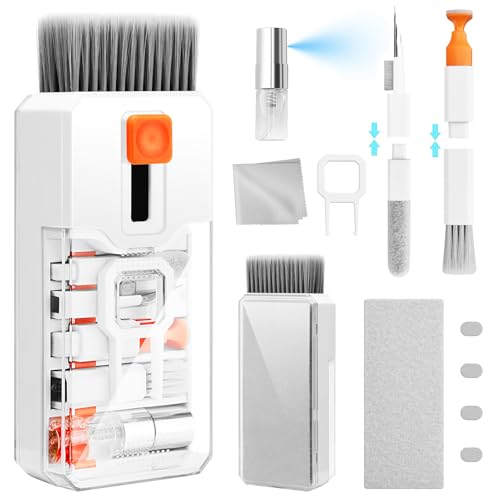
The Ordilend Cleaning Kit is the more serious cleaning option in this list. Instead of relying on one material, it includes a retractable large brush, a thin soft brush, a mini high-density brush, a keycap puller, a metal pen tip, a flocking sponge, a soft plastic lens pen, cleaning cloths, and spray. That spread makes it possible to clean different parts of a desk without using the same tool everywhere.
The keycap puller is the feature that matters most to mechanical keyboard owners. Removing keycaps exposes the spaces where dust and crumbs settle, while the brushes can work around flatter laptop keys. The metal tip is intended for stubborn marks, but it should be used carefully around finishes and delicate surfaces.
For screens, the kit includes a thicker polishing cloth and a large microfiber cloth. The listed design is intended to fit screen corners and reduce streaks or loose fibers. The flocking sponge is aimed at earbuds and charging cases, while the soft plastic lens pen and mini brush extend the kit to cameras and other delicate surfaces.
The kit is compact, measuring 4.8 by 2.5 by 1.48 inches and weighing about 0.31 pounds according to the product information. That makes it easy to keep in a drawer or bag. Compared with the ColorCoral Cleaning Gel, it takes more effort but reaches more types of dirt and surfaces.
The Ordilend is the right pick for a full cleaning routine. If you only want to lift dust from vents and keyboard gaps without removing keycaps, ColorCoral is faster and less involved.
10. ColorCoral Cleaning Gel: Best Quick Cleaner

Pros
- Fast way to pick up dust
- Works in keyboard gaps and vents
- Reusable until it darkens or becomes sticky
- No water washing required
- Small container is easy to store
Cons
- Cannot replace brushing or keycap removal
- Must be kept away from water
- Needs replacement when it becomes dark or sticky
Best for: quick maintenance between deeper keyboard and desk cleanings.
ColorCoral Cleaning Gel is the simplest accessory here, but it solves a real problem. Dust and crumbs settle in the narrow spaces around keys, vents, speakers, and controller seams where a cloth cannot reach. The gel can be kneaded into a ball, pressed slowly into those gaps, and lifted away with debris attached.
The formula is described as a natural gel with a lemon fragrance and a non-sticky feel on hands. The instructions call for clean, dry hands and warn against washing the gel in water. It is intended to be reused until the color turns dark or the material becomes sticky, then replaced.
The container holds 5.6 ounces, and the product information lists dimensions of 2.69 inches long by 2.69 inches wide and 2.35 inches high. Its small footprint makes it easy to keep near a keyboard or in a drawer. The same gel can be used on car vents, cameras, printers, telephones, calculators, speakers, and other rugged surfaces.
This is not a deep-cleaning tool. It will not remove keycaps, polish a screen, or brush dirt out of a textured controller grip as thoroughly as the Ordilend kit. It is better understood as a maintenance accessory that keeps a desk from reaching the point where a larger cleaning session is necessary.
Choose ColorCoral for quick upkeep. Choose Ordilend if the keyboard already needs a detailed clean or you want one kit for several types of electronics.

How to choose best pc gaming accessories
The right accessory should remove a specific friction point from the desk. Start with the problem you notice most often, then check compatibility, controls, build, and the amount of setup the device demands.
Platform compatibility
Controllers and headsets often support fewer platforms than their titles suggest. Check whether the product works with Windows PC, Steam, Switch, PlayStation, Xbox, Android, or iOS before choosing it. The EasySMX X15 does not support Xbox or PlayStation, while the ManbaOne also excludes those platforms and GeForce Now.
For PC, check whether the preferred connection is USB, Bluetooth, or a 2.4GHz receiver. A wired connection is usually the simplest fallback, but wireless dongles can provide a more consistent gaming connection than Bluetooth.
Connection and latency
Wireless headsets and controllers need a connection suited to the game. The AOC headset uses 2.4GHz technology with stated latency of 20ms or less, while the EasySMX X15 offers 2.4G, Bluetooth, and wired USB-C modes. The ManbaOne lists an 800Hz or higher wired polling rate.
The best connection is the one your game and platform actually support, not the one with the longest feature list.
Audio controls
A headset microphone is convenient for casual chat, but a desktop microphone can offer better positioning and more direct controls. The TONOR TC310+ provides gain control and tap mute, while the FIFINE SC3 adds physical controls for four audio channels, XLR input, and 48V phantom power.
USB microphones are easier to start with. XLR equipment gives a more expandable path, but it requires compatible cables and a microphone that can use the interface. The SC3 is not designed for USB microphones, and its XLR cable is not included.
Controller layout
Hall effect joysticks and triggers are useful when you want a controller designed to resist common stick wear. Rear buttons help with shortcuts and repeated actions, but only if their position feels natural to you. The ManbaOne has four rear keys and four saved configurations, while the EasySMX X15 keeps the feature set more focused.
Also check button layout. The X15 can switch between PC and Switch ABXY layouts, which can reduce confusion when moving between platforms.
Desk organization and lighting
Stands should be chosen by what they store, not only by how they look. The KDD RGB Stand adds ports, RGB, and room for several controllers. The KDD Drawer Stand uses aluminum construction, a drawer, and cable organizers but does not charge devices.
For lighting, look for the controls you will actually use. Ledagic offers app control, a remote, audio syncing, timers, white light, and dimming from 1% to full brightness. USB power makes placement flexible, but it also means cable routing remains part of the installation.
Cleaning access
A gel cleaner is useful for quick dust pickup in gaps, while a full kit is better when you need to remove keycaps, clean screens, or handle several device types. Avoid using water on the ColorCoral gel, and use the Ordilend metal tip cautiously around delicate surfaces.

Frequently asked questions
What are the most useful PC gaming accessories?
The most useful accessory depends on the desk's main weakness. A headset improves game audio and chat, a controller changes how certain games feel, and a microphone improves desktop voice communication. Cleaning tools and stands are less exciting but can make the setup easier to use every day.
Is the AOC headset compatible with PC?
Yes. The AOC Wireless Gaming Headset supports PC through its low-latency USB dongle, and it also lists Bluetooth 6.0 and a 3.5mm audio cable. The product says PS5 and PS4 do not support Bluetooth audio with this headset, while Xbox use is through the wired connection.
Which PC controller has Hall effect controls?
Both the EasySMX X15 and ManbaOne Controller list Hall effect joystick technology. The ManbaOne also lists linear Hall effect triggers, while the EasySMX X15 focuses on Hall effect joysticks, rear buttons, vibration, and three connection modes.
Is the TONOR TC310+ good for streaming?
The TONOR TC310+ is designed for streaming, gaming communication, and content creation. It includes a boom arm, tap mute, gain control, RGB lighting, and a desk clamp that supports surfaces up to 2.36 inches thick. It uses USB, so it is simpler than an XLR setup such as the FIFINE SC3.
Can the FIFINE SC3 use a USB microphone?
No. The listed features specify that its XLR microphone input and 48V phantom power are for an XLR setup and that the mixer is not available for USB microphones. It is intended for users who want physical control over an XLR microphone and other audio channels.
How do I clean a gaming keyboard?
For quick maintenance, press the ColorCoral gel slowly into gaps and lift it away without washing the gel. For a deeper clean, the Ordilend kit includes a keycap puller, several brushes, cleaning cloths, and a cleaning pen. Disconnect the keyboard before cleaning and be careful with any liquid or metal tool.
Do gaming stands charge controllers?
The KDD RGB Stand includes two Type-C ports and one USB port for powering compatible devices. The KDD Drawer Stand is a storage and cable-management product without listed charging ports. Confirm device compatibility before relying on the charging ports, especially for iPhone use.
The bottom line
The Best PC gaming accessories are not all trying to do the same job. The AOC Wireless Gaming Headset is the strongest all-around addition for players who need low-latency audio, a detachable microphone, and support across several platforms. The EasySMX X15 is the better choice for PC and Steam players who want Hall effect joysticks, rear buttons, and three connection options.
For streaming, the TONOR TC310+ is the straightforward USB kit, while the FIFINE AmpliGame SC3 makes more sense for an XLR microphone and hands-on audio control. The ManbaOne is the enthusiast controller, and the KDD stands, Ledagic lights, and cleaning tools handle the less glamorous jobs that keep a desk functional.
If you are undecided, start with the accessory that fixes the annoyance you notice every gaming session.
As an Amazon Associate we earn from qualifying purchases.