

The ritual of building your own PC has its fans, but there is a simpler path: open the box, plug in three cables, and start fragging. The pre built gaming PC market has matured past the era of cheap cases and bottlenecked builds. Today, shops like KOTIN, ZOTAC, iBUYPOWER, and Alienware will sell you a machine that is thoughtfully specced and fully tested, with warranty support that you do not get from a pile of parts.
The challenge is picking the right one. For this roundup, we evaluated nine pre built gaming desktops that span a wide performance band, from affordable rigs that handle Rust and Fortnite to properly powerful machines built for 1440p and 4K gaming with ray tracing turned on. Our top pick for most players is the KOTIN Pre Built Gaming PC with an RTX 5070 and Ry zen 7 9700X. It hits the sweet spot of CPU, GPU, memory and cooling. But we also found specific winners for content creation, for budget minded buyers, and for folks who want the tallest build.
Comparison table
| # | Product | Award | Processor | Graphics | Memory & Storage | Best for |
|---|---|---|---|---|---|---|
| 1 | KOTIN RTX 5070 PC | Best overall | AMD Ryzen 7 9700X (8 cores) | NVIDIA GeForce RTX 5070 12GB | 32GB DDR5 6000MHz, 1TB NVMe SSD | The full package for modern gaming |
| 2 | MSI Codex Z2 | Best storage | AMD Ry zen 7 8700F (8 cores) | NVIDA GeForce RTX 5070 12GB | 32GB DDR5, 2TB NVMe SSD | Tons of fast storage out of the box |
| 3 | iBUYPOWER Element RTX 5070 | Best CPU | AMD Ryzen 9 7900X (12 cores) | NVIDA GeForce RTX 5070 12GB | 32GB DDR5 4800MHz, 1TB NVMe SSD | Ry zen 9 power for streaming and editing |
| 4 | Alienware Aurora RTX 5070 | Best support | Intel Core Ultra 7 265F (8 cores) | NVIDIA GeForce RTX 5070 12GB | 32GB DDR5, 1TB NVMe SSD | Dell onsite warranty and reliable brand |
| 5 | ZOTAC MEK RTX 5060 Ti | Most VRAM | AMD Ryzen 7 9700X (8 cores) | NVIDIA GeForce RTX 5060 Ti 16GB GDDR7 | 32GB DDR5 6000MHz, 1TB NVMe SSD | Content creators who need 16GB VRAM |
| 6 | KOTIN RTX 5060 Ti PC | Best value RTX 5060 Ti | AMD Ryzen 7 8700F (8 cores) | NVIDIA GeForce RTX 5060 Ti 8GB | 16GB DDR5 6000MHz, 1TB NVMe SSD | Solid 1440p gaming for less |
| 7 | ZOTAC MEK RTX 5060 | Best white build | AMD Ryzen 5 9600X (6 cores) | NVIDA GeForce RTX 5060 8GB GDDR7 | 16GB DDR5 5200MHz, 1TB NVMe SSD | Clean white aesthetic with good 1080p perf |
| 8 | suevery White Gaming PC | Best budget white | AMD Ryzen 5 (6 cores) | AMD Radeon RX560 4GB | 16GB DDR4 3200 MHz, 512GB NVMe SSD | Entry level gaming on a tight budget |
| 9 | suevery Black Gaming PC | Best budget black | AMD Ryzen 5 (6 cores) | AMD Radeon RX560 4GB | 16GB DDR4 3200 MHZ, 512GB NVMe SSD | Same as above in a black case |
1. KOTIN RTX 5070 PC: Best overall

Pros
- 11.3 inch smart display shows temps, usage and weather
- 360 mm liquid cooler keeps the Ry zen 7 9700X quiet under load
- Wi Fi 7 and 850W Gold PSU leave room for future upgrades
Cons
- No bundled peripherals
- Decent but not best in class CPU for heavy multi tasking
Best for: someone who wants a premium, ready to go machine with a unique showpiece feature.
The KOTIN RTX 5070 PC is the one we would buy for a friend who just wants to play everything at high settings without thinking about parts. It comes with a Ryzen 7 9700X, eight cores that boost to 5.5 GHZ, and a GeForce RTX 5070 with 12 gigs of GDDR7 memory and DLSS 4 Multi Frame Generation. In practice that means Cyberpunk 2077 with path tracing is playable at 1440p, and competitive shooters easily push past 144 frames at high detail. The 32 gigs of DDR5 6000 MHZ memory is exactly what that CPU wants and gives you headroom for a dozen browser tabs and a disc ord call while you game.
The standout feature is the built in 11.3 inch display on the side of the case. It shows real time CPU and GPU temperatures, usage percentages, and even the weather. It is genuinely useful for keeping an eye on thermals without overlays, and it looks far more premium than the bargain basement screens you sometimes see in this price band. The 360 mm liquid cooler is also a step above what most competitors include, and it keeps the Ry zen 7 whisper quiet even during extended sessions.
The only real trade off is that KOTIN does not bundle a keyboard or mouse, so you will need to supply your own. If you are starting from scratch, something like a good wireless gaming mouse from our roundup of the best wireless mouse for computers will pair nicely. The 850W 80 Plus Gold power supply and Wi Fi 7 are excellent for future proofing, and the case has enough room for standard ATX upgrades. The motherboard supports up to 256 GB of DDR5 across four slots, and there are three M.2 slots for storage expansion.
For anyone looking for a single machine that does everything well, this is the one to beat. It beats the MSI Codex Z2 on CPU single core performance and cooling, and it beats the iBUYPOWER Element on memory speed. The Alienware Aurora has better warranty coverage, but the KOTIN delivers better raw performance per dollar.
2. MSI Codex Z2: Best storage
Pros
- 2TB NVMe SSD is double the norm
- Four system fans keep thermals in check
- M SH LED button for easy lighting control
Cons
- CPU is the 8700F not the faster 9700X
- No liquid cooling, only air cooler
Best for: someone who stores a lot of installed games and values silent cooling.
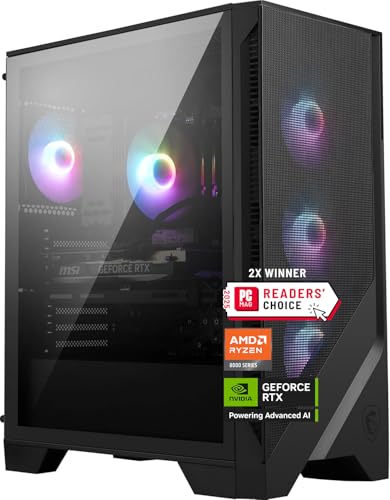
The MSI Codex Z2 focuses on the things that matter during a gaming session: fast storage and cool operation. It ships with a 2TB PCIe NVMe SSD, double the capacity of most rivals, so you can install Call of Duty, Forza, and Baldurs Gate 3 without shuffling files. The rest of the spec is solid: a Ryzen 7 8700F (eight cores up to 5.0 GHz) and an RTX 5070 with 12GB of VRAM. That combination is more than enough for 1440p gaming at high refresh rates, and DLSS 4 makes ray traced titles look smooth even on demanding settings.
Cooling is handled by an air cooler with an ARGB fan plus three front intake fans and one rear exhaust. It is not as exotic as the KOTINs 360mm AIO, but it keeps the system quiet enough that you wont hear the fans over normal gameplay. The case has a tempered glass side panel and a top mounted LED button that cycles through lighting modes, plus MSIs Center software for fine tuning.
The main compromise is the CPU. The 8700F is barely slower than the 9700X in gaming, but if you do heavy rendering or streaming, the 9700X in the KOTIN is a better choice. The Codex Z2 makes up for it with more storage and a slightly lower overall price. For anyone who keeps a library of 30 plus installed games and does not want to micromanage space, this is the pick.
3. iBUYPOWER Element RTX 5070: Best CPU

Pros
- Ryzen 9 7900X is a 12 core beast
- Bundled gaming keyboard and mouse
- Tempered glass RGB case with 16 color lighting
Cons
- DDR5 speed is limited to 4800 MHz
- Ram is only 32GB but at lower frequency than rivals
Best for: content creators and streamers who need CPU multithreading.
The iBUYPOWER Element packs a Ryzen 9 7900X, a 12 core processor that boosts to 5.6 GHz. That is more cores than any other machine in this roundup, and it shows in tasks like video editing, compiling, or streaming while gaming. The RTX 5070 is the same card found in the top picks, so gaming performance is roughly on par with the KOTIN and MSI, but the extra CPU cores give you headroom to run OBS, Discord, and your game simultaneously without stutter.
The case is a white tempered glass model with customizable RGB lighting controlled by the included iBUYPOWER software. The bundle includes a wired gaming keyboard and RGB mouse, which are basic but usable. That saves you a trip to the peripheral aisle, although you may eventually want to upgrade the mouse to something wireless from our guide to the best wireless mouse for computers.
The trade off is that the DDR5 RAM runs at 4800 MHz, slower than the 6000 MHz kits in the KOTIN and ZOTAC systems. In games, the difference is usually a few percent, but it is measurable. The Element also lacks liquid cooling, relying on the bundled air cooler, which does fine for gaming but may run a bit louder under sustained all core load. Still, for anyone who prioritizes CPU muscle for non gaming work, this iBUYPOWER rig is the strongest option.
4. Alienware Aurora RTX 5070: Best support
Pros
- 1 year onsite service from Dell
- Clean matte basalt black design with stadium lighting
- Alienware Command Center for deep control
Cons
- Some proprietary parts limit upgrade flexibility
- Pre installed bloatware from Dell
Best for: someone who wants a known brand with excellent warranty support.
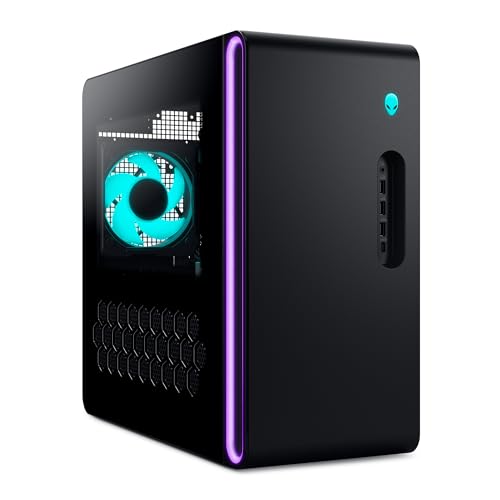
Alienware has been making prebuilts for two decades, and the Aurora chassis shows that experience. This version uses an Intel Core Ultra 7 265F processor, an 8 core chip that runs cool and steady, paired with an RTX 5070 with 12GB. Gaming performance is on par with the other RTX 5070 systems, hitting high frame rates at 1440p. The real differentiator is the 1 year onsite service from Dell. If something goes wrong, a technician comes to your home rather than you shipping the machine back.
The case design is a refined matte black with customizable Alien FX lighting zones, including the large stadium light across the front. The internal layout is clean but uses some proprietary parts like the motherboard and power supply switching. That means upgrading later may require Dell specific parts, which is the main downside. But the cooling is adequate, with a front intake and top exhaust.
Alienware Command Center gives you granular control over performance modes, lighting, and fan curves. It is one of the better software suites among these PCs. If you value a known name and the peace of mind of onsite support, the Aurora is a safe bet. Just know that you are paying a bit of a premium for that badge and service.
5. ZOTAC MEK RTX 5060 Ti: Most VRAM

Pros
- 16GB VRAM is huge for content creation
- 360 mm AIO liquid cooler included
- 3 year GPU warranty from ZOTAC
Cons
- RTX 5060 Ti does not match RTX 5070 gaming perf
- Price is close to RTX 5070 systems
Best for: video editors, 3D artists, and AI tinkerers who need VRAM.
The ZOTAC MEK with the RTX 5060 Ti 16GB is built for a specific audience: people who need video memory more than raw game frame rate. The 16GB of GDDR7 VRAM is double what the RTX 5070 offers and crucial for high resolution texture work, rendering, and running larger local AI models. The CPU is a Ryzen 7 9700X, same as in the KOTIN, paired with 32GB of DDR5 6000 MHZ. That makes this machine a genuine workstation that also games well at 1440p.
ZOTAC uses its own GPU in this system, the ZOTAC GAMING GeForce RTX 5060 Ti Twin Edge, with 16GB. In gaming benchmarks, the RTX 5060 Ti is about 10 to 15 percent slower than the 5070, but DLSS 4 closes some of that gap. The real star here is the 360 mm AIO liquid cooler, which is the same size unit found in the KOTIN. It keeps the system whisper quiet even under all core load. The case is a compact tempered glass chassis with a magnetic grill and a built in digital display that shows system info.
The three year GPU warranty (one year complete system) exceeds what most brands offer, and the US based support from ZOTAC USA is solid. If your work requires a large frame buffer and you still want to game, this is the machine to beat. The only hesitation is the price, which is close to RTX 5070 machines. But the VRAM argument is real.
6. KOTIN RTX 5060 Ti PC: Best value RTX 5060 Ti

Pros
- Good 1440p performance at an accessible tier
- Wi Fi 7 and 650W Gold PSU
- CPU air cooler with digital temperature displayCons
- Only 16GB of RAM, not 32GB
- ive fans can get loud under load
Best for: a budget minded gamer who wants to play at 1080p to 1440p with modern features.
KOTINs second entry swaps the RTX 5070 for an RTX 5060 Ti with 8GB of VRAM. That still gets you DLSS 4 and ray tracing support, and in most games at 1080p and 1440p medium to high settings, it delivers frame rates well above 60 FPS. The CPU is a Ryzen 7 8700F, an eight core chip that matches the one in the MSI Codex Z2. The memory is 16GB of DDR5 6000 MHz, which is enough for gaming but may need an upgrade if you multitask heavily. The storage is a 1TB PCIe Gen4 NVe SSD with 6000 MB/s reads, so games load fast.
The cooling uses a tower air cooler with six copper heat pipes and a digital display showing CPU temperature. Five 120mm ARGB fans move a lot of air, though they can get noticeable under sustained load. The system supports up to 256GB of DDR5 across four slots and has three M.2 slots, so future upgrades are easy.
Compared to the ZOTAC MEK with the 5060 Ti, this KOTIN has half the VRAM but costs significantly less. For pure gaming, 8GB is fine for today, and you get Wi Fi 7 and a solid power supply. It is the best value entry into the current generation of GPUs.
7. ZOTAC MEK RTX 5060: Best white build

Pros
- All white case, white GPU, and white cables
- 5 Gigabit LAN port included
- Temp display on CPU cooler
Cons
- Only 6 core CPU, 16GB RAM
- RTX 5060 is entry level for modern gaming
Best for: someone building a white themed setup on a tighter budget.
ZOTACs smaller MEK uses a Ryzen 5 9600X, a six core CPU that boosts to 5.4 GHz, and an RTX 5060 with 8GB of GDDR7. For 1080p gaming, this is a capable combination. With DLSS 4, it can run the latest titles at high settings with solid frame rates. The system is built in a white chassis with a tempered glass panel, a white RTX 5060 Twin Edge GPU, and even white cables. It is one of the cleanest looking machines in this list.
The cooler is a tower air cooler with a digital temperature display on top, and the case has 120mm fans. The board includes 5 Gigabit LAN, Wi Fi 6E, and Bluetooth 5.3, plenty for fast networking. The memory is 16GB of DDR5 5200 MHz, which is adequate but slower than the 6000 MHz kits.
The Ryzen 5 is noticeably weaker than the Ryzen 7 in multithreaded tasks, but for pure gaming the difference is small. This is a machine aimed at the person who cares as much about how the PC looks as how it performs. If you want a white build without sacrificing too much performance, this ZOTAC is the pick. The other white machine in this list is the suever white budget rig, but its GPU is much slower.
8. suevery White Gaming PC: Best budget white

Pros
- Very affordable entry point
- Wi Fi 6 and RGB lighting included
- White case looks good on a desk
Cons
- RX 560 4GB is a old architecture and slow
- Only 512GB storage fills fastBest for: someone who needs a basic PC for light gaming, office work, or media streaming.
The suevery white gaming PC is the cheapest machine in our roundup. It uses an AMD Ryzen 5 six core processor and an AMD Radeon RX 560 4GB graphics card. The RX 560 is not going to run modern AAA games at high settings, but it handles older titles, indie games, and esports games like League of Legends and Counter Strike 2 at 1080p with playable frame rates. It also works as a general purpose desktop for browsing, streaming, and office work. The 16GB of DDR4 3200 MHz memory is adequate, and the 512GB NVMe SSD loads quickly.
The case is a white chassis with ARGB fans and a side panel window. It includes Wi Fi 6, which is good for connectivity. The power supply and motherboard are basic but functional. This machine is best for a kid getting their first desktop, or for a second PC in the family that needs to do a bit of everything. It will not replace a dedicated gaming rig, but it is a solid starting point.
9. suevery Black Gaming PC: Best budget black

Pros
- Same internals as the white version
- Black case may suit darker setups
- Easy to expand with standard parts
Cons
- Same GPU limitation
- No USB C ports visible on the specs
Best for: the same budget buyer who prefers a black case.
The black version of the suevery pre built uses identical components to the white one: the same AMD Ryzen 5 CPU, Radeon RX 560 4GB GPU, 16GB DDR4 memory, and 512GB SSD. The only difference is the case color. Performance is the same. Choose based on whether the black or white case matches your room. Both include Wi Fi 6 and RGB fans. They ship with Windows 11 Home preinstalled.
For a budget minded buyer, these machines are step up from a basic office PC. They can handle light photo editing, older games, and streaming. If you soon want to play more demanding games, you will need to upgrade the GPU, but the power supply is likely enough for a modest card upgrade. For the price, this is a functional entry point into PC gaming.

How to choose a pre built gaming PC
CPU Cores and Clock Speed
The central processor determines how fast your system runs everything. For gaming, six cores is the current baseline, eight cores is ideal for future proof and streaming, and twelve cores (like the Ryzen 9 in the iBUYPOWER) is overkill for games but great for multitasking. Clock speed matters for frame rates, but modern CPUs from both AMD and Intel are fast enough. The generational performance leap is more important than the boost number.
Graphics Card VRAM and Architecture
The GPU is the most important gaming component. The RTX 5070 with 12GB is the sweet spot for 1440p gaming with ray tracing. The RTX 5060 Ti with 16GB trades some gaming speed for VRAM capacity, useful for content creation. The RTX 5060 with 8GB is good for 1080p. The RX 560 is entry level only. DLSS 4 in the RTX 40 series and RTX 50 series helps a lot, effectively boosting frame rates without sacrificing much quality.
Memory and Storage
32GB of DDR5 is becoming the standard for new builds, and 16GB is the absolute minimum for modern gaming. RAM speed matters: 6000 MHz is optimal for Ryzen 7000 and 9000 series CPUs. For storage, a 1TB NVMe SSD is enough for most, but heavy installers should seek 2TB. Gen 4 drives are fast enough; Gen 5 is overkill for gaming.
Cooling and Noise
Prebuilts often cut corners on cooling. Liquid cooling usually runs quieter and keeps temperatures lower under sustained load. Air coolers can be good if they have large heat pipes and multiple fans. Check the case airflow. A system that runs hot may throttle performance and wear out fans faster. You do not want a PC that sounds like a vacuum cleaner during a raid.
A quiet, cool machine will outlast a loud hot one. Spend the extra $100 on a prebuilt with better cooling; it pays off in comfort and longevity.
Connectivity and Future Upgrades
Look for Wi Fi 6 or 7, Bluetooth 5 or later, and enough USB ports. An 850W power supply gives headroom for a future GPU upgrade. Standard ATX motherboards and cases make upgrades easier than proprietary layouts (looking at you, Alienware). Check that the RAM is in upgradable DIMM slots, not soldered.

Frequently asked questions
Can I upgrade the GPU in a pre built gaming PC later?
Most prebuilts use standard GPU slots (PCle x16) and standard power supplies, so yes. But some brands like Alienware use proprietary connections that limit your upgrade options. Check the power supply wattage and case clearance before buying.
What is DLSS and why does it matter?
DLSS is NVIDIAs AI upscaling technology. It renders at a lower resolution and uses AI to boost frame rates and image quality. DLSS 4 with Multi Frame Generation can nearly double performance in supported games. For RTX 5000 series GPUs, it is a big reason to consider those models.
Is liquid cooling necessary for a pre built gaming PC?
No, a good air cooler with multiple heat pipes is enough for most gamers. But liquid cooling tends to be quieter and handles sustained loads better, especially with high end CPUs like the Ryzen 7 9700X. It also looks nicer in a case with a tempered glass panel.
How important is RAM speed for gaming?
For DDR5, 6000 MHz is the current sweet spot for Ryzen CPUs. Slower speeds like 4800 to 5200 MHz can cost 5 to 10 percent in frame rates in CPUbound titles. For Intel, the difference is smaller. If you have the choice, prefer 6000 MHz.
Should I get a Ryzen or Intel CPU for a pre built gaming PC?
At the moment, AMD Ryzen 7000 and 9000 series offer better gaming performance per dollar than Intel Core Ultra chips. Intel still does well for productivity tasks, but for pure gaming, Ryzen typically leads. Both work fine.
Do I need Windows 11 Pro, or is Home enough?
Home is enough for gaming. Pro adds features like Bitlocker and remote desktop, which are overkill unless you are running virtual machines or need enterprise security.
What about the warranty period?
Most brands offer one year on the whole system. ZOTAC offers an extra three years on the GPU. Dell offers onsite service for Alienware. Longer warranty and better service terms are worth paying for if you dislike diagnosing hardware issues.

The bottom line
The best pre built gaming PC for most people is the KOTIN RTX 5070 PC. It has the right balance of CPU, GPU, memory, cooling, and future proofing features. It comes with an 11.3 inch smart display that adds personality, a 360 mm liquid cooler, and Wi Fi 7. The next best are the MSI Codex Z2 for extra storage, and the iBUYPOWER Element if you need a 12 core CPU for streaming and editing.
If your budget is tighter, the KOTIN RTX 5060 Ti PC offers solid 1440p performance without the premium. And if you only play lighter games, the suevery budget PCs will get you started. For a white themed setup, the ZOTAC MEK RTX 5060 is the cleanest looking machine in this roundup.
An undecided reader should sit down and think about their most played game and whether they need lots of VRAM, lots of storage, or a known warranty brand. Whatever you pick, any of the top five machines on this list will give you years of satisfying gaming.
As an Amazon Associate we earn from qualifying purchases.