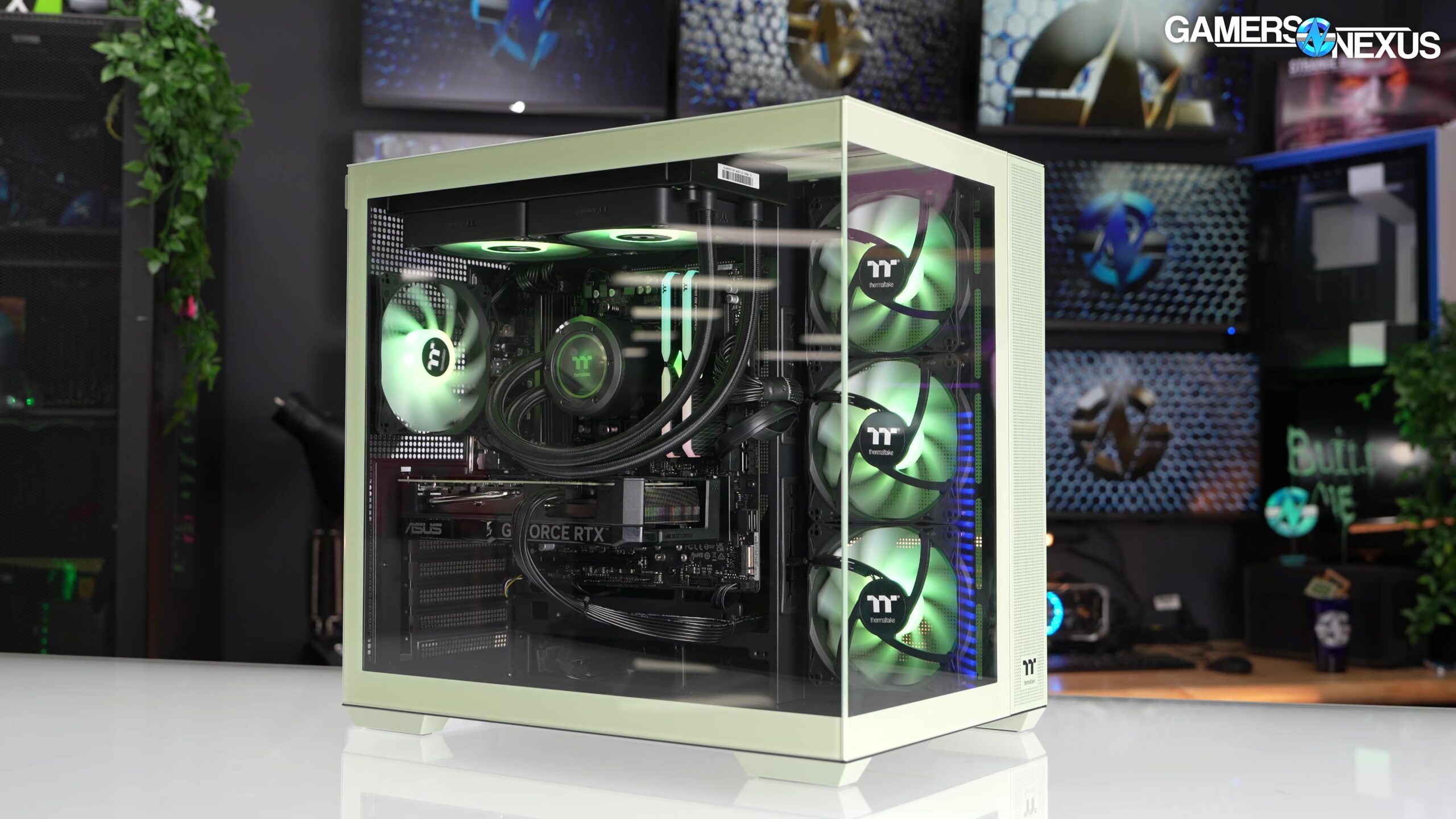

A good desktop should let you start playing instead of turning your evening into a cable-management project. The challenge is separating useful hardware from flashy cases, especially when several systems pair similar graphics cards with very different processors, memory, cooling, and storage.
Our Best prebuilt PC picks range from practical 1080p towers to high-end RTX 5080 systems. The KOTIN Ryzen 7 9700X RTX 5070 is the single best pick for most demanding players, while the other nine cover quieter cooling, larger storage, stronger processors, and lower-cost entry points.
Comparison
| # | Product | Award | Graphics | Processor | Memory and storage | Best for |
|---|---|---|---|---|---|---|
| 1 | KOTIN Ryzen 7 9700X RTX 5070 | Best overall | RTX 5070 12GB | Ryzen 7 9700X | 32GB DDR5, 1TB NVMe | 1440p and 4K gaming |
| 2 | MSI Codex Z2 RTX 5070 | Best for storage | RTX 5070 | Ryzen 7 8700F | 32GB DDR5, 2TB NVMe | Large game libraries |
| 3 | CyberPowerPC Xtreme VR | Best Intel option | RTX 5070 12GB | Core i9-14900KF | 32GB DDR5, 2TB NVMe | Gaming and heavy multitasking |
| 4 | KOTIN Ryzen 7 9700X RTX 5060 Ti | Best 1440p starter | RTX 5060 Ti 8GB | Ryzen 7 9700X | 16GB DDR5, 1TB NVMe | High-refresh 1440p gaming |
| 5 | KOTIN Ryzen 7 8700F RTX 5060 Ti | Best for upgrades | RTX 5060 Ti 8GB | Ryzen 7 8700F | 16GB DDR5, 1TB NVMe | Expandable gaming desktops |
| 6 | ZYNEEX Ryzen 5 RTX 3050 | Best entry-level tower | RTX 3050 6GB | Ryzen 5 5500 | 16GB DDR4, 1TB NVMe | 1080p gaming |
| 7 | KOTIN Ryzen 7 7800X3D RTX 5070 | Best for esports | RTX 5070 12GB | Ryzen 7 7800X3D | 32GB DDR5, 1TB NVMe | High-frame-rate play |
| 8 | YAWYORE Ryzen 7 5700X RTX 5060 | Best DDR4 option | RTX 5060 8GB | Ryzen 7 5700X | 32GB DDR4, 1TB NVMe | General gaming and multitasking |
| 9 | STORMCRAFT Phantom RTX 5080 | Best 4K powerhouse | RTX 5080 16GB | Ryzen 7 9800X3D | 32GB DDR5, 2TB NVMe | Maximum gaming performance |
| 10 | CyberPowerPC Ryzen 7 RTX 5060 Ti | Best connected desktop | RTX 5060 Ti 8GB | Ryzen 7 8700F | 16GB DDR5, 1TB NVMe | Ports and wireless features |
1. KOTIN Ryzen 7 9700X RTX 5070: Best Overall

Pros
- RTX 5070 graphics with 12GB GDDR7 memory
- 32GB DDR5 6000MHz memory
- 360mm liquid cooling
- Built-in 11.3-inch system display
- WiFi 7 and an 850W Gold power supply
Cons
- Only 1TB of included storage
- Large liquid cooler adds build complexity
- Display and lighting may not appeal to minimalist setups
Best for: someone who wants a powerful gaming tower with useful monitoring features.
The KOTIN Ryzen 7 9700X RTX 5070 gets the fundamentals right before it adds the showpiece features. Its Ryzen 7 9700X has eight cores, while the RTX 5070 supplies 12GB of GDDR7 graphics memory. That pairing is well suited to demanding 1440p play and gives the system a credible route into 4K gaming, streaming, and creative workloads.
The memory configuration is one of the reasons this is our top pick. It has 32GB of DDR5 running at 6000MHz, enough headroom for modern games, browser tabs, voice chat, and background applications without making multitasking feel cramped. The 1TB PCIe 4.0 NVMe SSD should make Windows and game loading feel quick, though a large library will eventually call for more storage.
KOTIN also includes a built-in 11.3-inch smart display that can show CPU and GPU temperatures, usage, and weather. That is more useful than decorative lighting alone, particularly for someone who likes to keep an eye on a system during long sessions. The 360mm AIO cooler, 850W 80 Plus Gold power supply, WiFi 7, and ARGB mid-tower case give it a more complete hardware package than the smaller KOTIN RTX 5060 Ti models.
The weakness is size and excess. A 360mm liquid cooler and a 30-pound chassis are more involved than an ordinary air-cooled desktop, and the second display takes up visual space inside the case. The MSI Codex Z2 gives you the same RTX 5070 class of graphics with 2TB of storage, while the KOTIN wins on memory capacity, cooling, and its newer Ryzen 7 9700X processor. Choose this one if you want a balanced high-performance desktop and do not mind the extra hardware personality.
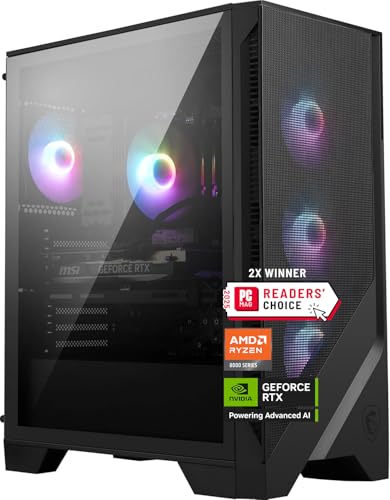
2. MSI Codex Z2 RTX 5070: Best for Storage
Pros
- RTX 5070 graphics
- 2TB M.2 NVMe SSD
- 32GB DDR5 memory
- Four-fan cooling layout
- USB Type-C and customizable RGB lighting
Cons
- Ryzen 7 8700F is less ambitious than the top KOTIN processor
- No included liquid cooler
- Tall 19-inch chassis needs generous desk or floor space
Best for: players who want a recognizable desktop design and room for a large game library.
The MSI Codex Z2 RTX 5070 is the straightforward alternative to the more elaborate KOTIN systems. It pairs an eight-core, 16-thread Ryzen 7 8700F that boosts to 5.0GHz with an RTX 5070. For a gaming-first desktop, that is a sensible combination, and it avoids spending the entire build around a processor that only matters in unusually CPU-heavy workloads.
Storage is the clear reason to choose the Codex Z2. Its 2TB M.2 NVMe SSD gives a substantial amount of breathing room for large modern games, recordings, and everyday applications. The 32GB of DDR5 memory is also the right capacity for a system aimed at simultaneous gaming, streaming, and general multitasking.
MSI uses an ARGB air cooler and four system fans, with three pulling air through the front and one exhausting at the rear. That layout is easier to understand and maintain than a liquid loop. Windows 11 Home is installed, and the case includes an LED button for cycling through the lighting modes. USB Type-C support adds a useful modern connection for peripherals and mobile devices.
The trade-off is the unusually tall 19-inch chassis. Check the available space before ordering, particularly if the tower has to sit beneath a shallow desk. The KOTIN Ryzen 7 9700X RTX 5070 is the more compelling all-round performer, and the CyberPowerPC Xtreme VR offers a much stronger Intel processor, but MSI makes the most sense for buyers who want 2TB of storage from the start and prefer conventional air cooling.
3. CyberPowerPC Xtreme VR: Best Intel Option

Pros
- 24-core Intel Core i9-14900KF
- RTX 5070 with 12GB graphics memory
- 2TB PCIe 4.0 NVMe SSD
- Broad USB connectivity
- Liquid CPU cooling and tempered side panel
Cons
- Heavy 42.7-pound chassis
- WiFi 5 is older than the wireless standard on several rivals
- More processor than many gaming-only buyers need
Best for: users who game, stream, edit, and run demanding applications at the same time.
The CyberPowerPC Xtreme VR stands apart through its processor. The Core i9-14900KF has 24 cores, giving this desktop a much broader multitasking ceiling than the eight-core AMD systems in most of this roundup. It still uses an RTX 5070 with 12GB of graphics memory, so gaming performance remains the central attraction rather than an afterthought.
Its 2TB PCIe 4.0 NVMe SSD is a practical match for that processor and GPU. There is room for a sizable game collection plus creative projects, while 32GB of DDR5 keeps the machine comfortable with multiple demanding applications open. The listing specifies one HDMI output and three DisplayPort outputs from the graphics card, useful for a multi-display desk.
Connectivity is unusually well covered. Two USB-C 3.2 ports join four USB-A 3.2 and four USB-A 2.0 ports, alongside wired LAN, WiFi 5, Bluetooth 4.2, and 7.1-channel audio. A liquid-cooled CPU, RGB lighting, tempered side panel, keyboard, and mouse complete the setup. The one-year parts and labor warranty and lifetime technical support are also clearly stated.
The problem is physical heft. At more than 42 pounds, this is not a tower you will want to move often, and the older WiFi 5 and Bluetooth 4.2 standards are less current than the wireless hardware in KOTIN's systems. For pure gaming, the KOTIN Ryzen 7 7800X3D RTX 5070 is a more focused choice. Pick CyberPowerPC when processor-heavy work matters as much as frame rates.
4. KOTIN Ryzen 7 9700X RTX 5060 Ti: Best 1440p Starter

Pros
- Modern Ryzen 7 9700X processor
- RTX 5060 Ti with 8GB graphics memory
- 360mm ARGB liquid cooling
- WiFi 7 and Bluetooth 5.4
- Built-in 11.3-inch smart display
Cons
- 16GB memory leaves less multitasking headroom
- 1TB SSD may fill quickly
- Graphics card is less suited to demanding 4K play
Best for: players moving into 1440p who want a modern processor and distinctive cooling system.
The KOTIN Ryzen 7 9700X RTX 5060 Ti is a curious but appealing combination. It uses the same eight-core Ryzen 7 9700X found in our top pick, but steps down to an RTX 5060 Ti with 8GB of graphics memory. That makes the system better suited to 1080p and 1440p gaming than to consistently demanding 4K settings.
The processor is not the limiting part here. Its boost speed reaches 5.5GHz, and the CPU gives the desktop a strong foundation for esports, streaming, and everyday creator applications. The 16GB of DDR5 memory is adequate for gaming, but buyers who keep many applications open should plan around a future upgrade rather than treating the initial configuration as generous.
KOTIN includes a 1TB PCIe 4.0 NVMe SSD rated for up to 6, 000MB/s reads, along with WiFi 7 and Bluetooth 5.4. The 360mm ARGB liquid cooler has a digital temperature display on the pump head, and the case adds an 11.3-inch smart display for system information. These are unusually elaborate extras for a graphics card in this class.
That feature mix is also the main compromise. The cooling and monitoring hardware are premium touches, but the 8GB GPU and 16GB memory put a ceiling on the system sooner than the case suggests. The KOTIN Ryzen 7 8700F RTX 5060 Ti is a simpler alternative with expansion features, while this model wins if the newer CPU and WiFi 7 matter more. It is a good fit for a 1440p buyer who expects to upgrade memory later.
5. KOTIN Ryzen 7 8700F RTX 5060 Ti: Best for Upgrades

Pros
- Ryzen 7 processor with eight cores
- RTX 5060 Ti 8GB
- Four memory slots and three M.2 slots
- Five 120mm ARGB fans
- WiFi 7 and 650W Gold power supply
Cons
- Starts with 16GB of memory
- Air cooler is less elaborate than KOTIN's liquid-cooled models
- 1TB storage is modest for a large library
Best for: buyers who want a sensible base system with clear memory and storage expansion paths.
The KOTIN Ryzen 7 8700F RTX 5060 Ti is less flashy than its sibling, but its layout is easier to recommend to people who plan to keep a desktop for years. The eight-core Ryzen 7 8700F boosts to 5.0GHz, and the RTX 5060 Ti has 8GB of graphics memory. That combination targets responsive 1080p and 1440p play, including high-refresh competitive games.
The initial 16GB of DDR5 6000MHz memory is the obvious place to start an upgrade. KOTIN says the board supports up to 256GB across four DIMM slots, which gives the system a clear path for heavier games, editing, and streaming workloads. Three M.2 SSD slots are equally useful because they let storage grow without immediately replacing the included 1TB PCIe Gen4 NVMe drive.
Cooling is handled by an air cooler with six copper heat pipes, a digital CPU temperature display, and five 120mm ARGB fans. That is a more conventional arrangement than the 360mm liquid cooler in the other KOTIN RTX 5060 Ti model, and many owners will prefer the simpler maintenance. WiFi 7, Bluetooth, and a 650W 80 Plus Gold power supply round out the practical hardware.
The limitation is that the system's strongest feature is its future flexibility, not its out-of-box capacity. The KOTIN Ryzen 7 9700X RTX 5060 Ti brings a newer processor and liquid cooling, while the CyberPowerPC Ryzen 7 RTX 5060 Ti offers USB-C, WiFi 6, and Bluetooth 5.3. Choose this KOTIN if accessible expansion matters more than a polished showcase build.
6. ZYNEEX Ryzen 5 RTX 3050: Best Entry-Level Tower

Pros
- Six-core Ryzen 5 5500 processor
- RTX 3050 with 6GB GDDR6
- 16GB DDR4 memory
- 1TB NVMe SSD
- Built-in WiFi and multiple display outputs
Cons
- Older DDR4 memory platform
- RTX 3050 has less graphics headroom than every other modern gaming pick here
- Air cooling lacks the advanced monitoring found on several rivals
Best for: first-time PC gamers who mainly play at 1080p.
The ZYNEEX Ryzen 5 RTX 3050 is the uncomplicated entry point in this group. Its Ryzen 5 5500 has six cores and 12 threads, with boost speeds up to 4.2GHz. The RTX 3050 adds 6GB of GDDR6 graphics memory and is aimed squarely at 1080p gaming, where sensible settings can keep the experience responsive.
The 16GB of DDR4 3200MHz memory is enough for ordinary gaming and multitasking, while the 1TB NVMe SSD gives the machine a quick start and usable room for applications. ZYNEEX also calls out 4K video editing support, but the older processor and GPU mean this should be viewed as an occasional capability rather than a workstation replacement.
Multiple ARGB fans provide air cooling, and the desktop includes built-in WiFi. HDMI and DisplayPort outputs make it easier to connect a current monitor, while the multiple USB ports cover the usual keyboard, mouse, headset, and external drive needs. It arrives with Windows 11 and is intended to work without a build project.
The RTX 3050 is the clear reason this tower sits below the rest. The KOTIN and CyberPowerPC RTX 5060 Ti systems have considerably more graphics headroom for 1440p, and even the YAWYORE RTX 5060 is a more ambitious choice. Anyone shopping specifically for a first gaming desktop should also consider the hardware compromises that shape an entry-level gaming tower. Choose ZYNEEX for mainstream 1080p play, not for a long-term high-resolution build.
7. KOTIN Ryzen 7 7800X3D RTX 5070: Best for Esports

Pros
- Ryzen 7 7800X3D with 3D V-Cache
- RTX 5070 with 12GB graphics memory
- 32GB DDR5 6000MHz
- 11.3-inch smart display
- 850W Gold power supply and liquid cooling
Cons
- 1TB SSD is smaller than the storage in two competing RTX 5070 systems
- Older CPU platform than the Ryzen 7 9700X
- Large, feature-heavy chassis
Best for: competitive players who prioritize high frame rates and stable gaming responsiveness.
The KOTIN Ryzen 7 7800X3D RTX 5070 is built around a processor with a very specific gaming advantage. The Ryzen 7 7800X3D uses 3D V-Cache to provide a larger game cache, which can help frame-rate stability and responsiveness in high-refresh esports titles. Paired with an RTX 5070 and 12GB of graphics memory, it is also ready for demanding 1440p and 4K gaming.
The rest of the core configuration is strong. There is 32GB of DDR5 6000MHz memory and a 1TB PCIe 4.0 NVMe SSD, so the machine has plenty of working memory but less installed storage than the MSI Codex Z2 or CyberPowerPC Xtreme VR. WiFi and Bluetooth are included, making wireless networking and peripheral pairing simple.
This KOTIN adds a glass side panel, ARGB lighting, and an 11.3-inch smart display that can show CPU and GPU temperatures, memory usage, and SSD usage. Its ARGB-sync liquid cooler includes a cooler-head display for processor temperature, and the listing describes CPU temperature stress testing. An 850W 80 Plus Gold power supply gives the RTX 5070 comfortable electrical support.
The real question is whether you want a specialized gaming CPU or a newer general-purpose platform. The KOTIN Ryzen 7 9700X RTX 5070 is the better balanced pick for mixed creative work, and the MSI provides 2TB of storage with a simpler air-cooled design. The 7800X3D is the one we'd keep for a high-refresh gaming setup, especially when esports responsiveness matters more than having the newest CPU generation.
8. YAWYORE Ryzen 7 5700X RTX 5060: Best DDR4 Option

Pros
- Eight-core, 16-thread Ryzen 7 5700X
- RTX 5060 with 8GB GDDR7
- 32GB dual-channel DDR4 memory
- Built-in WiFi and Bluetooth
- 1TB M.2 NVMe SSD
Cons
- DDR4 platform is less current than the DDR5 alternatives
- Graphics card brand may vary
- 650W Bronze power supply is less robust than several rivals
Best for: everyday gaming and multitasking on a familiar, established platform.
The YAWYORE Ryzen 7 5700X RTX 5060 is a balanced desktop with one foot in an older platform. Its Ryzen 7 5700X has eight cores and 16 threads, with a boost speed up to 4.6GHz. That is enough CPU for gaming, streaming, and multi-application use, while the RTX 5060 supplies 8GB of GDDR7 graphics memory.
YAWYORE installs 32GB of DDR4 3200MHz memory as two 16GB modules. The capacity is reassuring for multitasking, even though DDR4 is behind the DDR5 memory used by most of the other systems here. A 1TB M.2 NVMe SSD handles the operating system and games, and the MSI B550M-A PRO motherboard gives the build a known model rather than an entirely unspecified platform.
Wireless features are built in, with both WiFi and Bluetooth available for networking and peripherals. The 650W 80 Plus Bronze power supply is designed for stable operation, though it is less substantial than the Gold-rated units in several KOTIN systems. YAWYORE also says the graphics card brand may vary, which is important for buyers who care about exact component matching.
The RTX 5060 puts this desktop between ZYNEEX and the RTX 5060 Ti options in the list. The KOTIN Ryzen 7 8700F RTX 5060 Ti has a newer DDR5 platform and clearer expansion provisions, while YAWYORE counters with 32GB already installed. Before choosing any tower, it helps to understand which components matter most when a desktop handles gaming and everyday work. This is a reasonable choice for someone who prefers a ready-to-use 32GB system and does not need the latest memory platform.
9. STORMCRAFT Phantom RTX 5080: Best 4K Powerhouse

Pros
- RTX 5080 with 16GB GDDR7
- Ryzen 7 9800X3D processor
- 32GB DDR5 6000MHz memory
- 2TB Gen4 NVMe SSD
- 360mm AIO and seven ARGB fans
Cons
- Very large chassis
- High-end hardware is unnecessary for basic 1080p gaming
- Seven fans and liquid cooling add noise and maintenance considerations
Best for: enthusiasts who want maximum graphics performance in a preassembled tower.
The STORMCRAFT Phantom RTX 5080 is the obvious performance leader in this roundup. Its RTX 5080 carries 16GB of GDDR7 memory on a 256-bit interface, while the Ryzen 7 9800X3D provides eight cores, 16 threads, and a boost speed up to 5.2GHz. This is the configuration to consider when 4K gaming, ray tracing, and demanding visual settings take priority.
The 32GB of DDR5 6000MHz memory is a suitable starting point for a premium gaming machine, and the 2TB Gen4 NVMe SSD is the most comfortable storage configuration in the group. It gives large games and recordings more room before expansion becomes part of the ownership experience.
Cooling is correspondingly serious. STORMCRAFT uses a 360mm AIO liquid cooler, seven adjustable ARGB fans, and an 850W Gold-certified power supply. The Phantom case measures 17 by 9.25 by 17 inches, so this is a substantial tower that should be measured against the intended desk or floor location before purchase. The listed support package includes two years of parts coverage, three years of labor, one year of shipping, and lifetime technical support.
This much hardware is wasted if the target is casual 1080p play. The KOTIN Ryzen 7 7800X3D RTX 5070 is a more focused gaming system for most high-refresh setups, and the CyberPowerPC Xtreme VR is a better fit when productivity workloads matter as much as gaming. The Phantom is for the buyer who specifically wants the strongest graphics card and the least compromise at 4K.
10. CyberPowerPC Ryzen 7 RTX 5060 Ti: Best Connected Desktop

Pros
- Ryzen 7 8700F processor
- RTX 5060 Ti with 8GB graphics memory
- USB-C, WiFi 6, and Bluetooth 5.3
- Tempered side panel and custom RGB lighting
- Keyboard and mouse included
Cons
- 16GB memory is the minimum sensible capacity for a new gaming PC
- 1TB SSD leaves limited room for a large library
- No liquid cooling listed
Best for: buyers who want modern ports and wireless connectivity in a ready-made tower.
The CyberPowerPC Ryzen 7 RTX 5060 Ti takes a familiar approach and executes it cleanly. Its Ryzen 7 8700F has eight cores, and the RTX 5060 Ti contributes 8GB of graphics memory. That is a sensible pairing for 1080p and 1440p gaming, with enough processor capacity for streaming and ordinary creative applications.
Memory and storage are more restrained. The desktop includes 16GB of DDR5 and a 1TB PCIe 4.0 NVMe SSD. Those capacities work for a new gaming setup, but frequent players with a large library will need to think about storage expansion, and streamers who keep numerous programs open may eventually want more memory.
CyberPowerPC gives this model a useful selection of connections: two USB-C 3.2 ports, four USB-A 3.2 ports, two USB-A 2.0 ports, wired LAN, WiFi 6, Bluetooth 5.3, and 7.1-channel audio. The graphics card has one HDMI and two DisplayPort outputs. A tempered side panel, custom RGB lighting, keyboard, and mouse make it feel like a complete first desktop rather than a bare tower.
The KOTIN Ryzen 7 8700F RTX 5060 Ti offers stronger stated expansion support, including three M.2 slots and four memory slots, while the CyberPowerPC wins on clearly listed USB-C and Bluetooth specifications. The newer CyberPowerPC also has a stated one-year parts and labor warranty with lifetime technical support. Pick it when connectivity and a supplied keyboard and mouse matter more than elaborate cooling.

How to choose best prebuilt pc
The right desktop depends less on the case lighting than on how the processor, graphics card, memory, storage, cooling, and upgrade paths fit the games and applications you actually use.
Graphics card
The GPU has the largest effect on gaming resolution and visual settings. RTX 3050 hardware in the ZYNEEX is aimed at 1080p, while RTX 5060 and RTX 5060 Ti systems are more appropriate for 1080p at high refresh rates or 1440p with sensible settings. RTX 5070 systems provide more room for demanding 1440p and 4K play, and the RTX 5080 in the STORMCRAFT is the clear choice for enthusiasts chasing maximum 4K performance.
Graphics memory matters too. The RTX 5070 models include 12GB, while the RTX 5080 has 16GB. The 8GB cards remain useful, but demanding textures and future games can put more pressure on that capacity.
Processor
A processor with eight cores is a strong baseline for a modern gaming desktop. The Ryzen 7 9700X and Ryzen 7 8700F cover gaming, streaming, and everyday creative work, while the 7800X3D and 9800X3D add cache-focused designs that suit high-frame-rate gaming. The 24-core Core i9-14900KF in the CyberPowerPC Xtreme VR is the specialist option for heavy multitasking and processor-intensive applications.
Do not select a large CPU while ignoring the GPU. A powerful processor paired with a modest graphics card can be sensible for mixed workloads, but it will not automatically make games run like a high-end system.
Memory
Most current picks use DDR5, with 16GB as a workable starting point and 32GB as the more comfortable configuration for gaming alongside streaming, browsers, and communication tools. The ZYNEEX and YAWYORE use DDR4, which is still functional but belongs to an older memory platform.
Capacity is only part of the decision. Check whether the system has open memory slots and whether the manufacturer specifies an upgrade ceiling. KOTIN's Ryzen 7 8700F model is particularly clear about four DIMM slots and support up to 256GB.
For a new gaming desktop, 32GB gives multitasking room, while 16GB should be treated as an upgradeable starting point.
Storage
A 1TB NVMe SSD is enough for Windows, applications, and a selection of games, but large modern libraries can consume it quickly. The 2TB drives in the MSI Codex Z2, CyberPowerPC Xtreme VR, and STORMCRAFT Phantom are more convenient for owners who do not want to manage storage constantly.
PCIe 4.0 NVMe drives provide quick boot and loading behavior, but expansion options matter more than headline transfer figures once the system is in everyday use. Three M.2 slots on the KOTIN Ryzen 7 8700F RTX 5060 Ti provide a particularly clear path for adding storage.
Cooling and power
Air cooling is easier to maintain and is perfectly appropriate for many eight-core desktops. Liquid cooling can provide more thermal capacity, but it adds a pump and radiator to the system. The KOTIN models with 360mm coolers and the STORMCRAFT Phantom are designed around higher sustained loads, while the MSI Codex Z2 uses a four-fan air-cooled layout.
Power supplies should have enough capacity for the installed GPU and planned upgrades. Gold-certified 650W and 850W units appear across several picks, while the YAWYORE uses a 650W Bronze unit. Wireless standards, USB-C availability, and display outputs are worth checking when the tower will sit at the center of a busy desk.
Frequently asked questions
Is a prebuilt PC ready to use immediately?
These systems are sold assembled with Windows 11 Home installed. You still need to connect a monitor and peripherals, complete initial Windows setup, and remove any internal shipping protection before use.
Which graphics card is best for 4K gaming?
The RTX 5080 in the STORMCRAFT Phantom is the strongest graphics option in this list, with 16GB of GDDR7 memory. RTX 5070 systems are better suited to demanding 1440p and can handle 4K depending on the game and settings.
Is 16GB of memory enough for a gaming PC?
16GB can handle gaming and ordinary multitasking, but 32GB is more comfortable for streaming, editing, large games, and many open applications. The KOTIN Ryzen 7 8700F model has a particularly clear upgrade path through four DIMM slots.
Does the processor matter as much as the graphics card?
For most games, the graphics card has the larger effect on resolution and visual settings. The processor still matters for high-refresh esports, simulation games, streaming, and applications that use many cores, which is why the CyberPowerPC Xtreme VR and the X3D-based KOTIN and STORMCRAFT systems occupy distinct roles.
How much SSD storage should a gaming desktop have?
A 1TB SSD is workable for a smaller game collection, but 2TB is more comfortable for people who install many large games or keep recordings locally. An extra M.2 slot is valuable because it lets you expand without replacing the original drive.
Is liquid cooling necessary?
No. A well-designed air cooler can handle many gaming desktops, and it is simpler to maintain. Liquid cooling becomes more interesting when the system uses a high-performance processor, runs sustained workloads, or includes a large radiator as part of its thermal design.

The bottom line
The Best prebuilt PC for most demanding players is the KOTIN Ryzen 7 9700X RTX 5070. Its 32GB of DDR5, RTX 5070 graphics, 360mm cooler, WiFi 7, and useful system display make it the most complete combination in this group, though its 1TB SSD and feature-heavy case are not ideal for everyone.
Choose the STORMCRAFT Phantom RTX 5080 when 4K performance is the priority, or the MSI Codex Z2 RTX 5070 when 2TB of storage and conventional air cooling matter more. For a more modest 1440p system, the KOTIN Ryzen 7 8700F RTX 5060 Ti offers the clearest upgrade path.
If you are undecided, choose the graphics card for your monitor first, then confirm the memory, storage, cooling, and case will not become the next limitation.
As an Amazon Associate we earn from qualifying purchases.