

A tracing projector has one job: put a clean, steady version of a small reference image onto a wall, canvas, cookie, or sign so you can concentrate on the artwork instead of measuring every line. The wrong type can make that simple task surprisingly awkward, especially if it needs a phone connection for every sketch or fades badly under ordinary room lighting.
The Best projector for tracing artwork depends on how you work. Optical models such as the Caydo S1 and Artograph LED Tracer are deliberately simple, while the Siftary, MEDAMOC, and similar models accept images from phones and other devices. We compared the useful differences, including projection size, resolution, alignment controls, stands, and setup.
The Caydo S1 LED Art Tracing Projector is our top pick, with the Artograph LED Tracer close behind for artists who prefer a traditional optical workflow. The rest of the list covers app-free web control, portable stands, phone mirroring, and projectors suited to cookies, banners, and large wall designs.
Comparison
| # | Product | Award | Resolution or source | Projection range | Best for |
|---|---|---|---|---|---|
| 1 | Caydo S1 | Best overall | Optical 5 x 5 inch source | 2.5x to 11x, up to 80 inches | Simple tracing and murals |
| 2 | GIKUCNZL Mini Projector | Best dual-purpose model | Native 1280 x 720P | Up to 10.5 feet | Tracing and occasional video |
| 3 | Siftary Drawing Projector | Best creative controls | Native 720P | Up to 150 inches | Editing images before tracing |
| 4 | Artograph LED Tracer | Best traditional tracer | Optical 5 x 5 inch source | 2x to 14x | Reliable offline enlargement |
| 5 | GiftmiyHime Web-Control Projector | Best wireless control | Phone or tablet source | Adjustable stand | Phone-based tracing without an app |
| 6 | JosenHoames Web-Control Projector | Best offline flexibility | Phone or tablet source | Adjustable stand | Mobile work away from internet |
| 7 | MEDAMOC 720P Projector | Best stand included | Native 1280 x 720P | 10 to 150 inches | Canvas and wall work |
| 8 | GIKUCNZL Banner Projector | Best for banners and cookies | Native 1280 x 720P | Up to 10.5 feet | Decorative lettering and food art |
| 9 | Dyhodu 720P Projector | Best broad compatibility | 1280 x 720P | 9.5 to 150 inches | Phones, computers, and crafts |
1. Caydo S1: Best Overall

Pros
- No app, WiFi, or pairing required
- Enlarges a small image up to 80 inches
- Built-in handle and non-slip base
- Front tray and hidden power-cord compartment
- LED light source rated for up to 20, 000 hours
Cons
- Needs a dim or dark room
- Brightness softens at maximum projection distance
- Limited to source images up to 5 x 5 inches
Best for: artists who want a straightforward optical tracer for canvas, walls, and murals.
The Caydo S1 is the one to choose when you do not want the tracing session to turn into a technology project. Put a printed photo, sketch, or pattern under its 5 x 5 inch copy area, position the projector, and adjust the top focus knob. There is no phone interface, wireless setup, screen mirroring, or USB connection to troubleshoot. That simplicity is a real advantage when the important thing is getting a reference onto a surface quickly.
Its enlargement range is 2.5x to 11x, with a maximum diagonal projection of 80 inches. That makes it suitable for everything from a compact canvas outline to a reasonably substantial wall design. The image grows as you move the unit farther away, and Caydo says a distance of 2 to 3 meters can reach the largest projection. At that end of the range, brightness softens, so closing curtains and switching off overhead lights matters. The same dim-room requirement applies to most of the optical projectors here, but it is especially important when working at a large size.
The physical design is unusually friendly for repeated repositioning. A built-in handle makes it easier to move from table to ladder or shelf, the non-slip base helps keep it steady, and the front tray gives brushes, pencils, or markers a place to sit. The 1.2-meter power cord stores in a hidden compartment. Its dimensions are 10 inches long, 5.7 inches wide, and 9.7 inches high, and it weighs about 3.3 pounds, so it is portable without being a pocket-sized gadget.
The LED source is rated for up to 20, 000 hours, which removes the old concern about replacing a projection bulb. The base can become warm during extended use, a behavior the product information describes as normal for an LED device. The weakness is the same feature that makes the S1 so easy to use: it only accepts a physical source image in that small copy area. The Siftary and MEDAMOC are more convenient if your references live on a phone, and neither optical model is the right pick for a bright room.
For someone who works from printed references and wants dependable enlargement without accounts or wireless connections, the Caydo S1 is the Best projector for tracing artwork on this list. It is also the clearest choice for beginners who would rather spend their time drawing than learning a projector interface.
2. GIKUCNZL Mini Projector: Best Dual-Purpose Model

Pros
- Native 1280 x 720 physical resolution
- Supports wireless and wired screen mirroring
- Works with phones, tablets, laptops, consoles, and USB drives
- Included stand extends to 34 inches
- Stand rotates 360 degrees
Cons
- Requires more setup than an optical tracer
- Best tracing visibility requires controlled lighting
- Maximum projection size is described as 10.5 feet
Best for: artists who also want a small general projector for video and presentations.
The GIKUCNZL Mini Projector makes sense for the artist whose reference library is mostly on a phone or computer. Unlike the Caydo S1, it is not limited to a printed image under a copy area. Wireless and wired screen mirroring let you bring in images from smartphones, tablets, laptops, gaming consoles, and USB drives, which gives it a much wider role around a studio or home.
The native physical resolution is 1280 x 720, with support for 4K input and HDR clarity according to the product details. For tracing, the native resolution is the figure that matters most. It gives outlines and small image details a defined foundation, while 4K support does not turn the projected image into a native 4K picture. That distinction is useful when deciding between this and the purely optical Artograph LED Tracer. The GIKUCNZL is more flexible with digital material, while the Artograph has the cleaner no-device workflow.
The included stand reaches up to 34 inches and rotates 360 degrees. That is helpful when the work surface is horizontal, when a wall is not directly in front of a convenient table, or when you need to change the angle without building a makeshift support. The projector itself is described as compact, measuring 3.2 by 3.2 by 4.7 inches in the feature list, with a listed weight of 2.2 pounds there. The product information gives a different height and weight, so we would treat the compact form as the main takeaway rather than rely on one exact dimension.
Projection can reach 10.5 feet, enough for banners, large canvases, and wall work. The unit is also described as suitable for movies and presentations, which is a meaningful advantage if this will stay in a family room rather than a dedicated art space. Those extra functions do not replace careful positioning, focus adjustment, and subdued room lighting when you need a faint outline to remain visible while working.
The trade-off is setup. Screen mirroring and source selection take more steps than sliding a printed design under the Caydo S1, and the product provides fewer art-specific editing tools than the Siftary. Artists who want to crop, rotate, flip, or turn a photo into a line drawing before projecting should move up to the Siftary. Pick this GIKUCNZL when a versatile digital projector is more useful than a purpose-built optical device.
3. Siftary Drawing Projector: Best Creative Controls

Pros
- Native 720P HD projection
- Browser control works with iPhone and Android
- Eight built-in tracing tools
- Four-point keystone correction
- Projects designs up to 150 inches
Cons
- More involved than a print-based optical projector
- Requires a phone for its mobile control workflow
- Large projections need carefully controlled lighting
Best for: artists who want to edit, align, and enlarge digital references before tracing.
The Siftary Drawing Projector is the most capable pick here for shaping an image before it reaches the wall. Its browser-based mobile control lets you scan a QR code, import an image, and work from an iPhone or Android device without installing a dedicated app. That puts it between the Caydo S1's pure simplicity and a more conventional multimedia projector. You get digital flexibility, but the interface remains in a phone browser.
The native resolution is 720P, which is the level that determines the detail actually projected. Siftary pairs that with eight creative tools, including sketch mode, grid overlay, zoom, rotate, crop, and flip. These tools are useful in practical ways. A grid can help keep proportions under control, crop can remove distracting background material, and rotation or flipping can make a reference fit the available canvas. Sketch mode is aimed at producing clearer line-based references before you pick up a pencil or brush.
Four-point keystone correction is another reason this model stands out. Projectors often need to sit somewhere other than perfectly square to the surface, especially when a canvas is on an easel or the artwork is on a wall. Four-point adjustment gives you more control over the corners than a simple tilt correction. Manual focus still matters, since keystone correction can align the image but cannot make an unfocused outline sharp.
Siftary lists a projection size up to 150 inches and says it can work on paper, canvas, wood, fabric, and other surfaces. That is a wide range for murals and large decorative projects. At that scale, the room must be dim enough for the lines to remain visible. The product's dimensions are listed as 7.48 inches long, 17.17 inches wide, and 3.94 inches high, a footprint worth considering if your workspace is tight.
This is a better fit than the MEDAMOC if image editing is central to your process, and it is more useful than the Artograph when the original artwork is digital. The downside is that every extra control adds another step between idea and outline. If you want to trace a printed reference immediately, choose the Caydo S1. If you want to turn a phone photo into something easier to draw, the Siftary earns its place as the Best projector for tracing artwork for digital workflows.
4. Artograph LED Tracer: Best Traditional Tracer

Pros
- Simple optical workflow
- Enlarges a 5 x 5 inch design up to 14 times
- 200 mm optical glass lens
- High-intensity LED source
- Works for signs, murals, quilt patterns, and classroom projects
Cons
- Requires a dark room for maximum visibility
- Limited to physical source artwork
- Larger designs need to be handled in sections
Best for: artists and crafters who prefer a proven offline method for enlarging small designs.
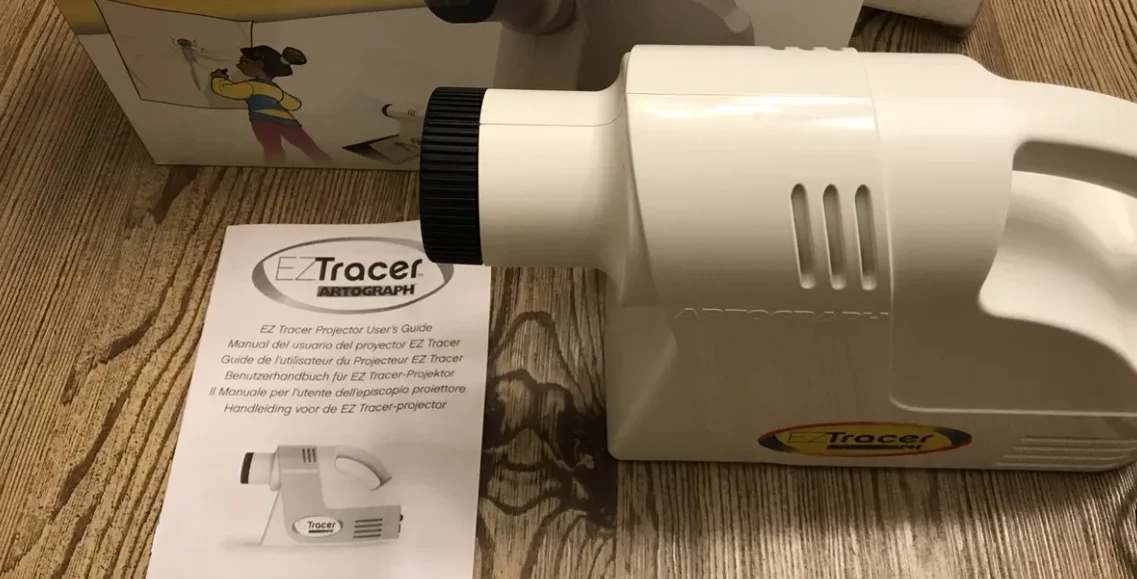
The Artograph LED Tracer is refreshingly focused. It does not try to be a streaming projector or a wireless display. Place a design under the 5 x 5 inch copy area, aim it at the wall or easel, and trace the enlarged image. For a printed sketch, quilt pattern, sign, or small illustration, that direct path is often exactly what is wanted.
It enlarges the source from 2x to 14x. Compared with the Caydo S1's upper limit of 11x, the Artograph can take the same small design a little larger. It is still a section-by-section tool for truly large artwork rather than a single-pass mural machine. The product specifically recommends working in sections for larger designs, which is sensible because shifting the projector can change alignment and require a fresh reference point.
A 200 mm optical glass lens is the key hardware detail. The lens is intended to keep the projected copy clear, while the high-intensity LED runs cooler and longer than a CFL bulb. The unit measures approximately 5.5 inches wide by 12.75 inches deep by 9 inches high and weighs 3 pounds. That makes it a manageable studio tool, though its deeper body is less convenient to pack than the smaller digital projectors.
The Artograph is especially appealing when the reference is already printed. There is no wireless pairing, browser interface, image mirroring, or file preparation to consider. That gives it a stronger claim than the Siftary for classroom use or a craft table shared by several people. The GIKUCNZL Mini Projector is the more adaptable option if you also want movies or presentations, but it introduces digital setup and does not offer the Artograph's dedicated 5 x 5 inch optical workflow.
Its limitation is firm: it cannot accept a phone image directly. Ambient light also affects the result, and Artograph recommends a dark room for maximum visibility. Artists who make most references on a tablet should choose the Siftary, MEDAMOC, or Dyhodu instead. For everyone else, the Artograph LED Tracer is a strong traditional alternative and the Best projector for tracing artwork when offline simplicity matters more than connectivity.
5. GiftmiyHime Web-Control Projector: Best Wireless Control

Pros
- 5G and 2.4G dual-band WiFi
- Browser control without a downloaded app
- Online and offline connection modes
- Adjustable stand for horizontal and vertical work
- Phone-based rotation and scaling controls
Cons
- Digital setup is less immediate than optical tracing
- Requires a phone or tablet for the web workflow
- Connection performance still depends on the selected mode and workspace
Best for: mobile artists who want browser controls and an adjustable stand.
The GiftmiyHime Web-Control Projector takes a different approach from the traditional tracers. Instead of using a printed transparency or relying on a downloaded application, it opens a control page in a phone browser after you scan a QR code. From there, the product says you can manage projection settings, rotate the image, and scale it to suit the artwork.
Its 5G and 2.4G dual-band WiFi support is intended to reduce latency when projecting from a phone or tablet. That matters when you are adjusting an image and want the projected result to respond without an obvious delay. The product also identifies the wireless module as FCC ID certified. Those details make this a more modern option than the Artograph, although they do not remove the need to focus the image and position the projector carefully.
The online and offline modes are useful for artists who move between a connected studio and a place without internet access. The important distinction is that offline support is described as a local connection, not as a guarantee that every online feature works without a network. It is a practical way to keep the source device and projector communicating when there is no broader internet connection available.
The adjustable stand is one of its better physical features. It can adapt to small horizontal craft projects as well as vertical walls, and the mount lets you alter height and tilt. That makes it more flexible than placing a small projector on a stack of books. The product does not provide dimensions or weight in the supplied product information, so the stand's range and adaptability are more useful buying details than an assumed footprint.
For a broader look at how a projector's placement changes outside art work, the room distance and screen size decisions for home viewing follow many of the same principles. Tracing is less concerned with cinematic color, but it still depends on a clear image at the right angle and a room dark enough to show fine lines.
The GiftmiyHime is a better match than the Caydo S1 when your references are digital and you want to rotate or scale them from a browser. The JosenHoames offers a similar control concept and also emphasizes offline use, so the choice is close. Pick GiftmiyHime if dual-band wireless and stand flexibility are the features you value most.
6. JosenHoames Web-Control Projector: Best Offline Flexibility

Pros
- 5G and 2.4G dual-band WiFi
- No app download required
- Online and direct offline modes
- Browser controls for rotation and zoom
- Adjustable stand with manual focus
Cons
- Needs a phone or tablet for digital references
- More setup than a print-based tracer
- Supplied information does not specify projection resolution
Best for: artists who need to continue working with mobile references away from a regular internet connection.
The JosenHoames Web-Control Projector is closely related in concept to the GiftmiyHime. It uses a QR code to open a browser control panel, so there is no app download, and it supports iOS and Android devices. Its useful distinction is the emphasis on a stable direct offline connection. That makes it a sensible choice for mobile workshops, temporary workspaces, or any room where you do not want the tracing process to depend on an existing network.
The browser panel handles rotation, zoom, and settings. Those are basic controls, but they address common problems with reference images. A phone photo may need to be turned, enlarged, or cropped before it sits properly on a canvas. Since JosenHoames does not list a projection resolution in the supplied details, we would not choose it for a specific level of fine image detail. The product's strengths are control and connectivity flexibility instead.
Manual focus adjustment is paired with an adjustable stand. The stand is described as lightweight but stable, with enough adjustment for both small cookie work and larger canvas drawings. A wobble-free mount is more important than it sounds. If the projector shifts while a line is being traced, the reference no longer matches the work surface. The stand also makes it easier to move between horizontal and vertical projects without changing the entire table arrangement.
JosenHoames supports both online mode and a direct offline mode. The wording does not specify every limitation of those modes, so users should follow the included instructions rather than assume a full internet-free replacement for every phone feature. The product information lists a black finish and one unit, but it does not give dimensions or weight. That leaves the stand and browser workflow as the clearest reasons to select it.
Compared with GiftmiyHime, this model is the more natural choice for someone who puts offline operation first. The GiftmiyHime gives a similar web-control experience and emphasizes real-time dual-band performance, while the Siftary adds considerably more image editing through its eight creative tools. JosenHoames sits between those options: more flexible than the Caydo S1 for digital images, but less feature-rich than Siftary.
If you are trying to understand how much room to leave around a projected image, the practical relationship between viewing distance and screen size is a useful reference even though your finished work will be on a wall or canvas. Choose JosenHoames when a direct phone-to-projector workflow matters more than advanced drawing tools.
7. MEDAMOC 720P Projector: Best Stand Included

Pros
- Native 1280 x 720P resolution
- Projection range from 10 to 150 inches
- Included stand reaches 34 inches
- Stand rotates 360 degrees
- Wired and wireless screen mirroring
Cons
- Needs controlled lighting for large tracing work
- Digital mirroring takes more setup than an optical tracer
- The stand adds to the overall setup footprint
Best for: artists who want a wide projection range and a tall adjustable stand.
The MEDAMOC 720P Projector is a practical all-rounder for artists moving between small sketches and large wall work. Its stated projection range begins at 10 inches and extends to 150 inches, giving it one of the broadest ranges in this group. That flexibility is useful when the same projector needs to handle a small tabletop design one day and a mural outline the next.
The native resolution is 1280 x 720P, with 4K decoding and HDR support listed in the features. As with the GIKUCNZL, native 720P is the meaningful tracing specification. It can provide a defined outline for drawing and painting, while 4K decoding describes the type of input it can process rather than the number of pixels it creates on the surface.
The included stand extends to 34 inches, rotates through 360 degrees, and has an anti-slip base. That combination supports horizontal work on a tabletop and vertical projection toward a wall. The stand is a stronger reason to choose MEDAMOC than the generic promise of portability. It can put the projector at a useful height without requiring a separate tripod or improvised support. The product lists dimensions of 7.5 inches long, 3.9 inches wide, and 17.1 inches high, with a weight of 3 pounds.
MEDAMOC supports wired and wireless screen mirroring from iOS and Android devices, tablets, computers, game consoles, and USB drives. That gives it more source options than the optical Caydo S1 and Artograph. It also makes the projector useful for references that are stored digitally rather than printed. The cost is a little more setup, and the product does not list the image-editing tools found on the Siftary.
The 150-inch ceiling is attractive for murals, but a large projected outline needs a dark room to stay visible. No projector in this list turns a brightly lit wall into an ideal tracing surface. MEDAMOC is a better fit than the smaller GIKUCNZL models when stand height and projection range are priorities, while the Siftary remains preferable for correcting the image before it appears.
This is the Best projector for tracing artwork for someone who wants one adaptable digital unit and a stand that can move between surfaces. Choose it for canvas, wall murals, fabric, wood burning, or dessert decorating when you do not want to be locked into a single projection scale.
8. GIKUCNZL Banner Projector: Best for Banners and Cookies

Pros
- Native 1280 x 720 physical resolution
- Supports 4K input and HDR clarity
- Wired and wireless screen mirroring
- Included stand reaches 34 inches
- Rotating stand supports different work angles
Cons
- Maximum projection size is described as 10.5 feet
- Digital setup is slower than optical tracing
- Needs low ambient light for clear outlines
Best for: cookie decorators and banner painters who also want general projector functions.
The GIKUCNZL Banner Projector is the second GIKUCNZL entry, but its product listing is aimed more directly at banner painting and cookie work. The underlying feature set is familiar: a native 1280 x 720 image, 4K input support, HDR clarity, and source options that include phones, tablets, laptops, consoles, and USB drives. That makes it useful when the reference begins as a digital file.
The product describes a maximum projection size of 10.5 feet. For a long banner, that gives you room to enlarge lettering and decorative shapes without transferring the design by hand. For cookies or small craft pieces, the same projector can be positioned closer and used at a much smaller scale. The wide range is more useful than a single headline maximum because food decorating and sign painting rarely happen at the same size.
Its stand reaches 34 inches and rotates 360 degrees. This helps when a banner is laid out on a table or when the projector must aim toward a wall. A stand that can change angle also makes it easier to keep the projected image aligned with the work rather than forcing the work into one fixed position. The listing describes the projector as compact and lightweight, with dimensions of 3.2 by 3.2 by 4.7 inches and a weight of 2.2 pounds in the features.
The native 720P resolution is adequate for most bold outlines, lettering, and simple illustrations. Intricate reference images benefit from a carefully focused projection and a dim room. 4K support should not be mistaken for native 4K detail, but it does mean the projector can accept higher-resolution material before displaying it at its physical resolution.
The GIKUCNZL Mini Projector in the second position has essentially the same stated core capabilities, so this entry should be chosen by use case rather than assumed image quality. The Banner Projector is the more natural fit for someone making cookies or signs, while the MEDAMOC gives a much larger stated projection range and the Siftary adds more image manipulation. Both GIKUCNZL models also function as projectors for movies and presentations, which can be useful after the craft session.
The weakness is that it remains a general mini projector rather than a dedicated art enlarger. If you want to place a printed image under a lens and begin, choose Caydo or Artograph. For digital banner lettering, cookie designs, and occasional entertainment, this GIKUCNZL is the more targeted pick.
9. Dyhodu 720P Projector: Best Broad Compatibility

Pros
- Works with iOS, Android, Mac, and Windows
- Includes 2.4G WiFi and Bluetooth 5.0
- Projects from 9.5 to 150 inches
- Automatic keystone correction
- Manual focus adjustment
Cons
- Requires a digital source device
- Does not list art-specific editing tools
- Large projection sizes need subdued lighting
Best for: users who need a flexible projector for several kinds of phones and computers.
The Dyhodu 720P Projector is designed around compatibility. It works with iOS and Android phones and tablets, as well as Mac and Windows devices, so it is a useful option for a shared studio or household where references may come from different platforms. Built-in 2.4G WiFi and Bluetooth 5.0 add more ways to pair a source device, though the supplied details do not spell out which connection handles every type of content.
Its 1280 x 720P HD projection is suited to sketching, painting, crafts, and tracing. The stated projection range runs from 9.5 to 150 inches, covering small tabletop work and large wall art. That matches the MEDAMOC and Siftary at the upper end, but Dyhodu starts slightly below MEDAMOC's stated 10-inch minimum. In practice, the more important decision is whether you need the digital compatibility rather than an optical copy area.
Automatic keystone correction helps keep the image aligned when the projector is not perfectly square to the wall. Manual focus adjustment remains available for sharpening the reference. Those two controls address different problems: keystone correction handles geometry, while focus handles clarity. For tracing, both matter because a skewed or soft outline can make an accurate transfer harder.
The product information lists the unit as small, with dimensions of 7.5 inches long, 3.9 inches wide, and 17.1 inches high, and a weight of 3 pounds. The listed size appears tall for a compact projector, so placement deserves attention. Dyhodu is intended for wall canvas, sketching, painting, and DIY craft projects, but no included stand or special tracing tool is specified in the supplied data.
That omission separates it from MEDAMOC, whose stand is explicitly rated to 34 inches and rotates 360 degrees. Dyhodu is the better choice when source compatibility matters more than a supplied support, while Siftary is the better choice for cropping, rotating, grids, and line-art preparation. The Caydo S1 and Artograph remain easier for printed references because they avoid device pairing entirely.
Choose Dyhodu if your artwork is stored across phones and computers and you want one projector that can accept several source types. It is a capable general-purpose option, but artists seeking the shortest path from a printed image to a wall should look higher on the list.
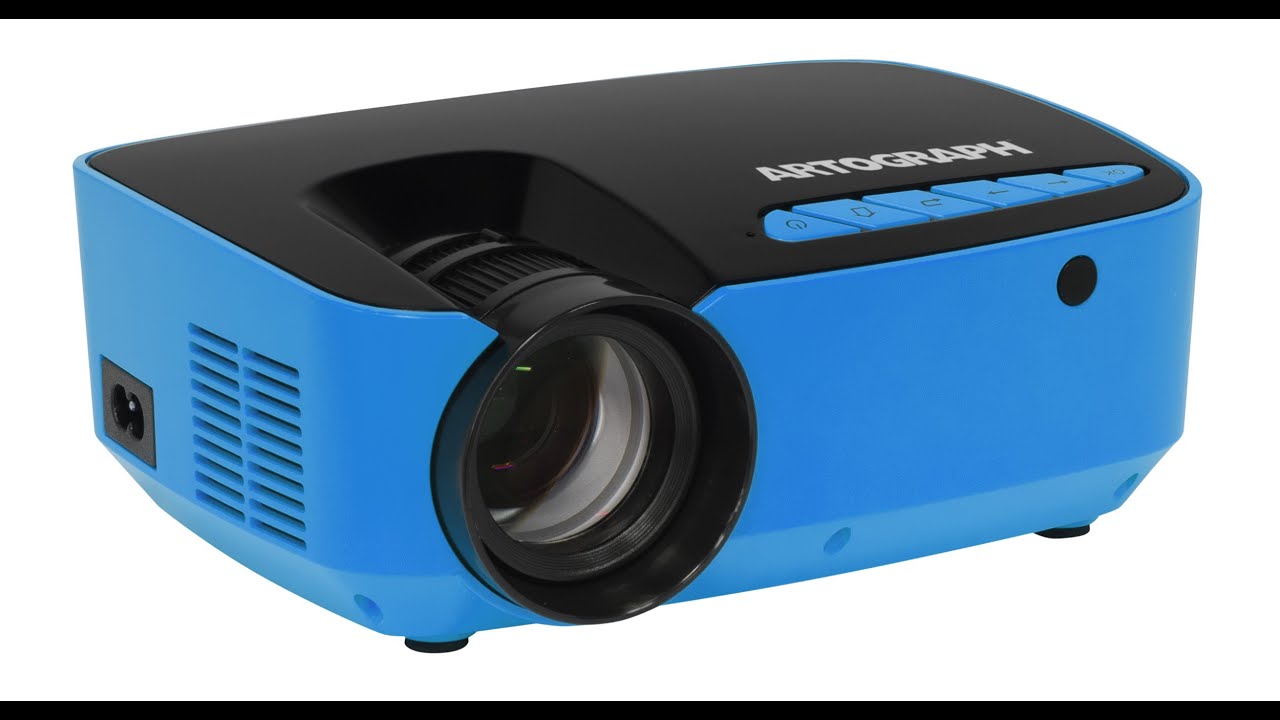
How to choose best projector for tracing artwork
The right projector is determined less by entertainment features than by how cleanly it puts a reference onto the surface and how easily you can keep it there while drawing.
Source method
Optical tracers such as the Caydo S1 and Artograph LED Tracer use a printed image placed in a copy area. They are fast to set up and do not depend on a phone, WiFi, or file format. Their limitation is equally clear: digital artwork must be printed first, and the source area is limited to 5 x 5 inches on both models.
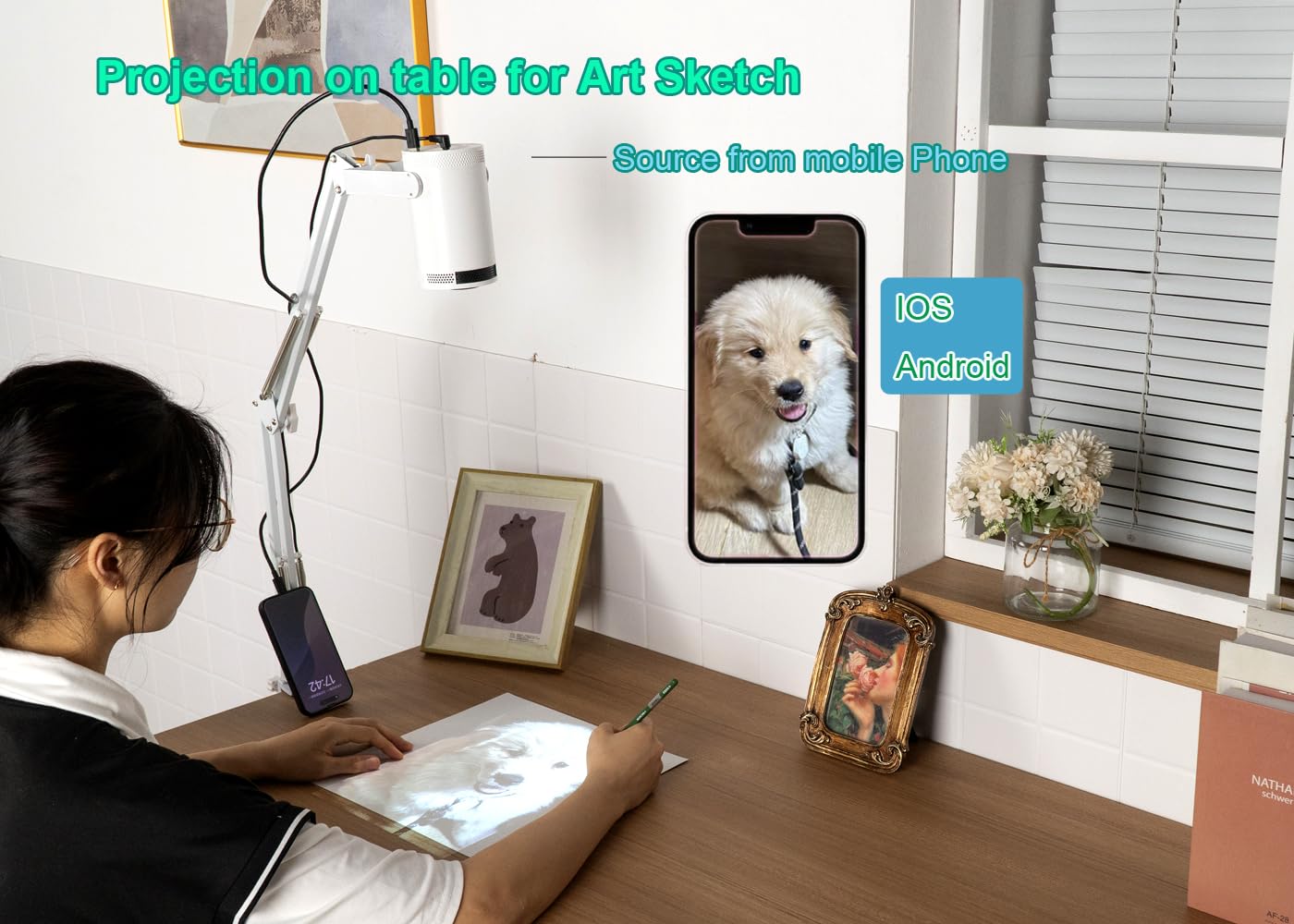
Digital projectors accept images from phones, tablets, computers, USB drives, or other devices, depending on the model. They are better for references that need rotation, scaling, or editing before projection. If you often start with a phone photo, a digital projector is usually the more convenient path.
Native resolution
Native resolution describes the actual pixel grid projected onto the artwork. Several models here use 1280 x 720P, also described as native 720P. That is more useful than a claim about decoding 4K because it determines the detail visible in the final outline.
For bold lettering, simple drawings, and large shapes, 720P can be adequate. Fine line art benefits from accurate focus, a dark room, and an image that is not enlarged beyond what the projector can show clearly. Do not select a model based only on an input format claim.
Projection size
The listed ranges vary from optical enlargement figures to diagonal image sizes. Caydo enlarges a 5 x 5 inch source from 2.5x to 11x and can reach 80 inches. Artograph goes from 2x to 14x. Digital models such as Siftary, MEDAMOC, and Dyhodu list maximum projection sizes of 150 inches, while the GIKUCNZL models describe a maximum of 10.5 feet.
A larger maximum is useful for murals and banners, but it also means the projector is farther from the surface and the image may be less bright. Plan the available distance before choosing a model for a large wall. The same placement questions apply to non-art use, and the relationship between distance and projected image size can help you think through the space.
The largest projection is only useful if the outline remains sharp and visible while your hand is between the projector and the artwork.
Focus and alignment
Manual focus is essential for tracing because a soft edge makes a line difficult to follow. Keystone correction can correct a trapezoidal image when the projector is angled, but it cannot recover detail that is out of focus. Siftary has four-point keystone correction, while Dyhodu lists automatic keystone correction and manual focus.
An adjustable stand also helps alignment. MEDAMOC and the two GIKUCNZL models include stands that reach 34 inches, with 360-degree rotation specified for those products. A stable mount is preferable to balancing the projector on books, especially when the work surface is horizontal.
Room lighting and surface
All of these projectors benefit from subdued lighting. Artograph specifically says a dark room is required for maximum visibility, and Caydo says brightness softens at maximum range. A white wall or light canvas gives the projected outline a stronger contrast than a dark or heavily textured surface.
Think about the surface before you buy. The listed applications include canvas, walls, desktops, wood, fabric, cookies, banners, and quilt patterns. A projector with a stand that can change height and angle is easier to use across several surfaces than one that only works from a fixed table position.
Frequently asked questions
Can a tracing projector work in a bright room?
It can project an image, but bright ambient light makes faint outlines harder to see. The optical models in particular work best when curtains are closed and overhead lights are off. Large projections also tend to look less bright because the available light is spread across a larger surface.
Is native 720P enough for tracing artwork?
Native 720P is suitable for many sketches, lettering, craft designs, and broad outlines. Fine details still depend on focus, source quality, projection size, and room lighting. A projector that accepts 4K input does not necessarily create a native 4K image, so check the physical resolution.
Is an optical art projector better than a phone projector?
Neither is universally better. An optical model is faster when your reference is printed and avoids connectivity problems, while a phone projector is more convenient for digital images and can offer rotation, scaling, or other controls. Caydo and Artograph suit printed references, while Siftary, MEDAMOC, and Dyhodu suit digital workflows.
How large can these projectors make artwork?
The answer depends on the model. Caydo lists enlargement up to 80 inches, Artograph lists 2x to 14x enlargement from a 5 x 5 inch copy, and Siftary, MEDAMOC, and Dyhodu list maximum sizes up to 150 inches. The GIKUCNZL models describe projection up to 10.5 feet.
Do I need a stand for tracing?
A stand is not essential, but it makes positioning easier and can reduce unwanted movement. MEDAMOC and the GIKUCNZL models include stands with a stated height of up to 34 inches, and the stands can rotate 360 degrees. Optical projectors can be placed on a stable table or other support if the angle and focus remain steady.
Can these projectors trace onto cookies and cakes?
Several listings specifically mention cookie or dessert decorating, including the GIKUCNZL, Siftary, MEDAMOC, and JosenHoames models. The projector provides the visual guide, but the work surface still needs to be positioned so the image is clear and stable. Digital models are helpful when the design begins as a phone image.
Can I use an art tracing projector for movies?
Some can. The GIKUCNZL models are explicitly described as suitable for movies and presentations, and several digital projectors accept sources beyond phones and tablets. The Caydo S1 and Artograph LED Tracer are optical tracing devices, so they are not the right choices for video playback.
The bottom line
The Caydo S1 is the Best projector for tracing artwork for most people because it removes the most common source of friction. Its printed 5 x 5 inch copy area, 2.5x to 11x enlargement, handle, stable base, and long-life LED source make it easy to move from a reference image to a wall or canvas. Its main limitation is the lack of digital input, so phone-first artists should choose the Siftary or MEDAMOC instead.
The Artograph LED Tracer is the better traditional alternative for artists who want up to 14x enlargement from a printed design, while the Siftary is the strongest digital option for editing and aligning images before projection. MEDAMOC is the sensible stand-equipped choice for work ranging from 10 to 150 inches.
If you are undecided, choose an optical model for printed references and a 720P digital projector for artwork that starts on your phone or computer.
As an Amazon Associate we earn from qualifying purchases.